
Table of Contents
Cloud migration is no longer a future consideration; it is a present-day competitive necessity. Amazon Web Services (AWS) is the world’s most widely adopted cloud platform, trusted by millions of organizations from agile startups to Fortune 500 enterprises.
Migrating to the AWS Cloud Platform delivers transformative advantages: reducing operational costs, enabling instant scalability, strengthening security, and accelerating digital transformation. This guide breaks down the top 10 benefits of migrating to the AWS Cloud Platform, backed by real ROI data and actionable insights to help you make the move with confidence.
What Is the AWS Cloud Platform?
Amazon Web Services is the world’s most comprehensive cloud platform, offering 200+ fully featured services across compute, storage, databases, AI/ML, networking, and security. It operates on a pay-as-you-go pricing model, and businesses pay only for what they consume, with zero upfront capital investment required.
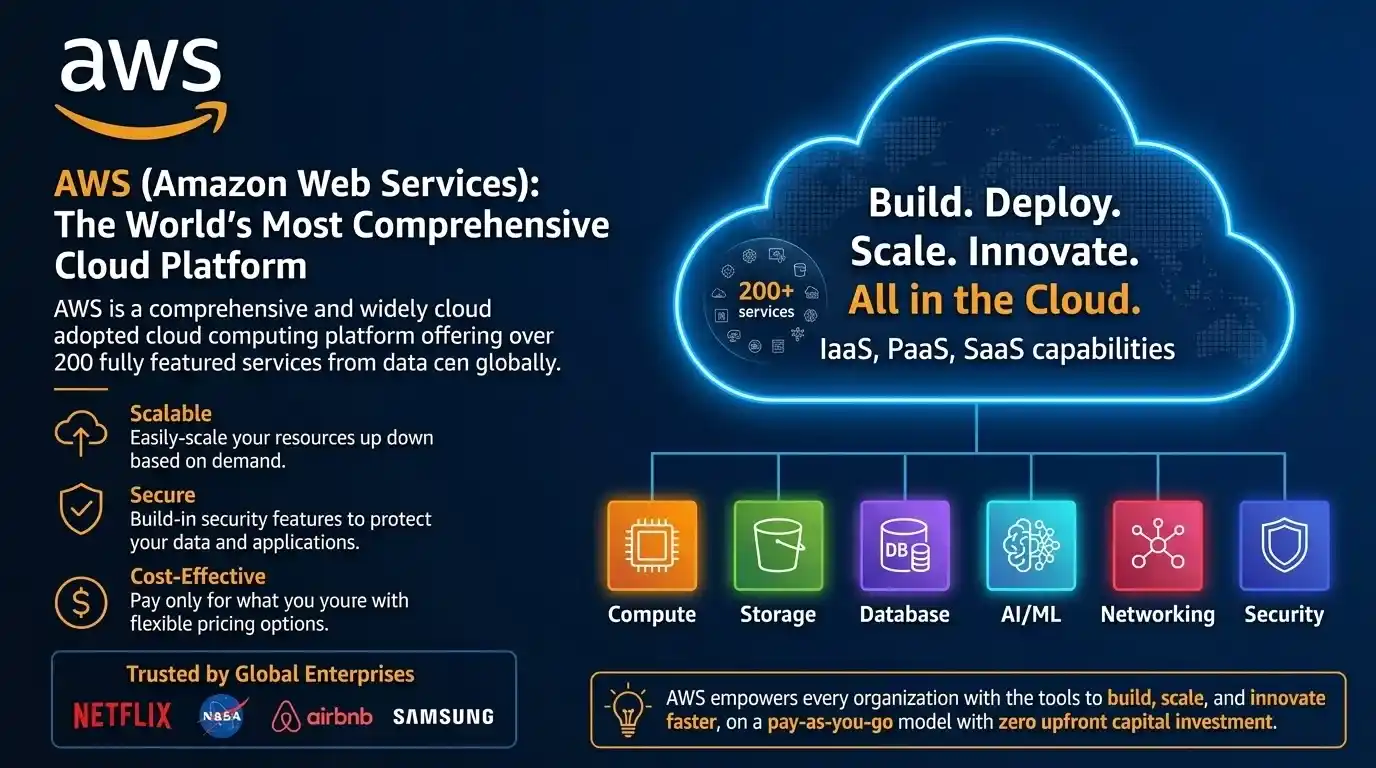
The AWS Cloud Platform powers mission-critical workloads for Netflix, NASA, Airbnb, Samsung, and thousands of enterprises globally. With IaaS, PaaS, and SaaS capabilities all under one roof, AWS gives every organization the tools to build, scale, and innovate faster.
Top 10 Benefits of Migrating to the AWS Cloud Platform

1. Significant Cost Savings and Optimized IT Spending
One of the biggest reasons businesses migrate to AWS is dramatic IT cost reduction. On-premises infrastructure demands massive capital expenditure on hardware, data centres, cooling, and maintenance. AWS converts all of this into a flexible operational expense.
Key cost optimization tools:
- Reserved Instances & Savings Plans: save up to 72% on compute costs (Source: AWS EC2 Reserved Instance Pricing)
- Spot Instances: access spare AWS capacity at up to 90% discount (Source: Amazon EC2 Pricing – AWS)
- AWS Cost Explorer: real-time cost visibility and optimization recommendations
AWS turns heavy infrastructure costs into a lean, predictable operational expense.
2. Unlimited Scalability and Flexibility
The AWS Cloud Platform was purpose-built for dynamic, elastic demand. Whether your traffic spikes tenfold overnight or drops during off-season, AWS scales compute, storage, and bandwidth within minutes, not months, with zero manual intervention.
Core scaling services:
- EC2 Auto Scaling: automatically adjusts capacity based on real-time traffic
- Elastic Load Balancing: distributes traffic intelligently across resources
- Amazon Aurora Serverless: a database that scales to zero when idle
With AWS, your infrastructure grows when your business does automatically.
3. Enterprise-Grade Security at Every Layer
Security is AWS’s highest design priority. The AWS Cloud Platform uses a shared responsibility model. AWS secures the physical infrastructure while customers control their applications and data.
World-class security toolset:
- AWS IAM: granular identity and access management with least-privilege enforcement
- AWS Shield Advanced: managed DDoS protection with 24/7 expert response
- AWS KMS: hardware-backed encryption key management
Compliance coverage:
- 140+ global certifications, including compliance like HIPAA, PCI DSS, ISO 27001, SOC 2, FedRAMP, and GDPR
AWS’s security model means your team spends less time managing firewalls and more time building products while staying audit-ready at all times.
4. Bulletproof Disaster Recovery and Business Continuity
Downtime is catastrophic. A single server failure can cost millions in lost revenue and brand damage. The AWS Cloud Platform enables cost-effective disaster recovery through its globally distributed infrastructure, with 99.99% SLA uptime on core services.
Disaster recovery services:
- AWS Backup: centralized, policy-driven backup across all AWS services
- Amazon S3 Cross-Region Replication: automatically replicates data across geographies
- AWS Elastic Disaster Recovery: sub-second RPO and minutes-level RTO for critical systems
For enterprises where downtime means direct revenue loss, AWS disaster recovery is not just a feature; it is a business continuity strategy.
5. Accelerated DevOps and Continuous Delivery
The AWS Cloud Platform powers some of the world’s most advanced DevOps ecosystems. By integrating DevOps and cloud best practices on AWS, engineering teams can dramatically reduce time-to-market and cut deployment-related incidents. AWS customers report up to 60% faster release cycles (Source: AWS Customer Success, 2024).
DevOps acceleration tools:
- AWS CodePipeline: fully automated CI/CD pipeline orchestration
- Amazon ECS / EKS: Docker and Kubernetes container orchestration at scale
- AWS CDK: define cloud infrastructure using familiar programming languages
Teams that migrate to AWS report fewer deployment failures, faster rollback times, and a measurable increase in engineering velocity within the first quarter.
6. Unmatched Global Reach and Low Latency
AWS operates 33 geographic regions and 105+ Availability Zones worldwide, the largest global cloud footprint of any provider. For businesses serving international audiences, AWS eliminates the need to build or lease data centres across multiple countries.
Global infrastructure services:
- Amazon CloudFront: 400+ global edge locations delivering content at sub-millisecond response times
- AWS Route 53: latency-based routing that intelligently directs users to the nearest endpoint
- AWS Global Accelerator: improves application availability and performance using the AWS global network
- AWS Local Zones: places compute, storage, and database services closer to end users for ultra-low latency
AWS’s global footprint means your users in Mumbai, São Paulo, or Frankfurt all experience the same fast, reliable performance without you managing a single data centre abroad.
7. AI and ML-Powered Digital Transformation
Cloud migration unlocks digital transformation. Organizations on the AWS Cloud Platform gain instant access to cutting-edge AI, machine learning, big data analytics, and IoT, all as fully managed, pay-as-you-go services.
Key AI/ML services:
- Amazon SageMaker: Scalable Platform for Building, Training, and Deploying ML Models
- Amazon Redshift: petabyte-scale cloud data warehousing
- AWS IoT Core: connect and manage billions of IoT devices securely
By migrating to AWS, businesses outpace legacy competitors still running on-premises systems and build the data-driven capabilities needed in today’s economy.
8. Simplified Compliance and Governance
Compliance is a growing burden across healthcare, finance, and retail. The AWS Cloud Platform simplifies this with built-in governance tools and pre-certified regulatory frameworks, saving organizations hundreds of thousands in compliance management annually.
Governance and compliance tools:
- AWS CloudTrail: an immutable log of all API activity across your environment
- AWS Audit Manager: automates evidence collection for 40+ compliance frameworks
- AWS Control Tower: automated governance guardrails across multi-account environments
With AWS, compliance shifts from a quarterly scramble to a continuous, automated baseline, giving your security and legal teams real-time confidence.
9. Remote Collaboration and Workforce Agility
The modern workforce is distributed. AWS natively supports remote teams, eliminating the friction of office-bound servers, legacy VPN tunnels, and rigid access controls. Teams can access development environments and enterprise applications securely from anywhere.
Remote workforce tools:
- Amazon WorkSpaces: fully managed cloud-based virtual desktops
- Amazon AppStream 2.0: stream desktop applications to any browser, any device
- AWS Client VPN: scalable, managed client VPN for secure remote access
Your office is wherever your team is; AWS keeps everyone securely connected.
10. Flexible Hybrid Cloud Strategy and Phased Migration
Not every business is ready for a full cloud migration overnight, and AWS accommodates exactly that. Through its robust hybrid cloud strategy support, AWS allows the gradual migration of workloads while keeping sensitive systems on-premises. This makes AWS the ideal starting point for businesses at every stage of their cloud journey.
Hybrid migration tools:
- AWS Outposts: run AWS services directly on-premises
- AWS Direct Connect: dedicated private network connection, bypassing the public internet
- VMware Cloud on AWS: extend your existing VMware environment to the cloud
Migrate at your own pace; AWS meets you exactly where you are.
AWS vs. On-Premises: Quick Comparison
| Factor | AWS Cloud Platform | On-Premises |
|---|---|---|
| Cost Model | Pay-as-you-go (OpEx) | High upfront CapEx |
| Scalability | Instant, unlimited | Slow, hardware-limited |
| Security | Enterprise-grade, shared model | Fully self-managed |
| Disaster Recovery | Built-in, multi-region | Costly and complex |
| Global Reach | 33 regions, 105+ AZs | Limited to physical offices |
| Compliance | 140+ certifications | Self-certified |
Conclusion
The benefits of migrating to the AWS Cloud Platform are comprehensive, proven, and compounding. From cutting costs and scaling instantly to securing enterprise data, enabling AI innovation, and supporting a global workforce, AWS delivers everything a modern business needs to compete and grow.
The question is no longer whether to migrate to the cloud; it is how quickly you can do it.
Start today with a free AWS Migration Evaluator assessment and take the first step toward a faster, more secure, and more cost-effective future on the world’s leading cloud platform.
FAQ’s
How much will AWS migration actually cost?
Lift-and-shift runs $5K–$20K for small setups; re-architecting can exceed $100K. Most businesses recover costs within 6–12 months via reduced maintenance and AWS’s pay-as-you-go model.
How long does an AWS migration take?
Small migrations wrap up in 2–4 weeks; large enterprise moves can take 6–18 months. Always budget 20–30% extra time for testing, data validation, and compliance checks.
Should we go multi-cloud or all-in on AWS?
All-in on AWS is simpler, cheaper, and faster to operate for most businesses. Multi-cloud adds complexity and cost, only pursue it if you have specific vendor-lock or regulatory requirements.
How do we ensure network performance doesn’t degrade after migration?
Use AWS Direct Connect for dedicated low-latency connectivity, place workloads in the nearest AWS region, and leverage CloudFront CDN to speed up delivery for end users globally.
What’s the biggest mistake companies make during AWS migration?
Skipping the assessment and planning phase, teams that rush straight to migration face ballooning costs, unexpected downtime, and security gaps that take months to fix post-launch.
What happens if the migration fails, can we roll back?
Always maintain a tested rollback plan: keep on-prem systems live in parallel until validation is complete, use AWS MGN’s cutover testing feature, and never decommission old infrastructure before sign-off.
How do we handle disaster recovery (DR) on AWS?
AWS offers multi-region DR with RPO/RTO as low as seconds using Route 53 failover, S3 Cross-Region Replication, and AWS Elastic Disaster Recovery, far cheaper than maintaining a secondary on-prem datacenter.
Should we containerize our apps before or after migrating?
Migrate first, containerize after, attempting both simultaneously doubles risk and complexity. Once workloads are stable on AWS, containerizing with ECS or EKS is far safer and faster to execute.