

Table of Contents
When a system failure strikes, the difference between a business that recovers in minutes and one that struggles for days comes down to one thing: a tested, well-architected disaster recovery planning strategy.
Research from EMA Research (2024) puts the average cost of unplanned IT downtime at $14,056 per minute across all organization sizes, rising to $23,750 per minute for large enterprises. For many mid-market businesses, a single four-hour outage can wipe out an entire quarter’s margin. The financial exposure is real, and it is growing.
This guide explains cloud disaster recovery planning fundamentals, compares primary strategies, reviews major cloud platform capabilities, and shows how to build solutions aligned with your risk tolerance and budget.
Note on terminology: “Cloud backup” and “cloud disaster recovery” are frequently conflated. Backup preserves copies of your data. Disaster recovery goes further it restores entire environments, applications, and network configurations, often in an automated sequence. A robust disaster recovery solution requires both.
What Is Cloud Disaster Recovery?
Cloud disaster recovery (cloud DR) refers to the policies, processes, and technologies that restore your critical IT infrastructure and data hosted in or replicated to a cloud environment following a disruptive event. Unlike traditional DR, which depends on secondary physical hardware, cloud DR leverages elastic compute resources, automated orchestration, and geographic redundancy to reduce both recovery time and capital expenditure.
Cloud replication is the foundational technology underlying modern cloud disaster recovery. Through cloud replication, your data and system configurations are continuously copied to secondary cloud regions or providers, ensuring that recovery targets remain current and ready for activation. Cloud replication enables both real-time and near-real-time recovery scenarios, dramatically reducing the data loss risk that plagued legacy backup strategies.
Common triggers for disaster recovery activation include:
- Ransomware and cyberattacks
- Data centre or hardware failure
- Natural disasters affecting a primary facility
- Cloud provider outages or zone-level failures
- Human error causes data corruption or accidental deletion
- Software failures or application-level data loss
Why Cloud Disaster Recovery Planning Is a Business Imperative
The financial risk is larger than most budgets account for
Current average downtime costs are $14,056 per minute (2024 EMA Research), with financial services and healthcare reaching $9,000–$12,000 per minute. A warm standby configuration with cloud replication typically costs $2,000–$8,000 monthly; one prevented four-hour outage pays for a year’s investment.
Regulatory compliance is non-negotiable in most sectors
Documented, tested disaster recovery procedures are required for regulated industries:
- HIPAA, SOC 2 Type II, PCI-DSS, GDPR, FedRAMP
Auditors specifically require evidence of structured DR planning and periodic testing documentation. An untested cloud DR plan will not satisfy compliance requirements.
Competitive resilience and business continuity
Service availability is now a commercial differentiator. Enterprise procurement teams routinely request SLA commitments and evidence of business continuity during vendor selection. Organizations demonstrating sub-hour RTOs with test results consistently win competitive tenders. A robust DR plan is table stakes for enterprise deals.

Understanding RTO and RPO
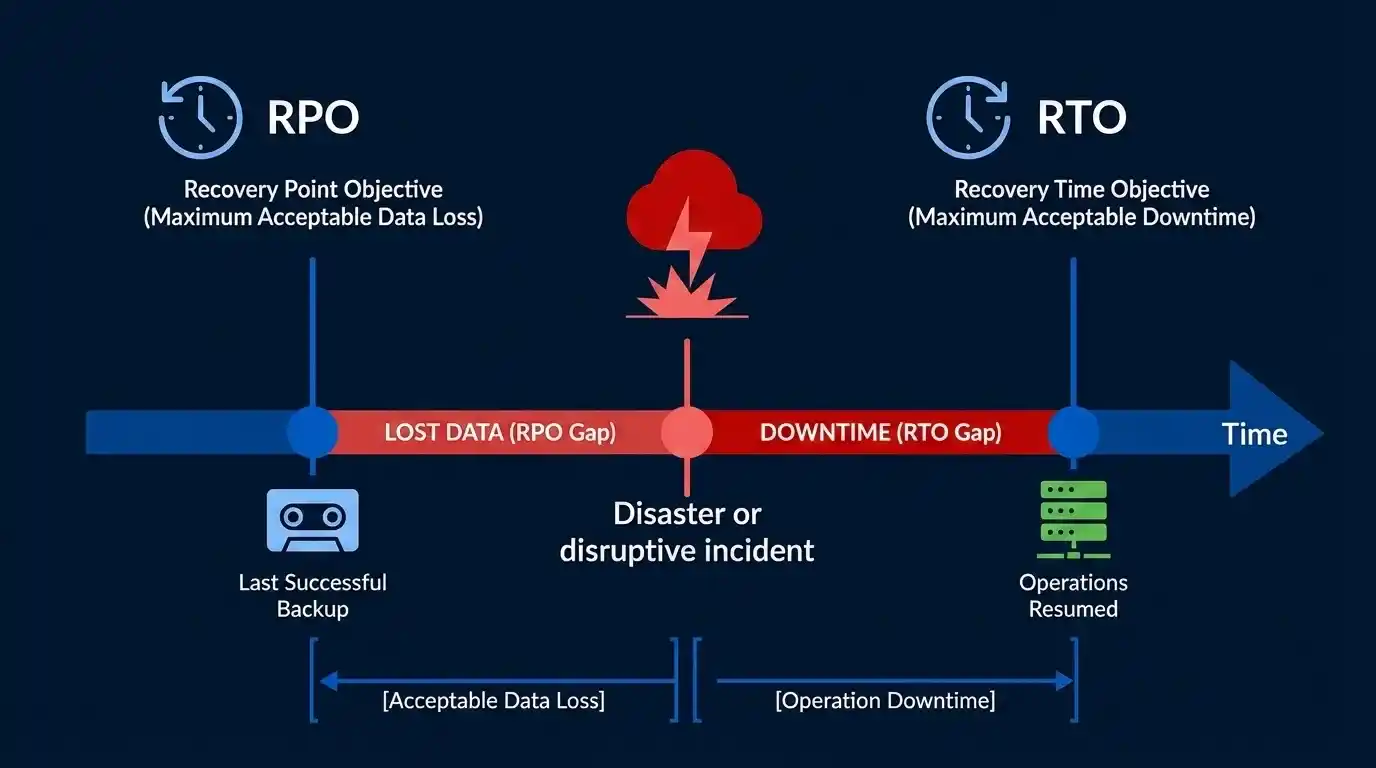
RTO and RPO are the two critical metrics that define what your disaster recovery solution must achieve. Understanding RTO and RPO is foundational to designing an appropriate disaster recovery architecture.
Recovery Time Objective (RTO)
RTO is the maximum tolerable duration of system unavailability the point at which downtime transitions from an inconvenience into material business damage. It answers the question: how quickly must we be back online?
RTO is not a technical target; it is a business decision. It should be set by business stakeholders, informed by the operational and financial cost of each additional hour of unavailability, not defaulted to whatever the cheapest technical option happens to deliver.
Different workloads warrant different RTO targets:
- Critical financial systems: 15–30 minutes RTO
- Customer-facing applications: 1–4 hours RTO
- Internal systems: 12–24 hours RTO
Recovery Point Objective (RPO)
RPO is the maximum amount of data loss your business can sustain, expressed as time. An RPO of one hour means you accept losing up to one hour of transactions or activity. It answers the question: how much data can we afford to lose?
RPO drives your backup and cloud replication frequency. Tighter RPOs require continuous replication and are significantly more expensive to operate than systems that tolerate a 24-hour data loss window. RPO directly determines whether you need real-time cloud replication (achieving near-zero RPO) or periodic backup strategies.
Aligning RTO and RPO with Your Disaster Recovery Planning
When building your disaster recovery planning framework, RTO and RPO targets must be defined before selecting a disaster recovery strategy or backup strategy. Misaligned RTO/RPO targets and actual capabilities are the leading cause of failed disaster recovery activations.
Industry RTO and RPO benchmarks
The table below reflects typical targets by sector, based on current industry practice and compliance requirements.
| Industry | Typical RTO | Typical RPO | Key Compliance Driver | Recommended Strategy |
|---|---|---|---|---|
| Financial Services | 15–30 min | < 15 min | SOC 2, GDPR, PCI-DSS | Warm Standby or Active-Active |
| Healthcare | 30–60 min | 15–30 min | HIPAA | Warm Standby |
| E-commerce | 1–4 hours | 1 hour | PCI-DSS | Pilot Light or Warm Standby |
| Government / Public Sector | 2–4 hours | 1–2 hours | FedRAMP | Warm Standby |
| Content & Media | 4–12 hours | 4 hours | General SLA | Pilot Light |
| Non-critical Internal Systems | 12–24 hours | 24 hours | Internal policy | Backup and Restore |
These are indicative targets. Actual RTO and RPO requirements should be validated through a formal Business Impact Analysis (BIA) for each critical system.
The Four Cloud Disaster Recovery Strategies
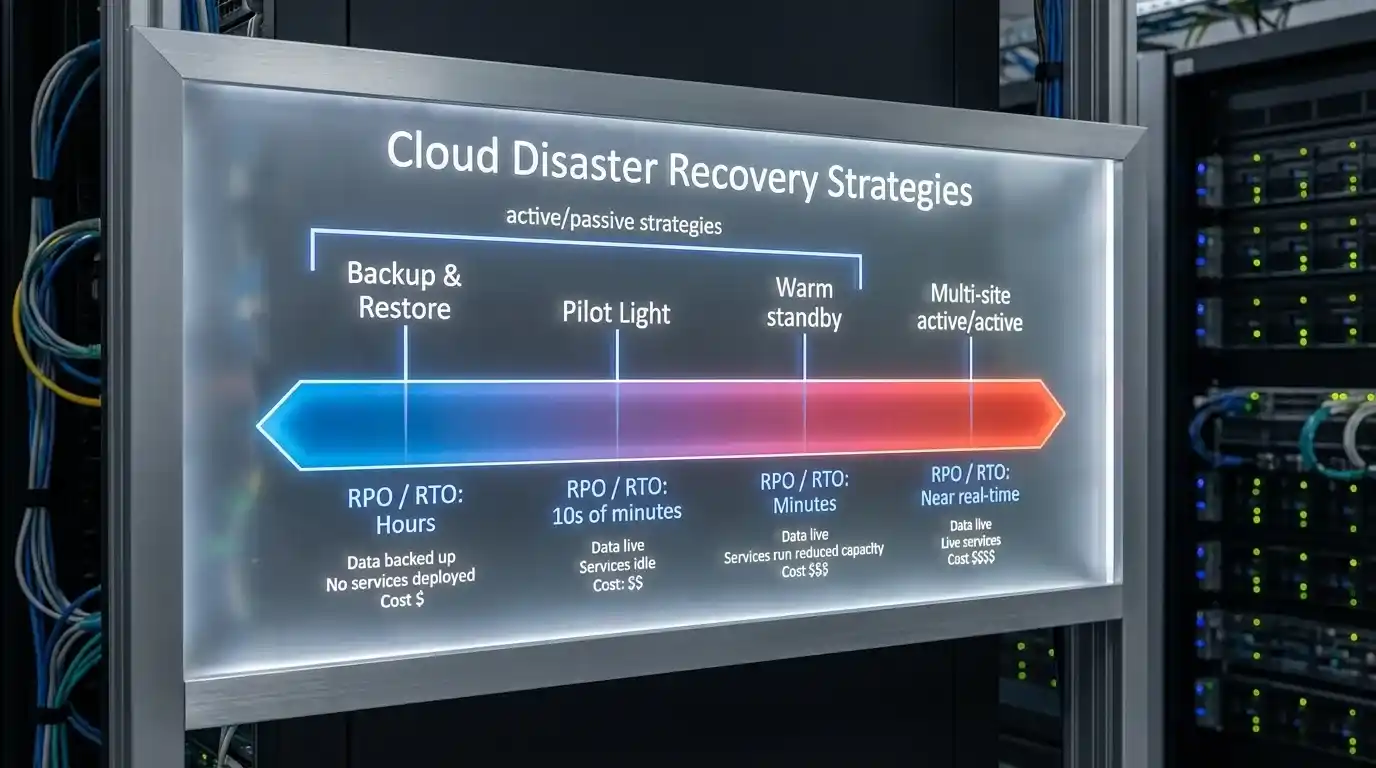
Cloud DR is not a single product; it is a spectrum of approaches, each carrying a different cost, complexity, and recovery capability. Selecting the right disaster recovery strategy for each workload requires matching your RTO and RPO requirements to the appropriate architecture. Your overall disaster recovery solution will typically employ a tiered approach, using different strategies for different workload priorities.
1. Backup and Restore
The most cost-effective disaster recovery strategy to start with. Regular snapshots of your data and system images are stored in cloud object storage (such as Amazon S3, Azure Blob Storage, or Google Cloud Storage). Recovery requires manually or automatically provisioning infrastructure and restoring from backup. Teams often pair cloud object storage with dedicated enterprise backup software to automate snapshot scheduling, retention, and policy-driven recovery across hybrid workloads. This backup strategy relies on periodic point-in-time copies rather than continuous replication.
- RTO: 4–24 hours | RPO: 4–24 hours
- Approximate cost: $50–$300/month for small workloads
- Best for: Non-critical internal systems, archive workloads, budget-constrained organizations building their first disaster recovery solution
Limitation: The full recovery process is manual-intensive and slow. For any system where a four-hour outage causes significant revenue or compliance exposure, this backup strategy approach is insufficient on its own.
Cloud Replication in Backup & Restore: While this tier doesn’t use continuous cloud replication, implementing versioned, replicated backups across geographic regions improves RPO and adds geographic resilience.
For a deep dive into implementing this at the database level, learn more.
2. Pilot Light
A minimal version of your environment runs continuously in the cloud, typically the core database layer with the rest of the infrastructure provisioned on demand during a failover event. Infrastructure-as-Code (IaC) tools such as Terraform or AWS CloudFormation are used to spin up the full application stack rapidly. This disaster recovery strategy uses cloud replication for the core database layer while maintaining cost-efficiency for non-critical components.
- RTO: 30–60 minutes | RPO: 15–30 minutes
- Approximate cost: $500–$2,000/month
- Best for: Mid-tier applications, organizations migrating workloads to the cloud, who want a balanced cost/capability trade-off in their disaster recovery solution
Cloud Replication in Pilot Light: Continuous or near-continuous cloud replication of the database layer keeps the standby environment current, enabling faster activation when failover is triggered.
3. Warm Standby
A fully configured, production-ready environment runs in a secondary region or cloud account at reduced scale. Real-time or near-real-time cloud replication keeps it current with the primary environment. Failover involves redirecting traffic to the standby environment and scaling it up, a process that can be fully automated through automated failover orchestration. This represents the most comprehensive disaster recovery strategy for mission-critical workloads.
- RTO: 5–15 minutes | RPO: Real-time to 5 minutes
- Approximate cost: $2,000–$8,000/month, depending on workload scale
- Best for: Mission-critical applications, regulated workloads, organizations with enterprise SLA commitments
Cloud Replication in Warm Standby: Continuous, real-time cloud replication using technologies like Aurora Global Database, Azure SQL Geo-Replication, or Cloud Spanner keeps the secondary environment in sync, enabling near-instantaneous activation.
Automated Failover: The warm standby strategy’s true power lies in automated failover capabilities. DNS-based traffic redirection combined with health-check-triggered failover can activate recovery without human intervention, enabling sub-15-minute RTOs consistently.
4. Multi-Site Active-Active
Your application runs simultaneously across multiple geographic regions, with live traffic distributed between them. Any single region can fail without service interruption. This is the most resilient and operationally complex disaster recovery solution available. Active-active architectures require sophisticated cloud replication that maintains data consistency across regions.
- RTO: Near-zero (seconds to under one minute) | RPO: Near real-time
- Approximate cost: $8,000+/month, often significantly more at enterprise scale
- Best for: Large enterprises, fintech, healthcare platforms, any workload where any measurable downtime is commercially or clinically unacceptable
Cloud Replication in Active-Active: Multi-region cloud replication with strong consistency guarantees (as provided by technologies like Cloud Spanner or DynamoDB Global Tables) enables true active-active operations where all regions serve live traffic simultaneously.
Strategy comparison at a glance
| Strategy | Typical RTO | Typical RPO | Approx. Monthly Cost | Automation Level | Best For |
|---|---|---|---|---|---|
| Backup & Restore | 4–24 hours | 4–24 hours | $50–$300 | Manual | Non-critical systems, SMBs |
| Pilot Light | 30–60 min | 15–30 min | $500–$2,000 | Semi-automated | Mid-tier apps, cost-conscious orgs |
| Warm Standby | 5–15 min | Real-time to 5 min | $2,000–$8,000 | Highly automated | Mission-critical, regulated industries |
| Multi-Site Active-Active | < 1 min | Near real-time | $8,000+ | Fully automated | Large enterprises, zero-downtime requirement |
Cost ranges are indicative for typical SMB-to-mid-market workloads. Exact pricing depends on data volumes, instance types, cloud replication costs, and provider pricing models. Formal scoping is required for accurate cost planning.
Cloud Platform DR Capabilities
How to Build a Cloud Disaster Recovery Planning Framework
Effective disaster recovery planning is a structured, methodical process. Organizations that follow a systematic approach to building their disaster recovery solution consistently achieve better RTOs, lower costs, and higher staff confidence in their procedures.
Step 1: Conduct a Business Impact Analysis (BIA)
Every disaster recovery planning exercise begins with understanding what each system is worth to the business when it is unavailable. A Business Impact Analysis (BIA) maps critical business functions to the underlying IT systems, assigns RTO and RPO targets based on business consequence (not IT preference), and establishes recovery priorities.
During the BIA, you should:
- Interview business stakeholders about the impact of system unavailability
- Quantify the cost of downtime per hour for each critical system
- Identify dependencies between systems
- Establish RTO and RPO targets tied to business impact
- Classify systems into recovery tiers (Backup & Restore, Pilot Light, Warm Standby, Active-Active)
Output: a prioritized system inventory with documented RTO/RPO targets per workload, approved by business leadership.
Step 2: Risk Assessment and Failure Scenario Definition
Identify failure scenarios your disaster recovery solution must address, as each may require different recovery strategies based on your risk profile and compliance requirements.
During risk assessment, you should:
- Identify cloud provider zone or regional outages as potential threats
- Assess ransomware encryption and data corruption risks
- Evaluate network failure and connectivity loss scenarios
- Consider third-party dependency failures
- Plan for data center physical disasters
- Map each scenario to appropriate recovery strategies
Output: a documented list of failure scenarios prioritized by likelihood and business impact, with assigned recovery strategies for each scenario.
Step 3: Strategy Selection by Workload Tier
Not all workloads need the same disaster recovery strategy. A tiered model assigning each system to Backup & Restore, Pilot Light, Warm Standby, or Active-Active based on its RTO/RPO requirements optimizes cost without creating unnecessary exposure.
Your disaster recovery planning should establish:
- Tier 1: Critical systems requiring Warm Standby or Active-Active (RTO < 1 hour)
- Tier 2: Important systems requiring Pilot Light (RTO 1-4 hours)
- Tier 3: Supporting systems using Backup & Restore (RTO 4-24 hours)
This tiered approach ensures your disaster recovery solution investments focus on the systems that matter most to business continuity.
Step 4: Architecture Design and Infrastructure-as-Code Implementation
Define the technical architecture for each tier:
- Replication tools: Which cloud replication technologies will synchronize data?
- Failover automation: How will automated failover be triggered?
- DNS routing strategy: How will traffic redirect to recovery environments?
- Access controls: Who can activate failover and manage recovery environments?
- Monitoring and alerting: How will you detect when a failover is needed?
Implement the environment using Infrastructure-as-Code so that recovery environments are reproducible and testable without human interpretation of a runbook. Tools like Terraform, AWS CloudFormation, and Azure Resource Manager enable disaster recovery solutions that can be validated, versioned, and deployed consistently.
Step 5: Comprehensive Documentation
A disaster recovery planning document that exists only in someone’s head is not a disaster recovery solution. Documentation must include:
- Recovery procedures for each system tier
- Step-by-step activation checklists
- Contact information and escalation procedures
- Communication protocols during recovery events
- Data validation checklists post-recovery
- Rollback procedures if recovery needs to be reversed
- Schedule for testing and plan review (at a minimum, quarterly)
Documentation should be version-controlled, accessible to authorized personnel, and regularly reviewed for accuracy.
Step 6: Structured Testing: The Step Most Organizations Skip
A disaster recovery solution that has never been tested under realistic conditions is unvalidated. Most organizations discover critical gaps in their disaster recovery planning only when they need to activate recovery during an actual incident, when it’s too late to fix problems.
Industry guidance and most compliance frameworks require a structured testing cadence:
| Test Type | Frequency | What It Covers | RTO/RPO Validation |
|---|---|---|---|
| Tabletop exercise | Quarterly | Walkthrough of disaster recovery planning procedures without activating systems | Strategic only |
| Component-level recovery test | Semi-annually | Individual system or database recovery under controlled conditions | Partial validation |
| Full failover drill | Annually minimum | Simulate a complete outage; measure actual RTO/RPO achieved against targets | Full validation |
| Chaos engineering test | 2-3 times yearly | Inject random failures into production to test disaster recovery automation | Real-world validation |
Testing best practices:
- Document all test results, including actual RTO/RPO achieved
- Identify gaps between planned and actual recovery procedures
- Update disaster recovery planning documentation based on test findings
- Schedule tests during predictable business periods when possible
- Involve all teams that would participate in the actual recovery
- Test both planned failover (clean handoff) and unplanned failover (sudden failure)
Organizations that conduct structured disaster recovery testing 2+ times annually achieve actual RTOs within 10-15% of targets. Organizations that test less frequently typically miss targets by 2-4x during actual incidents.
Step 7: Continuous Maintenance and Plan Updates
Cloud environments change continuously, new services are added, configurations are updated, and workloads are migrated. Disaster recovery planning must be an active, ongoing discipline, not a one-time exercise.
Disaster recovery plans must be reviewed:
- Immediately, whenever significant infrastructure changes occur
- Quarterly, as part of change management reviews
- Annually, as a scheduled review cycle
- After every test, incorporate findings and lessons learned
Assign clear ownership for disaster recovery planning maintenance. Establish a process for reviewing and updating documentation quarterly. As part of your disaster recovery planning refresh, verify that:
- Cloud replication configurations are still active and synchronized
- Automated failover procedures are still functional
- Contact information and escalation procedures are current
- RTO/RPO targets still align with business needs
- New workloads have been assessed and assigned to appropriate recovery tiers
Cloud DR Best Practices
A comprehensive, interactive checklist — click any topic to jump straight to it:
Conclusion
Cloud disaster recovery is not a checkbox exercise or an insurance policy you never expect to use. It is an active, maintained capability that directly determines how quickly your business can resume operations when, not if, a significant disruption occurs.
A comprehensive disaster recovery solution requires investment across three dimensions:
- Technology: Cloud replication, automated failover, Infrastructure-as-Code
- Process: Disaster recovery planning, documented procedures, regular testing
- People: Training, assigned ownership, regular communication
The organizations that handle failures well are not the ones that were lucky enough to avoid them. They are the ones who invested in architecture, testing, and automation before the event, and had a verified, practised disaster recovery solution ready to execute.
The entry cost is lower than most finance teams expect. A professionally scoped Backup and Restore or Pilot Light configuration can be implemented for a fraction of the cost of a single multi-hour outage. The question is not whether your business can afford cloud disaster recovery; it is whether it can afford not to have it.
Ready to assess your current disaster recovery posture? Our cloud migration and disaster recovery team conducts structured DR readiness assessments evaluating your existing architecture, mapping workloads to appropriate disaster recovery strategies, validating RTO/RPO targets, and producing a costed implementation roadmap. Contact us to arrange a no-obligation consultation.
FAQs
How much does cloud disaster recovery actually cost compared to downtime?
A cloud disaster recovery warm standby solution ($2,000–$8,000/month) typically costs less than a single prevented four-hour outage when cloud disaster recovery prevents $14,056–$23,750 per minute in downtime costs.
What’s the difference between cloud backup and cloud disaster recovery?
Cloud backup saves copies of data; cloud disaster recovery restores entire environments, applications, and network configurations in an automated sequence using cloud replication.
How long does it take to implement a cloud disaster recovery solution?
Cloud disaster recovery implementation timelines: Backup & Restore 2–4 weeks; Pilot Light 4–8 weeks; Warm Standby 8–12 weeks; Active-Active 12–20+ weeks, depending on cloud disaster recovery complexity.
Do I need to test my cloud disaster recovery plan, and how often?
Yes, organizations testing cloud disaster recovery 2+ times annually achieve actual RTOs within 10-15% of targets; those testing cloud disaster recovery less frequently miss targets by 2-4x during real incidents.
Can I implement cloud disaster recovery without moving entirely to the cloud?
Yes, you can use hybrid cloud disaster recovery with on-premises secondary data centers, but pure cloud disaster recovery is cheaper, requires less capital expenditure, and scales elastically without maintaining idle hardware.
What happens if my cloud disaster recovery region also fails?
Implement multi-region cloud disaster recovery using a third region, multi-cloud architectures, or different cloud providers; resilient cloud disaster recovery organizations replicate across at least two independent geographies.
What’s the cheapest way to start implementing cloud disaster recovery?
Cloud disaster recovery Backup & Restore strategy ($50–$300/month) is the entry point for cloud disaster recovery; graduate to cloud disaster recovery Pilot Light ($500–$2,000) as your business can justify the investment.
Is cloud disaster recovery required by law or compliance standards?
Yes, HIPAA, SOC 2 Type II, PCI-DSS, GDPR, and FedRAMP all require documented, tested cloud disaster recovery procedures with evidence of regular cloud disaster recovery testing.
How do I test cloud disaster recovery without affecting production?
Cloud disaster recovery can be tested using isolated test environments, non-disruptive cloud disaster recovery testing features (Azure Site Recovery’s “test failover”), or cloud disaster recovery failover drills during scheduled maintenance windows.
What’s the difference between RTO and RPO in cloud disaster recovery terms?
RTO = how long you can be offline before losing money (business decision in cloud disaster recovery); RPO = how much data loss you can afford (drives cloud disaster recovery backup frequency and costs).
Does my cloud provider (AWS, Azure, GCP) automatically handle cloud disaster recovery?
No, cloud providers offer cloud disaster recovery tools, but you must architect your cloud disaster recovery solution, configure cloud replication, and test it; the cloud doesn’t automate cloud disaster recovery away.