
Table of Contents
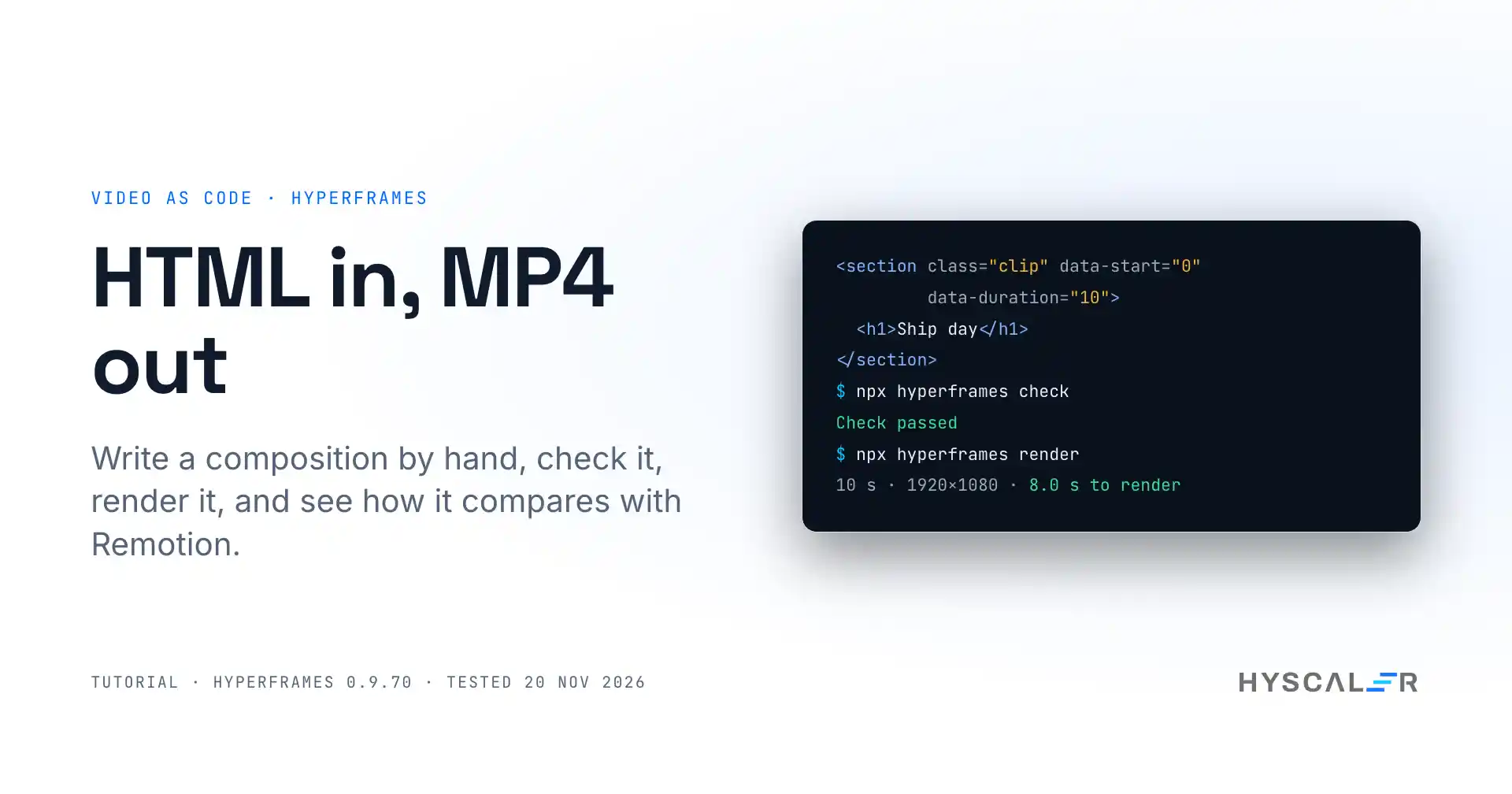
HyperFrames is an open-source framework from HeyGen that turns HTML, CSS, and seekable animations into MP4 video, for developers and for the coding agents they work with.
Most guides you will find show one route: install a skill, then ask an AI agent for a video. This HyperFrames tutorial takes the other route. We write the composition by hand, so you can see what the agent would be writing for you, and what the tool checks before it renders.
Every command and number below comes from our own test of version 0.9.70 (repo commit 592a9fe) on 19 and 20 November 2026. We installed it, wrote a 10-second clip, made two mistakes that the checker caught, rendered it in five formats, ran it in Docker, and rendered the same clip in Remotion on the same machine.
Key points
- HyperFrames is a command line tool and rendering engine under the Apache-2.0 licence. It had 86,928 GitHub stars on 19 November 2026.
- A video is an HTML file. Data attributes set the timing, and a paused GSAP timeline drives the motion. There is no build step and no React.
- In our test, a 10-second 1080p clip rendered in 8.0 seconds, and two renders of the same project produced files with the same SHA-256 hash.
hyperframes checkcaught a layout bug thatlintpassed: three lines of text stacked on top of each other. Run it before every render.- Inside Docker, three things need attention: shared memory, the browser build, and the preview address. Fixing the browser build cut one render from 33 seconds to 14.
- Usage telemetry is on by default, with a notice on first run. One command or one environment variable turns it off.
What is HyperFrames?
HyperFrames is a video framework from heygen-com/hyperframes on GitHub. You describe a video as a web page, and the tool plays that page frame by frame in headless Chrome and encodes the frames with FFmpeg. The README sums it up in three short sentences: “Write HTML. Render video. Built for agents.”
The facts, as of 19 November 2026:
| Licence | Apache-2.0 |
| Language | TypeScript |
| Stars | 86,928 |
| Public repository created | March 2026 |
| Version tested | 0.9.70, released 19 November 2026 |
| Requires | Node.js 22 or later, FFmpeg, and Chrome |
| Output | MP4, WebM, MOV, GIF, HLS, or a PNG sequence |
The project moves fast. Versions 0.9.67, 0.9.68, and 0.9.69 all came out on 18 November, the day before the one we tested. That is why this guide pins a version in every install command.
HyperFrames is three things under one name, and it helps to keep them apart:
- The CLI and engine. Open source, free, and what this guide covers.
- Agent skills. Instructions that teach Claude Code, Codex, Cursor, and other agents how to write compositions. We did not test them.
- HyperFrames Studio. A hosted app and a desktop app with a free plan and a paid Pro plan. We used only the local preview that ships with the CLI.
Why it matters for teams that ship software
Product videos, release clips, and tutorial intros are usually made in a video editor by one person, and they go stale the day the product changes. A video that lives in a repository as HTML can be reviewed in a pull request, rebuilt in CI, and updated by changing one line of text.
That idea is not new. Remotion has done it with React since 2021. HyperFrames makes a different bet: plain HTML, which every front-end developer already writes and every coding agent already produces well.
We have a stake in this approach. The tutorial videos for these articles are built the same way, by recording a real app under a narration and compositing the result in a browser. So we came to HyperFrames with one question: how much of that work does it take off your hands?
How HyperFrames works
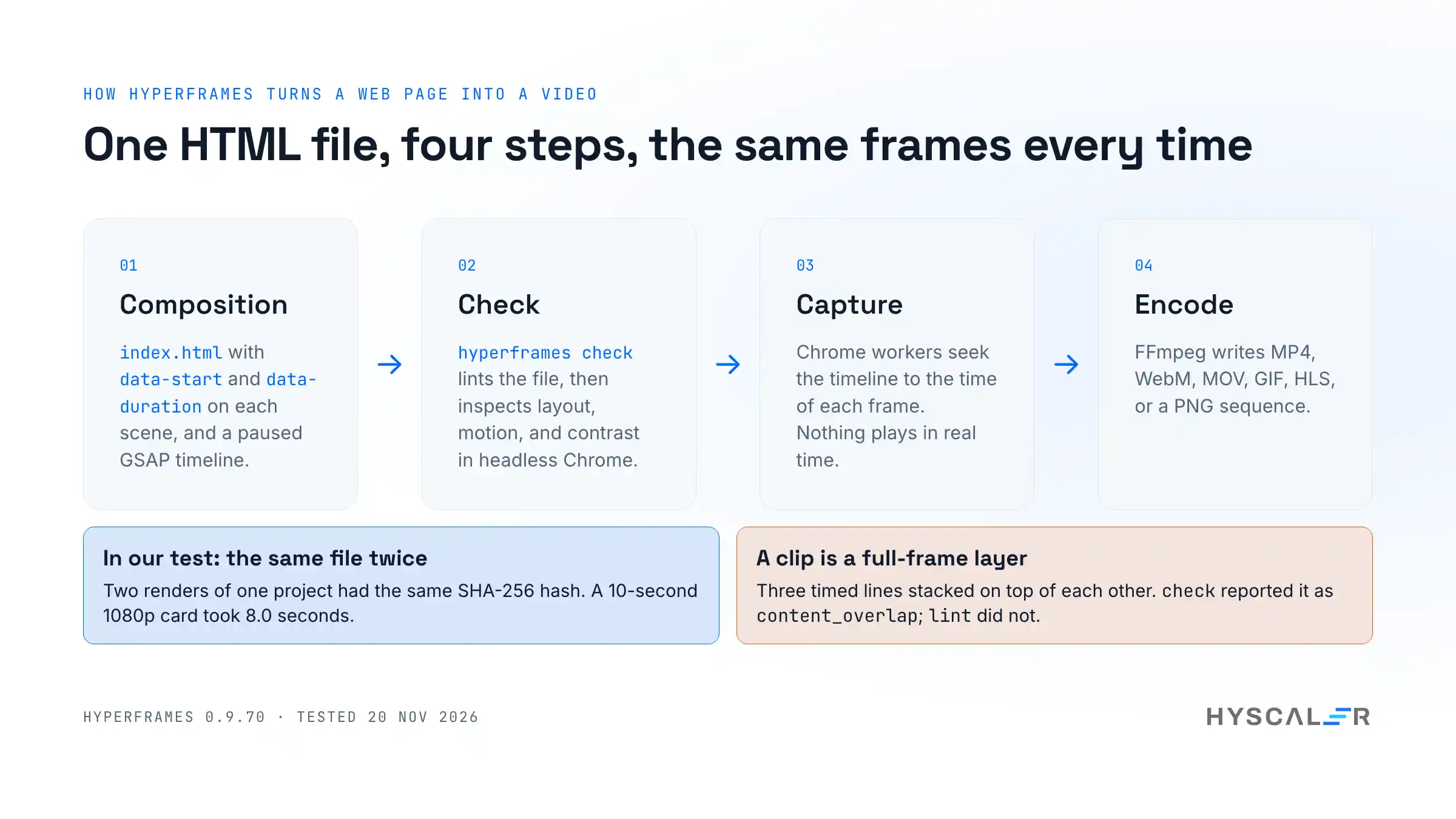
A HyperFrames project is a folder with an index.html in it. That file is the composition, and four ideas explain all of it.
- The root element declares the canvas. One element carries
data-composition-id,data-width,data-height,data-start, anddata-duration. Ours is 1920 by 1080 pixels and 10 seconds long. - Timed elements declare when they exist. Any element with
data-startanddata-durationis a clip. It appears at its start time and goes away when its duration ends. - A paused timeline drives the motion. You build a GSAP timeline with
paused: trueand register it onwindow.__timelinesunder the composition’s ID. HyperFrames never presses play. It seeks the timeline to the exact time of each frame. - Bigger videos are made of smaller files. A scene can live in its own HTML file under
compositions/and be mounted withdata-composition-src.
The third idea is the important one. Because the renderer seeks rather than plays, a frame never depends on how fast your machine is. The scaffolded project states the rule that follows from it: only deterministic logic, with no Date.now(), no Math.random(), and no network fetches in the composition.
GSAP is the default, not a requirement. The README lists CSS animations, Lottie, Three.js, Anime.js, and the Web Animations API as supported through adapters. We tested GSAP only.
HyperFrames tutorial: install and first render, step by step
These are the steps we ran, in order. They take about five minutes.
1. Check the prerequisites
You need Node.js 22 or later and FFmpeg. The npm package declares "node": ">=22", so an older Node.js will refuse to install it.
node -v
ffmpeg -version
Our lab had Node.js 22.23.5 and FFmpeg 5.1.9.
2. Install the CLI at a pinned version
mkdir video-lab && cd video-lab
npm init -y
npm install hyperframes@0.9.70
In our first run, the install took 5.1 seconds and node_modules came to 120 MB. A later run in a fresh home folder took 14 seconds. The package has no install scripts, which we checked with npm view before running anything.
You can also skip the install and call npx hyperframes@0.9.70 <command> each time. Pin the version either way.
3. Decide about telemetry
The first command you run prints this notice: “Hyperframes collects usage data to improve the tool, anonymous until you sign in. File paths and composition content are never collected.”
To turn it off, run one command, or set one variable:
npx hyperframes telemetry disable
# or, for CI and containers:
export HYPERFRAMES_NO_TELEMETRY=1
DO_NOT_TRACK=1 works too. We set the variable for the rest of the test.
4. Run the doctor
npx hyperframes doctordoctor lists what the tool found: Node.js, CPU, memory, FFmpeg, Chrome, and a few optional extras for speech and transcription. It found two real problems in our container, which we cover in the Docker section below.
5. Scaffold a project
npx hyperframes init hello --example blank --non-interactive --skip-skills
cd hello
This took under two seconds. The folder holds index.html, hyperframes.json, package.json, meta.json, and two instruction files for coding agents, AGENTS.md and CLAUDE.md.
Two flags are worth knowing. --example picks a starting point: blank gives one title on a black background, and warm-grain gives a finished multi-scene example. --skip-skills stops init from also installing the agent skills. Without it, init checked the skills against GitHub and fetched a separate npm package to install them.
6. Preview it
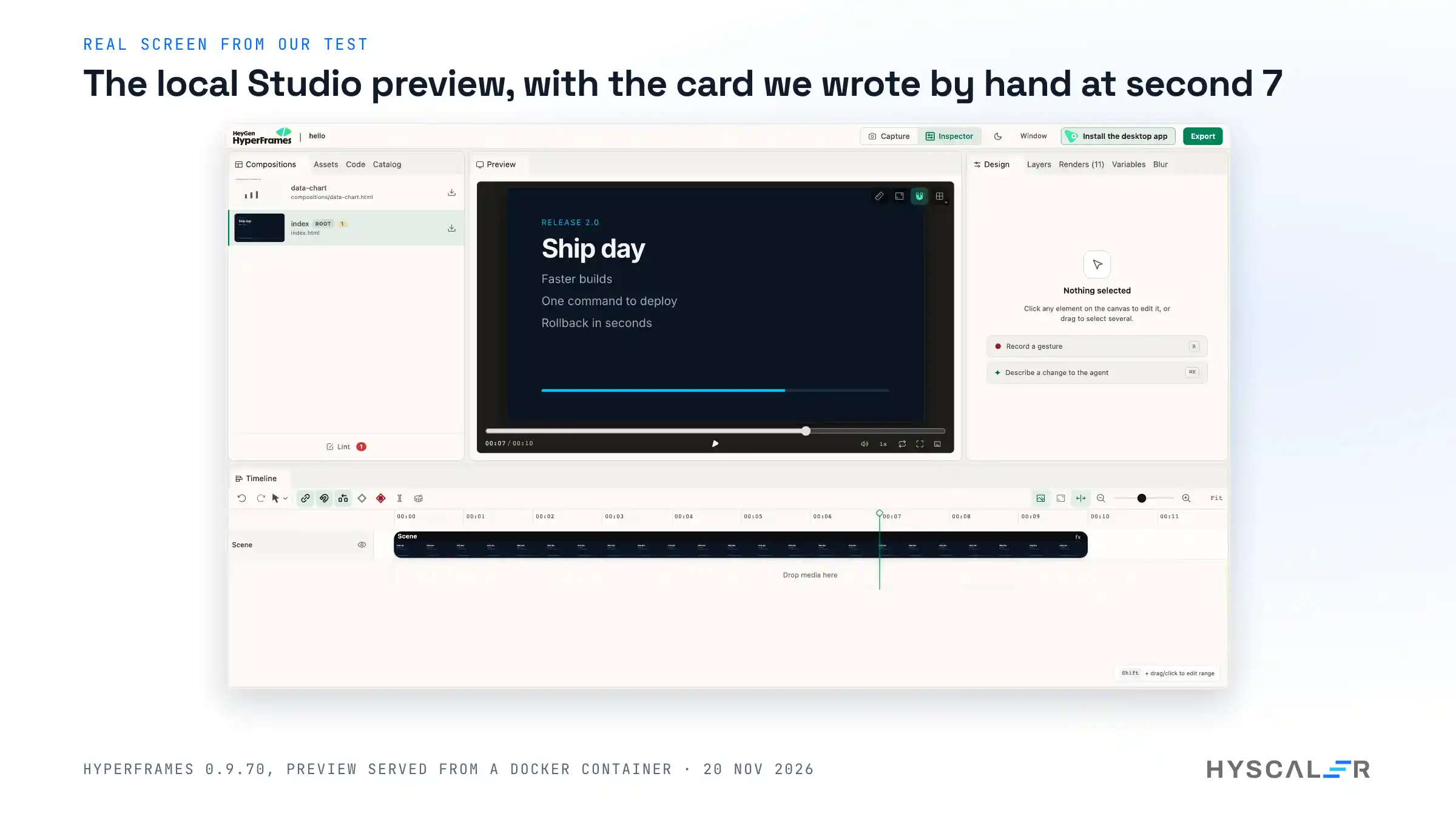
npx hyperframes previewThe preview server starts on port 3002 and opens the Studio in your browser at http://localhost:3002/#project/hello. It reloads when you save the file. Add --background to keep it running after the command returns, and --stop to end it.
7. Check it
npx hyperframes checkcheck runs the linter, then loads the composition in headless Chrome and inspects layout, motion, contrast, and audio across the timeline. This is the command that earns its place, as the worked example shows.
8. Render it
npx hyperframes render -o renders/hello.mp4The result is an H.264 MP4 at 1920 by 1080 and 30 frames a second. Without -o, the file goes to renders/ with the project name and a timestamp.
Write a composition by hand
The blank example gives you one centred title. We replaced it with a 10-second release card: a small label, a large title, three lines that arrive at seconds 2, 4, and 6, and a progress bar that fills over the whole clip.
We got it wrong twice before we got it right. The mistakes are the useful part, so here they are.
First attempt: the linter says no
Our first version gave every line its own data-start and class="clip", and set the bar’s starting width in CSS:
<p id="p1" class="point clip" data-start="2" data-duration="8">Faster builds</p>#fill { transform-origin: left center; transform: scaleX(0); }hyperframes lint returned one error and two warnings. The error was gsap_css_transform_conflict: the element has a CSS transform, and a GSAP tween animates the same property, so GSAP would overwrite the CSS. The fix it suggested was to remove the transform from CSS and use tl.fromTo, so the timeline owns both ends of the motion.
hyperframes check added a warning of its own, first_frame_empty: “Frame 0 shows only the background, and the first frame is the thumbnail on social players”. That is a note about craft, not code, and it was right. Our title faded in from nothing.
Second attempt: lint passes, the video is broken
We fixed both. The linter was now clean apart from a style warning. The render worked. And the video was wrong: all three lines sat on top of the title.
hyperframes check had already said so. Its layout pass reported content_overlap, “Two text blocks overlap and may render unreadable”, for the title against the first line, from second 2.1 to the end.
The cause is in the built-in docs: the shared .clip rule “is what gives a scene its full-frame box”. Every clip is a full-frame layer. Three clips in a row do not flow down the page like three paragraphs. They stack.
This is the one thing to understand before you write HyperFrames by hand. A clip is a scene, not a line of text.
Third attempt: one scene, animated children
The working version has a single timed scene. The lines inside it are ordinary elements, and the timeline brings them in:
<div id="root" data-composition-id="main" data-start="0" data-duration="10"
     data-width="1920" data-height="1080">
  <section id="scene" class="clip" data-start="0" data-duration="10" data-track-index="0">
    <p id="kicker">Release 2.0</p>
    <h1 id="title">Ship day</h1>
    <p id="p1" class="point">Faster builds</p>
    <p id="p2" class="point">One command to deploy</p>
    <p id="p3" class="point">Rollback in seconds</p>
    <div id="bar"><div id="fill"></div></div>
  </section>
</div>
<script>
  const tl = gsap.timeline({ paused: true });
  tl.from("#kicker", { opacity: 0, y: 30, duration: 0.6, ease: "power3.out" }, 0.2);
  tl.from("#p1", { opacity: 0, x: -40, duration: 0.5, ease: "power2.out" }, 2);
  tl.from("#p2", { opacity: 0, x: -40, duration: 0.5, ease: "power2.out" }, 4);
  tl.from("#p3", { opacity: 0, x: -40, duration: 0.5, ease: "power2.out" }, 6);
  tl.fromTo("#fill", { scaleX: 0 }, { scaleX: 1, duration: 10, ease: "none" }, 0);
  window.__timelines["main"] = tl;
  tl.seek(0);
</script>
The last argument of each tween is its position on the timeline, in seconds. The title has no tween, so it is on screen at frame 0.
This time check passed: no layout issues across 9 sampled moments, and 19 of 19 text checks met WCAG AA contrast.
Look at frames before you render
npx hyperframes snapshot --at 1,3,5,7,9 -o snapssnapshot writes a PNG for each time you ask for, plus one contact sheet with all of them. It was the contact sheet that showed us the stacked text at a glance. It is quicker than rendering and scrubbing a video.
Render options and what they cost
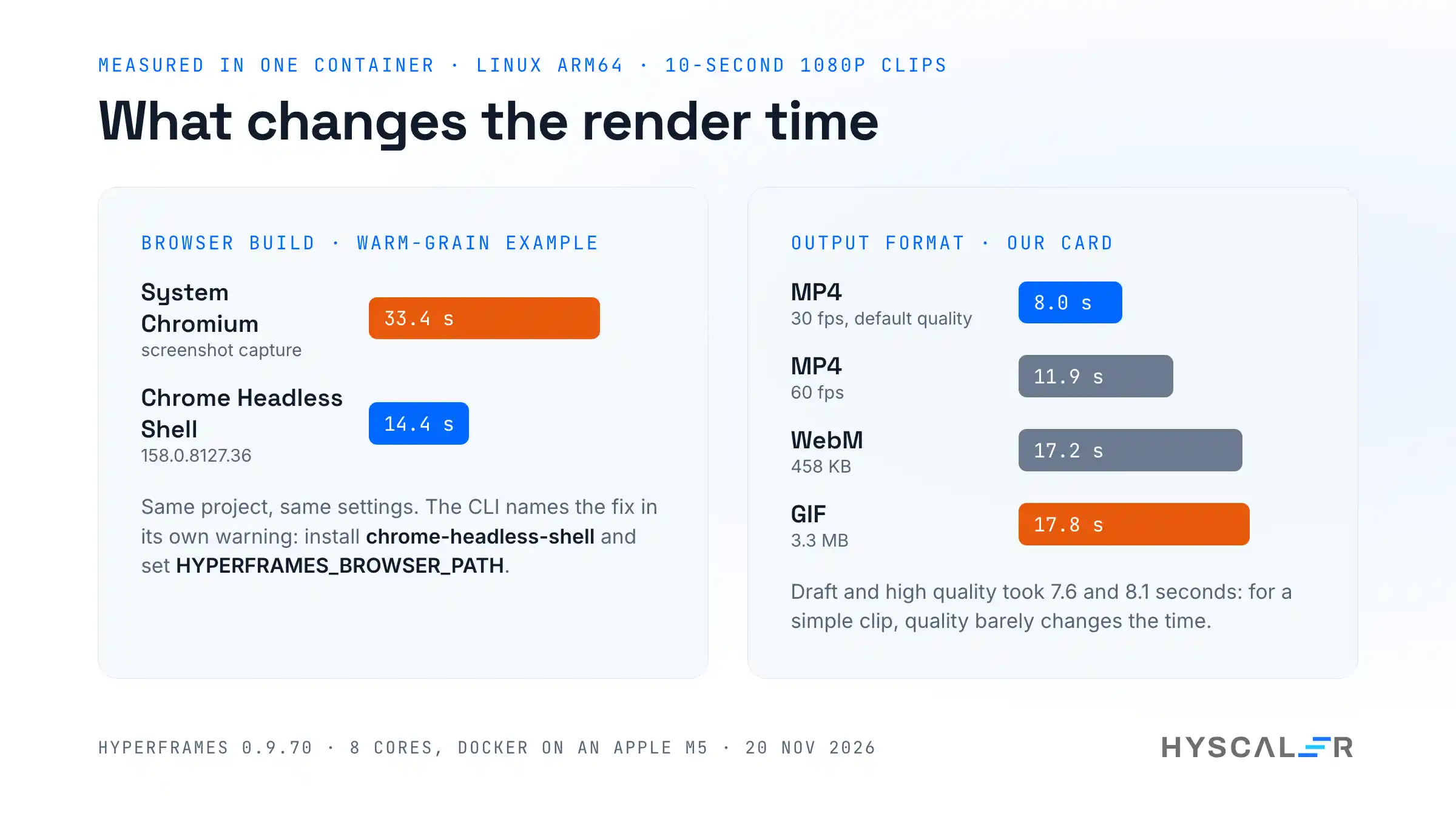
All timings are for the same 10-second, 1080p card, on 8 cores of an Apple M5 inside Docker, with Chrome Headless Shell.
| Command | Time | File size |
|---|---|---|
render (default quality, 30 fps) | 8.0 s | 230 KB |
render --quality draft | 7.6 s | 183 KB |
render --quality high | 8.1 s | 239 KB |
render --fps 60 | 11.9 s | 306 KB |
render --workers 1 | 10.7 s | 230 KB |
render --format webm | 17.2 s | 458 KB |
render --format gif | 17.8 s | 3.3 MB |
A few things follow from the table.
- Quality barely changes the time. For a clip this simple, the capture is the work, not the encode.
- Workers help, but not in proportion. The default used 5 workers and was only a quarter faster than 1. Each worker is a separate Chrome process that needs about 256 MB of memory, according to the help text.
- GIF is the expensive format. It took twice as long and was 14 times the size of the MP4.
We also tested the claim that renders are deterministic. We rendered the card twice and compared the files. Both had the same SHA-256 hash. For a team that wants to regenerate videos in CI and only commit real changes, that matters.
The scaffolded warm-grain example is heavier: several scenes, a paper texture, and more motion. It rendered in 14.4 seconds with Chrome Headless Shell.
Add a block from the catalog
HyperFrames has a catalog of ready-made scenes, such as transitions, overlays, captions, and charts. One command copies a block into your project as editable source:
npx hyperframes add data-chartIn our run, this wrote compositions/data-chart.html and a lock file, and printed the line to paste into index.html:
<div data-composition-id="data-chart" data-composition-src="compositions/data-chart.html"
     data-duration="15" data-width="1920" data-height="1080"></div>
The block then shows up in the Studio’s list of compositions. You own the file, so you can change the numbers, colours, and timing in it.
How to run HyperFrames in Docker
We ran the whole test in a container, with only the project folder mounted. Trending repositories are untrusted code, and a container is also how you would run this in CI. Three things did not work out of the box.
Give Chrome more shared memory
hyperframes doctor flagged it: “/dev/shm 64 MB. Chrome needs ≥256 MB. Use: docker run –shm-size=512m”. Docker’s default shared memory is too small for Chrome. Start the container with the flag:
docker run -d --name hyperframes-lab --shm-size=512m \
  -v "$PWD/lab":/work -w /work -p 127.0.0.1:3002:3002 \
  node:22-bookworm sleep infinity
Then install FFmpeg and a browser inside it:
apt-get update && apt-get install -y ffmpeg chromiumInstall Chrome Headless Shell, even on arm64
On Linux arm64, which is what Docker gives you on an Apple silicon Mac, the CLI looks for a system Chromium and uses it. It also prints a warning: regular Chrome builds lack the capture method HyperFrames prefers, so it “falls back to screenshot mode”.
The warning names the fix, and it worked on arm64:
npx @puppeteer/browsers install chrome-headless-shell@158.0.8127.36
export HYPERFRAMES_BROWSER_PATH="$PWD/chrome-headless-shell/linux_arm-158.0.8127.36/chrome-headless-shell-linux-arm64/chrome-headless-shell"
The download took 28 seconds. The difference was large on the heavier example:
| Browser | warm-grain example | Our card |
|---|---|---|
| System Chromium, screenshot capture | 33.4 s | 9.9 s |
| Chrome Headless Shell | 14.4 s | 8.0 s |
Let the preview listen outside the container
The preview server binds to 127.0.0.1 inside the container. With a published port, the browser on your Mac gets no answer. The --help text does not mention a way to change this. The setting exists, though, and we found it in the package:
HYPERFRAMES_PREVIEW_HOST=0.0.0.0 npx hyperframes preview --port 3002 --background --no-openWith that variable, the Studio opened from the host. Publish the port on 127.0.0.1 only, as in the docker run line above, so the preview is not exposed to your network.
Security and privacy: what leaves your machine
We looked at what the tool sends and fetches. This is from the first-run notice, the telemetry status command, and a search of the installed package. It is not a full network trace.
- Telemetry is on by default. The notice says it is anonymous until you sign in to HeyGen, and that file paths and composition content are never collected. The installed package points at PostHog’s US endpoint. Turn it off with
hyperframes telemetry disable,HYPERFRAMES_NO_TELEMETRY=1, orDO_NOT_TRACK=1. - Compositions load code from a CDN. Both examples load GSAP from
cdn.jsdelivr.net, and thewarm-grainexample loads a texture from another site. A render therefore needs the network unless you copy those files into the project. - Fonts are fetched for you. Our card asked for Inter. The compiler fetched 11 font faces from Google Fonts, cached them, and injected its own
@font-facerules so later renders match. initinstalls agent skills unless you say no. Use--skip-skills, or setHYPERFRAMES_SKIP_SKILLS=1, if you only want the project files.- The project gets agent instruction files.
AGENTS.mdandCLAUDE.mdtell a coding agent how to work in the folder. Read them before you commit them to a shared repository.
None of this is hidden, and the telemetry notice is clearer than most. It is still worth knowing before you run the tool in a client’s CI.
Limits and gotchas
These are the things that surprised us, with the fix for each.
- A clip is a full-frame layer. Timed elements stack; they do not flow. Put one scene in one clip and animate its children.
lintpassing does not mean the video is right. Our stacked text passedlint.checkcaught it, because it looks at the rendered layout. Runcheck, then look at asnapshot.- Do not set a transform in CSS and animate it in GSAP. Use
tl.fromToso the timeline owns both values. - Docker needs
--shm-size. The default 64 MB is below what Chrome needs. - System Chromium is the slow path. Install Chrome Headless Shell and point
HYPERFRAMES_BROWSER_PATHat it. - The preview is local to the container. Set
HYPERFRAMES_PREVIEW_HOST=0.0.0.0to reach it through a published port. - The finished example warns about a missing element. Rendering
warm-grainprinted “GSAP target #a-roll not found” several times, because the example expects a video you have not added. The render still completes. - It releases several times a day. The scaffold pins the CLI version in
package.jsonfor that reason. Keep the pin, and upgrade on purpose.
What we did not test: the agent skills and plugins, the desktop app, the hosted Studio and its Pro features, and rendering in the cloud, on AWS Lambda, or on Cloud Run. We also left out speech, transcription, background removal, captions, audio, video footage, HDR, the --docker render flag, and Windows or macOS as the host. And we used it for one evening, not for a production pipeline.
HyperFrames vs Remotion
This is the comparison people search for, and the README addresses it directly: HyperFrames is “inspired by Remotion”, both render with headless Chrome and FFmpeg, and the difference is the authoring model.
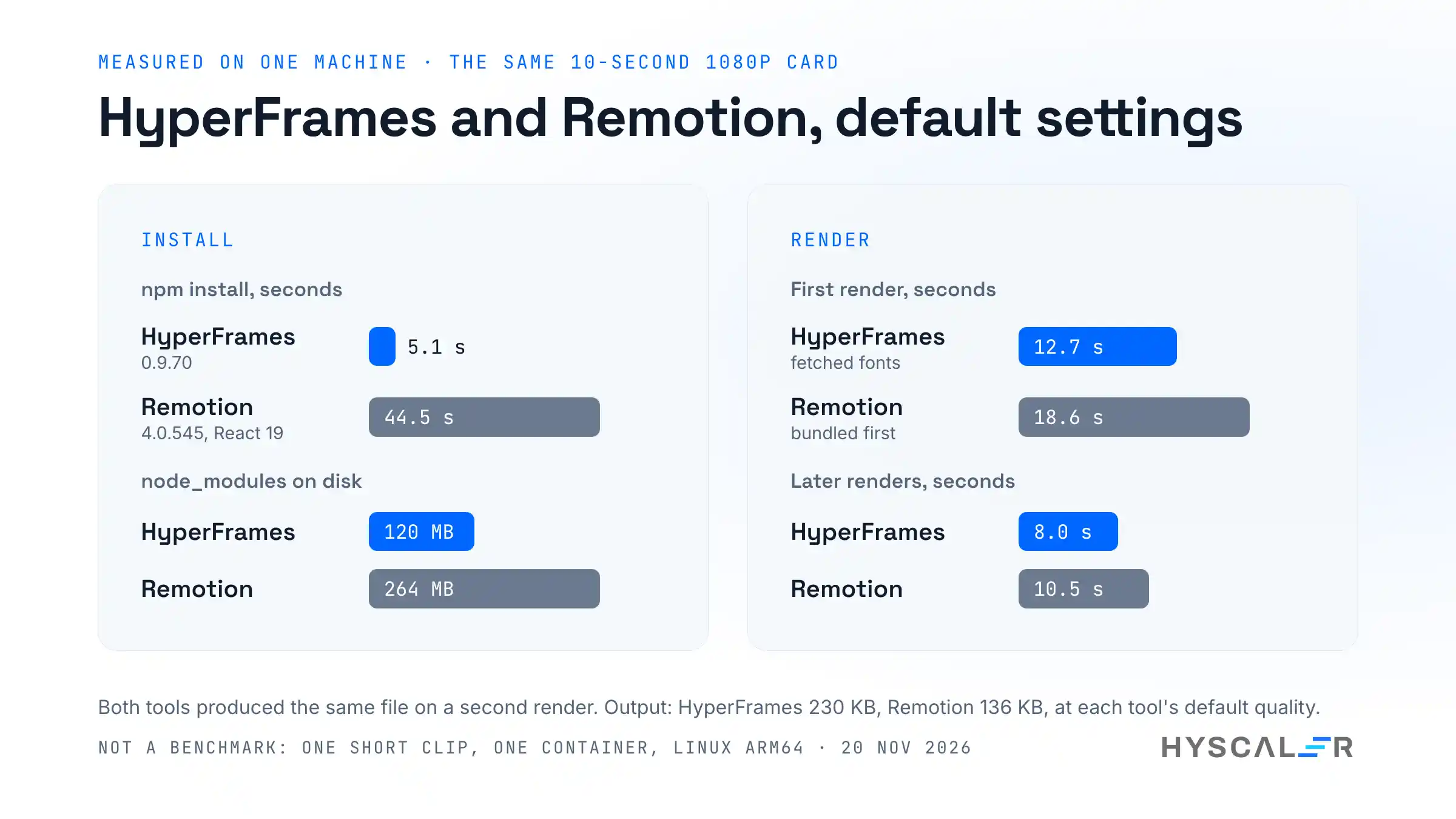
We built the same card in Remotion 4.0.545 with React 19, in the same container, and rendered it with default settings.
| HyperFrames 0.9.70 | Remotion 4.0.545 | |
|---|---|---|
| You write | HTML, CSS, a GSAP timeline | React components |
| Build step | None | Bundles before each render |
npm install | 5.1 s, 120 MB | 44.5 s, 264 MB |
| First render of the card | 12.7 s (fetched fonts) | 18.6 s (bundled first) |
| Later renders | 8.0 s | 10.5 s |
| Output file | 230 KB | 136 KB |
| Same file on a second render | Yes | Yes |
| Licence | Apache-2.0 | Free for individuals and companies of up to 3 people; a paid company licence above that |
Read the numbers with care. One short clip is not a benchmark. The two tools use different default quality settings, which explains the file sizes, and a video with footage or heavy effects could rank them the other way. What the test does show is that neither is slow for this kind of work, and both produced identical files on a second run.
The differences that will decide it for most teams are not about speed.
- Authoring. If your team thinks in React, Remotion’s components, props, and hooks will feel natural, and its ecosystem is older and larger. If you want a video that a designer can open as a web page, or that an agent can write without a project setup, HyperFrames asks for less.
- Checking. HyperFrames ships
lint,check, andsnapshotin the CLI. They found two real mistakes in our first draft. Remotion’s CLI help lists no command for linting or checking a composition. - Licence. HyperFrames is Apache-2.0, and its README says there are “no per-render fees or commercial-use thresholds”. Remotion’s licence is free for individuals, non-profits, and for-profit organisations with up to 3 employees, and larger companies need a company licence. Check the current terms before you choose.
- Maturity. Remotion has years of production use behind it. HyperFrames is eight months old in public and still below version 1.0.
Is HyperFrames free?
The CLI and the rendering engine are free under Apache-2.0. Everything in this guide ran without an account or a key.
The paid part is the hosted product. As of 20 November 2026, the pricing page for HyperFrames Studio lists two plans:
| Free | Pro | |
|---|---|---|
| Price | $0 | $25 per month |
| Credits | 5,000 to start | 25,000 a month |
| Local exports | Unlimited | Unlimited |
| Cloud exports | 5 a month | Unlimited |
| AI video clips | 3 a month | With credits |
| Background removal | Not included | Unlimited |
The page also says that HyperFrames Pro is separate from HeyGen plans. If you only render locally from your own HTML, none of this applies to you.
Who should use HyperFrames, and who should wait
Use it now if:
- You make short product, release, or documentation videos, and you want them in a repository where they can be reviewed and rebuilt.
- Your team writes HTML and CSS more easily than React.
- You already work with a coding agent and want it to produce video that you can read and correct.
Wait, or choose something else, if:
- You need a stable API. The project ships several releases a day and is not at 1.0.
- You are editing long footage with cuts and colour. HyperFrames has tools for media, but a composition of HTML scenes is the wrong shape for an hour of interview.
- Your team has a working Remotion pipeline. The gains we measured are not a reason to migrate.
Frequently asked questions
What is HyperFrames?
HyperFrames is a free, open-source framework from HeyGen that renders video from HTML. You write a web page with data attributes for timing and a paused animation timeline, and its command line tool plays the page frame by frame in headless Chrome and encodes an MP4 with FFmpeg. It is licensed under Apache-2.0.
How do I install HyperFrames?
Install Node.js 22 or later and FFmpeg, then run npm install hyperframes@0.9.70 in a project folder, or call npx hyperframes@0.9.70 directly. Run npx hyperframes doctor to confirm that Node.js, FFmpeg, and Chrome are found. In our test, the install took between 5 and 14 seconds and used 120 MB.
Do I need an AI agent to use HyperFrames?
No. The agent skills are optional. You can scaffold a project with npx hyperframes init, edit index.html by hand, and run preview, check, and render yourself. Everything in this guide was done without an agent, an account, or an API key. Pass --skip-skills to init to leave the skills out.
How do I render an MP4 with HyperFrames?
Run npx hyperframes render -o renders/video.mp4 in the project folder. The default is H.264 at the composition’s size and 30 frames a second. Add --fps 60, --quality draft or --quality high, or --format webm, gif, mov, hls, or png-sequence. Our 10-second 1080p card rendered in 8.0 seconds.
Is HyperFrames better than Remotion?
It depends on how your team writes. HyperFrames uses plain HTML with no build step and an Apache-2.0 licence, and it includes layout and contrast checks. Remotion uses React, has a larger ecosystem, and has years of production use. In our test on one short clip, HyperFrames rendered in 8.0 seconds and Remotion in 10.5.
Is HyperFrames free for commercial use?
Yes, for the open-source CLI and engine. They are under the Apache-2.0 licence, and the README states that there are no per-render fees or commercial-use thresholds. The hosted HyperFrames Studio has a free plan and a Pro plan at $25 per month, which adds a built-in agent and AI models. Local rendering needs neither.
Can I run HyperFrames in Docker?
Yes. Start the container with --shm-size=512m, because Chrome needs more shared memory than Docker’s default. Install FFmpeg and a browser, and for speed install Chrome Headless Shell and set HYPERFRAMES_BROWSER_PATH. To open the preview from the host, set HYPERFRAMES_PREVIEW_HOST=0.0.0.0. We ran the whole test this way on Linux arm64.
Does HyperFrames send telemetry?
Yes, by default. The first run prints a notice that usage data is collected, anonymous until you sign in, and that file paths and composition content are never collected. Turn it off with npx hyperframes telemetry disable, or set HYPERFRAMES_NO_TELEMETRY=1 or DO_NOT_TRACK=1. npx hyperframes telemetry status shows the current setting.
Why do my text elements overlap in HyperFrames?
Each timed element with class="clip" is a full-frame layer, so several clips stack on top of each other. They do not flow like paragraphs. Put the lines inside one timed scene, and bring them in with the timeline. npx hyperframes check reports the problem as content_overlap before you render.
Does HyperFrames work without GSAP?
The README says it does, through adapters for CSS animations, Lottie, Three.js, Anime.js, and the Web Animations API. The examples and the scaffold use GSAP, loaded from a CDN, and that is the only route we tested. Whatever you use, the animation has to be seekable, so the renderer can jump to any frame.
What formats can HyperFrames export?
According to the render help text, HyperFrames exports MP4, WebM, MOV, GIF, HLS, and PNG sequences. MOV uses ProRes 4444 and keeps transparency, as does WebM. We tested MP4, WebM, and GIF. For the same 10-second clip, the MP4 was 230 KB, the WebM 458 KB, and the GIF 3.3 MB.
Are HyperFrames renders deterministic?
In our test, yes. We rendered the same project twice and both MP4 files had the same SHA-256 hash. The design explains why: the renderer seeks a paused timeline to each frame’s time, and the project rules ban clocks, random numbers, and network calls inside a composition.
Watch the setup video
The video records the same steps on a real terminal next to the Studio preview. It covers the install, the first project, the two mistakes the checker caught, a render, and the three fixes for Docker. Link to follow once it is on the HyScaler YouTube channel.
Try it
The code is at github.com/heygen-com/hyperframes and the docs start at the HyperFrames quickstart. Start with the blank example, break it once on purpose, and run check. That one loop teaches most of what you need.
If you are looking at agent-driven tools more widely, we have also tested agent-browser for driving a real browser from the terminal and Meta’s Astryx design system, which is built for agents to use.
If your team wants help building a product or the pipeline around it, HyScaler builds and operates web and mobile products for clients. More of our engineering notes are here. Disclosure: I work at HyScaler.
References
- HyperFrames on GitHub, tested at commit
592a9fe, version 0.9.70 - HyperFrames 0.9.70 release
- HyperFrames quickstart
- HyperFrames catalog: data-chart
- HyperFrames Studio pricing, read on 20 November 2026
- HTML to video, HeyGen research
- Remotion and the Remotion licence, read on 20 November 2026
- GSAP
- FFmpeg
- How to Edit Video with an AI Agent Using HyperFrames, DEV Community