
Table of Contents
Most enterprises run on software that predates the current AI wave.
Core ERPs, claims platforms, billing engines, and mainframe applications still process the transactions that keep the business running.
They also hold the data AI needs most, but they were never built to talk to a language model.
The usual advice is to modernize everything first, but that is expensive, disruptive, and often unnecessary.
A better question is how to connect AI to existing systems without compromising reliability, security, or established business processes.
The answer is an integration architecture that puts AI beside your systems of record instead of on top of them.
This guide covers five architecture patterns, how to choose between them, a six-step implementation process, and the security controls that keep the whole thing safe.
What Is AI Integration With Legacy Enterprise Systems?
AI integration with legacy enterprise systems is the process of connecting AI models, applications, and intelligent automation to existing business software through APIs, middleware, data pipelines, or integration layers, without necessarily replacing the underlying systems.
A legacy enterprise system is any business-critical application that is hard to change but too important to retire.
Age matters less than rigidity: proprietary data formats, limited or no APIs, batch-oriented processing, and tightly coupled logic.
The AI capabilities you can connect include large language models (LLMs), machine learning models for prediction or classification, retrieval-augmented generation (RAG) for knowledge access, and AI agents that carry out multi-step tasks.
The system of record stays authoritative.
AI reads from it, reasons about its data, and recommends or performs actions only through controlled channels.
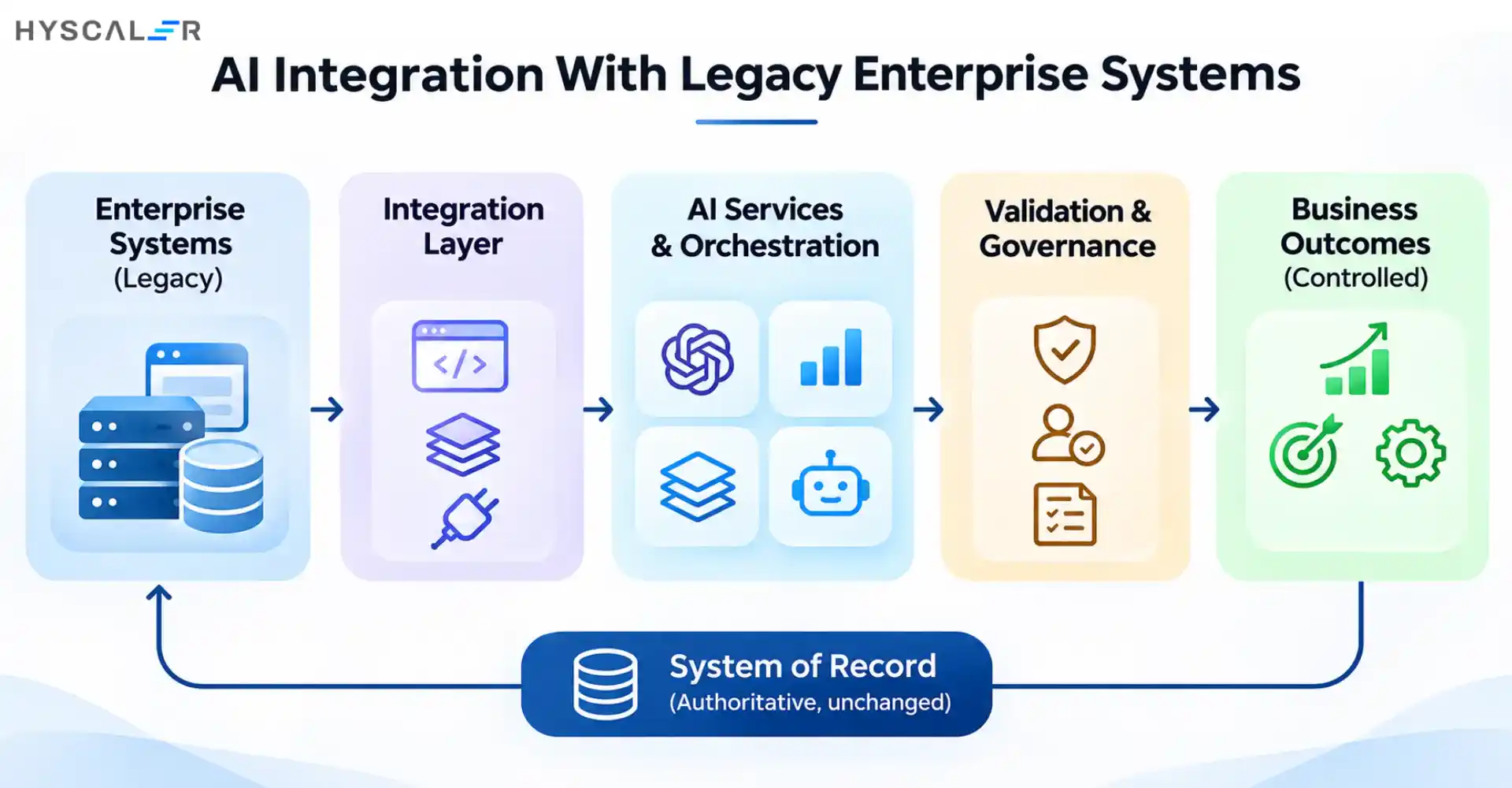
A well-designed flow looks like this:
- Existing enterprise systems: business applications, databases, internal software
- Integration layer: APIs, middleware, connectors, data pipelines
- AI services and orchestration: LLMs, ML models, RAG, AI agents
- Validation and governance: permissions, business rules, human approval
- Controlled business outcomes: insights, recommendations, approved actions
Why Enterprises Need AI Integration Instead of Replacing Legacy Systems
Existing systems still support critical operations
Legacy applications encode years of business rules, exception handling, and regulatory logic.
Much of that knowledge is undocumented and lives only in the code.
Replacing the system means rediscovering it.
Full system replacement introduces operational risk
Rip-and-replace programs bring downtime risk, data migration complexity, retraining costs, and long stretches in which the business pays for two systems.
Any one of those can outweigh the value of the AI use case that triggered the project.
AI can extend existing capabilities
AI can summarize case histories, classify incoming documents, flag anomalies in transaction data, and answer employee questions from internal records, all without rebuilding the application underneath.
Modernization can happen incrementally
AWS’s guidance on the strangler fig pattern describes gradually replacing pieces of a legacy application with modern services while the old and new versions coexist.
The same logic applies to AI.
You introduce one workflow at a time and keep the legacy system as a fallback.
AI integration and legacy modernization are not mutually exclusive.
Integration is often the safest first step toward broader modernization.
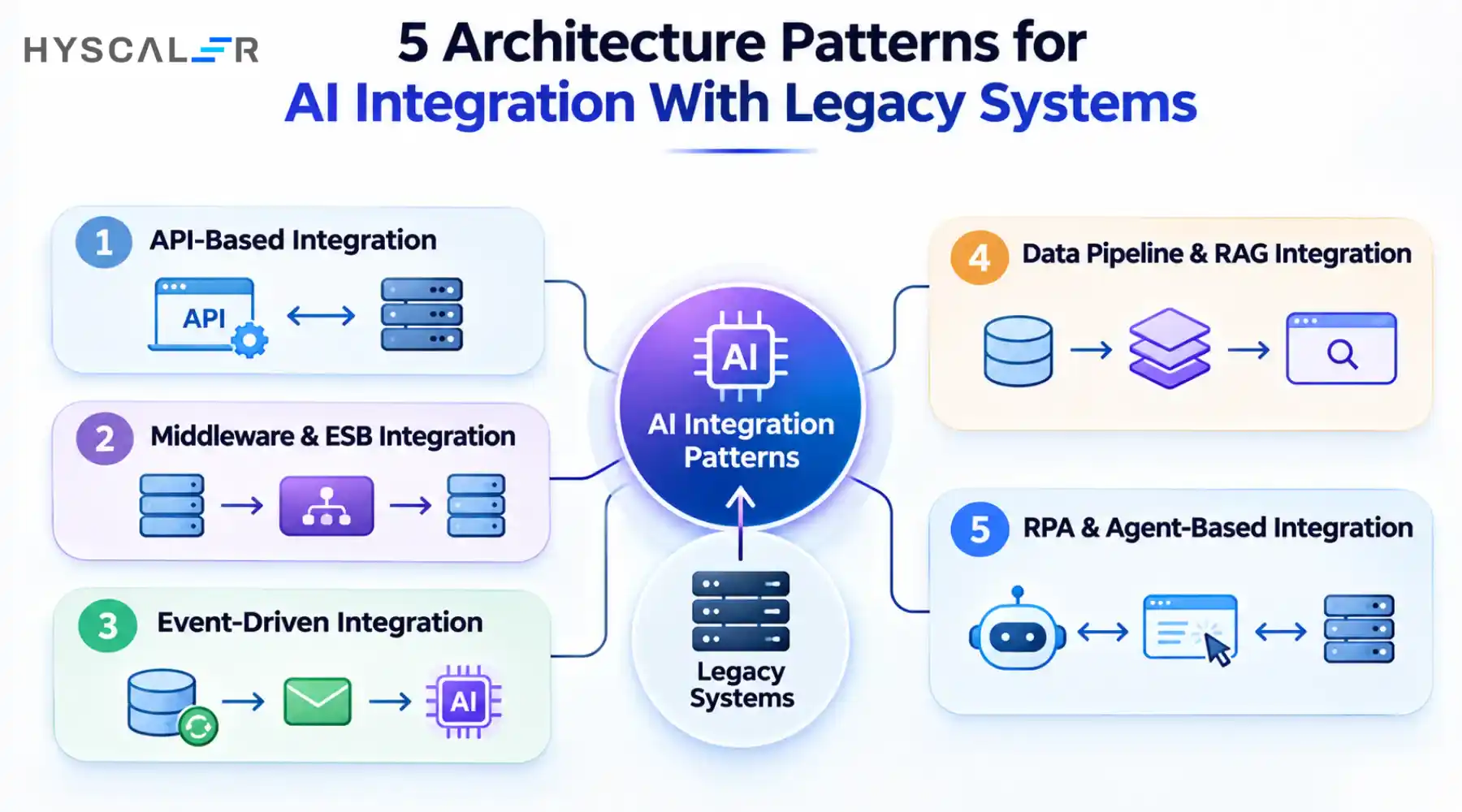
5 Architecture Patterns for AI Integration With Legacy Systems
No single architecture fits every legacy environment.
The right choice depends on API availability, data freshness requirements, system complexity, operational risk, and the type of AI workload.
IBM notes that fragmented integration approaches and custom scripts make it difficult to scale AI-driven workflows, which is why a deliberate pattern matters more than a quick connector.
1. API-Based Integration
An API layer, often a wrapper or façade around the legacy application, exposes selected functions to AI services.
REST is common for modern wrappers, while many older systems expose SOAP services that can be fronted by an API gateway.
The gateway handles authentication, authorization, throttling, and logging.
It also separates controlled data retrieval (read) from write-back (change).
Best suited for: legacy applications that already have APIs, or that can safely expose a narrow set of functions.
Watch out for: APIs that were designed for human-driven screens, not machine-speed calls. Rate limits and response times can become the bottleneck.
2. Middleware and Enterprise Service Bus Integration
Middleware sits between applications and translates between incompatible formats and protocols.
That includes traditional Enterprise Service Bus (ESB) platforms and cloud-based Integration Platform as a Service (iPaaS) tools.
It handles data transformation, routing, and orchestration, so the AI layer integrates once instead of once per application.
Best suited for: enterprises with several disconnected legacy applications.
Watch out for: the middleware itself becoming a heavy, hard-to-change dependency.
3. Event-Driven Integration
Instead of AI polling systems for changes, events trigger AI workflows.
A change in a record publishes a message to a broker or queue, and downstream consumers, including AI services, process it asynchronously.
Change Data Capture (CDC) can turn database changes into events even when the application code cannot be touched.
IBM describes event-driven architecture as a core integration pattern for reacting to real-time data across both legacy and modern systems.
Best suited for: workflows that need timely responses, such as fraud signals, order exceptions, or service escalations.
Watch out for: event governance. Without clear ownership, schemas, and replay rules, events become a new source of confusion.
4. Data Pipeline and RAG-Based Integration
Here, the AI does not call the legacy system directly.
Data is extracted through ETL or ELT, cleaned, and loaded into a warehouse or lakehouse.
Documents and records are then indexed, often in a vector database, so a RAG application can retrieve relevant context at query time.
This pattern is the safest first step for many enterprises because it is read-only by design.
Two details decide whether it works.
The first is data freshness: an assistant answering from last month’s extract can mislead.
The second is access permissions: retrieval must respect the same entitlements as the source system, or the AI will surface data the user should never see.
Best suited for: AI assistants, enterprise search, document intelligence, and knowledge retrieval.
Watch out for: stale indexes and permission drift.
5. RPA and Agent-Based Integration
When an application has no usable API, robotic process automation (RPA) can operate its user interface the way a person would.
AI agents can then call governed tools, including RPA bots, to complete multi-step tasks.
The Model Context Protocol (MCP) is an optional standard for describing those tools to agents, though it is a convenience, not a requirement.
RPA is a fallback when better interfaces do not exist, not a foundation to build everything on.
UI automation breaks when screens change, and an agent that clicks through a production system carries real execution risk. Sensitive actions should always require human approval.
Best suited for: older applications with limited integration capabilities.
Watch out for: UI fragility and treating agents as a substitute for a governed interface.
Comparing the 5 AI Integration Architecture Patterns
| Architecture | Best use case | Main advantage | Main limitation |
|---|---|---|---|
| API-based | Existing application interfaces | Structured access | API limitations |
| Middleware / ESB | Multiple enterprise systems | Centralized integration | Platform complexity |
| Event-driven | Time-sensitive workflows | Loose coupling | Event management |
| Data pipelines + RAG | Enterprise knowledge retrieval | Context-rich AI responses | Data freshness |
| RPA + agents | Systems with limited interfaces | Works with older applications | UI fragility and execution risk |
A quick decision guide:
- Usable APIs available? Start with API integration.
- Connecting multiple applications? Consider middleware.
- Need near-real-time responses? Consider event-driven architecture.
- Need AI to retrieve enterprise knowledge? Consider RAG and data pipelines.
- No usable interfaces? Evaluate RPA with strict operational controls.
In practice, most enterprises combine patterns.
A common sequence is read-only RAG first, then API-based actions with approval, then event-driven automation once the team trusts the controls.
Read-only AI should generally come before automated write-back, because it lets you prove accuracy before the model can change anything.
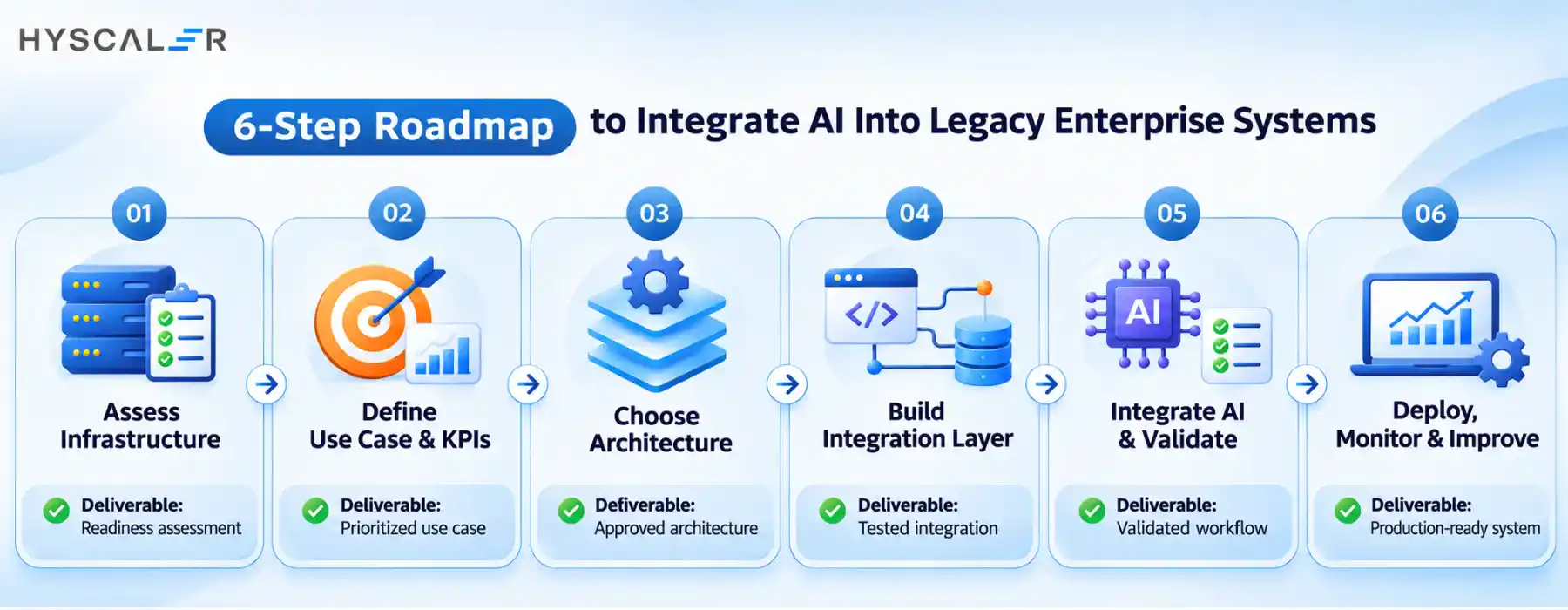
How to Integrate AI Into Legacy Enterprise Systems: A 6-Step Process
Each step ends with a concrete deliverable.
Step 1. Assess legacy infrastructure and integration readiness
Inventory applications and databases, identify available APIs and interfaces, map dependencies and data ownership, and note technical limitations such as batch windows or unsupported platforms.
Deliverable: a legacy system and integration readiness assessment.
Step 2. Identify a business use case and define success metrics
Look for repetitive or data-intensive workflows with clear business impact and manageable complexity.
Define measurable outcomes before building anything.
Deliverable: a prioritized AI use case and KPI baseline.
Step 3. Select the appropriate integration architecture
Evaluate the five patterns against latency, scalability, and risk.
AWS advises starting modernization with components that have good test coverage and less technical debt, and the same principle applies when choosing your first integration target.
Deliverable: an approved integration architecture.
Step 4. Build the integration and data access layer
Develop connectors and APIs, normalize data formats, configure identity and access controls, and establish logging and monitoring from day one.
Deliverable: a tested integration layer.
Step 5. Integrate AI models and validate outputs
Connect the selected model, test retrieval and response accuracy, validate business rules, and introduce human approval for sensitive actions.
Deliverable: a validated AI-enabled workflow.
Step 6. Deploy, monitor, and improve
Start with a limited rollout. Track latency, failures, accuracy, and cost, gather user feedback, and expand gradually.
Deliverable: a production-ready integration with a monitoring and improvement plan.
Security and Governance Considerations for Enterprise AI Integration
Connecting AI to legacy infrastructure widens your attack surface and your operational risk.
These systems often lack modern security features, and AI adds new failure modes such as manipulated prompts and confident but wrong outputs.
The core principle is that an AI model should never have unrestricted access to enterprise databases or transaction systems.
Access should flow through governed interfaces with narrowly scoped permissions.
OWASP’s guidance on excessive agency recommends least-privilege access for AI tool configurations, plus human approval for sensitive operations such as data writes, deletions, and financial transactions.
OWASP’s 2026 list of LLM application risks reflects this concern, with excessive agency moving from sixth to third place.
A further recommendation is to keep credentials and state-changing capability in application code rather than in the model.
Controls to build into the architecture:
- Identity and access management tied to the end user, not a shared service account
- Least-privilege permissions per tool and per operation
- Encryption in transit and at rest
- PII and sensitive data handling, including masking before data reaches a model
- Audit trails that record what the AI saw, recommended, and did
- Human approval for high-impact actions
- API security and rate limiting at the gateway
- Output validation and monitoring for accuracy and drift
For a broader governance structure, the NIST AI Risk Management Framework is a useful reference.
It is voluntary and organized around four functions: Govern, Map, Measure, and Manage, with Govern acting as the cross-cutting function that feeds the other three.
Common AI Integration Challenges and How to Overcome Them
| Challenge | Practical solution |
|---|---|
| No modern APIs | Build an API façade or evaluate RPA as a fallback |
| Inconsistent legacy data | Introduce data validation and normalization |
| Fragmented applications | Use middleware and standardized interfaces |
| Slow response times | Use caching, asynchronous processing, or optimized data access |
| Security concerns | Apply least privilege and centralized governance |
| Unreliable AI outputs | Introduce evaluation, validation, and human review |
| Integration failures | Implement retries, monitoring, and rollback procedures |
Most of these problems appear in the first pilot.
That is a good reason to keep the pilot narrow.
How to Measure the Success of Legacy AI Integration
Measure both business results and technical health.
Useful KPIs include:
- AI-assisted task completion rate
- Workflow processing time
- Data retrieval accuracy
- Integration failure rate
- API response latency
- Human correction and escalation rate
- Cost per completed workflow
- System availability
AI adoption on its own is not a success metric.
The goal is a measurable improvement in business processes without reducing the reliability of the systems you already depend on.
If correction rates stay high or availability dips, the integration needs rework regardless of how impressive the demo was.
When Should Enterprises Consider Professional AI Integration Services?
External expertise tends to pay off when:
- The legacy environment has many dependencies and little documentation
- Internal AI engineering capacity is limited
- The integration touches sensitive enterprise data
- AI pilots work in a sandbox but cannot connect to production systems
- You need a scalable architecture with ongoing maintenance
Businesses planning to connect AI capabilities with existing enterprise applications can explore HyScaler’s AI services for AI development, integration, and enterprise-focused AI solutions.
Conclusion: Modernize Legacy Systems Through Intelligent Integration
Replacing legacy infrastructure is not a prerequisite for AI adoption.
The right architecture depends on what your systems can expose, what your data requires, how much risk you can tolerate, and what the business wants to achieve.
A phased approach lets you introduce AI while protecting the operations you already rely on.
To plan that path, explore HyScaler’s AI services.
FAQ
Can AI be integrated into legacy systems without replacing them?
Yes. APIs, middleware, event streams, and data pipelines let AI work alongside existing applications. The legacy system remains the system of record, and AI adds insight or automation through controlled interfaces.
How can AI connect to legacy applications without APIs?
Options include building an API façade, using Change Data Capture to stream database changes, replicating data into a warehouse for RAG, or using RPA to operate the interface. Prefer data-level and API-level approaches, and treat RPA as the last resort.
What is the best architecture for integrating AI with legacy enterprise systems?
There is no universal answer. Start from your constraints: API availability, latency needs, data sensitivity, and whether AI must write back. Most mature deployments combine two or three patterns.
How do enterprises protect sensitive data during AI integration?
Apply least-privilege access, mask or redact PII before model calls, encrypt data in transit and at rest, log every AI interaction, and keep the model away from direct database access.
How long does it take to integrate AI with an existing enterprise system?
It depends on interface quality and scope. A narrow, read-only pilot against a system with usable APIs can move quickly, while multi-system or interface-poor environments take longer. Phasing the work reduces risk either way.