
Table of Contents
AG-UI is an open, event-based protocol from CopilotKit that standardizes how AI agents connect to the applications people use. An agent streams typed events, and any client that understands those events can render the chat, the tool calls, the shared state, and the pauses for approval.
Most guides start from a framework and an OpenAI key. This AG-UI tutorial goes the other way. We write a small agent and a browser client by hand, with no model behind the agent, so you can see every event on the wire and learn what the SDKs do for you. Every step ran on 21 November 2026 against AG-UI 1.0, at commit a6f2539a.
When you later put a real framework behind the same endpoint, the client does not change. That is the point of the protocol, and by the end you will have seen why.
Key points
- AG-UI 1.0 has a frozen specification: 31 event types in eight families, sent over HTTP as server-sent events.
- An agent is any HTTP endpoint that accepts one
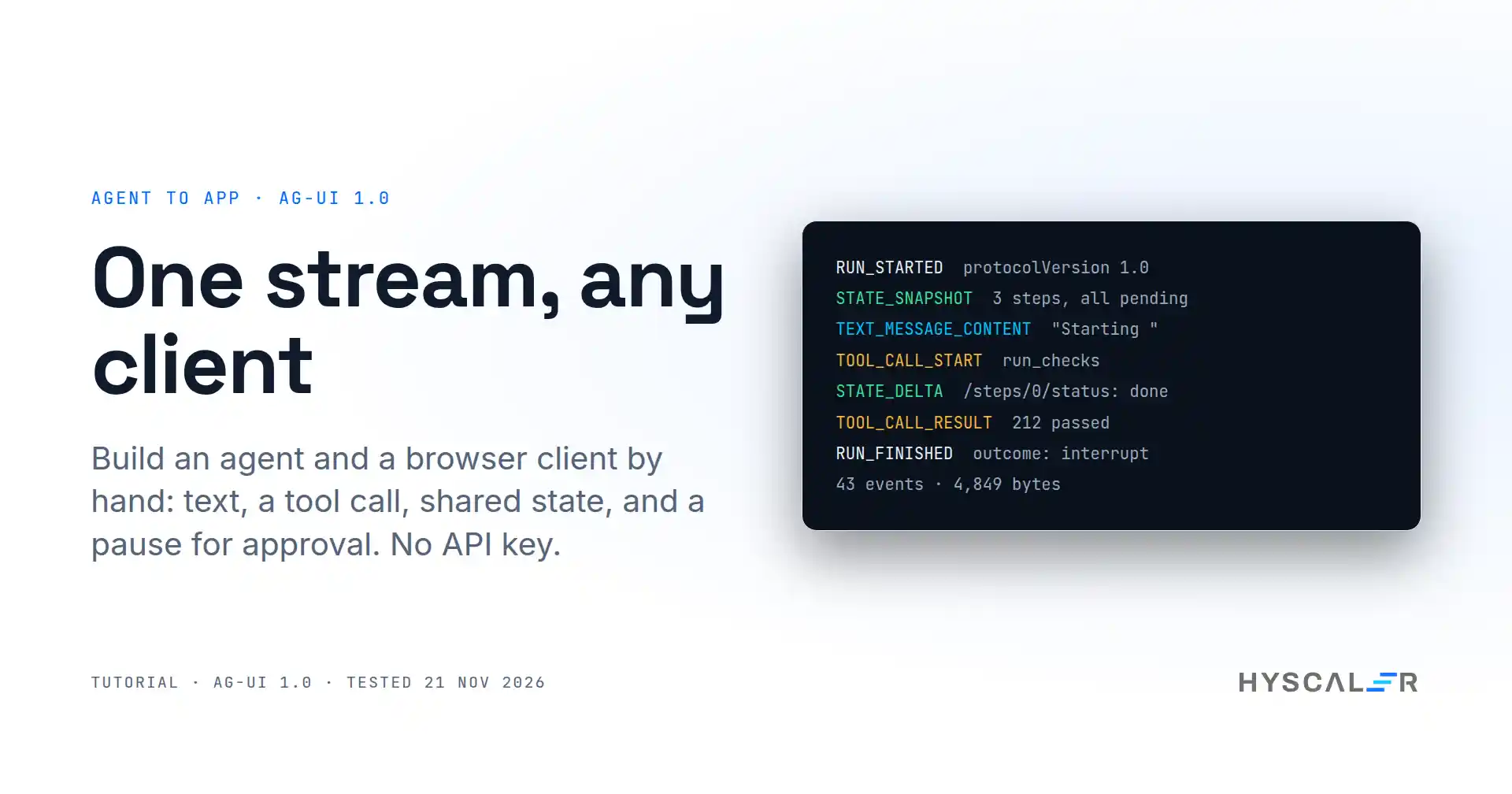
RunAgentInputand streams events back. Ours is about 150 lines of Python with no model. - Our first run was 43 events and 4,849 bytes: streamed text, a tool call, a state snapshot, three JSON Patch updates, and an interrupt.
- You do not need the SDK to read the stream. Our browser client is one
fetchand oneswitch. - The official client enforces the order of events. A stream that stopped without
RUN_FINISHEDraising any error, so catching that is your job. - The Python encoder answered in plain text even when we asked for the binary format, which the specification allows: the binary transport is optional.
What is AG-UI?
AG-UI, the Agent-User Interaction Protocol, lives at ag-ui-protocol/ag-ui on GitHub. Its README calls it “the open protocol that connects any agent to any app”. It was created by CopilotKit and is developed in the open under the MIT license.
The problem it solves is stated well in the same README: “app.” Agents don’t fit the request/response model. They stream tokens, call tools mid-response, update shared state, pause for a human, and spawn subagents, and every framework does it differently. “AG-UI replaces that custom wiring with one stream of typed events.
Some facts, as of 21 November 2026:
- Stars: 20,943, of which 3,621 came in the last week. It was eighth on GitHub Trending for the week.
- Version: 1.0. The README says the protocol “now has a stable, frozen specification backed by a JSON Schema,” and that the TypeScript, Python, and .NET SDKs are generated from it.
- SDKs: TypeScript (
@ag-ui/client), Python (ag-ui-protocol), and .NET, plus community SDKs for Kotlin, Go, Java, Dart, Rust, Ruby, C++, and Swift. - Adoption: the README lists integrations for LangChain, CrewAI, Microsoft Agent Framework, Google ADK, AWS Strands Agents, Mastra, Pydantic AI, LlamaIndex, and more.
The 1.0 release is why it is trending now. A protocol with a written specification is something a team can build on. A set of conventions inside one client library is not.
Why it matters for teams that build AI features
The hard part of an AI feature is rarely the model call. It is the screen. Text arrives in pieces. A tool runs for six seconds, and the user needs to see that something is happening. The agent fills in half a form. A button has to wait for a person before anything is deployed, paid, or deleted.
Every agent framework has its own stream format for these things, so the frontend wiring gets rebuilt for each one. A shared event format changes the economics. The frontend is written once against the protocol, and the agent behind it can move from a script to LangGraph to something else without the screen noticing.
The pause for approval matters most to us. We wrote about reviewing an agent’s plan before it runs in our Plannotator guide, and about agents that work across business systems in building multi-agent AI systems. In both, the question is the same: where does a person get to say no? AG-UI makes that a first-class part of the protocol and not something each team invents.
How AG-UI works
There are two halves, and both are small.
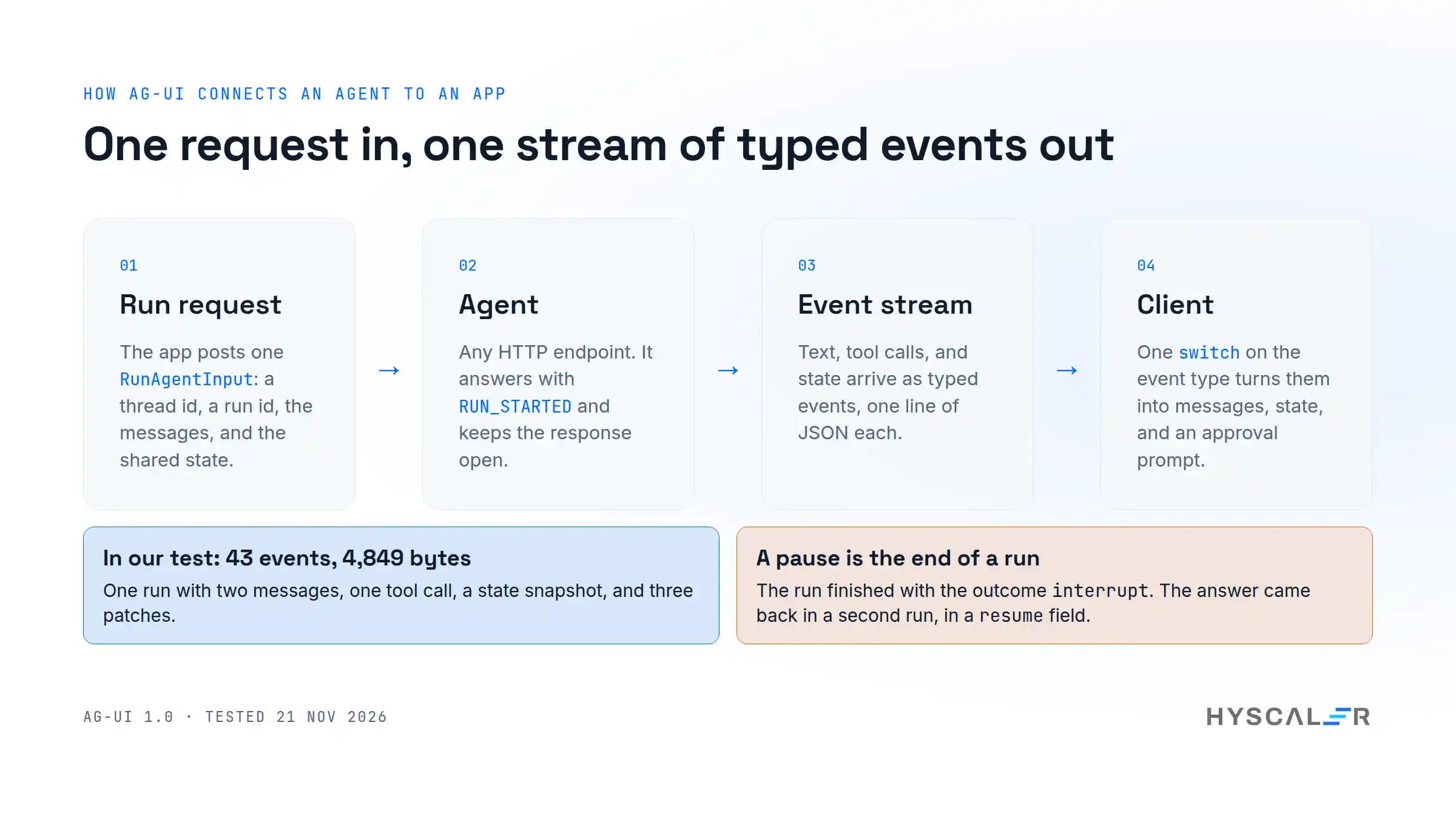
One request. The client starts a run by sending a RunAgentInput as an HTTP POST. In our test, three fields were required: threadId, runId, and messages. The others are optional: tools (tools the frontend offers the agent), context, state (the shared state as the client last saw it), forwardedProps, and resume (answers to an earlier pause).
One response. The agent answers with a stream of events. AG-UI 1.0 defines 31 event types in eight families:
| Family | Events |
|---|---|
| Runs and steps | RUN_STARTED, RUN_FINISHED, RUN_ERROR, STEP_STARTED, STEP_FINISHED |
| Text messages | TEXT_MESSAGE_START, TEXT_MESSAGE_CONTENT, TEXT_MESSAGE_END, TEXT_MESSAGE_CHUNK |
| Tool calls | TOOL_CALL_START, TOOL_CALL_ARGS, TOOL_CALL_END, TOOL_CALL_RESULT, TOOL_CALL_CHUNK |
| State | STATE_SNAPSHOT, STATE_DELTA, MESSAGES_SNAPSHOT |
| Reasoning | REASONING_START, REASONING_MESSAGE_*, REASONING_ENCRYPTED_VALUE, REASONING_END |
| Activity | ACTIVITY_SNAPSHOT, ACTIVITY_DELTA |
| Subagents | SUBAGENT_STARTED, SUBAGENT_FINISHED, SUBAGENT_ERROR |
| Passthrough | RAW, CUSTOM |
A few rules hold the stream together. It starts with RUN_STARTED. A text message is a start event, any number of content events, and an end event, all carrying the same message id. A tool call has the same shape. The state arrives as one snapshot, followed by small patches. The run ends with RUN_FINISHED or RUN_ERROR.
The specification defines two transports: HTTP with server-sent events and a binary HTTP with Protobuf binding. It says an implementation must support the first, and the second is optional. Everything in this guide went over server-sent events, which means every event is a line of JSON you can read with curl.
How to run AG-UI step by step: the README quick start
The README has a quick start that needs no API key. We ran it first, exactly as written.
1. Check the prerequisites
You need Python 3.9 or later and Node.js 20 or later. We used Python 3.12.16 and Node.js 22.23.5 on Ubuntu 24.04. You do not need an account, a key, or a model.
2. Install the Python package
mkdir ag-ui-demo && cd ag-ui-demo
python -m venv .venv && . .venv/bin/activate
pip install ag-ui-protocol fastapi uvicorn
In our run, the install took 2.1 seconds and brought in 15 packages, 32 MB on disk. The versions were ag-ui-protocol 1.0.0, fastapi 0.165.0, uvicorn 0.54.0, and pydantic 2.14.4.
The package is small because it is only two things: the event and input types, generated from the specification’s JSON Schema, and an encoder that turns an event into a line of the stream.
3. Write the smallest agent
This is the agent from the README, saved as hello.py:
import uuid

from fastapi import FastAPI, Request
from fastapi.responses import StreamingResponse
from ag_ui.core import (
    PROTOCOL_VERSION,
    RunAgentInput,
    RunStartedEvent,
    RunFinishedEvent,
    TextMessageStartEvent,
    TextMessageContentEvent,
    TextMessageEndEvent,
)
from ag_ui.encoder import EventEncoder

app = FastAPI()

@app.post("/")
async def run_agent(input_data: RunAgentInput, request: Request):
    encoder = EventEncoder(accept=request.headers.get("accept"))

    async def events():
        yield encoder.encode(RunStartedEvent(
            thread_id=input_data.thread_id,
            run_id=input_data.run_id,
            protocol_version=PROTOCOL_VERSION,
        ))
        message_id = str(uuid.uuid4())
        yield encoder.encode(TextMessageStartEvent(message_id=message_id, role="assistant"))
        for chunk in ["Hello ", "from ", "AG-UI!"]:
            yield encoder.encode(TextMessageContentEvent(message_id=message_id, delta=chunk))
        yield encoder.encode(TextMessageEndEvent(message_id=message_id))
        yield encoder.encode(RunFinishedEvent(thread_id=input_data.thread_id, run_id=input_data.run_id))

    return StreamingResponse(events(), media_type=encoder.get_content_type())
Read the generator in the middle. That is an agent: a run starts, a message starts, three pieces of content arrive, the message ends, the run finishes. A real agent replaces the list of three strings with tokens from a model.
One line deserves a second look. protocol_version=PROTOCOL_VERSION is how a 1.0 agent declares itself. The migration guide says a producer must declare its version on RUN_STARTED, and that no SDK adds it for you when you build the event yourself.
4. Start it and read the stream with curl
uvicorn hello:app --port 8000In a second terminal:
curl -sN localhost:8000 -H 'content-type: application/json' \
  -d '{"threadId":"t1","runId":"r1","messages":[{"id":"m1","role":"user","content":"Hi there!"}]}'
This is what came back, with the blank lines between events removed:
data: {"type":"RUN_STARTED","threadId":"t1","runId":"r1","protocolVersion":"1.0"}
data: {"type":"TEXT_MESSAGE_START","messageId":"5972cd2f-4659-46e2-9831-2540f4b4b2c1","role":"assistant"}
data: {"type":"TEXT_MESSAGE_CONTENT","messageId":"5972cd2f-4659-46e2-9831-2540f4b4b2c1","delta":"Hello "}
data: {"type":"TEXT_MESSAGE_CONTENT","messageId":"5972cd2f-4659-46e2-9831-2540f4b4b2c1","delta":"from "}
data: {"type":"TEXT_MESSAGE_CONTENT","messageId":"5972cd2f-4659-46e2-9831-2540f4b4b2c1","delta":"AG-UI!"}
data: {"type":"TEXT_MESSAGE_END","messageId":"5972cd2f-4659-46e2-9831-2540f4b4b2c1"}
data: {"type":"RUN_FINISHED","threadId":"t1","runId":"r1"}
Seven events. The Python code used snake case (message_id), and the wire uses camel case (messageId); the encoder does the conversion. The response’s content type was text/event-stream; charset=utf-8.
We also sent a body with too little in it, to see what a mistake looks like. A body of {"messages":[]} came back as HTTP 422, naming threadId and runId as missing. That check comes from FastAPI and the generated types, with no code of ours.
5. Read it with the official client
In the same folder:
npm init -y && npm pkg set type=module
npm install @ag-ui/client tsx
This added 17 packages, 40 MB on disk, with @ag-ui/client and @ag-ui/core at 1.0.5. The client from the README, saved as client.ts:
import { HttpAgent } from "@ag-ui/client";

const agent = new HttpAgent({ url: "http://localhost:8000/" });

agent.addMessage({ id: crypto.randomUUID(), role: "user", content: "Hi there!" });

await agent.runAgent({}, {
  onRunStartedEvent: ({ event }) => console.log(`run started (AG-UI ${event.protocolVersion})`),
  onTextMessageContentEvent: ({ event }) => { process.stdout.write(event.delta); },
  onRunFinishedEvent: () => console.log("\nrun finished"),
});
npx tsx client.tsrun started (AG-UI 1.0)
Hello from AG-UI!
run finishedThat is the whole quick start, and it worked as written. It shows one of the eight event families. The rest of this guide covers the others that matter on a first project.
AG-UI tutorial, part two: a tool call, shared state, and a pause
To see more of the protocol without a model, we wrote a scripted agent. It plays one fixed script, a release assistant: it announces a release, runs a tool, updates a checklist, and stops to ask before it deploys. The release and its numbers are made up by us; “212 tests” is demo data and not a measurement.
The script
The helpers first. say turns a sentence into the three kinds of text event, one word per content event, and step builds one JSON Patch operation:
def step(index, status):
    """One JSON Patch operation that changes the status of a step."""
    return {"op": "replace", "path": f"/steps/{index}/status", "value": status}


def say(sentence):
    """A whole assistant message as its three kinds of event, one word per content event."""
    message_id = new_id()
    words = sentence.split(" ")
    yield TextMessageStartEvent(message_id=message_id, role="assistant")
    for i, word in enumerate(words):
        yield TextMessageContentEvent(message_id=message_id, delta=word + (" " if i < len(words) - 1 else ""))
    yield TextMessageEndEvent(message_id=message_id)
Then the first run. It sends the state once as a snapshot, talks, calls a tool, patches the state as the work moves on, and ends with a question:
    yield StateSnapshotEvent(snapshot=initial_state())
    yield from say("Starting release 2.0. I'll build it, run the tests, and ask before I deploy.")

    call_id = "call_" + uuid.uuid4().hex[:8]
    yield StateDeltaEvent(delta=[step(0, "running")])
    yield ToolCallStartEvent(tool_call_id=call_id, tool_call_name="run_checks")
    for piece in ['{"branch": ', '"release/2.0", ', '"suite": ', '"unit"}']:
        yield ToolCallArgsEvent(tool_call_id=call_id, delta=piece)
    yield ToolCallEndEvent(tool_call_id=call_id)
    yield StateDeltaEvent(delta=[step(0, "done"), step(1, "running")])
    yield ToolCallResultEvent(
        message_id=new_id(),
        tool_call_id=call_id,
        role="tool",
        content=json.dumps({"passed": 212, "failed": 0, "seconds": 3.4}),
    )
    yield StateDeltaEvent(delta=[step(1, "done")])
    yield from say("Build and tests passed: 212 tests, no failures. Deploying needs your approval.")

    yield RunFinishedEvent(
        thread_id=inp.thread_id,
        run_id=inp.run_id,
        outcome=RunFinishedInterruptOutcome(
            interrupts=[
                Interrupt(
                    id="deploy-approval",
                    reason="confirmation",
                    message="Deploy release 2.0 to production?",
                    response_schema={
                        "type": "object",
                        "properties": {"approved": {"type": "boolean"}},
                        "required": ["approved"],
                    },
                )
            ]
        ),
    )
The endpoint is the same shape as the README’s. The pause between events is only there so a person can watch the stream, and a request header lets our video recording slow it down further:
@app.post("/agent")
async def run_agent(input_data: RunAgentInput, request: Request):
    encoder = EventEncoder(accept=request.headers.get("accept"))
    pause = float(request.headers.get("x-demo-pace", DELAY))  # a recording can ask for a slower stream

    async def stream():
        for event in script(input_data):
            yield encoder.encode(event)
            await asyncio.sleep(pause)

    return StreamingResponse(stream(), media_type=encoder.get_content_type())
What the first run looks like
We drove it with the official client, with a handler for each kind of event. This is the output of one run and its follow-up:
run started (AG-UI 1.0)
state: build=pending tests=pending deploy=pending deployed=false
Starting release 2.0. I'll build it, run the tests, and ask before I deploy.
state: build=running tests=pending deploy=pending deployed=false
tool call: run_checks({"branch":"release/2.0","suite":"unit"})
state: build=done tests=running deploy=pending deployed=false
tool result: {"passed": 212, "failed": 0, "seconds": 3.4}
state: build=done tests=done deploy=pending deployed=false
Build and tests passed: 212 tests, no failures. Deploying needs your approval.
run finished, outcome: interrupt (Deploy release 2.0 to production?)

answering the interrupt: approved=true
run started (AG-UI 1.0)
state: build=done tests=done deploy=running deployed=false
Approved. Deploying release 2.0 now.
state: build=done tests=done deploy=done deployed=true
Release 2.0 is live.
run finished, outcome: success
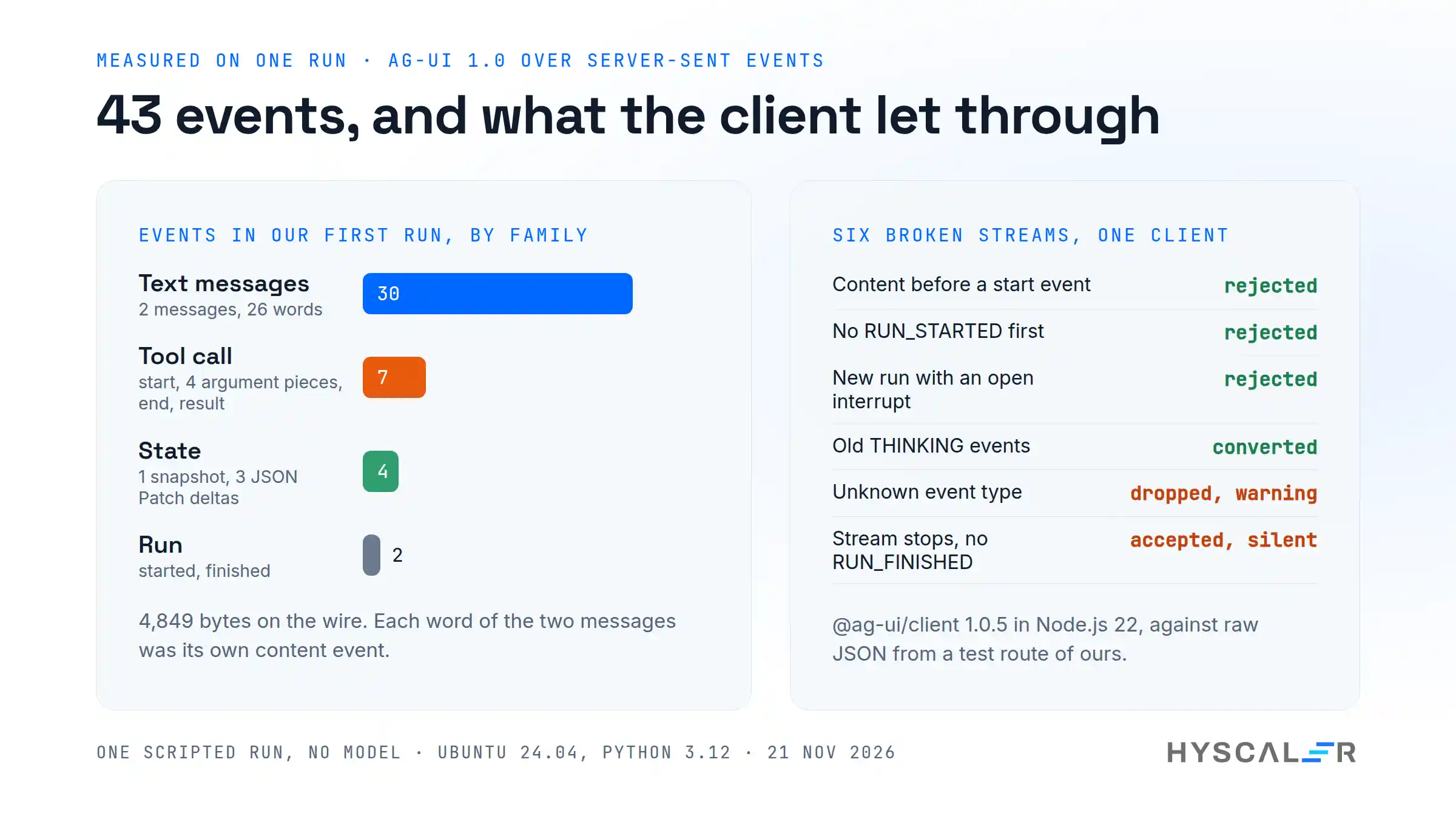
The first run was 43 events and 4,849 bytes on the wire. Text is most of it:
| Family | Events in the first run |
|---|---|
| Text messages (2 messages, 26 words) | 30 |
| Tool call (start, 4 argument pieces, end, result) | 7 |
| State (1 snapshot, 3 patches) | 4 |
| Run (started, finished) | 2 |
Shared state is a snapshot and patches
The state went out once in full:
data: {"type":"STATE_SNAPSHOT","snapshot":{"release":"2.0","deployed":false,"steps":[{"id":"build","label":"Build","status":"pending"},{"id":"tests","label":"Tests","status":"pending"},{"id":"deploy","label":"Deploy to production","status":"pending"}]}}After that, every change was a JSON Patch, the format from RFC 6902:
data: {"type":"STATE_DELTA","delta":[{"op":"replace","path":"/steps/0/status","value":"running"}]}
data: {"type":"STATE_DELTA","delta":[{"op":"replace","path":"/steps/0/status","value":"done"},{"op":"replace","path":"/steps/1/status","value":"running"}]}
The official client applies each patch for you and calls onStateChanged with the new state. It also sends its copy of the state back with the next RunAgentInput, which is how the agent and the app stay in step across runs. That is why the README calls it shared state: both sides can read it and both can write it.
The tool call streams its arguments
data: {"type":"TOOL_CALL_START","toolCallId":"call_aa4b79bd","toolCallName":"run_checks"}
data: {"type":"TOOL_CALL_ARGS","toolCallId":"call_aa4b79bd","delta":"{\"branch\": "}
data: {"type":"TOOL_CALL_ARGS","toolCallId":"call_aa4b79bd","delta":"\"release/2.0\", "}
data: {"type":"TOOL_CALL_ARGS","toolCallId":"call_aa4b79bd","delta":"\"suite\": "}
data: {"type":"TOOL_CALL_ARGS","toolCallId":"call_aa4b79bd","delta":"\"unit\"}"}
data: {"type":"TOOL_CALL_END","toolCallId":"call_aa4b79bd"}
data: {"type":"TOOL_CALL_RESULT","messageId":"e7ccce0f-016e-4d76-be18-9d629b726c04","toolCallId":"call_aa4b79bd","content":"{\"passed\": 212, \"failed\": 0, \"seconds\": 3.4}","role":"tool"}
The arguments are fragments of a JSON string, and they only parse once the last one has arrived. That is how a model produces them, and it is what lets a frontend fill in a form while the agent is still “typing”. The official client gave our handler the parsed object at TOOL_CALL_END. The result is a message of its own, with the role tool.
The pause: a run that ends with an interrupt
This is the event that ended the first run:
data: {"type":"RUN_FINISHED","threadId":"t1","runId":"r1","outcome":{"type":"interrupt","interrupts":[{"id":"deploy-approval","reason":"confirmation","message":"Deploy release 2.0 to production?","responseSchema":{"type":"object","properties":{"approved":{"type":"boolean"}},"required":["approved"]}}]}}AG-UI does not hold a connection open while a person thinks. The run ends, with an outcome of interrupt, and the stream closes. The interrupt carries an id, a reason, a message a client can show as it is, and an optional JSON Schema for the answer.
The docs define three core reasons: tool_call for a pause bound to one tool call, input_required when the agent needs structured input, and confirmation for a plain yes or no. Any other string is allowed, and the docs ask frameworks to namespace their own.
The resume: a new run with your answer
The answer travels in the next RunAgentInput, in a resume field:
curl -sN localhost:8123/agent -H 'content-type: application/json' \
  -d '{"threadId":"t1","runId":"r2","messages":[],"resume":[{"interruptId":"deploy-approval","status":"resolved","payload":{"approved":true}}]}'
The second run patched the state and finished normally:
data: {"type":"STATE_DELTA","delta":[{"op":"replace","path":"/steps/2/status","value":"running"}]}
data: {"type":"STATE_DELTA","delta":[{"op":"replace","path":"/steps/2/status","value":"done"},{"op":"replace","path":"/deployed","value":true}]}
data: {"type":"RUN_FINISHED","threadId":"t1","runId":"r2","outcome":{"type":"success"}}
Two details are easy to get wrong. A “no” is still status: "resolved": the refusal goes inside the payload, as {"approved": false}. The other status, cancelled, means the person walked away without answering. When we answered no, our agent marked the deploy step as skipped and said it had left production alone.
We also made the script fail on purpose. A run that cannot continue ends with one event:
run started (AG-UI 1.0)
run error BUILD_UNREACHABLE: The build server did not answer.
A browser client with no SDK
The SDK is a convenience and not a requirement. To prove it to ourselves, we wrote a browser client as one HTML file with no framework and no build step. It starts a run with fetch and reads the stream by hand:
async function run(extra = {}) {
  const input = { threadId, runId: crypto.randomUUID(), messages, tools: [], context: [], state: shared || {}, forwardedProps: {}, ...extra };
  const res = await fetch("/agent", { method: "POST", headers: { "content-type": "application/json", accept: "text/event-stream" }, body: JSON.stringify(input) });
  const reader = res.body.getReader(), decoder = new TextDecoder(); let buffer = "";
  for (;;) {
    const { value, done } = await reader.read(); if (done) break;
    buffer += decoder.decode(value, { stream: true });
    let cut;
    while ((cut = buffer.indexOf("\n\n")) >= 0) {
      const frame = buffer.slice(0, cut); buffer = buffer.slice(cut + 2);
      for (const line of frame.split("\n")) if (line.startsWith("data: ")) handle(JSON.parse(line.slice(6)));
    }
  }
}
Everything else is one switch on the event type. A few of its cases:
case "TEXT_MESSAGE_CONTENT": { const m = streaming[ev.messageId]; m.text += ev.delta; m.el.textContent = m.text; break; }
case "TOOL_CALL_ARGS": tool.args += ev.delta; renderTool(); break;
case "STATE_SNAPSHOT": shared = ev.snapshot; renderState(); break;
case "STATE_DELTA": applyPatch(shared, ev.delta); renderState(); break;
case "RUN_FINISHED":
  if (ev.outcome && ev.outcome.type === "interrupt") { pending = ev.outcome.interrupts[0]; showQuestion(pending.message); }
  else setStatus("finished");
  break;
Answering the question is one more call to the same function: run({ resume: [{ interruptId: id, status: "resolved", payload: { approved } }] }).
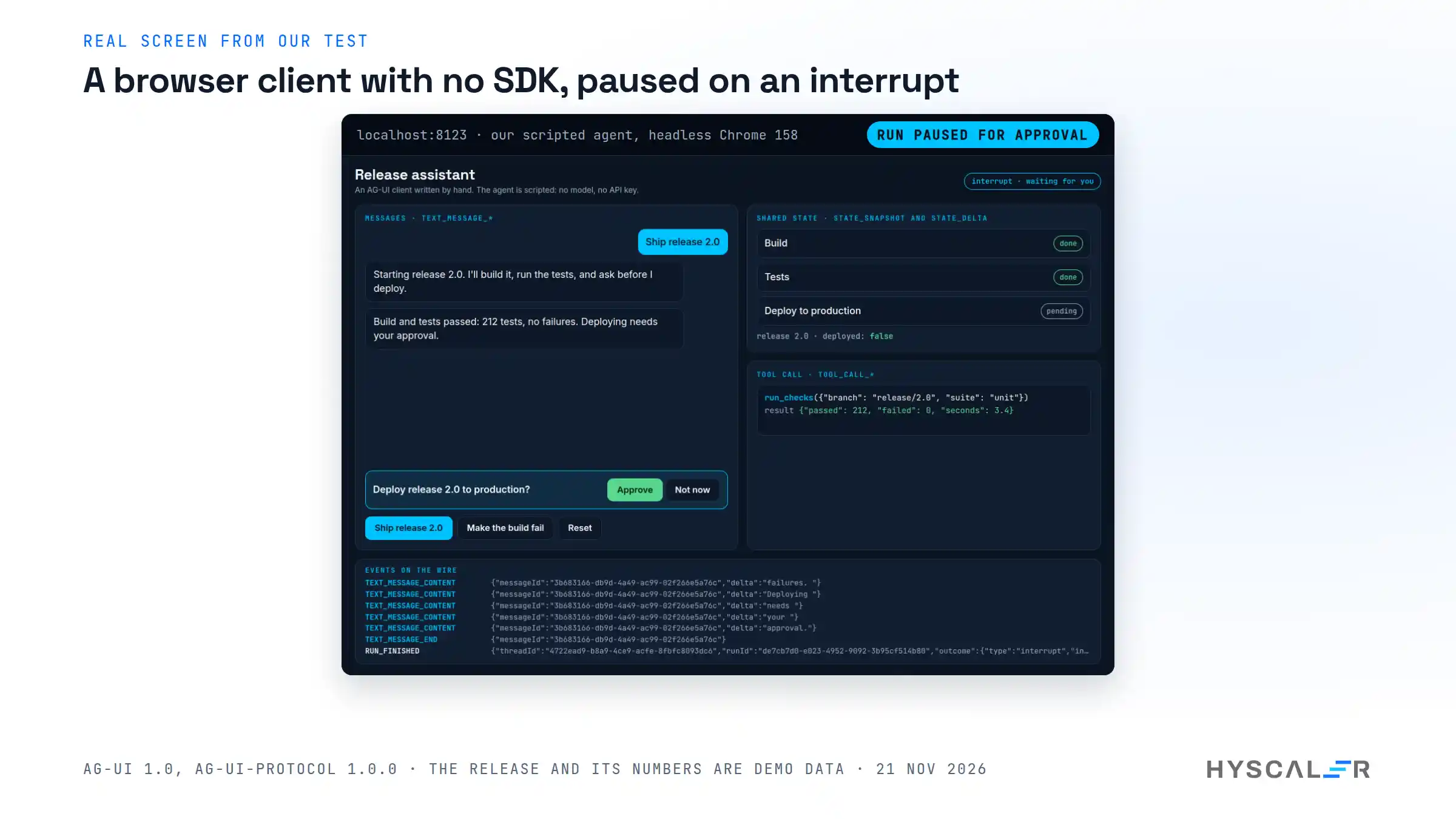
The page shows the messages, the checklist from the shared state, the tool call with its arguments, and the last seven events as they arrived. The whole client, with its styles, is about 190 lines.
What you give up by not using the SDK is everything in the next section.
What the official client checks, and what it lets through
A protocol is only as good as what happens when someone breaks it. We pointed the official TypeScript client at six streams that break the rules, sent as raw JSON from a test route of ours.
| What we sent | What @ag-ui/client 1.0.5 did |
|---|---|
| Content before a start event | Rejected: “Cannot send ‘TEXT_MESSAGE_CONTENT’ event: No active text message found with ID ‘m1’. Start a text message with ‘TEXT_MESSAGE_START’ first.” |
No RUN_STARTED at the beginning | Rejected: “First event must be ‘RUN_STARTED'” |
A stream that stops with no RUN_FINISHED | No error and no warning; the call returned, and no finish handler ran |
| An event type that does not exist | Dropped, with a warning: “Dropping unrecognised event ‘SOMETHING_NEW'” |
The old THINKING_* events from before 1.0 | Accepted and converted to REASONING_*, with a deprecation warning for each |
| A new run while an interrupt is still open | Rejected: “Thread has 1 pending interrupt(s) not addressed by resume: deploy-approval” |
Four of these are what you would hope for. The order of events is enforced, with error messages that tell you what to fix. An open question blocks the thread until it is answered, which is the behaviour you want for an approval. Old agents keep working: the client translated the retired events and pointed at DEPRECATIONS.md in the repo.
Two are worth knowing before you ship.
A stream that just stops is not an error. Our server sent a start, one complete message, and then closed the connection. The client’s runAgent returned normally, and our RUN_FINISHED handler never ran. The specification has a name for this, a truncated run. It says a consumer must not invent a RUN_FINISHED for it or report it as a success, and that whether to surface it any further “is the consumer’s business”. So the client did nothing wrong, and it also told us nothing. If your agent process dies between two events, your own code has to notice that no RUN_FINISHED or RUN_ERROR arrived.
An unknown event is dropped, with a warning. That is the right choice for forward compatibility, because an older client will meet newer events one day. It also means a typo in an event name does not fail loudly. Watch the console while you develop.
One more thing follows from where these checks live. They are in the client. The Python package gives you event classes and an encoder, with no object that represents a stream, so nothing on the server side stopped our test route from sending events in the wrong order.
Limits and gotchas
These are the things that surprised us, with what to do about each.
- The Python encoder only writes server-sent events. The README passes the request’s
Acceptheader toEventEncoder, which reads as if the format were negotiated. We asked our Python server forapplication/vnd.ag-ui.event+protoand it answeredtext/event-stream. The source agrees: inag-ui-protocol1.0.0 the encoder ignores itsacceptargument. This is within the specification, which makes the Protobuf binding optional, and in all eleven requests we logged the TypeScript client asked fortext/event-streamonly. Just do not plan on the binary format from Python yet. - Nothing warns you about a truncated run. See the table above. Treat “the stream closed and I never saw
RUN_FINISHEDorRUN_ERROR” as a failure in your own code, and start a new run with a new run id if you retry. - The order of events is your job on the server. The client checks it; the Python package does not. Test your agent against the real client before you trust it.
- Tool arguments are not JSON until the end. Do not parse each
TOOL_CALL_ARGSpiece. Add them up, and parse atTOOL_CALL_END, or show the raw string while it grows. - An open interrupt blocks the thread. With the official client you cannot start a normal run on a thread that still has a question open. Answer it, or cancel it with
status: "cancelled". - A refusal is a resolved interrupt.
statussays whether the person answered. What they answered is in the payload. - Declare your version. A 1.0 agent sets
protocolVersiononRUN_STARTEDitself. The migration guide is plain about it: no SDK adds the field for you when you build the event yourself, and its absence is how an older agent is recognised. - Pin your dependencies.
@ag-ui/clientdepends onfast-json-patchwith a caret range. Version 3.1.2 of that library, the first since 3.1.1 in March 2022, was published minutes before our first install. The registry listed it but could not yet serve it, andnpm installfailed with a 404. Pinning 3.1.1 worked at once, and the plain install worked a few minutes later. The client applied our state patches correctly with both versions. - The scaffolder needs a model key.
npx create-ag-ui-app@latestoffers LangGraph, CrewAI, Mastra, Pydantic AI, LlamaIndex, Agno, AG2, and ADK. The README says the generated templates call OpenAI. We read the scaffolder’s source and its help text, and did not generate a project.
On security and privacy: the protocol carries your messages and your shared state to your own agent endpoint, and the client sends the whole state with every run. Keep secrets out of it. AG-UI leaves authentication to HTTP, so the endpoint needs the same protection as any other API of yours. In our test nothing left the machine except the package downloads.
What we did not test: any real agent framework or model, the .NET and community SDKs, and the Protobuf transport. We also left out reasoning, activity, subagent and multimodal events, frontend tools that run in the browser, middleware, the Dojo demos, and CopilotKit’s React components. We used the protocol for one evening and not in production.
AG-UI vs MCP, A2A, and A2UI
The names are close and the jobs are different. The project describes AG-UI as one of three complementary protocols.
| Connects | Who started it | What travels | |
|---|---|---|---|
| AG-UI | An agent and the app a person uses | CopilotKit | A stream of typed events: text, tool calls, state, pauses |
| MCP | An agent and its tools and data | Anthropic | Tool definitions, calls, and results |
| A2A | An agent and other agents | Tasks and messages between agents | |
| A2UI | An agent and a description of UI | A declarative description of the interface to show |
AG-UI vs MCP. MCP gives an agent tools and context. AG-UI brings the agent’s work to a person. An agent can use MCP to reach a database and AG-UI to show the user what it found, and the README notes that AG-UI can front agents that speak MCP.
AG-UI vs A2UI. This is the one people mix up. A2UI is a generative UI specification: it describes what interface an agent wants to show. AG-UI is the runtime protocol that carries that description, with everything else, between the agent and the app. The README’s summary is that they “work together”.
AG-UI vs CopilotKit. CopilotKit created AG-UI and is one client for it, with React, Angular, Vue, and React Native components. The protocol does not need it, as the browser client in this guide shows.
AG-UI vs writing your own stream. For a single agent and a single screen, your own server-sent events would work. The case for AG-UI is the second agent framework, the second client, and the features you have not built yet: interrupts, shared state, subagents.
Who should use AG-UI, and who should wait
Use it if:
- You are building an agent into a web or mobile product and want the frontend to outlive your choice of agent framework.
- You need a person to approve, edit, or reject what the agent is about to do.
- You have more than one client for the same agent: a web app, a mobile app, a chat channel.
Wait, or keep it simple, if:
- Your feature is one prompt and one answer. A plain streaming response is enough.
- You need the binary transport from Python today. It is optional in the specification, and in our test it was not there.
- You cannot yet test your agent against the official client, which is where the rules are enforced.
Frequently asked questions
What is AG-UI?
AG-UI, the Agent-User Interaction Protocol, is an open, event-based protocol that standardizes how AI agents connect to user-facing applications. The client sends one request, and the agent streams back typed events for text, tool calls, shared state, and pauses for approval. It was created by CopilotKit and is MIT licensed.
Do I need an API key or a model to try AG-UI?
No. An AG-UI agent is any HTTP endpoint that accepts a run request and streams events back, so a script can play the part of a model. The README has a quick start with no API key, and every agent in this guide is scripted. You only need a key when you put a real model behind the endpoint.
What is the difference between AG-UI and MCP?
MCP connects an agent to tools and data, and AG-UI connects an agent to the application a person uses. They solve different halves of the same system and are designed to be used together: an agent can call tools through MCP and stream its progress, state, and questions to the user through AG-UI.
What is the difference between AG-UI and A2UI?
A2UI is a specification for describing a user interface that an agent wants to show. AG-UI is the runtime protocol that carries events between the agent and the app, and those events can include an A2UI description. In short, A2UI says what to draw, and AG-UI is how it arrives.
Does AG-UI require CopilotKit?
No. CopilotKit created AG-UI and offers ready-made components that speak it, but the protocol stands alone. In this guide, a Python server built with the ag-ui-protocol package talked to a browser page that used only fetch, and to the official @ag-ui/client in Node.js, with no CopilotKit code.
Which languages have an AG-UI SDK?
The project ships official SDKs for TypeScript (@ag-ui/client), Python (ag-ui-protocol), and .NET. Its README also lists community SDKs for Kotlin, Go, Java, Dart, Rust, Ruby, C++, and Swift. We tested the Python package at 1.0.0 and the TypeScript client at 1.0.5.
How does human in the loop work in AG-UI?
A run that needs a person ends with RUN_FINISHED and an outcome of interrupt, carrying an id, a reason, and a message. The stream closes. The client then starts a new run on the same thread with a resume entry for that id, containing the person’s answer. A refusal is sent inside the payload and not as a separate status.
What transport does AG-UI use?
The 1.0 specification defines two transports: HTTP with server-sent events, which every implementation must support, and an optional binary HTTP with Protobuf binding. In our test, the Python package only wrote server-sent events, and the TypeScript client asked for them, so every event was a readable line of JSON.
Is AG-UI 1.0 backwards compatible?
According to the project, yes, in both directions: agents written for 0.x work with 1.0 clients, and 1.0 agents work with 0.x clients. We tested one case. The 1.0.5 client accepted the retired THINKING_* events, converted them to REASONING_*, and printed a deprecation warning for each.
How many events does a simple AG-UI run produce?
Our scripted run, with two short messages, one tool call, a state snapshot, three state patches, and an interrupt, produced 43 events and 4,849 bytes over server-sent events. Thirty of the 43 were text events, because each word was sent as its own content event.
Watch the setup video
The video is under three minutes, recorded on a real terminal next to the browser client. It opens with one release running in the client, installs the two packages, and shows the README agent’s seven events with curl. Then it takes the scripted agent through an approval, a refusal, and a failing build, shows the interrupt and the resume as raw JSON, and ends with the three findings above. It will be linked here once it is on the HyScaler YouTube channel.
Try it
The code is at github.com/ag-ui-protocol/ag-ui, and the README quick start takes five minutes. Run it, then break it on purpose: send content before a start event and read what the client says. That one exercise teaches the rules faster than the reference does. If your team is planning an agent feature and wants a second pair of eyes on the design, HyScaler builds AI-powered web and mobile products.
References
- ag-ui-protocol/ag-ui on GitHub
- AG-UI documentation
- AG-UI 1.0 specification
- AG-UI events reference
- AG-UI 1.0 transports, including truncated runs
- AG-UI Dojo, live demos
- ag-ui-protocol on PyPI
- @ag-ui/client on npm
- RFC 6902: JSON Patch
- Server-sent events, MDN
- AG-UI getting started, Microsoft Agent Framework
- AG-UI tutorial, DataCamp
- A2UI on GitHub
- Model Context Protocol