
Microsoft Execution Containers (MXC) is Microsoft’s open-source way to run AI agents and the code they generate inside a boundary that limits which files and networks they can touch. It became generally available on Windows 11 in October 2026, and GitHub Copilot and OpenAI Codex already support it. MXC contains what an agent can reach. Deciding what it should reach, testing it, and stopping it when it goes wrong is still your team’s work.
Table of Contents
Ask a coding agent to fix a bug on a web server and it may decide the fastest route is to change the server’s configuration. Microsoft uses that exact example to explain the problem: without a boundary, the agent can “potentially break the production site,” even though the action seemed reasonable to it. As agents write and run more code on laptops and servers, that code inherits whatever access the agent has. Microsoft Execution Containers are Microsoft’s answer, and US searches for them have risen sharply in the last three months.
What are Microsoft Execution Containers?
Microsoft Execution Containers (MXC) are an open-source, policy-driven way to run AI agents and the code they generate with only the access they need. Microsoft Learn describes MXC as “an open-source, policy-driven execution technology for running workloads with defined resource permissions.”
The problem it targets is simple to state. According to Microsoft, without containment such code “can inherit broad access to files, credentials, network services, and other resources.” MXC limits that access to what the task requires.
Three facts set Microsoft Execution Containers apart from a standard container:
- It is not one technology. Microsoft notes that a container here “doesn’t necessarily mean a virtual machine or a container image.” MXC picks a containment backend to suit the workload.
- It is cross-platform. MXC supports Windows, Linux, and macOS, with SDKs for .NET, TypeScript, and Rust.
- It is open source. The code is on GitHub under the MIT license, and the repository had about 3,200 stars on 26 November 2026.
Microsoft announced MXC as generally available on Windows 11 on 7 October 2026, with Windows 365 support for Cloud PCs also generally available.
How do Microsoft Execution Containers work?
Microsoft Execution Containers work by separating the policy from the agent: a developer declares which files and network destinations a workload needs, and MXC enforces that boundary while the agent runs. In Microsoft’s words, “the agent or generated code cannot grant itself additional access.”
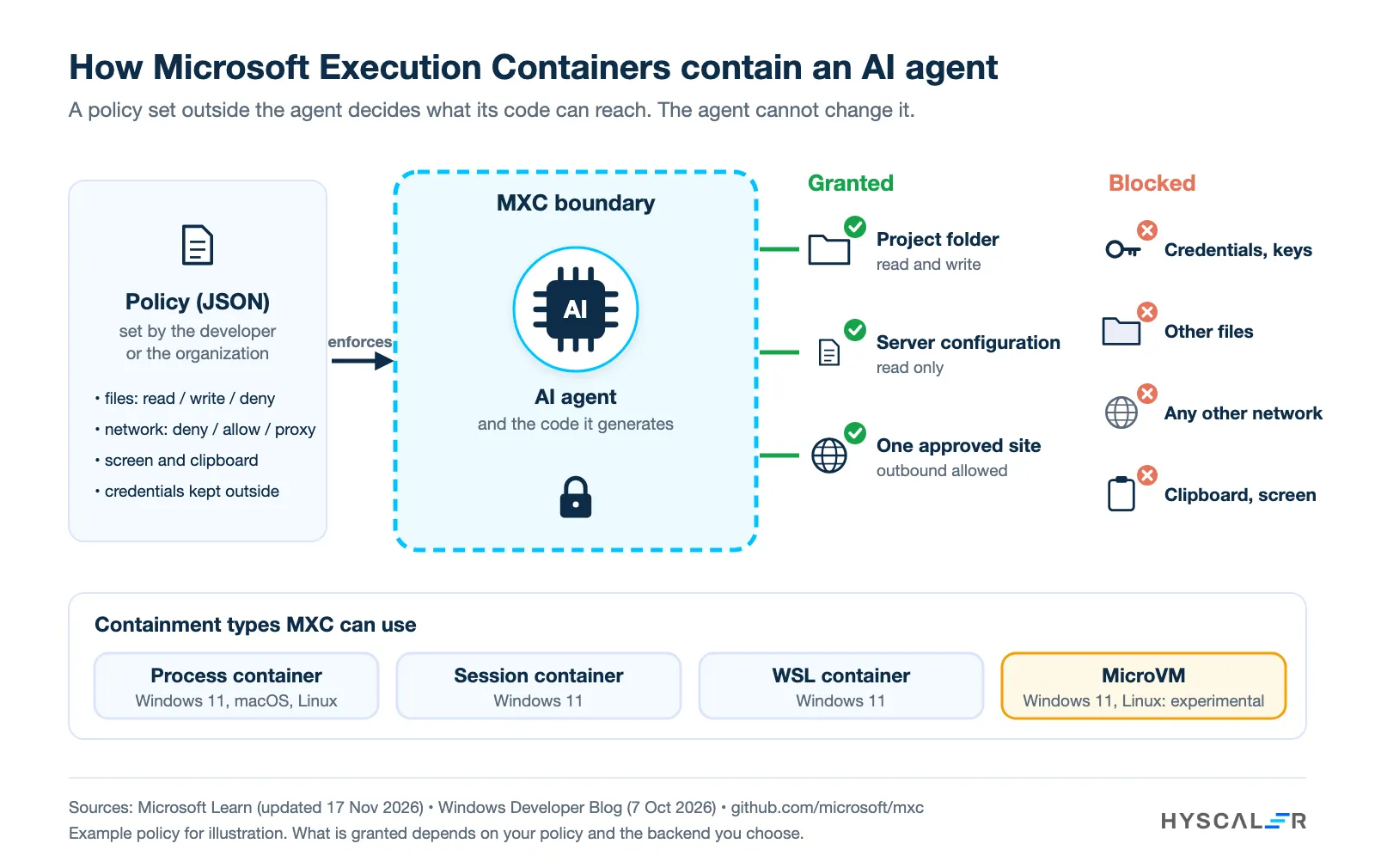
A policy covers four main areas:
- Files: which paths the workload can read, which it can write, and which it cannot reach at all.
- Network: whether outbound traffic is blocked, limited to selected destinations, or sent through a proxy.
- User interface: access to windows, the clipboard, and simulated keyboard or mouse input.
- Credentials: kept outside the workload’s reach.
MXC then runs the workload in one of several containment types, each with different strength and cost:
| Containment type | Where it runs |
|---|---|
| Process container | Windows 11, macOS, Linux |
| Session container (a separate Windows account and session) | Windows 11 |
| WSL container | Windows 11 |
| MicroVM (hardware-enforced isolation) | Windows 11 and Linux, experimental |
Writing a tight policy by hand is hard, so MXC includes a Learning mode. Microsoft explains that in Learning mode “MXC continues to enforce the configured boundary,” while blocked operations are “recorded in a JSON activity report.” Teams can review the report and grant only what the workload really needs. On Windows, this report is available for process containers.
Which AI agents support Microsoft Execution Containers?
According to Microsoft’s developer blog of 7 October 2026, “GitHub Copilot, OpenClaw, OpenAI Codex, Replit, LM Studio, and Unsloth AI” already support MXC, and NVIDIA has integrated its OpenShell into it.
Microsoft also lists agents that “will be releasing support,” including Anthropic Claude Code, Box, Egnyte, Manus, Perplexity, and Raycast. That second group is a list of plans, not shipped support, so check each vendor’s own release notes before relying on it.
For businesses, the practical point is that MXC does not depend on one AI vendor. A team can run agents from several providers inside the same kind of boundary, defined in the same JSON policy format.
What do Microsoft Execution Containers not cover?
Microsoft Execution Containers limit what an agent’s code can touch on a machine; they do not decide what the agent should be allowed to do, check whether its output is right, or watch it across a fleet. Microsoft says so directly: “Containment limits what a workload can do; it doesn’t make generated instructions, outputs, or permitted actions trustworthy.”
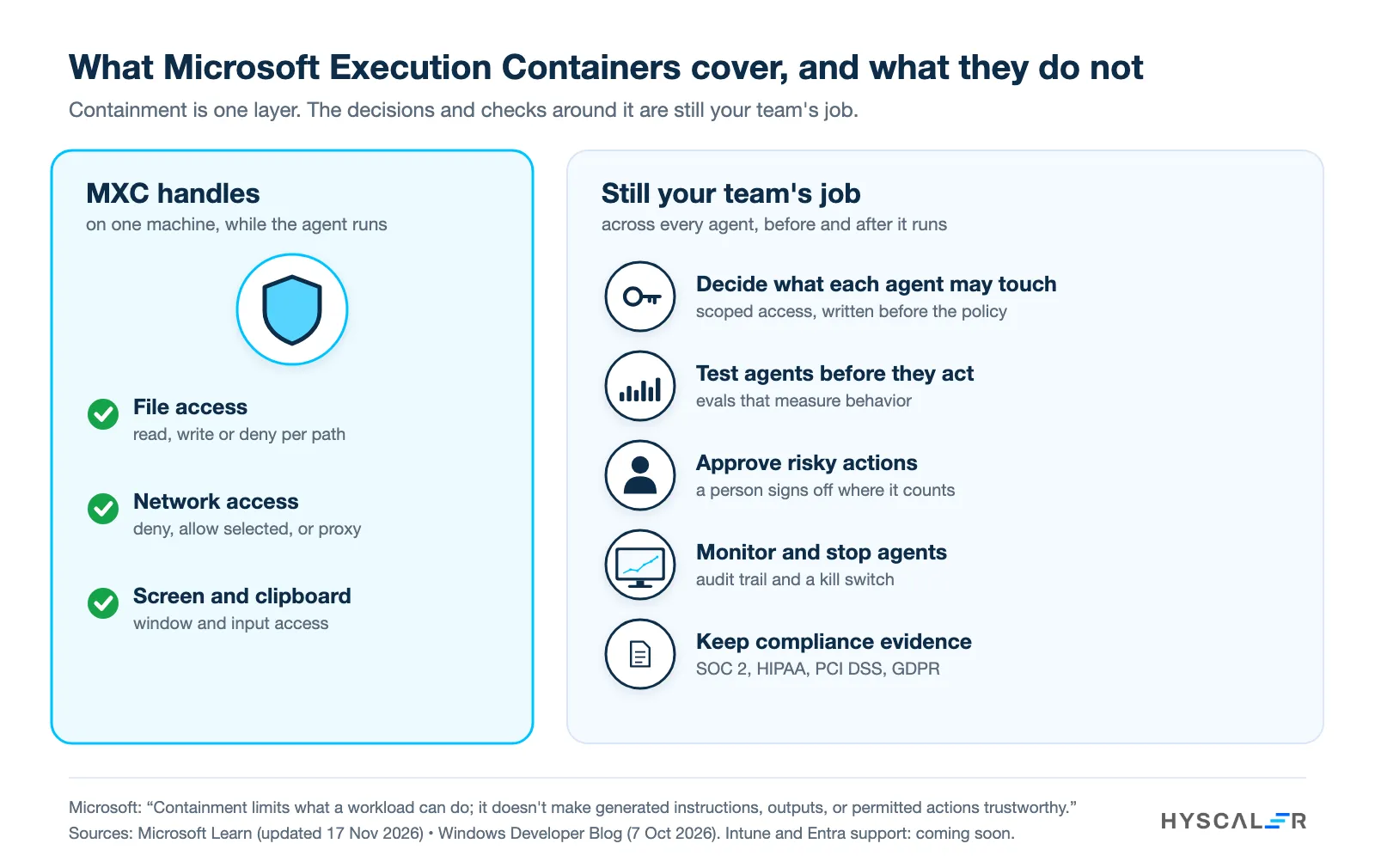
Several gaps matter for anyone planning an AI agent security approach:
- Fleet management is still coming. Intune policy for MXC process containers, Microsoft Entra support to tell agent activity apart from user activity, and Agent 365 controls for local agents are all described by Microsoft as “soon” or “coming soon.”
- Backends differ. Microsoft advises testing “both permitted and denied operations,” because each backend has different security properties. MicroVM is still experimental.
- Permitted actions can still do harm. If a policy lets an agent write to a repository, MXC will not stop it from writing a bad change there.
- Telemetry needs a review. The MXC README says eligible Windows builds send required diagnostic data to Microsoft, which security and compliance teams will want to assess.
None of this makes MXC less useful. It means MXC is one layer of a secure AI agent setup, and the rest has to be designed around it. Our look at the security debt that vibe coding creates shows why AI-generated code needs checks beyond any single control.
Where does HyScaler fit?
HyScaler helps businesses decide what their AI agents should be allowed to do, then build and run them so that every action is visible and can be stopped. A sandbox such as Microsoft Execution Containers handles one part of that; we take on the work around it, whatever containment technology you use.
| What MXC provides | What still has to be done | How HyScaler helps |
|---|---|---|
| Limits on files, network, and screen access | Deciding what each agent needs, and nothing more | Scoped access through roles you control |
| A contained place to run AI-generated code | Agents built around a real workflow and tested before launch | MCP-based agents with evals written before the agent |
| Isolation on one machine | Visibility across every agent and every action | Monitoring and audit trails, with a kill switch on every action |
| A JSON policy per workload | Policies that stay in force as code and agents change | Policy as code and security gates in the delivery pipeline |
| No compliance reporting | Evidence for SOC 2, HIPAA, PCI DSS, or GDPR | Continuous compliance evidence, from a team that runs under ISO/IEC 27001:2022 |
Decide what each agent may touch
Every agent project starts with a list of the systems it needs and the actions it may take. Our MCP-based AI agents come with “role-based access control and audit trails,” and before building we ask for API access to the systems involved and a sandbox to test in. That list is what a containment policy, MXC or otherwise, should be written from.
Test agents before they act
Agent behavior is checked against “evals written before the agent, so changes are measured, not assumed.” We add human checkpoints where they count, so an action with real risk, such as changing production configuration, waits for a person. Our guide to human in the loop and human on the loop explains how we decide where that sign-off sits.
Watch and stop agents in production
Containment limits the damage one agent can do; monitoring tells you it is happening. Our AgentOps practice covers monitoring, guardrails, and cost control, with “monitoring and a kill switch on every action” and audit trails of what each agent did. If you run many agents, our overview of AI agent management tools covers the wider options.
Build security into delivery
Policies drift unless they live in the delivery process. Our DevOps security work keeps policy as code and pipeline security gates in your repositories. We scan continuously and track the time from a vulnerability being found to it being patched, and compliance evidence is “maintained continuously rather than rebuilt before audits.”
Own what we build
Agent code, MCP server implementations, and configuration are delivered into your repositories and run in your own cloud account. We start with one workflow and aim for a live agent in production in 90 days, on a fixed scope.
Microsoft Execution Containers FAQ
What are Microsoft Execution Containers?
Microsoft Execution Containers (MXC) are Microsoft’s open-source, policy-driven technology for running AI agents and generated code with only the file and network access a developer grants. They run on Windows, Linux, and macOS.
Are Microsoft Execution Containers generally available?
Yes. Microsoft announced MXC as generally available on Windows 11 on 7 October 2026, along with Windows 365 support. MicroVM containment is experimental, and Intune, Entra, and Agent 365 management are described as coming soon.
Is MXC free and open source?
Yes. The MXC code is published on GitHub under the MIT license, with SDKs for .NET, TypeScript, and Rust.
Which AI agents work with MXC?
Microsoft lists GitHub Copilot, OpenAI Codex, OpenClaw, Replit, LM Studio, and Unsloth AI as supporting MXC today. Anthropic Claude Code, Perplexity, Manus, and others have announced plans to add support.
Does a sandbox make AI agents secure?
No. A sandbox such as MXC limits what an agent’s code can reach, but Microsoft notes it does not make the agent’s instructions, outputs, or permitted actions trustworthy. Secure AI agents also need scoped access and testing before launch, plus human approval and monitoring once they run.
Sources
Microsoft Learn, “Microsoft Execution Containers (MXC),” updated 17 November 2026: https://learn.microsoft.com/en-us/windows/security/application-security/application-isolation/microsoft-execution-containers
Microsoft Learn, “Microsoft Execution Containers overview”: https://learn.microsoft.com/en-us/windows/apps/develop/mxc/
Windows Developer Blog, “Microsoft Execution Containers: Policy-driven containment for AI agents,” Logan Iyer, 7 October 2026: https://blogs.windows.com/windowsdeveloper/2026/10/07/microsoft-execution-containers-policy-driven-containment-for-ai-agents/
Windows Experience Blog, “Building Windows for hybrid intelligence,” Pavan Davuluri, 7 October 2026: https://blogs.windows.com/windowsexperience/2026/10/07/building-windows-for-hybrid-intelligence/
Microsoft MXC repository and README, accessed 26 November 2026: https://github.com/microsoft/mxc
Petri, “Microsoft Makes Execution Containers Generally Available for AI Agents,” Rabia Noureen, 8 October 2026: https://petri.com/microsoft-execution-containers-ai-agents/
Talk to HyScaler about running AI agents safely
If your teams are starting to let agents write and run code, begin with what each agent should be allowed to touch. Our MCP-based AI agents and DevOps security pages show how we work. Talk to our team and we will help you set the boundaries before the agents go live.