
Table of Contents
The NGINX ACME module is an open-source add-on from the nginx team that lets nginx request, install and renew its own TLS certificates from Let’s Encrypt or any other ACME certificate authority. There is no certbot, no cron job and no reload hook: the certificate arrives through two variables in the configuration.
This NGINX ACME tutorial is a test, not a rewrite of the documentation. We ran nginx 1.31.10 with version 0.4.2 of the module on 26 November 2026, and issued and renewed certificates against a local test authority. Then we broke the setup on purpose in a dozen ways and wrote down what nginx said each time. One of those ways crashes nginx with no message at all, and you should know about it before you roll this out.
Key points
- What it is:
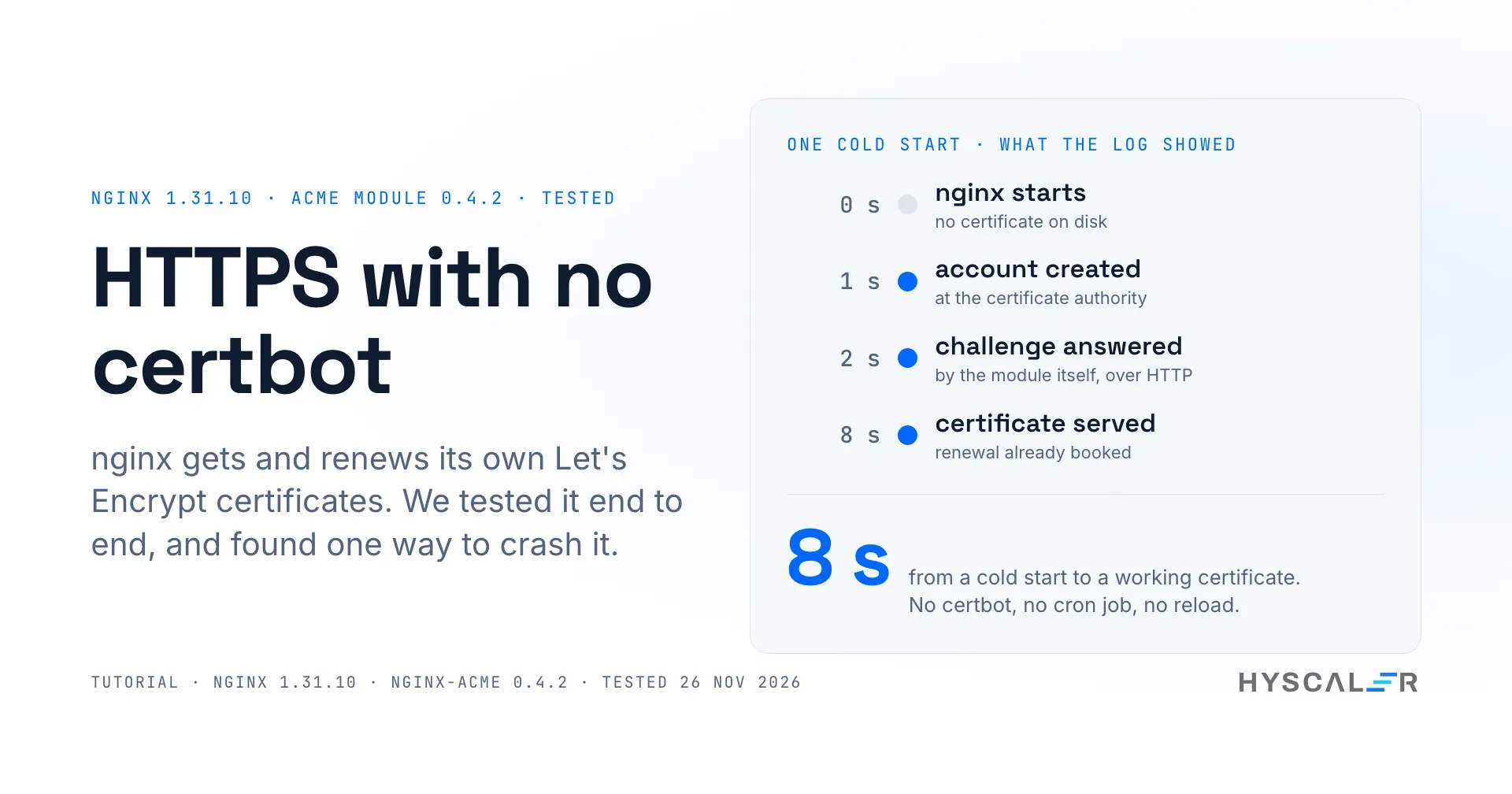
ngx_http_acme_module, a module written in Rust by the nginx team at F5, Apache-2.0, shipped as the packagenginx-module-acmesince nginx 1.29.1. - What it replaces: certbot, its timer, and its reload hook. In our test, nginx had its first certificate about 8 seconds after it started.
- Renewal needs no reload. In a 22-minute watch, nginx served 23 certificates through 22 renewals, with no reload and no failed handshake.
- What it cannot do: wildcard certificates and the DNS-01 challenge. It supports HTTP-01 and TLS-ALPN-01 only.
- The bug we found: a wrong file path in
ssl_trusted_certificatemakesnginx -tdie with a segmentation fault (10 of 10 runs). A reload by signal then kills the nginx master process (5 of 5 runs). - Check your version first: nginx 1.31.9 and 1.30.7 fixed ten vulnerabilities on 18 November 2026, and 1.31.10 and 1.30.8 fixed one more on 23 November.
What is the NGINX ACME module?
ACME is the protocol Let’s Encrypt uses to hand out certificates to software with no person in the loop. For ten years the usual way to use it with nginx was a separate client, most often certbot, that fetched a certificate, wrote it to disk and told nginx to reload.
The nginx-acme module moves that client inside nginx. The nginx team announced it on 12 August 2025, and Let’s Encrypt welcomed it a month later, noting that nginx now joins Caddy, Traefik, and Apache httpd, which already had it. The facts as of 26 November 2026:
- Repository: nginx/nginx-acme, Apache-2.0, written in Rust, 456 stars. The lead maintainer has 194 of the commits.
- Latest release: 0.4.2, from 9 November 2026. Earlier releases added the TLS-ALPN-01 challenge and external account binding (0.2.0), certificate profiles and IP address certificates (0.3.0), and ACME Renewal Information, known as ARI (0.4.0).
- Packages:
nginx-module-acmein the official nginx.org repositories for Debian, Ubuntu, the RHEL family, SLES, Alpine, and Amazon Linux. Each module package is built for one exact nginx version. - Works with open-source nginx 1.22.0 or later when built from source and NGINX Plus as
nginx-plus-module-acme.
The reference is the ngx_http_acme_module page on nginx.org. It is short and accurate, and it says nothing about when renewal happens, what the log looks like, or what goes wrong. That is what this guide adds.
nginx itself is on GitHub’s trending list this week (33,389 stars on 26 November 2026) for a less happy reason: two rounds of security releases in six days. We come back to those below, because the version you install matters.
Why automatic certificates matter more in 2027
Certificate lifetimes are about to get shorter, and a renewal you do by hand or by a fragile script will hurt more often.
- Let’s Encrypt issues 90-day certificates today. From 10 February 2027 every certificate it issues or renews will last 64 days, and from 16 February 2028 the default drops to 45 days (its announcement of 7 October 2026).
- A 160-hour certificate, under seven days, has been generally available since January 2026 as the
shortlivedprofile. - Let’s Encrypt stopped sending expiry warning emails in June 2025. If a renewal fails quietly, nobody tells you.
A setup with fewer moving parts fails in fewer ways. With certbot you run a second program with its own updates, a timer, a hook that reloads nginx, and files that both programs must agree on. Certbot’s own guide notes that a failing hook does not make certbot exit with an error, so a renewal can succeed on disk while nginx keeps serving the old certificate.
My own view after this test: for a plain site on one or a few servers, the module is the better default now. It is not yet the answer for wildcards or for a fleet behind a load balancer, and the section on limits says why. If you serve static builds, as we do for headless WordPress sites, nginx is often the only long-running process on the box, and letting it look after its own certificate removes the last cron job.
How the NGINX ACME module works
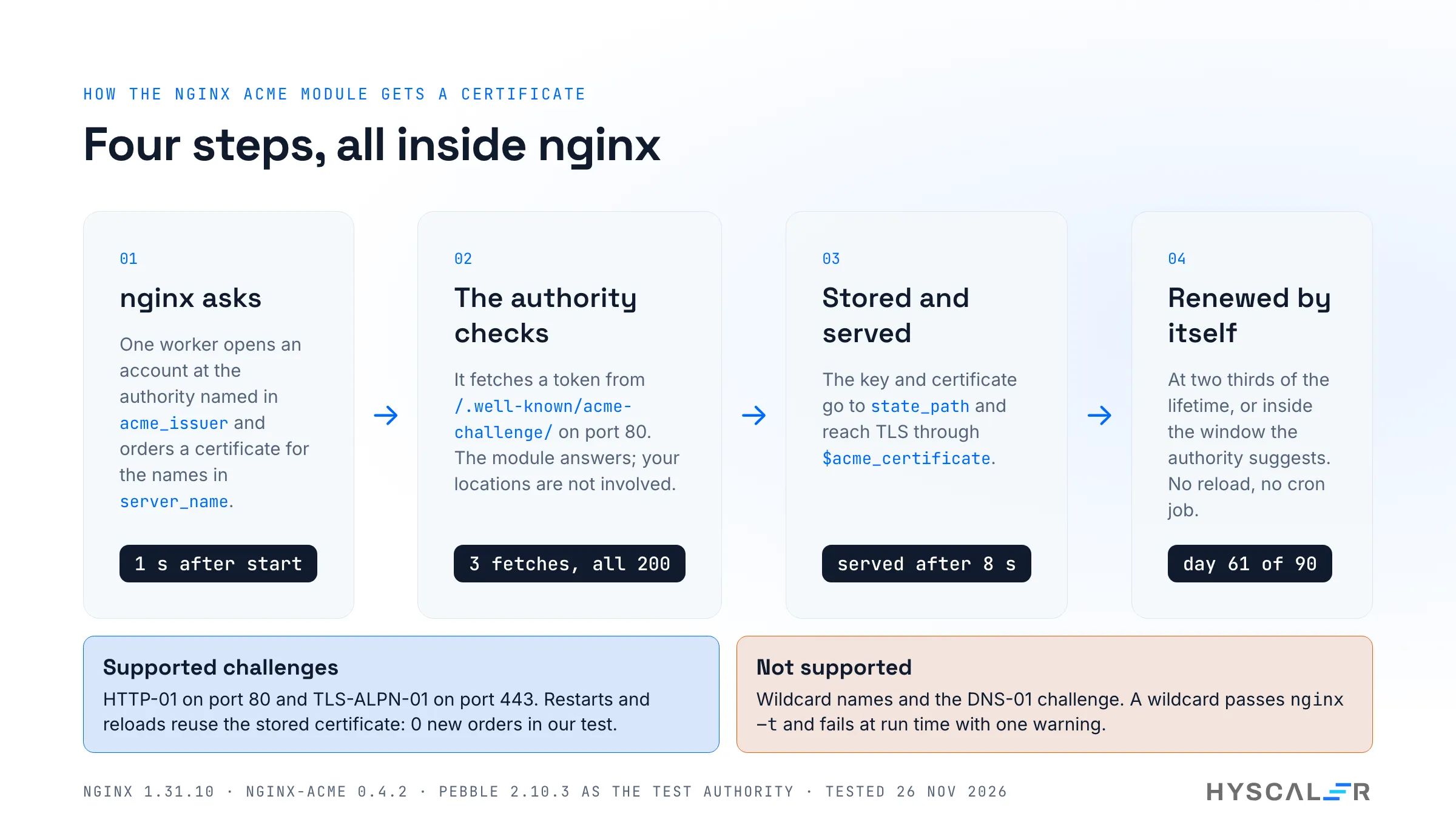
Everything happens inside nginx. There are five parts, and each is one directive.
- An issuer (
acme_issuer) names a certificate authority by its directory URL and holds the account settings. - A certificate request (
acme_certificate) in aserverblock asks the issuer for a certificate. The names come fromserver_nameunless you list them. - A challenge. The authority checks you control the name. For HTTP-01 it fetches a token over plain HTTP on port 80; the module answers that request itself. For TLS-ALPN-01 it connects to port 443.
- State on disk (
state_path): the account key, the certificates and their private keys, so a restart does not start from zero. - Two variables,
$acme_certificateand$acme_certificate_key, that you pass tossl_certificateandssl_certificate_key. When a renewal lands, the variables point at the new certificate.
Three details from the source code are worth knowing, because the documentation does not state them:
- The ACME work runs in one worker process only, not in every worker.
- Without ARI, renewal is scheduled at two thirds of the lifetime for certificates longer than 10 days and at half for shorter ones. With ARI, which Let’s Encrypt supports, the module picks a moment inside the window the authority suggests.
- After a failure, it tries again after 60 seconds, then 600, then 6,000, and after that at most once a day. We saw the first two of those intervals in our test.
What we tested, and on what
- Software: nginx 1.31.10 (mainline) and
nginx-module-acme1.31.10+0.4.2, both from the official nginx.org repository for Ubuntu 24.04. - Certificate authority: Pebble 2.10.3, the small ACME test server that Let’s Encrypt publishes, running on the same machine with its mock DNS server.
- Machine: Ubuntu 24.04.5, x86_64, 32 CPUs. A shared lab server. The first certificate was timed while it was idle. The afternoon runs shared it with another user’s work.
- Date: 26 November 2026.
Three things we did not run, so you can weigh the rest:
apt install. Our test account has no root. We downloaded the two official packages, checked them against the repository’s index and unpacked them withdpkg-deb -x. The binary and the module are the onesaptinstalls, but the systemd service never ran.- Let’s Encrypt itself. That needs a public domain name and ports 80 or 443 open to the internet. Every certificate in this article came from Pebble. The lines for Let’s Encrypt are from its documentation and are marked as such.
- Ports 80 and 443. Without root, nginx listened on 5002 for the challenge and 8443 for the site.
How to install the NGINX ACME module step by step
1. Check the prerequisites
- nginx 1.29.1 or later from the nginx.org packages. Your distribution’s own nginx package does not carry the module.
- A name that resolves to the server, and port 80 reachable from the internet for the HTTP-01 challenge (or port 443 for TLS-ALPN-01).
- A DNS resolver address you can put in the configuration. The module refuses to start without one.
2. Install nginx and the module
The documented route on Ubuntu, from the nginx.org packages page, with the mainline repository and the module’s package name added to the last line:
sudo apt install curl gnupg2 ca-certificates lsb-release ubuntu-keyring
curl https://nginx.org/keys/nginx_signing.key | gpg --dearmor \
    | sudo tee /usr/share/keyrings/nginx-archive-keyring.gpg >/dev/null
echo "deb [signed-by=/usr/share/keyrings/nginx-archive-keyring.gpg] \
https://nginx.org/packages/mainline/ubuntu `lsb_release -cs` nginx" \
    | sudo tee /etc/apt/sources.list.d/nginx.list
sudo apt update
sudo apt install nginx nginx-module-acme
We could not run those lines, so here is what we ran instead. It gives the same files and needs no root:
B=https://nginx.org/packages/mainline/ubuntu
curl -sSO "$B/pool/nginx/n/nginx/nginx_1.31.10-1~noble_amd64.deb"
curl -sS -o "nginx-module-acme_1.31.10+0.4.2-1~noble_amd64.deb" \
  "$B/pool/nginx/n/nginx-module-acme/nginx-module-acme_1.31.10%2B0.4.2-1~noble_amd64.deb"
curl -sS "$B/dists/noble/nginx/binary-amd64/Packages.gz" | gunzip > Packages
sha256sum *.deb
dpkg-deb -x nginx_1.31.10-1~noble_amd64.deb root
dpkg-deb -x "nginx-module-acme_1.31.10+0.4.2-1~noble_amd64.deb" root
Each download took under 3 seconds. The two checksums matched the SHA256: lines in the repository’s Packages index:
7321a08124881bfef18b82afdfaef201efa867e815a209349ec18fd718643cbe  nginx_1.31.10-1~noble_amd64.deb
f1285379fe9d418f5dabd6bc3b13f5428472d74835945c90cb8845a0e955e335  nginx-module-acme_1.31.10+0.4.2-1~noble_amd64.deb
The index also shows why you must upgrade the two packages together: the module depends on nginx-r1.31.10, that exact version.
3. Load the module
The package does not edit nginx.conf. Add this as the first line, in the main context:
load_module modules/ngx_http_acme_module.so;The file is /usr/lib/nginx/modules/ngx_http_acme_module.so on Debian and Ubuntu. Leave the line out and every ACME directive fails with unknown directive "acme_issuer".
4. Set the error log level at the top
This one line saves an evening. The module writes to the main error log, and nginx’s built-in level hides most of what it says. Put this in the main context, not inside http {}:
error_log /var/log/nginx/error.log info;A thread on the nginx community forum from 20 November 2026 is exactly this problem: certificates silently not arriving, with the reason logged at a level nobody was reading.
Test against a local authority before Let’s Encrypt
Let’s Encrypt allows 5 certificates for the same set of names every 7 days, and 5 failed validations for a name per hour. A configuration mistake repeated a few times can lock you out for a week. So we tested against Pebble first, and we recommend you do the same, or at least use the Let’s Encrypt staging directory.
Pebble is one binary. Two things tripped us:
- The release archive holds the binary without the execute bit.
chmod +xit. - Its own HTTPS certificate is not in the archive. Take
test/certs/localhost/cert.pem,key.pemandtest/certs/pebble.minica.pemfrom the repository at the same tag.
Our configuration, with a 90-day profile like Let’s Encrypt’s default and a 90-second one that exists only so we could watch renewals:
{
  "pebble": {
    "listenAddress": "127.0.0.1:14000",
    "managementListenAddress": "127.0.0.1:15000",
    "certificate": "pebble/certs/localhost/cert.pem",
    "privateKey": "pebble/certs/localhost/key.pem",
    "httpPort": 5002,
    "tlsPort": 5001,
    "ocspResponderURL": "",
    "externalAccountBindingRequired": false,
    "retryAfter": { "authz": 3, "order": 5 },
    "keyAlgorithm": "ecdsa",
    "profiles": {
      "default": { "description": "90 days", "validityPeriod": 7776000 },
      "ninety":  { "description": "90 seconds, to watch renewals", "validityPeriod": 90 }
    }
  }
}
Pebble looks for the HTTP-01 challenge on port 5002 and not on port 80, which is why the whole test needs no root. Its companion pebble-challtestsrv is a mock DNS server that answers every name with 127.0.0.1:
pebble-challtestsrv -defaultIPv4 127.0.0.1 -defaultIPv6 "" -dnsserver 127.0.0.1:8053 \
    -management 127.0.0.1:8055 -http01 "" -https01 "" -tlsalpn01 "" -doh "" &
PEBBLE_VA_NOSLEEP=1 pebble -config pebble-config.json -dnsserver 127.0.0.1:8053 &
Pebble is a test tool. Its README says it is “for testing only”, and it drops every account and certificate when it stops.
The NGINX ACME configuration, line by line
This is the configuration that worked, with the test values in place. The comments show what changes for Let’s Encrypt. Three paths are written here as a packaged install has them: in our no-root run the module, the state folder and the test CA file all sat under the test folder. The lines only a no-root run needs, a pid file and temp paths in that folder, are left out.
load_module modules/ngx_http_acme_module.so;

error_log logs/error.log info;

events { worker_connections 256; }

http {
    # required: the module will not start without a resolver
    resolver 127.0.0.1:8053;                  # your own resolver in production

    acme_issuer pebble {
        uri        https://127.0.0.1:14000/dir;   # the authority's directory URL
        contact    admin@shop.example.test;
        state_path /var/cache/nginx/acme-pebble;
        ssl_trusted_certificate pebble/certs/pebble.minica.pem;   # test CA only
        accept_terms_of_service;
    }

    acme_shared_zone zone=ngx_acme_shared:1M;

    server {
        listen 5002;                          # port 80 in production
        location / { return 404; }
    }

    server {
        listen 8443 ssl;                      # port 443 in production
        server_name shop.example.test;

        acme_certificate pebble;

        ssl_certificate       $acme_certificate;
        ssl_certificate_key   $acme_certificate_key;
        ssl_certificate_cache max=2;

        location / { return 200 "hello from nginx $nginx_version over TLS\n"; }
    }
}
What each part does, and what we learned about it:
resolveris mandatory. Without itnginx -tsaysacme_issuer: "resolver" is not configured. The module cannot use the system resolver, because that call would block the worker.uriis the only required line in an issuer.contacttakes an email address;mailto:is added for you.state_pathis where the account key and the certificates live. Read the section on disk state before you choose a path.ssl_trusted_certificateis only for an authority whose own HTTPS certificate is not in the system bundle: a test CA or a private one. For Let’s Encrypt, leave it out. This is the directive behind the crash we describe below.accept_terms_of_serviceis required by Let’s Encrypt and by Pebble. Leave it out and nothing is issued.acme_shared_zoneholds certificates, keys and challenge data in memory. The default of 256k is enough for about 50 ECDSA certificates.- The port 80 server has no ACME directive in it. It only has to exist: the module answers
/.well-known/acme-challenge/requests itself. Our access log shows three such requests answered with 200 although the only location saysreturn 404. acme_certificate pebble;with no names takes them fromserver_name.ssl_certificate_cachestops nginx parsing the certificate on every handshake. The official example includes it, and so should you.
Your first certificate: what happens, second by second
Check the configuration, then start nginx:
nginx -t
nginx
nginx: the configuration file nginx.conf syntax is ok
nginx: configuration file nginx.conf test is successfulWe started nginx at 08:46:35. The error log then read:
08:46:36 [info] account "https://127.0.0.1:14000/my-account/750f3f8aa5129d25" created,
         acme issuer: "pebble", order: "shop.example.test-712045c4b0c5cf9b"
08:46:43 [info] certificate issued, renewal scheduled at 2027-01-26T04:36:22Z,
         acme issuer: "pebble", order: "shop.example.test-712045c4b0c5cf9b"
08:46:43 [info] CA suggested renewal window: 2027-01-24T03:16:37Z..2027-01-26T03:16:37Z
About 8 seconds from a cold start to a certificate, in one timed run on an idle machine. Eight more starts later that day took 6 to 8 seconds. The authority’s own log shows it had issued the certificate by 08:46:38: it took the order, fetched the challenge three times from http://shop.example.test:5002/.well-known/acme-challenge/... and signed. nginx picked the result up at its next poll, 5 seconds later, which is the interval Pebble asks clients to wait. With Let’s Encrypt, expect a similar order of magnitude, not the same number.
Then we fetched the test authority’s root certificate from its management port and asked the site for a page, trusting only that root:
curl --cacert pebble/certs/pebble.minica.pem https://127.0.0.1:15000/roots/0 -o pebble-root.pem
curl --cacert pebble-root.pem --resolve shop.example.test:8443:127.0.0.1 https://shop.example.test:8443/
hello from nginx 1.31.10 over TLSThe certificate nginx served:
| Field | Value |
|---|---|
| Issuer | CN = Pebble Intermediate CA 5faf3f |
| Valid | 26 November 2026 to 24 February 2027 (90 days) |
| Key | ECDSA P-256, the module’s default |
| Names | DNS:shop.example.test |
| Subject | empty: since 0.4.0 the module sends no common name unless you set common_name_in_csr on; |
| Chain sent | the leaf and the intermediate |
Renewal was booked for 26 January 2027, day 61 of 90. The authority suggested a window of 24 to 26 January through ARI, and the module’s own rule of two thirds lands in the same place.
Where nginx stores ACME certificates
Everything the module needs to survive a restart is in state_path. After the first certificate ours held four files, each readable by its owner only:
-rw------- account.key                               241 bytes
-rw------- account.url                                51 bytes
-rw------- shop.example.test-712045c4b0c5cf9b.crt   1267 bytes
-rw------- shop.example.test-712045c4b0c5cf9b.key    241 bytes
The .crt file holds two certificates, the leaf and the intermediate. The long suffix is a hash of the names and the key type, so there is no stable file name to point another program at. If your mail server reads certbot’s live/ folder today, that is a reason to keep certbot for now (it is an open request, issue 145).
Two traps with the path:
- A relative
state_pathis not relative to nginx’s prefix. We wrotestate_path acme-state;, started nginx with our own prefix, and gotmkdir() "/var/cache/nginx/acme-state" failed. The packaged module is built to resolve relative paths under/var/cache/nginx. That is also where the default lives: with nostate_pathat all, look in/var/cache/nginx/acme_<issuer name>. - The module creates one folder, not a tree. A path whose parent does not exist fails the same way.
In a container, put that folder on a volume. Without one, every restart asks for a new certificate, and Let’s Encrypt’s limit of 5 per week for the same names is reached in an afternoon. The forum thread from November 2026 mentioned earlier ended exactly there.
Reload and restart: no new certificate
We counted orders at the authority to see whether routine operations spend requests.
| Action | New orders at the authority | Certificate served afterwards |
|---|---|---|
nginx -s reload | 0 | the same one |
| Stop, then start | 0 | the same one (same serial number) |
Stop, then start, with state_path off; | 1 on every start (2 orders in 2 starts) | a new one each time |
On a restart the worker read the certificate back from disk and only asked the authority for the renewal window again. That is the behaviour you want: restarts are free.
Configuration mistakes: what nginx tells you
We broke the configuration one line at a time. Some mistakes are caught by nginx -t, some only show when a visitor arrives, and one crashes nginx.
Caught by nginx -t:
| Mistake | Message |
|---|---|
No resolver | [emerg] acme_issuer: "resolver" is not configured |
| Module not loaded | [emerg] unknown directive "acme_issuer" |
acme_certificate names an issuer that does not exist | [emerg] issuer "letsencrypt" is missing |
No server_name and no names listed | [emerg] "acme_certificate": no identifiers found in "server_name" |
A regular expression in server_name | [warn] ... unsupported regular expression in server_name, then the error above |
Two acme_certificate lines in one server | [emerg] "acme_certificate" directive is duplicate |
Passes nginx -t, fails when it runs. In each case nginx starts normally and a visitor’s browser gets a TLS “internal error” alert:
| Mistake | What the error log says |
|---|---|
A wildcard, server_name *.example.test; | [warn] no supported challenges while updating certificate |
accept_terms_of_service left out | [error] urn:ietf:params:acme:error:userActionRequired: Provided account did not agree to the terms of service |
The two variables used with no acme_certificate in the server | [notice] acme: no certificates |
| Nothing listening on the challenge port | [warn] urn:ietf:params:acme:error:connection: ... connect: connection refused while updating certificate |
The wildcard case deserves a second look, because the documentation says wildcards are not supported and you might expect an error. There is none. nginx created an account, sent an order for *.example.test, was offered only a DNS challenge it cannot do, and logged one warning. Note also that, by the module’s source code, an order the authority marks invalid is not retried until the next reload: fix the cause, then nginx -s reload.
One name form that looks like a wildcard does work: server_name .example.test; gave us one certificate for both example.test and www.example.test.
One message that misleads. Until the first certificate has arrived, every TLS connection logs this pair. The quoted path is nginx’s prefix, /etc/nginx/ on a packaged install:
[error] cannot load certificate "/etc/nginx/": PEM_read_bio_X509_AUX() failed
        (SSL: error:0480006C:PEM routines::no start line:Expecting: TRUSTED CERTIFICATE) while SSL handshaking
[info]  SSL_do_handshake() failed (SSL: error:0A000179:SSL routines::cert cb error)
It reads like a corrupt file. It means “there is no certificate yet”: the variable is still empty. If it keeps coming, look further up the log for the real reason.
The crash: a wrong path in ssl_trusted_certificate
This is the finding we did not expect, and the one to remember.
Put a path that does not exist in ssl_trusted_certificate inside an acme_issuer block. A typo is enough:
acme_issuer pebble {
    uri https://127.0.0.1:14000/dir;
    ssl_trusted_certificate pebble/certs/does-not-exist.pem;
    accept_terms_of_service;
}
nginx -tSegmentation fault (core dumped)That is the whole output. No file name, no line number, exit code 139.
- A missing file: 10 crashes in 10 runs. An empty file: 10 in 10. A file with text that is not a certificate: it crashed too. The valid file: 0 in 10.
- With
ssl_verify off;in the same block, the wrong path is ignored and the test passes.
A debugger with the official debug packages shows where it dies:
#0  ngx_ssl_error ()
#1  ngx_ssl_trusted_certificate ()
#2  nginx_acme::conf::ssl::NgxSsl::set_verify (...) at src/conf/ssl.rs:145
#3  nginx_acme::conf::issuer::Issuer::init (...) at src/conf/issuer.rs:195
#4  nginx_acme::conf::cmd_add_issuer (...) at src/conf.rs:217
#5  ngx_conf_parse ()
nginx does notice the bad file. It crashes while trying to report it.
How much damage this does depends on how you reload:
| How the reload is sent | What happened |
|---|---|
nginx -s reload | The command itself crashed before it could signal the server. The running nginx kept serving with the old configuration. |
A HUP signal to the master, which is what the packaged systemd unit does for systemctl reload nginx | The master process died, in 5 runs of 5. Its worker stayed behind as an orphan and kept answering requests, with nothing left to reload it, rotate its logs or replace it. The log’s last words were reconfiguring. |
We sent the same signal the unit file sends (kill -s HUP to the master’s PID); we did not run systemd itself. It was not in the module’s tracker, so we filed issue 236 on 26 November 2026. Issue 140, an older crash report, has a different backtrace.
What to do about it:
- Do not set
ssl_trusted_certificatefor Let’s Encrypt. The system’s CA bundle is the default and it is the right one. The directive is for test and private authorities. - If you do need it, check the file first:
test -s /path/to/ca.pem && nginx -t. - If
nginx -tever prints only “Segmentation fault” with this module loaded, look at that path before anything else. - Always run
nginx -tbefore a reload. Here it crashes, but it crashes in a throwaway process and tells you something is wrong before the signal reaches the server.
Renewal with no reload: 22 renewals watched
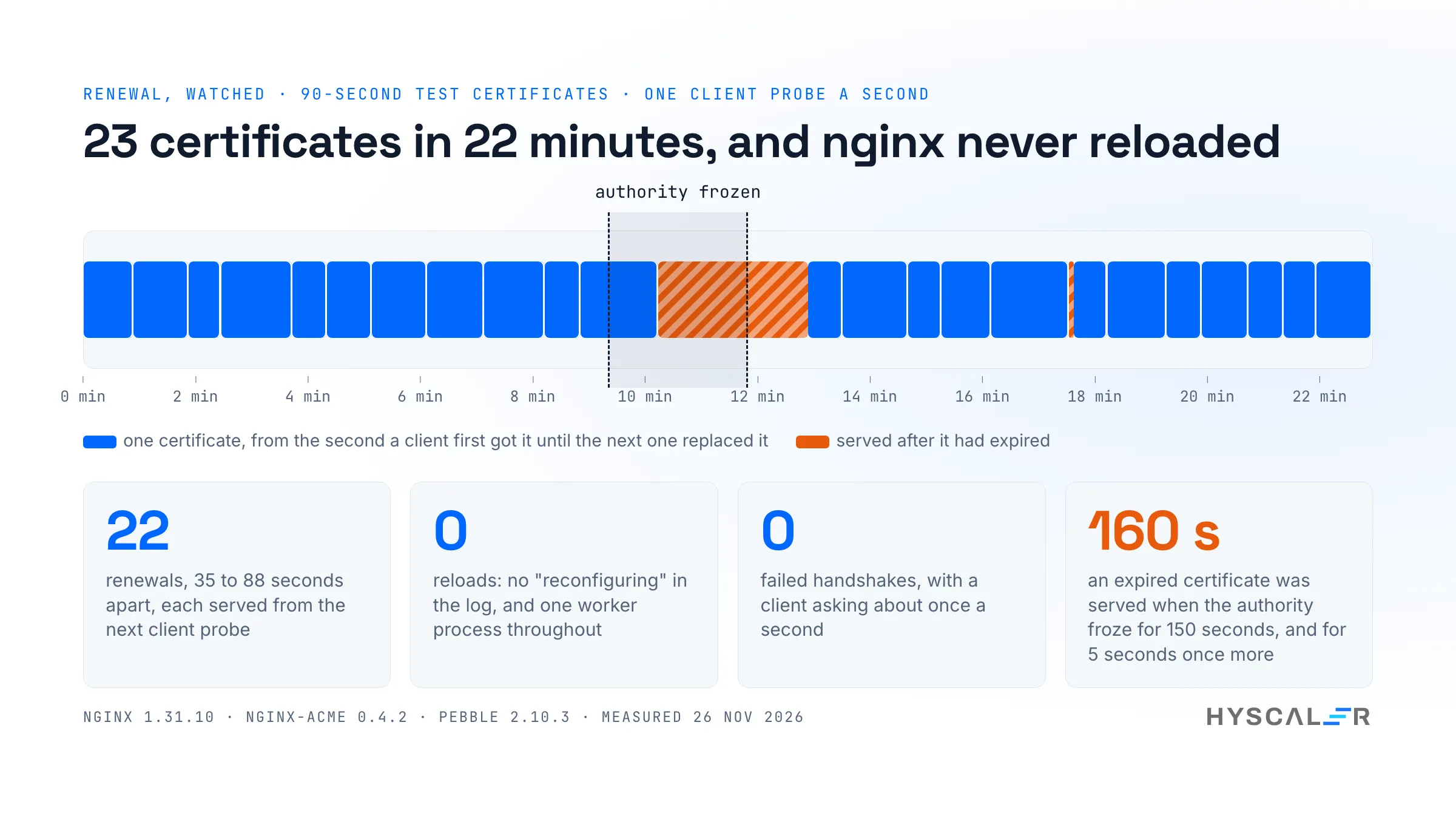
The claim that matters most is that a renewed certificate reaches visitors with no reload. Nobody can wait 60 days to check that. So we gave the test authority a profile that issues 90-second certificates, asked for it with profile ninety; in the issuer, and had a client ask nginx for its certificate about once a second for 22 minutes.
- 23 certificates, 22 renewals, between 35 and 88 seconds apart while the authority was answering.
- No reload. The log has no
reconfiguringline in those 22 minutes, and one worker process logged everycertificate issuedline. - No failed handshake. The client got a certificate on every probe, and each new one was there on the probe after it was issued.
- 23 orders at the authority, one per certificate, all from one account.
The gaps vary because of how the timing works. For certificates shorter than 10 days the module’s own rule is to renew at half the lifetime. Here the authority also offered a renewal window through ARI, and the module took a random moment inside it. The log shows both after every issue:
[info] certificate issued, renewal scheduled at 2026-11-26T08:52:07Z, acme issuer: "pebble"
[info] CA suggested renewal window: 2026-11-26T08:51:23Z..2026-11-26T08:52:52Z, acme issuer: "pebble"
One caution about our own setup. For these 90-second certificates the suggested window ran right up to the second of expiry. Of the 21 renewals made while the authority was answering, 20 arrived before the old certificate ran out, the closest with 8 seconds to spare. One arrived 5 seconds late, so for 5 seconds nginx served a certificate that had just expired. For the 90-day certificate earlier, the same authority’s window ended 29 days before expiry. We read the late one as an effect of a very short lifetime, not as a fault of the module.
When the certificate authority cannot be reached
Certificate authorities have outages, and your server may start while its network is not ready. We tried both.
The authority is down when nginx starts, and there is no certificate on disk yet. nginx started normally and logged a warning:
14:08:39 [warn] directory update failed (Connection refused (os error 111)) while creating account, acme issuer "pebble"
14:09:37 [warn] directory update failed (Connection refused (os error 111)) while creating account, acme issuer "pebble"
We brought the authority back at 14:09:39, two seconds after that second attempt. nginx did not try again until 14:19:45, then had its certificate six seconds later.
| Moment | Time |
|---|---|
| First attempt fails | 14:08:39 |
| Second attempt fails | 14:09:37, 58 seconds later |
| Authority is back | 14:09:39 |
| Third attempt succeeds | 14:19:45, 608 seconds after the second |
| Certificate served | 14:19:52 |
So the site had no certificate for a little over 11 minutes, 10 of them after the problem was gone. That matches the module’s source: it waits 60 seconds after the first failure, 600 after the second and 6,000 after the third, with a little jitter. For a renewal that starts 30 days before expiry, a wait of 100 minutes costs nothing. For a first certificate on a new server, it is the difference between “up in 8 seconds” and “up in 11 minutes”. If your first issue fails, fix the cause and run nginx -s reload instead of waiting. We checked: with the authority back, a reload made nginx try again within a second, in two runs of two.
The authority stops answering while a renewal is due. Ten minutes into the renewal watch we froze the test authority for 150 seconds, so its connections hung instead of being refused. The 90-second certificate nginx was serving ran out during the freeze, and nginx kept serving it. For 2 minutes 40 seconds a visitor would have seen an expired certificate; no handshake failed. The log stayed silent while the request hung, then spoke the moment the authority came back:
14:33:20 [warn] connection error: connection error
14:33:20 [warn] directory update failed (request error: operation was canceled) while creating account, acme issuer "pebble"
14:34:23 [info] certificate issued, renewal scheduled at 2026-11-26T09:05:00Z, acme issuer: "pebble"
The retry came 63 seconds later and worked. With a real 90-day certificate renewed around day 60, an outage of hours changes nothing a visitor can see. The lesson is about monitoring: an expired certificate is still served, so watch the expiry date from outside and do not count on nginx to stop.
More names, RSA keys and the TLS-ALPN-01 challenge
Three variations, each run once against the test authority.
Two names and an RSA key. acme_certificate takes a key= parameter, and names come from server_name:
server_name shop.example.test www.shop.example.test;
acme_certificate pebble key=rsa:2048;
Result: one certificate for both names with a 2048-bit RSA key, issued 8 seconds after start. The supported key types are ecdsa:256 (the default), ecdsa:384, ecdsa:521, rsa:2048, rsa:3072 and rsa:4096. You cannot have an ECDSA and an RSA certificate for the same server yet: a second acme_certificate in the same server is rejected as a duplicate (an open request, issue 170).
The TLS-ALPN-01 challenge. Add challenge tls-alpn-01; to the issuer and the authority validates over the TLS port instead. We removed the plain HTTP server block completely, let the TLS server also listen on 5001 (the port Pebble uses for this challenge), and nginx still had its certificate 6 seconds after start. With a real authority that means only port 443 has to be open, which suits servers where port 80 is closed by policy.
acme_issuer pebble {
    uri https://127.0.0.1:14000/dir;
    challenge tls-alpn-01;
    accept_terms_of_service;
}
Certificate profiles. profile <name>; asks the authority for a named profile. Let’s Encrypt has three today: classic (90 days), tlsserver (45 days) and shortlived (160 hours). When we asked for a profile the authority did not have, nginx logged acme profile "nosuch" is not supported by the server and took the default. With profile nosuch require; it refused instead, with urn:ietf:params:acme:error:invalidProfile: Order includes unrecognized profile name "nosuch", and no certificate was issued.
What the module cannot do in version 0.4.2:
- Wildcards and DNS-01. This is the most requested feature (issue 11 has 33 reactions). The maintainer has said he does not intend to put DNS provider credentials next to a worker process, so do not expect it soon.
- TCP and mail proxies.
acme_certificateexists only in thehttpmodule’sserverblock. - Sharing between servers. Each nginx instance has its own account, challenges and certificates. Two servers behind one DNS name will each try to validate, and the challenge may land on the wrong one.
Moving from the test authority to Let’s Encrypt
We did not run this part: it needs a public name. These are the lines to change, from the module’s and Let’s Encrypt’s documentation.
- Use staging first. Staging has far higher limits and issues certificates browsers do not trust, which is what you want for a rehearsal:
acme_issuer letsencrypt_staging {
    uri        https://acme-staging-v02.api.letsencrypt.org/directory;
    contact    you@example.com;
    state_path /var/cache/nginx/acme-le-staging;
    accept_terms_of_service;
}- Then production, in a second issuer with its own state path:
acme_issuer letsencrypt {
    uri        https://acme-v02.api.letsencrypt.org/directory;
    contact    you@example.com;
    state_path /var/cache/nginx/acme-le;
    accept_terms_of_service;
}- Point
resolverat a real DNS server, listen on 80 and 443, and removessl_trusted_certificate.
The limits that matter while you experiment, from Let’s Encrypt’s rate limit page as updated on 5 August 2026:
| Limit | Production |
|---|---|
| Certificates for the same exact set of names | 5 every 7 days |
| Certificates per registered domain | 50 every 7 days |
| Failed validations per name | 5 per hour |
| New orders per account | 300 every 3 hours |
Renewals that use ARI are exempt from all of these, and the module uses ARI whenever the authority offers it. That is the best argument for keeping the state folder safe: the certificate you renew is free, and the one you ask for from scratch is not.
NGINX ACME vs certbot
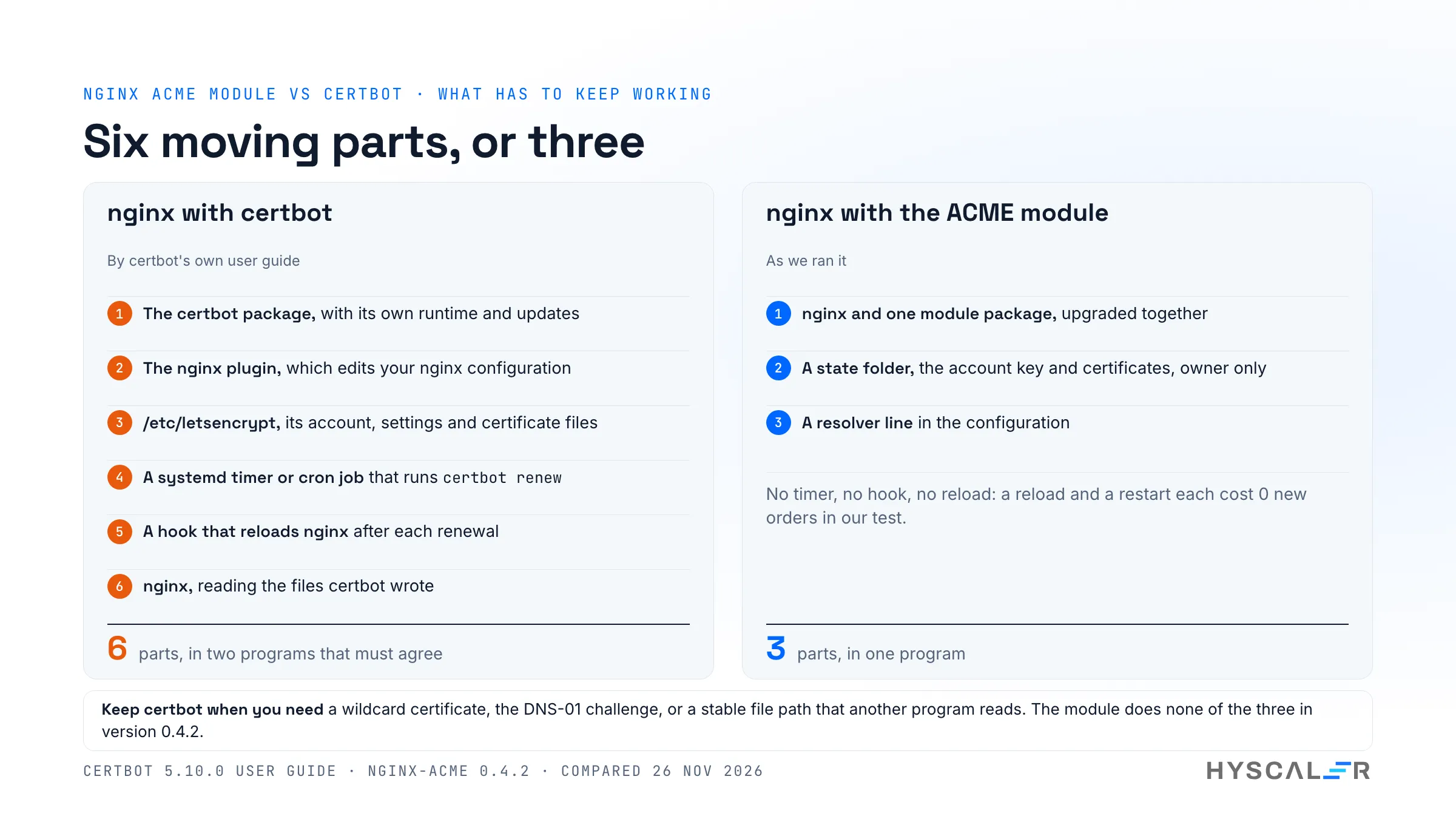
Certbot is not going away, and for some setups it is still the right tool. Here is how the two compare, with the certbot column taken from its user guide for version 5.10.0.
| nginx with certbot | nginx with the ACME module | |
|---|---|---|
| Extra software | certbot and its nginx plugin | one module package |
| Who renews | a systemd timer or cron job running certbot renew | nginx itself, in one worker |
| When it renews | when under a third of the lifetime is left | at two thirds of the lifetime, or in the ARI window |
| After a renewal | a hook must reload nginx | nothing: the variable changes |
| Where certificates live | /etc/letsencrypt/live/<name>/, a stable path | state_path, with a hash in the file name |
| Wildcards, DNS-01 | yes, through DNS plugins | no |
| Changes your nginx config | the installer plugin edits it for you | you write it |
| Works for other programs (mail, databases) | yes | no |
My reading: the module wins on anything that is “a website on nginx”. Certbot wins on anything that is “a certificate that other things also use”. If you only run nginx, certbot’s flexibility is a set of parts you maintain and never use.
Caddy and Traefik have had built-in ACME for years, a fair reason to choose them for a new project. This module is for teams that already run nginx. We wrote about what nginx is good at before; this closes one of its long-standing gaps.
Check your nginx version: the November 2026 security releases
nginx is trending this week because of security fixes, and they affect which version you should install the module on.
- 18 November 2026, nginx 1.31.9 and 1.30.7: ten vulnerabilities fixed in mainline, nine of them in stable too. F5 rates five of them at 8.1 on the CVSS 3.1 scale: memory errors in HTTP/2, HTTP/3, the mail proxy and the resolver.
- 23 November 2026, nginx 1.31.10 and 1.30.8: one more, CVE-2026-132779, where a server with
ssl_early_data oncan be made to burn a CPU core.
One of the fixes of 18 November, CVE-2026-123634, is a use-after-free in the resolver, the component this module requires you to configure. The published trigger involves subrequests resolving the same name, and we cannot say whether the module’s own lookups could reach it. It is one more reason not to run the module on anything older than 1.31.9 or 1.30.7.
Check what you run, and remember that the module package is tied to the nginx version:
nginx -vnginx version: nginx/1.31.10The module is packaged for both lines at the fixed versions: nginx-module-acme 1.31.10+0.4.2 for mainline and 1.30.8+0.4.2 for stable. Upgrade both packages in one step.
When to use the NGINX ACME module, and when not
Use it when:
- You run one or a few nginx servers and each name points at one of them.
- You want fewer things that can fail silently: no timer, no hook, no second program to update.
- You are moving to shorter certificate lifetimes and want renewal driven by ARI.
Stay with certbot, or another client, when:
- You need a wildcard certificate or the DNS-01 challenge.
- Other programs read the certificate from a fixed path.
- Several servers answer for the same name and must share one certificate.
- You are on a distribution’s own nginx package and cannot switch to the nginx.org packages.
And where a team would call us: wiring this into an existing estate, with staged rollout, monitoring of the error log and a tested rollback, is ordinary DevOps engineering work. The module is small; the migration plan around it is where the care goes.
Limits and gotchas
The short list, each one from our test unless marked:
- A wrong
ssl_trusted_certificatepath crashes nginx during the config test and on a reload by signal. Do not set it for Let’s Encrypt. - The error log level must be set in the main context, at
infoornotice, or the module is silent. - Relative
state_pathvalues land under/var/cache/nginxin the official packages. - Wildcards pass
nginx -tand fail at run time with one warning. - A failed first issue is retried after 1 minute, then 10, then 100. Reload to retry at once.
- An order the authority rejects is not retried until a reload (from the source; our closed-port test showed one attempt in 45 seconds).
- Before the first certificate, visitors get a TLS error and the log shows “cannot load certificate”. Start nginx before you point traffic at it.
- Pebble’s release binary is not executable and comes without its certificate files.
- Old files stay in
state_pathafter you change a certificate’s names (open issue 25, not tested by us). - The state folder holds private keys. Version 0.4.2 creates the files readable by their owner only; back the folder up as you would a key.
What we did not test
Let’s Encrypt itself, ports 80 and 443, the systemd service, IP address certificates, external account binding, NGINX Plus, and any load above a handful of test requests.
Frequently asked questions
Does nginx have built-in Let’s Encrypt support?
Yes. Since August 2025 the nginx team ships ngx_http_acme_module, packaged as nginx-module-acme from nginx 1.29.1. It is a separate package that you load with load_module, not part of the default build. Once configured, nginx requests and renews certificates from Let’s Encrypt or any other ACME authority by itself.
Do I still need certbot with nginx?
Not for an ordinary website. With the ACME module nginx gets and renews its own certificate, and in our test on nginx 1.31.10 it had one 8 seconds after starting. You still need certbot or another client for wildcard certificates, for the DNS-01 challenge, and when other programs must read the certificate from a fixed path.
Does the NGINX ACME module support wildcard certificates?
No. Version 0.4.2 supports the HTTP-01 and TLS-ALPN-01 challenges only, and wildcard certificates need DNS-01. A wildcard in server_name passes nginx -t and then fails at run time with the warning “no supported challenges while updating certificate”. DNS-01 is the most requested feature and has no release date.
Does nginx reload when a certificate is renewed?
No. The renewed certificate reaches TLS through the $acme_certificate variable, so nothing is reloaded. In our test nginx renewed 90-second test certificates 22 times in 22 minutes. The log shows no reload, the worker process never changed, and a client asking once a second never got a failed handshake.
Where does nginx store ACME certificates?
In the folder named by state_path in the acme_issuer block. With the official packages the default is /var/cache/nginx/acme_<issuer name>. It holds account.key, account.url, and one .crt and one .key file per certificate, each readable by its owner only. Keep it on persistent storage, or every restart orders a new certificate.
How do I install the NGINX ACME module on Ubuntu?
Add the nginx.org package repository, then run sudo apt install nginx nginx-module-acme. Add load_module modules/ngx_http_acme_module.so; as the first line of nginx.conf, because the package does not edit the file for you. The module package must match the nginx version exactly, so upgrade the two together.
How often does the NGINX ACME module renew certificates?
When the authority supports ACME Renewal Information, as Let’s Encrypt does, nginx renews at a moment inside the window the authority suggests. Otherwise it renews at two thirds of the lifetime, or at half for certificates shorter than 10 days. For a 90-day certificate our test scheduled renewal on day 61.
Why does nginx log “cannot load certificate” with the ACME module?
Because there is no certificate yet. Until the first one is issued, $acme_certificate is empty and every TLS handshake logs “cannot load certificate” and “cert cb error”. It stops when the certificate arrives. If it does not stop, look earlier in the main error log for a warning about the resolver, the challenge or the terms of service.
Why does nginx return an SSL internal error with the ACME module?
Because nginx has no certificate to present. A client gets the TLS alert “internal error” until the first certificate is issued. That lasts when the authority is unreachable, the terms of service are not accepted, the name is a wildcard, or the challenge port is closed. The main error log names the reason when its level is info.
Which nginx version do I need for the ACME module?
The official packages provide it from nginx 1.29.1, and a source build needs nginx 1.22.0 or later. In November 2026 use at least 1.31.9 or 1.30.7, which fix ten vulnerabilities, and preferably 1.31.10 or 1.30.8. Module 0.4.2 is packaged for both of those.
Is the NGINX ACME module production ready?
It works, and it is still young: version 0.4.2, 23 open issues, and in our test one crash caused by a wrong file path in ssl_trusted_certificate. For a single site with a tested configuration and a watched error log, we would run it. For wildcards, shared certificates or large fleets, it is not ready yet.
Watch the video
A video of this test, recorded on the same machine, shows nginx fetching its certificate, a renewal seen live, and the crash.
Watch it on YouTube: NGINX SSL Certificate Tutorial: Let’s Encrypt Without Certbot (ACME).
Try it
Run it against a test authority before you touch a real one. Unpack the two official packages into a folder, start Pebble beside them, and use the configuration above. You need no root, no domain and no open ports, and a certificate arrives in seconds. Then break it the ways we did. Knowing what the log says when it fails is worth more than knowing it works.
The module’s code and issue tracker are at github.com/nginx/nginx-acme.
References
- nginx/nginx-acme on GitHub, README, changelog and source at tag v0.4.2 (read 26 November 2026)
- Module ngx_http_acme_module, the directive reference on nginx.org
- nginx: Linux packages, repository setup and the list of module packages
- nginx news for 2026 and security advisories, for the releases of 18 and 23 November 2026
- NGINX Introduces Native Support for ACME Protocol, NGINX Community Blog, 12 August 2025
- Native ACME Support Comes to NGINX, Let’s Encrypt, 11 September 2025
- 64-Day Certificate Lifetimes Coming Feb 2027, Let’s Encrypt, 7 October 2026
- Decreasing Certificate Lifetimes to 45 Days, Let’s Encrypt, 2 December 2025
- Let’s Encrypt rate limits, updated 5 August 2026, and staging environment
- Let’s Encrypt profiles and challenge types
- Pebble, the ACME test server, release v2.10.3 of 11 November 2026
- Certbot user guide, version 5.10.0
- ACME Module not getting certificates, nginx community forum, 20 November 2026
- Issue 11: ACME DNS-01 challenge and issue 140: segfault after reload in the module’s tracker
- Nginx introduces native support for ACME protocol, Hacker News discussion, 13 August 2025