
Table of Contents
OpenVINO is an open-source toolkit from Intel that optimizes trained AI models and runs them on ordinary hardware, most often the CPU you already have. It reads an ONNX file as it is, shrinks and quantizes the model, and has a companion package for chat, speech, and image models.
Most guides to it are official pages written for Intel hardware. This OpenVINO tutorial is a test on a machine with no Intel chip in it: an AMD Ryzen server with AMD graphics cards. We ran version 2026.4.1 on 24 November 2026, and every command below ran in that test.
We also measured it twice: against ONNX Runtime on the same model file, and against Ollama on the same chat model. One result favors OpenVINO, and one does not. Both are below.
Key points
- OpenVINO 2026.4.1 installed with pip in 3.9 seconds and ran every example here on an AMD Ryzen 9 9950X. AMD is not on Intel’s list of supported processors, but nothing failed.
- It is listed only
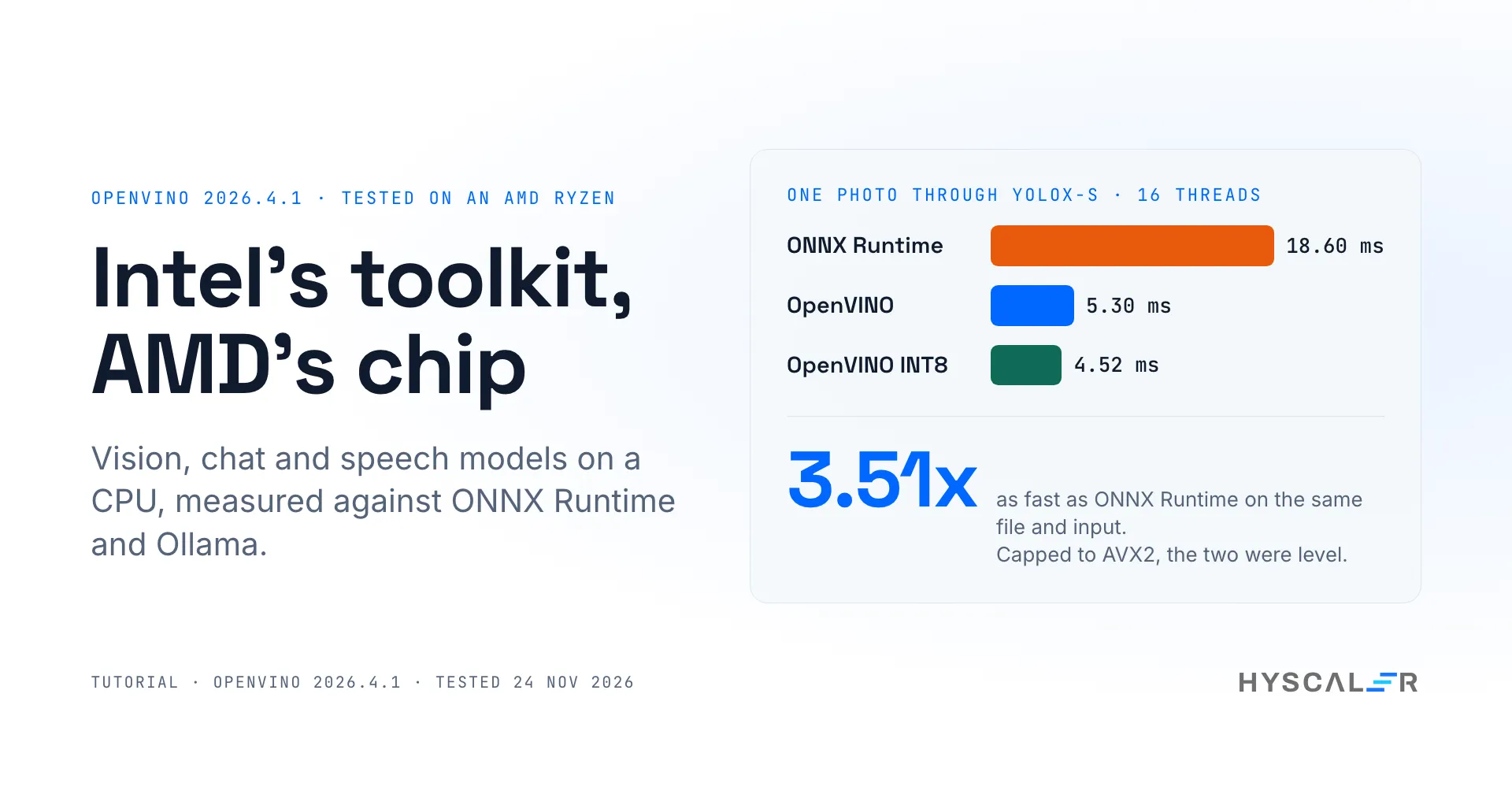
CPUon our server. The documentation describes GPU support for Intel graphics, and our account could not reach the machine’s Radeon cards. - On a YOLOX-s detection model, OpenVINO was 3.51 times as fast as ONNX Runtime with 16 threads and 1.77 times with one on the same file and the same input.
- That lead came from AVX-512. With OpenVINO capped to AVX2, it took 16.98 ms, and ONNX Runtime took 18.08 ms.
- INT8 quantization with NNCF took 9.8 seconds and cut the file from 35.9 MB to 9.0 MB. It added 17 to 36 percent in speed and one false detection.
- For a chat model, Ollama was slightly ahead: 44.5 tokens a second against 40.5 for OpenVINO GenAI.
- Usage telemetry is on by default and starts at
import openvino. One command turns it off.
What is OpenVINO?
OpenVINO lives at openvinotoolkit/openvino on GitHub, and the repo describes it as an open-source toolkit for optimizing and deploying AI inference. Inference is the part after training: you have a model, and you want answers from it quickly on the hardware you can afford.
In practice it is four pieces:
- The runtime. It reads a model, compiles it for a device, and runs it. The Python package is
openvino. - Compression. NNCF quantizes a model to 8-bit integers after training, with a small set of sample inputs.
- OpenVINO GenAI. A second package with ready pipelines for chat models, speech recognition, image generation, embeddings, and more.
- OpenVINO Model Server. A server that puts a model behind an API, including OpenAI-style endpoints.
Some facts, as of 24 November 2026:
- License and size: Apache-2.0, 12,413 stars, and 3,690 forks, written mostly in C++. It was on GitHub Trending’s daily list that day.
- Version: 2026.4.1, a fix release from 1 October 2026. Version 2026.4.0 came out on 16 September 2026.
- Who maintains it: the most active contributors list Intel as their employer.
- Devices, from the README: “CPU (x86, ARM), GPU (Intel integrated & discrete GPU) and AI accelerators (Intel NPU)”.
You may have met it without knowing. Intel’s AI plugins for Audacity use it for transcription and music separation, and the Frigate video recorder uses it as an object detector.
What changed in 2026.4
The 2026.4.0 release notes add support for more models, among them Gemma-3n, Kokoro-82M and Qwen3-ASR. They also add a faster decoding method for chat models and, in preview, idle model unloading in Model Server.
Three notices in them matter for a tutorial:
start_chat()andfinish_chat()are deprecated. You now pass aChatHistorytogenerate(), and our chat script does that.- The CPU device “now requires support for the AVX2 instruction set as a minimum system requirement”.
- Python 3.10 support ends in 2026.5.
The 2026.4.1 notes add one line we use later: “The OV_CPU_MAX_ISA instruction-set cap now works in release builds”. It lets you compare AVX2 with AVX-512 on one machine.
We wrote a plain-language overview of OpenVINO for edge AI in 2024. This guide is the hands-on follow-up.
Why it matters if you run models on your own hardware
Plenty of real systems have processors and no graphics cards: a camera box in a shop, a PC on a factory line, a server in a clinic that must keep its data. The inference engine decides how many cameras one box can serve, or whether a model answers fast enough to be useful.
An engine that is several times faster on the same processor changes that sum without new hardware. That is OpenVINO’s promise, and it is why we wanted numbers of our own before repeating it.
Our view after the test: OpenVINO earns its place for vision and speech models on a CPU. It is not a reason to move a chat model off Ollama. The measurements behind both halves of that sentence are below.
If you are weighing where to run models at all, our pieces on language models with cheap inference and on edge AI chips cover the hardware side.
How OpenVINO works
A model goes through up to four stages, and you can stop after the second.
- A trained model. An ONNX file, a ready-made folder from Hugging Face, or, in preview, a GGUF file.
- Read and convert. OpenVINO reads the file and can save it in its own format, called IR: an
.xmlfile for the graph and a.binfile for the weights. Saving compresses the weights to 16-bit floats by default. - Quantize. NNCF runs sample inputs through the model and rewrites it to use 8-bit integers where it can.
- Compile and run.
compile_modelprepares the model for one device with a performance hint,LATENCYorTHROUGHPUT. On a CPU, the runtime picks the widest instruction set it finds.
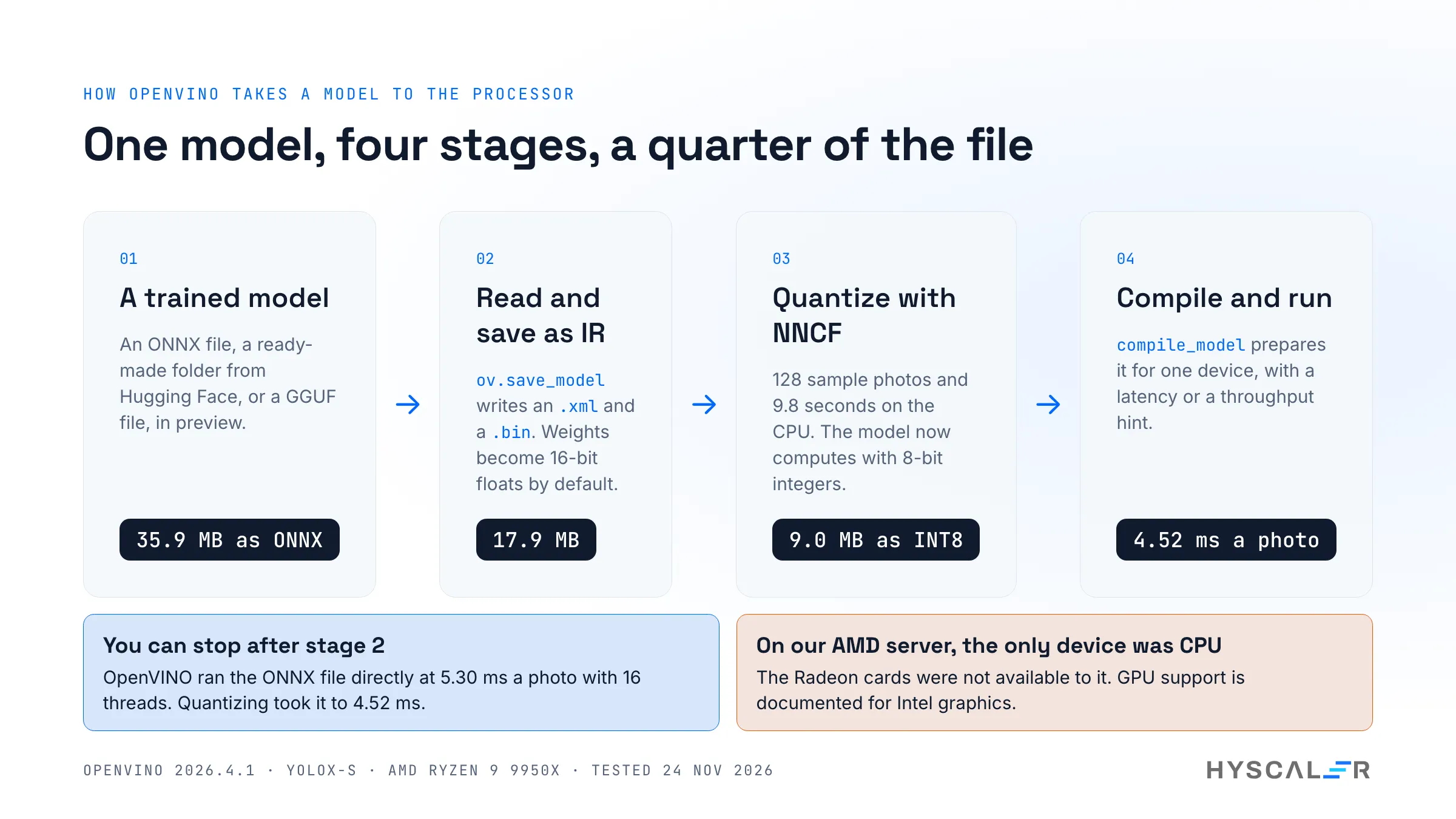
The device is a name: CPU, GPU, NPU, or AUTO, which lets OpenVINO choose. On our server only one of those names existed.
What we tested for this OpenVINO tutorial, and on what
The test ran on a shared lab server, with Python 3.12.16 in a virtual environment, with no sudo and no Docker:
- Processor: AMD Ryzen 9 9950X, 16 cores and 32 threads, with AVX2, AVX-512, and VNNI.
- System: Ubuntu 24.04.5 LTS, kernel 7.0.0, 186 GB of memory.
- Graphics: two Radeon RX 6800 or 6900 XT class cards and the Ryzen’s integrated graphics, with AMD’s ROCm 7.2.4 installed. Our account is not in the
renderorvideogroup, so it had no access to them.
The server is shared, and another user’s build ran during part of our test, with a load average of 40 to 70 on 32 threads. Every timing below is from a window when the machine was idle, with a load under 10, unless we mark it “busy”.
We ran six things: object detection, quantization, a comparison with ONNX Runtime, a chat model with a comparison with Ollama, speech to text, and Model Server. The scripts are ours, written for this guide, and they are printed in full. The models and the photo are other people’s, and each is credited where it appears.
How to install OpenVINO and run it step by step
1. Check the prerequisites
You need Python, pip and an x86-64 processor with AVX2. We used Python 3.12.16 on Linux. You do not need an account, an API key, a graphics card or PyTorch for anything in this guide.
2. Install OpenVINO with pip
python3 -m venv venv && . venv/bin/activate
pip install openvino            # 3.9 s
pip install openvino-genai      # 0.9 s
pip install onnxruntime         # 1.9 s  (only for the comparison)
pip install nncf                # 10.5 s (quantization)
pip install huggingface_hub pillow opencv-python-headless   # 5.2 s
The times are from our run. That gave us openvino 2026.4.1, openvino-genai 2026.4.1.0, nncf 3.4.0, and onnxruntime 1.32.0. The whole environment is 832 MB.
The openvino package also installs two commands, benchmark_app and ovc, and one dependency worth knowing about: openvino-telemetry.
3. Turn telemetry off first
Do this before your first real run:
opt_in_out --opt_outIt printed, “You have successfully opted out to send the telemetry data.” Here is why we put it this early.
A plain import openvino reports usage to Google Analytics by default, with no prompt. We had not agreed to anything, and after our first import the server had two new files: ~/intel/openvino_ga_cid, holding a random ID, and ~/intel/stats. By the end of our test runs, stats read {"usage_count": 27}.
After the opt-out, ~/intel/openvino_telemetry held a 0 and the other two files were gone. A later import openvino did not bring them back.
The two official sources disagree. The telemetry page in the docs says “Anonymous telemetry data is collected by default”. The telemetry package’s README says that when the control file does not exist, “no data will be transmitted”. The code agrees with the docs, and issue 34588 reports the mismatch.
We read the code to see what is sent; we did not capture the network. The list: a random client ID, a session ID, the app name and version, the operating system name, a Docker flag, a usage count, and event names. Model conversion adds the framework and its parameters, with file paths replaced. No model data is in that list.
There is no documented environment variable for this yet. The code also stops when CI=true is set, which we read and did not run. A variable called OPENVINO_TELEMETRY_OPTOUT exists only in a pull request opened on 23 November 2026.
4. See which devices OpenVINO found
import openvino as ov
core = ov.Core()
print(core.available_devices)                       # ['CPU']
print(core.get_property("CPU", "FULL_DEVICE_NAME")) # AMD Ryzen 9 9950X 16-Core Processor
print(core.get_property("CPU", "OPTIMIZATION_CAPABILITIES"))  # ['BF16', 'WINOGRAD', 'FP32', 'INT8', 'BIN', 'EXPORT_IMPORT']
The comments are what our server printed. One device, the processor, with INT8 among its capabilities.
Asking for the graphics card failed: core.compile_model(model, "GPU") raised [GPU] Context was not initialized for 0 device. Asking for AUTO worked and ran on ['CPU'].
OpenVINO on AMD: what works and what is not supported
AMD processors
Everything in this guide ran on an AMD Ryzen, and nothing failed. Officially, though, you are on your own.
The system requirements page lists Intel processor families, ARM and Apple Silicon, and AMD appears nowhere on it. The CPU device page speaks of “Intel® x86-64 and Arm® CPUs”. An answer on Intel’s forum from 2021 says it is “officially supported by Intel Platform only”.
The Frigate project puts the practical side in one line of its docs: “It will also run on AMD CPUs despite having no official support for it.” That matches what we saw.
AMD and NVIDIA graphics cards
The GPU device page describes “an OpenCL based plugin for inference of deep neural networks on Intel GPUs, both integrated and discrete ones”. The Linux setup page asks you to install Intel’s OpenCL packages.
We have to be careful about what we tested here. Our server listed only the processor, and our account had no access to the graphics devices at all. So we did not test whether a Radeon card would show up with an OpenCL driver and the right permissions. The plugin’s code does list OpenCL graphics devices from other makers, so it might.
What we can say is that it is unsupported today. A proposal from Fujitsu for NVIDIA and then AMD graphics cards says “There is currently no equivalent AMD GPU plugin”, and its technical direction was approved on 2 October 2026. An NVIDIA plugin exists in a side repo, but it is not part of the official distribution and is built from source.
The NPU device is for the neural processor in Intel’s Core Ultra chips. We had none to test.
Run an object detection model with OpenVINO
The first example finds objects in a photo. The model is YOLOX-s, a 35.9 MB ONNX file from the YOLOX project, under the Apache-2.0 licence.
mkdir -p models data out assets
curl -L -o models/yolox_s.onnx https://github.com/Megvii-BaseDetection/YOLOX/releases/download/0.1.1rc0/yolox_s.onnx
The test photo is “Time lapse london red bus” by David Marcu, released under CC0 on Wikimedia Commons. We saved the 1,920 pixel wide version as assets/bus.jpg.
OpenVINO only runs the network. Preparing the picture and turning the raw output into boxes is your code. Ours is one helper file, yolox.py:
"""YOLOX-s helpers shared by the tests: letterbox, decode, NMS, drawing. Our own demo code."""
import cv2
import numpy as np

COCO = ("person bicycle car motorcycle airplane bus train truck boat,traffic light,fire hydrant,stop sign,parking meter,bench bird cat dog horse "
        "sheep cow elephant bear zebra giraffe backpack umbrella handbag tie suitcase frisbee skis snowboard,sports ball,kite,baseball bat,"
        "baseball glove,skateboard surfboard,tennis racket,bottle,wine glass,cup fork knife spoon bowl banana apple sandwich orange broccoli carrot,"
        "hot dog,pizza donut cake chair couch,potted plant,bed,dining table,toilet tv laptop mouse remote keyboard,cell phone,microwave oven toaster "
        "sink refrigerator book clock vase scissors,teddy bear,hair drier,toothbrush")
NAMES = [n for part in COCO.split(",") for n in ([part] if " " in part and part in (
    "traffic light", "fire hydrant", "stop sign", "parking meter", "sports ball", "baseball bat", "baseball glove", "tennis racket",
    "wine glass", "hot dog", "potted plant", "dining table", "cell phone", "teddy bear", "hair drier") else part.split())]
assert len(NAMES) == 80, len(NAMES)
SIZE = 640


def letterbox(img):
    """BGR image to a 1x3x640x640 float32 tensor (raw 0 to 255, padded with 114), plus the scale used."""
    r = min(SIZE / img.shape[0], SIZE / img.shape[1])
    resized = cv2.resize(img, (int(img.shape[1] * r), int(img.shape[0] * r)), interpolation=cv2.INTER_LINEAR)
    canvas = np.full((SIZE, SIZE, 3), 114, dtype=np.uint8)
    canvas[: resized.shape[0], : resized.shape[1]] = resized
    return np.ascontiguousarray(canvas.transpose(2, 0, 1)[None].astype(np.float32)), r


def decode(out, ratio, conf=0.35, iou=0.45):
    """Raw YOLOX output (1, 8400, 85) to a list of (name, score, x1, y1, x2, y2) in the original image."""
    out = out[0].copy()
    grids, strides = [], []
    for s in (8, 16, 32):
        n = SIZE // s
        xv, yv = np.meshgrid(np.arange(n), np.arange(n))
        grids.append(np.stack((xv, yv), 2).reshape(-1, 2))
        strides.append(np.full((n * n, 1), s))
    grids, strides = np.concatenate(grids), np.concatenate(strides)
    out[:, :2] = (out[:, :2] + grids) * strides
    out[:, 2:4] = np.exp(out[:, 2:4]) * strides
    scores = out[:, 4:5] * out[:, 5:]
    cls = scores.argmax(1)
    best = scores.max(1)
    keep = best > conf
    boxes = out[keep, :4]
    xyxy = np.stack([boxes[:, 0] - boxes[:, 2] / 2, boxes[:, 1] - boxes[:, 3] / 2, boxes[:, 0] + boxes[:, 2] / 2, boxes[:, 1] + boxes[:, 3] / 2], 1) / ratio
    best, cls = best[keep], cls[keep]
    dets = []
    for c in np.unique(cls):
        m = cls == c
        b = xyxy[m]
        idx = cv2.dnn.NMSBoxes([[float(x[0]), float(x[1]), float(x[2] - x[0]), float(x[3] - x[1])] for x in b], best[m].tolist(), conf, iou)
        for i in np.array(idx).reshape(-1):
            dets.append((NAMES[c], float(best[m][i]), *[float(v) for v in b[i]]))
    return sorted(dets, key=lambda d: -d[1])


def draw(img, dets, path):
    out = img.copy()
    for name, score, x1, y1, x2, y2 in dets:
        p1, p2 = (int(x1), int(y1)), (int(x2), int(y2))
        cv2.rectangle(out, p1, p2, (255, 194, 0), 3)
        label = f"{name} {score:.2f}"
        (tw, th), _ = cv2.getTextSize(label, cv2.FONT_HERSHEY_SIMPLEX, 0.7, 2)
        cv2.rectangle(out, (p1[0], max(p1[1] - th - 10, 0)), (p1[0] + tw + 8, max(p1[1], th + 10)), (255, 194, 0), -1)
        cv2.putText(out, label, (p1[0] + 4, max(p1[1] - 6, th + 4)), cv2.FONT_HERSHEY_SIMPLEX, 0.7, (34, 20, 11), 2, cv2.LINE_AA)
    cv2.imwrite(path, out)
The script that uses OpenVINO is short. This is detect.py:
"""Detect objects in a photo with OpenVINO on the CPU.  python detect.py <model> [image] [out.png]"""
import os
import sys
import time
import cv2
import openvino as ov
from yolox import letterbox, decode, draw

model_path = sys.argv[1]
image_path = sys.argv[2] if len(sys.argv) > 2 else "assets/bus.jpg"
stem = os.path.splitext(os.path.basename(model_path))[0]
out_path = sys.argv[3] if len(sys.argv) > 3 else f"out/bus-{stem}.png"
core = ov.Core()
t0 = time.perf_counter()
compiled = core.compile_model(model_path, "CPU", {"PERFORMANCE_HINT": "LATENCY"})
t_load = time.perf_counter() - t0
img = cv2.imread(image_path)
tensor, ratio = letterbox(img)
compiled(tensor)  # warm-up
t0 = time.perf_counter()
out = compiled(tensor)[0]
t_inf = time.perf_counter() - t0
dets = decode(out, ratio)
os.makedirs(os.path.dirname(out_path) or ".", exist_ok=True)
draw(img, dets, out_path)
counts = {}
for d in dets:
    counts[d[0]] = counts.get(d[0], 0) + 1
parts = [f"{v} {k}" for k, v in sorted(counts.items(), key=lambda kv: -kv[1])]
print(f"load    {t_load * 1000:.0f} ms")
print(f"infer   {t_inf * 1000:.1f} ms, one {img.shape[1]}x{img.shape[0]} photo")
print(f"found   {len(dets)} objects")
for i in range(0, len(parts), 3):
    print("        " + ", ".join(parts[i:i + 3]))
print(f"wrote   {out_path}")
Three lines do the work. compile_model takes the ONNX file directly, with no conversion step, and returns something you can call. Calling it with the tensor runs the network.
$ python detect.py models/yolox_s.onnx
load    129 ms
infer   6.4 ms, one 1920x1275 photo
found   18 objects
        14 person, 2 traffic light, 1 bus
        1 car
wrote   out/bus-yolox_s.png
The bus scores 0.90. The car in the foreground, blurred by motion, is missed. That is the model’s limit and not the engine’s: an inference engine runs the network you give it, no better and no worse.
Quantize the model to INT8 with NNCF
Quantization rewrites a model to compute with 8-bit integers. The file gets smaller, and processors with the right instructions run it faster. NNCF does it after training: it only needs sample inputs to see what range of values flows through each layer.
We used the 128 images of COCO128 as samples. They are only read for calibration and are not shown here.
cd data
curl -L -o coco128.zip https://github.com/ultralytics/assets/releases/download/v0.0.0/coco128.zip
python3 -c "import zipfile; zipfile.ZipFile('coco128.zip').extractall('.')"
cd ..
This is quantize.py:
"""Post-training INT8 quantization of YOLOX-s with NNCF, calibrated on COCO128.  python quantize.py"""
import glob
import os
import time
import cv2
import nncf
import openvino as ov
from yolox import letterbox

core = ov.Core()
model = core.read_model("models/yolox_s.onnx")
ov.save_model(model, "models/yolox_s_fp16.xml")  # IR, weights compressed to FP16 by default
files = sorted(glob.glob("data/coco128/images/train2017/*.jpg"))
print(f"calibration images: {len(files)}")
dataset = nncf.Dataset(files, lambda f: letterbox(cv2.imread(f))[0])
t0 = time.perf_counter()
quantized = nncf.quantize(model, dataset, subset_size=len(files))
print(f"quantized in {time.perf_counter() - t0:.1f} s")
ov.save_model(quantized, "models/yolox_s_int8.xml")
for f in ("models/yolox_s.onnx", "models/yolox_s_fp16.bin", "models/yolox_s_int8.bin"):
    print(f"{os.path.getsize(f) / 1e6:6.1f} MB  {f}")
The key call is nncf.quantize(model, dataset). The dataset is a list of files and a function that turns one file into a model input, the same letterbox as before. The script’s last lines printed:
calibration images: 128
quantized in 9.8 s
  35.9 MB  models/yolox_s.onnx
  17.9 MB  models/yolox_s_fp16.bin
   9.0 MB  models/yolox_s_int8.bin
So the file is a quarter of the original, after 9.8 seconds on the idle processor (19.2 seconds the first time, while the shared server was busy). The NNCF guide suggests about 300 samples. We used 128.
Now the same photo through the quantized model:
$ python detect.py models/yolox_s_int8.xml
load    421 ms
infer   5.4 ms, one 1920x1275 photo
found   19 objects
        14 person, 2 traffic light, 1 bus
        1 car, 1 couch
wrote   out/bus-yolox_s_int8.png
There is no couch in the photo. The quantized model labels a puffer jacket at the right edge “couch”, with a score of 0.40. Everything else matches: the same 18 objects, and the bus at 0.89 instead of 0.90.
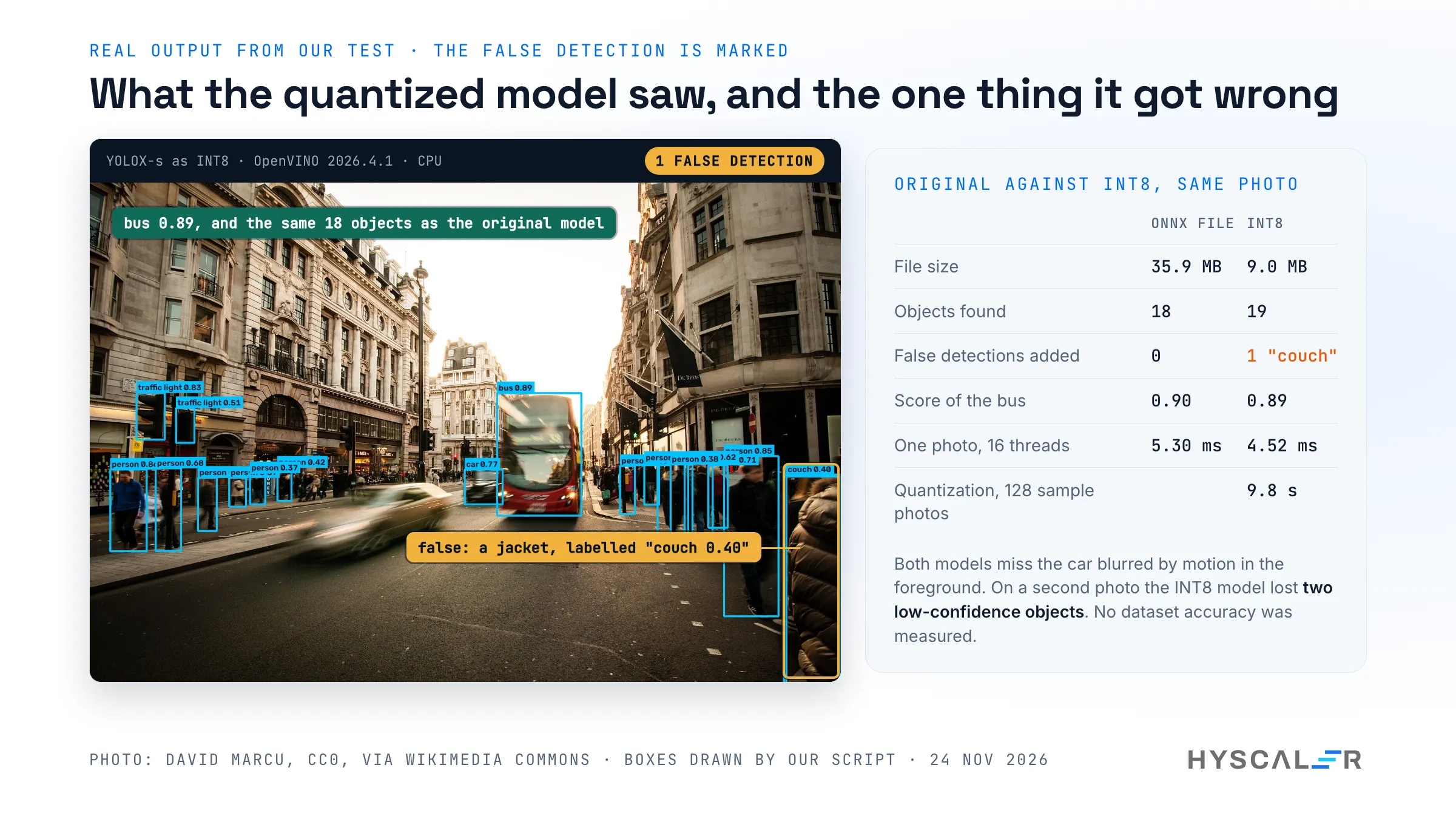
One photo proves little, so here is the honest version. On a second street photo, the INT8 model lost two low-confidence objects, 11 down to 9. We did not measure accuracy on a full dataset. Before you ship a quantized model, measure it on your own data.
OpenVINO vs ONNX Runtime: what we measured
ONNX Runtime is the obvious alternative, because it runs the same ONNX file. So we timed one photo through both, with the same input and the same number of threads. This is bench.py:
"""Time for one YOLOX-s photo, same input and thread count: ONNX Runtime against OpenVINO (FP32 and INT8).
Engines run in turn for several rounds; each figure is the median of the round medians.
  python bench.py [threads] [rounds] [runs]"""
import json
import os
import statistics
import sys
import time
import cv2
import numpy as np
import onnxruntime as ort
import openvino as ov
from yolox import letterbox

threads = int(sys.argv[1]) if len(sys.argv) > 1 else 16
rounds = int(sys.argv[2]) if len(sys.argv) > 2 else 5
iters = int(sys.argv[3]) if len(sys.argv) > 3 else 100
tensor, _ = letterbox(cv2.imread("assets/bus.jpg"))
load = lambda: open("/proc/loadavg").read().split()[0]

so = ort.SessionOptions()
so.intra_op_num_threads = threads
sess = ort.InferenceSession("models/yolox_s.onnx", so, providers=["CPUExecutionProvider"])
iname = sess.get_inputs()[0].name
core = ov.Core()
cfg = {"PERFORMANCE_HINT": "LATENCY", "INFERENCE_NUM_THREADS": threads}
ov_fp32 = core.compile_model("models/yolox_s.onnx", "CPU", cfg)
ov_int8 = core.compile_model("models/yolox_s_int8.xml", "CPU", cfg)
engines = {
    "onnxruntime": lambda: sess.run(None, {iname: tensor}),
    "openvino": lambda: ov_fp32(tensor),
    "openvino-int8": lambda: ov_int8(tensor),
}
print(f"{threads} threads, {rounds} rounds of {iters} runs, load {load()}")
res = {k: [] for k in engines}
for r in range(rounds):
    for name, fn in engines.items():
        for _ in range(15):
            fn()
        ts = []
        for _ in range(iters):
            t0 = time.perf_counter()
            fn()
            ts.append((time.perf_counter() - t0) * 1000)
        res[name].append(statistics.median(ts))
summary = {}
for name, meds in res.items():
    m = statistics.median(meds)
    summary[name] = {"median_ms": round(m, 2), "best_ms": round(min(meds), 2), "worst_ms": round(max(meds), 2), "fps": round(1000 / m, 1), "rounds": [round(x, 2) for x in meds]}
base = summary["onnxruntime"]["median_ms"]
for name, r in summary.items():
    r["speedup"] = round(base / r["median_ms"], 2)
    faster = "" if name == "onnxruntime" else f"  {r['speedup']:.2f}x"
    print(f"{name:<14}{r['median_ms']:6.2f} ms {r['fps']:7.1f} a second{faster}")
os.makedirs("out", exist_ok=True)
json.dump({"threads": threads, "rounds": rounds, "iters": iters, "results": summary, "onnxruntime": ort.__version__, "openvino": ov.__version__}, open(f"out/bench-{threads}t.json", "w"), indent=1)
The method, in words. The three engines run in turn, so anything else happening on the machine hits them alike. Each gets 15 warm-up runs and then 100 timed runs per round, for 7 rounds. The figure is the median of the round medians. Both engines keep their default settings, and model loading is not counted.
$ python bench.py 16 7 100
16 threads, 7 rounds of 100 runs, load 0.07
onnxruntime    18.60 ms    53.8 a second
openvino        5.30 ms   188.7 a second  3.51x
openvino-int8   4.52 ms   221.2 a second  4.12x
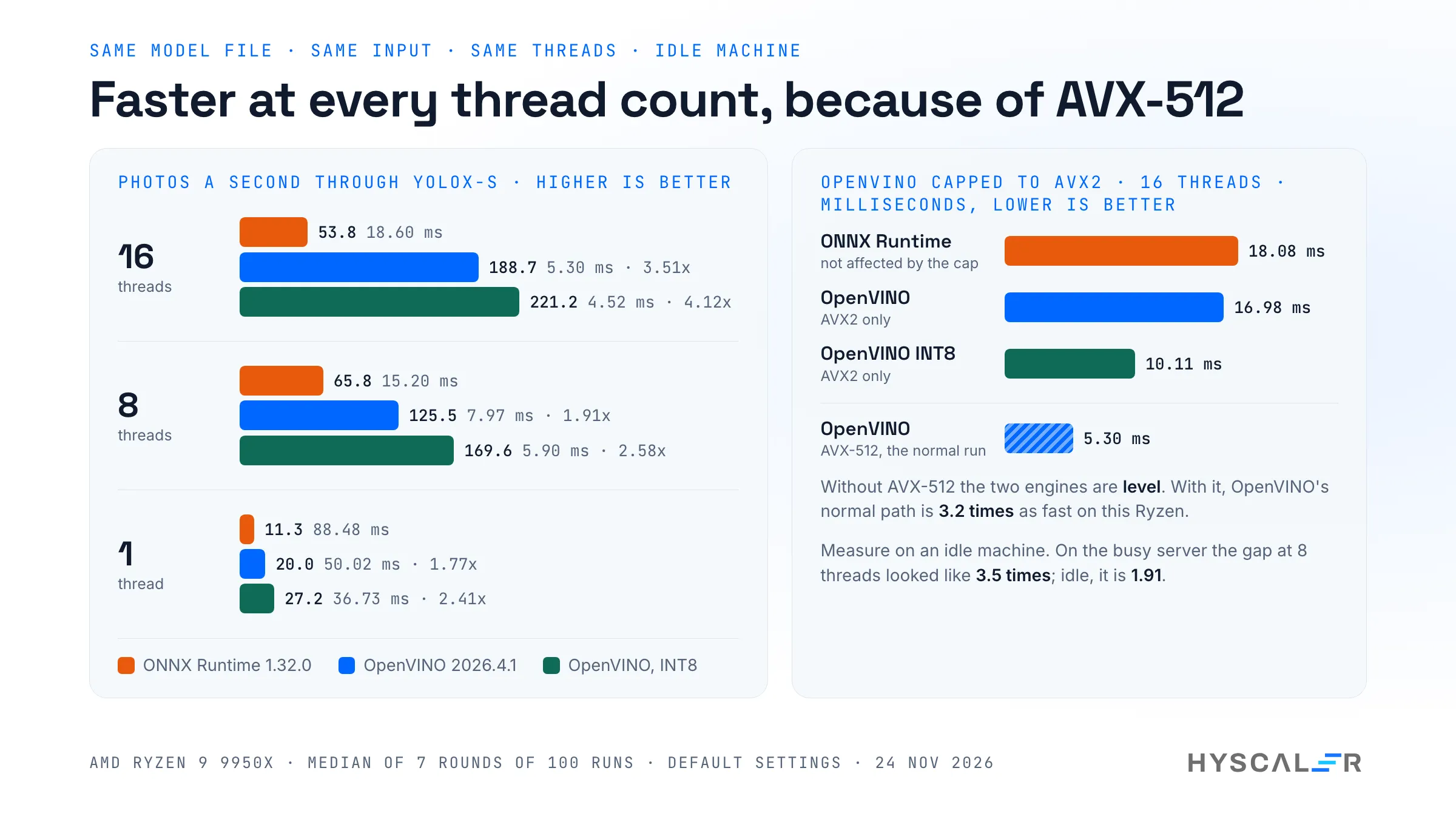
The same run at three thread counts, on the idle machine, with ONNX Runtime 1.32.0 and OpenVINO 2026.4.1:
| Threads | ONNX Runtime | OpenVINO | OpenVINO INT8 | OpenVINO vs ONNX Runtime | INT8 vs ONNX Runtime |
|---|---|---|---|---|---|
| 16 | 18.60 ms | 5.30 ms | 4.52 ms | 3.51x | 4.12x |
| 8 | 15.20 ms | 7.97 ms | 5.90 ms | 1.91x | 2.58x |
| 1 | 88.48 ms | 50.02 ms | 36.73 ms | 1.77x | 2.41x |
The one-thread row used 5 rounds of 40 runs. Rounds agreed closely on the idle machine: OpenVINO’s ranged from 5.28 to 5.34 ms at 16 threads. A second full run an hour later, in another idle window, gave 18.28, 5.39 and 4.59 ms at 16 threads, so 3.39 and 3.98 times. Read the ratios as about three and a half and about four.
Three things stand out.
OpenVINO is faster at every thread count. It was 1.77 times as fast with one thread and 3.51 times as fast with 16.
ONNX Runtime got slower from 8 threads to 16 on this processor, 15.20 ms to 18.60 ms. OpenVINO kept getting faster. We tuned neither engine, and ONNX Runtime has settings we did not touch.
INT8 is a small speed gain here. Inside OpenVINO, the quantized model was 1.17 times as fast at 16 threads and 1.36 times at one. That is far from the multiples you may see quoted. The file is the bigger win, at a quarter of the size.
Where the lead comes from: AVX-512
The 2026.4.1 release lets you cap the instruction set, so we ran the 16-thread test again with OpenVINO held to AVX2:
OV_CPU_MAX_ISA=AVX2 ONEDNN_MAX_CPU_ISA=AVX2 python bench.py 16 3 60OpenVINO took 16.98 ms, and ONNX Runtime took 18.08 ms in the same run. The two were level. The INT8 model took 10.11 ms.
So on this Ryzen, AVX-512 makes OpenVINO’s normal path 3.2 times as fast, and that is the whole lead. We did not test a processor without AVX-512, but the capped run suggests the two engines would be close there. It also suggests INT8 would matter more: under the cap it was 1.68 times as fast as the unquantized model.
A warning about busy machines
We first ran this while another user’s build was loading the server. With 8 threads and a load of about 47, ONNX Runtime took 39.65 ms, with rounds from 23.70 to 44.32. OpenVINO took 11.20 ms.
That looks like a lead of 3.5 times. On the idle machine with 8 threads, the lead is 1.91 times. Contention hurt ONNX Runtime far more, so a benchmark on a shared machine flatters OpenVINO. Measure on an idle one.
OpenVINO’s own benchmark tool
The package ships benchmark_app, which feeds a model random input and reports latency and throughput:
benchmark_app -m models/yolox_s.onnx -d CPU -hint latency -t 8
benchmark_app -m models/yolox_s_int8.xml -d CPU -hint throughput -t 8
With the latency hint it used one stream and 16 threads. The median was 5.46 ms for the original model and 4.62 ms for INT8, within 3 percent of our own numbers.
With the throughput hint it used all 32 threads and 8 requests in parallel. The original model reached 237.95 photos a second and INT8 reached 344.67. That is the mode for many camera streams at once, where total output matters more than the wait for one frame.
Intel’s own advice on comparing engines is worth following. Two of its rules: “Do not include model loading time” and “Ensure that the inputs are identical”.
Run a chat model with OpenVINO GenAI
OpenVINO GenAI needs models in OpenVINO’s format, and you do not have to convert them yourself. The OpenVINO organisation on Hugging Face publishes 475 ready-made ones. We took a small chat model:
from huggingface_hub import snapshot_download
snapshot_download("OpenVINO/Qwen2.5-1.5B-Instruct-int4-ov", local_dir="models/Qwen2.5-1.5B-Instruct-int4-ov")
That was 893 MB in 21 seconds. The model is Apache-2.0 and not gated, so no account was needed. This is chat.py:
"""Ask a local chat model a question with OpenVINO GenAI on the CPU.  python chat.py <model folder or .gguf> "<question>" [max tokens]"""
import sys
import time
import openvino_genai as og

model, prompt = sys.argv[1], sys.argv[2]
limit = int(sys.argv[3]) if len(sys.argv) > 3 else 120
t0 = time.perf_counter()
pipe = og.LLMPipeline(model, "CPU")
load = time.perf_counter() - t0


col = 0


def show(piece):
    """Print the answer as it arrives, wrapped at about 64 columns."""
    global col
    for ch in piece:
        if ch == "\n" or (ch == " " and col >= 64):
            print(flush=True)
            col = 0
        else:
            print(ch, end="", flush=True)
            col += 1
    return og.StreamingStatus.RUNNING


history = og.ChatHistory()
history.append({"role": "user", "content": prompt})
result = pipe.generate(history, max_new_tokens=limit, do_sample=False, streamer=show)
m = result.perf_metrics
print(f"\n\nload {load:.1f} s, first token {m.get_ttft().mean:.0f} ms\n{m.get_num_generated_tokens()} tokens, {m.get_throughput().mean:.1f} tokens a second")
It uses the current API: a ChatHistory with one user message, a function that prints each piece as it arrives, and the performance numbers that come back with the result. We asked it “In two sentences, what does an inference engine do?”, with a limit of 90 tokens. The answer began “An inference engine uses logical rules to make predictions or draw conclusions based on the input it receives.” The run ended with:
load 0.6 s, first token 328 ms
71 tokens, 39.1 tokens a second
Read that answer again. It describes a rule-based system from an older kind of AI, not a neural network runtime. A 1.5 billion parameter model answered quickly and missed the point. Speed is not quality, and we show the answer as it came.
OpenVINO vs Ollama on the same chat model
People ask how this compares with Ollama, so we installed Ollama 0.40.18 in the same folder, with no sudo, and pulled the same model as qwen2.5:1.5b. Its log reported inference compute id=cpu, so it used no graphics card either.
A small script of ours, llm_bench.py, asks each engine the same question, allows 160 tokens, and runs three times after a warm-up:
"""Tokens a second for the same question: OpenVINO GenAI (a model folder) and Ollama (a model tag), CPU only.
  python llm_bench.py openvino models/Qwen2.5-1.5B-Instruct-int4-ov
  python llm_bench.py ollama qwen2.5:1.5b"""
import json
import statistics
import sys
import time
import urllib.request

PROMPT = "Explain in one short paragraph what an inference engine does and why quantization makes a model faster."
LIMIT, RUNS = 160, 3
engine, model = sys.argv[1], sys.argv[2]
rows = []
if engine == "openvino":
    import openvino_genai as og
    t0 = time.perf_counter()
    pipe = og.LLMPipeline(model, "CPU")
    load = time.perf_counter() - t0
    pipe.generate([PROMPT], max_new_tokens=8, do_sample=False)
    for _ in range(RUNS):
        m = pipe.generate([PROMPT], max_new_tokens=LIMIT, do_sample=False).perf_metrics
        rows.append((m.get_num_generated_tokens(), m.get_throughput().mean, m.get_ttft().mean))
else:
    host = "http://127.0.0.1:11435"
    def ask(n):
        body = json.dumps({"model": model, "prompt": PROMPT, "stream": False, "options": {"num_predict": n, "temperature": 0}}).encode()
        req = urllib.request.Request(host + "/api/generate", data=body, headers={"Content-Type": "application/json"})
        return json.load(urllib.request.urlopen(req, timeout=600))
    t0 = time.perf_counter()
    first = ask(8)
    load = first["load_duration"] / 1e9
    for _ in range(RUNS):
        r = ask(LIMIT)
        rows.append((r["eval_count"], r["eval_count"] / (r["eval_duration"] / 1e9), r["prompt_eval_duration"] / 1e6))
tps = statistics.median(r[1] for r in rows)
print(f"{engine:<9} {model:<40} load {load:5.1f} s | {rows[0][0]} tokens | {tps:6.1f} tokens a second (runs: {', '.join(f'{r[1]:.1f}' for r in rows)}) | first token {statistics.median(r[2] for r in rows):.0f} ms")
The address in it is the spare port we gave our Ollama server. The results, on the idle machine:
| Engine | Model | Tokens a second | Load |
|---|---|---|---|
| OpenVINO GenAI 2026.4.1.0 | Qwen2.5-1.5B-Instruct, int4 | 40.5 | 0.7 s |
| Ollama 0.40.18 | qwen2.5:1.5b, Q4_K_M | 44.5 | 0.8 s |
| OpenVINO GenAI 2026.4.1.0 | Phi-4-mini-instruct, int4 | 16.9 | 0.9 s |
Ollama was about 10 percent faster on this processor. A second pass gave 40.7 and 44.4, and the three runs inside each pass were within 0.3 of each other.
The two setups are not identical. The 4-bit formats differ, and the answers differ in length, 71 tokens against 119. So we call it level, with Ollama slightly ahead. What it does not show is any reason to replace Ollama with OpenVINO for chat on an AMD processor.
GGUF files, in preview
OpenVINO GenAI can also read a GGUF file directly, the format Ollama and llama.cpp use. The feature is marked as a preview. We pointed chat.py at Ollama’s own copy of the model, a 986 MB GGUF, through a link named qwen2.5-1.5b-instruct-q4_k_m.gguf.
It worked. Loading took 4.9 seconds, because the file is converted as it loads, and a short answer ran at 27.3 tokens a second. That is slower than the ready-made folder, so use the folder when one exists. The code accepts only the llama, qwen2 and qwen3 model families, which we read and did not test.
Speech to text with OpenVINO GenAI
The same package transcribes speech with Whisper models. We downloaded OpenVINO/whisper-base-fp16-ov, 148 MB in 10 seconds, the same way as the chat model. This is transcribe.py:
"""Speech to text with OpenVINO GenAI on the CPU.  python transcribe.py <model folder> <audio.wav, 16 kHz mono>"""
import sys
import time
import wave
import numpy as np
import openvino_genai as og

model, path = sys.argv[1], sys.argv[2]
with wave.open(path) as w:
    assert w.getframerate() == 16000 and w.getnchannels() == 1, "convert to 16 kHz mono first (ffmpeg -ar 16000 -ac 1)"
    audio = np.frombuffer(w.readframes(w.getnframes()), dtype=np.int16).astype(np.float32) / 32768.0
seconds = len(audio) / 16000
t0 = time.perf_counter()
pipe = og.ASRPipeline(model, "CPU")
load = time.perf_counter() - t0
t0 = time.perf_counter()
result = pipe.generate(audio.tolist(), language="<|en|>", task="transcribe")
took = time.perf_counter() - t0
import textwrap
print(textwrap.fill(result.texts[0].strip(), 64))
print(f"\naudio {seconds:.1f} s, transcribed in {took:.2f} s\n{seconds / took:.0f} times faster than real time")
It uses ASRPipeline, the class the 2026 docs use. The older WhisperPipeline still exists. The pipeline wants 16 kHz mono samples, so convert first:
ffmpeg -i audio/clip-24k.wav -ar 16000 -ac 1 -c:a pcm_s16le audio/clip.wavOur clip was 19.6 seconds of a synthetic narrator reading a few sentences we wrote. The run ended with:
audio 19.6 s, transcribed in 0.23 s
85 times faster than real time
Every word was right. The transcript began “OpenVino is an open source toolkit from Intel. It takes a trained model, optimizes it, and runs it on the processor you already have.” Its only quirks were the spelling “OpenVino” and the American “optimizes”.
Two more clips keep that honest. A 6.2 second clip, the one in the video, came back word for word in 0.12 seconds. A third sentence did not: the narrator said “a plain processor” and the base model wrote “a plane processor”. The words sound the same, and a small speech model has little context to choose with. Read the transcript before you rely on it, or use a larger Whisper model.
Load matters here too. The same clip took 0.72 seconds on the busy server, 27 times faster than real time against 85.
OpenVINO Model Server without Docker
The scripts so far run a model inside one Python process. Model Server puts it behind an HTTP API, and it has a package that runs without Docker. We used the C++ only package for Ubuntu 24.04 from the v2026.4.1 release:
curl -L -o ovms.tar.gz https://github.com/openvinotoolkit/model_server/releases/download/v2026.4.1/ovms_ubuntu24_2026.4.1_python_off.tar.gz
tar -xzf ovms.tar.gz
export LD_LIBRARY_PATH=$PWD/ovms/lib PATH=$PWD/ovms/bin:$PATH
ovms --version
The download is 181 MB. Fetching and unpacking it took 17 seconds, and it is 457 MB on disk. The bare-metal guide asks for sudo apt install -y libxml2 curl. On our Ubuntu 24.04 server no library was missing, so we skipped that step.
One command pulls a model from Hugging Face and serves it:
ovms --source_model OpenVINO/Qwen2.5-1.5B-Instruct-int4-ov --model_repository_path ovms_models \
     --rest_port 8190 --target_device CPU --task text_generation
It reported the model available 26 seconds after launch, including the 895 MB download. GET /v3/models listed it. A normal OpenAI-style request to /v3/chat/completions returned the same answer as chat.py, with a usage block of 40 prompt tokens and 71 completion tokens. The /v1 path answered too. An OpenAI client library should only need a new base address, which we did not try.
The system message is dropped
The guide warns that the C++ only package does not include the system message in the prompt. We checked:
curl -s http://127.0.0.1:8190/v1/chat/completions -H "Content-Type: application/json" -d '{
  "model": "OpenVINO/Qwen2.5-1.5B-Instruct-int4-ov", "max_tokens": 20, "temperature": 0,
  "messages": [{"role": "system", "content": "Answer only with the word PINEAPPLE."},
               {"role": "user", "content": "What is the capital of France?"}]}'
The reply was “PARIS.” The instruction never reached the model. The same package has no tool calling. The guide points to the build with Python for both, which we did not run. Most chat apps set a system message, so check which package you have before you test prompts against it.
When to choose OpenVINO, and when not
| OpenVINO | ONNX Runtime | Ollama and llama.cpp | TensorRT | |
|---|---|---|---|---|
| What it is | Intel’s toolkit: runtime, quantization, GenAI pipelines, a server | A runtime for ONNX models with plug-in providers from many vendors | Runtimes for chat models in GGUF format | NVIDIA’s kit for inference on NVIDIA graphics cards |
| Hardware | Intel and ARM processors, Intel graphics and NPUs; ran on AMD in our test | Many, through providers such as CUDA, DirectML, CoreML and AMD MIGraphX | Processors and many graphics cards | NVIDIA graphics cards only |
| Models | Vision, speech, chat, image generation, embeddings | Anything exported to ONNX | Chat models, mostly | Anything it can convert |
| In our test | 1.77 to 3.51 times as fast as ONNX Runtime on a detection model | The baseline; level with OpenVINO once AVX-512 was off | About 10 percent faster than OpenVINO on a chat model | Not tested |
Choose OpenVINO when the work is vision or speech on processors, most of all Intel ones or any with AVX-512. Choose it too when you want one stack for several kinds of model, or a smaller file through quantization.
Stay with ONNX Runtime when you need one engine across many kinds of hardware. The two also combine: OpenVINO is one of ONNX Runtime’s providers, which we did not test.
Stay with Ollama or llama.cpp when chat models are all you run, or when you want to use an AMD or NVIDIA graphics card. Ollama lists llama.cpp as its backend, and on our processor it was at least as fast as OpenVINO.
Use TensorRT when the hardware is NVIDIA. Its docs call it “an SDK for optimizing deep learning inference on NVIDIA GPUs”.
The hard part of a vision project is rarely the engine. It is checking accuracy after quantization, picking the device, and keeping a fleet of boxes updated. If your team is putting vision models on edge hardware and wants that done with a second pair of eyes, it is the work our vision and edge computing team at HyScaler does. This guide is published by HyScaler, so weigh that sentence as you would any vendor’s.
Limits and gotchas
Nine things to know before you rely on it.
- Telemetry is on by default, from the first import. Run
opt_in_out --opt_outfirst. - It is Intel’s toolkit. AMD processors work and are not supported. Graphics support is documented for Intel cards, and our AMD server listed only
CPU. - The speed lead depends on AVX-512. Capped to AVX2, OpenVINO was level with ONNX Runtime.
- INT8 changed the detections. One false “couch” on one photo, and two objects lost on another. Check accuracy on your own data.
- INT8’s speed gain was 17 to 36 percent here, not a multiple. The file, four times smaller, is the reliable win.
- For a chat model, Ollama was slightly faster on this processor.
- The C++ only Model Server drops system messages and has no tool calling.
- Shared machines distort benchmarks, and in OpenVINO’s favour. Ours showed 3.5 times where the idle figure was 1.91.
- A fast small model can still be wrong. Ours defined the wrong kind of inference engine at 39 tokens a second.
What we did not test
We did not test any Intel graphics card or NPU, Windows, macOS or ARM. We did not measure accuracy as mAP on a dataset, and we ran four models: YOLOX-s, Qwen2.5-1.5B, Phi-4-mini and Whisper base.
We also left out the Python build of Model Server, tool calling, embeddings and image generation. And we could not check whether a Radeon card would be listed with an OpenCL driver and access to the device. It was one evening on one shared server, not a production deployment.
Frequently asked questions
Does OpenVINO work on AMD CPUs?
Yes, in our test, although AMD is not officially supported. OpenVINO 2026.4.1 ran object detection, quantization, a chat model and speech recognition on an AMD Ryzen 9 9950X without errors. Intel’s system requirements list only Intel, ARM and Apple silicon processors, so you run it on AMD without Intel’s validation or support.
Does OpenVINO use AMD or NVIDIA GPUs?
Not officially. The documentation describes the GPU device as a plugin for Intel integrated and discrete graphics. On our AMD server OpenVINO listed only the CPU, and our account had no access to the Radeon cards, so we could not test further. An NVIDIA plugin exists outside the official distribution and is built from source.
Is OpenVINO faster than ONNX Runtime?
On our AMD Ryzen it was, for a YOLOX-s detection model: 1.77 times as fast with one thread and 3.51 times with 16, on the same file and input. The lead came from AVX-512. With OpenVINO capped to AVX2, it took 16.98 ms against 18.08 ms for ONNX Runtime.
Is OpenVINO faster than Ollama for a local LLM?
Not in our test. On an AMD Ryzen 9 9950X, Ollama 0.40.18 ran Qwen2.5 1.5B at 44.5 tokens a second, and OpenVINO GenAI 2026.4.1 ran its int4 version at 40.5. The setups differ slightly, so we call it level, with Ollama about 10 percent ahead.
How do I disable OpenVINO telemetry?
Run opt_in_out --opt_out in the environment where OpenVINO is installed. It writes a 0 to ~/intel/openvino_telemetry. Telemetry is on by default and starts at import openvino. In our test the opt-out removed the ID and usage files, and a later import did not recreate them.
What is OpenVINO GenAI?
OpenVINO GenAI is a companion package, openvino-genai, with ready pipelines on top of the OpenVINO runtime. It covers chat models, speech recognition, image generation, embeddings and more. You point a pipeline at a model folder, and ready-made models are published under the OpenVINO organisation on Hugging Face.
Can OpenVINO run GGUF models?
Yes, in preview. OpenVINO GenAI 2026.4.1 loaded a 986 MB GGUF file of Qwen2.5 1.5B directly in our test. Loading took 4.9 seconds because the file is converted as it loads, and it ran at 27.3 tokens a second. The code accepts only the llama, qwen2 and qwen3 model families.
How do I install OpenVINO with pip?
Run pip install openvino in a Python virtual environment, and pip install openvino-genai for the chat and speech pipelines. In our test on 24 November 2026, version 2026.4.1 installed in 3.9 seconds. You need an x86-64 processor with AVX2, and no graphics card or PyTorch.
What is OpenVINO Model Server?
OpenVINO Model Server is a server that puts OpenVINO models behind an HTTP API, including OpenAI-style chat endpoints. Version 2026.4.1 has a package that runs without Docker. In our test one command pulled a chat model from Hugging Face and served it 26 seconds after launch.
Does INT8 quantization reduce accuracy?
It can. In our test the INT8 version of YOLOX-s found the same 18 objects in one photo and added a false one, and it lost two low-confidence objects in another photo. We did not measure accuracy on a full dataset. Always compare a quantized model with the original on your own data.
Watch the video
A short video runs the same test on the same AMD server, in under three minutes. It opens with the detection photo and the comparison with ONNX Runtime. Then it shows the install, the telemetry opt-out, and the quantization with what it does to the file size. It ends with the measurement at 16 threads and with OpenVINO capped to AVX2, the chat model, and the speech clip.
Watch it on YouTube: OpenVINO Tutorial: Install, Run AI Models on a CPU, vs ONNX Runtime.
Try it
The code is at github.com/openvinotoolkit/openvino. Install it, opt out of telemetry, and run a model you already have as an ONNX file through benchmark_app. Then run the same file through whatever you use today, on an idle machine, with the same input. Ten minutes will tell you whether your processor gives OpenVINO the lead ours did.
References
- openvinotoolkit/openvino on GitHub
- OpenVINO 2026.4.0 release notes
- OpenVINO 2026.4.1 release notes
- OpenVINO system requirements
- OpenVINO CPU device
- OpenVINO GPU device
- OpenVINO telemetry
- openvinotoolkit/telemetry on GitHub
- Issue 39331: install OpenVINO without telemetry
- Capping the CPU instruction set, OpenVINO CPU plugin docs
- OpenVINO benchmark tool
- OpenVINO GenAI on GitHub
- OpenVINO models on Hugging Face
- OpenVINO Model Server on GitHub
- OpenVINO Model Server LLM quickstart
- NNCF on GitHub
- ONNX Runtime execution providers
- llama.cpp OpenVINO backend
- Ollama on GitHub
- NVIDIA TensorRT documentation
- Frigate object detectors
- YOLOX on GitHub