
Table of Contents
Arcane is an open-source web interface for managing Docker: containers, images, networks, volumes, and Compose projects, from a browser, for people who run their own servers.
This Arcane Docker tutorial covers version 3, which came out on 14 November 2026 and changed how you install it. Most guides you will find were written for 1.x and 2.x, and their Compose files no longer start. Every command and output below comes from our own test of version 3.1.0 (repo commit 117da0f) on 18 November 2026.
We install it, sign in, deploy two Compose projects, read live logs, scan an image for vulnerabilities, and put a proxy in front of the Docker socket. We also measured it against Portainer and Dockhand on the same machine, and we list seven gotchas the docs do not warn you about.
Key points
- Arcane is a Docker management UI under the BSD-3-Clause licence, with a Go backend and a SvelteKit front end. It had 9,714 GitHub stars on 18 November 2026.
- Version 3 breaks older guides. Every setting now starts with
ARCANE_,JWT_SECRETis gone, and the image is now calledmanager. A 2.x Compose file stops at startup with a list of what to rename. - The install is one container. In our test, it answered health checks about one second after
docker compose up -d. - The first project failed with “permission denied” when we followed the docs exactly. One
chownon the projects folder fixed it. - Arcane needs the Docker socket, which is root on that host. Put it behind a login you trust, and use a socket proxy if you can.
What is Arcane?
Arcane is a self-hosted Docker manager from getarcaneapp/arcane on GitHub. You run it as a container on the host you want to manage, open port 3552 in a browser, and get a dashboard for everything Docker is doing there.
The facts, as of 18 November 2026:
| Licence | BSD-3-Clause |
| Language | Go backend, SvelteKit front end |
| Stars | 9,714 (547 gained on 18 November, fifth on GitHub Trending that day) |
| Repository created | April 2025 |
| Latest release | 3.1.0, on 18 November 2026 |
| Price | Free. The project site says “Always free. Forever.” |
It is trending because of version 3. The 3.0.0 release on 14 November redesigned the dashboard and the activity center, and made every page cover all your hosts at once. Version 3.1.0 followed four days later with LDAP sign-in and moving projects between hosts.
Beyond a single host, the documentation describes remote agents, Docker Swarm, Podman, Git sync for Compose projects, volume backups, single sign-on, passkeys, and a command line client. We did not test those. This guide stays with one host, which is where most people start.
Why it matters for small teams running Compose
My view: most teams that run a few servers do not need Kubernetes, and they should not need SSH for every restart either. A plain Compose file and a UI that shows what is running covers most of the work.
Portainer has been the default answer for years. It still works, but it keeps features such as role-based access for its paid edition, and many self-hosters have been looking for something that stays free. That is why “portainer alternative” is a search people type every day, and why Arcane and Dockhand both grew fast this year.
Arcane’s pitch is that the UI works on the same files you already have. A project is a folder with a compose.yaml in it. Arcane reads that folder, so you can still edit the file by hand or keep it in Git. If you already run stacks for a headless CMS, like the ones in our guide to incremental builds for headless WordPress, nothing about them has to change.
How Arcane works
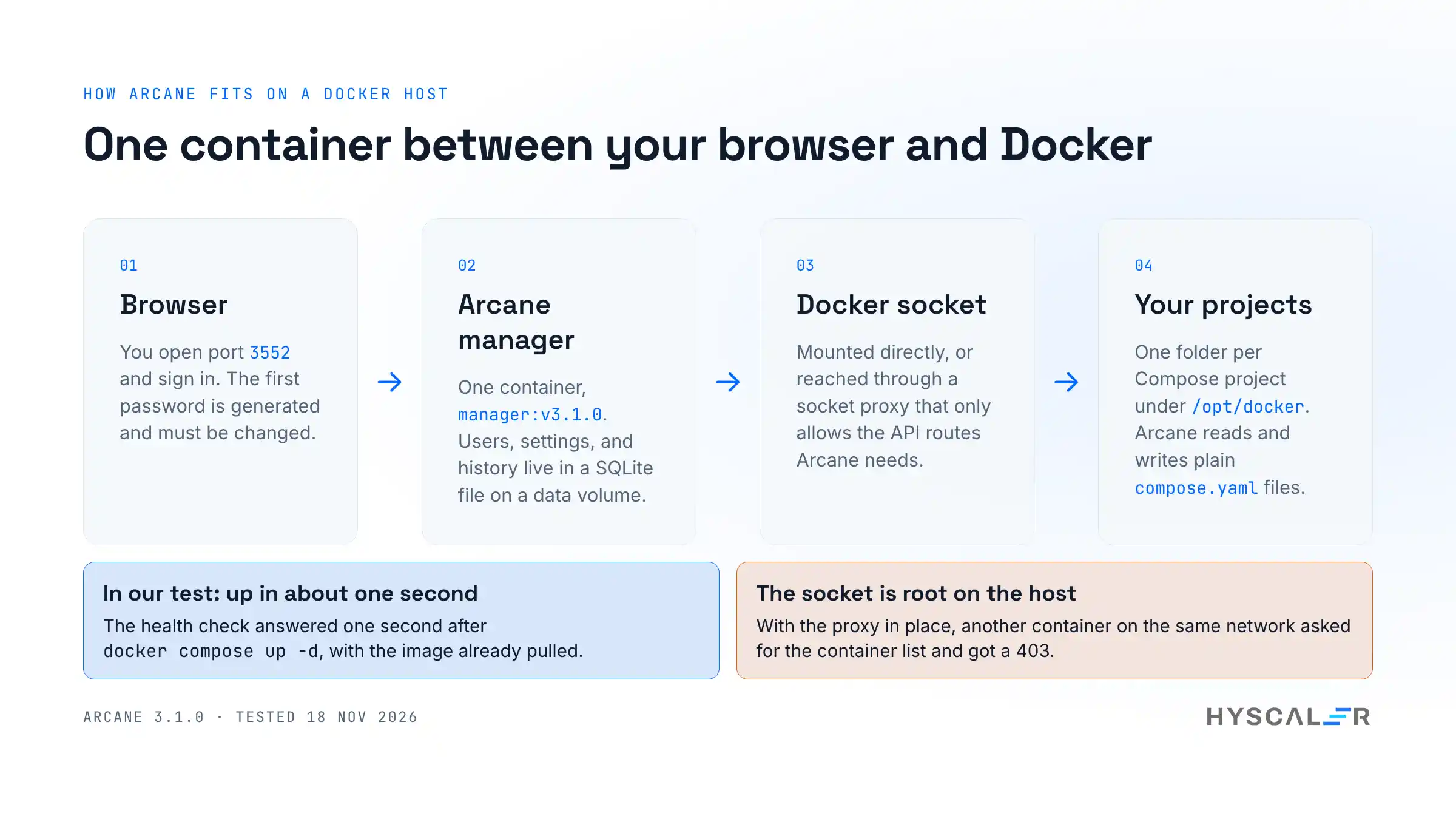
Arcane on one host has four parts:
- The manager is one container from the image
ghcr.io/getarcaneapp/manager. It serves the web UI and the API on port 3552. - The Docker socket (
/var/run/docker.sock) is how the manager controls Docker. It can be mounted directly or reached through a socket proxy. - The data volume (
/app/data) holds a SQLite database with users, settings, and history. You can point it at Postgres instead. - The projects folder holds one folder per Compose project. It is mounted at the same path inside the container as on the host, so relative paths in your Compose files mean the same thing to Arcane and to Docker.
The image has no shell. That is good for security, and it explains one of the gotchas below: docker exec arcane cat ... does not work.
How to install Arcane Docker manager step by step
We ran these steps on Docker Engine 27.5.1 with Docker Compose 2.33.0 on Linux arm64. To keep our own containers out of the test, the Docker host was itself a container (Docker-in-Docker) on a Mac. The steps are the same on a normal Linux server.
1. Check the prerequisites
You need Docker Engine and the Compose plugin:
docker version --format '{{.Server.Version}}'
docker compose version
Arcane publishes images for amd64, arm64, arm/v7, and riscv64, so a Raspberry Pi or an ARM cloud server works.
2. Generate an encryption key
Arcane encrypts stored secrets with a key you supply. It can generate one for you:
docker run --rm ghcr.io/getarcaneapp/manager:v3.1.0 /app/arcane generate secretThe output has a two-line header before the key:
BASE64
------
<your key>
Copy only the last line. openssl rand -hex 32 also works, because the key is a passphrase of at least 32 characters.
Older guides also tell you to generate a JWT_SECRET. Version 3 does not use one. It signs sessions with its own key.
3. Create the projects folder and fix its owner
sudo mkdir -p /opt/docker
sudo chown 1000:1000 /opt/docker
The second line is not in the install docs, and we needed it. See the gotchas section for what happens without it. Use the same numbers you put in PUID and PGID below.
4. Write the Compose file
Create a folder for Arcane itself, for example ~/arcane, with two files. First, .env, so the key stays out of the Compose file:
ARCANE_ENCRYPTION_KEY=<your key>You can also skip the copy and paste. This one line generates the key and writes the file, so the key never appears on your screen:
echo "ARCANE_ENCRYPTION_KEY=$(docker run --rm ghcr.io/getarcaneapp/manager:v3.1.0 /app/arcane generate secret | tail -n 1)" > .envThen compose.yaml:
services:
  arcane:
    image: ghcr.io/getarcaneapp/manager:v3.1.0
    container_name: arcane
    ports:
      - "3552:3552"
    volumes:
      - /var/run/docker.sock:/var/run/docker.sock
      - arcane-data:/app/data
      - /opt/docker:/opt/docker
    environment:
      - ARCANE_APP_URL=http://localhost:3552
      - PUID=1000
      - PGID=1000
      - ARCANE_ENCRYPTION_KEY=${ARCANE_ENCRYPTION_KEY}
      - ARCANE_PROJECTS_DIRECTORY=/opt/docker
      - ARCANE_ANALYTICS_ENABLED=false
    cgroup: host
    restart: unless-stopped

volumes:
  arcane-data:
Three choices here differ from the official example:
- The version is pinned to
v3.1.0, notlatest. Version 3 is four days old and ships fixes every few days. Pin it, and upgrade when you choose to. - The key comes from
.env. The official example puts it inline. - Analytics is off. That line is optional. The privacy section below explains what it controls.
Change ARCANE_APP_URL to the address you will open in the browser. From another machine, that is http://<server-ip>:3552.
5. Start it
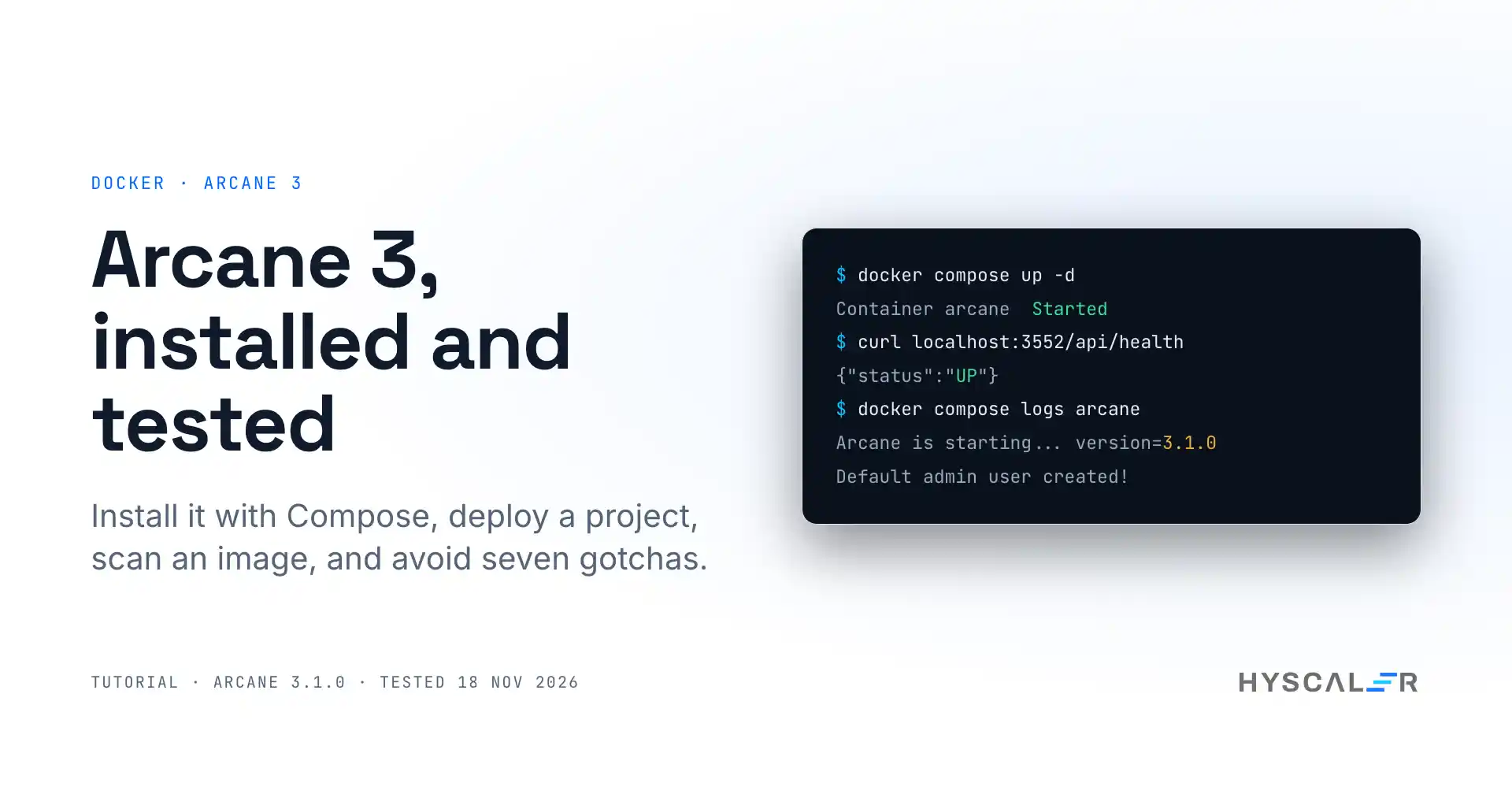
docker compose up -d
docker compose logs arcane | head -20
With the image already pulled, our instance answered its health check about one second after the container started. The log shows the database being created and the first user:
INF Arcane is starting... version=3.1.0
INF Database migrations completed successfully provider=sqlite targetVersion=116
INF 👑 Default admin user created!
INF 🔑 Default admin username username=arcane
INF 🔑 Default admin password was generated and written to a file file=data/initial-admin-password
INF ⚠️  User will be prompted to change password on first login
6. Check it worked
curl http://localhost:3552/api/health{"$schema":"http://localhost:3552/api/api/schemas/HealthResponse.json","status":"UP"}7. Sign in for the first time
Version 3 has no fixed default password. It generates one and writes it to a file inside the container. Copy the file out:
docker compose cp arcane:/app/data/initial-admin-password .
cat initial-admin-password
Open http://localhost:3552, sign in as arcane with that password, and Arcane asks for a new one before it shows anything else. The new password needs at least 12 characters with an uppercase letter, a lowercase letter, a number, and a symbol. Delete the copied file afterwards.
The dashboard then lists your host as one agent, with its containers, images, pending updates, a risk score, and disk space you can reclaim.
Using Arcane in a real project
Deploy a Compose project from the browser
Open Projects and click Create Project. Arcane opens an editor with a starter file:
services:
  nginx:
    image: nginx:alpine
    container_name: nginx_service
    ports:
      - "${NGINX_HOST_PORT:-8080}:80"
    volumes:
      - nginx_data:/usr/share/nginx/html
    restart: unless-stopped

volumes:
  nginx_data:
    driver: local
The editor checks the file against the Compose schema as you type. Click the project name to rename it (we used web), then Create Project. Arcane writes the file to /opt/docker/web/compose.yaml, owned by the user from PUID.
The project starts as Stopped. Click Up. Arcane pulls the image and starts the container, and the status changes to Running. Then:
curl -s -o /dev/null -w '%{http_code}\n' http://localhost:8080printed 200 in our test.
Let Arcane pick up projects you already have
You do not have to create projects in the UI. We made one by hand:
sudo mkdir -p /opt/docker/whoami
sudo tee /opt/docker/whoami/compose.yaml > /dev/null <<'EOF'
services:
  whoami:
    image: traefik/whoami:v1.11
    container_name: whoami
    ports:
      - "8081:80"
    restart: unless-stopped
EOF
sudo chown -R 1000:1000 /opt/docker/whoami
Arcane noticed it within seconds:
INF Discovered new project with unknown status project=whoami path=/opt/docker/whoamiIt appeared in the Projects list as Stopped. Clicking Up had it running 9.1 seconds later, including the image pull. This matters if you are moving from Portainer or plain Compose: put your existing folders under the projects path and they show up.
Read logs and open a shell
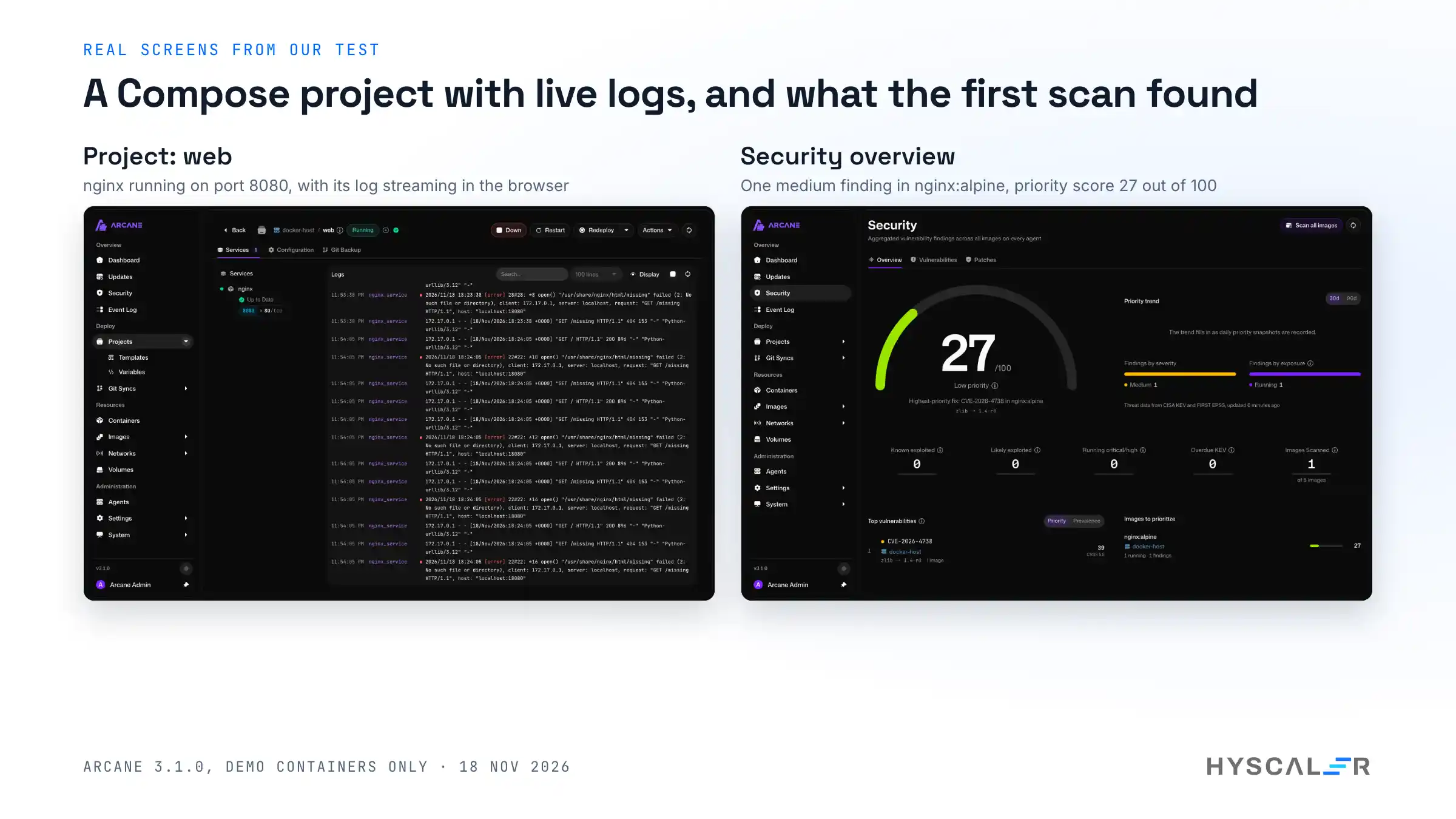
The Services tab of a project has a log panel. Click Start and the lines stream in live. We sent a few requests to nginx, including one for a page that does not exist, and watched them arrive:
172.17.0.1 - - [18/Nov/2026:18:23:38 +0000] "GET / HTTP/1.1" 200 896 "-" "Python-urllib/3.12" "-"
[error] 23#23: *2 open() "/usr/share/nginx/html/missing" failed (2: No such file or directory)
172.17.0.1 - - [18/Nov/2026:18:23:38 +0000] "GET /missing HTTP/1.1" 404 153 "-" "Python-urllib/3.12" "-"
Click a container for more. The detail page has ten tabs: Overview, Metrics, Processes, Logs, Shell, Configuration, Networks, Storage, Compose, and Inspect. Shell opens sh inside the container in the browser, which replaces most of the reasons to SSH into the host.
Scan an image for vulnerabilities
Open Images. Each row has a Not scanned badge. Click it and Arcane runs a Trivy scan in a temporary container. The badge moves through “Creating container” and “Scanning image”, then shows a count.
Our first scan, of nginx:alpine, took about 75 seconds, because it had to download the scanner and its database. It found one medium finding, in zlib, with a fixed version available.
The Security page then gave the host a priority score of 27 out of 100 (“Low priority”) and named that finding as the highest-priority fix. It also checks findings against the CISA list of known exploited vulnerabilities and EPSS scores, so the score reflects what is being attacked, not only how severe a finding looks on paper. The page says it plainly: a scan with no findings is not a guarantee.
See what talks to what
Networks > Topology draws every network and the containers attached to it. On our host, it showed three project networks with one container each. It is a quick way to confirm that two projects cannot reach each other.
How to lock down the Docker socket with a proxy
Anything that holds /var/run/docker.sock can start a privileged container and take over the host. Arcane has to hold it to do its job. A socket proxy reduces what it can ask for.
The socket proxy page gives a full Compose file using wollomatic/socket-proxy. The idea is short:
- The proxy container mounts the socket and listens on an internal network.
- Arcane does not mount the socket. It gets
DOCKER_HOST=tcp://docker-socket-proxy:2375. - The proxy only accepts connections from the container named
arcane, and only for an allowlist of API routes.
We ran that file with version 1.13.1 of the proxy. Arcane came up healthy in 2 seconds and found our projects through it. Then we started another container on the same network and asked the proxy for the container list:
intruder GET /containers/json -> 403
level=WARN msg="blocked request" reason="forbidden IP" method=GET URL=/containers/json response=403
Be clear about what this buys you. The docs say it themselves: the allowlist still lets Arcane create containers and run commands in them, because managing stacks needs that. The proxy stops other containers from using the socket and blocks routes Arcane never needs. It does not make Arcane harmless. The login is still the real gate.
Security and privacy: what leaves your machine
We read the source for the analytics job (backend/internal/scheduler/analytics_job.go at commit 117da0f) and compared it with the analytics page. They agree.
- What is sent: by default, about once a day, Arcane posts three fields to
checkin.getarcane.app: its version, a random instance ID, and whether it is a manager or an agent. No project names, no user data, no environment variables. Your IP address is visible to that server, as with any request. - How to turn it off: set
ARCANE_ANALYTICS_ENABLED=false, as in our Compose file. Beta builds send nothing. - Other outbound calls: image pulls, update checks against your registries, and the Trivy database download from GitHub Container Registry. The threat data on the Security page comes from CISA and FIRST, and the setting that fetches it can be turned off for air-gapped hosts.
Handing a tool the keys to your host because it saves time is exactly the kind of shortcut we wrote about in the security debt of moving fast. Arcane does more than most to earn the trust: no default password, a forced password change, no shell in the image, and signed release artifacts. It is still a web app with root on your server. Do not put port 3552 on the public internet without TLS and a reverse proxy in front.
Upgrading from Arcane 2.x to 3.0
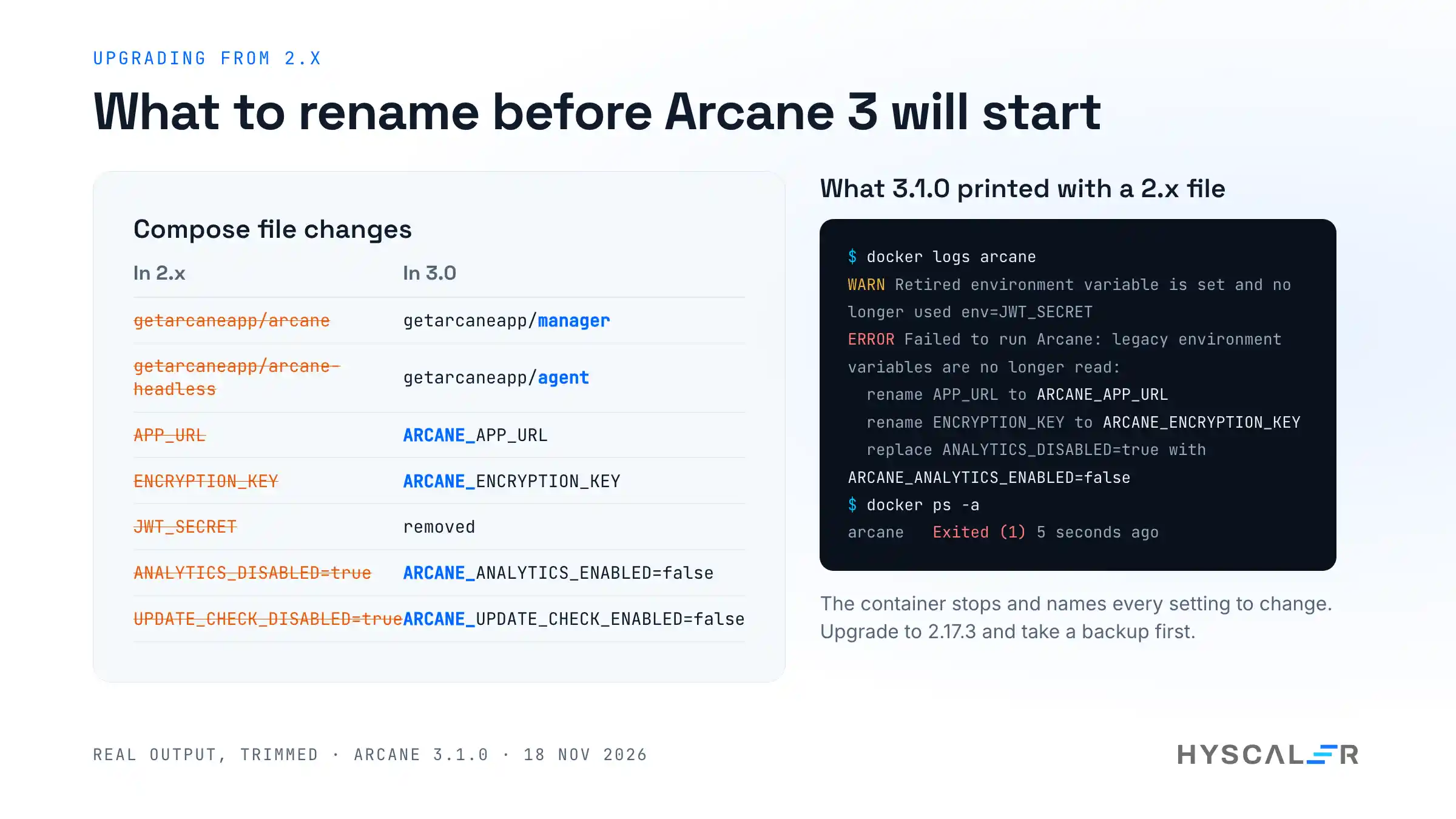
If you already run Arcane, do not change the tag and hope. We started 3.1.0 with a Compose file in the 2.x style, as older guides show it, and it exited at once:
WARN Retired environment variable is set and no longer used; remove it from your environment env=JWT_SECRET
ERROR Failed to run Arcane error="legacy environment variables are no longer read:
rename APP_URL to ARCANE_APP_URL
rename ENCRYPTION_KEY to ARCANE_ENCRYPTION_KEY
replace ANALYTICS_DISABLED=true with ARCANE_ANALYTICS_ENABLED=false"
The error is a good one: it tells you every rename. The migration guide has the full list. The short version:
| In 2.x | In 3.0 |
|---|---|
ghcr.io/getarcaneapp/arcane | ghcr.io/getarcaneapp/manager |
ghcr.io/getarcaneapp/arcane-headless | ghcr.io/getarcaneapp/agent |
APP_URL, ENCRYPTION_KEY, PROJECTS_DIRECTORY | Same names with an ARCANE_ prefix |
JWT_SECRET | Removed |
ANALYTICS_DISABLED=true | ARCANE_ANALYTICS_ENABLED=false |
UPDATE_CHECK_DISABLED=true | ARCANE_UPDATE_CHECK_ENABLED=false |
| Six-field cron schedules | Five fields, without seconds |
/api/environments/... | /api/agents/... |
The guide’s order of work is: upgrade to 2.17.3 first, back up the database and /app/data, change the Compose files, then restart the manager and every agent. The manager, the agents, and the CLI all have to be on 3.0 together.
Limits and gotchas
These are the things that surprised us, with the fix for each.
- Older install guides do not work on version 3. A Compose file with
ENCRYPTION_KEY,APP_URL, or thearcaneimage name fails at startup. Use the file in this guide or the current docs. - The first project fails if the projects folder belongs to root. We followed the docs and created a project. The error was: “failed to create project directory: /opt/docker/web: permission denied (projects directory /opt/docker must be writable by uid 1000)”. Docker creates a missing bind-mount folder as root. Run
sudo chown 1000:1000 /opt/docker, matching yourPUIDandPGID. - You cannot
execinto the Arcane container.docker exec arcane cat /app/data/initial-admin-passwordfails with “executable file not found”, because the image has no shell or tools. Usedocker compose cp, as the docs say. - The key generator prints a header.
generate secretprints “BASE64” and a line of dashes before the key. Paste only the key. - The old opt-out variables now stop startup. The migration guide says
ANALYTICS_DISABLEDandUPDATE_CHECK_DISABLEDare ignored with a warning. On 3.1.0, with only those two old names left in the file, the container refused to start and told us the new names. That is the safer behaviour, since your opt-out cannot be dropped without you noticing. - The first scan is slow. About 75 seconds for one small image, because the scanner and its database download first. The scanner image then shows up in your image list.
- Version 3 is days old. The issue tracker has open reports about slow page loads after upgrading with agents (issue 4840) and a webhook that does not redeploy (issue 4825). Pin a version and read the release notes before each upgrade.
What we did not test: remote agents, Swarm, Podman, Git sync, backups, single sign-on, LDAP, passkeys, automatic updates, image builds, the CLI, and the Linux install script. We also ran it for an evening, not for a month.
Arcane vs Portainer vs Dockhand
We started all three on the same host and measured two things: the size of the image on disk, and memory after start with nobody signed in. These are small measurements, not a benchmark. Portainer had not had its admin account created yet, and we used only Arcane in depth.
| Arcane | Portainer CE | Dockhand | |
|---|---|---|---|
| Version we ran | 3.1.0 | 2.45.3 | latest image built 16 November 2026 |
| Licence | BSD-3-Clause | zlib | Business Source License 1.1 |
| Free for a company in production | Yes | Yes, for the Community Edition | No, a commercial licence is needed |
| GitHub stars (18 November 2026) | 9,714 | 38,850 | 7,192 |
| Repository created | April 2025 | May 2016 | December 2025 |
| Image size on disk (arm64) | 170.6 MB | 148.3 MB | 692.0 MB |
| Memory after start, idle | about 116 MiB | about 23 MiB | about 93 MiB |
| First start in our test | Generated admin password, forced change | Redirected to its setup page (we went no further) | Started with authentication disabled, and said so in its log |
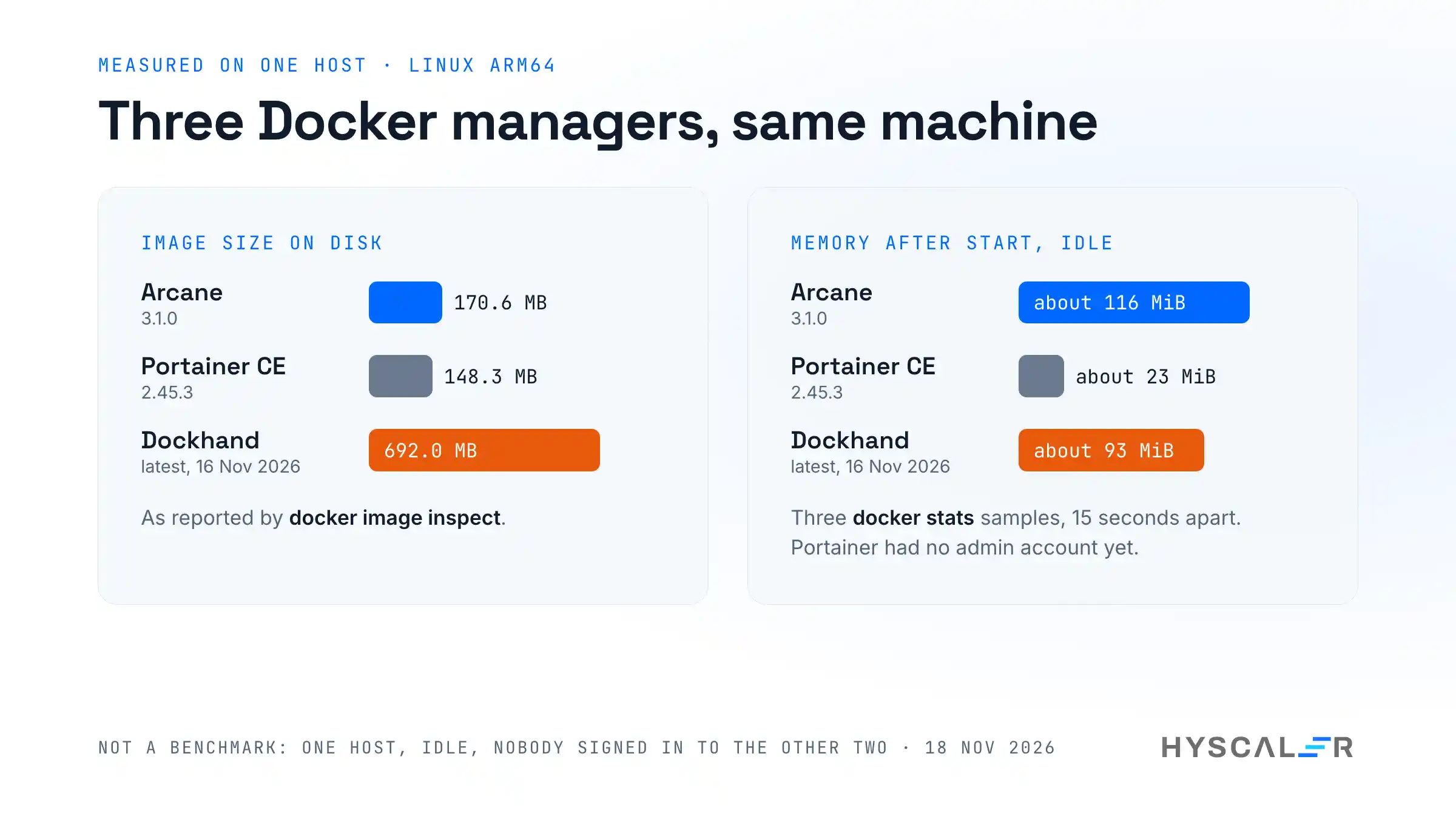
How to read it:
- Portainer is the lightest and the oldest, and it also manages Kubernetes. Its Community Edition is free, and some team features are reserved for the paid Business Edition. If you already run it and it does what you need, there is no reason to move.
- Dockhand is the newest. Its licence allows free use at home, in non-profits, and in testing, and asks businesses to pay for production use. Each version becomes Apache 2.0 four years after release. It started with authentication off in our run, so set that up before anything else.
- Arcane is the one with a permissive open-source licence and everything included. It used the most memory of the three at idle, which will not matter on a server but might on a small single-board computer.
For independent views, Rackspace’s list of Portainer alternatives and Bitdoze’s Arcane and Dockhand comparison cover features we did not test. Check their version numbers against the current releases, since both tools move fast.
Who should use Arcane, and who should wait
Use it now if you run Compose stacks on one to a few hosts and want a UI that works on plain files. The licence also lets a company use it without a conversation about tiers.
Wait a few weeks if you are on 2.x with several agents. Version 3 changed how agents connect, and the open reports are about exactly that setup. Let a few more point releases land, then follow the migration guide.
Stay on Portainer if you manage Kubernetes with it, or if its lower memory use matters on your hardware.
Frequently asked questions
What is Arcane Docker?
Arcane is a free, open-source web interface for managing Docker on your own servers. It runs as a single container, shows containers, images, networks, volumes, and Compose projects in a browser, and lets you deploy, update, and scan them. It is licensed under BSD-3-Clause, and version 3.1.0 was released on 18 November 2026.
How do I install Arcane with Docker Compose?
Generate a key with docker run --rm ghcr.io/getarcaneapp/manager:v3.1.0 /app/arcane generate secret. Write a Compose file that mounts the Docker socket, a data volume, and your projects folder, and sets ARCANE_ENCRYPTION_KEY and ARCANE_APP_URL. Run docker compose up -d and open port 3552. In our test, it was up in about one second.
What is the default login for Arcane?
The username is arcane. Version 3 has no fixed default password. On first start, it generates one and writes it to /app/data/initial-admin-password inside the container. Copy it out with docker compose cp arcane:/app/data/initial-admin-password ., sign in, and Arcane makes you set a new password of at least 12 characters.
Is Arcane better than Portainer?
It depends on your needs. Arcane is BSD licensed with every feature included, and its UI works on plain Compose files. Portainer is older, lighter (about 23 MiB of memory against 116 MiB in our test), and also manages Kubernetes, but keeps some team features for its paid edition. For Compose on a few hosts, Arcane is a strong choice.
Should I use Arcane or Dockhand?
Check the licence first. Arcane is BSD-3-Clause, so a company can run it in production for free. Dockhand uses the Business Source License 1.1, which is free for personal and non-profit use and asks businesses to buy a commercial licence for production. In our test, Dockhand’s image was also four times larger, at 692 MB against 171 MB.
Is Arcane free?
Yes. Arcane is open source under the BSD-3-Clause licence, and its site states “Always free. Forever.” We found no paid edition: roles, single sign-on, and vulnerability scans are all in the same build. The project is supported by sponsors on GitHub.
Is it safe to give Arcane access to the Docker socket?
The Docker socket gives full control of the host, so Arcane is as sensitive as an SSH key. Reduce the risk with a strong password, TLS, and a reverse proxy, and never expose port 3552 directly to the internet. A socket proxy also helps: in our test, it refused another container on the same network with a 403.
How do I upgrade Arcane from 2.x to 3.0?
Upgrade to 2.17.3 first and start it once. Back up the database and /app/data. Then change every Compose file: use the manager and agent images, add the ARCANE_ prefix to every Arcane variable, and remove JWT_SECRET. Restart the manager, then every agent. If you miss a variable, 3.x stops and lists each rename.
Does Arcane send telemetry?
By default, it sends a small heartbeat about once a day with three fields: the version, a random instance ID, and whether it is a manager or an agent. We confirmed this in the source at commit 117da0f. Set ARCANE_ANALYTICS_ENABLED=false in the environment to turn it off. No project or user data is included.
Does Arcane support Docker Swarm and Podman?
According to its documentation, yes: Arcane has pages for Swarm clusters, services, configs, and secrets, and for Podman pods, Quadlets, and Kubernetes YAML. It also manages remote hosts through agents. We did not test any of these. Our test covered a single Docker host with Compose projects.
Does Arcane have an MCP server?
Not in the project itself. We searched the source at version 3.1.0 and found no Model Context Protocol server. Arcane does have a documented REST API and API keys, and third-party MCP servers that wrap that API are listed in public directories. We have not tested them, so treat them as you would any unreviewed code.
Why does my Arcane container fail to start after an update?
The most likely cause is a 2.x Compose file running a 3.x image. Version 3 refuses to start when it sees old variable names such as ENCRYPTION_KEY or APP_URL. Run docker compose logs arcane: the error lists each variable to rename. Add the ARCANE_ prefix, remove JWT_SECRET, and start again.
Watch the setup video
The video records the same steps on a real terminal next to the running app. It covers the install, the first sign-in, a project deployed from the browser, live logs, a vulnerability scan, and the errors that older guides now cause. Link to follow once it is on the HyScaler YouTube channel.
Try it
The code is at github.com/getarcaneapp/arcane and the docs are at getarcane.app. The project also runs a public demo, linked from its home page, if you want to click around before you install anything.
If your team runs Docker in production and wants a second pair of eyes on the setup, HyScaler builds and operates web and mobile products for clients. More of our engineering notes are here. Disclosure: I work at HyScaler.
References
- Arcane on GitHub, tested at commit
117da0f, version 3.1.0 - Arcane installation docs
- Migrate to 3.0
- Socket proxy
- Analytics
- Arcane 3.0.0 release notes and 3.1.0 release notes
- wollomatic/socket-proxy
- Trivy
- Portainer on GitHub
- Dockhand licence
- The Best Portainer Alternatives in 2026, Rackspace Spot
- Arcane vs Dockhand, Bitdoze