
Table of Contents
We manage multiple articles and news sites. Each one publishes somewhere between 10 and 20 stories a day, and the archives are already in the tens of thousands of pages.
A CMS like WordPress can do the whole job for sites like these: editors write in it, and its theme serves the pages to readers. We moved away from that setup for three reasons. We wanted full control of the front end, and a theme with plugins only allows that up to a point. We wanted pages that load fast without a pile of caching plugins, for readers and for search and answer engines alike. And we wanted fewer things exposed to the internet.
That last one matters a lot for a news site. So much of the web runs on WordPress that a public install is a constant target. Bots hammer the login page xmlrpc.php with password guesses. Vulnerable plugins and themes, which is where Patchstack’s yearly reports find the large majority of new WordPress vulnerabilities, get used for SQL injection, cross-site scripting, and malicious file uploads, and a hacked site ends up serving spam links or redirects to its own readers. A traffic flood is also harder to absorb when every request runs PHP and a database query.
So editors still work in WordPress, but readers never see it. The public sites are built with Next.js, React, or Astro and pull their content from the CMS, an arrangement people call headless WordPress, or more generally, a headless CMS. Readers get plain files. WordPress sits behind a firewall where only editors and the build machine can reach it, so there is no public login page to guess at and no plugin code running when a visitor asks for a page.
It works well, with one catch that gets worse as a site grows. Every time someone publishes an article, the whole static site gets rebuilt. On a small site you don’t notice. On a big archive with twenty publishes a day, the builds eat the day.
We ended up writing a tool for this, called hybld. It does incremental builds: when one article changes, it rebuilds the pages that article touches and leaves the rest of the site alone. Below is the problem as we see it, what we looked at before building anything, and how the tool works.
Key points
- Static sites rebuild every page on every publish. Build time grows with the archive even though you publish the same number of stories each day.
- hybld is an open-source (MIT) tool for incremental builds: change one article, and it rebuilds that page plus the listing pages that show it.
- It works with React + Vite, Next.js, Astro, SvelteKit, and Nuxt and reads from WordPress, Strapi, Contentful, Sanity, or any headless CMS with a REST or GraphQL API.
- Server-side rendering and Next.js ISR also solve freshness, but both need a server running behind every page. ISR isn’t available at all for static exports.
- Static pages suit both SEO and AEO. Search crawlers and AI answer engines get complete HTML with no JavaScript to run, and WordPress stays out of public reach.
- In our tests, publishing one article into a 100000-page site took under a second on React + Vite, and a 300000-article build ran inside 400 MB of memory.
- It isn’t meant for personalized pages, for content that changes every few seconds, or for small sites where a full build is already quick.
Why we use a separate front end and what it costs
Why not just use WordPress for the front end?
WordPress is a good editing tool, and our editors know it well. As the public face of a busy site, it gave us three problems, and each deserves a little more detail than the opening gave it.
The first was control. Themes and page builders cover a lot of ground, but as soon as a design needs something the theme didn’t plan for, you end up fighting it. With React or Astro, the markup is ours.
The second was speed. WordPress assembles a page with PHP and a database when someone asks for it. You can make that fast, and plenty of people do, but it takes page caching, object caching, and a CDN, and each layer is another place for a stale page to hide. A prebuilt HTML file doesn’t need any of it.
The third was security. The attacks are described above. The part people underestimate is the upkeep. Every plugin update on a live site is a small risk, and every skipped update is a bigger one. When the public can’t reach WordPress, a late patch stops being an emergency. It still has to be done.
None of this means WordPress is a bad choice. A well-kept WordPress site on decent hosting, with a short plugin list, is fine for a lot of publishers. Going headless swaps one set of problems for another, and the main new problem is the one this article is about.
Are static sites good for SEO and AEO?
Yes, and for a publisher that was part of the appeal. Search engines and AI answer engines both do better with pages that are fast and complete on arrival.
- The whole article is in the HTML. A crawler gets the headline, body, links, and structured data in the first response, with nothing to run. Google can render JavaScript, but it does that later and not always. The crawlers behind AI answer engines mostly don’t run it at all: Vercel’s study of AI crawler traffic found that none of the major ones rendered JavaScript. A page that needs it to show its content may never be read.
- Pages load fast. A prebuilt file served from a CDN gives a quick first byte and a steady layout, which helps Core Web Vitals. Google uses those as a ranking signal. It’s a small one, but it counts when two pages are otherwise close.
- Crawlers cover more of the archive. Fast, reliable responses let Googlebot fetch more pages per visit. That matters when the archive runs to tens of thousands of URLs.
- A traffic spike doesn’t slow anything down. A story that takes off is served from the same kind of file as a quiet one, so neither readers nor crawlers hit timeouts on the busiest day.
Static pages don’t do the work for you. Clear headings, direct answers, structured data, and a current sitemap still decide most of it. A static build only makes sure that what you wrote is what the crawler sees.
There’s one catch for news. A static page is only as fresh as the last build, so when builds are slow, a new story waits in the queue before any crawler can see it.
Every publish becomes a build.
Once the front end is static, the only way new content reaches readers is through a build, and a static build renders everything.
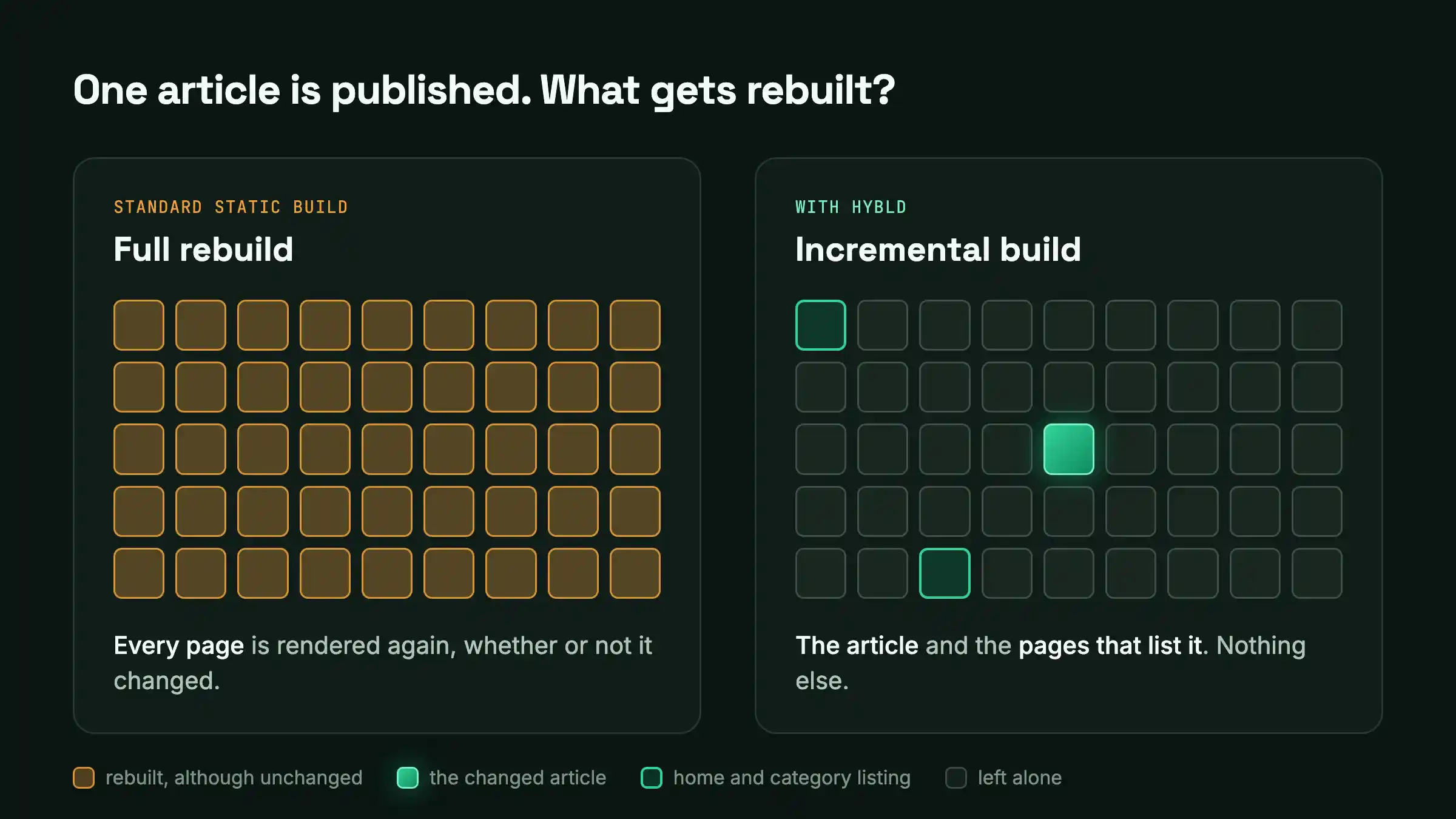
Take a site where a full build has crept up to 15 minutes. Twenty publishes a day, which is five hours of building. If two editors publish five minutes apart, the second story waits for the first build to finish or cancels it and starts over. Fixing a typo in a headline costs the same 15 minutes as launching a redesign.
Other teams have written about the same thing. The case study on moving Backlinko to headless WordPress and Next.js mentions rebuilds of up to 25 minutes at one stage.
What bothered us most was the direction. The newsroom’s output is flat, 10 to 20 stories a day, but build time tracks the size of the archive. So it creeps up every month while the amount of new work stays the same.
What that does day to day
Stories go out late, which matters a lot when the story is news. Editors start holding changes back so they can publish several at once, and at that point the build system is deciding how the newsroom works.
There are quieter costs too. CI runners are busy most of the day. A full build asks WordPress for every post in a short burst, and on modest hosting, that can make the admin sluggish for editors while it runs. Long builds also fail more often, simply because there are more CMS requests that can time out, and one failure usually fails the lot.
And all of it happens because one row changed in a database. The code is the same as it was an hour ago.
SSG, SSR, or ISR: what are the options?
If you search for ways to cut static build times, you’ll find the same handful of suggestions. Here’s how each one looked from where we sit.
Server-side rendering (SSR)
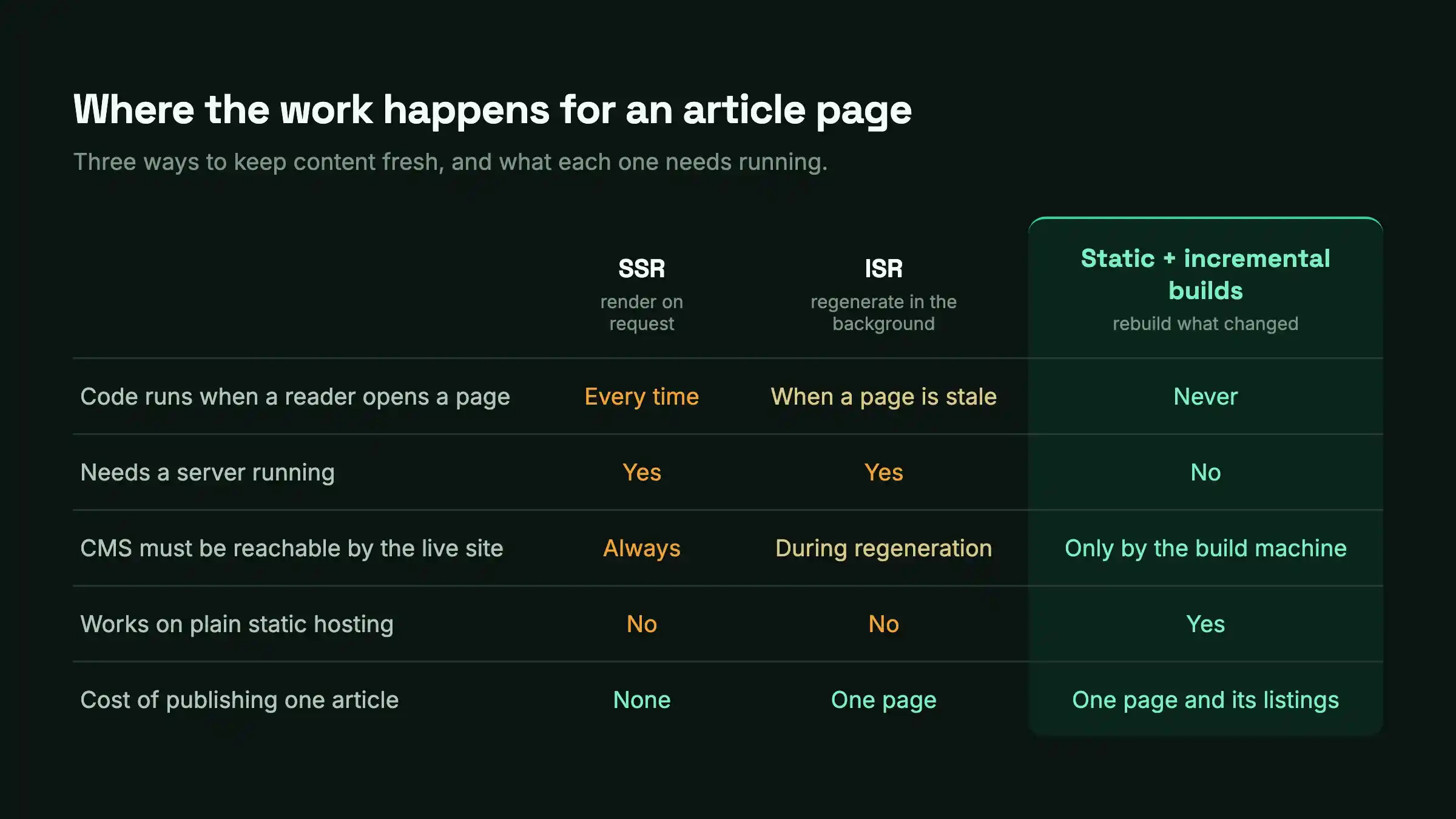
With SSR, the page is rendered when it’s requested, so content is always current. The price is that you’re now running a service. It needs capacity planning, health checks, and somebody on call, whereas a static site needs a bucket and a CDN.
It also puts the CMS in the path of every page view. When the CMS is slow, the site is slow. When it’s down, pages fail, unless you add a cache in front, and then cache invalidation is your problem. Traffic spikes hurt as well: a story that takes off is exactly when a render server is most likely to struggle.
SSR makes sense when the HTML is different for each visitor. An article page isn’t. Everyone gets the same thing, so rendering it again per request buys nothing.
Incremental Static Regeneration (ISR) in Next.js
ISR regenerates a page in the background, either on a timer or when you ask it to. If your site runs on a platform that hosts Next.js for you, it’s a good answer, and you should probably just use it.
It didn’t fit us for two reasons. ISR needs a Next.js server, and the Next.js documentation says plainly that it isn’t supported with a static export. If you ship plain files (output: "export") to S3, Nginx, or a CDN, it isn’t an option.
Self-hosting it is also more work than it sounds. Each server instance keeps its own cache by default, so with several instances you can get different versions of a page depending on which one answers. The self-hosting guide recommends a shared cache handler on Redis or S3. That fixes it, but by then you’re running a server fleet and a cache store for pages that could have been files.
A smaller point that a few guides raise: if you set a short revalidation time across thousands of pages, they all regenerate on that timer whether or not anything changed, and the load on the CMS comes straight back. On-demand revalidation avoids this, though it needs webhooks like everything else here.
And ISR only exists in Next.js, which doesn’t help our Astro sites.
The usual advice for long build times
Some guides suggest building only the most recent posts and generating the rest on demand. That’s fine if there’s a server or serverless function to do the generating. On plain static hosting, there isn’t.
Another common tip is to fetch only the latest content at build time. It’s quick, but older pages then never get rebuilt, so a correction to last year’s article, or a template change, never reaches them.
You can split a large site into several smaller ones that build separately. It helps, and it also multiplies your configuration, your deploys, and your cross-linking headaches.
A bigger build machine with dependency caching speeds up installs and bundling. The rendering of every page still happens.
Then there’s switching to a faster generator such as Hugo. It is fast, but it means giving up React, Next.js, or Astro, and build time still grows with the archive.
Each of these makes a full build cheaper. We wanted to stop doing full builds, which means incremental builds: work out what changed and rebuild only that.
Incremental builds in other tools
This is our understanding at the time of writing. These projects change quickly, so check their docs before relying on this table.
| Approach | What you get | Where it stops |
|---|---|---|
| Next.js ISR | Pages regenerate on a timer or on demand | Needs a Next.js server; not available with static export |
| Astro incremental builds | Skips unchanged prerendered pages (experimental, off by default) | The build still enumerates every page to decide; pages need a cache key; the cache directory must be restored in CI |
Eleventy --incremental | Rebuilds the template you edited | Aimed at local development; a cold start is a full build |
| Gatsby incremental builds | Worked well on Gatsby Cloud | Tied to a hosted product that was later folded into Netlify |
| Host-level build caching | Faster installs and bundling | The page rendering step still runs for every page |
| Splitting the build across CI jobs | Shorter wall-clock time | The same total work on more machines |
| Client-side rendering | No build at all | Poor SEO, slow first paint, and the CMS is exposed to every browser |
Most of these work out what to rebuild by looking at which source files changed. On a content site the source files usually haven’t changed at all, which is why none of them quite fit our case.
How incremental builds work in hybld
hybld looks at the content instead of the code. It keeps a small SQLite database, which we call the manifest, with one row for every page it has built. Each row holds the page’s route, a hash of the data the page was built from, and which version of the site’s code built it.
What happens on a publish
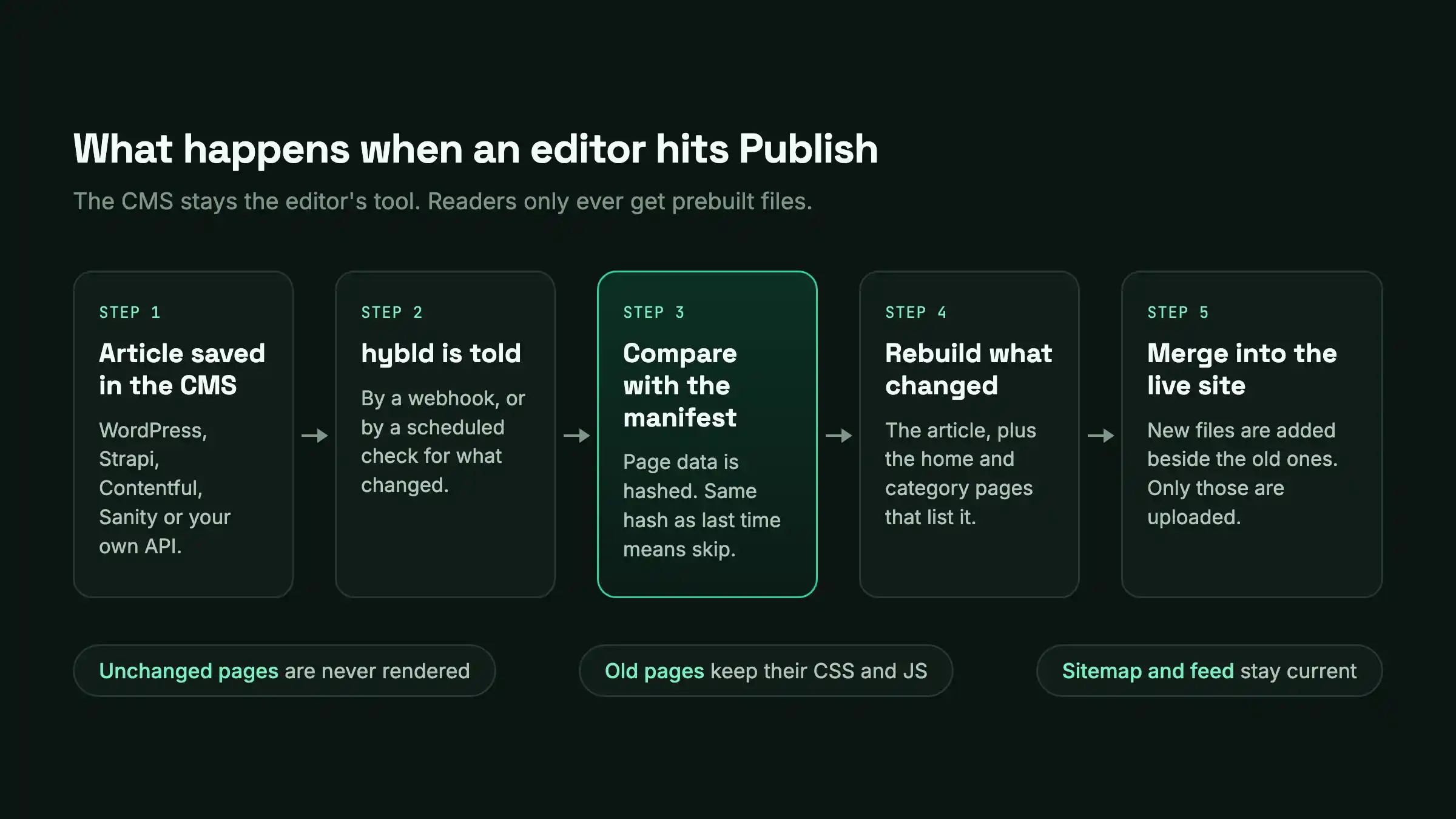
- The CMS fires a webhook, or a scheduled job asks the CMS what changed since the last run.
- hybld fetches only those articles and hashes the data each page would render.
- If a page’s hash matches the manifest, it’s skipped. Otherwise it’s rebuilt.
- Each article says which listing pages it appears on, for example the home page and its category archive. Those get rebuilt too, once each, no matter how many articles point at them.
- New files are written into the existing output folder next to the old ones. Hashed CSS and JavaScript files are added and never overwritten, so a page built last month still finds the assets it references.
- The sitemap, RSS feed and redirects file are refreshed from the manifest.
The two functions that matter
Most of the behaviour comes from two functions you write in the config.
data() returns what a page needs to render. hybld hashes that value, and if the hash is the same as last time, the page is left alone. So anything the page shows has to come from data().
dependents() lists the other pages an article can affect. Only those are touched when the article changes.
How pages are rendered
For plain React + Vite, hybld renders the pages itself in a pool of worker threads. This is the quick path. Once things are warm, rebuilding a single page takes milliseconds.
Next.js, Astro, SvelteKit, and Nuxt have their own build systems, and we didn’t want to replace them. So for those, hybld does this:
- It writes the changed pages and their data to a scope file.
- It runs the framework’s normal production build.
- Your dynamic routes read the scope file to find out which pages to generate. The framework builds a dozen pages where it would have built the whole archive.
- hybld copies those pages, and any new hashed assets, into the deployed site.
Your pages stay ordinary framework pages, with your own components and layouts. Client-side navigation between pages from different builds still works, because each page’s navigation data (React Server Component payloads, SvelteKit’s __data.json, Nuxt’s _payload.json) is copied along with it.
Other things it takes care of
When an article is unpublished, its page is removed, and its listings are rebuilt so it drops out of them. When a slug changes, the old page goes and a redirect from the old URL is recorded, in formats Netlify and Nginx can use.
Each page remembers which build of your code produced it. After you deploy new code, the old pages keep working, and you can bring them up to date gradually or in one go.
There’s also image handling (CMS images can be downloaded, resized, and converted to WebP so the site doesn’t hotlink the CMS), hreflang links in the sitemap for translated pages, and draft previews rendered to a hidden, noindexed URL. Every build writes a report of exactly which files were created, updated, and deleted, which is handy for CDN purges.
How to set it up
1. Install
# React + Vite
npm install -D hybld @hybld/adapter-wordpress

# Next.js, Astro, SvelteKit or Nuxt: add the matching package
npm install -D hybld @hybld/next @hybld/adapter-wordpress
2. Describe the site
// hybld.config.ts
import { defineConfig } from "hybld";
import { wordpress } from "@hybld/adapter-wordpress";

export default defineConfig({
  adapter: wordpress({ baseUrl: process.env.CMS_URL, trackDeletes: true }),
  outDir: "dist",
  pages: {
    // One page per CMS article.
    article: {
      route: (a) => `/articles/${a.slug}/`,
      data: (a) => ({ title: a.title.rendered, html: a.content.rendered, date: a.date }),
      dependents: (a) => ["/", { type: "category", id: a.category_slug, depth: 2 }],
    },
    // One page built from many articles.
    home: {
      route: () => "/",
      data: async ({ cms }) => ({ latest: await cms.list({ perPage: 10 }) }),
    },
    // One archive per category, paginated.
    category: {
      enumerate: async ({ cms }) => cms.listTerms("category"),
      paginate: { perPage: 20 },
      route: (c, page) => (page === 1 ? `/category/${c.slug}/` : `/category/${c.slug}/page/${page}/`),
      data: async (c, page, { cms }) => ({
        name: c.name,
        items: await cms.list({ perPage: 20, page, category_slug: c.slug }),
      }),
    },
  },
  sitemap: { enabled: true, baseUrl: "https://www.example.com" },
});
The route function is yours to write, so the site’s URLs don’t have to follow the CMS’s permalink structure.
3. Connect your framework
In Next.js it’s one helper call in each dynamic route:
// app/articles/[slug]/page.jsx
import { hybldParams, hybldData } from "@hybld/next";

export async function generateStaticParams() {
  return hybldParams("article", (_data, job) => ({ slug: job.slug }));
}

export default async function Page({ params }) {
  const { slug } = await params;
  const article = await hybldData("article", { slug });
  return <article dangerouslySetInnerHTML={{ __html: article.html }} />;
}
Astro uses hybldPaths inside getStaticPaths. SvelteKit uses hybldEntries in +page.server.js. Nuxt needs one line in nuxt.config.ts and a useHybldData() call in the page. If you run the framework’s build on its own, without hybld, the same helpers return the full catalog, so your normal workflow still works.
4. Build
npx hybld build --limit 50            # smoke test on a slice
npx hybld build --all                 # first build: everything
npx hybld build --since last-build    # afterwards: only what changed
npx hybld build --slugs my-new-post   # one article, typically from a webhook
npx hybld build --dry-run --all       # show what would be built, write nothing
How fast is it, and how far does it scale?
We measured these on a developer laptop, so read them as rough sizes and not as promises.
| Operation | Measured |
|---|---|
| Engine work for a 100000 page full build (listing, hashing, manifest, file writes, sitemap, with a trivial renderer) | about 30 seconds |
| A sweep of 100,000 pages where nothing changed | about 3 seconds |
| Publishing one article into a 100000 page site (React + Vite) | under 1 second |
| 12 articles plus a home page from a live WordPress API through Next.js | 8 seconds, 14 CMS requests |
| Memory for a 300000 article build with 30 KB bodies | fits in a 400 MB heap |
The first build of a real site will take longer than the first row suggests, because two things dominate it that the tool doesn’t control: how quickly your CMS responds and how heavy your components are to render. For 100,000 articles on React + Vite we’d expect somewhere between 5 and 15 minutes on one machine. You pay that once. From then on the cost depends on how much changed.
Keeping large builds safe
The biggest factor is how you talk to the CMS. At 100 articles per request, 100,000 articles is roughly 1,000 calls, as long as each page’s data comes from the list response. If the config fetches every article individually, that becomes 100,000 calls, and no build tool can make that fast.
You can set requests per second and concurrency. When the CMS replies 429 with a Retry-After header, hybld waits for that long and tries again.
The catalog is processed a few thousand articles at a time. Each batch is rendered, written to disk and dropped from memory before the next one is fetched, and the manifest is saved after every batch. If the machine dies at 80%, running the same command again carries on from there.
For a very large first build, --chunk 3/10 builds one tenth of the catalog, so ten CI jobs can share the work and merge their manifests at the end. A page that still fails after retries is recorded, the build carries on, and the next incremental run picks it up again.
A memory bug we nearly shipped
Our first benchmark used very short article bodies, and the numbers looked great. Then we reran it with 30 KB articles, which is closer to real content, and a 100,000 article build used 2 GB of memory. It kept climbing with catalog size. The engine was loading and evaluating the entire catalog before it rendered anything.
We changed the build to work through the catalog in batches. The same test now finishes in a 400 MB heap with three times as many articles.
We found two other bugs in our own testing before release. The request throttle let bursts through when several requests ran at the same time, so the real rate could be a few times what was configured. And on Nuxt, client-side navigation between pages from different builds quietly failed to load page data. The file checks all passed; it took a headless browser test to catch it.
Is a static site more secure?
Generally yes, mainly because there’s less running that someone could attack.
Nothing runs when a page is requested
A page served as a file has no code behind it at request time. There’s no middleware to get around, no server component to send a crafted payload to, and no database connection reachable from the web tier.
Two well-known issues from 2025 are good examples. CVE-2025-29927 was a Next.js middleware authorization bypass, rated 9.1 out of 10. Applications that relied on middleware for access checks could be reached without it. CVE-2025-55182 was a remote code execution flaw in React Server Components, rated 10.0 and disclosed in December 2025.
Both were patched quickly. Both also needed a running server to exploit, and a statically exported site doesn’t run that code when a visitor arrives. You still have to keep dependencies updated, since the build machine runs them, but the build machine isn’t sitting on the public internet taking requests from strangers.
The CMS can be locked away
With SSR the CMS has to be reachable by the render servers all the time, and in practice it often ends up reachable from more places than anyone intended. With a build step, the CMS can sit behind a firewall that only lets the build host in. API tokens live on that one machine. They never end up in a browser bundle or on a server handling public traffic. The WordPress login page, XML-RPC and plugin endpoints are off the internet too, which removes the attacks described at the top of this article.
There’s a reliability side to this as well. If the CMS goes down, an SSR site goes down with it or starts serving errors. A static site carries on serving the last version that was built.
What we did to harden hybld itself
hybld has one optional part that listens on the network: a small server that receives CMS webhooks and starts builds. We treated that as the risky bit.
- It listens on
127.0.0.1by default, and won’t bind to a public interface unless you set a shared secret. - The secret is compared in constant time, and request bodies are limited to 1 MB.
- Routes that come from CMS data are validated, so a malicious slug can’t write files outside the output folder.
- Percent-encoded path traversal attempts are decoded first and then rejected by the same checks.
- Rebuilds triggered by requests for unknown URLs are capped, and URLs that led nowhere are remembered, so someone hitting junk URLs can’t keep the builder busy.
Static hosting doesn’t cover everything. Comment forms, search, logins and payments still need a backend, and that backend needs the usual care.
Running it in production
A typical setup
The setup we recommend is webhooks for speed and a scheduled job as a safety net. hybld serve exposes an endpoint the CMS calls when something is published. Requests that arrive while a build is running are queued, and identical ones are merged, so an editor hitting save five times causes one rebuild.
Webhooks get lost now and then, so a cron job runs hybld build --since last-build every few minutes. It picks up anything that was missed, deletions included.
For deploys, hybld sync copies just the files listed in the last build’s report to the web root or bucket. A publish uploads a handful of files.
After a code deploy
Deploying new code doesn’t force a rebuild. Existing pages keep working because their hashed assets are still there. You can catch up when it suits you:
npx hybld build --stale --chunk-size 50000   # nightly, until nothing is stale
npx hybld assets gc                          # then remove superseded bundles
Looking after the manifest
The manifest is what makes incremental builds possible, so treat it like a small database. hybld takes a snapshot of it after builds and restores the snapshot automatically if the file goes missing or gets corrupted. If the snapshot is gone too, hybld manifest adopt rebuilds the manifest from the pages already on disk without rendering them again. hybld manifest push and pull let you keep a copy somewhere off the build host.
Monitoring
Every build returns a summary you can parse (built, skipped, failed, deleted, moved, CMS request count, duration) and an exit code: 0 for success, 2 if it finished with some page failures, 1 for a hard error. A cron job with --json and a check on the exit code covers most of what you need.
What it costs to run
You need one small build machine and static hosting. The alternative we were comparing against was a set of render servers, a cache store, and the time it takes to keep both healthy. For a content site, the build machine is usually the cheaper option by some distance.
Frequently asked questions
Do I have to rebuild my entire static site for every change?
With a standard static site generator, yes. The build renders every page each time. Incremental builds avoid that by keeping track of which pages each piece of content affects and rebuilding only those.
Can a Next.js static export rebuild only changed pages?
Not by itself. ISR is the Next.js feature for that, and it isn’t available with output: "export". hybld does it from the outside: it tells the Next.js build which pages changed, so the export contains only those, and then merges them into the deployed site.
SSG, SSR or ISR: which is best for a news or article site?
Article pages are the same for every reader, so static generation gives you the best speed and the least to attack, as long as publishing doesn’t mean a full rebuild. Use ISR if you’re already on a platform that hosts Next.js for you. Keep SSR for pages that differ per user.
Is headless WordPress faster and more secure than regular WordPress?
It can be, because readers get prebuilt files and never reach WordPress directly. It isn’t automatic, though. You’re maintaining two systems, and a badly set up headless site can be slower and less safe than a well-run WordPress one.
What are incremental builds?
An incremental build regenerates only the pages whose content changed. Everything else on the static site stays as it was. You’ll also see it called incremental static generation.
How is hybld different from Next.js ISR?
ISR regenerates pages inside a running Next.js server. hybld regenerates them at build time and outputs plain files, so it works with static exports, on any host, and with five frameworks.
Can I add it to an existing site?
Yes. You add a config file that describes your page types, and replace the CMS call in each dynamic route with a hybld helper. Your components, layouts and styles stay as they are.
Do I need a server?
Not to serve the site. Builds can run in CI, on a schedule, or from the optional webhook listener on a build machine.
How long does the first build of a large site take?
That depends on your CMS and your components. For 100,000 articles on React + Vite we’d expect roughly 5 to 15 minutes on one machine, and you only do it once.
What happens to deleted or renamed articles?
A deleted article’s page is removed and its listings are rebuilt. A renamed article gets a redirect from its old URL.
What happens when I deploy new code?
Old pages keep working. You can bring them up to the new code gradually with --stale, or all at once with a full build.
Which headless CMS platforms are supported?
There are adapters for WordPress, Strapi, Contentful and Sanity. Any REST or GraphQL API works through the helper functions, and a custom adapter is three functions: count, list, and get one item.
Does it affect SEO?
It helps in the ways static sites usually do. Pages arrive as complete HTML that search crawlers and AI answer engines can read without running JavaScript, responses are fast, and the sitemap is always up to date, with hreflang links for translated pages. And because a publish no longer waits for a full build, new stories reach crawlers sooner.
Is it free?
Yes, it’s MIT-licensed.
Try it
npm install -D hybld @hybld/adapter-wordpressThe repository includes starter projects for React + Vite, Next.js and Astro. They build real articles from a public WordPress API in under a minute. Run one twice, and you’ll see the second run skip everything, then point it at your own CMS.
If you try it on a large catalog, tell us what broke. We found the memory bug with our own benchmark, and we’d expect real sites to turn up things we haven’t.
References
- Incremental Static Regeneration, Next.js documentation
- Self-hosting, Next.js documentation
- Experimental incremental static builds, Astro documentation
- Incremental builds, Eleventy documentation
- Moving Backlinko to headless WordPress and Next.js, Bejamas case study
- The rise of the AI crawler, Vercel
- State of WordPress Security in 2026, Patchstack
- CVE-2025-29927, National Vulnerability Database
- CVE-2025-55182, National Vulnerability Database