

Table of Contents
Creating a successful app is part strategy, part craft, and part patience. With millions of apps already competing for attention, app making today isn’t just about writing code; it’s about understanding your market, designing for real users, building something secure and reliable, and knowing how to grow it after launch.
This guide walks through the full app-making journey in three phases: deciding what to build, actually building it, and making it succeed once it’s live. Whether you’re a founder validating your first idea or a business exploring a digital product, this is the roadmap.
Phase 1: Strategy & Planning
Before any app making begins, you need clarity on why the app should exist and who it’s for. This phase feels slow compared to actually building something, but skipping it is the single biggest reason apps fail to gain traction after launch.
Understanding the App Market
App making starts with market research, not code. Before you commit time or budget, you need an honest picture of the space you’re entering: who else is solving this problem, how well they’re solving it, and where the real openings are.
What to research before you start building:
- Competitor apps: Download and actually use the top 3–5 apps in your category. Note what they do well, what feels clunky, and what users complain about in reviews.
- User reviews and ratings: App store reviews are a goldmine of unfiltered feedback. Look specifically at 2- and 3-star reviews; they usually describe a real problem, not just praise or venting.
- Pricing and monetization models: Understand how similar apps make money (subscriptions, ads, one-time purchases, freemium) so you can decide early what fits your business.
- Market gaps: The goal isn’t necessarily to find an empty market. It’s to find an underserved one, a specific audience or use case that existing apps handle poorly.
Equally important is defining your target audience with precision. A vague answer like “everyone who owns a smartphone” won’t guide any real decisions during app making. Instead, build a clear user persona around:
- Demographics: age range, profession, location, income bracket, and tech familiarity.
- Behavior patterns: how often they’d realistically use an app like yours, and in what context (commuting, at work, at home).
- Pain points: the specific frustration or unmet need that would make them switch to your app.
- Expectations: what “good” looks like to them, based on the apps they already use daily.
This persona becomes the filter for every decision that follows: features, design, tone of voice, and eventually, marketing.
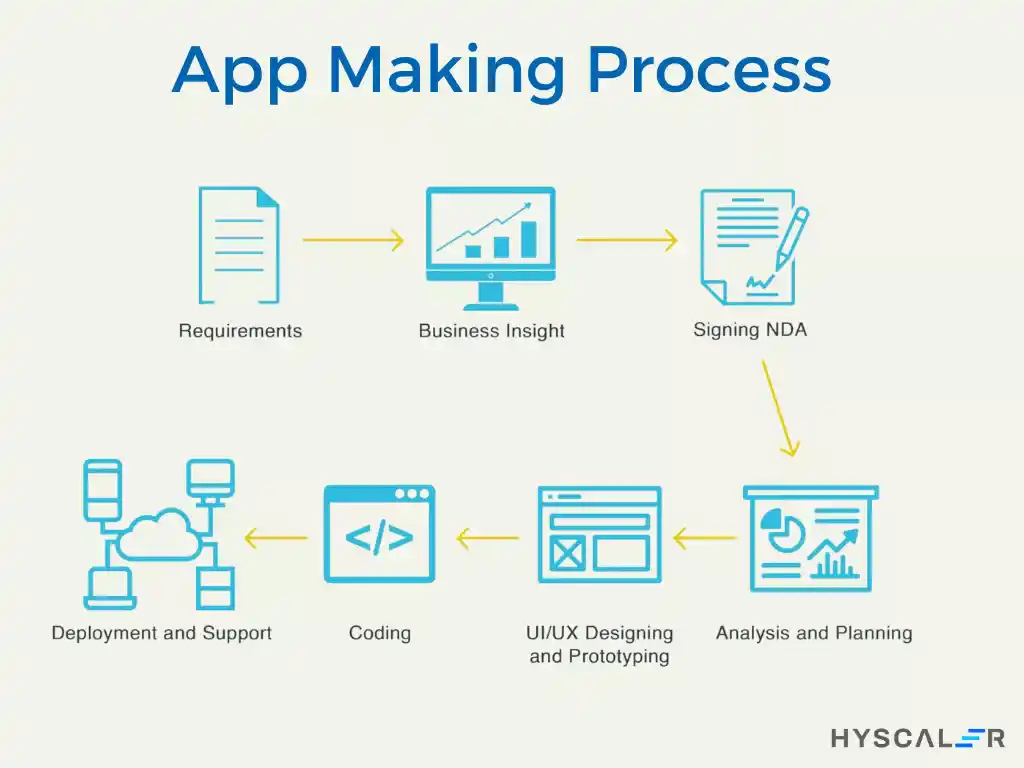
Planning Your App
Once you understand your audience and the opportunity, the next step in app making is turning that understanding into a concrete plan.
Defining the app’s purpose and goals:
- Write a single-sentence problem statement: “This app helps [audience] do [specific task] without [current frustration]. If you can’t write this sentence clearly, the idea likely needs more research.
- Identify your unique value proposition: what makes your app worth choosing over the alternatives your audience already uses?
- Set early success metrics like downloads, retention rate, or revenue targets, so you have a way to measure whether the app making effort is working after launch.
Sketching your app idea:
- Low-fidelity wireframes: rough, black-and-white sketches of each screen’s layout. These are meant to be quick and disposable, focused purely on structure, not visuals.
- User flow diagrams: a map of how a user moves from opening the app to completing their main goal (signing up, booking, or purchasing). This step often reveals unnecessary steps or confusing detours before a single line of code is written.
- Tools worth using: Figma, Sketch, and Adobe XD are the most common choices, offering free tiers suitable for early-stage planning.
- High-fidelity mockups: once the flow is validated, add real colors, typography, and imagery to see how the finished product might actually look and feel.
Getting this phase right doesn’t guarantee success, but getting it wrong almost guarantees expensive rework later in the app making process.
Phase 2: Design & Build
This is where app making becomes tangible: personas and wireframes turn into interfaces, interfaces turn into working software, and working software gets hardened and tested before anyone outside your team sees it.
Designing the User Experience (UX)
Good app makers treat UX as a discipline, not an afterthought. A user-centered design approach means every decision from button placement to error messages is made by asking “what does the user need here?” rather than “what looks good to us?”
Core UX principles to apply:
- Simplicity first: Every screen should have one clear primary action. If a user has to think about what to do next, the design needs simplifying.
- Consistency: Icons, colors, and interaction patterns should behave the same way throughout the app, so users build muscle memory instead of relearning each screen.
- Forgiving design: Make mistakes easy to undo (a “cancel” or “back” option) rather than punishing users for clicking the wrong thing.
- Usability testing: Even informal testing with 5–8 real users, watching them attempt core tasks without guidance, surfaces friction you’d never catch reviewing the design alone.
Crafting the interface (UI):
- Use familiar design patterns: a hamburger menu, a bottom navigation bar, and a swipe-to-delete gesture since users already understand these from other apps they use daily.
- Prioritize accessibility: sufficient color contrast, readable font sizes, and support for screen readers where relevant.
- Maintain visual hierarchy so the most important information or action on each screen is the first thing a user’s eye lands on.
Developing Your App
This is the technical core of app making, and the approach you choose here shapes your timeline, budget, and long-term flexibility.
Choosing a development approach:
- Native development: Building separately for iOS (Swift) and Android (Kotlin). Best for apps that need top performance or deep access to device hardware (camera, sensors, Bluetooth), at the cost of maintaining two separate codebases.
- Cross-platform development: Frameworks like React Native or Flutter let you write one codebase for both platforms. This significantly reduces development time and cost, though very hardware-intensive apps may still need native modules for specific features.
- Progressive Web Apps (PWAs): Apps that run in a browser but feel app-like, with no installation required. A good fit for content-driven apps where app store distribution isn’t essential.
Building the backend:
- Handles core functions like data storage, user authentication, and communication between the app and your servers.
- Many teams start with managed backend platforms like Firebase or AWS Amplify to move fast without managing infrastructure directly.
- As the app scales, some teams migrate to custom server setups (Node.js, Django) for more control over performance and cost.
Integrating APIs and third-party services:
- Payments: Stripe, PayPal, or platform-native billing (Apple/Google) for in-app purchases.
- Social login: Google, Apple, or Facebook sign-in to reduce friction at signup.
- Location services: Google Maps or Mapbox APIs for location-aware features.
- Using established APIs instead of building these capabilities from scratch saves significant development time and reduces the risk of introducing bugs into a critical system.
Ensuring Security and Compliance
Security in app making isn’t a feature you add later; it needs to be built in from the first line of backend code.
Security measures to implement early:
- Encryption: Protect data both in transit (HTTPS/TLS) and at rest (encrypted databases).
- Secure authentication: Use established protocols like OAuth 2.0 rather than building custom login systems, and never store passwords in plain text.
- Regular updates: Keep libraries and dependencies current to patch known vulnerabilities before they’re exploited.
- Access controls: Limit who (and what parts of your system) can access sensitive user data, following the principle of least privilege.
Legal and compliance requirements:
- Data privacy laws: Depending on your users’ locations, you may need to comply with GDPR (EU), CCPA (California), or similar regional laws.
- Privacy policy and terms of service: These should be clear, specific to your app’s actual data practices, and easy for users to find and understand.
- Consent management: Get explicit, informed consent before collecting or using personal data, especially for location, contacts, or health-related information.
The app development market itself continues to grow rapidly, which means more competition for user trust; getting security and compliance right from day one is now a competitive advantage, not just a legal checkbox.
Testing and Quality Assurance
No responsible app making process skips this phase, even under launch-date pressure.
Types of testing to run before release:
- Functional testing: Does every feature work as intended, across the full range of expected user actions?
- Usability testing: Can real users complete core tasks without confusion or unnecessary steps?
- Performance testing: Does the app stay responsive under load, with reasonable load times and memory use?
- Security testing: Are there vulnerabilities an attacker could exploit, from injection attacks to insecure data storage?
- Beta testing: Releasing to a small group of real users before full launch often reveals issues no internal team would catch, simply because real usage patterns are unpredictable.
Addressing what testing finds:
- Prioritize bugs that affect core functionality first, then move to smaller usability issues.
- Optimize performance by trimming unnecessary load times, compressing assets, and reducing memory-heavy operations.
- Treat testing as iterative; one round rarely catches everything, especially on a first release.
Phase 3: Launch & Grow
App making doesn’t end when the app ships. In many ways, this is where the real work begins, since a great app with no visibility or momentum still fails.
Launching Your App
Preparing for app store submission:
- Review each platform’s specific guidelines carefully. Apple’s review process tends to be stricter than Google’s, and non-compliance is one of the most common reasons for rejection.
- Prepare high-quality assets: app icon, screenshots across required device sizes, and a clear, benefit-focused app description.
- Test the submission build one final time on a device that matches what real users will have, not just a development environment.
Marketing your app:
- App Store Optimization (ASO): Optimize your title, keywords, and description for app store search, much like SEO for websites.
- Social media: Build anticipation before launch, not just promotion after it.
- Content marketing: Blog posts, videos, or tutorials that address the same problem your app solves can drive organic discovery.
- Influencer partnerships: Relevant micro-influencers in your niche often convert better than broad, expensive campaigns.
- Landing page and paid ads: A simple landing page paired with a modest, targeted ad campaign can meaningfully boost your first wave of downloads.
Post-Launch Strategies
Gathering and using user feedback:
- Encourage in-app prompts for reviews and ratings, timed after a positive user action (not immediately on first open).
- Actively respond to reviews and support requests; users notice when a team is engaged, and it affects both retention and public perception.
- Use analytics tools to understand actual usage patterns, not just assumptions about how people are using the app.
Regular updates and improvements:
- Ship updates that address real feedback, not just internal preferences about what the app “should” have.
- Balance new features with bug fixes and performance improvements; an app that adds features but never gets more stable will frustrate long-term users.
- Consistent updates signal to users (and app store algorithms) that the app is actively maintained, which affects both retention and discoverability.
Staying Ahead in App Making
Monitoring industry trends:
- AI-powered features (personalization, smart recommendations, and conversational interfaces) are becoming standard user expectations, not novelties.
- Augmented reality is opening new use cases in retail, education, and navigation-heavy apps.
- User expectations shift alongside these trends; what felt cutting-edge two years ago can feel dated quickly.
Adapting to user needs over time:
- Revisit your original market research periodically; the gaps you identified at launch may have closed, or new ones may have opened.
- Stay genuinely responsive to feedback, even when it means changing features you were originally attached to.
Expanding your app’s ecosystem:
- A web companion app extends usability to contexts where mobile isn’t ideal (data entry, reporting, admin tasks).
- New integrations with tools your users already rely on can deepen retention.
- Partnerships with complementary businesses can extend your app’s reach into audiences you couldn’t easily acquire alone.
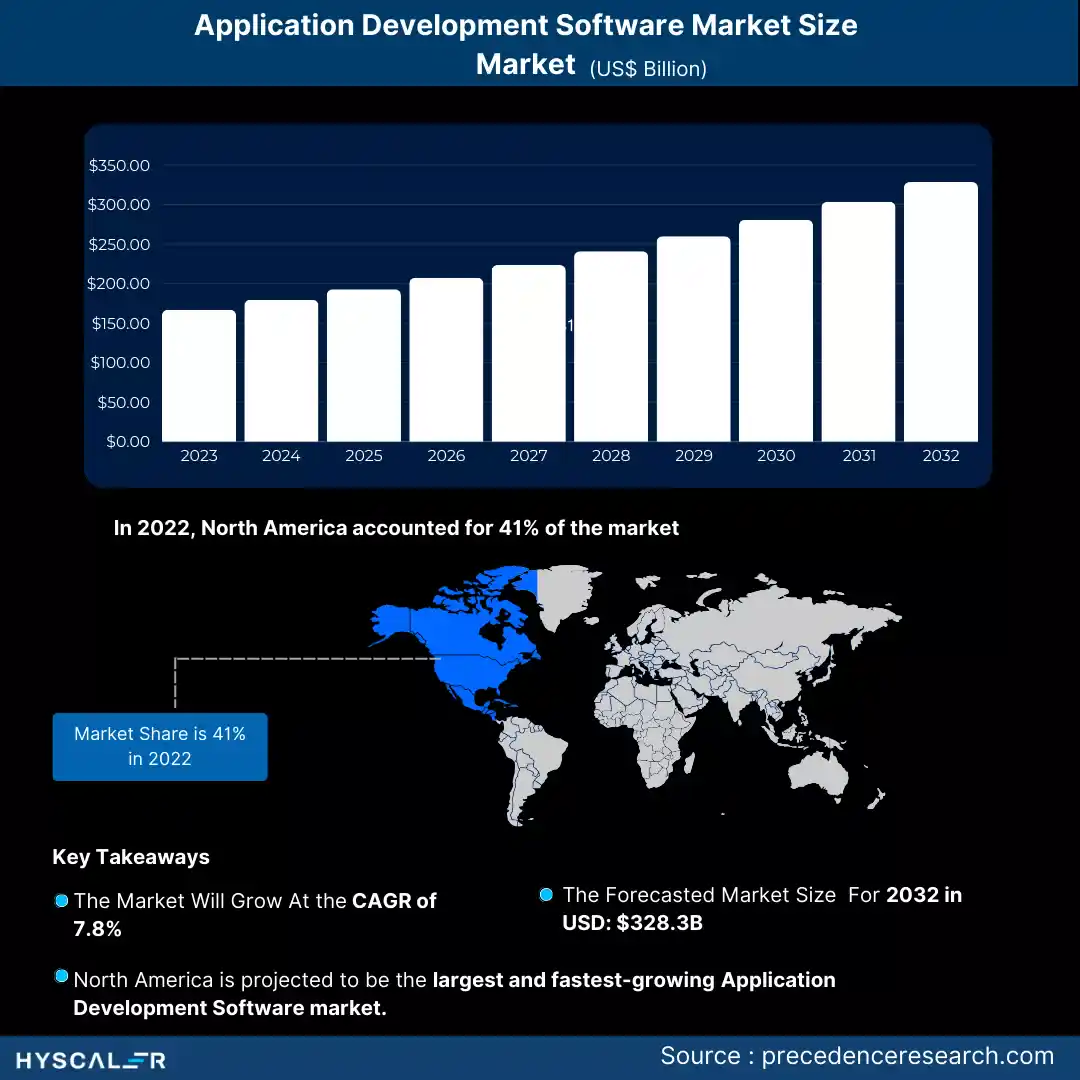
The global application development software market is estimated to reach USD 328.3 billion by 2032, up from USD 155.64 billion in 2022, and will grow at a 7.8% CAGR between 2023 and 2032.
Conclusion
App making in 2026 requires a well-rounded approach that combines market research, user-centered design, robust development, and strategic marketing. By following this guide, you’ll be well-equipped to create an app that not only meets user needs but also stands out in a crowded market. Remember, the journey doesn’t end at launch; continuous improvement and adaptation are crucial for long-term success in the ever-evolving world of app making.
HyScaler, as a technology-first App Development service partner, recognizes the paramount importance of crafting meaningful designs that captivate customers and influence purchasing behaviors. Our App Development services enable clients to deliver positive and memorable experiences throughout the buyer’s journey.
HyScaler offers scalable solutions that are tailored to your needs, ensuring that your digital presence is revitalized and your brand is positioned for the digital era.
As a decade-old company with over 150 team members, 50 delighted clients, and expertise across more than 40 technologies, HyScaler brings over a decade of trust and commitment to your project. Whether you’re looking to join the tech revolution or supercharge your IT landscape, partnering with HyScaler provides you with the exceptional advantages of their dynamic and passionate team.
FAQs
Why do apps get rejected from the App Store or Play Store?
Common reasons include broken links, incomplete metadata, privacy policy issues, and functionality that crashes or doesn’t match the app’s description. Apple’s review tends to be stricter than Google’s.
What security practices are non-negotiable in app making?
Encrypted data storage, secure authentication (like OAuth), and regular dependency updates are baseline requirements; skipping these creates liability, especially with user data involved.
How do I scale an app once it starts growing fast?
Cloud infrastructure that autoscales (like AWS or Azure) and a backend architecture built with growth in mind from day one prevent the common trap of rebuilding under pressure.
What’s the real difference between building for iOS first vs. Android first?
iOS users typically spend more per app and have a more predictable device ecosystem, while Android has broader global reach; the right choice depends on your target market.
How do I handle version control and updates without breaking the app for existing users?
Staged rollouts, backward-compatible APIs, and thorough regression testing before each release prevent updates from disrupting users already on the app.
Should I use a monolithic or microservices architecture for app making?
A monolith is simpler and faster to ship for early-stage apps, while microservices suit apps expecting heavy scale or multiple independent teams working on different features.
How do I handle user authentication securely in app making?
Use established protocols like OAuth 2.0 or OpenID Connect rather than building custom auth from scratch, and always store passwords hashed with bcrypt or Argon2, never in plain text.
What’s the best way to handle in-app payments technically?
Use platform-native billing (Apple’s StoreKit, Google Play Billing) for digital goods and PCI-compliant providers like Stripe for physical goods or services, since app stores mandate this split.