

Table of Contents
Mobile software development has entered a mature phase. For years, teams focused on aggressive download campaigns and thin web wrappers. Heading into 2027, business priorities will shift toward user retention and spending.
According to the Sensor Tower State of Mobile 2026 report, global in-app purchase revenue rose 10.6% year-over-year to $167 billion, while app downloads grew by only 0.8%. Revenue from non-gaming apps expanded 21% to reach $85 billion, surpassing mobile games for the first time. Mobile users spent 5.3 trillion hours inside apps, but active users interact with only about 10 apps each day.
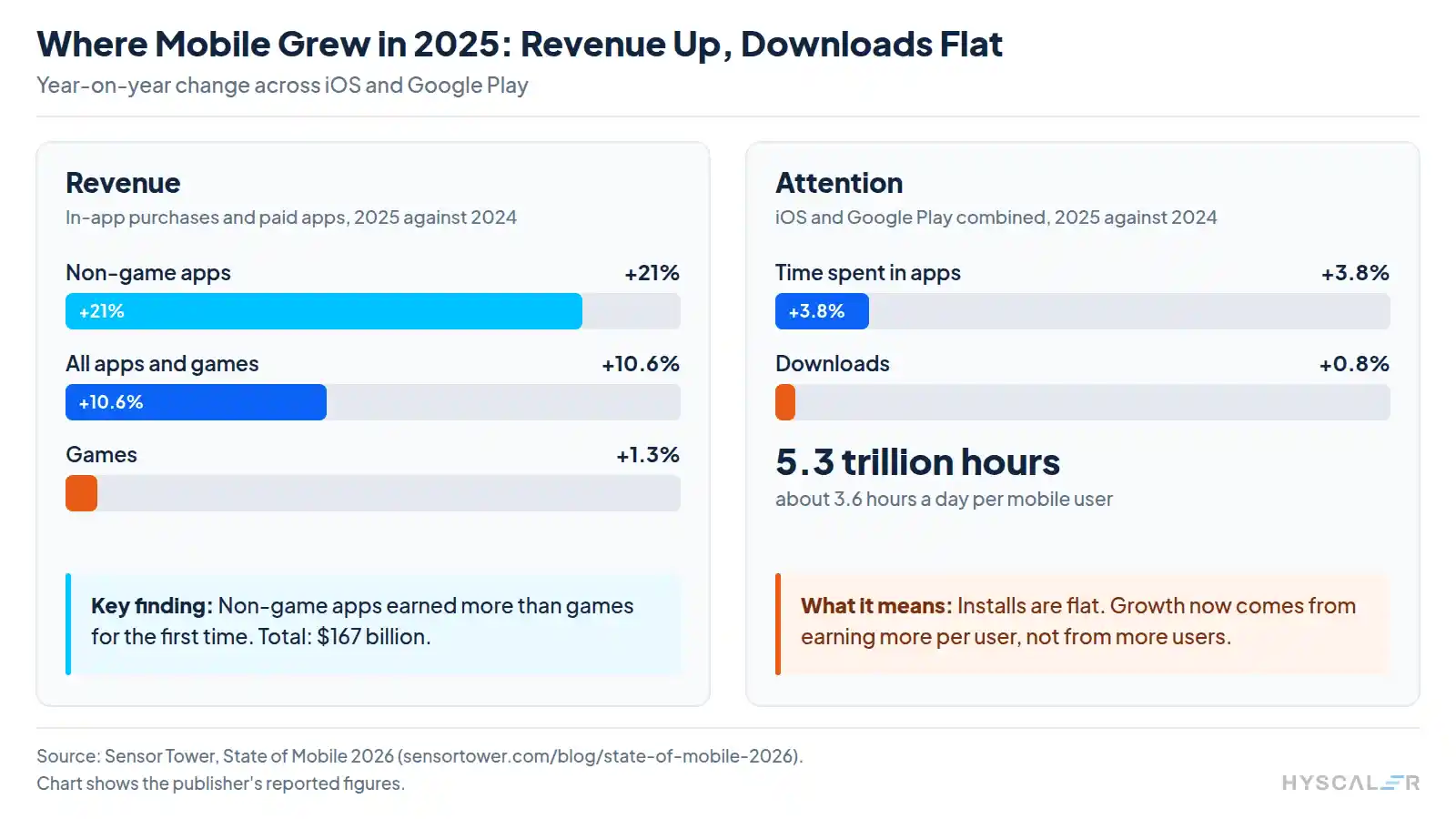
This split changes how teams spend engineering budgets. Winning apps no longer just chase installs. Instead, budgets focus on fast onboarding, reliable sessions, and clear utility.
Summary
- App revenue continues to climb even as total downloads flatten, with non-game revenue now surpassing games.
- Phones run compact AI models directly on local chips, cutting cloud bills and network delay.
- System assistants trigger in-app actions using official tools like Android AppFunctions.
- Google Play enforces hard deadlines for developer verification, privacy buttons, and network declarations.
- AI coding tools speed up development, but human review remains essential to catch security holes.
- Cross-platform defaults have settled: Kotlin Multiplatform shares core logic, while Flutter Impeller prevents animation stutter.
- Passkeys replace traditional passwords with fast, biometric device logins.
- Mobile commerce focuses on one-tap biometric checkout, visual search, and reliable backends.
- The open Matter standard over Thread networks connects smart home devices without vendor lock-in.
- Operating systems penalize battery waste, making power-conscious coding vital for app store rankings.
Mobile App Development Trends to Adopt
1. On-Device Edge AI and Neural Processing Units
Sending every AI request to remote cloud servers creates slow responses, recurring bills, and privacy concerns. Modern mobile architecture solves this by running compact models directly on device chips.
Both Apple and Google have turned on-device AI into core system features:
- Apple Foundation Models and Core AI: Apple documented at WWDC26 that the Foundation Models framework gives Swift apps access to on-device models for text and images. For custom models, Apple introduced the Core AI framework to run weights directly on Apple silicon.
- Android AICore and Gemini Nano: Google built Gemini Nano to handle text formatting, summaries, and smart replies on local silicon. This keeps sensitive user data on the phone without sending it to outside servers.
- Hybrid Cloud Offloading: Apple allows apps with fewer than 2 million total downloads to route heavy tasks to Apple Foundation Models on Private Cloud Compute without extra infrastructure fees.
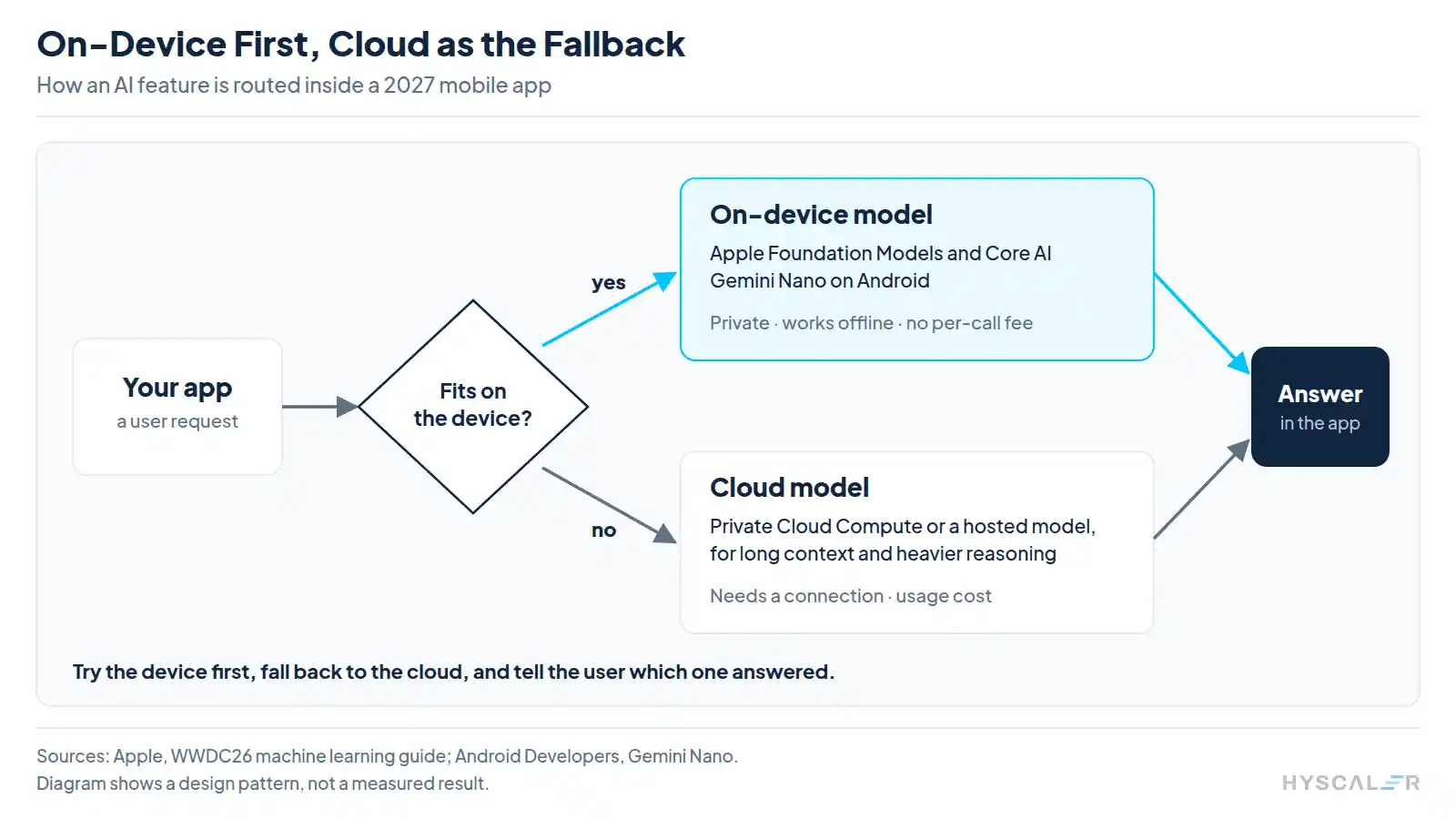
Teams should use a two-tier setup. Run instant tasks like text cleanup, image parsing, and local search on the phone, and save cloud servers for heavy multi-step reasoning. Our AI engineering team designs and builds both sides of this pipeline.
2. Agent-Ready Mobile Apps: AppFunctions and Assistant Actions
Users no longer interact only by tapping on screens. They increasingly ask voice assistants and AI agents to check orders, book appointments, or update settings across multiple apps.
Operating systems now give developers clear tools to connect apps with system assistants:
- Android AppFunctions: Android introduced AppFunctions as an official platform framework with an accompanying Jetpack library. It lets approved on-device AI agents discover and run specific actions inside installed apps.
- Google Play Agent Policy: Google updated its Google Play Developer Policies with an enforcement deadline of 14 April 2027 for apps using AppFunctions. The policy strictly forbids apps from deceiving users or executing unauthorized purchases through AI agents.
- Apple Agent Actions: Apple Foundation Models support structured tool calls. This allows Siri and system assistants to trigger in-app actions safely within user permission limits.
To prepare, teams should identify their top three user actions, such as reordering an item or checking delivery status, and expose them through system APIs. Apps that work with system agents will capture traffic from competitors that ignore them.
3. Mandatory Android Developer Verification and Play Deadlines
Google Play has turned security and identity rules into mandatory gates with strict calendar cutoffs. Missing these dates can lead to app suspensions or store removal.
Google published specific deadlines that development teams must schedule into their sprints:
- Global Developer Verification: Google’s developer verification framework began regional enforcement in September 2026 across Brazil, Indonesia, Singapore, and Thailand. Google confirms verification expands globally in 2027, requiring package registration and cryptographic signing key validation.
- Location Button Mandate (27 January 2027): Under Google Play policies, apps targeting Android 17 (API 37) and above that need temporary location data must use the system location button. This replaces repetitive permission prompts.
- Contact Picker Requirement (27 January 2027): Apps that do not need full address book access must switch to the Android Contact Picker. Google has also removed geofencing as an approved foreground service.
- Local Network Declarations (25 August 2027): Apps targeting Android 17 and above that scan local Wi-Fi networks must submit a formal declaration in the Google Play Console explaining why this access is required.
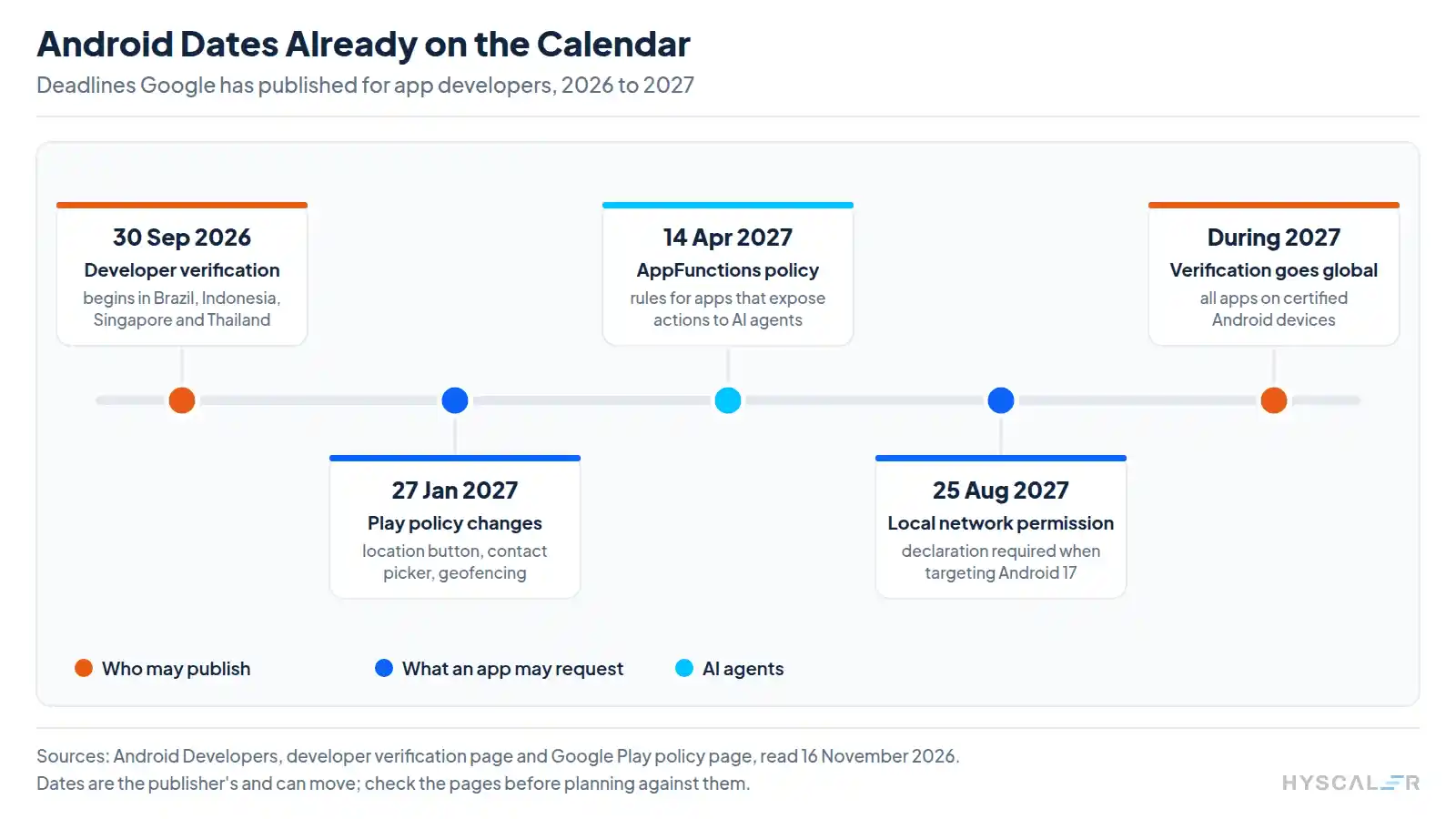
Legacy codebases that skip target updates risk sudden removal from the store. Updating older apps before these deadlines is a core focus of our mobile app modernization service.
4. AI-Written Code and Mandatory Security Verification
AI coding assistants help teams write software faster than ever. However, production data shows that speed does not guarantee security.
Recent industry benchmarks highlight this quality gap:
- High Daily Adoption: In the Stack Overflow 2026 Developer Survey, 73% of professional engineers report using AI coding tools every day.
- Careful Developer Trust: While 87% of developers express some trust in AI output, 48% trust code only when they can easily test and verify it.
- Security Deficits in AI Code: Research in Veracode’s Spring 2026 A GenAI code security study found that while AI code compiles over 95% of the time, it is secure only about 55% of the time. Nearly 45% of tasks introduced security flaws like improper input handling or weak encryption. In older languages like Java, security compliance fell to 29%.
Teams should not assume AI-generated code is production-ready. Every build needs automated vulnerability scans alongside human peer review. Our testing and QA practice sets up automated verification pipelines to protect production releases.
5. Settled Cross-Platform Defaults: KMP and Flutter Impeller
The long debate between native and cross-platform tools has settled. For most business applications, cross-platform frameworks are now the practical standard, while native code remains best for specialized hardware.
Teams generally choose between four clear paths:
- Kotlin Multiplatform (KMP): Supported by Google for Android teams, Kotlin Multiplatform lets developers share business logic, networking, and data storage across iOS and Android. Teams build native user interfaces using SwiftUI and Jetpack Compose, avoiding interface compromises.
- Flutter with Impeller: The Flutter framework eliminated interface stutter by replacing Skia with Impeller. Impeller precompiles shaders ahead of time, ensuring smooth 120 FPS animations on iOS and Android.
- React Native: React Native continues to serve web-focused teams. Its new architecture uses direct native calls to eliminate bridge bottlenecks.
- Pure Native Development: Building separate codebases via iOS application development (Swift) and Android application development (Kotlin) remains best for apps that need immediate access to new hardware sensors or custom camera controls.
For a deeper comparison of framework trade-offs, read our top mobile app development platforms guide, or explore our cross-platform application development services.
6. Universal Passwordless Security with FIDO2 Passkeys
Traditional passwords and SMS verification codes cause user drop-off and security leaks. SMS codes are vulnerable to SIM swapping, while reused passwords feed automated account attacks.
Mobile security is standardizing on biometric passkeys:
- Hardware Protection: FIDO Alliance passkey standards replace typed passwords with digital key pairs. The private key never leaves the phone security chip, such as the Apple Secure Enclave or Android StrongBox.
- Consumer Adoption: A study by the FIDO Alliance found that 53% of users have enabled passkeys on at least one account. Users point to quick biometric logins as the primary benefit.
- Gradual Rollout: Teams should offer passkeys alongside existing login options first. This gives users a smooth upgrade path without unexpected friction.
Passkeys protect backend systems because servers store only public keys. If an attacker breaches the server database, the stolen keys cannot be used to log in.
7. Platform Age Assurance and Privacy Move Left
New privacy regulations and store policies require digital platforms to verify user age brackets while keeping minor data secure.
Mobile platforms now handle age checks directly in the operating system:
- Apple Declared Age Range API: Apple’s age assurance developer guidance introduces the Declared Age Range API. Apps can confirm whether a user is an adult, teen, or child using system checks, without ever collecting ID cards or birth dates.
- Reduced Liability: Moving age verification to the operating system keeps user identity documents off private servers. This reduces compliance overhead and eliminates data breach risks.
Teams building apps for broad audiences should plan for native age checks in early 2027 to prevent store review delays.
8. Contextual M-Commerce and Frictionless Agentic Checkout
Mobile shopping has moved beyond basic responsive websites and clunky forms. High-converting shopping apps rely on instant biometric payments, quick visual search, and reliable backends.
Key engineering patterns include:
- Native Digital Wallets: Apple Pay and Google Pay let shoppers check out with a single tap. This eliminates manual address forms and cuts cart abandonment.
- On-Device Visual Search: Phone cameras now scan products or screenshots and match them against store catalogs directly on the device before calling network APIs.
- Resilient Backend Systems: Mobile stores need backends that stay fast during traffic spikes. In our e-commerce platform modernization case study, HyScaler updated a retail system to handle a 50% traffic spike while cutting manual data entry by 40% through integrated ERP and CRM systems.
Combining fast client checkouts with resilient backends is the most reliable way to grow mobile sales.
9. Unified Smart Devices via Matter and Thread
Smart home setups previously suffered from fragmented wireless systems and proprietary hubs. Users often had to juggle separate apps for each brand of device.
The industry has unified around open standards:
- The Matter Protocol: Developed by the Connectivity Standards Alliance with support from Apple, Google, Amazon, and Samsung, Matter provides an open standard for smart devices over Wi-Fi and Thread.
- Thread Mesh Networks: Thread Group technology provides low-power, self-healing mesh networks. Mobile apps can talk directly to nearby smart bulbs and locks without routing traffic through outside cloud servers.
- Built-In System Pickers: Apple HomeKit and Google Home provide native system tools to pair and control Matter devices. This drastically simplifies companion app development for hardware brands.
10. Thermal-Aware and Battery-Conscious Mobile Engineering
Mobile operating systems actively monitor background battery drain and processor heat. Google Play Console (through Android Vitals) and Apple Xcode Organizer penalize battery-heavy apps by pushing them down in store rankings.
Practical ways to keep apps power-efficient include:
- Batching Background Work: Group background sync and analytics tasks using tools like Android WorkManager and Apple BackgroundTasks. Schedule these jobs to run when the phone is charging and connected to Wi-Fi.
- Using Dedicated Chips: Move repetitive image and math calculations to local Neural Processing Units. These dedicated chips consume far less power than high-performance CPU cores.
- Dark Mode for OLED Displays: Support true dark themes to take advantage of OLED screens. When displaying pure black, OLED pixels turn off completely, saving noticeable battery life.
Four Over-Hyped Mobile Trends to Skip in 2027
Every technology cycle brings trends that generate loud headlines but fail to deliver practical business returns. Budget holders should avoid these four distractions:
- Training Custom Mobile Foundation Models from Scratch: Training custom base models costs millions in cloud compute and data curation. For almost all business apps, fine-tuning built-in models like Apple Foundation Models and Gemini Nano delivers great results at minimal cost.
- Attempting to Build an All-in-One Super App: Replicating the WeChat model in Western markets rarely works because users prefer focused apps for specific needs. Solve one core problem well rather than bundling dozens of unrelated tools into a single download.
- Adding Gimmicky Augmented Reality: Unless a realistic 3D preview directly drives a purchase decision, such as furniture placement, decorative AR modes see almost zero use after the first day.
- Marketing Network Generation Upgrades: Marketing an app around 5G speeds ignores real user conditions. Apps must handle weak connections using on-device processing and offline-first storage.
2027 Mobile Engineering Roadmap: Action Plan and Effort
| Priority Shift | Core Engineering Action | Estimated Effort |
|---|---|---|
| Android Developer Verification | Register app package names and SHA-256 signing certificates in developer console | Low (1 to 2 sprints) |
| Play Policy Permissions Audit | Implement Android location button, Contact Picker, and Local Network declaration | Low to Medium |
| On-Device AI Integration | Shift classification, summarization, and autocomplete to Apple Core ML and Gemini Nano | Medium (1 quarter) |
| Agentic Action Exposure | Implement Android AppFunctions and iOS Foundation Models tool calling for top 3 actions | Medium |
| Security Review for AI Code | Implement automated SAST and DAST gates to catch security flaws in generated code | Low (Immediate setup) |
| Passkey Authentication | Implement FIDO2 passkeys alongside existing authentication methods | Medium |
| Cross-Platform Rationalization | Audit architecture; standardize on Kotlin Multiplatform or Flutter Impeller | Strategic Decision |
Frequently Asked Questions
What are the top mobile app development trends for 2026 and 2027?
Key trends include on-device AI running on phone chips, agent-ready apps using Android AppFunctions, and mandatory Android store verification. Teams are also adopting settled cross-platform defaults like Kotlin Multiplatform and Flutter Impeller, alongside biometric passkeys.
How is artificial intelligence changing mobile app engineering?
AI is moving from paid cloud servers to local phone chips. Tools like Apple Foundation Models and Android AICore run compact models on device hardware, lowering server costs, speeding up responses, and protecting user privacy.
What Android store policy deadlines must teams plan for in 2027?
Deadlines include global developer verification in 2027, the location button and Contact Picker rules on 27 January 2027, the AppFunctions agent policy on 14 April 2027, and Local Network declarations on 25 August 2027.
Why are enterprise development teams choosing Kotlin Multiplatform?
Kotlin Multiplatform allows teams to share networking, data storage, and business logic across iOS and Android while keeping 100% native interfaces built with SwiftUI and Jetpack Compose. This prevents duplicate logic without sacrificing native app performance.
Is AI-generated code safe to deploy in production mobile apps?
Not without automated testing and human peer review. Veracode research shows that while AI code compiles over 95% of the time, it contains security flaws in roughly 45% of test cases. Automated vulnerability scans remain essential.
How HyScaler Accelerates Your Mobile Roadmap
Navigating platform updates, store deadlines, and AI integrations requires an experienced development partner. HyScaler provides full technical delivery across the mobile software lifecycle:
- Custom Mobile App Engineering: Our mobile app development services build high-performance software across native iOS application development, native Android application development, and unified cross-platform application development.
- Legacy Modernization and Compliance Audits: Our mobile app modernization team updates legacy codebases, handles store permission declarations, and implements passkeys.
- On-Device and Hybrid AI Delivery: Our AI services team builds two-tier AI setups that maximize local chip performance while keeping cloud infrastructure scalable.
- Quality Assurance and Security Hardening: Our rigorous testing and QA practice audits both human and AI-written code to safeguard production releases.
To evaluate your technical architecture or plan your upcoming release schedule, schedule a consultation with our mobile team.