
Adobe MCP arrived about a year after Canva and Figma opened their tools to AI agents, starting with a Claude connector in April 2026. At MAX 2026 it promised more, with agents editing native Photoshop and Premiere files and the layers still intact, but that is due only as a private beta in early 2027. Teams that want agents in their design work before then have other options.
Table of Contents
Adobe MCP is Adobe’s plan to let AI agents from other companies, such as Claude, ChatGPT and Gemini, work directly inside Photoshop, Illustrator, Premiere and After Effects. Adobe previewed it at Adobe MAX 2026 in Miami Beach on November 10, alongside its own Creative Agent and a set of new Firefly tools.
It arrives after two of Adobe’s closest rivals, Canva and Figma, had already opened their tools to agents. So the question many design leads are asking is a fair one: Is Adobe too late?
What did Adobe announce at MAX 2026?
Adobe announced agents across its whole product line, and most of them are in beta or preview rather than finished. The change that matters most for other tools is Adobe MCP: planned integrations that would let outside AI agents work directly inside Photoshop, Illustrator, Premiere, and After Effects files, leaving the layers intact for a designer to pick up. Adobe showed it as a preview, with a private beta due in early 2027.
| Announcement | What it does | Status |
|---|---|---|
| Creative Agent and Firefly AI Assistant | Adobe’s own agent, with a Plan Mode that shows its steps for approval before it runs, and a choice of AI models | Beta |
| Creative Agent in Illustrator, Premiere, InDesign, After Effects and Frame.io | The same assistant inside the desktop apps | Beta |
| Always-on agents | Run recurring tasks in the background | Preview |
| Local MCP integrations (Adobe MCP) | Outside agents edit native Photoshop, Illustrator, Premiere and After Effects files | Preview, private beta in early 2027 |
| Firefly Design | One canvas for illustration, image editing, animation, 3D and print | Beta |
| Firefly Graph | Repeatable creative workflows | Beta |
| Firefly Builder | Turns a written idea into a working prototype without code | Private beta |
On the enterprise side, Adobe added CX Enterprise Coworker to GenStudio, announced a multi-year AI alliance with Disney, and said it will explore AI editing in Photoshop with Google DeepMind. The Firefly AI Assistant is the part most people can try today. Adobe MCP is the part that changes how other tools connect to Adobe.
How is the industry reading Adobe’s move?
The analysts who have written about it so far see opening the apps as the right move, and raise questions about what it will cost Adobe.
Keith Kirkpatrick, research vice president at The Futurum Group, wrote that “the strategic signal is that Adobe is willing to let someone else own the interface.” He called opening the apps “still the right call,” while warning that “the cost is real” and that Adobe’s bundled pricing will come under pressure from agent workloads. Speaking to Computerworld, he added: “I see Canva and Figma going after the same in-house teams and are showing up in the same AI assistants.”
Computerworld also pointed to the risk for Adobe itself. If people work through Claude or ChatGPT, the move could “loosen the direct relationship Adobe has with customers.”
Diginomica noted that a show built around individual creatives now put the emphasis on how teams use the tools across a company. It also suggested several of the new Firefly features “would have come to Adobe earlier” had Adobe completed its abandoned acquisition of Figma.
Investors are cautious too. On November 11, Mizuho kept its Neutral rating on Adobe, saying customer checks were “more mixed than last year” and that AI adoption “remains modest.”
Is Adobe too late to AI agents?
Yes, on timing. Adobe opened its tools to AI agents about a year after Canva and Figma, and the deeper access it announced at MAX is not due until early 2027.
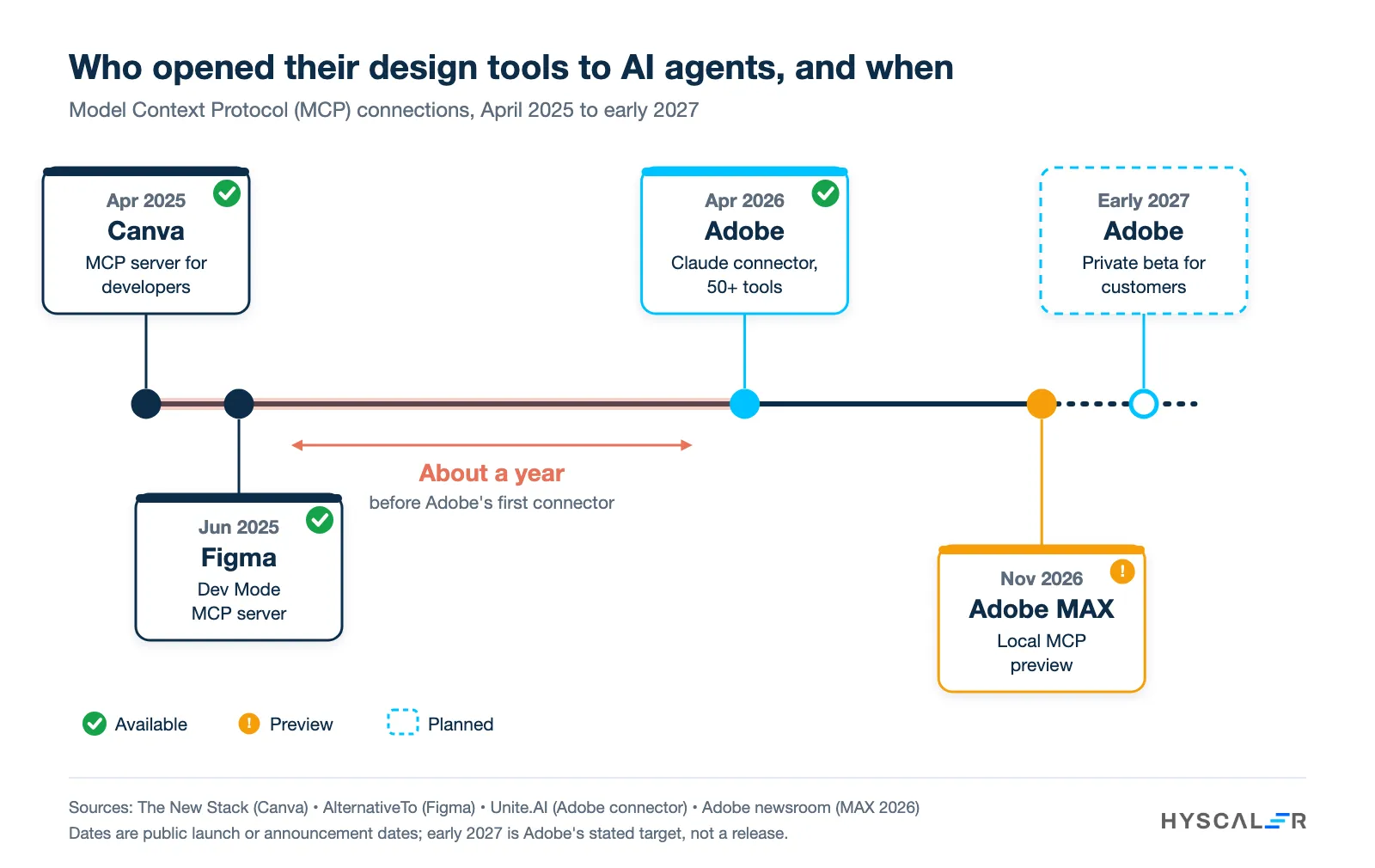
Canva launched an MCP server for its developer platform in April 2025 and later made it generally available. Figma released its Dev Mode MCP server in beta on June 4, 2025, and it is now generally available. Adobe followed on April 28, 2026, when Anthropic launched an Adobe for creativity connector for Claude, with more than 50 tools across Photoshop, Illustrator, Firefly, Express, Premiere, Lightroom, InDesign and Stock. According to Computerworld, these earlier connectors offer “limited editing capabilities” inside the assistant.
What Adobe announced at MAX is a promise of more. With the local Photoshop MCP integration, Adobe says an agent will edit the actual project file in the desktop app, and that layers, sequences and compositions will remain editable afterwards, so a designer can pick up where the agent stopped. That is still a preview, and nobody outside a private beta will use it before early 2027. For a team planning its next twelve months, the date matters more than the feature list. If you are new to the protocol itself, our guide to MCP and how it compares with UTCP covers the basics.
Who is responsible when an AI design agent edits your files?
You are. An agent can make the edit, but the brand, the client and any legal exposure still sit with the business that publishes the work.
Adobe’s Plan Mode is a sensible start, because it shows what the agent intends to do before it does it. For anything a customer will see, we recommend a named person who approves the final file, and a record of what the AI design agent changed. Our guide to keeping a human in the loop sets out where that approval step belongs.
What can design teams use while Adobe’s agents are in preview?
Teams that want agents producing design work now can use tools that already expose MCP, including HyCanvas, the open source design platform we build at HyScaler.
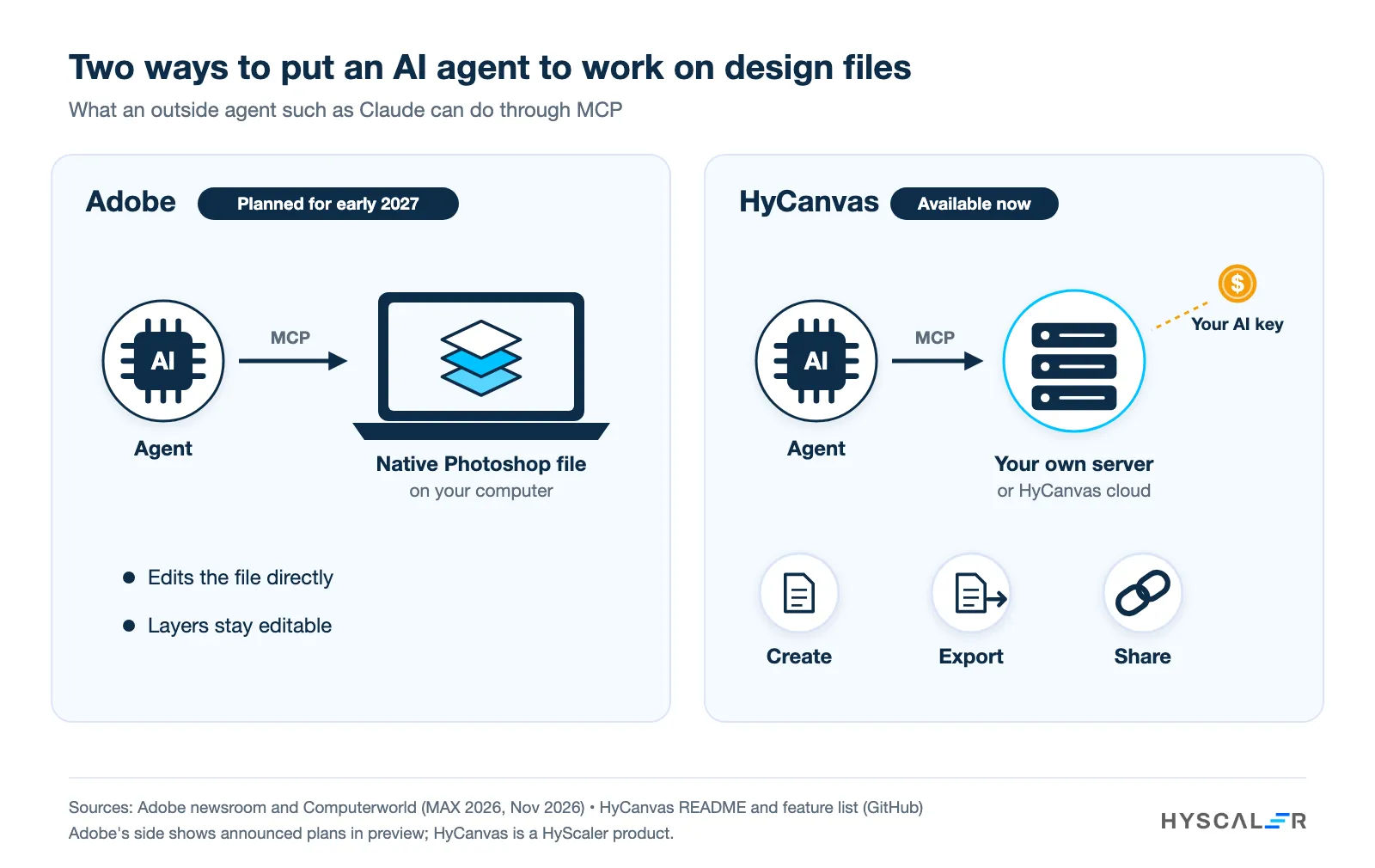
HyCanvas is our browser-based editor for social posts, posters, presentations, video, whiteboards, documents, and spreadsheets. It is released under the AGPL-3.0 license; every feature is free on every plan, and exports carry no watermark. It runs on your own server with one Docker command, storing designs in your own Postgres database and your own disk or S3-compatible storage.
For agents, every HyCanvas instance serves an MCP endpoint. Through it, an assistant such as Claude can generate a deck, document, poster, or social set, read a design, export it, and create a share link, using a scoped API key with the same rate limits and audit trail as the HyCanvas API. Inside the editor, a design assistant can also restyle a design, translate a whole deck, and critique a layout. AI runs on your own provider key, with 13 presets including OpenAI, Anthropic, Azure OpenAI, and Amazon Bedrock, and HyCanvas adds no markup.
| Adobe MCP (local integrations) | HyCanvas | |
|---|---|---|
| Availability | Preview, private beta in early 2027 | Available now, pre-1.0, released every week or two |
| Where files live | Adobe’s desktop apps on your computer | Your own server or HyCanvas cloud |
| How AI is paid for | Pricing not yet announced | Your own provider key, no markup |
| What outside agents can do | Planned: edit native Photoshop, Illustrator, Premiere and After Effects files, with layers intact | Generate, read, export and share designs |
| Licence | Commercial Creative Cloud subscription | AGPL-3.0 open source, commercial licence available |
Two limits are worth stating plainly. HyCanvas does not open existing Photoshop files for agents to edit layer by layer, and agents that work directly on the canvas are still on its roadmap. For teams comparing open source Adobe alternatives more widely, our roundup of open source and AI design alternatives covers other options. You can try HyCanvas or read the code on GitHub.
Where do you start?
Start with the work your team repeats every week, such as resizing campaign assets, building decks from notes or producing localised versions, and connect an agent to that first.
HyScaler builds MCP-based AI agents that connect design and marketing tools to the systems a business already runs, inside its own cloud account, with named approval before anything is published. Whether your team waits for Adobe MCP or uses Figma, Canva or HyCanvas, the pattern is the same: an agent, a scoped connection to the tool, and an approval step.
Want an agent working on your design and content pipeline before 2027? Talk to our AI team about which job to automate first.
Adobe MCP FAQ
Is Adobe MCP available now?
Partly. Adobe’s connector for Claude, with more than 50 tools, has been available since April 2026. The local MCP integrations shown at MAX 2026, which let outside agents edit native project files, are in preview and due in private beta in early 2027.
Can Claude edit Photoshop files?
Through Adobe’s existing connector, Claude can use Photoshop tools with limited editing inside the chat. Editing the native Photoshop file on your computer, with layers kept intact, arrives with Adobe’s local MCP integrations, starting with a private beta in early 2027.
Is Adobe too late to AI agents?
On timing, yes. Adobe opened its tools to agents about a year after Canva and Figma. Its local integrations, which Adobe says will let agents edit layered professional files, are not due before early 2027.
What is HyCanvas?
HyCanvas is an open source design platform built by HyScaler. It covers graphics, presentations, video, whiteboards and documents, can run on your own server, and serves an MCP endpoint that lets AI assistants create, export and share designs.
Is HyCanvas free?
Yes. Every feature works on every plan with no watermark, and self-hosting costs nothing. Paid cloud plans cover hosting and support. AI features run on your own provider key.