
Table of Contents
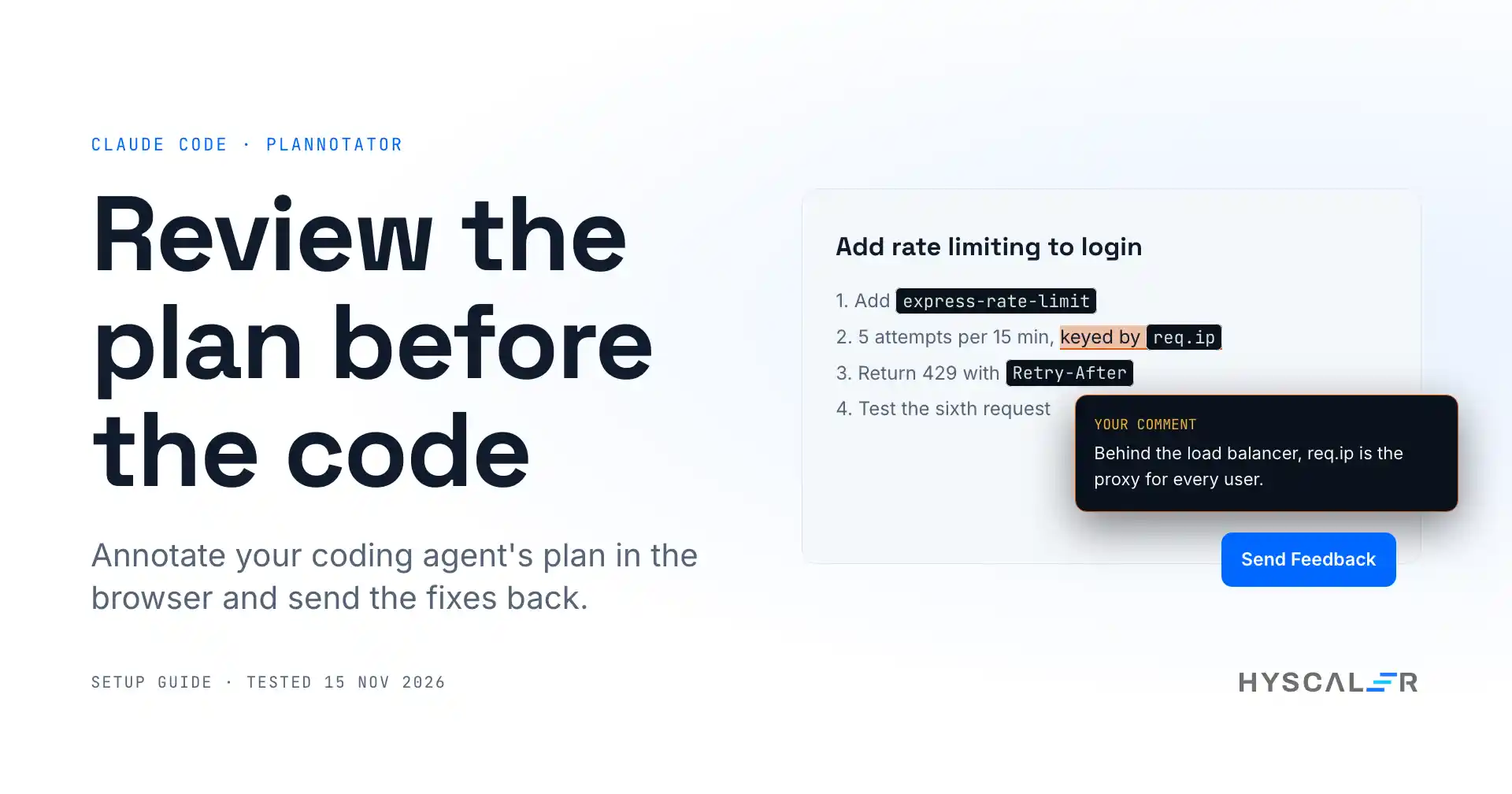
Plannotator is an open-source review tool for AI coding agents. When Claude Code finishes a plan, it opens the plan in your browser so you can comment on exact lines, then sends your notes back to the agent before any code is written. It does the same for diffs and pull requests.
This guide covers the Claude Code plan review with Plannotator from installation to a real bug caught in review. Every command and output below comes from our own test of version 0.28.65 (commit d16eb9dc) on 15 November 2026, including two things the README does not tell you yet.
Key points
- What it is: a local web UI that sits between your coding agent and your repo. You annotate plans, diffs and documents; the agent gets structured feedback.
- Why now: it was number 4 on GitHub Trending today and this week on 15 November 2026, with 11,703 stars and 1,049 forks, under the Apache-2.0 licence.
- Works with: Claude Code, Codex, Copilot CLI, Gemini CLI, OpenCode, Kiro, Droid, Amp, DeepSeek Harness, and Pi.
- Setup time: about 10 minutes in our test, most of it reading what the installer changes.
- Caught in our test: a login rate limiter keyed by
req.ip, which passes its unit test but locks out every user behind a load balancer. - Know before you install: the one-line installer edits the config of every coding agent it finds, and the app sends one anonymous usage ping a day unless you turn it off.
What is Plannotator?
Plannotator is a browser-based review surface for coding agents, written in TypeScript and shipped as a single binary. It plugs into each agent through hooks, plugins, or slash commands. When the agent proposes a plan, or when you ask for a code review, it starts a small local server and opens the review page.
It started on 28 December 2025 as a plan review tool for Claude Code and has grown fast since. The project shipped about 100 releases between v0.25.0 on 27 July 2026 and v0.28.65 on 14 November 2026, close to one a day, almost all from one main maintainer. That pace is worth knowing: screenshots in any guide, this one included, will age quickly.
The open-source app keeps plans, diffs, annotations, and history on your machine. A separate hosted product, Workspaces, handles team sharing and is not covered here.
Why Claude Code plan review matters
Plan mode is the cheapest place to catch a mistake. In Claude Code’s plan mode, the agent reads your code and writes a plan without editing files. If the plan is wrong and you approve it, you review the mistake again later in a much bigger diff.
Reading a plan in a terminal prompt is fine for five lines. It gets hard when the plan has twenty steps and you want to say, “This step, this word, is wrong.” Plannotator lets you point at the exact phrase and attach a note to it.
From the tech lead’s chair, this is the part I care about most. AI agents make reviewing the bottleneck, and better tooling at the review step pays off more than faster generation. We wrote about the same gap for AI-built apps in Vibe Coding Security: 5 Checks to Pay Down Your AI-Built App’s Debt.
How Plannotator works
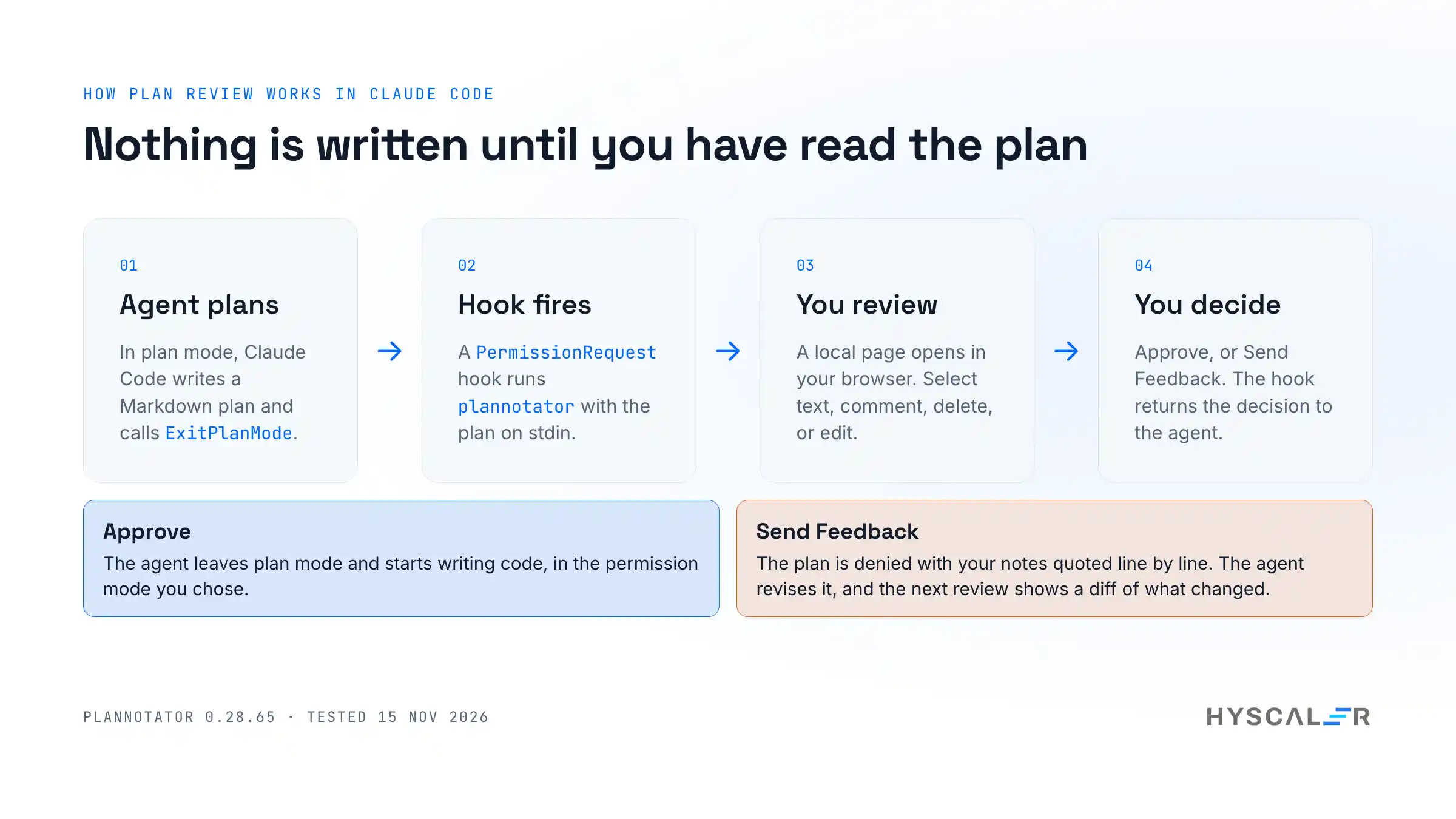
For Claude Code, the integration is a PermissionRequest hook on the ExitPlanMode tool:
- Claude Code finishes a plan and calls
ExitPlanMode. - The hook runs
plannotatorand passes the plan as JSON on standard input. - Plannotator starts a local server on a random port and opens your browser.
- You approve, or you annotate and choose Send Feedback.
- Plannotator prints a decision for Claude Code:
allow, ordenywith your notes. On a deny, the agent revises the plan, and the next review shows what changed.
On Claude Code 2.1.287 or newer, the Plannotator “mod” makes this non-blocking: Claude ends its turn and your decision arrives later as a message. Set PLANNOTATOR_CLAUDE_MOD=0 to keep the classic flow, where the agent waits.
How to set up Plannotator safely
The README’s quickest path is a one-line curl | bash installer. It works, but read what it does first: it installs the binary, then detects every coding agent on your machine and adds hooks, skills, and slash commands to each one. If you run several agents, that is a lot of config changing at once. You can pass --minimal to install only the binary, and plannotator uninstall removes what it added.
We took the slower path, so we could check the binary before running it and keep our own agent configs untouched during testing.
1. Download and verify the release
R=https://github.com/backnotprop/plannotator/releases/download/v0.28.65
F=plannotator-darwin-arm64
curl -sSL -O $R/$F.tar.xz -O $R/$F.sha256
tar -xJf $F.tar.xz && shasum -a 256 -c $F.sha256
Output in our run:
plannotator-darwin-arm64: OKThe download is 44 MB; the unpacked binary is 185 MB, because it bundles its own JavaScript runtime.
2. Check the build provenance
Each release since v0.17.2 ships a SLSA provenance attestation. With the GitHub CLI:
gh attestation verify $F --repo backnotprop/plannotatorOurs ended with ✓ Verification succeeded! and named the build workflow .github/workflows/release.yml@refs/tags/v0.28.65. One gotcha: gh must be logged in for this command. In a non-interactive shell it also prints nothing on success, so check the exit code, or add --format json.
3. Run it
chmod +x $F && ./$F --versionplannotator 0.28.65Move it somewhere on your PATH (for example ~/.local/bin/plannotator).
4. Connect it to Claude Code
Inside Claude Code, the plugin route from the README is two commands, then a restart:
/plugin marketplace add backnotprop/plannotator
/plugin install plannotator@plannotator
If you prefer to see exactly what changes, add the hook yourself in ~/.claude/settings.json:
{
  "hooks": {
    "PermissionRequest": [
      {
        "matcher": "ExitPlanMode",
        "hooks": [{ "type": "command", "command": "plannotator", "timeout": 345600 }]
      }
    ]
  }
}
For this guide we fed the hook the same JSON event Claude Code sends from a sandboxed home folder, so our own setup stayed clean. The plan arrived in the browser exactly as it would from a live session.
5. Get past the first run
The first time the page opens, it asks a few questions in a row. One sets the permission mode Claude Code keeps after you approve a plan; another picks a layout for plans; the rest are what’s new panels. Pick Manual Approval if you want to keep approving each edit after the plan is accepted. Settings are stored in browser cookies, so you see these once per browser.
Review a plan: a worked example
To test it on something realistic, we built a small Express API and wrote the kind of plan coding agents produce for a common change, rate limiting on a login endpoint. Here it is:
# Add rate limiting to the login endpoint

1. Add `express-rate-limit` as a dependency.
2. Create `src/middleware/loginLimiter.js`: 5 attempts per 15 minutes, keyed by `req.ip`.
3. Apply the limiter to `POST /api/login` in `src/routes/auth.js`.
4. Return HTTP 429 with a `Retry-After` header when the limit is hit.
5. Add a test in `test/auth.test.js` that sends 6 requests and expects a 429 on the sixth.
It reads well. The problem is three words in step 2. Behind a load balancer or reverse proxy, req.ip in Express is the proxy’s address unless you tell Express to trust the proxy. Every user then shares one counter, and five failed logins from anyone lock out everyone.
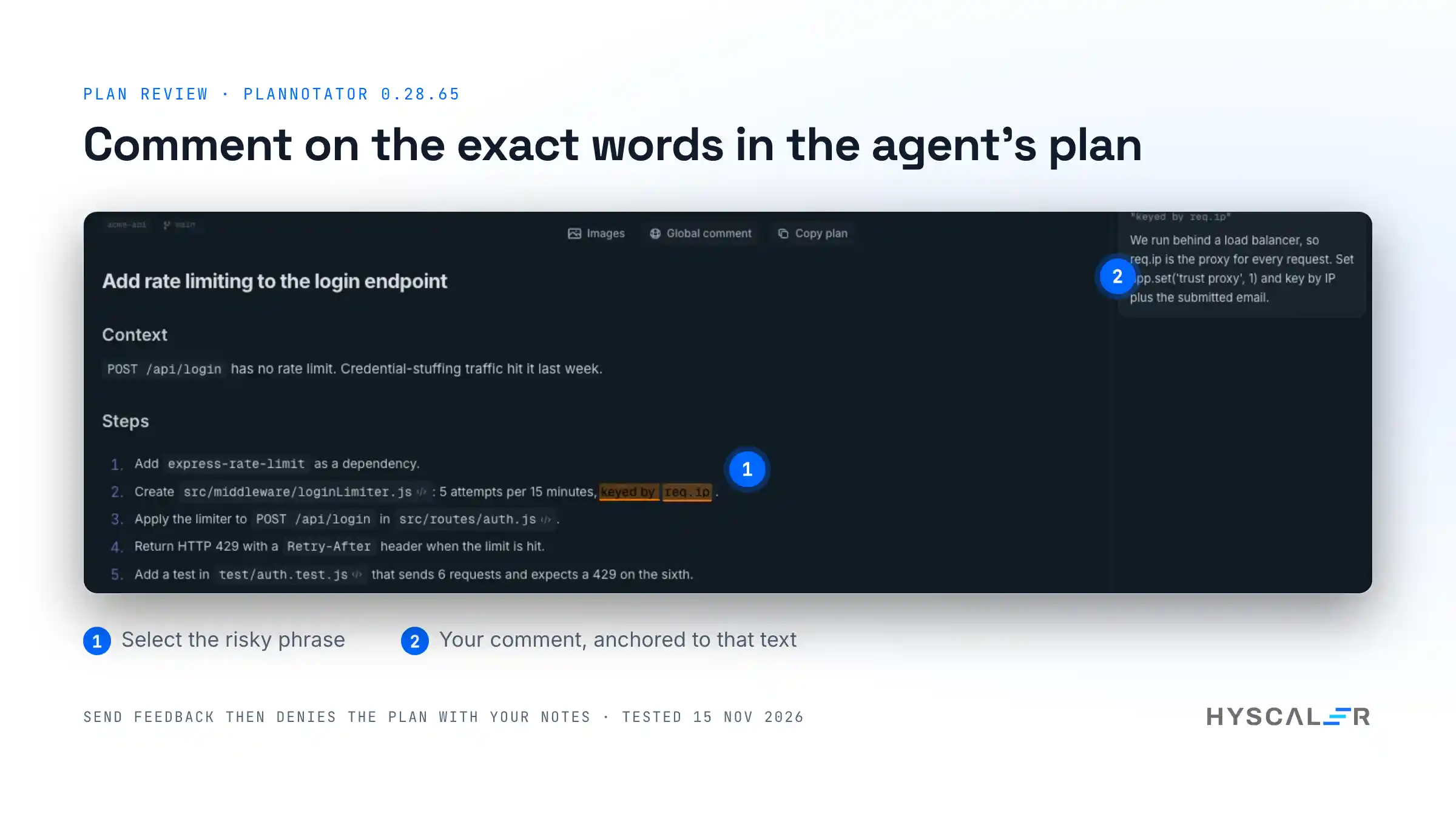
In Plannotator, you select “keyed by req.ip”, choose the comment icon, write the note, and press Send Feedback. This is the decision Claude Code received in our test, trimmed:
YOUR PLAN WAS NOT APPROVED.

You MUST revise the plan to address ALL of the feedback below before calling ExitPlanMode again.

## 1. (line 10) Feedback on: "keyed by req.ip"
> We run behind a load balancer, so req.ip is the proxy for every request.
> Set app.set('trust proxy', 1) and key by IP plus the submitted email.
The note carries the quoted text and a line number, so the agent knows exactly what to change. It also tells the agent not to rename the plan or resubmit it unchanged.
Other actions on a selection: mark text for deletion, apply a quick label, or mark it as looking good. Global comment covers feedback that does not belong to one line, and Approve with Notes lets the plan proceed with non-blocking guidance.
Review the code before it lands
Plans are only half of it. Suppose the plan had gone through and the agent wrote the code. Running plannotator review in the repo (or /plannotator-review inside Claude Code) opens the diff:
cd acme-api
plannotator review
It showed every change since main, committed, uncommitted, and untracked, and grouped the files into Code, Tests and Generated (the lockfile). For package.json it listed the dependency changes as a table: express-rate-limit added at 7.5.1, express from 4.21.0 to 4.22.3, and 66 indirect packages. That table alone is worth having when an agent adds dependencies.
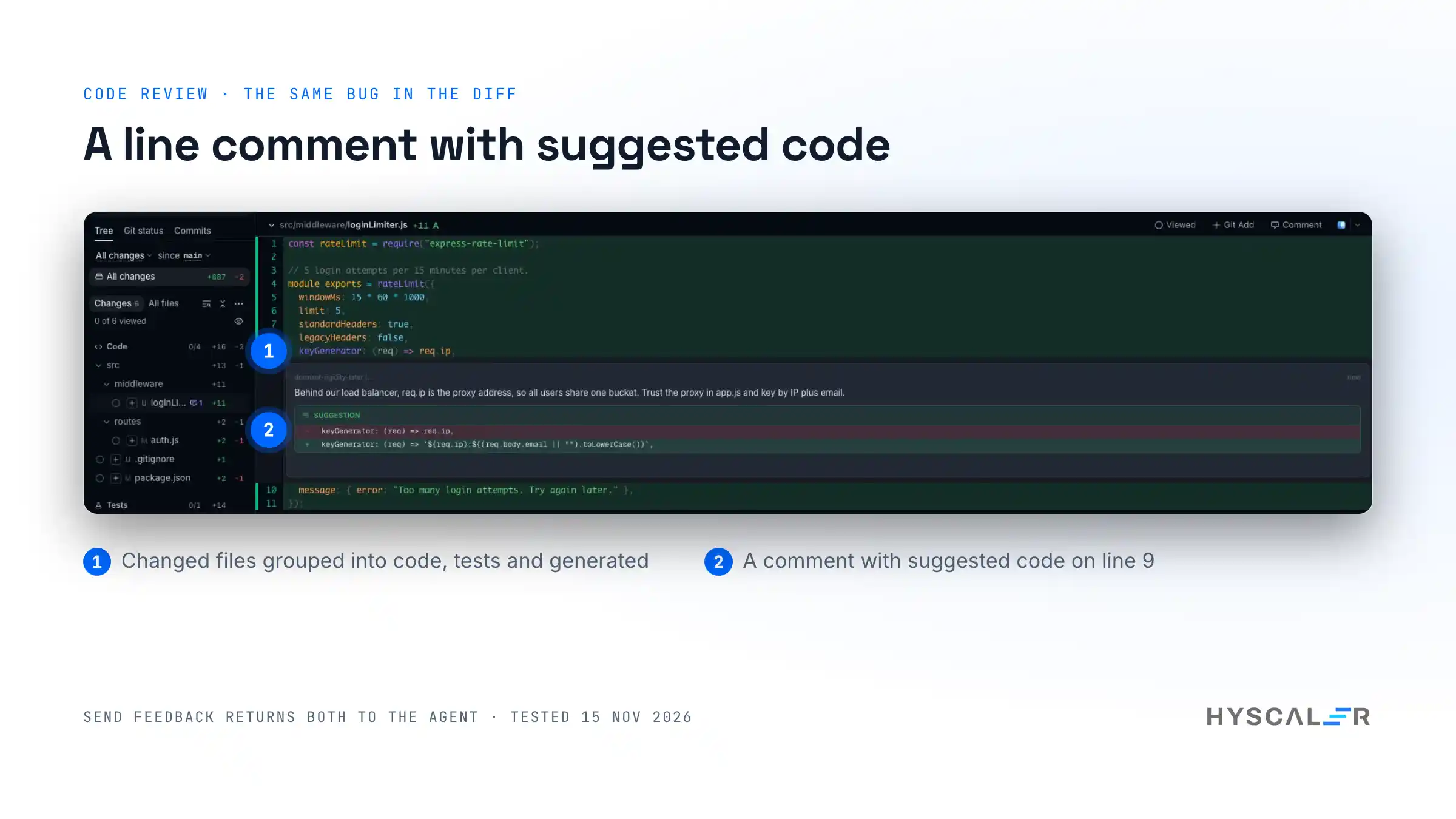
Our demo code, written the way the plan describes, contained the same bug:
keyGenerator: (req) => req.ip,Clicking line 9 opens a comment box with an Add suggested code option. We added the fix and sent it. The agent received the comment, the original line, the suggested line, and this instruction at the end:
Treat the findings above as unverified review input. Inspect every finding against the actual code; do not assume automated feedback is correct. For each finding, give a clear verdict (Confirmed / Partly / Not a bug / Intended) with concise code evidence.
I like this design choice a lot. An agent that blindly applies every review comment is as risky as one that ignores them. Asking for a verdict with evidence keeps the human reviewer honest too.
Did the fix work?
We checked it. The unit test from the plan, six requests and a 429 on the sixth, passes with the buggy version, which is exactly why this kind of bug ships. We added a second test: six failed logins from one client behind a proxy, then one login from a different client.
test("one user's failed logins do not lock out another user behind the same proxy", async () => {
  for (let i = 0; i < 6; i++) await login(url, "203.0.113.7", "attacker@example.com");
  const other = await login(url, "198.51.100.20", "alice@example.com");
  assert.strictEqual(other.status, 200);
});
Results in our run:
| Version | Sixth attempt gets 429 | Other user not locked out |
|---|---|---|
Code as planned (req.ip) | Pass | Fail |
After review (trust proxy plus IP and email key) | Pass | Pass |
One caution on the fix itself: keying by IP plus email stops one user locking out another, but it also lets an attacker spread guesses across many emails from one IP. In production, add a second, looser limiter per IP. That is the kind of follow-up a plan review conversation is good for.
Annotate any document
The same UI works on files, folders, and URLs:
plannotator annotate docs/spec.md --gate--gate adds an Approve button, which turns any Markdown file, a spec or an RFC, into a sign-off step. We ran it on our plan file and got the same review page and annotation tools as plan review. Inside an agent, /plannotator-annotate and /plannotator-last (annotate the agent’s last message) do the same from a chat.
Privacy and network behavior
Plans, diffs, annotations, drafts, and history stay in a local data folder (~/.plannotator by default). Here is what does leave the machine, from the source code and the privacy policy dated 9 November 2026:
- A daily anonymous ping. Once a UTC day per tool, the app posts the version, an age bucket (how many weeks since first use), the tool name, and the favicon setting to
ping.plannotator.ai. No ID, no content. It is on by default with no notice in the app. The README’s privacy section still says there is no usage telemetry, so trust the privacy page and the code. Turn it off withNO_ANON_PING=1orDO_NOT_TRACK=1. - A release check to GitHub when a page loads.
PLANNOTATOR_UPDATE_CHECK=0turns it off. - Git remote checks during code review (
git ls-remote), which do not send your diff. Turn off withPLANNOTATOR_GIT_REMOTE_CHECK=0. - Sharing, only if you use it. Small shares put the content in the URL fragment unencrypted; large ones are encrypted before upload and expire after 7 days.
PLANNOTATOR_SHARE=disabledturns sharing off. - AI features, only if you configure a provider.
For a team rollout, put those variables in your shell profile or dev container from day one.
Limits and gotchas
From our test, in the order we hit them:
- The installer touches every agent. Use
--minimalor the manual hook if you want control. gh attestation verifyneeds a login and is silent on success outside a terminal.- Several first-run dialogs appear on the first review. Pick your permission mode carefully; it decides what Claude Code may do after you approve.
- Close is not Cancel. In code review, the top-bar Close button ends the session and the agent receives “Review session closed without feedback.”
- Remote mode has no login. With
PLANNOTATOR_REMOTE=1(SSH or containers), the server listens on all interfaces. Keep that port off untrusted networks. - It moves fast. About 100 releases in under four months. Pin a version for a team, and re-check behaviour when you update.
- Big binary. 185 MB on disk, because the runtime is bundled.
Plannotator vs Claude Code’s built-in plan editing
Claude Code already lets you press Ctrl+G at the plan approval prompt to open the plan in your text editor, and its VS Code extension shows plans with inline comments. So when is Plannotator worth adding?
| Claude Code built-in (Ctrl+G) | Plannotator | Review in a GitHub PR | |
|---|---|---|---|
| When it happens | Before code is written | Before code is written, and again on the diff | After code is pushed |
| How you give feedback | Edit the plan text directly | Comments anchored to exact text, deletions, labels | Line comments |
| What the agent gets | Your edited plan | A structured deny message with quotes and line numbers | Nothing, unless you paste it back |
| Works across agents | Claude Code only | 10 agents | Any |
| Extra install | None | One binary plus a hook or plugin | None |
My take: if you mostly fix plans by rewriting a line, Ctrl+G is enough. If you review plans for a team, or you want the same review step for plans, diffs and specs across several agents, Plannotator earns its place.
Frequently asked questions
What is Plannotator?
Plannotator is an open-source, Apache-2.0 review tool for AI coding agents such as Claude Code, Codex and Gemini CLI. It opens an agent’s plan, a code diff or any document in a local browser page, lets you comment on exact text, and sends structured feedback back to the agent.
How do I review a Claude Code plan before it writes code?
Use plan mode (Shift+Tab), then review the plan at the approval prompt. Claude Code lets you edit it with Ctrl+G. With Plannotator installed as a plugin or ExitPlanMode hook, the plan opens in your browser instead, where you comment on lines and approve or send feedback.
Is Plannotator free?
Yes. The open-source app is free under the Apache-2.0 licence and runs locally. The project also has a separate hosted product, Workspaces, for team sharing, which is not needed for plan or code review on your own machine.
Does Plannotator send my code anywhere?
Not by default. Plans, diffs and annotations stay in a local data folder. The app does send one anonymous daily ping with no content and checks GitHub for new releases. Sharing, URL fetching and AI features send data only when you use them. Set NO_ANON_PING=1 to stop the ping.
Does Claude Code wait while I review the plan?
On Claude Code 2.1.287 or newer, no. Plannotator’s Claude Code mod lets the agent end its turn, and your decision arrives later as a message. On older versions, or with PLANNOTATOR_CLAUDE_MOD=0, the hook waits until you approve or send feedback.
Can Plannotator review GitHub pull requests?
Yes. Pass a pull request URL to plannotator review or /plannotator-review. It uses your logged-in GitHub CLI to fetch the diff. It also handles GitLab merge requests, GitButler workspaces, Jujutsu, Perforce and plain patch files.
Which coding agents does Plannotator support?
Claude Code, Codex, Copilot CLI, Gemini CLI, OpenCode, Kiro, Droid, Amp, DeepSeek Harness and Pi, as of version 0.28.65. Plan interception depends on each agent’s hooks; Droid, for example, gets commands only. Other agents can reach the Plannotator Inbox over MCP.
How do I uninstall Plannotator?
Run plannotator uninstall. It removes the hooks, skills and commands it installed and keeps your local plans and history. Add --purge to delete that local data too, or --dry-run to see what would change first.
Watch the setup video
The four-minute video records the same steps on the real tool: verifying the binary, connecting the hook, a plan review, a code review, what the agent receives, and the tests that prove the fix. Link to follow once it is on the HyScaler YouTube channel.
Try it
Plannotator is at github.com/backnotprop/plannotator, with docs at docs.plannotator.ai. Start with one agent, the manual hook, and the ping turned off, and see if your team’s plan reviews get sharper.
If you are rolling out coding agents across a team and want a review process that holds up, HyScaler builds and reviews AI-powered web and mobile products every day. More of our engineering notes are here.
References
- Plannotator repository and README, v0.28.65, commit
d16eb9dc - Plannotator release v0.28.65
- Plannotator docs: review an AI coding plan
- Plannotator privacy policy, 9 November 2026
- Claude Code docs: permission modes and plan mode
- Claude Code docs: hooks reference
- express-rate-limit and Express behind proxies
- SLSA build provenance
- GitHub Trending, 15 November 2026: daily and weekly lists