

Table of Contents
Every 100 users on Salesforce’s Advanced edition cost $474,000 a year at list price, before implementation, data migration, or a single AI agent.
An enterprise CRM solution is the system a large organisation runs its customer relationships on: hundreds of users, several business units, strict access control, and live links to finance, billing and data. The big products now share most of their features. In 2027 the decision is about money and fit: what the licences cost at your size, how AI agents get charged, and whether your process suits a packaged product at all.
What is an enterprise CRM solution, and how does it work?
Think of an enterprise CRM solution as one shared record of every customer, with the sales, service and marketing work that runs on top of it. Accounts, contacts, deals and cases live in one place, and the CRM stays connected to every other system that knows something about that customer.
So what makes an enterprise CRM solution different from a standard one? Mostly scale and control. It has to carry thousands of users and millions of records without slowing down. It needs role-based access, field-level permissions, audit trails and single sign-on, because a rep in Singapore has no business reading the contract terms on a German key account. You will want your own objects, fields and relationships, so the system fits how your company sells and serves. And it has to stay in step with ERP, billing, the data warehouse and identity through APIs and events, all day, with nobody exporting spreadsheets.
If you are unsure where CRM ends and ERP begins, our guide to CRM, ERP and HRMS sets out the boundary.
How much does an enterprise CRM solution cost?
List prices first. The enterprise tiers of the two biggest sales CRMs run from $105 to $550 per user per month, billed annually. Salesforce is the larger of the two. IDC has ranked it the leading CRM provider for thirteen years running, with a 20.0% share of the market in 2025, according to Salesforce’s summary of IDC’s tracker.
On 17 November 2026, each vendor’s own pricing page showed the prices below. Dynamics 365 Sales Professional and Salesforce Pro Suite are the entry business tiers, listed for comparison.
| Product and edition | List price per user per month | Published by |
|---|---|---|
| Dynamics 365 Sales Professional | $65 | Microsoft |
| Dynamics 365 Sales Enterprise | $105 | Microsoft |
| Dynamics 365 Sales Premium | $150 | Microsoft |
| Salesforce Sales, Pro Suite | $100 | Salesforce |
| Salesforce Sales, Core | $195 | Salesforce |
| Salesforce Sales, Advanced | $395 | Salesforce |
| Salesforce Sales, Max | $550 | Salesforce |
A quick warning. Plenty of comparison articles still quote old Salesforce edition names and old prices, and both have changed since. Check the vendor’s page on the day you set the budget.
How do licence costs scale with team size?
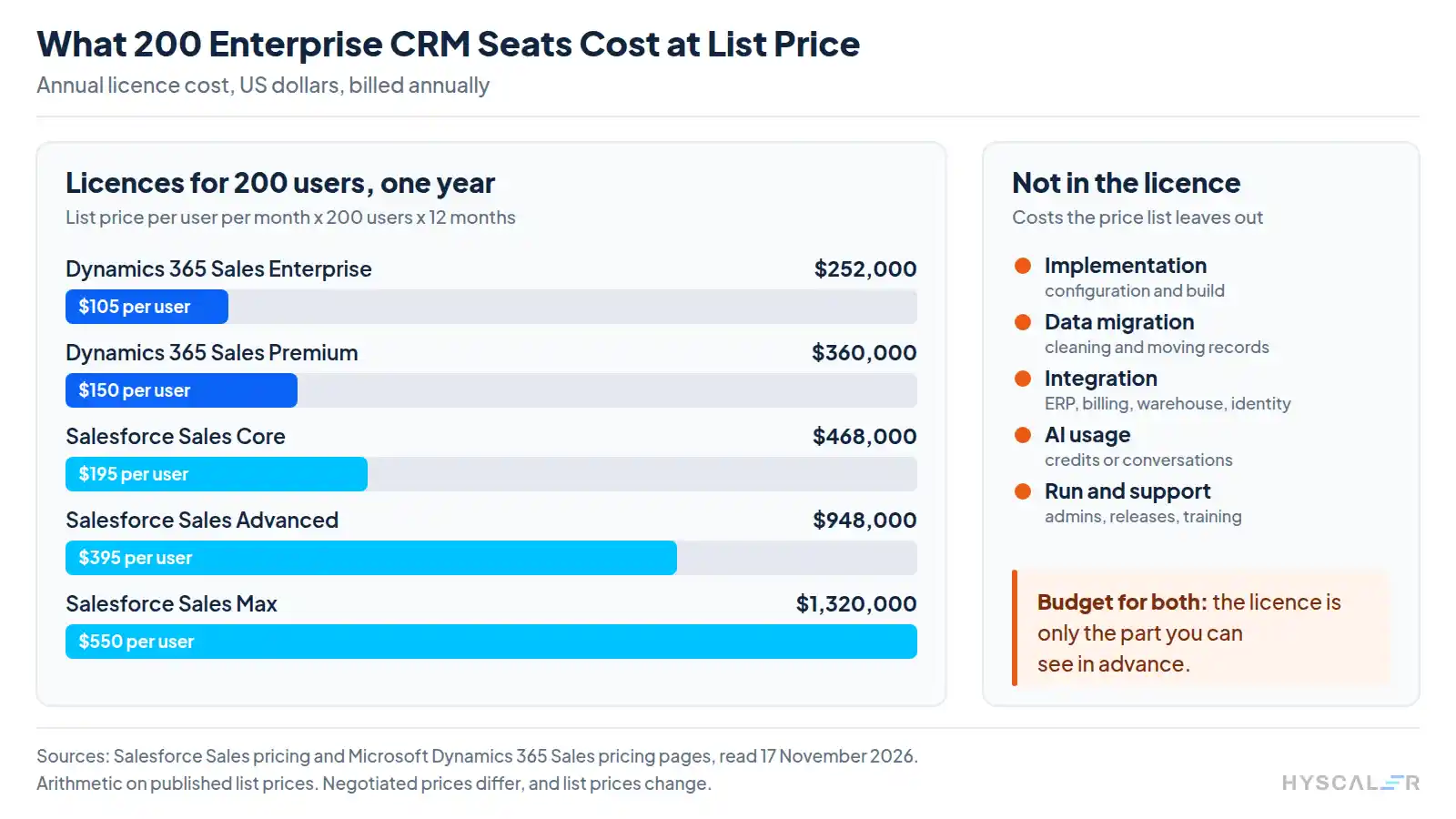
Multiply it out. At list price, each user on the enterprise editions below costs between $1,260 and $6,600 a year in licences, depending on the product and edition. A 50-person team lands between $63,000 and $330,000 a year. At 500 users, the same range runs from $630,000 to $3.3 million.
| Edition | Per user, one year | Per 100 users, one year | Per 100 users, three years |
|---|---|---|---|
| Dynamics 365 Sales Enterprise | $1,260 | $126,000 | $378,000 |
| Dynamics 365 Sales Premium | $1,800 | $180,000 | $540,000 |
| Salesforce Sales, Core | $2,340 | $234,000 | $702,000 |
| Salesforce Sales, Advanced | $4,740 | $474,000 | $1,422,000 |
| Salesforce Sales, Max | $6,600 | $660,000 | $1,980,000 |
Treat the table as a rough guide. Large buyers negotiate discounts, and the three-year column assumes prices stay flat for three years. What it gives you is the order of magnitude, in your head, before the first sales call.
What sits outside the licence?
Beyond the licence, an enterprise CRM solution carries implementation, data migration, integration, AI usage, and the people who keep the system running after launch. Get every vendor and partner to price each of these in writing, because this is where budgets tend to slip. Our seven-step CRM implementation guide walks through the order they happen in.
How are AI agents in a CRM priced?
This is the newer line in the budget, and it sits apart from user licences. Salesforce’s Agentforce pricing page lists four ways to pay:
| Model | How it is charged | List price |
|---|---|---|
| By action | Flex Credits, with 20 credits per action in Salesforce’s own example | $500 per 100,000 credits, about $0.10 per action |
| By conversation | Each conversation an agent handles | On request (Salesforce lists this model as “Contact us”) |
| By seat | Per user, per month | $125 per user per month |
| Bundled | Included with the Max edition | 2.75 million Flex Credits per organisation per year |
Seat prices are easy to forecast: in January you already know what December will cost. Usage pricing moves with how busy your agents are, so a heavy quarter turns up as a bigger invoice. Before you sign, estimate actions per month for each use case, then ask the vendor what happens when you go over the bundle.
Is your CRM data ready for AI agents?
Probably not, if Validity’s numbers are any guide. Its State of CRM Data Management in 2026 surveyed 500 marketers in the US, UK, Brazil, Australia and New Zealand, and only 21% said their CRM data was “very well prepared” to support AI. These are marketers grading their own data, which is worth keeping in mind.
The other findings, from Validity’s release, lean the same way. 62% said poor CRM data had cost them revenue directly. Two in three had handed more marketing decisions to autonomous AI agents over the past year. Yet only 41% had a dedicated team or owner for data governance and privacy risk.
An agent working from that data acts on whatever the record says. Hand it a duplicate account, or a contact who left the company eighteen months ago, and it will send a well-written email to the wrong person, promptly and politely. Clean the data and put a named person in charge of it before any agent goes live.
What does the architecture of an enterprise CRM solution look like?
Draw an enterprise CRM solution as a stack. At the top are the people and channels that use the system. Below them sit the AI agents that act in it. Under those is the CRM core, which holds the record, and at the bottom, the integration layer that connects it to everything else.
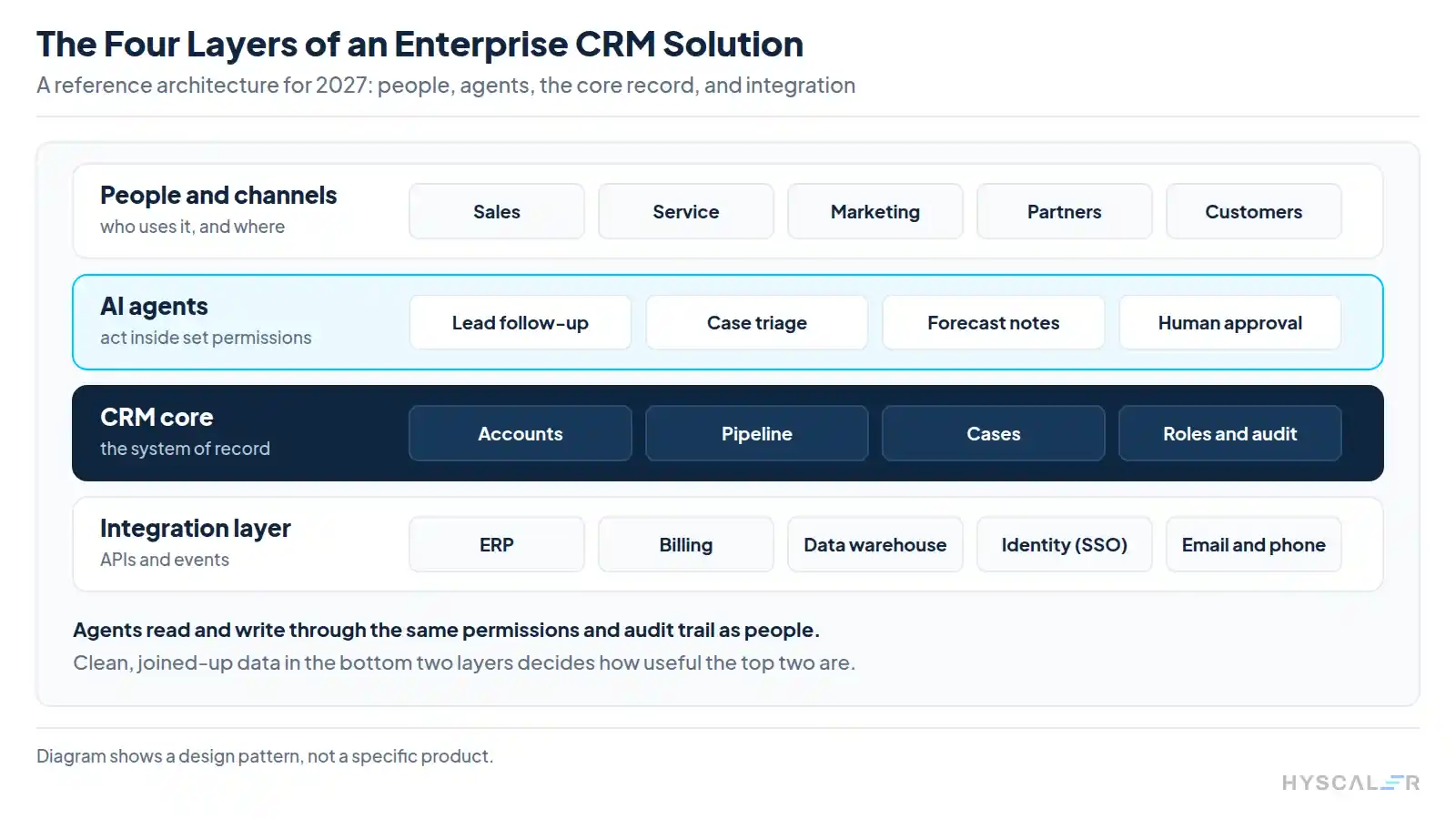
- People and channels: sales, service, marketing, partners and customers, each seeing only what their role allows.
- AI agents: follow up leads, triage cases and draft forecast notes, inside set permissions and with human approval where the stakes are high.
- CRM core: accounts, pipeline, cases, roles and the audit trail. This is the system of record.
- Integration layer: APIs and events linking finance and billing systems, the data warehouse, identity, email and phone.
Give agents the same permissions and the same audit trail as the people they work for, with no special access of their own. Notice, too, that the top of the stack leans on the bottom: an agent can only work with the record it reads and the systems it can reach. For agents that work across several systems at once, see our piece on multi-agent AI systems for ERP and CRM.
Should you buy, extend or build an enterprise CRM solution?
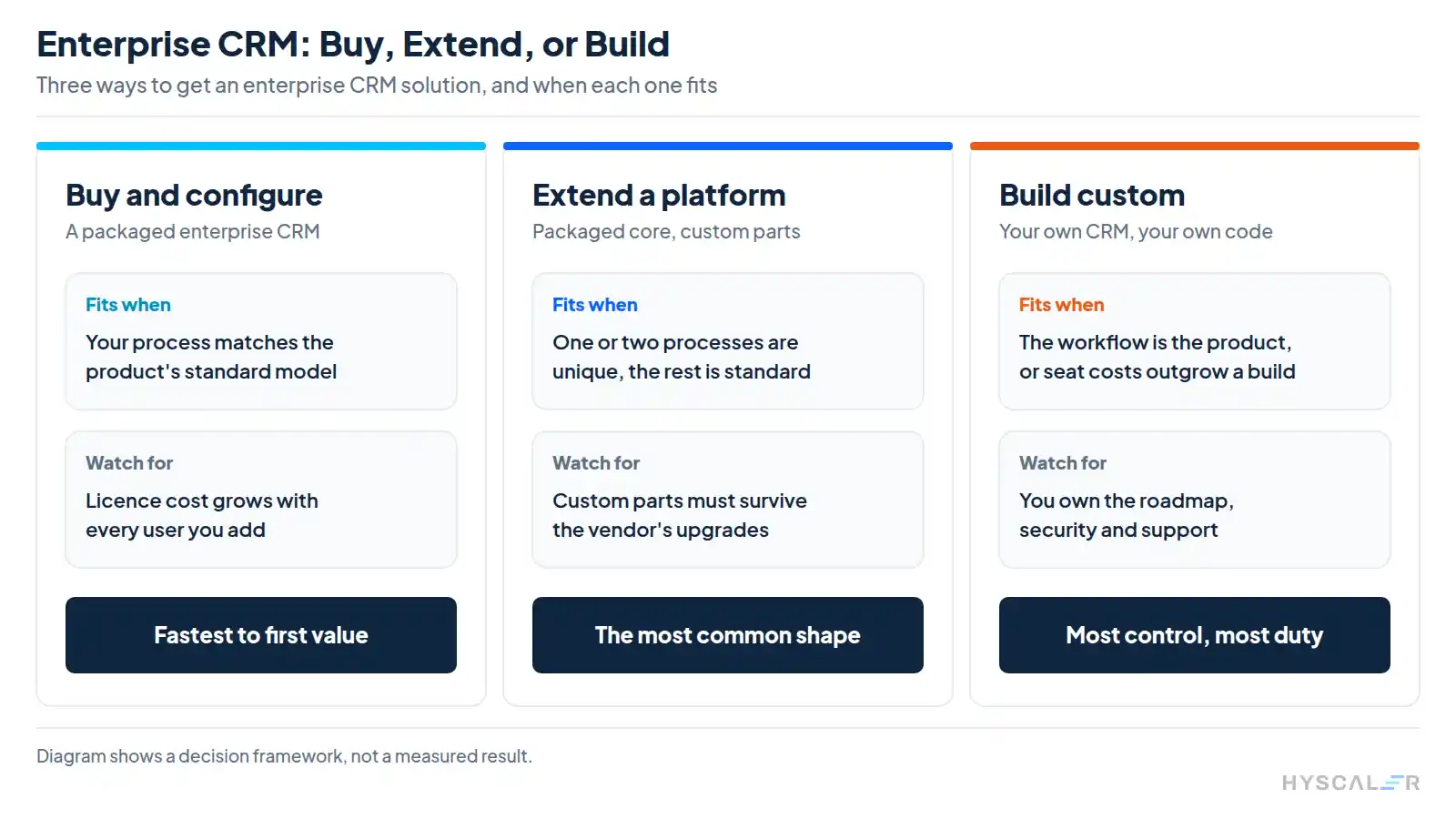
The deciding factor is how unusual your process is. A team whose sales and service work fits the product out of the box should buy and configure. If one or two processes are specific to your business, extend a platform. Build when the workflow itself is what you sell, or when the seat bill has grown past the cost of owning the software.
| Route | Fits when | Watch for |
|---|---|---|
| Buy and configure | Your sales and service process matches the product’s standard model | Licence cost that grows with every user you add |
| Extend a platform | One or two processes are unique and the rest is standard | Custom parts that must survive the vendor’s upgrades |
| Build custom | The workflow is the product, the data model is unusual, or per-seat cost exceeds the cost of a build | You own the roadmap, security and support |
To test the build route roughly, take the three-year licence figure for your edition, scale it to your headcount, and set it next to a written quote for building and running a custom system over the same period. On Salesforce’s $195 Core edition, three years of licences cost $7,020 per user, which passes $1 million at about 143 users. A custom build might come in above or below that, and at that size the quote is worth getting. Our guide to building a custom CRM covers what goes into one.
Banks, hospitals and property firms often end up extending or building, because their records do not fit a generic sales model. We have written about each of them: CRM in banking, CRM in healthcare and property management CRM.
What should production support for an enterprise CRM solution include?
Think about the day something breaks. Support for a live enterprise CRM solution needs agreed response times for monitoring and incidents, someone looking after users and permissions, a release process for vendor updates and your own changes, regular checks on integrations and data quality, and a clear route for change requests, with all of it written into the contract.
Put the awkward questions to every vendor. Who is on call at 2am on a Saturday? What counts as a critical incident? How long can a fix take? If any answer comes back as “we will look into it”, keep asking.
How HyScaler can help with your enterprise CRM solution
We help companies choose, extend and build CRM systems, and connect them to the rest of the business.
On the planning side, our consultants help you pick a route and plan the rollout, as part of our digital transformation services and enterprise platforms work. If you are building, our custom enterprise application development team designs the CRM around your own data model and workflow.
Before go-live, our data migration engineers clean and move your records. And if you want agents working inside your CRM and ERP, we build AI-powered automation and MCP-based agents for exactly that.
Bring your user count and your three-year licence figure, and we will help you work through the buy, extend or build decision. Talk to our team.
Frequently Asked Questions
What is the difference between a standard CRM and an enterprise CRM solution?
A standard CRM serves one team with a fixed data model. An enterprise CRM solution serves many teams and business units, with custom objects, role-based access, audit trails and integration with systems such as ERP and billing.
Which enterprise CRMs support customisable data models?
Salesforce, Microsoft Dynamics 365 and other enterprise platforms let you add custom objects and fields and set how they relate. If your model is unusual enough that you would be fighting the platform, a custom build gives you full control of the schema.
What is an enterprise sales CRM platform?
It is the sales part of an enterprise CRM: lead and opportunity management, forecasting, territory and quota planning, and reporting, for a sales organisation with many teams and regions.
Do small businesses need an enterprise CRM?
Usually not. A team of ten with one sales process is better served by a starter or professional edition. Move up when you need custom objects, tighter permissions or integration that the smaller edition does not allow.
How do you keep an enterprise CRM implementation on track?
Start with one process and one team, migrate only clean data, integrate the systems that team depends on, and expand in phases. Agree the measure of success before the build starts.
Sources
- Salesforce, Sales pricing and Agentforce pricing, read 17 November 2026
- Microsoft, Dynamics 365 Sales pricing, read 17 November 2026
- Salesforce, Salesforce ranked number one CRM provider for the thirteenth consecutive year, citing IDC’s Worldwide Semiannual Software Tracker, April 2026
- Validity, State of CRM Data Management in 2026, and its release as carried by CustomerThink