

Table of Contents
CRM in banking is software that helps banks manage customer information, interactions, sales opportunities, and service workflows in one place. It gives authorized teams a unified view of each customer relationship, so branches, mobile apps, websites, and contact centers can work from the same context instead of from disconnected records.
That matters because most banks still operate with fragmented data. A customer may speak to a relationship manager, raise a complaint through the contact center, and apply for a loan online, yet each team sees only part of the story. The result is repeated questions, slow resolutions, missed opportunities, and an experience that feels inconsistent.
A well-implemented banking CRM closes those gaps. This guide explains what CRM in banking is, the benefits and features that matter, practical use cases, the role of AI, security and compliance considerations, how to choose a platform, how to implement it step by step, and how to measure results.
What Is CRM in Banking?
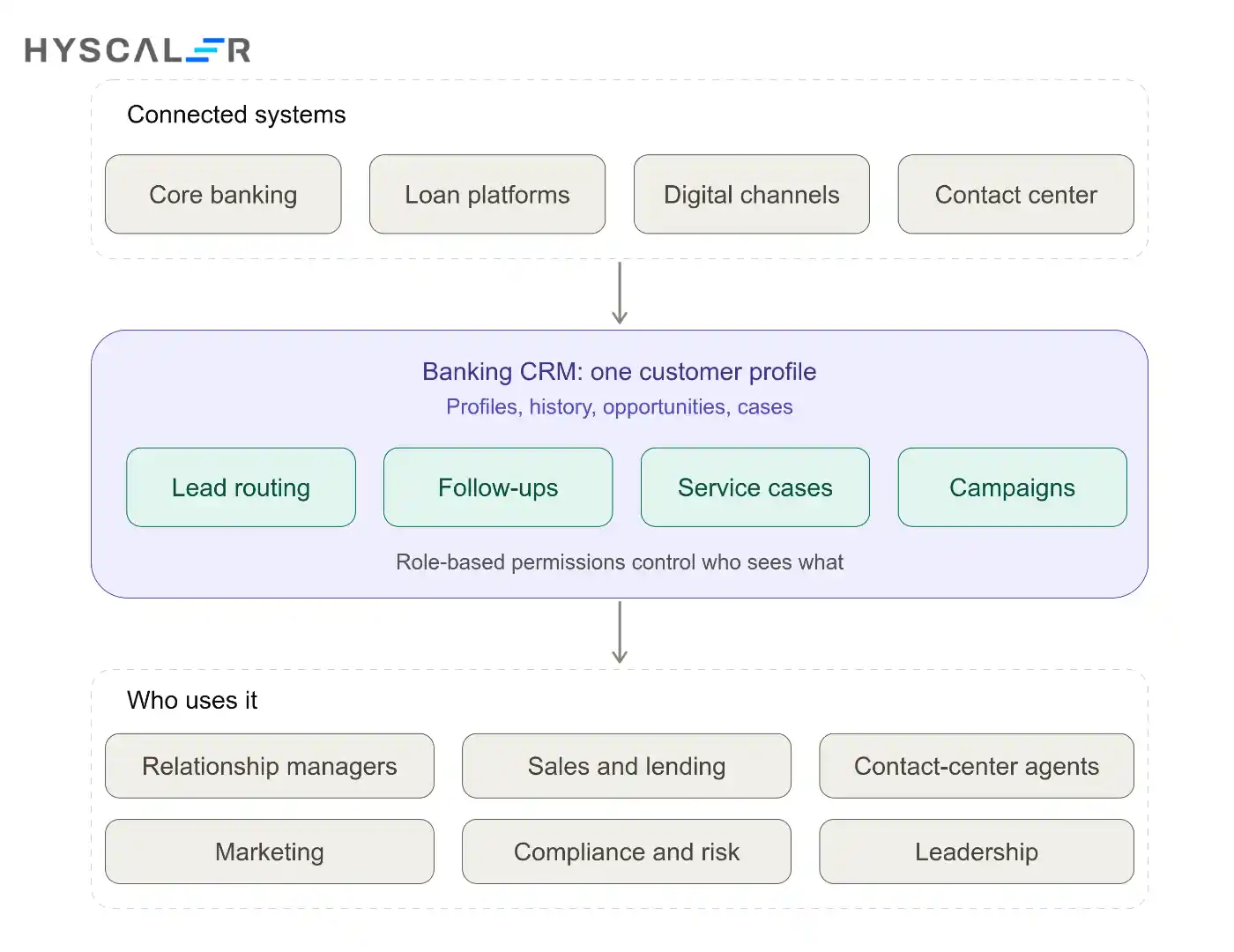
CRM (customer relationship management) in banking is a system for managing every interaction between a bank and its customers or prospects, from first inquiry through onboarding, ongoing service, and long-term retention. It stores profiles, communication history, sales opportunities, tasks, and service cases, and makes them available to the right people at the right time.
How a banking CRM system works
A banking CRM pulls customer data from connected systems such as core banking, lending platforms, digital channels, and contact-center tools. It consolidates that data into a single profile, then supports workflows on top of it: assigning leads, scheduling follow-ups, logging service requests, triggering campaigns, and producing reports. Role-based permissions control who can see what.
CRM vs. core banking software
CRM and core banking solve different problems. Core banking software processes accounts, deposits, balances, and transactions. CRM manages relationships, sales activity, and service interactions. The two should integrate so that a relationship manager can see a customer’s relationship context alongside relevant account information, but neither replaces the other.
CRM vs. customer data platforms and customer service systems
A customer data platform (CDP) focuses on collecting and unifying customer data, often for analytics and marketing. A customer service system focuses on tickets and support cases. A banking CRM typically covers both relationship management and service workflows, and often connects to a CDP or analytics layer for deeper insight. The right setup depends on how much of that functionality your bank already has.
Who uses CRM in a bank?
CRM is used across the institution: relationship managers and branch staff, sales and lending teams, contact-center agents, marketing teams, compliance and risk teams (for audit trails and consent records), and leadership teams who rely on dashboards and reporting.
Why Is CRM Important in Banking?
Banks hold more customer data than almost any other industry, but data alone does not create better relationships. The problem is access and context. When information is scattered across systems, teams cannot act on it quickly or consistently. CRM turns that scattered data into something people can use.
Creating a unified customer view
A unified view brings together contact details, products held, past interactions, open service cases, and sales opportunities. Employees no longer have to ask customers to repeat themselves, and they can see at a glance what a customer needs next. Learn more about how a CRM fits into a banking environment.
Delivering consistent experiences across channels
Customers move between branches, mobile apps, websites, and phone support, and they expect the bank to keep up. A shared CRM means a conversation started in one channel can continue in another without losing context.
Improving relationship management and retention
When teams can see relationship history, life events, and service issues, they can reach out at the right moment and resolve problems before they lead to churn.
Supporting data-driven decisions
CRM reporting shows which segments are growing, where leads stall, how quickly cases are resolved, and which campaigns perform. That visibility helps leaders decide where to invest, and it supports any CRM investment case with evidence.
Key Benefits of CRM in Banking
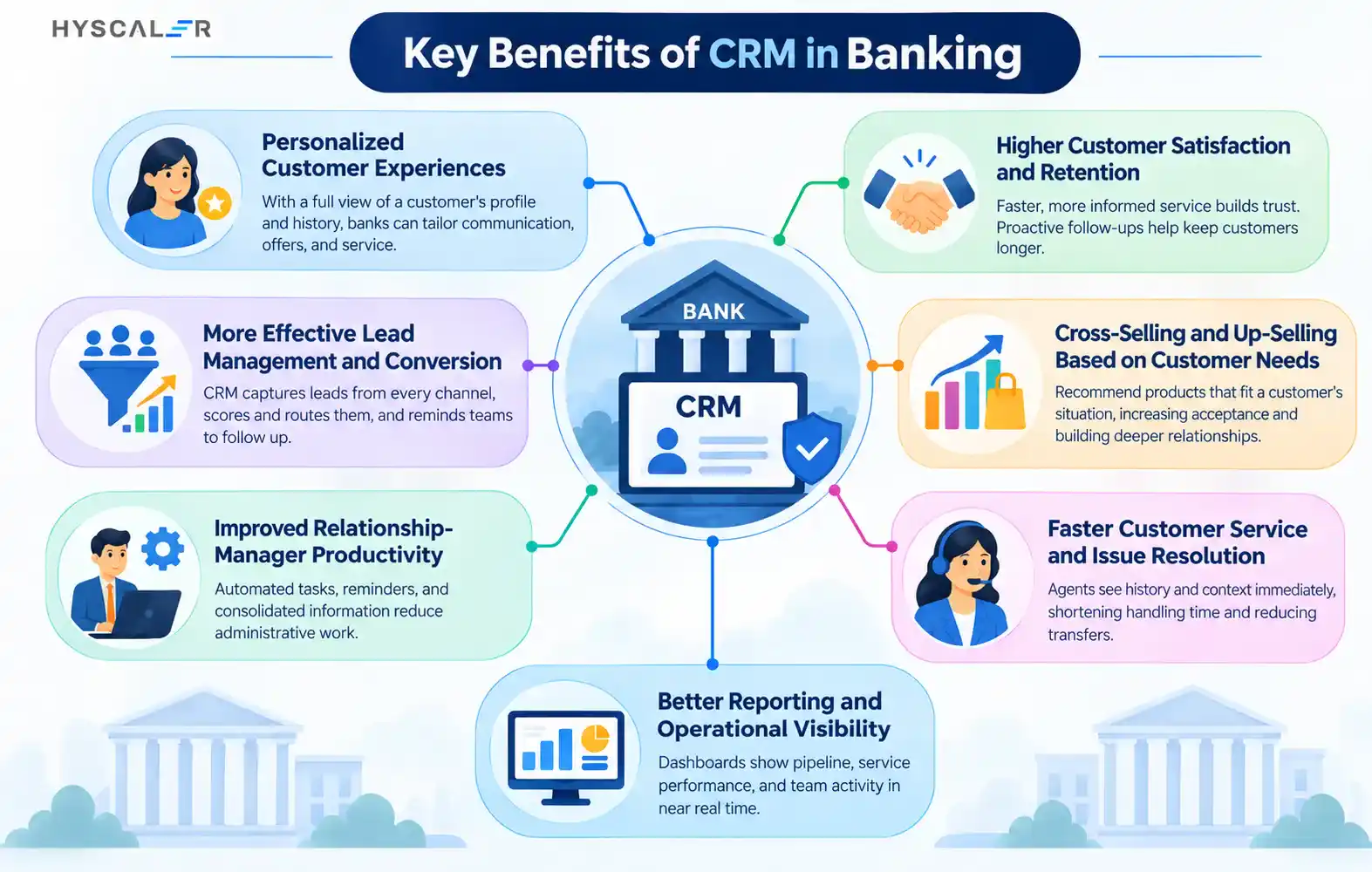
Results vary with data quality, integration, and adoption, so it is better to tie each benefit to a measurable outcome than to promise fixed percentage gains.
Personalized customer experiences
With a full view of a customer’s profile and history, banks can tailor communication, offers, and service. A small business owner receives relevant working-capital guidance, while a young professional is shown savings and first-home products.
Higher customer satisfaction and retention
Faster, more informed service builds trust. Proactive follow-ups and early flagging of at-risk relationships help keep customers longer.
More effective lead management and conversion
CRM captures leads from every channel, scores and routes them, and reminds teams to follow up. Fewer leads fall through the cracks.
Cross-selling and up-selling based on customer needs
Instead of pushing products indiscriminately, teams can recommend products that fit a customer’s situation, which is more likely to be accepted and less likely to feel intrusive.
Improved relationship-manager productivity
Automated tasks, reminders, and consolidated information reduce administrative work and give relationship managers more time with clients.
Faster customer service and issue resolution
Agents see history and context immediately, which shortens handling time and reduces transfers.
Better reporting and operational visibility
Dashboards show pipeline, service performance, and team activity in near real time, replacing manual spreadsheet reporting.
| Benefit | Example KPI |
|---|---|
| Personalized experiences | Customer satisfaction (CSAT), Net Promoter Score |
| Retention | Churn rate, customer lifetime value |
| Lead management | Lead-to-customer conversion rate |
| Cross-sell and up-sell | Products per customer, cross-sell conversion |
| Relationship-manager productivity | Client meetings per RM, time spent on admin |
| Faster service | First-response time, average resolution time |
| Reporting | Report preparation time, forecast accuracy |
Essential Features of Banking CRM Software
360-degree customer profiles and interaction history
Centralized profiles that combine demographics, products, communications, and service history are the foundation of every other feature.
Lead, sales pipeline, and relationship management
Look for pipeline stages, opportunity tracking, household or business-group relationship mapping, and task management for relationship managers.
Omnichannel engagement and contact-center integration
The CRM should connect branch, mobile, web, email, chat, and phone interactions. Integrating telephony through a Salesforce CTI integration or an equivalent connector lets agents see customer context as calls arrive and log interactions automatically.
Workflow automation and task management
Automated routing, approvals, reminders, and escalations reduce manual effort and keep processes consistent.
Customer segmentation and campaign management
Segment customers by behavior, product holdings, life stage, or value, then run targeted campaigns and measure results.
Dashboards, reporting, and analytics
Configurable dashboards for executives, branch managers, and relationship managers make performance visible.
Secure role-based access and audit trails.
Granular permissions and complete activity logs are essential in a regulated environment.
API integration and interoperability
Open APIs let the CRM connect with core banking, loan origination, document management, and analytics systems, which is often what determines whether a CRM succeeds.
Mobile access and scalable architecture
Relationship managers need secure mobile access in the field, and the platform must scale as customer volumes and use cases grow.
Practical Use Cases of CRM in Banking
Retail banking and customer onboarding
CRM tracks onboarding tasks, document collection, and follow-ups so new customers are activated smoothly and receive relevant next steps.
Business banking and relationship management
Relationship managers manage complex client structures, track opportunities, and coordinate across product specialists.
Wealth management and advisory relationships
Advisors keep notes, goals, meeting schedules, and client preferences in one place, supporting a more personal service.
Loan inquiries, lead nurturing, and application follow-ups
CRM captures loan inquiries, nurtures prospects, and prompts timely follow-up while an application moves through loan origination systems. The same approach applies to products such as auto finance software workflows.
Customer support and complaint resolution
Cases are logged, assigned, tracked against service targets, and escalated when needed, creating a clear record for both customers and compliance teams.
Customer lifecycle management and retention campaigns
CRM triggers outreach at key moments, such as an approaching product renewal, a change in activity, or a life event.
Example customer journey
A small business owner submits a loan inquiry on the bank’s website. The CRM creates a lead and assigns it to a business banking manager, who contacts the owner within the service target. After the application is handed to the lending system, the CRM tracks outstanding documents and reminds the manager to follow up. Once the loan is approved and the account opened, an onboarding checklist runs, and a service case is routed automatically if the customer later reports a problem. Six months on, the CRM flags a relevant follow-up conversation about additional services.
Note that CRM coordinates these customer-facing workflows. It does not replace the bank’s underwriting or transaction-processing systems.
AI and Predictive Analytics in Banking CRM

AI is becoming a standard part of CRM platforms, but it should support banking teams rather than replace judgment. Traditional CRM automation follows fixed rules, such as “send a reminder after three days.” AI-assisted capabilities learn from data to make predictions or suggestions.
Predicting customer needs and identifying churn risk
Predictive models can highlight customers who show signs of disengagement or who may be ready for a new product, helping teams prioritize outreach.
AI-assisted customer service and agent support
AI can summarize conversations, suggest responses, and surface relevant knowledge-base articles, reducing handling time and improving consistency.
Next-best-action and product recommendations
Recommendation engines can suggest the most relevant action for each customer based on history and context, within the bank’s rules and consent boundaries.
Automating routine customer relationship workflows
Repetitive work such as data entry, follow-up drafting, and case categorization can be automated. Banks exploring this can consider AI-powered workflow automation to connect CRM data with end-to-end processes.
Human oversight, explainability, and responsible AI use
AI outputs should be reviewed by people, particularly in customer-facing or consequential decisions. Banks should assess accuracy, bias, privacy, and explainability, and ensure models only use data they are permitted to use.
Banking CRM Security, Data Privacy, and Compliance
Because CRM holds sensitive personal and financial information, security and governance must be designed in from the start rather than added later.
Protecting sensitive customer information
Use encryption in transit and at rest, strong authentication, and secure hosting. Limit the sensitive data stored in the CRM to what is genuinely needed.
Identity management, role-based access, and audit logging
Apply least-privilege access so employees see only what their role requires. Maintain audit logs of who viewed or changed what, and review them regularly.
Data minimization, consent, and retention controls
Collect only necessary data, record customer consent and preferences, and define retention and deletion rules aligned with legal requirements.
Secure third-party integrations and API access
Every integration is a potential exposure point. Vet vendors, secure API keys and tokens, apply rate limits, and monitor traffic.
Regulatory requirements based on geography and business model
Obligations differ by country and by what the bank does. GDPR may apply to the personal data of people in the EU, while PCI DSS applies where payment card data is stored, processed, or transmitted. These address different concerns: GDPR governs privacy and personal data rights, whereas PCI DSS sets security requirements for payment card data. Banks should confirm which regulations apply with their legal and compliance teams, and verify requirements for AI use in their jurisdictions.
How to Choose the Right CRM for a Bank
Define business requirements and customer journeys
Start with the journeys you want to improve, such as onboarding, lending inquiries, or complaint handling, and the outcomes you want to measure.
Evaluate integration with core banking, lending, and contact-center systems
Check whether the platform offers prebuilt connectors or open APIs for your core systems. Integration effort is often the largest cost driver.
Assess security, governance, and deployment options
Review certifications, access controls, audit capabilities, data residency options, and whether cloud, private cloud, or on-premises deployment fits your risk profile.
Compare configuration, customization, licensing, and support
Understand what can be configured without code, what requires development, how licensing scales, and what support the vendor provides.
Evaluate scalability, reporting, usability, and vendor capabilities
A CRM that employees find difficult will not be used. Involve end users in demonstrations and pilots.
| Criterion | What to assess |
|---|---|
| Functional fit | Coverage of your required journeys and features |
| Integration effort | Connectors, APIs, and complexity with core systems |
| Security controls | Access control, encryption, audit, certifications |
| Customization | Configuration flexibility and development needs |
| Total cost of ownership | Licenses, implementation, integration, training, support |
| Vendor support | Implementation partners, roadmap, service levels |
Popular Banking CRM Platforms: A Comparison
Compare platforms against the same criteria: banking-specific capabilities, integration options, customization, governance, scalability, and total cost of ownership. Product capabilities and pricing change often, so verify current details with each vendor before deciding.
Salesforce Financial Services Cloud
Built for financial services, it offers relationship and household management, financial account views, and workflow tools. It has a large ecosystem of partners and integrations. Costs and implementation complexity can be significant, so it tends to suit banks that want a mature, extensible platform.
Microsoft Dynamics 365
Dynamics 365 integrates closely with Microsoft 365, Teams, and Azure, which is attractive to banks already invested in the Microsoft ecosystem. It offers sales, customer service, and analytics modules that can be configured for banking scenarios.
Odoo and configurable CRM alternatives
Odoo and similar configurable platforms can be cost-effective and flexible, particularly for smaller institutions or specific use cases. Banks should assess whether the platform meets their security, scalability, and banking-specific needs, and may need additional development.
When should a bank consider custom CRM development?
Custom development may make sense when a bank has specialized workflows, unusual integration requirements, strict data-control needs, or wants a differentiated experience that packaged products cannot deliver. It requires more investment and ongoing maintenance, so it should be weighed against configurable options. Banks considering this route can explore custom enterprise application development or custom web application development for secure portals and CRM interfaces.
How to Implement CRM in Banking: A Step-by-Step Guide
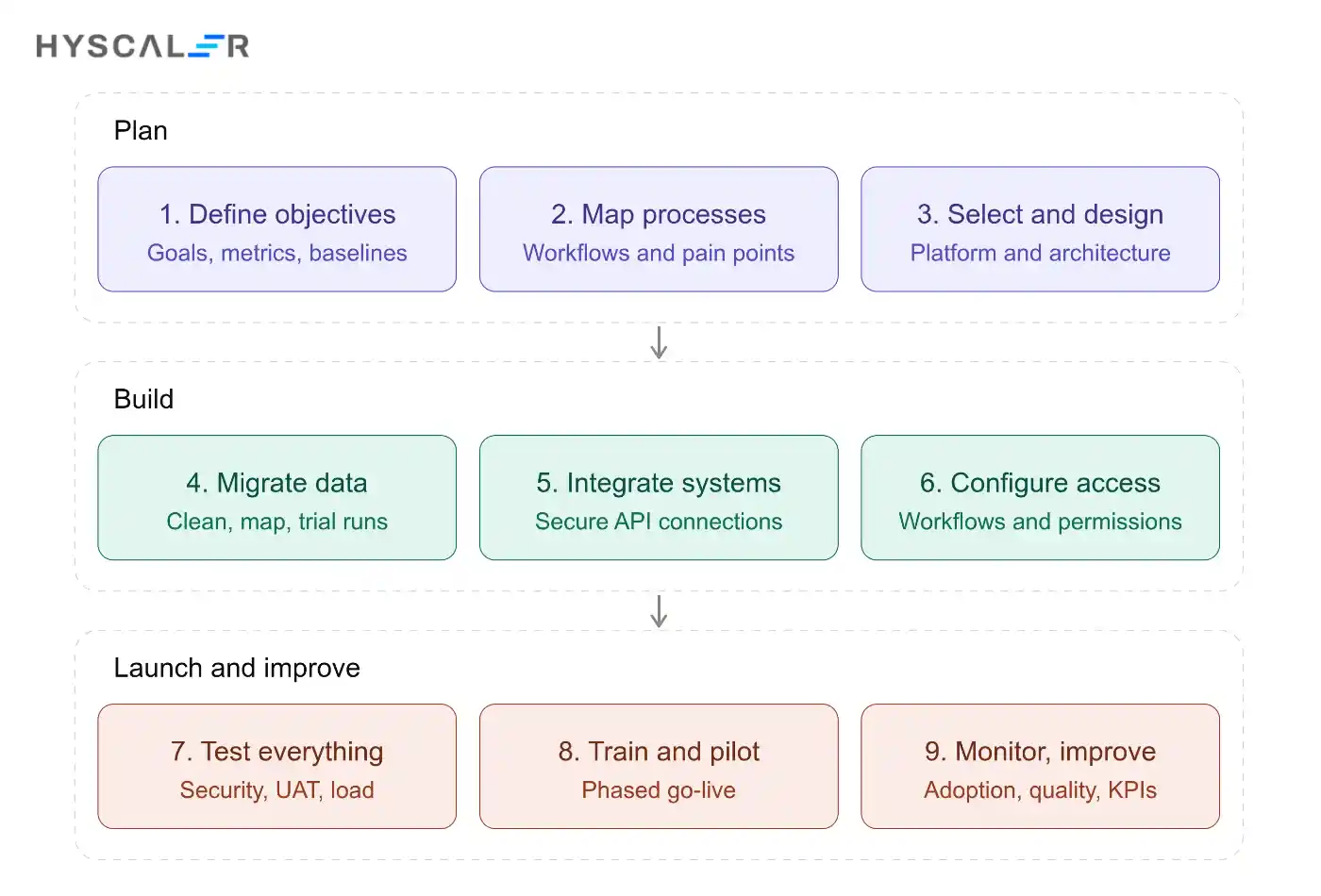
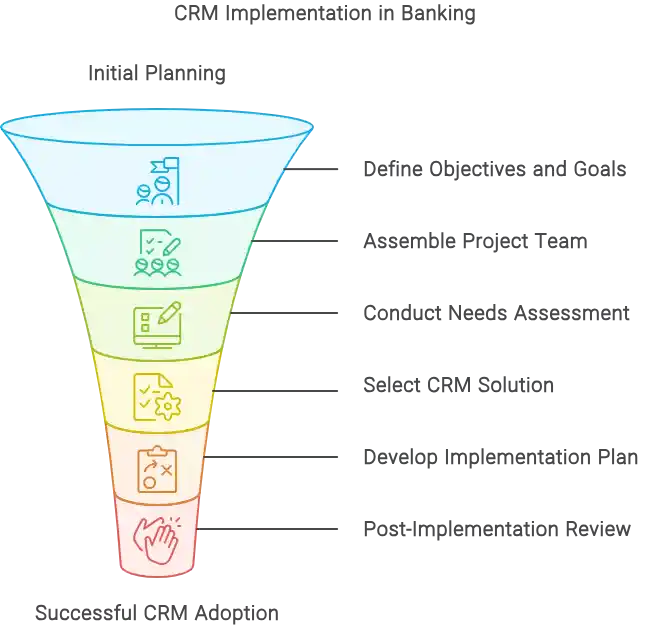
Step 1: Define objectives and success metrics
Decide what the CRM must achieve, such as faster onboarding or better retention, and set measurable targets and baselines.
Step 2: Map processes and assess existing systems
Document current workflows, pain points, and the systems involved. This reveals integration needs and opportunities to simplify.
Step 3: Select the platform and design the architecture
Use your requirements and selection criteria to choose a platform, then design how it will connect to core banking, lending, channels, and analytics.
Step 4: Clean, map, and migrate customer data
Deduplicate records, standardize formats, and map fields between old and new systems. Strong data engineering services can help with migration, quality, and analytics readiness. Run trial migrations and validate results before the final cutover.
Step 5: Integrate banking and customer engagement systems
Connect the CRM to core banking, loan origination, contact center, email, and document systems through secure APIs.
Step 6: Configure workflows and access permissions
Build the workflows, approval paths, and dashboards you defined, and apply role-based access from the beginning.
Step 7: Test security, functionality, and performance
Test integrations, permissions, data accuracy, and performance under realistic load. Include security testing and user acceptance testing.
Step 8: Train employees and launch in phases
Start with a pilot group or a single business line, gather feedback, and refine before expanding. Set explicit go-live acceptance criteria, for example, data migration accuracy, integration stability, security sign-off, and user readiness. Pair training with clear guidance on why the change matters. Modernizing surrounding systems may also be part of the effort, and digital transformation services can support legacy modernization.
Step 9: Monitor adoption, outcomes, and ongoing support
Track usage, data quality, and KPIs after launch, and keep improving workflows based on feedback.
Common Banking CRM Implementation Challenges and Solutions
| Challenge | Problem | Business impact | Recommended solution |
|---|---|---|---|
| Legacy system integration | Older systems lack modern APIs | Delays, higher cost, incomplete customer view | Use middleware or API layers, and integrate in phases |
| Inconsistent and duplicated data | Multiple records for one customer | Poor personalization, reporting errors | Define data standards, deduplicate, assign data owners |
| Security and privacy risks | Excess access or weak controls | Regulatory exposure, loss of trust | Least-privilege access, audit logging, regular reviews |
| Employee adoption and training | Staff resist or misuse the system | Low ROI, inconsistent data | Involve users early, provide role-based training, secure leadership sponsorship |
| Scope creep and unclear ownership | Expanding requirements, no accountable owner | Budget and schedule overruns | Fixed phases, change control, a named business owner |
| Poor data quality after launch | Fields skipped or outdated | Declining trust in the CRM | Mandatory fields, validation rules, regular data audits |
How to Measure Banking CRM ROI and Performance
Establish a baseline before implementation and compare results over time. That is the only reliable way to attribute improvement to the CRM.
| KPI | How to calculate | Why it matters |
|---|---|---|
| Customer retention and churn | Customers lost during a period ÷ customers at the start | Shows whether relationships are strengthening |
| Lead-to-customer conversion | Converted leads ÷ total leads | Indicates sales effectiveness |
| Service response and resolution time | Average time to first response and to case closure | Reflects service quality and efficiency |
| Relationship-manager productivity | Client interactions or opportunities handled per RM | Shows time freed for customer-facing work |
| Cross-sell conversion and lifetime value | Additional products sold per customer; projected revenue per customer | Measures revenue growth from existing customers |
| Adoption, data quality, and cost to serve | Active users ÷ licensed users; completeness and accuracy rates; service cost per customer | Indicates whether the system is used and efficient |
Conclusion: Building a Customer-Centric Banking Experience With CRM
CRM in banking is not just a database. Done well, it connects customer data, channels, and teams so that every interaction is informed, consistent, and useful. It supports better engagement, more efficient operations, smoother integration with core systems, and responsible use of data and AI.
Success depends on clear objectives, the right platform choice, clean data, secure integration, thoughtful rollout, and ongoing measurement against a baseline.
If your bank is exploring custom enterprise applications, system integration, or AI-enabled workflows to support its CRM strategy, HyScaler can help you plan and build a solution that fits your processes and compliance needs. Talk to our team to discuss your requirements.
FAQ
What is CRM in banking?
CRM in banking is software that helps banks manage customer information, interactions, sales opportunities, and service workflows. It gives authorized teams a more unified view of customer relationships, helping them coordinate service, personalize engagement, and identify relevant business opportunities.
What are the main benefits of CRM in banking?
The main benefits include improved customer experience, stronger retention, better lead management, more productive relationship managers, streamlined service workflows, and improved reporting. Results depend on data quality, employee adoption, integration, and how effectively the bank uses the system.
What features should banking CRM software have?
Essential features include centralized customer profiles, interaction history, lead management, omnichannel communication, workflow automation, analytics, secure access controls, audit trails, and integrations with existing banking systems.
How is CRM different from core banking software?
CRM manages customer relationships, sales activities, and service interactions. Core banking software manages essential banking operations such as accounts, deposits, balances, and transactions. The systems can integrate to support consistent customer experiences without replacing each other’s core functions.
How much does CRM implementation cost for a bank?
Costs vary according to licensing, customization, integrations, data migration, security requirements, employee training, and ongoing support. Banks should compare total cost of ownership rather than software subscription prices alone and establish measurable business objectives before investing.
Is custom CRM development better than off-the-shelf banking CRM software?
Neither option is universally better. Off-the-shelf platforms can accelerate deployment when their capabilities fit the bank’s requirements. Custom development may suit organizations with specialized workflows, integration needs, or greater control requirements. The decision should consider cost, compliance, maintainability, scalability, and time to deploy.
How does AI improve CRM in banking?
AI can support customer segmentation, service-agent assistance, churn prediction, lead prioritization, and personalized recommendations. Banks should evaluate accuracy, privacy, bias, explainability, and human oversight before deploying AI in customer-facing or consequential workflows.
How long does it take to implement a banking CRM?
The timeline depends on the platform, scope, data readiness, integrations, regulatory requirements, and organizational readiness. A focused pilot can help validate workflows before broader deployment. A reliable estimate should follow a requirements assessment and implementation plan.