
Table of Contents
Most enterprise AI programs start the same way.
One team connects an application to a language model, another team picks a different provider, and a third builds an internal assistant with its own credentials and its own logging.
Within a year, the organization has a dozen AI integrations, several vendors, no shared view of spend, and no consistent answer to the question security teams eventually ask: what data is going where?
An enterprise AI gateway exists to solve that problem.
This guide explains what it is, how it works, what it should and should not control, when a business actually needs one, and how to design and implement it for production AI.
What Is an Enterprise AI Gateway?
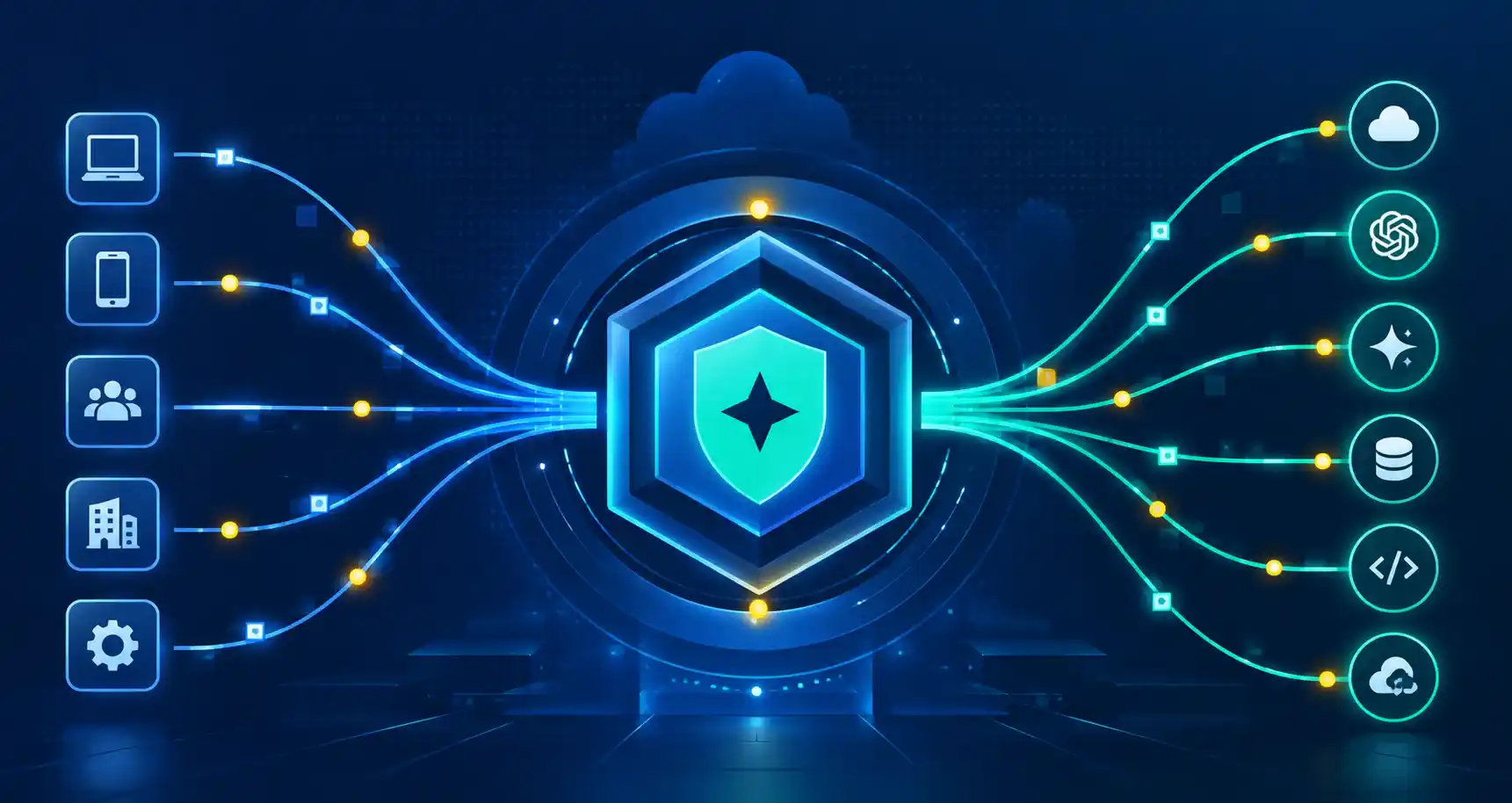
An enterprise AI gateway is a centralized control layer between business applications, AI agents, and model providers that manages AI traffic, including model routing, authentication, security policies, cost controls, observability, and governance.
Instead of every application calling a model provider directly, requests flow through one governed layer.
That layer decides who is allowed to call which model, what data may be sent, which provider handles the request, what happens if that provider fails, and how usage is recorded.
The traffic that typically passes through it includes:
- Prompts and completions between applications and large language models
- Embedding and retrieval requests used in RAG pipelines
- Calls made by AI agents to models and, increasingly, to tools
- Requests to MCP (Model Context Protocol) servers that expose enterprise systems to agents
The simplest mental model: if an API gateway is the front door for your services, an AI gateway is the checkpoint for everything that touches a model.
How Does an Enterprise AI Gateway Work?
Implementations differ, but a request generally moves through the same sequence:
- Request arrives – An application, user, or agent sends a request to the gateway’s single, standardized endpoint rather than to a provider.
- Identity is verified – The gateway authenticates the caller and resolves who or what is making the request: a team, a service, an agent, or an end user.
- Policy is evaluated – Rules determine whether this caller may use this model, within this budget, for this purpose.
- Data is inspected – The prompt is checked for sensitive content such as personal data, secrets, or restricted material, and for patterns associated with prompt injection.
- A model is selected – Routing logic chooses a model or provider based on task type, cost, latency, availability, or data-residency requirements.
- The request is sent – The gateway translates it into the provider’s format, applies the correct credentials, and forwards it, often using cached results where policy allows.
- The response is validated – Output is checked against content and safety rules before it returns to the caller.
- Usage and cost are recorded – Tokens, latency, errors, model used, and cost are logged and attributed to a team, application, or project.
The value comes from doing these steps once, centrally and consistently, rather than re-implementing them (or skipping them) inside every application.
Enterprise AI Gateway Architecture
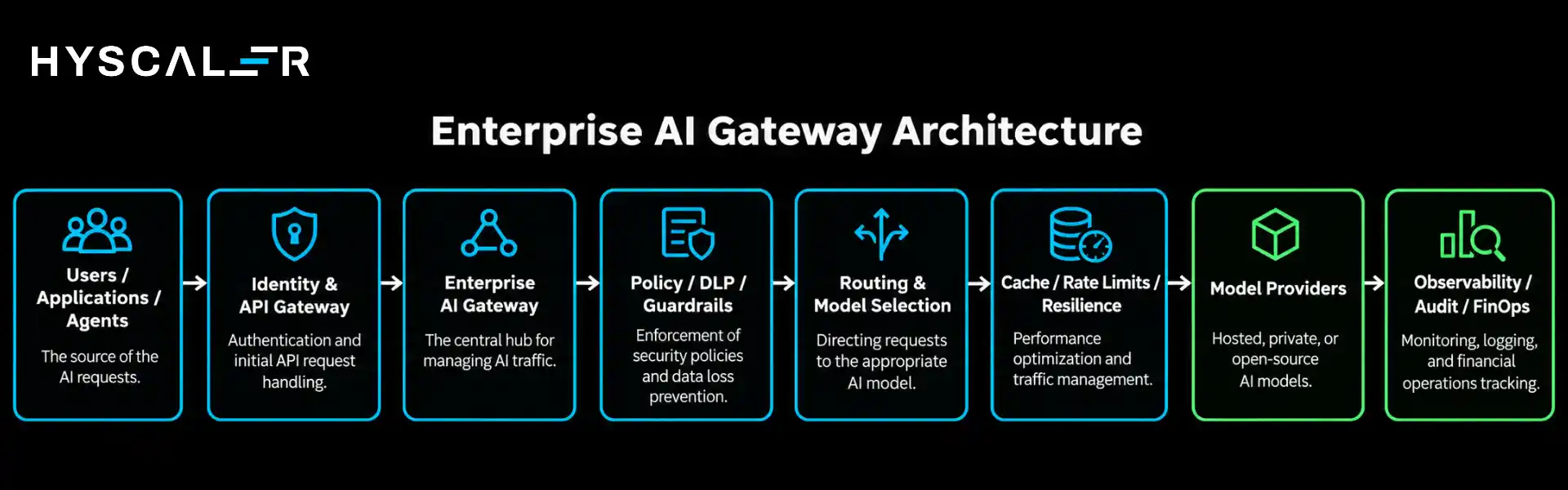
A production architecture is more than “Application → Gateway → LLM.”
A fuller view looks like this:
Data plane and control plane
Two concepts keep the design clean.
The data plane handles live traffic.
It sits in the request path, so it must be fast, resilient, and horizontally scalable.
Authentication checks, routing, rate limiting, caching, guardrail enforcement, and provider calls all happen here.
The control plane is where policies and configuration are defined and distributed.
Administrators manage approved models, budgets, access rules, guardrail settings, and routing logic here, and the data plane enforces them.
Separating the two lets a platform team change policy without redeploying applications, and keeps a control-plane outage from stopping live requests.
The layers around the gateway
- Model/provider layer: commercial APIs, cloud-hosted models, and privately hosted or open-source models behind a consistent interface.
- Governance layer: approved-model lists, data-handling rules, access policies, and compliance evidence.
- Observability layer: traces, token and cost metrics, latency, error rates, and audit trails.
- Agent/MCP layer: identity, permissions, and logging for the tools and systems agents can reach.
What Does an Enterprise AI Gateway Manage?
| Area | What the gateway does |
|---|---|
| Model routing | Directs each request to the most suitable model or provider |
| Authentication | Verifies applications, services, users, and agents |
| Authorization | Controls which callers can use which models, tools and data |
| Rate limits | Throttles by requests, tokens, or budget, per team or application |
| Token budgets | Caps spend before it becomes a surprise |
| Provider credentials | Keeps API keys out of application code and rotates them centrally |
| Failover | Retries or reroutes when a provider is slow, rate-limited, or down |
| Caching | Reuses responses for repeated or equivalent requests where appropriate |
| Guardrails | Applies content, safety and policy checks to inputs and outputs |
| DLP | Detects and masks or blocks sensitive data |
| Observability | Captures usage, latency, errors, and quality signals |
| Cost attribution | Assigns spend to the teams and products generating it |
AI Gateway vs API Gateway
The two are often confused, and the confusion leads to the wrong architecture.
A traditional API gateway manages general API traffic: it authenticates callers, routes requests to services, and applies request-based limits.
It has no native understanding of tokens, prompts, models, or providers.
An AI gateway adds those AI-specific concerns.
| Capability | Traditional API Gateway | Enterprise AI Gateway |
|---|---|---|
| Authentication | ✓ | ✓ |
| API routing | ✓ | ✓ |
| Rate limiting | Request-based | Token- and model-aware |
| Model routing | – | ✓ |
| Multi-LLM provider routing | – | ✓ |
| Token tracking | – | ✓ |
| AI cost attribution | Limited | ✓ |
| Prompt inspection | Usually limited | ✓ |
| PII/DLP controls | Generic | AI-specific |
| Model fallback | Service-level | Provider/model-level |
| AI guardrails | Limited | ✓ |
| AI observability | Basic API telemetry | Model, token, cost, and latency telemetry |
| MCP/tool governance | Usually not available | Increasingly available |
| Agent governance | Limited | ✓ |
The important nuance is that an AI gateway does not necessarily replace an API gateway.
In many enterprise architectures, they work together:
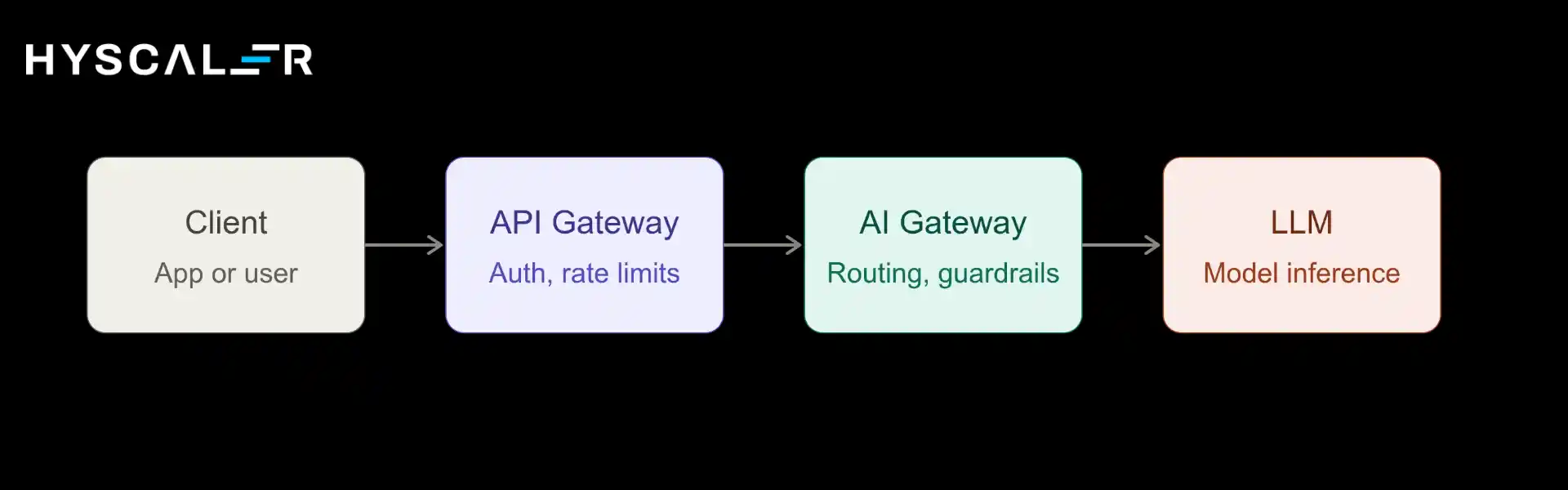
The API gateway protects the application and API perimeter.
The AI gateway then handles model selection, token budgets, prompt policies, provider routing, model failover, AI-specific observability, and guardrails.
Treating them as complementary layers avoids both gaps and duplicated effort.
Why Enterprises Use AI Gateways
- Less duplicated integration work: Teams build against one interface instead of writing and maintaining provider-specific code in every application.
- Centralized governance: Approved models, data rules, and access policies live in one place and apply everywhere.
- Controlled AI spend: Budgets, quotas, and cost attribution make usage visible and manageable before invoices arrive.
- Better reliability: Retries, fallbacks, and load distribution keep applications running when a single provider degrades.
- Reduced provider lock-in: With a unified interface, switching or adding a model is a configuration change rather than a rewrite.
- Clear visibility: Leaders can finally see which teams use which models, at what cost, with what results.
- Consistent security: Controls are enforced uniformly rather than depending on each team’s discipline.
Enterprise AI Gateway Security
For many organizations, security and compliance are the deciding factors.
A gateway gives them one enforcement point.
- Authentication and RBAC – Every call is tied to a verified identity, and role-based access limits who can use which models and capabilities.
- PII and DLP controls – Sensitive data can be detected, masked, or blocked before it leaves the organization’s boundary.
- Prompt injection controls – Inputs and retrieved content can be screened for instructions designed to hijack a model’s behavior. This reduces risk but is not a complete defense on its own.
- Output controls – Responses can be checked for policy violations, leaked data, or unsafe content before reaching users or downstream systems.
- Secrets management – Provider keys stay in the gateway instead of being scattered across code repositories and configuration files.
- Audit logs – Detailed, tamper-resistant records support investigations and compliance reviews.
- Data residency – Routing rules can keep regulated workloads within approved regions or on privately hosted models.
AI Gateway for LLM Routing and Cost Optimization
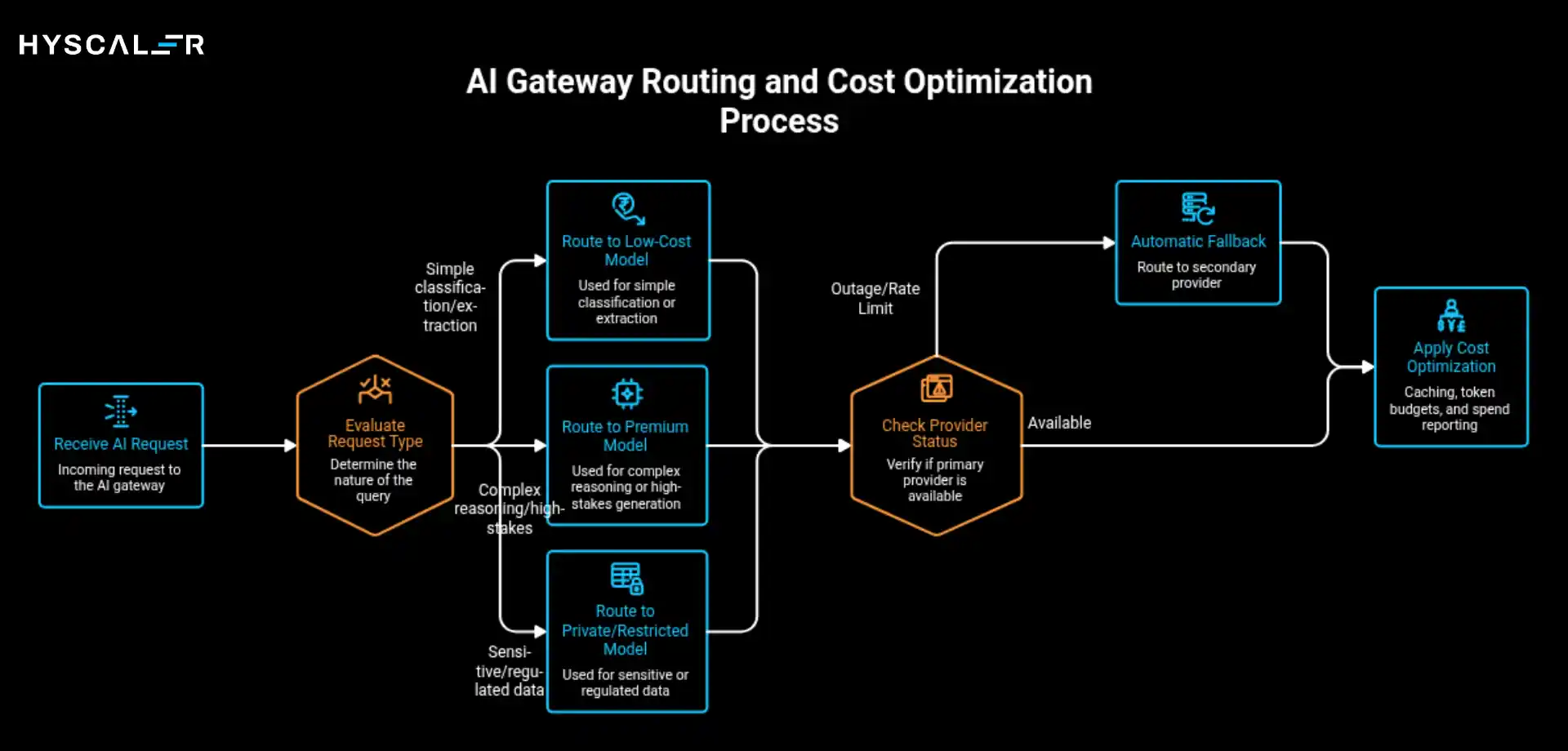
Routing is where a gateway most visibly pays for itself.
Not every request needs the most capable, and most expensive, model.
A practical routing policy might look like this:
- Simple classification or extraction → a lower-cost, faster model
- Complex reasoning or high-stakes generation → a premium model
- Sensitive or regulated data → a privately hosted or region-restricted model
- Provider outage or rate limit → automatic fallback to a secondary provider
Combined with caching for repeated queries, token budgets per team, and spend reporting by application, routing turns AI cost from an unpredictable line item into something that can be forecast and optimized.
Whether it reduces cost in a given organization depends on workload mix, but without a central layer there is usually no way to find out.
AI Gateway for Agents and MCP
Early gateways governed one thing: calls to language models.
That is no longer enough.
When AI can take actions (query a database, update a CRM record, trigger a workflow), the risk profile changes.
A bad answer is an inconvenience.
A bad action can be an incident.
Traditional LLM gateways govern model calls.
Enterprise AI gateways increasingly need to govern the entire AI interaction layer, including agents, tools, and MCP traffic.
That means:
- Agent identity – Each agent needs its own identity and permissions, not a shared service account.
- Tool and MCP access control – Agents should reach only the tools and data sources they are approved to use, with scoped permissions.
- Context propagation – The identity of the end user behind an agent’s request should travel with it so downstream systems can enforce the right access.
- Action logging – Every tool invocation should be recorded for audit and debugging.
- Limits on autonomy – High-impact actions may need rate limits, approval steps, or human review.
Designing this layer well is as much an architecture exercise as a product choice.
HyScaler’s MCP-based agents service addresses it directly, with enterprise security, RBAC, audit trails, and scalable agent architecture.
When Does Your Business Need an AI Gateway?
Not every organization needs one on day one.
A single team with one application and one provider can reasonably start without it.
The need grows with complexity.
Consider these signals:
| Signal | Why it matters |
|---|---|
| Multiple AI applications | Duplicate integrations and inconsistent controls appear |
| Multiple model providers | Credentials, formats, and failure modes multiply |
| Growing or unpredictable AI spend | Without attribution, costs cannot be managed |
| Regulatory or data-residency requirements | Policies must be enforced and evidenced consistently |
| Agent and tool usage | Actions, not just text, need governance |
| Need for centralized governance | Security and compliance teams require one control point |
| Provider switching requirements | Avoiding lock-in requires abstraction |
| High production traffic | Reliability, caching, and rate limiting become critical |
A useful rule of thumb: consider an enterprise AI gateway when multiple teams independently manage model credentials, providers, budgets, security policies, or AI observability.
If that already describes your organization, the question is usually how soon, not whether.
Build vs Buy an Enterprise AI Gateway
Both paths are legitimate.
The right answer depends on your situation.
| Situation | Build | Buy |
|---|---|---|
| Few AI applications | Possible | Often unnecessary |
| Many providers | More engineering | Strong candidate |
| Strict data residency | Depends on architecture | Evaluate deployment model |
| Custom routing logic | Strong case | Check extensibility |
| Large platform team | Possible | Compare TCO |
| Fast enterprise rollout | Slower | Often faster |
| Complex compliance | Requires significant engineering | Evaluate controls and evidence |
When comparing options, evaluate:
- Deployment model: managed, self-hosted, cloud-native or hybrid, and whether it fits your data-residency rules
- Provider and protocol coverage: supported models, streaming, embeddings, and MCP/agent support
- Policy flexibility: how deeply you can customize routing, guardrails, and budgets
- Performance overhead: the latency the gateway adds under realistic load
- Integration fit: identity providers, SIEM, observability stack, and CI/CD
- Total cost of ownership: licensing plus the engineering time to operate and extend it
- Exit options: how portable your policies and configuration are if you switch
Many organizations land on a hybrid: adopt an existing gateway as the foundation, then build custom policies, integrations, and agent controls on top.
How to Implement an Enterprise AI Gateway
A phased approach reduces risk and builds momentum.
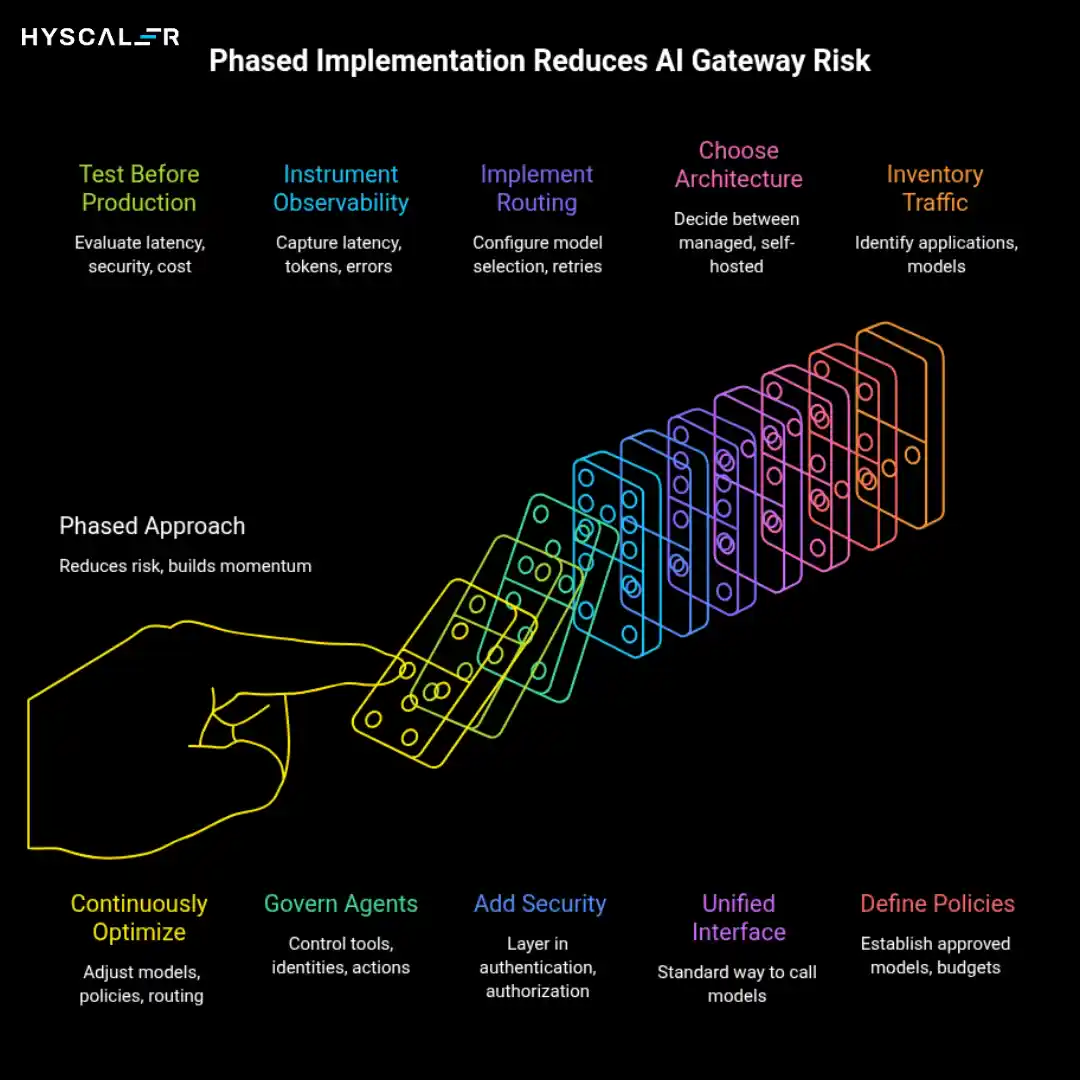
- Inventory AI traffic: Identify applications, agents, models, providers, and data flows. You cannot govern what you cannot see.
- Define governance policies: Establish approved models, data restrictions, budgets, and access rules before configuring anything.
- Choose the gateway architecture: Decide between managed, self-hosted, cloud-native, or hybrid, based on security, residency, and operational capacity.
- Create a unified model interface: Give applications one standard way to call models so provider-specific code stays out of every application.
- Implement routing and resilience: Configure model selection, retries, fallback, and rate limits.
- Add security controls: Layer in authentication, authorization, DLP, PII protection, and prompt and output policies.
- Instrument observability: Capture latency, tokens, errors, model usage, and spend, attributed to teams and applications.
- Govern agents and MCP: Control tools, identities, and actions as agent adoption expands.
- Test before production: Evaluate latency, security, cost, and failure scenarios, including what happens when the gateway or a provider goes down.
- Continuously optimize: Adjust models, policies, and routing based on production data.
Most teams migrate incrementally: start with one high-value application, prove the pattern, then move others behind the gateway over time.
Because this work spans LLM integration, RAG, agents, and production AI, many organizations bring in a specialist partner.
HyScaler’s AI and ML services cover that full path from architecture to production.
What an AI Gateway Should Not Handle
A gateway is powerful, but it should not become the answer to every AI problem.
It does not replace:
- IAM: it consumes identity but does not replace your identity provider
- SIEM: it feeds security tooling rather than substituting for it
- Data governance: classification, lineage, and ownership still need their own programs
- Model evaluation: quality testing and benchmarking remain separate disciplines
- Application security: secure coding and testing still apply
- Agent runtime isolation: sandboxing and execution boundaries sit outside the gateway
- RAG infrastructure: retrieval, indexing, and knowledge management are separate systems
- Human approval processes: review workflows for high-impact actions need their own design
- Incident response: the gateway provides evidence, not a response plan
Keeping these boundaries clear prevents an overloaded gateway from becoming a bottleneck or a false sense of security.
Enterprise AI Gateway Challenges
Centralization has trade-offs, and they should be planned for rather than discovered in production.
- Architectural complexity – A new layer means a new system to design, deploy, and operate.
- Gateway latency – Every inspection step adds time. Measure it under realistic load and keep the hot path lean.
- Centralized failure point – If the gateway goes down, every AI application is affected. Plan for high availability, redundancy, and graceful degradation.
- Policy complexity – Rules multiply quickly. Without ownership and versioning, they become hard to reason about.
- Data privacy – The gateway sees prompts and responses, so it needs its own strict controls on logging, retention, and access.
- Vendor lock-in – Proprietary policy formats or APIs can recreate the lock-in the gateway was meant to remove.
- Observability volume – Detailed prompt-level logging generates large data volumes and sensitive records. Decide what to store and for how long.
Enterprise AI Gateway Best Practices
- Start with an inventory and a governance model, not a product demo
- Keep the data plane thin and fast; put complexity in the control plane
- Treat routing and guardrail policies as code: versioned, reviewed, and tested
- Give every application, team, and agent its own identity and budget
- Log enough to audit and debug, but minimize retention of sensitive prompt content
- Design for provider failure from the start, including tested fallbacks
- Run the gateway alongside, not instead of, your API gateway and IAM
- Extend governance to agents and MCP before agent usage scales
- Review cost, latency, and quality data regularly and adjust routing accordingly
- Migrate incrementally, one application at a time
Conclusion
An enterprise AI gateway is less a product category than an architectural decision: whether AI governance, security, and cost control will be designed once and enforced centrally, or reinvented, inconsistently, by every team.
As AI moves from pilots into production, and from generating text to taking actions through agents and MCP, the cost of leaving that decision unmade grows.
The practical path is straightforward. Inventory what exists, define the policies you need, choose an architecture that fits your security and residency constraints, and migrate incrementally.
Organizations that want support designing and implementing this layer can explore HyScaler’s AI and ML services or its MCP-based agents practice for production-grade agent architecture.
FAQ
What is an enterprise AI gateway?
It is a centralized control layer between applications, AI agents, and model providers that manages routing, authentication, security, cost, observability, and governance for AI traffic.
How does an AI gateway work?
It intercepts AI requests, verifies identity, applies policies, inspects data, selects a model, forwards the request, validates the response, and records usage and cost.
Why do enterprises need an AI gateway?
As AI adoption spreads across teams and providers, a gateway provides consistent security, governance, cost control, and reliability that is hard to achieve application by application.
What is the difference between an AI gateway and an API gateway?
An API gateway manages general API traffic. An AI gateway adds model, token, and prompt awareness, multi-provider routing, AI-specific guardrails, and cost attribution. The two commonly work together.
Can an AI gateway work with multiple LLM providers?
Yes. Multi-provider routing behind a unified interface is one of its core functions.
Does an AI gateway reduce AI costs?
It can, through model routing, caching, budgets, and usage visibility. The actual savings depend on your workloads and how the policies are configured.
Does an AI gateway add latency?
Yes, some. Inspection and routing take time. Well-designed gateways keep the overhead small relative to model response time, but it should be measured in your environment.
How does an AI gateway improve AI security?
It enforces authentication, access control, DLP, prompt and output policies, and audit logging in one place, reducing inconsistent or missing controls across applications.
How does an AI gateway handle AI agents and MCP?
Modern gateways extend governance to agent identity, tool access, MCP traffic, and action logging, so agents can only do what they are explicitly permitted to do.
Do I need an AI gateway if I use only one LLM provider?
Not necessarily at first. But if you have multiple teams, budget concerns, compliance requirements, or plans to add providers or agents, a gateway still adds value.
Should an enterprise build or buy an AI gateway?
It depends on scale, compliance needs, customization requirements, and platform-team capacity. Many organizations adopt an existing gateway and build custom policies on top.