
Table of Contents
Employees already lose hours hunting for answers across wikis, drives, ticketing tools, CRMs, and chat threads.
An AI assistant that unifies that knowledge is an obvious win, but a generic chatbot pointed at company data is not safe to deploy.
It has no concept of who is asking, what they can see, or what actions they can trigger.
A badly designed copilot can also turn latent permission problems into a search engine for sensitive information: the document was always over-shared, but now anyone can find it by asking a question in plain English.
The hard part is not the LLM.
It is connecting AI, data, permissions, business systems, and governance into one coherent design.
This guide lays out that architecture, layer by layer, with the security decisions that matter most.
What Is Enterprise AI Copilot Architecture?
Enterprise AI copilot architecture is the design of an AI assistant that connects employees with approved enterprise data, AI models, business applications, and workflows while enforcing identity, access control, security, governance, and monitoring requirements.
The core principle: the model generates, or reasons over information, but identity, authorization, policy enforcement, and tool execution must stay under deterministic application controls.
The LLM should never be the security boundary.
Authorization must happen before restricted data reaches the model, and before a tool executes an action.
This matches current enterprise guidance.
AWS’s agentic AI architecture guidance separates identity, tools, knowledge, security, governance, and observability into distinct concerns, and Microsoft’s Copilot architecture is built around the principle that Copilot only reaches organizational data the user is already permitted to access.
Chatbot, assistant, copilot, and agent: what is the difference?
These terms are used interchangeably, but they imply very different architectures and risk profiles.
| Capability | Chatbot | AI Assistant | Enterprise Copilot | AI Agent |
|---|---|---|---|---|
| Answers questions | Yes | Yes | Yes | Yes |
| Uses enterprise data | Limited | Yes | Yes | Yes |
| Maintains context | Limited | Yes | Yes | Yes |
| Connects to business systems | Limited | Yes | Yes | Yes |
| Recommends actions | Limited | Yes | Yes | Yes |
| Executes actions | Rarely | Limited | Controlled | Yes |
| Autonomy | None | Low | Low to medium | Medium to high |
| Governance requirement | Low | Medium | High | Very high |
An enterprise copilot sits in the middle: it works alongside an employee, uses real company data, and takes action only under control.
That control requirement is what drives most of the architecture below.
What Does an Enterprise AI Copilot Architecture Look Like?
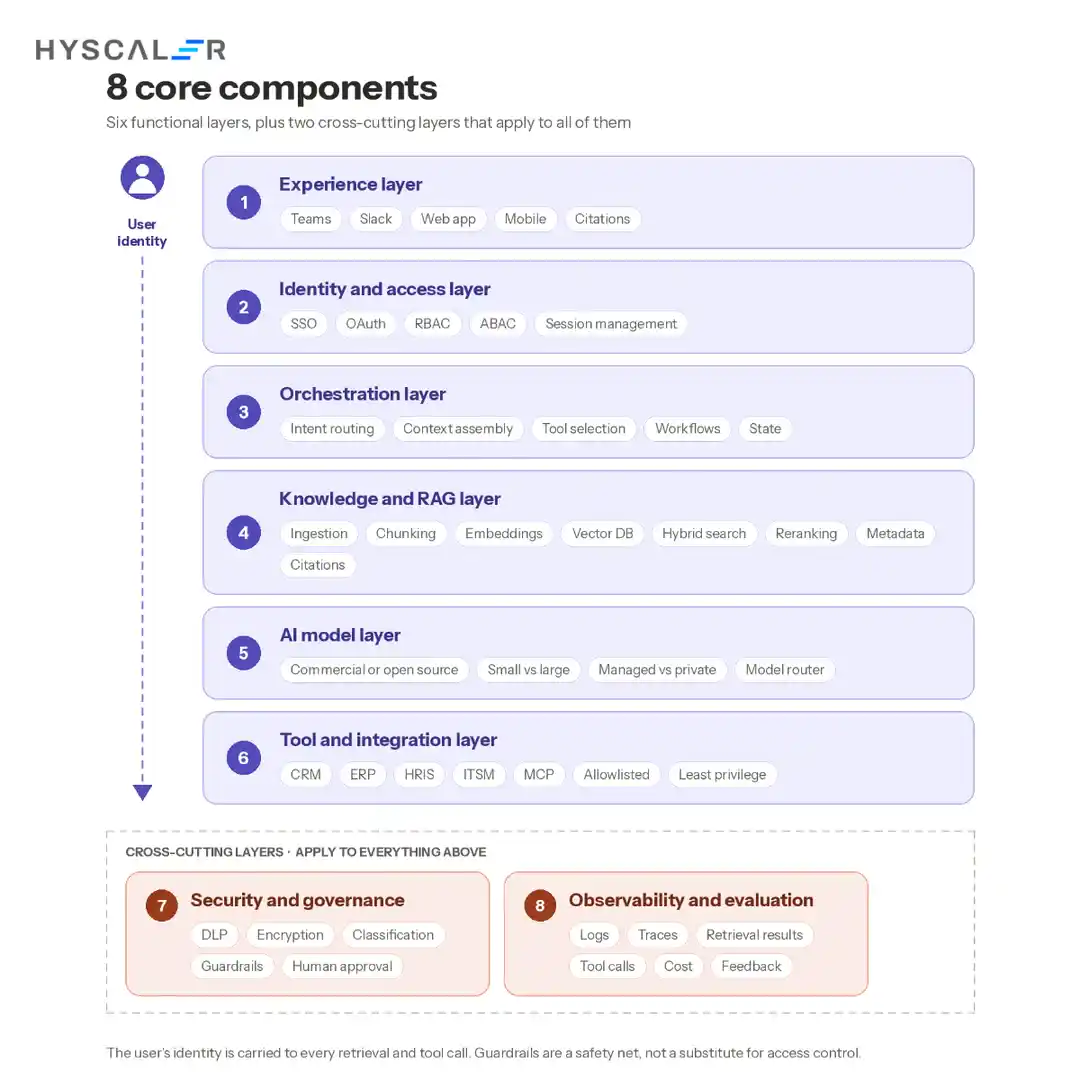
A production copilot is best understood as eight cooperating layers, with observability and governance running across all of them.
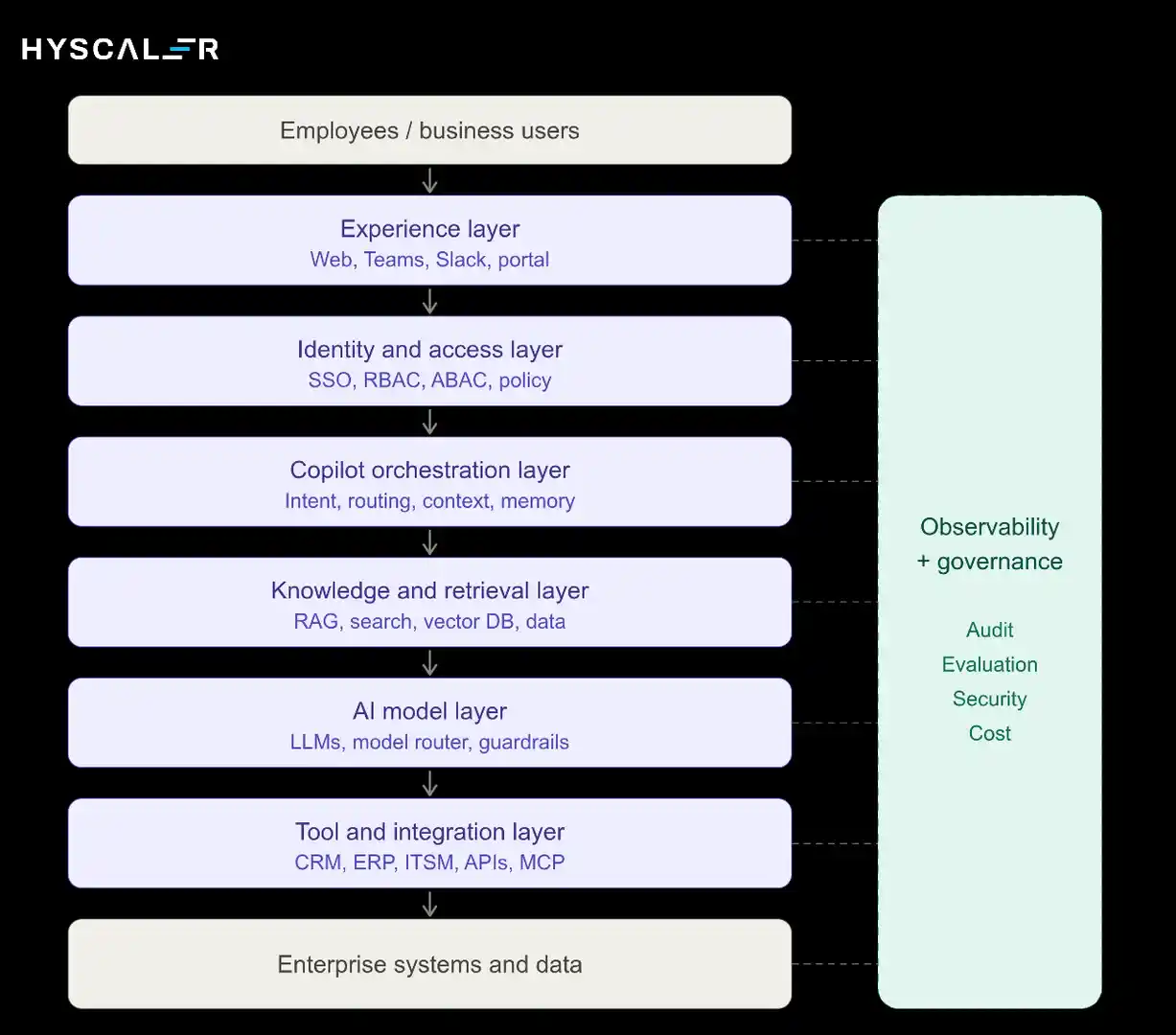
The most important design decision is to treat the copilot as two separate paths, not one generic “AI layer”:
Knowledge path: User, Identity, Retrieval, Authorized Context, LLM, Answer.
Action path: User, Identity, Policy, Approved Tool, Enterprise System, Result, Audit Log.
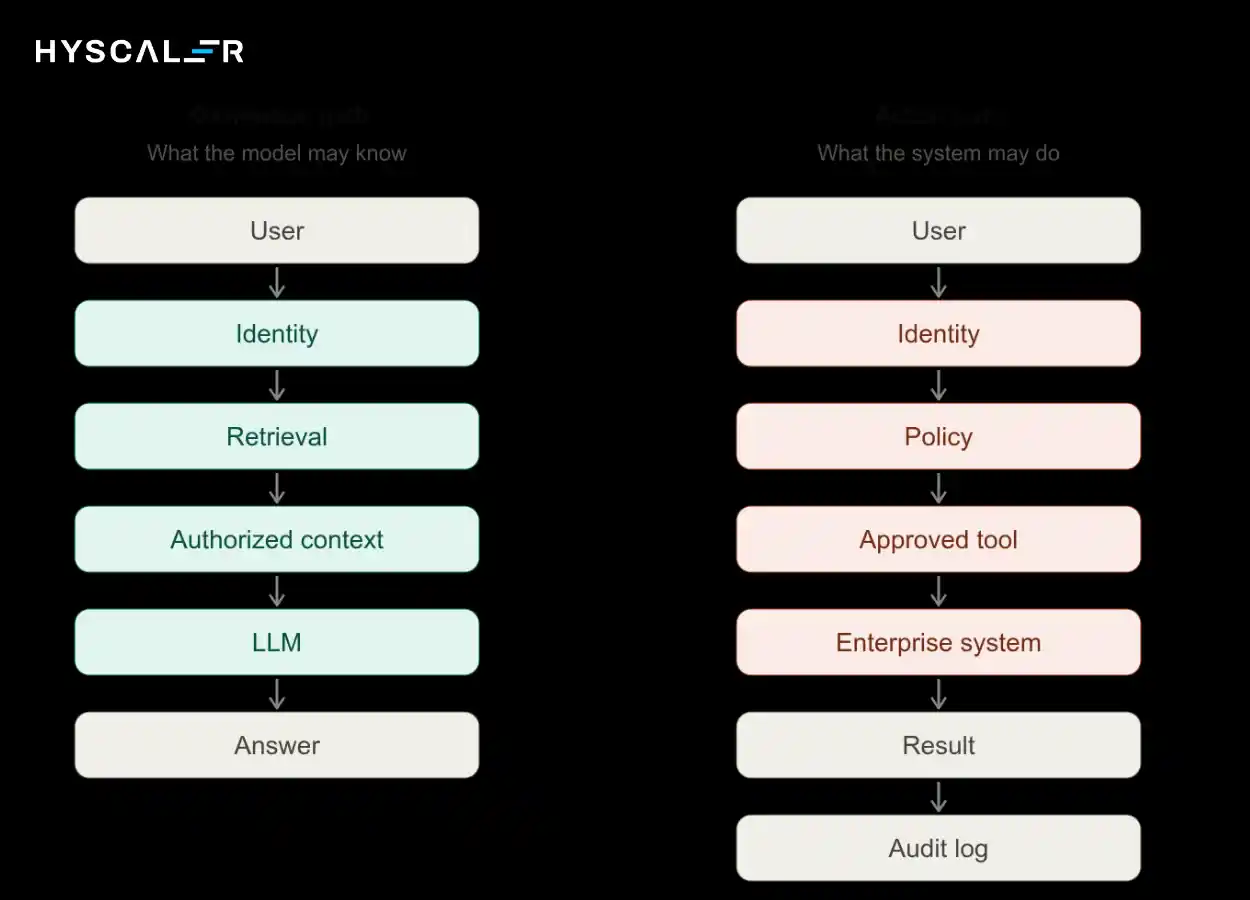
The knowledge path decides what the model is allowed to know.
The action path decides what the system is allowed to do.
They need different controls, different testing, and different approval models, and merging them is where most security gaps appear.
8 Core Components of an Enterprise AI Copilot
1. Experience Layer
This is where employees interact with the copilot: a web app, Microsoft Teams, Slack, an internal portal, or a mobile interface.
Meeting people inside tools they already use drives adoption far more than a standalone app.
The experience layer should carry the user’s authenticated session through to every downstream call, never a shared service identity.
2. Identity and Access Layer
This layer answers, “Who is asking, and what are they entitled to?” It typically combines SSO, OAuth, identity federation, and session management with role-based (RBAC) and attribute-based (ABAC) access control.
RBAC grants access by role, such as “finance analyst.”
ABAC adds context such as department, region, data classification, or employment status, which is usually needed to express real enterprise policy.
The key requirement: the user’s identity must be propagated to retrieval and tool calls so those systems can enforce their own permissions.
3. Orchestration Layer
The orchestrator is the copilot’s control plane.
It classifies intent, routes the query, assembles context, selects tools, manages multi-step workflows, and holds conversation state.
Keep this logic in deterministic application code where possible, with the model contributing reasoning inside boundaries the orchestrator defines.
4. Knowledge and RAG Layer
Retrieval-augmented generation (RAG) lets the model work with current, proprietary information without retraining.
A production pipeline covers data ingestion, chunking, embeddings, a vector database, hybrid (keyword plus semantic) search, reranking, rich metadata, and source citations.
Metadata is not optional: it carries the classification and permission information that makes secure retrieval possible.
RAG is useful when the assistant needs current or proprietary knowledge, but it is not mandatory for every copilot.
A narrowly scoped assistant that only calls APIs may not need it.
5. AI Model Layer
This layer covers model choice and inference: commercial models versus open-source, small versus large models, managed versus privately hosted inference, and a model router that sends simple queries to cheaper models and complex reasoning to stronger ones.
Many enterprises end up with a portfolio rather than a single model, so design the platform to swap models without rewriting the application.
6. Tool and Integration Layer
The copilot becomes useful when it connects to systems of record: CRM, ERP, HRIS, ITSM, databases, SaaS applications, and internal APIs.
Increasingly, organizations do this through standardized tool protocols such as MCP.
Whatever the mechanism, every tool should be explicitly allowlisted, scoped to least privilege, and called on behalf of the authenticated user.
7. Security and Governance Layer
This includes data loss prevention, encryption, data classification, guardrails, prompt-injection protection, policy enforcement, and human approval workflows.
Guardrails help, but they are a safety net, not a substitute for access control.
8. Observability and Evaluation Layer
You cannot govern what you cannot see.
Capture logs, traces, retrieval results, tool calls, quality metrics, latency, cost, security events, and user feedback.
This layer feeds both incident response and continuous improvement.
How Does an Enterprise AI Copilot Process a User Request?
Take a realistic request: “What is our current parental leave policy, and can you draft an email explaining it to my team?”
- Authenticate the employee through SSO and establish a session.
- Resolve role and permissions from the identity provider and policy engine.
- Classify the request. It combines a knowledge lookup with a drafting task. No system action is needed.
- Search authorized knowledge sources only, using the user’s entitlements as retrieval filters.
- Retrieve relevant policy documents such as the current HR policy and any regional variations.
- Filter out unauthorized content that slipped through, as a second line of defense.
- Build model context from the permitted passages plus the user’s request.
- Generate the answer and draft the email with the model.
- Cite the source so the employee can verify the policy document.
- Apply output policy, checking for sensitive data, policy violations, or unsupported claims.
- Return the response to the employee.
- Log the interaction, including what was retrieved, what was shown, and which sources were cited.
Notice where the security decisions happen: steps 2, 4, and 6 occur before the model sees anything.
That ordering is the heart of the design.
How to Design Secure RAG for an Enterprise Copilot
Secure RAG is a pipeline in which permissions travel with the data:
Ingestion, classification, metadata, embeddings, indexing, permission mapping, retrieval filtering, reranking, context assembly, LLM.
At ingestion, every document is classified and tagged with its access rules, and those rules are stored as metadata next to the embeddings.
At query time, the retrieval step filters by the requesting user’s entitlements before ranking and context assembly.
AWS security guidance for generative AI recommends exactly this: metadata filtering and access controls applied at retrieval time.
Never retrieve sensitive enterprise information first and ask the LLM to decide whether the user should see it.
Once restricted text is in the model’s context, you are relying on a probabilistic system to keep a secret.
Prompt injection, clever phrasing, or a simple model error can expose it.
Three practical points often get missed:
- Permissions change: Employees move teams and documents get re-shared. Sync permission metadata continuously, or retrieve with live permission checks, so the index does not drift from reality.
- Fix over-sharing first: RAG will surface whatever the user can technically access. If your file shares are over-permissioned, audit and remediate before launch.
- Retrieval is not truth: Retrieved documents can conflict or be outdated. Prefer authoritative sources, surface document dates, and design behavior for conflicting results.
How Do You Secure an Enterprise AI Copilot?
Organize security around five boundaries, each answering one question:
| Boundary | Question | Control focus |
|---|---|---|
| Identity | Who is asking? | SSO, session management, identity propagation |
| Data | What can they access? | RBAC/ABAC, classification, permission-aware retrieval |
| Model | What can reach the model? | Context filtering, DLP, private inference where needed |
| Tools | What can the copilot execute? | Allowlists, least privilege, approvals |
| Output | What can it return or cause? | Output validation, redaction, downstream checks |
The threats to design against
OWASP’s GenAI security guidance identifies the major risk categories.
The ones that matter most for an employee copilot:
- Prompt injection: Malicious instructions in a user message, document, or web page that try to redirect the model. Treat all retrieved content as untrusted input.
- Sensitive information disclosure: The model revealing data the user should not see. Prevented by retrieval-time authorization, not by prompting.
- Excessive agency: The copilot holding more tool permissions than the task requires. Prevented by least privilege and approval gates.
- Data and model poisoning: Tampered documents or training data that skew answers. Control who can write to indexed sources.
- Vector and embedding weaknesses: Flaws in how embeddings and indexes are stored, accessed, or queried, including cross-tenant leakage.
- Insecure tool calling: Unvalidated parameters passed from model output to real systems. Validate and constrain every call.
- Improper output handling: Model output treated as trusted by downstream systems. Sanitize it as you would any user input.
The unifying rule: enterprise AI security must be enforced by architecture, not by instructions given to the model.
Match autonomy to risk
Not every copilot needs the same controls. Define autonomy levels and choose your architecture accordingly:
| Level | Copilot capability | Approval |
|---|---|---|
| Level 1 | Read and answer | None |
| Level 2 | Recommend and prepare actions | Human approval |
| Level 3 | Execute approved low-risk actions | Policy-controlled |
Start at Level 1, graduate to Level 2 when retrieval quality and permissions are proven, and allow Level 3 only for narrow, reversible actions with strong audit trails.
Design for failure, not just the happy path
Most architecture diagrams show success.
A production copilot needs defined behavior for each failure:
- RAG finds nothing: say so and offer escalation, rather than guessing.
- User lacks permission: respond without confirming that the restricted content exists.
- Model is uncertain: express uncertainty, cite what was found, or route to a human.
- A tool fails, or a connector is down: fail safely, report clearly, never retry destructive actions blindly.
- Retrieved data conflicts: present both sources with dates, or defer to the authoritative one.
- Prompt injection is detected: block, log, and alert the security team.
- An action needs approval: pause, route to the approver, and resume only on explicit confirmation.
Enterprise AI Copilot vs AI Agent
The line between the two is autonomy.
| Feature | AI Copilot | AI Agent |
|---|---|---|
| Primary role | Assist the employee | Complete the task |
| Autonomy | Limited | Higher |
| Human approval | Common | Depends on risk |
| Tool usage | Controlled | Extensive |
| Workflow execution | Limited | Core capability |
| Risk | Lower | Higher |
| Governance | Required | Critical |
A copilot helps a person do work.
An agent does the work.
As you move from one toward the other, the architecture has to evolve: finer-grained authorization, stronger monitoring, explicit approval policies, and a reliable kill switch.
Most enterprises should build the copilot foundation first, since identity, retrieval, policy, and observability are what agents require anyway.
Build vs Buy vs Hybrid: Which Approach Is Right?
| Approach | Best for | Advantages | Limitations |
|---|---|---|---|
| Buy | Standard employee productivity | Fast deployment | Less customization |
| Build | Proprietary workflows | Maximum control | Higher engineering effort |
| Hybrid | Most complex enterprises | Speed plus customization | Integration complexity |
Buy when the workflow is standard.
Build when the workflow is strategically differentiating.
Go hybrid when you need both speed and proprietary capability.
In practice, a commercial copilot often covers general productivity while a custom-built layer handles proprietary data, internal systems, and domain-specific workflows.
That is where custom RAG, LLM integration, and MCP-based agent work typically sits.
Cloud vs Private vs Hybrid Deployment
There is no universally best deployment model.
The right choice depends on data sensitivity, regulation, latency, and operating capacity.
| Model | Data control | Scalability | Complexity | Best for |
|---|---|---|---|---|
| Public cloud | Medium to high | High | Low to medium | Most enterprises |
| Private cloud | High | Medium to high | High | Sensitive workloads |
| On-premises | Very high | Variable | Very high | Strict data requirements |
| Hybrid | High | High | High | Complex enterprises |
Many organizations run the orchestration and interface in the cloud while keeping the most sensitive data sources and inference closer to home.
Whichever you choose, the identity, retrieval, and policy controls described above apply unchanged.
Enterprise AI Copilot Use Cases
Start with frequent workflows, text-heavy, and currently slow.
- HR copilot: policy questions, onboarding, benefits information.
- IT copilot: troubleshooting, knowledge retrieval, ticket creation.
- Sales copilot: CRM summaries, account research, proposal drafting.
- Finance copilot: report explanation, policy retrieval, financial analysis.
- Operations copilot: SOP retrieval, incident assistance, workflow support.
- Engineering copilot: codebase search, documentation, incident investigation.
HR and IT are common starting points because the knowledge is well defined and the actions are low risk.
Finance and sales typically require stricter permission modeling.
How to Build an Enterprise AI Copilot: 10-Step Process
- Choose one high-value workflow – Pick a measurable pain point, not a vague “AI for everyone” goal.
- Define the copilot’s scope – Decide what it will answer, what it will refuse, and what it may do.
- Map enterprise data sources – Identify systems, owners, formats, and sensitivity.
- Audit permissions and data quality – Fix over-sharing and stale content before indexing.
- Select the model strategy – Choose models, hosting, and routing based on data sensitivity, cost, and latency.
- Design the RAG architecture – Define ingestion, metadata, permission mapping, and retrieval filtering.
- Build orchestration and integrations – Implement routing, tool allowlists, and identity propagation.
- Implement security and governance – Add guardrails, DLP, approvals, audit logging, and a kill switch.
- Evaluate with real employee workflows – Test against real questions, including adversarial and unauthorized ones.
- Deploy gradually and monitor continuously – Pilot with a small group, expand in stages, and track quality, security, and cost.
The NIST AI Risk Management Framework: Generative AI Profile is a useful governance backbone for identifying, measuring, and managing generative AI risks across this lifecycle.
Enterprise AI Copilot Evaluation Framework
Demos prove a copilot can work.
Evaluation proves it does, safely and repeatedly. Measure five dimensions:
| Dimension | What to measure |
|---|---|
| Accuracy | Answer correctness, groundedness, retrieval relevance, citation accuracy, hallucination rate |
| Security | Permission violations, data leakage, prompt-injection success rate |
| Reliability | Failure rate, uptime, tool-call accuracy |
| Experience | Task completion rate, human escalation rate, user satisfaction |
| Economics | Cost per interaction, latency, infrastructure cost |
Copilot Readiness Score = Accuracy + Security + Reliability + Experience + Economics
Score each dimension from 1 to 5, for a maximum of 25.
As a working guide: 21 to 25 is ready for broader rollout, 15 to 20 supports a controlled pilot with fixes, and below 15 needs more work before users depend on it.
Treat Security as a gate: a score below 4 should block release regardless of the total.
Use the same test set before every model change, prompt change, or data-source addition, so employees catch regressions before they see them.
What Determines Enterprise AI Copilot Cost?
Fixed price ranges for enterprise copilots are rarely trustworthy, because the cost depends on choices specific to your environment. The major drivers are:
- LLM usage: model choice, token volume, routing strategy.
- Users and query volume: the main driver of recurring inference cost.
- RAG infrastructure: vector database, hybrid search, reranking.
- Data ingestion: connectors, pipelines, re-indexing frequency.
- Enterprise integrations: number and complexity of connected systems.
- Security controls: DLP, policy engines, private networking.
- Observability and evaluation: logging, tracing, test suites, human review.
- Cloud infrastructure: hosting, scaling, regional requirements.
- Maintenance: model upgrades, connector changes, ongoing tuning.
A better approach than chasing a benchmark number: estimate the value of the specific workflow, then model usage, infrastructure, and engineering cost separately and revisit after the pilot.
10 Architecture Mistakes to Avoid
- Connecting the LLM directly to databases: It bypasses authorization and auditing.
- Treating prompts as security controls: Instructions can be overridden. Policy must live in code.
- Ignoring existing permissions: The copilot must inherit, not replace, your access model.
- Using RAG without access filtering: Retrieval must be entitlement-aware.
- Giving agents excessive tool permissions: Apply least privilege to every tool.
- Skipping source citations: Without them, users cannot verify, and trust erodes.
- Not logging tool calls: You cannot investigate what you did not record.
- Deploying without evaluation: Quality drifts silently without a test set.
- Starting with too many use cases: Breadth early means shallow quality everywhere.
- Measuring adoption instead of business outcomes: Usage is not value. Track time saved, resolution rates, and error reduction.
Enterprise AI Copilot Production Readiness Checklist
- Clear business owner
- Defined use case and scope
- Approved data sources
- Permission-aware retrieval
- SSO implemented
- RBAC/ABAC implemented
- LLM security controls in place
- Prompt-injection defenses tested
- Tool allowlisting
- Human approval for high-risk actions
- Audit logging
- Evaluation framework and baseline scores
- Cost monitoring
- Incident response plan
- Rollback and kill switch
- Employee training
If you cannot check every item, you are not blocked from piloting, but you should know which gaps you are accepting and who owns them.
Build a Secure Enterprise AI Copilot With HyScaler
Building an enterprise AI copilot requires more than connecting an LLM to company documents.
HyScaler helps organizations design and implement secure AI solutions that combine RAG, custom LLM integration, AI agents, enterprise data, workflow automation, and production monitoring.
If you are scoping a copilot, assessing whether your current architecture is production-ready, or deciding between build, buy, and hybrid, explore HyScaler’s AI services and solutions, including MCP-based agents, custom LLM integration, conversational AI, MLOps, and RAG.
FAQ
What is an enterprise AI copilot?
An enterprise AI copilot is an AI-powered assistant designed to help employees access company knowledge, analyze information, and complete business tasks. It connects large language models with enterprise data, applications, and workflows while enforcing organizational permissions, security policies, and governance requirements.
How does an enterprise AI copilot work?
It authenticates the employee, determines what information and tools they can access, retrieves relevant enterprise context, sends authorized context to an AI model, and returns a response or proposed action. If the copilot can execute workflows, policy controls determine which actions are allowed.
What architecture is needed for an enterprise AI copilot?
A production enterprise copilot typically needs an experience layer, identity and access controls, orchestration, enterprise search or RAG, an AI model layer, business-system integrations, security and governance controls, and observability. These layers should work together without making the LLM responsible for authorization or security.
How do you secure an enterprise AI copilot?
Secure the copilot using identity-based access control, permission-aware retrieval, data classification, encryption, input and output controls, tool allowlisting, audit logging, monitoring, and human approval for high-risk actions. Security should be enforced by application and infrastructure controls rather than relying only on model instructions.
Does an enterprise AI copilot need RAG?
RAG is not mandatory for every copilot, but it is useful when the assistant needs current or proprietary enterprise knowledge. RAG retrieves relevant information from approved sources at query time, allowing the model to work with changing company information without retraining the foundation model.
What is the difference between an AI copilot and an AI agent?
An AI copilot primarily assists an employee by providing information, recommendations, or prepared actions. An AI agent can independently plan and execute multi-step tasks using tools. As autonomy increases, enterprises need stronger authorization, monitoring, approval, and governance controls.
Should enterprises build or buy an AI copilot?
Enterprises should buy when the required capabilities are standardized and speed matters most. Building makes more sense when proprietary workflows, data, integrations, or governance requirements create differentiation. A hybrid approach is often appropriate when organizations want a commercial foundation combined with custom enterprise capabilities.
How much does an enterprise AI copilot cost?
There is no reliable universal price because cost depends on users, query volume, model choice, RAG complexity, integrations, security requirements, infrastructure, and ongoing maintenance. A better approach is to estimate the cost of the specific workflow, then model usage, infrastructure, and engineering costs separately.