
Table of Contents
Ask any store manager what keeps them up at night, and the answer is often the same: shelves that run empty, checkout lines that grow too long, and losses nobody can explain. Most of these problems are visible on the shop floor long before they show up in a report, but no team can watch every aisle at once.
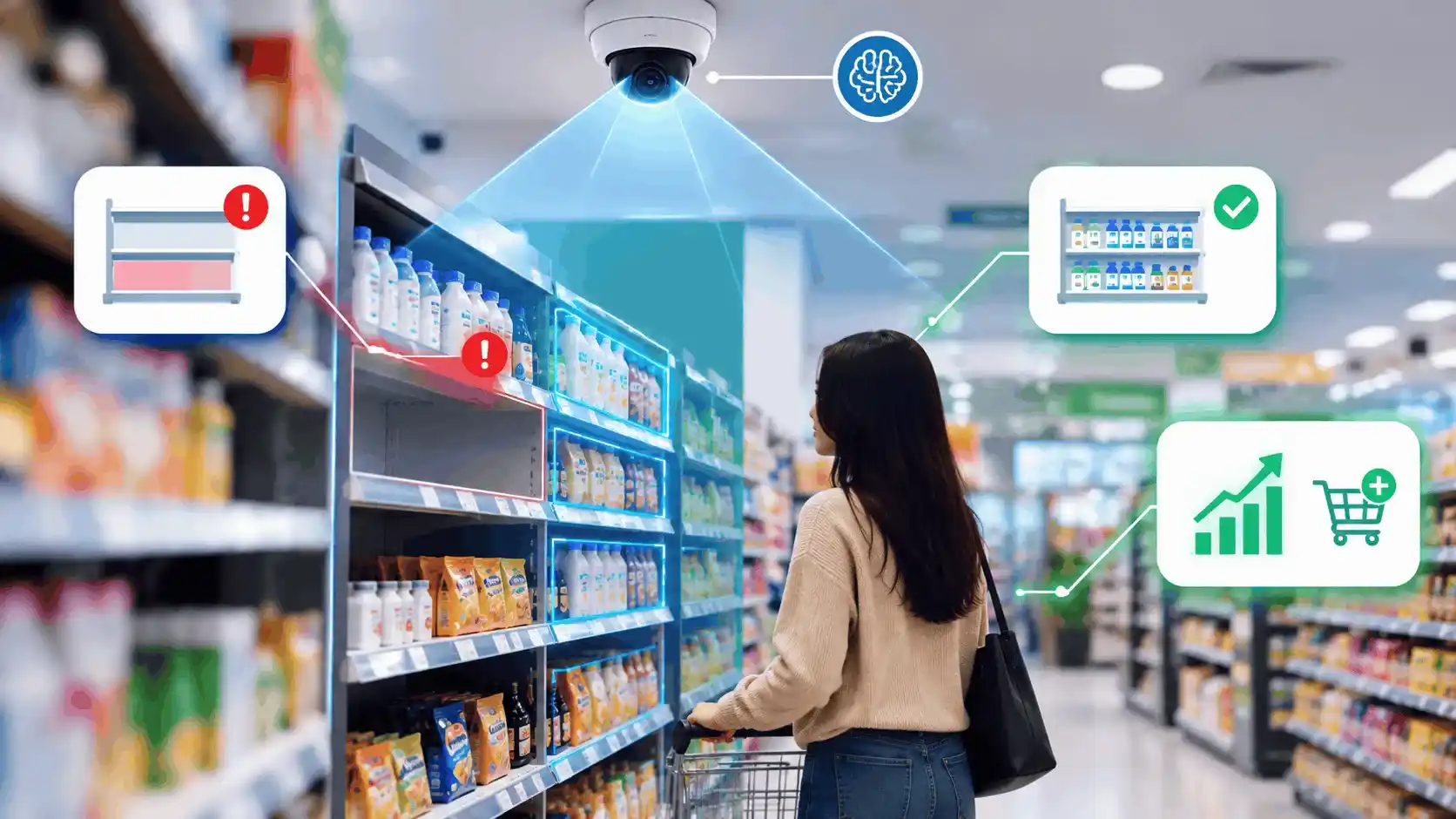
That gap is where computer vision in retail comes in. It applies AI to images from ordinary store cameras, so retailers can spot problems while they are still happening and act before a sale is lost.
In this guide, you will learn what computer vision in retail is, the main ways stores use it, the benefits and risks to weigh, and a simple roadmap for getting started without overspending.
Key takeaways
- Computer vision in retail lets stores monitor shelves, queues, and checkout automatically.
- The strongest early wins are out-of-stock detection, loss prevention, and faster checkout.
- Privacy, accuracy, and integration are the three areas that decide success.
- A focused pilot beats a big-bang computer vision in retail rollout almost every time.
What Is Computer Vision in Retail?
Computer vision is a field of AI that teaches machines to understand images and video. Computer vision in retail analyzes footage from store cameras, shelf-edge devices, or staff mobile phones to recognize products, people, and activity.
Instead of a person walking the aisles with a clipboard, the system watches continuously. It compares what it sees with what should be there, such as a planogram or a stock threshold, and flags the gaps.
Think of computer vision in retail as giving every aisle a pair of tireless eyes. The technology doesn’t get tired, doesn’t skip a shelf, and checks every store with the same standard.
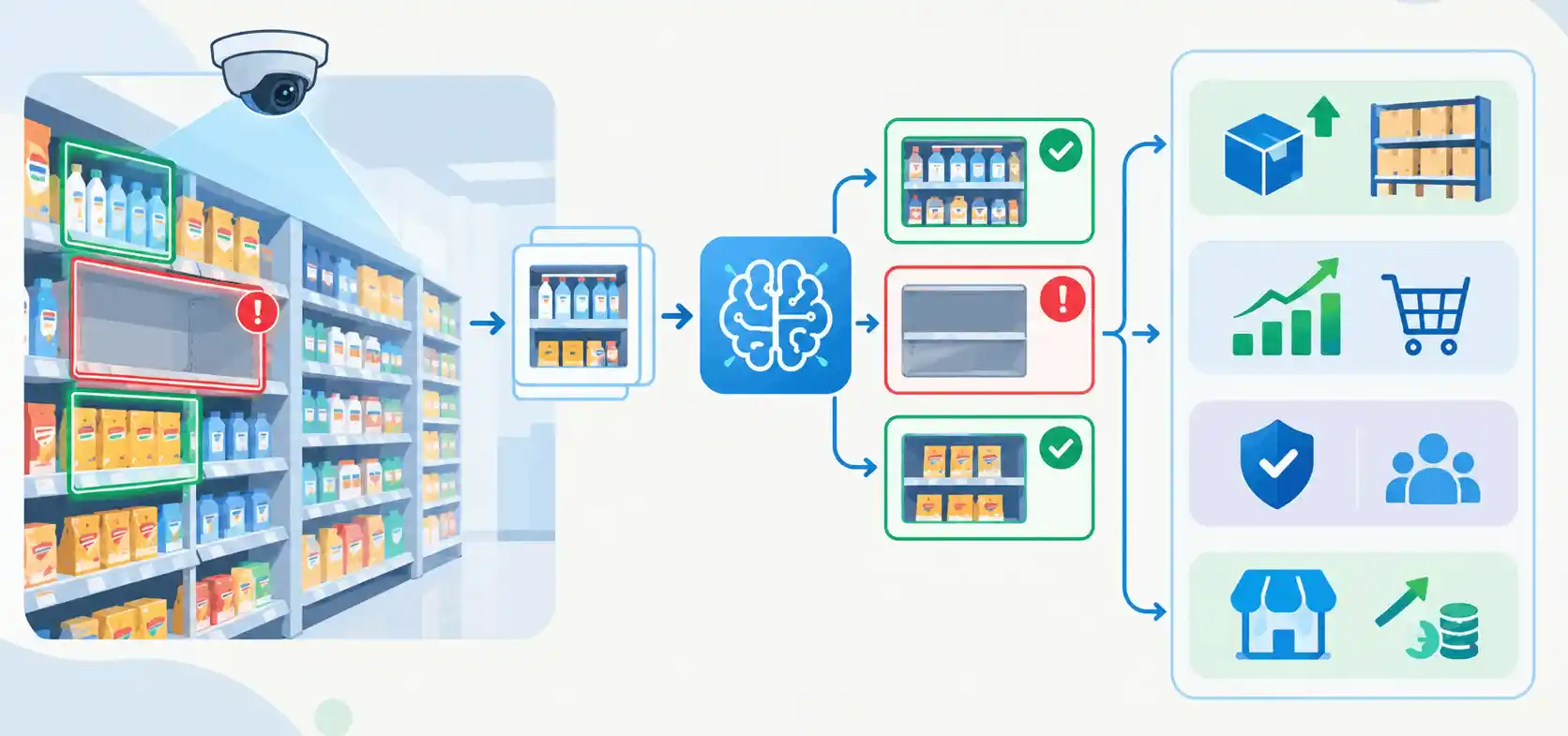
Why it matters now: Retail margins are thin, shoppers switch brands quickly, and labor is hard to find, which is why computer vision in retail is gaining ground. Computer vision retail monitoring helps stores do more with the team they already have.
How Retail Monitoring Using Computer Vision Works
Behind the scenes, most computer vision in retail systems follow the same four-stage flow.
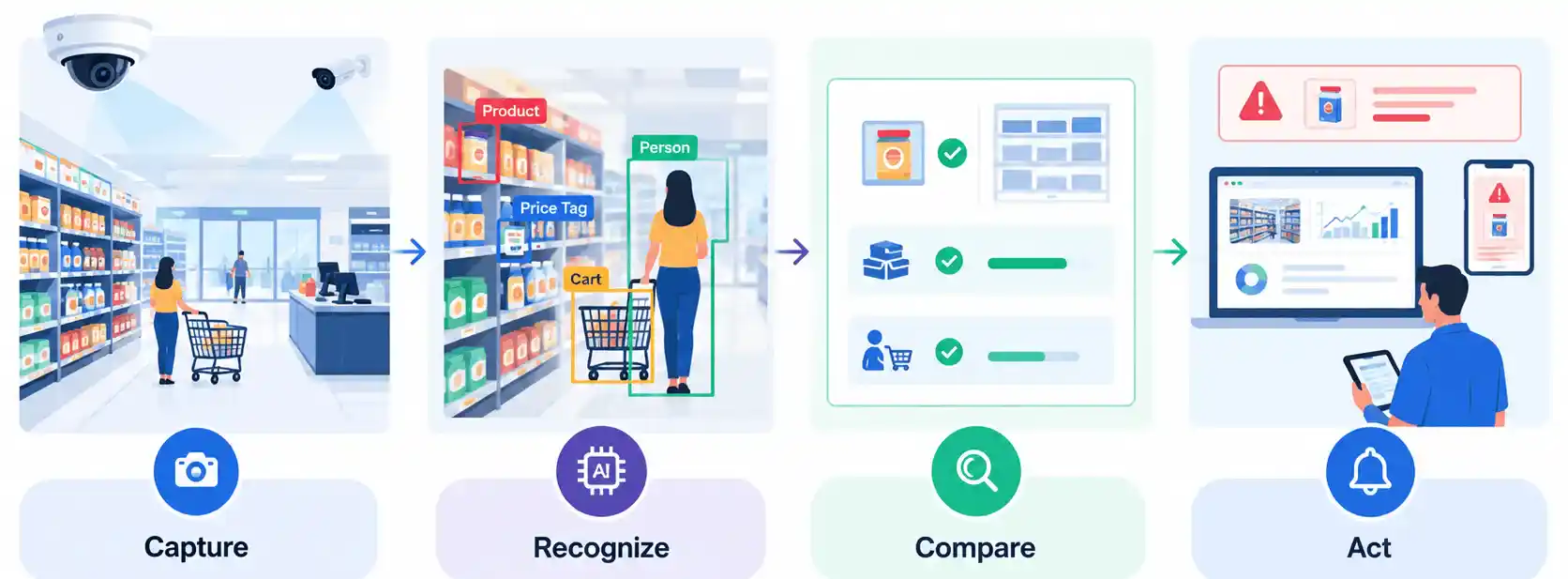
- Capture: Cameras or edge devices record images and video of shelves, aisles, entrances, and checkout areas. Placement and lighting matter more than most teams expect.
- Recognition: AI models detect and classify what they see, including products, price labels, carts, and people. Many run on edge devices inside the store to keep response times low.
- Comparison: The results are matched against business rules, such as the planogram, minimum stock levels, or expected checkout behavior.
- Action: Alerts, dashboards, and reports reach store teams and head-office managers, who can fix the issue or act on the insight right away.
The real value of computer vision in retail sits in the last step. A system that only collects video is a security feed. A system that triggers the right action at the right moment is a business tool.
Ten High-Impact Use Cases of Computer Vision in Retail
Shelf monitoring and out-of-stock detection
Empty shelves quietly drain revenue. AI shelf monitoring identifies gaps, low stock, and misplaced items, then sends a task to staff to fix them.
- What it catches: Empty facings, items on the wrong shelf, and products running low before they disappear.
- Why it works: Alerts reach employees while shoppers are still in the store, not after closing.
Planogram compliance
Brands and retailers agree on how products should be arranged, but real shelves drift from the plan quickly.
- What it catches: Wrong product positions, missing facings, and incorrect shelf placement.
- Why it works: Head office gets a visual record of compliance across every location without sending auditors.
Inventory management automation
Manual stock counts are slow and often outdated by the time they are finished. Computer vision in retail gives a much fresher view of what is on the shelf and in the aisle, then sends a task to staff when something needs fixing.
- What it improves: Count accuracy, replenishment timing, and visibility between the shelf and the backroom.
- Why it works: Teams spend less time counting and more time acting on the numbers.
Retail store layout optimization
With computer vision in retail, heatmaps and dwell-time analysis show which displays attract attention and which are ignored. Layout decisions can then rest on how shoppers actually move through the store.
- What it reveals: Popular zones, dead spots, shopper paths, and where queues tend to build.
- Why it works: Merchandising and floor-plan changes are based on observed behavior rather than guesses, using anonymized data instead of individual identification.
Automated checkout
From self-checkout assistance to fully cashierless stores, computer vision in retail recognizes items as shoppers pick them up or place them on a counter.
- What it improves: Speed, accuracy, and the number of customers one team member can serve.
- Why it works: Shorter lines remove one of the most common reasons people abandon a purchase.
Virtual try-on
Shoppers can’t always try before they buy, especially with eyewear, makeup, or apparel. Virtual try-on uses a phone camera or an in-store smart mirror to overlay products on the shopper in real time.
- What it improves: Buying confidence, and it can reduce returns caused by the wrong size, shade, or fit.
- Why it works: Shoppers compare more options quickly without handling every item, whether they are in the store or at home.
Visual search and contextual commerce
Visual search lets shoppers look for products with a photo instead of words. Contextual commerce goes a step further and uses what appears in an image or video to suggest matching or complementary items.
- What it improves: Product discovery, especially when a shopper can’t describe exactly what they want.
- Why it works: A photo of a jacket or a sofa can lead straight to similar items in the catalog, which shortens the path from inspiration to purchase.
Video surveillance and loss prevention
Shrinkage comes from theft, scanning errors, and process gaps. Computer vision in retail can spot patterns that are easy to miss with the human eye, turning passive camera feeds into live alerts.
- What it catches: Unscanned items at self-checkout, suspicious behavior patterns, and known process errors.
- Why it works: Staff are alerted early, so they can intervene politely rather than investigate after the fact.
Queue and footfall management
Knowing how many people are in the store and where they are waiting changes how staff managers work each hour.
- What it measures: Entry counts, queue length, and wait times.
- Why it works: Managers can open another counter before frustration builds and plan shifts around real traffic.
Price and promotion compliance
A promotion that is advertised but not displayed, or a shelf label that doesn’t match the till price, hurts trust.
- What it catches: Missing promotional signage, outdated price tags, and mismatched labels.
- Why it works: Stores fix errors quickly and avoid disputes at checkout.
Benefits of Computer Vision in Retail
The advantages of computer vision in retail fall into three groups: money, operations, and experience.
- Higher sales availability: Faster stockout detection means products are back on the shelf sooner, so fewer shoppers leave empty-handed.
- Lower manual workload: Automated checks replace time-consuming audits, so employees can focus on helping customers.
- Reduced shrinkage: Earlier detection of theft and process errors protects margin.
- Better shopping experience: Well-stocked shelves, accurate prices, and shorter queues make every visit smoother.
- Smarter decisions: Real in-store data supports better merchandising, staffing, and layout choices.
- Consistent standards: Every store is measured the same way, which is nearly impossible to achieve manually across a large network.
A simple way to see the shift that computer vision in retail brings:
| Area | Traditional approach | With computer vision |
|---|---|---|
| Shelf checks | Periodic manual walks | Continuous automated monitoring |
| Issue detection | Hours or days later | Near real time |
| Compliance audits | Sampled, labor-heavy | Covers every store consistently |
| Staff time | Spent on checking | Spent on serving customers |
| Decisions | Based on reports and instinct | Based on live store data |
Challenges to Plan For
Computer vision in retail delivers strong results, but it is not a plug-and-play product. These are the issues that most often decide whether a project succeeds.
- Privacy and compliance: Cameras capture people, so retailers must follow data protection laws, post clear notices, and avoid storing personally identifiable information they don’t need. Build privacy into the design from day one.
- Accuracy in the real world: Poor lighting, crowded shelves, reflective packaging, and look-alike products can confuse models. Expect a tuning period for each store format.
- Integration with existing systems: Insights are far more useful when they connect to inventory, POS, and ERP platforms. Standalone dashboards often get ignored.
- Upfront investment: Hardware, installation, and model training all have costs. A pilot helps prove the return before scaling.
- Staff adoption: If employees don’t trust or understand the alerts, nothing changes on the floor. Training and simple workflows are essential.
- Scalability: A model that works in one store may need adjustment for different layouts, lighting, or product ranges.
Pro tip: Treat the first rollout as a learning exercise. The goal is not perfection but a clear view of what works, what doesn’t, and what it will take to scale.
A 5-Step Roadmap to Get Started
You don’t need to transform your entire operation at once. A structured approach to computer vision in retail reduces risk and speeds up results.
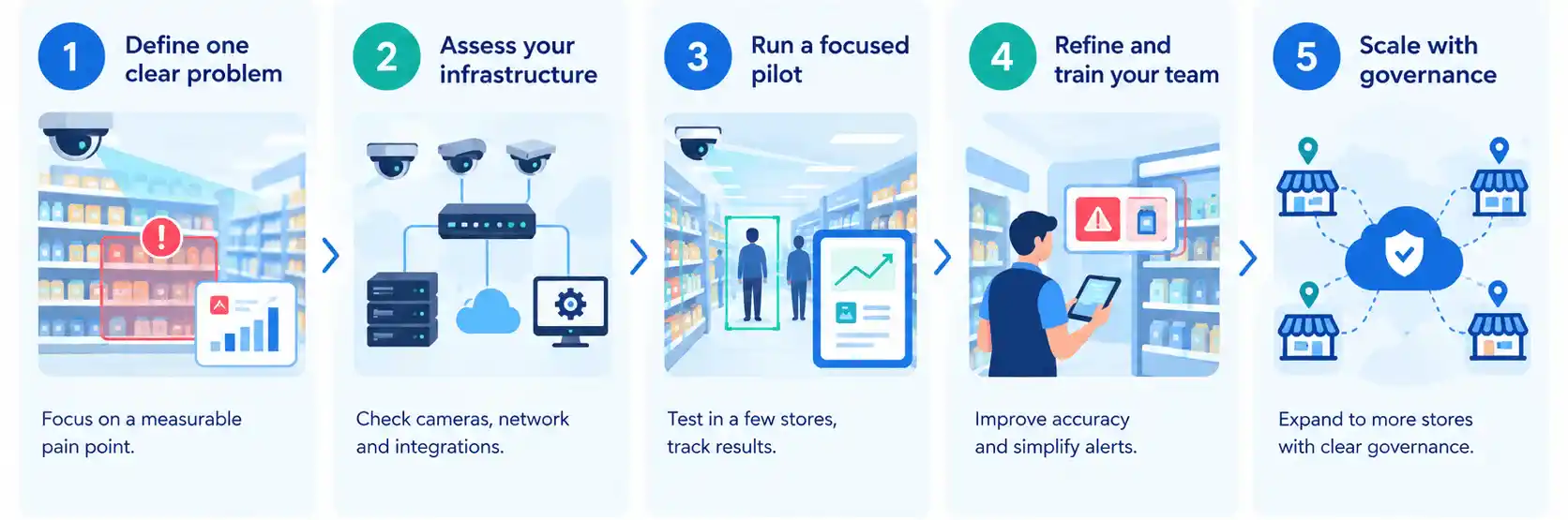
- Define one clear problem: Choose a measurable pain point, such as out-of-stock rates on top-selling categories or queue times at peak hours.
- Assess your infrastructure: Review existing cameras, network capacity, and system integrations before buying anything new.
- Run a focused pilot: Start with a small number of stores, set a baseline, and track results against it over several weeks.
- Refine and train your team: Use pilot findings to improve accuracy, simplify alerts, and prepare store staff for the new workflow.
- Scale with governance: Expand to more stores with documented privacy practices, clear ownership, and regular performance reviews.
Choosing a technology partner: Look for experience in AI, edge computing, and enterprise integration, as well as a clear approach to data security. A partner who understands both the technology and retail operations will shorten the path from pilot to scale.
The Future of Computer Vision in Retail
Computer vision in retail is moving in a few clear directions.
- Smarter edge devices: More processing will happen directly in the store, which lowers latency and reduces the amount of video sent to the cloud.
- Connected supply chains: Shelf data will feed demand forecasting and automated replenishment, so stock levels adjust with less manual input.
- Personalized experiences: Retailers will use anonymized in-store signals to improve layouts, promotions, and service.
- Broader adoption: As costs fall and accuracy improves, vision-based monitoring will become standard for stores of all sizes, not just large chains.
Retailers who start learning now will be better positioned when these capabilities mature.
Conclusion
Computer vision in retail turns store cameras into a live source of insight, from shelf availability to customer flow. It helps retailers fix problems while shoppers are still in the aisle, and it frees teams to focus on service.
The path to success is simple: start with one clear problem, protect customer privacy, connect the data to your existing systems, and scale only after the pilot proves its value.
Ready to explore computer vision for your retail business? Talk to our AI experts.
FAQs
What is computer vision in retail?
It uses AI to analyze images and video from store cameras so retailers can monitor shelves, inventory, queues, and checkout automatically. The system flags problems as they happen instead of after a manual audit.
How is computer vision used in retail stores?
Stores use it for shelf and inventory monitoring, automated checkout, loss prevention, store layout analysis, virtual try-on, and visual search. Most retailers start with one of these and add others over time.
How does camera-based store monitoring work?
Cameras capture the store, AI identifies products and activity, and the results are checked against rules such as planograms or stock levels. Staff then get an alert on a device or dashboard when something needs fixing.
Does it work with existing store cameras?
Often, yes. Many software-first solutions work with cameras already installed in the store. A coverage check may find blind spots, and shelf-level monitoring may need extra devices for close-up views.
Computer vision vs RFID: which is better for inventory accuracy?
It depends on the products. RFID counts tagged items and suits categories like apparel, while vision reads the state of the shelf and suits open grocery displays. Some retailers combine both.
Does it reduce self-checkout shrink?
It can help. Cameras flag items that were not scanned at the basket, so staff can step in quickly and politely before the shopper leaves the checkout area.
What are the main challenges of adopting it?
The common hurdles are privacy and compliance, accuracy in real store conditions, integration with inventory and POS systems, upfront cost, and getting staff to trust the alerts.
Is computer vision in retail safe for customer privacy?
Yes, if retailers follow data protection laws, store little identifiable data, and are open about how cameras are used. Shelf and product recognition use cases do not need to track individual shoppers.