
Table of Contents
AI teams are burning through cloud budgets faster than ever, and the biggest culprit is almost always GPU spend. Training runs get scheduled, inference endpoints stay live around the clock, and nobody circles back to check whether any of it is actually being used efficiently. GPU Cloud Optimization is the practice of closing that gap, making sure every GPU hour you pay for is a GPU hour that’s actually doing useful work.
This isn’t a niche concern anymore. As more companies move from experimenting with AI to running it in production, GPU costs have become one of the largest line items in the entire cloud bill. Without a deliberate approach to GPU Cloud Optimization, teams end up paying for idle capacity, oversized instances, and compute that nobody is monitoring closely.
This guide breaks down where the waste comes from, how to fix it, and what a mature GPU Cloud Optimization strategy looks like in practice.
Why GPU Costs Spiral Out of Control
GPUs are expensive by nature, but that’s only part of the story. The real cost driver is how loosely most teams manage them. A few patterns show up again and again:
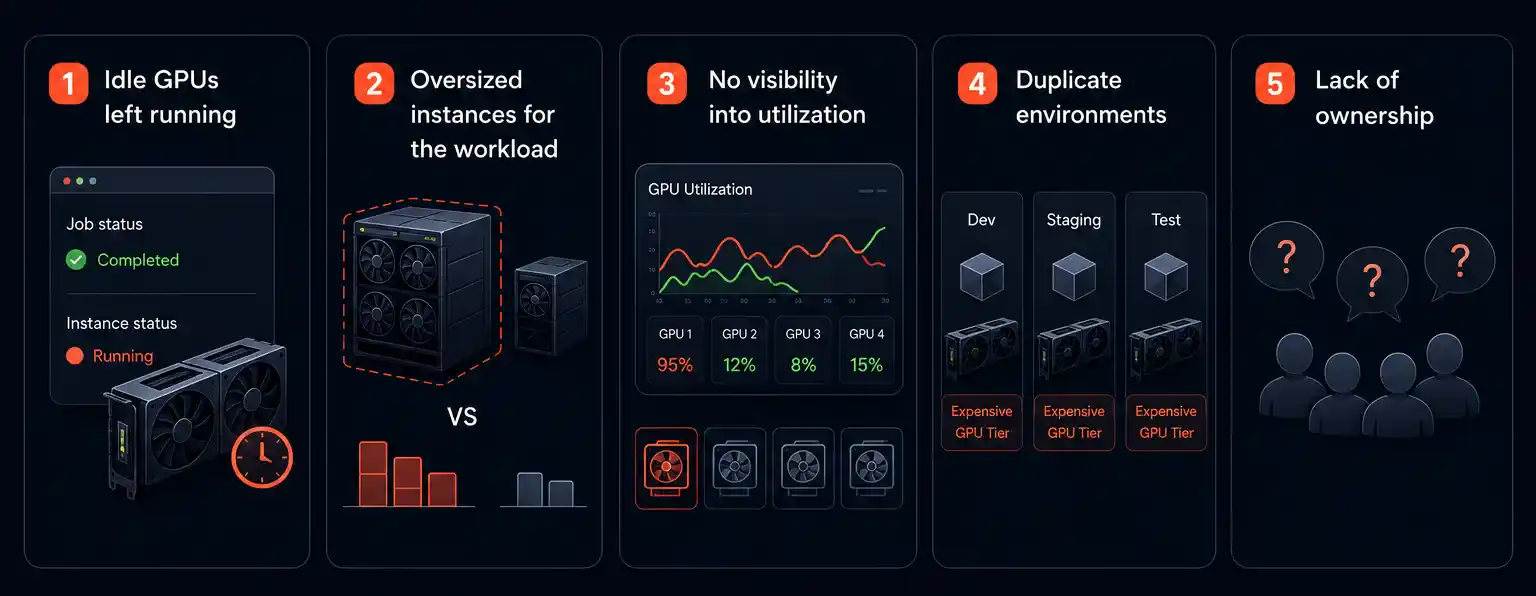
- Idle GPUs left running. Training jobs finish, but the underlying instance keeps running because nobody set up auto-shutdown.
- Oversized instances for the workload. A team requests a high-end multi-GPU node for a job that could run comfortably on a fraction of that capacity.
- No visibility into utilization. Without monitoring, it’s impossible to know which GPUs are working hard and which are sitting nearly empty.
- Duplicate environments. Dev, staging, and test environments often run on the same expensive GPU tiers as production, multiplying the bill unnecessarily.
- Lack of ownership. When no single team is accountable for GPU spend, nobody feels pressure to optimize it.
Each of these issues is fixable, but they require a structured approach rather than one-off fixes. That’s where this discipline comes in, rather than a single one-time action.
What GPU Cloud Optimization Actually Means
GPU Cloud Optimization isn’t just about finding cheaper instances. It’s a combination of right-sizing, scheduling, monitoring, and architectural decisions that together reduce waste without slowing down AI development.
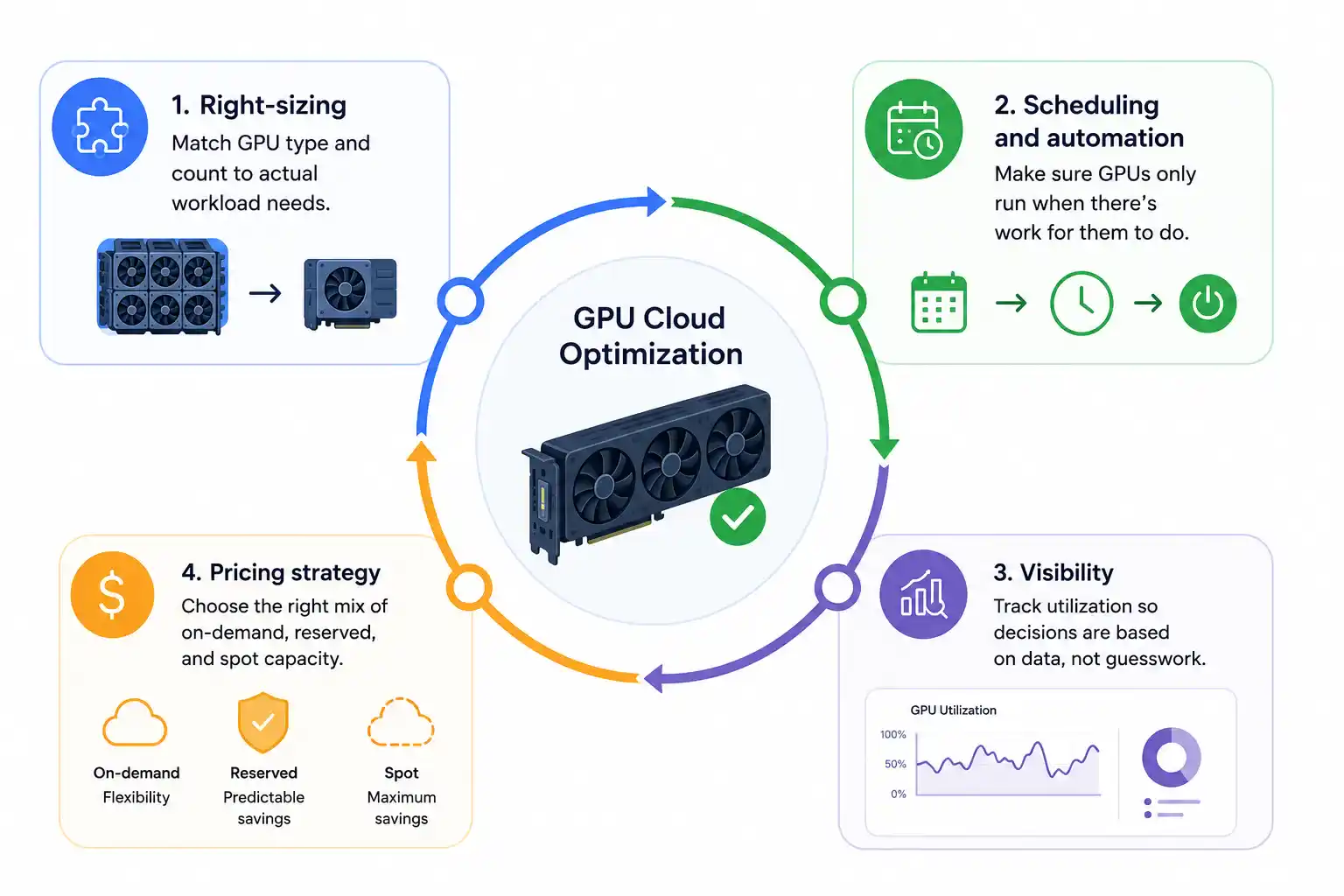
A solid strategy in this space typically touches four areas:
- Right-sizing: matching GPU type and count to actual workload needs.
- Scheduling and automation: making sure GPUs only run when there’s work for them to do.
- Visibility: tracking utilization so decisions are based on data, not guesswork.
- Pricing strategy: choosing the right mix of on-demand, reserved, and spot capacity.
Teams that treat GPU Cloud Optimization as a one-time cleanup tend to slide back into bad habits within a few months. Treating it as an ongoing practice, with regular review cycles, is what makes the savings stick.
How to Implement It: A Step-by-Step Approach
Step 1: Right-Size Your GPU Instances
The fastest win in any GPU Cloud Optimization effort is matching instance size to actual workload demand. Many teams default to the largest available GPU instance “just in case”, without testing whether a smaller configuration would perform just as well.
Practical steps for right-sizing:
- Benchmark workloads against multiple instance types before committing to one.
- Separate training workloads from inference workloads; they rarely need the same hardware.
- Use smaller, single-GPU instances for development and experimentation, reserving multi-GPU clusters for production training runs.
- Revisit instance choices periodically, since model architectures and dataset sizes change over time.
Right-sizing alone often delivers some of the most noticeable savings in this kind of rollout, simply because oversized instances are so common.
Step 2: Eliminate Idle GPU Time
Idle GPU time is the silent budget killer. A GPU sitting idle for hours after a job completes costs exactly as much as one running at full capacity. This is why automation has to be central to any GPU Cloud Optimization plan.
Ways to cut idle time:
- Auto-shutdown policies that terminate instances after a period of inactivity.
- Job-based provisioning, where GPUs spin up only when a job is queued and shut down immediately after.
- Shared GPU pools for smaller workloads, so multiple jobs can run on the same hardware instead of each claiming a dedicated instance.
- Alerts for long-running idle instances, so engineering teams catch waste before it accumulates into a large bill.
Idle elimination is often the easiest part of this process to automate, and it tends to have an immediate, measurable impact on monthly spend.
Step 3: Build Real Visibility Into GPU Usage
You can’t optimize what you can’t see. A surprising number of teams have no clear picture of GPU utilization across their cloud environment, which makes any GPU Cloud Optimization initiative difficult to sustain.
A good monitoring setup for this kind of work should include:
- Utilization dashboards showing GPU memory and compute usage per job, per team, and per environment.
- Cost attribution so spend can be traced back to specific projects or teams, not just lumped into a single cloud bill.
- Historical trend tracking to spot patterns, like recurring spikes around specific workloads or times of day.
- Threshold-based alerts for instances running below a reasonable utilization level for extended periods.
Once visibility is in place, the entire process shifts from guesswork to a data-driven one. Teams can make targeted decisions instead of broad, blunt cuts that might affect performance.
Step 4: Get the Pricing Model Right
Cloud providers offer several purchasing options for GPU capacity, and choosing the wrong one is a common reason GPU Cloud Optimization efforts stall. The three main options are:
- On-demand pricing: flexible, but the most expensive per hour. Best suited for unpredictable or short-term workloads.
- Reserved capacity: significant discounts in exchange for committing to usage over a longer period. Ideal for steady, predictable training or inference workloads.
- Spot or preemptible instances: the cheapest option, but instances can be reclaimed by the provider with little notice. Well-suited for fault-tolerant batch jobs and certain training workloads that can checkpoint and resume.
A mature GPU Cloud Optimization approach blends all three: reserved capacity for predictable baseline workloads, spot instances for flexible batch jobs, and on-demand as a buffer for unplanned spikes. Relying on a single pricing model, especially on-demand alone, almost always leaves savings on the table.
Step 5: Optimize at the Workload Level, Not Just the Infrastructure Level
Infrastructure changes matter, but GPU Cloud Optimization shouldn’t stop at the hardware layer; the way workloads are built and run has a direct impact on GPU efficiency.
Workload-level techniques worth considering:
- Mixed precision training, which reduces compute load without significantly affecting model accuracy.
- Batching inference requests instead of processing them one at a time, which improves GPU throughput.
- Model quantization and distillation, where applicable, to reduce the resource footprint of deployed models.
- Efficient data pipelines, since slow data loading can leave GPUs waiting instead of computing.
These adjustments often require closer collaboration between data science and infrastructure teams, but they’re a meaningful part of any serious effort in this area.
Step 6: Set Up Governance and Accountability
Even the best technical fixes erode over time without ownership. Successful GPU Cloud Optimization programs assign clear responsibility for GPU spend, just as teams assign ownership of other cloud costs.
Governance practices that help:
- Budget thresholds per team or project, with alerts when spend approaches the limit.
- Regular cost review meetings, where GPU usage is discussed alongside other cloud spend.
- Tagging policies so every GPU resource is linked to a specific owner, project, or environment.
- Approval workflows for provisioning large or expensive GPU clusters.
Governance turns this from a one-time project into a habit that the organization maintains naturally.
Common Mistakes That Undermine GPU Cloud Optimization
Even well-intentioned teams make mistakes that quietly cancel out their savings:
- Treating optimization as a one-time event. Workloads change, and so should the infrastructure supporting them.
- Cutting capacity is too aggressive. Under-provisioning can hurt performance and create new problems, like job failures or slow training cycles.
- Ignoring development and test environments. These often run longer than expected and consume more GPU time than people assume.
- Optimizing infrastructure without involving the teams running the workloads. The best results come from collaboration between infrastructure and data science teams.
Avoiding these pitfalls is just as important as implementing the right tools. A strategy in this space is only as good as the discipline behind it.
Building a Long-Term GPU Cloud Optimization Strategy
The most successful teams don’t treat GPU Cloud Optimization as a single project with a start and end date. They build it into their regular operating rhythm, with periodic reviews of utilization, pricing, and workload efficiency.
A practical long-term approach includes:
- Quarterly reviews of instance types and utilization patterns.
- Ongoing monitoring dashboards that are actually checked, not just built and forgotten.
- A clear policy for choosing between on-demand, reserved, and spot capacity as workloads evolve.
- Continuous communication between infrastructure teams and the engineers actually running AI workloads.
This kind of consistency is what separates teams that get lasting value from this approach from those that see a brief drop in costs before spend creeps back up.
Conclusion
AI compute costs aren’t going to get cheaper on their own, and GPU demand across the industry continues to climb. Teams that treat GPU Cloud Optimization as an afterthought will continue to overpay for capacity they don’t fully use. Teams that build it into their regular workflow, through right-sizing, smarter scheduling, real visibility, the right pricing mix, and clear ownership, put themselves in a much stronger position to scale AI work sustainably.
GPU Cloud Optimization isn’t about cutting corners on compute. It’s about making sure every dollar spent on GPUs is actually working toward something useful. Start with visibility, fix the obvious waste, and build the habits that keep costs under control as your AI workloads grow.
FAQs
What is GPU Cloud Optimization?
It’s the practice of reducing wasted GPU spend in cloud environments through right-sizing, scheduling, monitoring, and smarter pricing choices.
Why do GPU costs get out of control so easily?
Idle instances, oversized hardware, and a lack of visibility are the main drivers. Without active management, waste accumulates quickly.
Is spot capacity safe to use for AI workloads?
It works well for fault-tolerant or checkpointed jobs, but it isn’t ideal for workloads that can’t tolerate interruption.
How often should teams review their GPU usage?
A quarterly review is a reasonable baseline, though fast-growing teams may benefit from monthly check-ins.
Does optimizing GPU usage hurt performance?
Not if done carefully. The goal is matching resources to actual need, not under-provisioning critical workloads.