
Table of Contents
In today’s digital age, where businesses and individuals rely heavily on networks to connect and share information, safeguarding these networks from cyber threats has become paramount.
Network security solutions play a crucial role in protecting networks from various attacks, such as unauthorized access, malware, and data breaches.
By understanding the different types of network security solutions and their key features, organizations can make informed decisions to bolster their network security posture.
Defining Network Security Solutions
Network security solutions are specialized hardware devices designed to protect networks from cyber threats, and modern innovations like Juniper Mist networking for secure, scalable infrastructure further enhance visibility, automation, and overall network performance.
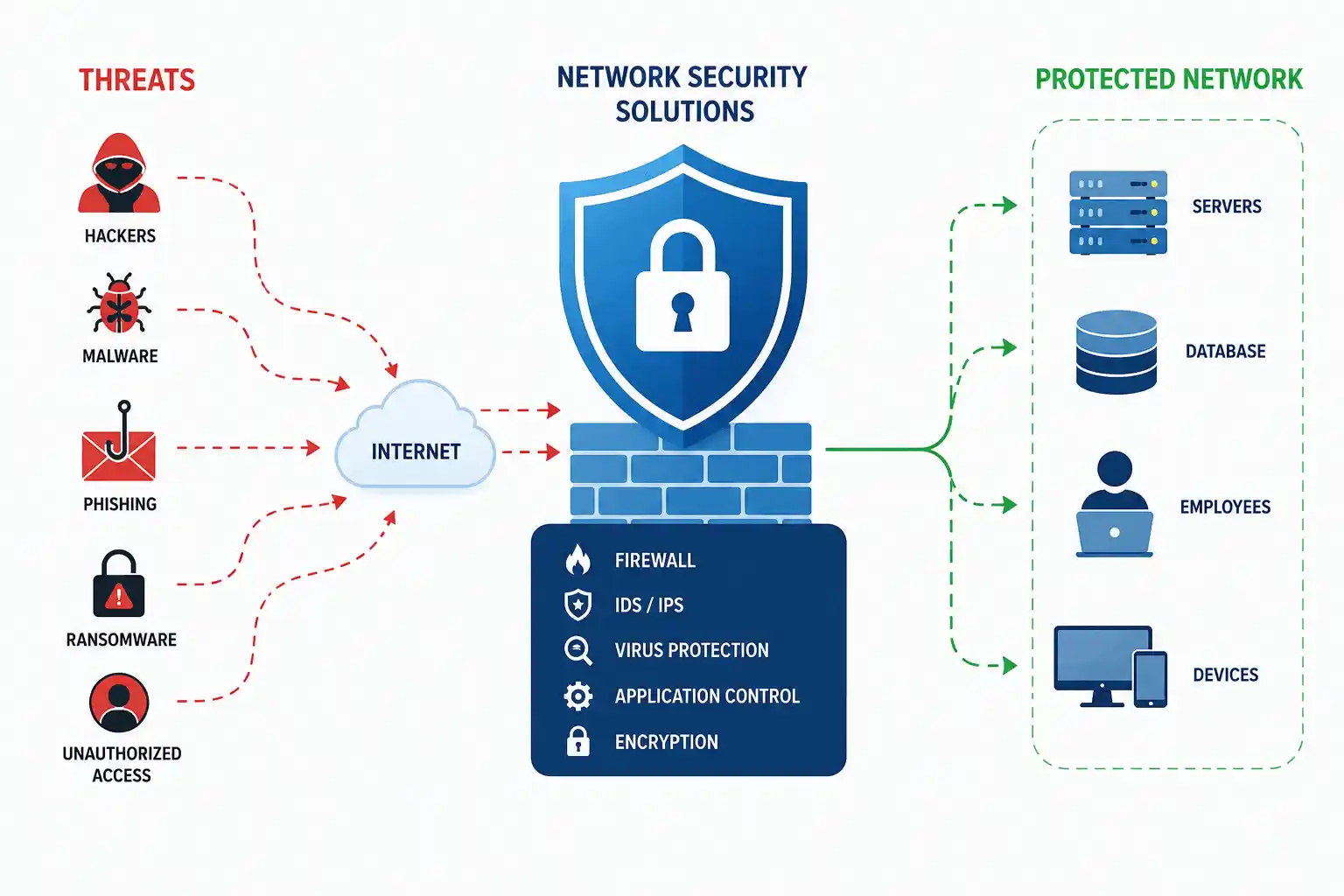
These appliances are deployed at strategic points within a network to monitor and control network traffic, identify potential threats, and take appropriate actions to prevent attacks.
By acting as a barrier between a network and the internet, network security solutions help to safeguard sensitive data and ensure business continuity.
The Importance of Network Security Solutions in Today’s Digital Landscape
The need for robust network security solutions has never been greater.
As businesses increasingly adopt cloud-based services, remote work, and the Internet of Things (IoT), their attack surface expands significantly.
Cybercriminals are constantly evolving their tactics and exploiting vulnerabilities to gain unauthorized access to sensitive data and database software environments.
Network security appliances provide a critical line of defense by detecting and preventing a wide range of cyber threats and protecting organizations from financial losses, reputational damage, and operational disruptions. For remote teams and individual users, adding a reliable VPN service can further enhance privacy by encrypting internet traffic and reducing exposure to network-based threats.
When comparing options like Surfshark vs. NordVPN, businesses should evaluate factors such as encryption standards, independent audits, logging policies, and performance across their global server networks.
They also play a vital role in supporting PCI DSS compliance services, ensuring that businesses handling payment data adhere to strict security standards and safeguard customer information.
Types of Network Security Solution Appliances
When it comes to network security management, you need a strong network.
These are the types of network security products that are available, each with specific functions and capabilities.
Let’s explore some of the most common types:
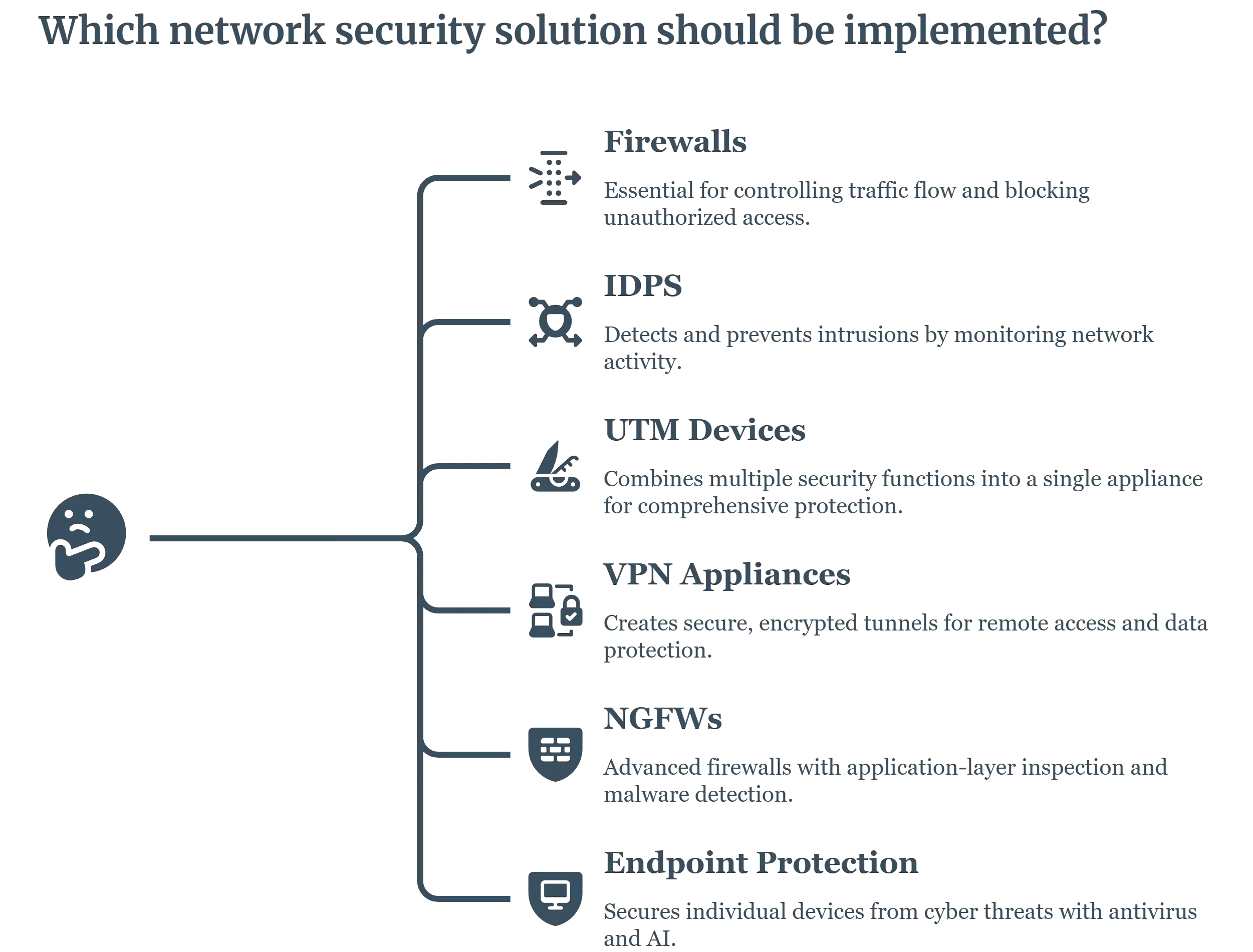
1. Firewalls
Firewalls are among the most fundamental network security appliances.
They act as gatekeepers, controlling traffic flow between a network and the internet.
Firewalls examine network traffic for suspicious activity, such as unauthorized access attempts or malicious code.
They can be configured to block or allow traffic based on specific criteria, such as IP addresses, ports, and protocols.
2. Intrusion Detection and Prevention Systems (IDPS)
IDPS systems are designed to detect and prevent unauthorized access to networks.
They continuously monitor network traffic for signs of intrusion, such as abnormal patterns of activity or known attack signatures.
If an intrusion is detected, IDPS systems can take immediate action to block the attack and alert administrators.
3. Unified Threat Management (UTM) Devices
UTM devices combine multiple security functions into a single appliance, providing comprehensive protection against a wide range of threats.
These devices typically include features such as firewall, intrusion prevention, antivirus, content filtering, and VPN capabilities.
UTMs offer a cost-effective solution for organizations that need to protect their networks from various threats.
4. Virtual Private Network (VPN) Appliances
Business VPNs create secure, encrypted tunnels between networks, allowing users to connect remotely to a corporate network and access resources securely.
VPNs are commonly used for remote access, telecommuting, and branch office connectivity.
They help to protect sensitive data transmitted over the internet by encrypting it and preventing unauthorized access.
They can be extremely useful for businesses that leverage international PEO and work with a global team across various locations.
VPN vs. Proxy
VPN – It’s a virtual private network that encrypts all your internet traffic and sends it through a secured server.
It works at the system level, meaning all apps and browsers on your device are covered. With a VPN, you can expect privacy, security, and access to geo-blocked content.
Proxy – Unlike a VPN, it routes traffic from a specific app or web browser. It hides your IP address but doesn’t encrypt your data, which makes it less secure than a VPN. A proxy server can manage this traffic efficiently, and if you’re unsure whether your proxy is working correctly or what type it is, you can use a proxy checker tool to verify its performance and anonymity level.
5. Next-Generation Firewalls (NGFW)
NGFWs are advanced firewalls that provide additional security features over traditional firewalls.
They can inspect traffic at the application layer, providing more granular control over network access.
NGFWs also incorporate features such as intrusion prevention, malware detection, and application control to provide comprehensive protection against sophisticated threats.
6. Endpoint protection
Endpoint security protects devices like laptops, phones, and servers from cyber threats.
With more remote work and personal devices in use, each device becomes a potential risk.
Modern endpoint protection uses tools like antivirus, firewalls, and AI-powered threat detection to secure these endpoints.
It also allows centralized monitoring and quick responses to attacks.
This security is essential for protecting data, staying compliant, and keeping operations running smoothly.
Key Features to Consider
When selecting network security appliances, it is important to consider several key features:
- Performance and Throughput: The appliance should be able to handle the expected network traffic without compromising performance. Look for appliances with high throughput capabilities to ensure smooth network operations.
- Scalability: As your network grows, the appliance should be able to scale to meet your changing needs. Consider appliances that can be easily expanded or upgraded to accommodate future requirements.
- User-Friendly Interface: A user-friendly interface makes it easier to manage and configure the appliance.
Look for appliances with intuitive dashboards and easy-to-use management tools. - Support for Multiple Protocols: The appliance should support a wide range of protocols, including HTTP, HTTPS, FTP, SMTP, and others. This ensures that it can protect your network from threats that may exploit different protocols.
- Reporting and Analytics Capabilities: Robust reporting and analytics features allow you to monitor network activity, identify potential threats, and track security trends.
Look for appliances that provide detailed reports and customizable dashboards.
Top Network Security Solutions Appliance Brands
Several leading vendors offer a wide range of network security solution appliances to meet the diverse needs of organizations.
Here are some of the top brands:
1. Cisco
Cisco is one of the most recognized names in enterprise networking and security, with decades of experience building infrastructure that powers organizations of every size. Its network security appliances are built to integrate tightly with existing Cisco networking hardware, making it a natural fit for organizations already invested in the Cisco ecosystem. The brand is often the default choice for large enterprises that need proven, battle-tested security at scale.
Key Products: Firewalls, intrusion prevention systems (IPS), VPN solutions, and unified threat management (UTM) devices.
Strengths: Strong reliability, easy centralized management, and robust network security monitoring tools that give organizations a performance edge.
2. Fortinet
Fortinet has built its reputation around its Security Fabric approach, which ties together firewalls, endpoint protection, and cloud security into a single, unified architecture. This integration is designed to reduce the complexity that comes from managing multiple disconnected security tools. Fortinet appliances are particularly popular with mid-size to large organizations that want high throughput without sacrificing depth of protection.
Key Products: Firewalls, IPS, and UTM appliances.

Strengths: Innovative security technologies paired with a strong emphasis on speed and throughput.
3. Palo Alto Networks
Palo Alto Networks positions itself at the premium end of the market, focusing heavily on research-driven threat intelligence and machine-learning-based detection. Its next-generation firewalls go beyond traditional port-and-protocol filtering, inspecting traffic at the application layer to catch threats that older firewall models would miss. This makes it a common choice for organizations facing sophisticated or targeted attacks.
Key Products: Next-gen firewalls, threat prevention platforms, and traffic visibility tools.
Strengths: Advanced detection capabilities and a strong track record against sophisticated, evolving attacks.
4. Sophos
Sophos is known for making enterprise-grade security accessible, particularly for small and mid-sized businesses that may not have large in-house IT security teams. Its unified console and straightforward setup process reduce the learning curve typically associated with network security appliances. Sophos has also expanded aggressively into cloud-native security, reflecting the shift toward hybrid and remote work environments.
Key Products: Firewalls, IPS, endpoint protection, and cloud-based security solutions.

Strengths: Ease of use combined with effective threat protection, plus solid support for cloud infrastructure security.
5. Check Point
Check Point is considered one of the pioneers of the modern firewall, having introduced foundational technologies that shaped how network security is approached today. The company continues to focus on consolidated security architectures that span on-premises networks, data centers, and multi-cloud environments. Check Point is frequently chosen by organizations with complex, hybrid infrastructure that need consistent policy enforcement across environments.
Key Products: Firewalls, IPS, VPN solutions, and UTM devices.

Strengths: Advanced security technology and a strong, ongoing commitment to innovation.
Comparison of Leading Appliances
To help you choose the right network security appliance for your organization, here is a comparison of some of the leading brands based on key features.
| Feature | Cisco | Fortinet | Palo Alto Networks | Sophos | Check Point |
| Performance | Excellent | Excellent | Excellent | Good | Excellent |
| Scalability | Good | Excellent | Excellent | Good | Excellent |
| User-friendliness | Good | Good | Excellent | Excellent | Good |
| Protocol support | Excellent | Excellent | Excellent | Good | Excellent |
| Reporting and analytics | Good | Excellent | Excellent | Good | Excellent |
| Pricing | Mid-range | Mid-range | Premium | Mid-range | Premium |
Difference Between Network Security Devices And Cyber Security Devices
The digital world is increasing with cyber threats, and for that, businesses must deploy the right tools to protect their digital data.
While network security devices and cyber security devices are used interchangeably, they serve a whole different purpose altogether.
Now, let’s understand the major differences between the two.
What are Network Security Devices?
Network security devices primarily consist of hardware and software that protect, monitor, and manage network traffic and infrastructure.
This helps in preventing unauthorized access, ensuring safe data transmission, and maintaining uptime.
Here are some common Network Security Devices:
- Firewalls: Monitor and filter incoming/outgoing traffic based on pre-set rules.
- Intrusion Detection Systems (IDS): Easily detect and alert on suspicious traffic or attacks
- Intrusion Prevention Systems (IPS): You can actively block identified threats in real time.
- Network Access Control (NAC): Regulates access based on compliance and identity
- Virtual Private Network Gateways (VPN): Encrypt remote access for secure communications
What Are Cyber Security Devices?
Cybersecurity devices, on the other hand, protect on a broader scale.
This also comes with different tools that secure endpoints, software, user identities, cloud data, and digital assets from cyber threats like phishing, malware, ransomware, and insider attacks.
Here are some common Cyber Security Devices:
- Endpoint Detection and Response (EDR): Monitors end-user devices like laptops and servers
- Antivirus/Antimalware protection: Detects and removes malicious programs
- Data Loss Prevention (DLP): You can easily stop sensitive data from being leaked or misused.
- Identity and Access Management (IAM): Identity and access management controls who can access what based on multiple roles.
- Cloud Security Posture Management (CSPM) – This helps secure cloud configurations and compliance.
Why Do You Need Both Of Them?
Your digital environment needs to be fully secured; that’s why you can’t solely depend on one type.
While network security devices defend the perimeter, cybersecurity devices protect the internal systems, users, and data.
A layered security architecture combining both provides
- Real-time intrusion prevention
- Device-level protection
- Strong access control
- Safe cloud and remote access
- Enhanced incident response
Stitching several of these tools together into one coherent posture is what our cloud infrastructure security services are for.
How To Do Network Security Monitoring?
To ensure effective network security, it is important to follow the best practices for implementing and managing network security appliances
You can monitor network security through these points:
- Assessing Organizational Needs: Conduct a thorough assessment of your organization’s security needs to identify the appropriate types and features of network security products.
Consider factors such as network size, traffic volume, and the types of threats you face. To emphasize the risks of skipping this step, Dmitry Kurskov, cybersecurity consultant at ScienceSoft, warns: “If you neglect proper vulnerability assessment for longer than a year, you are likely to become an easy target for hackers.” This underscores the importance of proactive and recurring evaluation of your network infrastructure, especially after any major changes. - Regular Updates and Maintenance: Keep your network security appliances up-to-date with the latest software and security patches. This also includes tracking whether your Fortinet devices are still supported, and using a reliable Fortinet EOL list helps teams quickly identify which appliances should be upgraded or replaced before they become a security risk.
Regular maintenance is essential to ensure optimal performance and protection against emerging threats. - Employee Training and Awareness: Educate your employees about the importance of network security equipment and how to recognize and avoid potential threats. For IT teams and aspiring professionals, formal training through a hands-on Network Engineer Course ensures a deeper understanding of monitoring tools, incident response workflows, and enterprise-grade security practices.
Provide training on best practices for using the network and handling sensitive information. This can also include sharing social networking safety tips for businesses, helping employees understand how to maintain professionalism and data security on social media platforms. - Continuous Monitoring and Improvement: Monitor network activity regularly to identify potential security breaches or anomalies.
Continuously evaluate your security measures and adjust as needed to improve your organization’s security posture. To strengthen visibility across identity-based threats and prevent privilege abuse during network incidents, many organizations now integrate identity-first incident response into their monitoring strategy, linking network activity with real-time identity context for faster, smarter containment.
Conclusion
Network security appliances are essential tools for protecting networks from cyber threats.
By understanding the different types of appliances, their key features, and best practices for implementation, organizations can make informed decisions to enhance their network security posture.
By understanding the importance of network security, you can enhance your network security assessment that will protect you from various cyber threats.
By investing in robust network security, businesses can safeguard their sensitive data, protect their reputation, and ensure business continuity in today’s digital landscape.
Comment below your thoughts.
FAQ
What are the network security technologies and solutions?
A combination of tools like firewalls, IDS/IPS, VPN gateways, and web/email security gateways that protect an organization’s IT infrastructure from cyber threats and breaches.
What are the five types of network security?
Firewalls, intrusion prevention systems (IPS), VPNs, antivirus/anti-malware, and access control & authentication.
What is the most common network security?
The firewall monitors and filters traffic between trusted internal networks and untrusted external ones based on defined rules.
What is the difference between network security and cybersecurity?
Network security protects the internal network itself (traffic, access, infrastructure). Cybersecurity is broader, covering devices, data, applications, and systems against digital attacks.
What are the technologies used in Network Security?
Firewalls, IDS/IPS, VPNs, antivirus/anti-malware, network access control (NAC), and security gateways work together as a layered defense.
Is a hardware firewall better than a software firewall?
Hardware appliances offer higher throughput and stop bad traffic before it reaches your devices; software firewalls are cheaper and more flexible but rely on the host system staying secure. Most businesses use both.
Is pfSense/OPNsense (open-source) good enough for a small business?
Yes, for tech-savvy teams, it’s free, flexible, and capable, but you’re responsible for updates, support, and troubleshooting. Commercial appliances (Sophos, Fortinet, and Watchguard) trade cost for vendor support and easier management.
UTM vs NGFW: What’s actually the difference?
A UTM bundles firewall, antivirus, IPS, and content filtering loosely into one box, ideal for SMBs. An NGFW does deep, application-layer inspection with more advanced threat detection built for larger or higher-risk networks.
Do I need a separate IPS, or does my firewall already include it?
Most modern NGFW and UTM appliances include IPS as a licensed feature; check whether it’s bundled or a separate add-on subscription before assuming it’s active out of the box.