

Table of Contents
If you’re weighing whether to pay for ChatGPT, you’ve probably noticed the landscape has gotten more complicated.
What used to be a simple free-vs-paid decision is now a six-tier ladder, and the features bundled into each tier keep shifting.
This guide breaks down exactly what ChatGPT Plus is, what it costs, what you can do with it, especially around file uploads and document analysis, and how it stacks up against the other plans OpenAI offers.
What Is ChatGPT Plus?
ChatGPT Plus is OpenAI’s paid individual subscription plan, sitting above the Free and Go tiers and below Pro, Business, and Enterprise.
It’s designed for people who use ChatGPT regularly enough that free-tier limits start getting in the way: students, professionals, marketers, developers, and researchers who need more than occasional Q&A.
Where Free gives you a genuinely usable but capped experience, Plus removes most of those ceilings: higher message volume, access to more capable models, expanded file uploads and data analysis, image generation, voice, and tools like Deep Research and Projects that aren’t fully available (or available at all) on Free.
One important thing to understand before subscribing: OpenAI changes model names, feature bundles, and usage limits fairly often.
What Plus includes today isn’t necessarily what it included six months ago, and it will likely look different six months from now.
Treat any specific model name or numeric limit as a snapshot rather than a permanent spec; always double-check current details in your account or OpenAI’s Help Center before making a purchasing decision.
How Much Does ChatGPT Plus Cost?
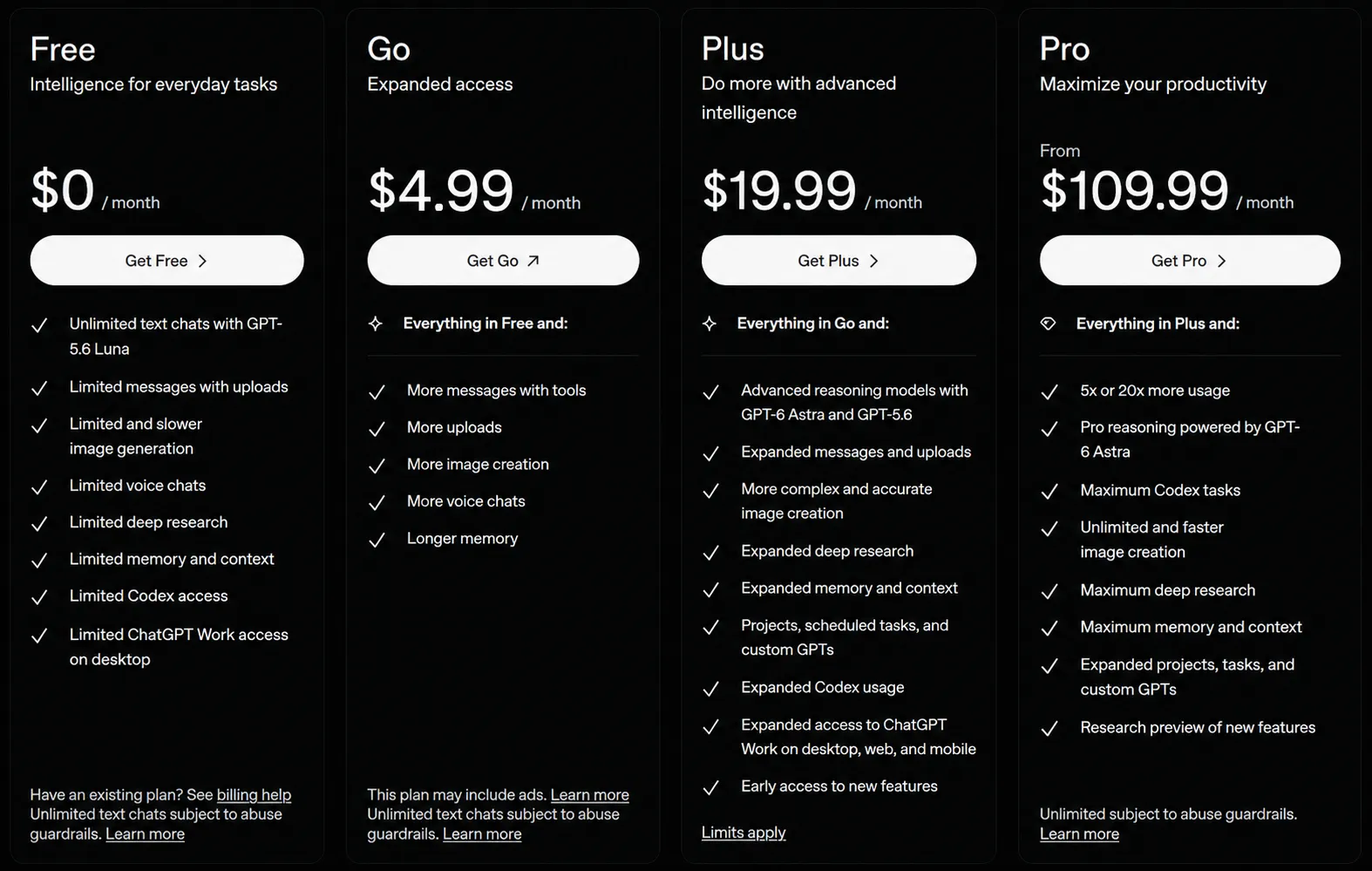
ChatGPT Plus Pricing
- $20 per month
- Billed monthly, there’s currently no discounted annual Plus plan
- No contract; cancels anytime
- API usage is billed separately and isn’t included in a Plus subscription
The $20 price point has held steady for years even as the feature set behind it has expanded considerably.
That said, OpenAI has restructured pricing and naming around it repeatedly (renaming its team plan, cutting prices elsewhere, adding a lower-cost Go tier), so it’s worth checking OpenAI’s pricing page directly before you buy.
What Do You Get for $20/Month?
| Feature | Free | Plus |
|---|---|---|
| ChatGPT access | Yes | Yes |
| Message limits | Capped, tighter on advanced models | Expanded |
| File uploads | Limited (a few per day) | Significantly expanded |
| Data analysis | Limited | Expanded |
| Image generation | Limited | Expanded |
| Advanced reasoning models | Limited/unavailable | Available |
| Deep Research | Very limited | Monthly allowance |
| Projects | Limited or unavailable | Available |
| Custom GPTs | Use only | Create and use |
| Ads | May be present | Ad-free |
Keep this table dynamic rather than treating it as fixed; OpenAI has already changed what’s available on Free multiple times this year, including adding advertising to the free tier and later loosening some free-tier text-chat limits.
The gap between Free and narrows and widens depending on what OpenAI decides to give away.
ChatGPT Plus Features
Higher access to advanced models and reasoning
Plus unlocks access to OpenAI’s more capable models and reasoning modes, rather than restricting you to a lighter, faster default.
In practice, this means better performance on complex, multi-step tasks, writing that requires nuance, technical troubleshooting, or reasoning through a problem with several moving parts.
Exactly which model is “the flagship” changes over time, so rather than anchoring to a specific model name, think of Plus as your ticket to whatever OpenAI currently considers its best generally-available model.
File uploads and document analysis
This is the feature this article’s original version was built around, and it’s still one of the most practical reasons to upgrade.
With Plus, you can:
- Upload documents and ask ChatGPT to summarize them
- Compare two or more documents side by side
- Extract specific information from long files
- Analyze spreadsheets for trends or errors
- Turn a document into a different format (a report into a slide outline, for instance)
- Apply a structure or framework from one document to another
OpenAI frames file uploads around three core use cases: synthesis (combining information across files into something new), extraction (pulling out specific data), and transformation (reshaping content into a new format).
That framing is a useful way to think about what to actually ask ChatGPT to do with a file, rather than just uploading and hoping.
Data analysis
Beyond reading documents, Plus is genuinely useful for working with data:
- Analyzing CSV files for patterns and trends
- Running calculations across large datasets
- Cleaning messy or inconsistent data
- Generating charts and visualizations
- Producing summarized reports for business use
This turns ChatGPT into a lightweight alternative to opening a spreadsheet tool for common analysis tasks, especially useful when you want a quick read on data rather than building a formal model.
Image generation
Plus includes expanded access to image generation, letting you create original visuals from a text description, iterate on them, and combine image generation with the rest of a conversation (for example, generating an illustration for a document you just uploaded).
The underlying image model changes periodically, so rather than describing a specific tool by name, it’s more useful to know that image generation is bundled into Plus with meaningfully higher usage room than Free.
Voice conversations
Voice mode turns ChatGPT into something closer to a spoken assistant, useful for brainstorming out loud, practicing a conversation in another language, or working hands-free while doing something else.
On Plus, voice access is broader than on Free, both in terms of usage and in the naturalness of the interaction.
Deep Research
Deep Research lets ChatGPT autonomously plan and execute a multi-step research task, searching, reading, and synthesizing information from many sources into a single report, rather than answering from a single prompt.
Plus includes a monthly allowance of Deep Research runs (OpenAI has published figures in the range of around 10 per month for Plus, though this is exactly the kind of number that shifts, so confirm the current allowance before relying on it).
For most individual professional use, that’s enough to research a handful of substantial questions per month; if you’re running research reports daily, you’ll likely outgrow it.
Projects
Projects give you a dedicated workspace for a specific piece of ongoing work, bundling related chats, uploaded files, and custom instructions together so you’re not re-explaining context or re-uploading the same documents every session.
This is particularly useful for long-running work like a research project, a recurring report, or an ongoing client engagement.
Custom GPTs
Plus lets you create your own specialized versions of ChatGPT, configured with specific instructions, uploaded knowledge files, and a narrower purpose, for tasks you repeat often.
If you find yourself writing the same kind of prompt over and over, a custom GPT turns that repeated setup into a one-click tool.
Tasks and other productivity features
OpenAI periodically adds smaller productivity features on top of the core plan, scheduled or recurring tasks, agent-style tools that can take actions on your behalf, and coding-focused tools.
Availability of these features can vary by account and roll out gradually, so it’s worth checking what’s live in your account rather than assuming every feature mentioned in marketing material is available to you on day one.
ChatGPT Plus File Upload: What Can You Upload?
Supported File Types
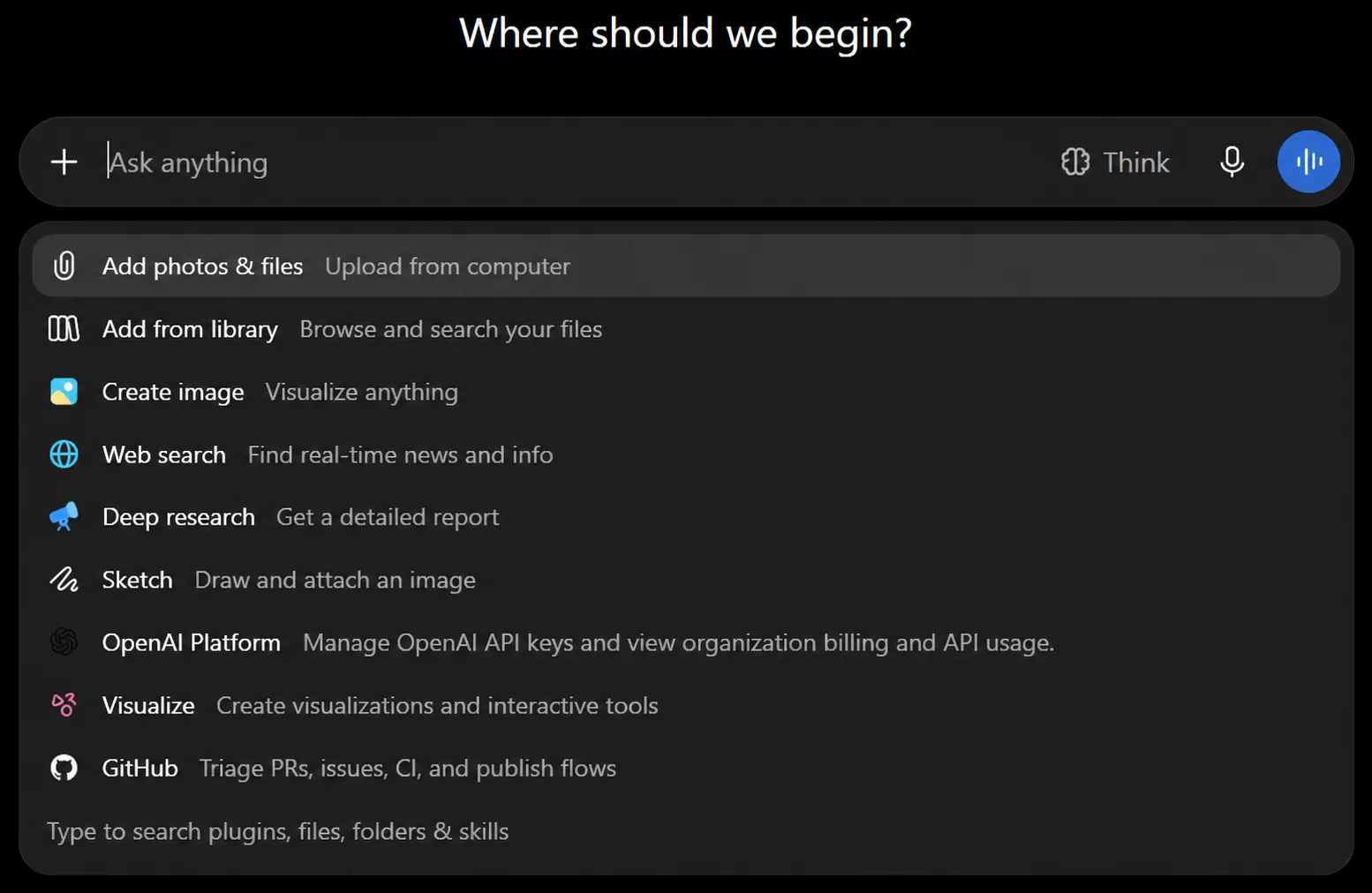
ChatGPT supports a broad range of common file types, including:
- Documents (Word files, plain text, PDFs)
- Spreadsheets (Excel files, CSVs)
- Presentations (PowerPoint files)
- Images, where supported by the specific feature you’re using
Video, audio, executable files, and password-protected or encrypted documents generally aren’t supported; you’ll need to convert or unlock a file before uploading it.
ChatGPT Plus File Upload Limits
| Limit | Current guidance |
|---|---|
| Maximum file size | 512 MB per file (hard limit, applies across plans) |
| Text/document files | Capped at 2 million tokens per file |
| CSV/spreadsheet files | Roughly 50 MB, depending on row size |
| Images | 20 MB per image |
| Upload frequency | Up to roughly 80 files every 3 hours on Plus (a rolling window, not a fixed daily reset) |
| Files per message | Limited (OpenAI has adjusted this figure during 2026; confirm the current per-message cap in-app) |
| Storage | 25 GB per user, 100 GB per organization |
A few important notes:
- The 512 MB size ceiling and 2-million-token cap for text files apply even if a file is well under the size limit; a dense document can exceed the token cap while still being small in megabytes.
- OpenAI can lower the rolling upload-frequency limit during high-traffic periods, and it doesn’t display exactly how much of your quota you’ve used.
- Storage is cumulative and shared across your regular chats, Projects, and any custom GPTs you’ve built; deleting a conversation doesn’t automatically free up the files that were in it.
Important: treat all of the numbers above as current-as-of-writing rather than permanent. OpenAI has changed several of these figures multiple times in the past year alone.
What Can You Do With ChatGPT Plus File Uploads?
Analyze PDFs: Upload a PDF and ask targeted questions instead of reading the whole thing; useful for contracts, long reports, or research papers.
Summarize reports and research papers: Turn a 40-page report into a one-page brief, or ask for a summary tailored to a specific audience (executives, technical reviewers, etc.).
Compare multiple documents: Upload two versions of a contract, two competing proposals, or two research papers and ask ChatGPT to highlight the differences.
Analyze Excel and CSV files: Ask for trends, outliers, or a specific calculation across a dataset without building a pivot table yourself.
Extract information from documents: Pull out specific fields (dates, names, figures, clauses) from a batch of similar documents.
Review presentations: Upload a slide deck and get feedback on structure, clarity, or messaging, or ask for a written summary of the deck’s content.
Rewrite and transform documents: Convert a formal report into a blog post, a technical spec into a client-friendly summary, or notes into a structured document. By using electronic signatures you can also sign the documents instantly.
Apply one document’s framework to another: Upload a template or style guide alongside a new piece of content and ask ChatGPT to apply the same structure or tone.
ChatGPT Plus Use Cases
For students: Research support, generating study material from lecture notes, summarizing PDFs of assigned readings, and getting explanations tailored to how you learn.
For professionals: Drafting reports and emails, reviewing documents, and getting a faster first pass on repetitive writing tasks.
For marketers: Content and campaign research, analyzing performance data, and drafting briefs or first-pass copy.
For developers: Coding help, debugging, generating documentation, and analyzing logs or data files.
For researchers: Deep Research for multi-source synthesis, comparing documents, and turning raw findings into a structured write-up.
For businesses: Data analysis on shared reports, building custom GPTs for recurring workflows, and using Projects to keep ongoing work organized.
ChatGPT Plus vs Free
| Category | Free | Plus |
|---|---|---|
| Access | Yes | Yes |
| Usage limits | Tighter, model-dependent | Meaningfully higher |
| File uploads | A few per day | Dozens per rolling window |
| Data analysis | Limited | Expanded |
| Image generation | Limited | Expanded |
| Reasoning models | Limited or unavailable | Available |
| Deep Research | Very limited | Monthly allowance |
| Projects | Limited/unavailable | Available |
| Custom GPTs | Use existing ones | Create your own |
The gap between these two tiers has moved in both directions over the past year; OpenAI has both added ads to Free and loosened some of its text-chat limits.
The constant is that Plus removes the ceilings on the features that require heavier compute: file-heavy work, research, image generation, and advanced reasoning.
ChatGPT Plus vs Pro vs Business vs Enterprise
| Plan | Best For | Positioning |
|---|---|---|
| Free | Casual users | Basic ChatGPT access |
| Plus | Individual users | Expanded AI productivity |
| Pro | Heavy individual users | Higher usage ceilings and priority access |
| Business | Teams | Workspace tools plus business/data controls |
| Enterprise | Large organizations | Enterprise-grade security, admin, and scale |
Plus vs Pro: Pro is priced well above Plus and is aimed at people who consistently run into Plus’s usage ceilings, heavier Deep Research use, more intensive file and data work, and priority access during high-demand periods.
The core feature set is often similar; the difference is mostly usage headroom rather than a fundamentally different toolset.
Plus vs Business/Enterprise: Business and Enterprise plans are priced per seat and built for organizations, not individuals.
Beyond shared workspaces and admin controls, the meaningful difference for many businesses is data handling: Business and Enterprise plans typically don’t use your data for model training by default, while Plus offers this only as an opt-out setting.
For any team handling client, health, legal, or financial data, that distinction can matter more than any feature checkbox.
Is ChatGPT Plus Worth It?
ChatGPT Plus is worth considering if you:
- Use ChatGPT frequently, not just occasionally
- Regularly work with documents, spreadsheets, or presentations
- Need advanced reasoning for complex tasks
- Do research that benefits from multi-source synthesis
- Analyze data as part of your work
- Want reliable access to image generation or voice
- Keep hitting Free’s usage limits
Free may be enough if you:
- Use ChatGPT occasionally, for simple questions
- Rarely upload files
- Don’t need advanced reasoning, Deep Research, or heavy image generation
- Aren’t bothered by ads or tighter limits during busy periods
A simple way to decide: track how often you hit a limit, get bumped to a lighter model, or wish you could upload one more file over the course of a week.
If that happens more than once or twice, Plus will likely pay for itself in saved time.
ChatGPT Plus Limitations
Plus removes many of Free’s ceilings, but it isn’t unlimited:
- Usage caps still apply; they’re just higher than Free’s, not absent.
- Limits can and do change, sometimes with little notice, based on demand and system conditions.
- Some features roll out gradually and may not be available on every account at the same time.
- Advanced tools like Deep Research have a monthly allowance rather than unlimited use.
- API usage is billed and managed completely separately from a Plus subscription.
- Data handling on Plus differs from Business and Enterprise: Plus uses an opt-out setting for training data, rather than a contractual guarantee that your data won’t be used for training.
How to Get ChatGPT Plus
- Log in to your ChatGPT account.
- Open the profile menu.
- Select Upgrade Plan.
- Choose Get Plus.
- Complete payment.
Your upgraded access typically applies immediately after payment is processed.
FAQ
What is ChatGPT Plus?
ChatGPT Plus is OpenAI’s $20/month individual subscription plan that expands access to ChatGPT’s models, tools, and features beyond what’s available for free.
How much does ChatGPT Plus cost?
$20 per month, billed monthly with no long-term contract.
Is ChatGPT Plus worth it?
It depends on usage. If you regularly hit Free’s limits on messages, file uploads, reasoning, or research, Plus generally pays for itself in time saved.
What are the main ChatGPT Plus features?
Expanded access to advanced models, higher file upload and data analysis limits, image generation, voice, Deep Research, Projects, and custom GPTs.
Can ChatGPT Plus analyze PDFs?
Yes, you can upload PDFs for summarization, extraction, comparison, and analysis, subject to the platform’s size and token limits.
What is the ChatGPT Plus file upload limit?
Files are capped at 512 MB, with text/document files further capped at 2 million tokens, spreadsheets around 50 MB, and images at 20 MB. Upload frequency is limited to a rolling window rather than a hard daily cap.
How many files can I upload to ChatGPT Plus?
Plus supports a considerably higher upload frequency than Free; check your account or OpenAI’s Help Center for the current exact figure, since this number has changed more than once in 2026.
What is the difference between ChatGPT Free and Plus?
Plus offers meaningfully higher usage limits across the board, plus access to features that are limited or unavailable on Free, like Deep Research, Projects, and creating custom GPTs.
What is the difference between ChatGPT Plus and Pro?
Pro costs significantly more and is built for heavy users who need higher usage ceilings and priority access, rather than a fundamentally different set of features.
Does ChatGPT Plus include API access?
No. API usage is billed and managed separately from a ChatGPT Plus subscription.