

Table of Contents
What actually feeds AI transformation analytics tools: 6 proxy providers rated
A Databricks AI/BI dashboard can tell a merchandising team that a competitor dropped prices 4% overnight. What it usually doesn’t say is that 1,200 of the 6,000 product pages behind that number returned a CAPTCHA instead of real content and got quietly dropped from the average. The dashboard still reports high confidence. The sample behind it is wrong.
That’s the blind spot in most conversations about AI transformation analytics tools. Vendors like Databricks, Domo, ThoughtSpot, and Tableau Pulse talk about models, governance, and natural-language queries. Almost none of them talk about the layer that decides whether the external web data reaching those models is complete, current, and geographically accurate before any model touches it: the proxy infrastructure behind the scraper.
This matters more every quarter. Internal data (CRM records, transaction logs, product events) reaches a warehouse through well-tested connectors. External data, the kind that tells an AI transformation analytics tool what competitors charge or what’s trending outside your own systems, has no such connector. Someone has to go get it, and getting it reliably from the open web means proxies.
Where AI transformation analytics tools actually get their external data
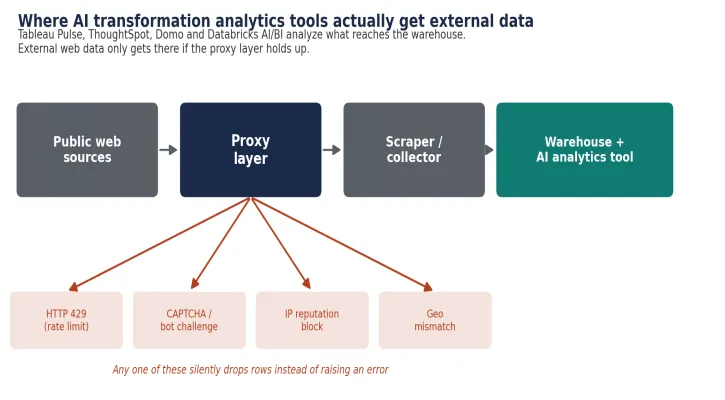
Figure 1. Three hops sit between the open web and the dashboard. A failure at any of them looks like a normal row downstream.
Fivetran, Airbyte, and native warehouse connectors move first-party data cleanly: CRM to Snowflake, product events to BigQuery, support tickets to a lakehouse. None of that infrastructure touches a competitor’s product page or a marketplace listing.
For that, a team runs a scraper, custom Python, Scrapy, or a managed service like Bright Data’s Web Unlocker, that requests pages through a proxy, parses the response, and writes rows into the same warehouse the AI transformation analytics tool reads from. The AI layer never sees the web. It sees whatever made it through the proxy first.
Three hops sit between the public internet and the model or dashboard: proxy, scraper, warehouse. A failure at any hop looks the same downstream, a normal row that happens to be wrong or missing, and nothing in a standard BI pipeline flags it as a proxy problem.
Four ways the input gets corrupted before anyone notices
Rate limiting is the most common. A target site returns HTTP 429 once request volume from one IP crosses a threshold, typically somewhere between 20 and 200 requests per minute depending on the site’s own infrastructure. A scraper that doesn’t back off gets throttled, then blocked outright.
CAPTCHA and JavaScript challenges from services like Cloudflare Turnstile, PerimeterX, or DataDome intercept the request before it reaches the real page. A response that comes back 200 OK with a challenge page in the body looks successful to a naive scraper. It isn’t, and unless something checks response content rather than just status codes, that row enters the warehouse as legitimate data.
IP reputation is the quiet failure. Datacenter ranges get reused across customers, and if a previous tenant ran anything aggressive on that subnet, the range carries a lower trust score with commercial anti-bot systems regardless of what the current user is doing with it.
Geo-mismatch breaks anything price- or availability-sensitive. A retailer showing region-locked pricing serves a different number to a foreign exit node, and an AI transformation analytics tool ingesting that number has no way to flag the geography was wrong unless someone tagged it at collection time.
Six providers, rated for this specific job
Pricing below was checked directly against each provider’s public pages in September 2026. Enterprise quotes run lower for all six, and none of that is visible without contacting sales.
| Provider | Pricing model | Entry rate (Sept 2026) | Published IP pool | Coverage | Best fit |
| Proxys.io | Flat per-IP/month, or pay-per-traffic | $1.50/GB pay-per-traffic, or from $1.40/IP/month | Not published | 24 countries on the Foreign IPv4 tier; more via other tiers | Steady, IP-bound feeds against a fixed set of sources |
| Bright Data | Per-GB (residential/mobile), per-IP (ISP) | From $8.00/GB, PAYG list | 150M+ (vendor-claimed) | 195 countries | Hardest targets, enterprise budget |
| Oxylabs | Per-GB, per-IP | From $6.00/GB, self-serve | 175M+ (vendor-claimed) | 195 countries | Enterprise scraping with managed APIs |
| Decodo | Per-GB, per-IP | From $3.75/GB entry, $2.00/GB at 1TB | 115M+ (vendor-claimed) | 195+ countries | Mid-market teams wanting a documented pool |
| IPRoyal | Per-GB, non-expiring; per-IP | From $1.75/GB bulk, $7.00/GB at 1GB | 32M+ (vendor-claimed) | 195 countries | Bursty, unpredictable collection jobs |
| SOAX | Per-GB, committed tiers | From $2.00–$3.60/GB, self-serve | Not consistently published | 195+ countries | Compliance-conscious mid-market |
Table 1. Entry-level pricing, published pool size, and coverage for six proxy providers, verified September 2026.
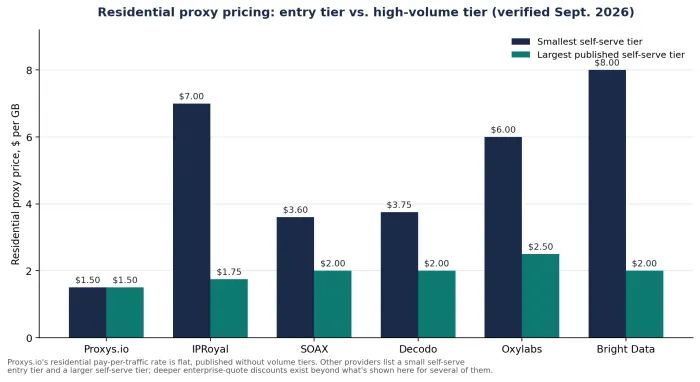
Bright Data and Oxylabs sell the deepest tooling: managed unblocking APIs, SERP endpoints, dataset marketplaces, and independent reviewers consistently rank both toward the top for success rate against hardened targets like large e-commerce platforms. That capability shows up in the price. Both list residential proxies from roughly $6 to $8 per GB before any committed-volume discount.
Decodo, IPRoyal, and SOAX sit in the middle: real residential pools, Decodo publishes 115M+ IPs across 195+ locations, decent geo-targeting, and self-serve pricing that drops to $1.75 to $2.00 per GB once you commit to real volume. IPRoyal’s purchased traffic doesn’t expire, which helps if your collection schedule is bursty rather than steady.
Proxys.io runs a different model. Alongside flat per-IP monthly pricing for dedicated datacenter, mobile, and residential IPs starting at $1.40 per IP, it sells residential proxies on a pay-per-traffic basis at $1.50 per GB, flat, with no published volume tiers. That undercuts every other provider’s entry rate in this comparison.
What it doesn’t publish is a residential pool size or an uptime SLA, both of which Bright Data, Oxylabs, and Decodo state outright. For a team that wants a documented pool size and a contractual uptime number before signing, that’s a real gap, not a rounding error.
What it costs to feed one analytics pipeline
Take a concrete workload: daily price and stock-status collection across roughly 4,000 SKUs on three marketplace domains, which works out to about 45 GB of proxied traffic a month, plus 10 dedicated IPs held for session-consistent, account-linked monitoring that can’t tolerate a mid-session rotation.
| Provider | 45GB residential (entry rate) | 10 dedicated/ISP IPs | Modeled monthly total |
| Proxys.io | $67.50 | $15.00 | $82.50 |
| IPRoyal | $315.00 | $24.00 | $339.00 |
| SOAX | $162.00 | Not sold as a flat per-IP product | $162.00+ |
| Decodo | $168.75 | $33.30 | $202.05 |
| Oxylabs | $270.00 | $16.00 | $286.00 |
| Bright Data | $360.00 | $15.00 | $375.00 |
Table 2. Modeled monthly cost at each provider’s published entry rate; actual invoices depend on tier rounding and committed-volume discounts.
At this volume, none of the six providers sit anywhere near their best committed rate. That only shows up past 500 GB to 1 TB a month, where Decodo, IPRoyal, and SOAX converge around $2.00 per GB and Bright Data and Oxylabs drop into the $2.00 to $2.50 range.
Below that threshold, the per-GB gap between providers is the whole story. It’s roughly a factor of five between the cheapest and most expensive option modeled here.
Root causes worth fixing before you switch providers
Most block-rate problems aren’t a proxy problem at all. A scraper using default request headers behind a residential IP still looks nothing like a real browser to a fingerprinting system that checks TLS handshake order, HTTP/2 frame sizes, and header order together. Swapping proxy providers without fixing that mismatch just moves the same failure to a different vendor.
Session handling causes a second, quieter class of failures. Rotating IPs mid-session on a site that ties a cart or login state to the connecting IP invalidates the session. That looks like a proxy failure. It’s actually a configuration choice, and sticky sessions held for the length of one logical task fix it without changing providers at all.
New IPs need warming, too. An IP that hammers a target at full concurrency on day one behaves nothing like a real user’s traffic pattern and gets flagged faster than an IP that ramps up gradually over its first few days of use.
Before filing a support ticket with any provider, check three things:
- Whether the failure is a proxy-layer block (connection refused, 407, 429) or an application-layer challenge that switching proxies won’t fix on its own.
- Whether concurrency per IP exceeds what the target site tolerates for a shared or datacenter range.
- Whether the success rate, not just uptime, has actually dropped. A proxy can stay “up” and still fail 40% of requests against one specific target.
When to actually switch proxy providers
The honest signal isn’t price. It’s the ratio of cost to successful requests. If block rate on a stable target climbs month over month with no change on your side, the provider’s IP pool on that subnet has probably degraded, and no amount of retry logic fixes a structurally bad pool.
A second signal: needing dedicated, session-consistent IPs for a fixed set of sources rather than a large rotating pool for broad, unpredictable crawling. That’s a workload where Proxys.io’s flat per-IP pricing, including its residential proxies line, tends to beat bandwidth-metered pricing, because cost doesn’t scale with how much data those specific sources happen to return that month.
The trade-off runs the other way for adversarial targets. A team fighting a well-defended commerce or ticketing site with sophisticated bot detection is better served by a provider with a managed unblocking product and a documented success-rate track record, which in practice means Bright Data or Oxylabs, even at a higher per-GB cost, because the alternative is building that fingerprint-matching layer in-house.
Matching IP type to the workload
Datacenter, residential, and mobile IPs aren’t interchangeable, and picking the wrong one for a given target is one of the most common misconfigurations in proxy setups feeding analytics pipelines. Getting the proxy client configured correctly at the application layer matters as much as which IP type sits behind it.
A residential IP routed through a client that still leaks the wrong TLS fingerprint fails the same way a datacenter IP does. Datacenter IPs are fast and cheap, and they work fine against targets that don’t fingerprint aggressively: internal tools, low-traffic sites, most API endpoints.
Residential IPs cost more per GB but pass on sites that specifically flag datacenter ASN ranges, which by 2026 includes most major marketplaces and travel sites. Mobile IPs, the priciest of the three, matter mainly for testing how a target behaves on carrier-grade NAT, since some sites serve different content or pricing to mobile carrier ranges specifically.
Before you commit budget
Run the same couple hundred requests against your actual targets, not a generic benchmark site, before picking a provider. Success rate on specific domains varies more between providers than any published benchmark suggests, and the number that matters is cost per successful, correctly geo-tagged row landing in the warehouse, not cost per GB or per IP in isolation.
That number is also the one no vendor publishes, because it depends on your targets, your concurrency, and how closely your scraper’s fingerprint matches a real browser. Measure it once, on a short trial, before committing to a monthly plan with any of the six.