
Table of Contents
Businesses still drown in scanned PDFs, invoices, forms, receipts, and ID photos.
Optical Character Recognition (OCR) turns that unstructured visual information into machine-readable text, and modern OCR has moved well past simple character recognition into full document understanding: layout analysis, table extraction, and AI-ready structured output.
Open source OCR software is especially useful when a team needs customization, self-hosting, data privacy, or full control over a document pipeline, rather than depending on a third-party API.
This guide compares ten of the best open source OCR software options in 2026, from the mature, battle-tested engines to newer document-AI and layout-aware tools, so you can pick the one that actually fits your documents, languages, and infrastructure.
What Is Open Source OCR Software?
OCR (Optical Character Recognition) is technology that extracts text from images, scans, and PDFs by recognizing the shapes of characters and words.
“Open source” means the underlying code is publicly available, so you can inspect it, modify it, self-host it, and integrate it into your own pipeline without per-page licensing fees.
It helps to separate three related but different things:
- OCR engine – the core recognition model/algorithm (e.g., Tesseract’s LSTM engine).
- OCR library – a wrapper that makes an engine (or several) easy to call from code (e.g., EasyOCR).
- Document-processing platform – a fuller toolkit that adds layout analysis, table extraction, and structured output on top of OCR (e.g., PaddleOCR, Surya).

How Does OCR Work?
At a high level, most OCR pipelines follow the same stages:
- Image/document input – a scan, photo, or PDF page.
- Preprocessing – deskewing, denoising, contrast correction, binarization.
- Text detection – locating where text lines and words are on the page.
- Character/text recognition – converting the detected regions into characters/words.
- Layout analysis – understanding reading order, columns, tables, and headers.
- Post-processing – spell-checking, confidence scoring, formatting.
- Structured output – plain text, hOCR, JSON, Markdown, or PDF/A with a searchable text layer.
Why Use Open Source OCR Software?
Lower Software Costs
There’s no per-page or per-call licensing fee for the software itself, though you’ll still pay for compute, GPUs for deep-learning models, or servers for self-hosting at scale.
It isn’t automatically “free” once infrastructure and engineering time are counted, but it removes the recurring API bill.
Greater Customization
Open source tools let you fine-tune models on your own documents, swap preprocessing steps, add language packs, choose your own output format, and embed the engine directly inside existing applications rather than working around a vendor’s fixed API.
Data Privacy and Self-Hosting
For healthcare, finance, legal, and government use cases, sending documents to a third-party cloud API can be a non-starter.
Self-hosted OCR keeps sensitive documents inside your own infrastructure end-to-end.
Integration With AI and LLM Applications
This is where OCR has changed the most since 2024.
OCR is now the text layer that feeds RAG systems, document-processing AI agents, knowledge bases, and automated workflows.
A scanned contract or invoice isn’t usable by an LLM until OCR turns it into text and structure the model can read.
How We Selected the Best Open Source OCR Tools
The tools below are evaluated on: OCR accuracy, language support, printed vs. handwritten text recognition, document/layout understanding, table extraction, PDF support, GPU acceleration, ease of integration, available APIs/SDKs, model customization, deployment options, community activity, license, and compatibility with AI/LLM pipelines.
Best Open Source OCR Software Compared
| OCR Software | Best For | License | Languages | Handwriting | Layout Understanding | GPU |
|---|---|---|---|---|---|---|
| Tesseract OCR | Mature, general-purpose OCR | Apache 2.0 | 100+ | Limited | Limited | – |
| PaddleOCR | Document AI / structured extraction | Apache 2.0 | 100+ (50 in one PP-OCRv6 model) | Better via PaddleOCR-VL | Strong | Yes |
| EasyOCR | Quick developer integration | Apache 2.0 | 80+ | Some support | Moderate | Yes |
| docTR | Deep-learning document OCR | Apache 2.0 | Multiple | Some support | Strong | Yes |
| Surya | Modern layout-aware document OCR | Apache 2.0 (code) | 90+ | Via Chandra sibling model | Strong (VLM) | Yes |
| OCRmyPDF | Searchable PDFs | MPL-2.0 | Uses Tesseract’s | – | PDF-focused | – |
| Kraken | Historical/non-Latin scripts | Apache 2.0 | Trainable, any script | Strong for historical hands | Moderate | Yes |
| Calamari OCR | Custom line-based OCR pipelines | GPL-3.0 | Trainable | Used in HTR research | Limited | Yes |
| MMOCR | Research/custom vision pipelines | Apache 2.0-family | Trainable | – | Customizable | Yes |
| GOCR | Lightweight, basic OCR | GPL | Limited | Limited | Limited | – |
1. Tesseract OCR
Tesseract, originally developed by Hewlett-Packard and later maintained by Google, remains the most widely used open source OCR engine and is released under the Apache License 2.0, supporting well over 100 languages with trainable custom models.
Key Features
- Mature, LSTM-based recognition engine
- Multilingual recognition with trainable language packs
- Command-line usage plus bindings in most languages
- Multiple output formats: plain text, hOCR, PDF, TSV, ALTO, PAGE
- Fully self-hostable, no GPU required
Pros
- Enormous community and ecosystem of wrappers
- No licensing cost, works fully offline
- Very well documented after two decades of use
Cons
- Struggles with poor scan quality, unusual fonts, or dense layouts
- Handwriting recognition is weak
- No built-in layout or table understanding, needs pairing with another tool for that
Best Use Cases
Scanned documents, searchable PDFs, archival digitization, batch OCR jobs, and as a dependable fallback engine inside larger pipelines.
Tesseract vs. Modern Deep-Learning OCR
Tesseract is CPU-friendly and extremely reliable on clean, printed text, but it wasn’t designed for complex layouts, tables, or handwriting the way newer deep-learning-first tools like PaddleOCR or Surya were.
Many teams still use Tesseract for simple, high-volume, well-scanned documents and reach for a heavier tool only when layout matters.
2. PaddleOCR
Developed by Baidu, PaddleOCR has evolved from an OCR toolkit into a full document-AI pipeline: the latest stable release (v3.7.0, June 2026) introduces PP-OCRv6, which unifies 50 languages into a single model and claims meaningful accuracy gains over the prior PP-OCRv5 generation, alongside PaddleOCR-VL, a vision-language model supporting 109 languages for harder document-parsing tasks.
The project is released under the Apache 2.0 license.
Key Features
- Text detection and recognition plus document structure analysis (PP-StructureV3)
- 100+ languages overall; 50 in a single unified PP-OCRv6 model
- Table, chart, and formula recognition via PaddleOCR-VL
- Structured JSON/Markdown output built for LLM pipelines
- Browser inference SDK and multiple deployment backends
Pros
- Genuinely strong layout and table extraction, not just line-level text
- Actively developed with frequent releases
- Designed from the ground up to feed AI/RAG pipelines
Cons
- Steeper learning curve than a plain OCR call
- Larger model footprint than lightweight engines like Tesseract
- Best accuracy (PaddleOCR-VL) benefits from GPU acceleration

Best Use Cases
Document AI, invoice and form processing, complex multi-column PDFs, and RAG pipelines that need structure preserved, not just raw text.
3. EasyOCR
EasyOCR is built for ease of use, supporting 80+ languages and popular scripts (Latin, Chinese, Arabic, Devanagari, Cyrillic, and more) under the Apache 2.0 license, with active development and issue triage continuing into 2026.
Key Features
- Simple Python API, a working reader in a few lines of code
- GPU acceleration for faster batch processing
- Swappable detection backends (CRAFT, DBNet)
- Recognizes both printed and some handwritten text
Pros
- Easiest of the deep-learning OCR libraries to get running quickly
- Good multilingual coverage out of the box
- Minimal setup compared to PaddleOCR or docTR
Cons
- Less customizable than heavier toolkits
- Accuracy varies more with font and image quality than production-grade engines
- No built-in layout/table analysis
Best Use Cases
Developers who want OCR functionality added to an app quickly, without assembling a full detection-plus-recognition pipeline themselves.
4. docTR
docTR (Document Text Recognition) is a deep-learning OCR library built on PyTorch (and formerly TensorFlow), created by Mindee and now under active development and maintenance by t2k GmbH, released under the Apache 2.0 license and recently accepted into the PyTorch ecosystem.
Key Features
- Two-stage pipeline: text detection, then text recognition, each with swappable architectures
- Pre-trained models for both detection and recognition
- Python-native integration, designed for developers already in the PyTorch/ML stack
- Docker images for reproducible deployment
Pros
- End-to-end pipeline with strong pre-trained checkpoints
- Actively maintained and now backed by the PyTorch ecosystem
- Good balance of accuracy and customizability for document-focused workflows
Cons
- More setup and GPU dependency than a plug-and-play library
- Learning curve if you want to swap architectures or fine-tune
Best Use Cases
Teams already working in PyTorch who want a document-focused OCR pipeline they can fine-tune, rather than a black-box API.
5. Surya
Surya, from Datalab, has moved from a lightweight OCR library into a single vision-language model (Surya 2) that handles OCR, layout analysis, reading order, and table recognition together, supporting 90+ languages.
Its code is Apache 2.0; model weights carry a modified OpenRAIL-M license that’s free for research, personal use, and startups under a revenue/funding threshold, with separate commercial terms above that.
Key Features
- Combined OCR + layout + reading order + table recognition in one model
- Benchmarks itself against document-parsing baselines like olmOCR-bench
- Works via GPU (vLLM) or CPU/Apple Silicon (llama.cpp) backends
- LaTeX OCR support for scientific/technical documents
Pros
- Genuinely modern architecture, a single model doing what used to require several
- Competitive accuracy against both open and closed-source document parsers
- Actively developed, with frequent releases through 2026
Cons
- Model weight licensing is more nuanced than a straightforward open license; check current terms before large-scale commercial use
- Newer project with a shorter production track record than Tesseract or PaddleOCR
Avoid describing Surya as narrowly built “for Indian languages”; that framing matches an earlier description of the project, but current documentation positions it as a general-purpose, 90+ language document OCR and layout model.
Best Use Cases
Modern document workflows that need layout, reading order, and tables handled together, a common requirement for RAG ingestion pipelines.
6. OCRmyPDF
OCRmyPDF solves a narrower, very common problem: adding a searchable OCR text layer to scanned PDFs without changing how they look.
It’s built on top of Tesseract, released under the Mozilla Public License 2.0, and remains actively maintained.
Key Features
- Generates PDF/A output with an invisible, copy-pasteable OCR text layer
- Deskew, rotate, and clean up pages before OCR
- Multi-core batch processing of large PDF sets
- Optimizes and often shrinks output file size
Pros
- Does one job extremely well: turning image PDFs into searchable ones
- Simple command-line tool, easy to script into a pipeline
- Inherits Tesseract’s broad language support
Cons
- Not a general OCR library; it’s PDF-in, PDF-out
- Recognition quality is bounded by Tesseract’s accuracy
Best Use Cases
Scanned PDF archives, document management systems, and accessibility workflows where the deliverable needs to remain a PDF, just a searchable one.
7. Kraken
Kraken is a turnkey OCR system built specifically for historical documents and non-Latin scripts, released under the Apache 2.0 license and developed at the École Pratique des Hautes Études with EU research funding.
It runs on Linux and macOS (no native Windows support).
Key Features
- Fully trainable layout analysis, reading order, and recognition
- Right-to-left, bidirectional, and top-to-bottom script support
- ALTO, PageXML, abbyyXML, and hOCR output
- Tightly linked with the eScriptorium annotation/training platform
Pros
- Genuinely strong on the “long tail” of low-resource languages and historical scripts that general OCR engines ignore
- Highly trainable for custom, unusual material
- Backed by active academic development
Cons
- No Windows support
- Steeper setup than mainstream OCR libraries
- Not the right tool for standard modern printed documents; it’s a specialist
Best Use Cases
Digitizing historical manuscripts, archives in non-Latin or low-resource scripts, and humanities research projects.
8. Calamari OCR
Calamari is a line-based, neural-network OCR engine built on OCRopy and Kraken foundations, widely used in the digital humanities and historical-document communities.
It’s released under the GPL-3.0 license.
Key Features
- CNN/LSTM-based line recognition (no glyph-by-glyph segmentation needed)
- Straightforward model training on your own line-level transcriptions
- TensorFlow-backed training pipeline
- Confidence-based voting across model ensembles for higher accuracy
Pros
- Well suited to training custom models on unusual fonts or historical print
- Simpler training data requirements than some alternatives (whole lines, not individual glyphs)
- Backed by ongoing academic use, particularly via the OCR-D framework
Cons
- GPL-3.0 is more restrictive for proprietary/commercial redistribution than Apache/MIT-style licenses; check compatibility with your stack
- Smaller community than Tesseract or PaddleOCR
- Best results require training your own model rather than using it out of the box
Best Use Cases
Custom OCR pipelines for historical or non-standard print, especially inside OCR-D-based digitization workflows.
9. MMOCR
MMOCR is OpenMMLab’s text detection, recognition, and understanding toolbox, built on PyTorch and mmdetection.
It’s positioned as a research and experimentation platform rather than a plug-and-play OCR tool.
Key Features
- Modular design covering detection, recognition, and key-information extraction
- Implementations of numerous published state-of-the-art model architectures
- Customizable backbones, necks, heads, and loss functions
- Part of the broader OpenMMLab computer-vision ecosystem (shares tooling with MMDetection, MMSegmentation, etc.)
Pros
- Excellent for benchmarking or reimplementing published OCR research
- Deep customization at every stage of the pipeline
- Benefits from the shared OpenMMLab tooling and conventions
Cons
- Release activity has slowed compared to its 2022–2023 peak; treat it as community-maintained rather than fast-moving, and verify current compatibility with your PyTorch/mmdetection versions before adopting it
- Steep learning curve aimed at ML researchers, not application developers
- Not the right choice if you just need OCR output quickly
Best Use Cases
Computer vision research, custom OCR model development, and advanced developers who want full control over architecture choices.
10. GOCR
GOCR (also known as JOCR) is one of the oldest open source OCR programs still available, written in C and released under the GNU General Public License.
Development has been minimal since around 2010, with the last stable release in 2018.
Key Features
- Converts PNM/PBM/PGM/PPM and some PCX/TGA images to text
- No training required, no large model files to manage
- Runs on very modest hardware, no GPU, no deep-learning framework
Pros
- Extremely lightweight, simple to compile and run
- No dependency on modern ML frameworks
- Useful as a minimal baseline or teaching tool
Cons
- No deep-learning backbone, accuracy lags far behind modern tools on anything but clean, simple, sans-serif printed text
- Development has essentially stalled; don’t expect fixes for edge cases
- Very limited language and layout support compared to every other tool on this list
Best Use Cases
Extremely constrained environments, legacy systems, or simple, single-column printed text where installing a full deep-learning stack isn’t practical.
Open Source OCR Software vs. Commercial OCR APIs
| Factor | Open Source OCR | Commercial OCR API |
|---|---|---|
| Upfront cost | Usually lower (compute only) | Usually usage-based per page/call |
| Customization | High, fine-tune, swap models | Usually limited to vendor options |
| Self-hosting | Often possible | Depends on provider |
| Data control | High, stays on your infrastructure | Depends on provider’s data policies |
| Setup | More technical | Easier, managed |
| Maintenance | Your responsibility | Provider-managed |
| Scaling | Your infrastructure | Usually easier, elastic |
| Custom models | Often possible | Provider-dependent |
Neither is universally “better”; commercial OCR APIs trade control and customization for convenience and managed scaling, while open source OCR trades convenience for control, cost predictability at scale, and the ability to keep sensitive documents in-house.
How to Choose the Right Open Source OCR Software
Choose Tesseract if simple, mature, multilingual OCR on reasonably clean scans is your priority and you don’t need layout or table understanding.
Choose PaddleOCR if you need document understanding, structured extraction, tables, and strong AI/LLM pipeline integration.
Choose EasyOCR if you want a fast, low-friction developer experience and broad language coverage without a steep setup.
Choose docTR if you’re already in a PyTorch stack and want a deep-learning OCR pipeline you can fine-tune.
Choose Surya if your workflow needs layout analysis, reading order, and table recognition handled together in one modern model; just review the model-weight license for your scale of commercial use.
Choose OCRmyPDF if your actual requirement is simply making scanned PDFs searchable, not general OCR.
Choose Kraken or Calamari if you’re working with historical documents, non-Latin scripts, or need to train a custom model on unusual material.
Choose MMOCR if you’re doing OCR research or need full architectural control and have the ML background to use it.
Choose GOCR only if your environment genuinely can’t support a modern deep-learning framework.
Open Source OCR for AI Agents and RAG
A typical document-AI pipeline looks like this:
Documents → OCR → Text/Layout Extraction → Chunking → Embeddings → Vector Database → RAG/AI Agent
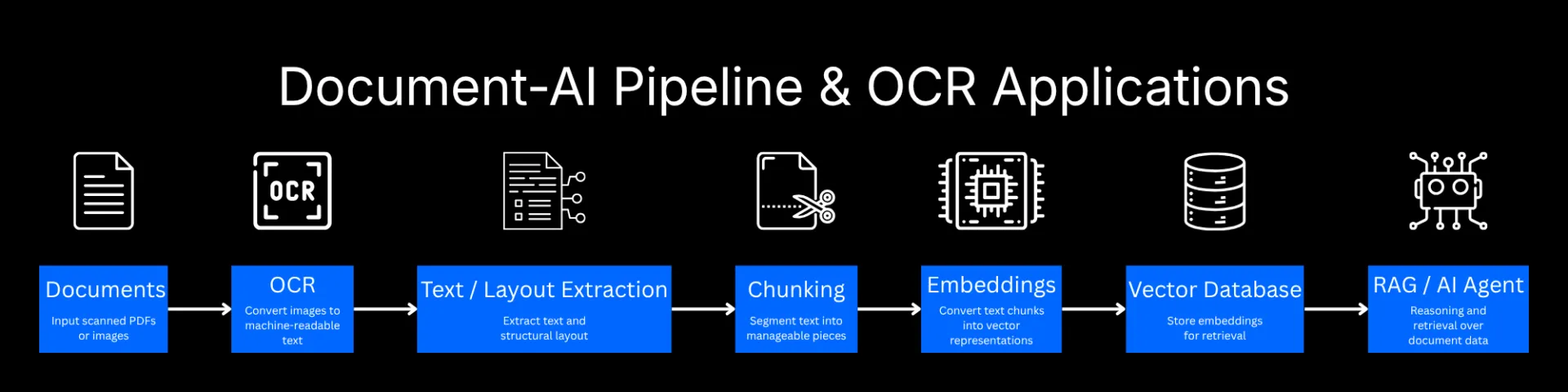
OCR is the step that turns an unreadable scanned PDF or image into text an LLM can actually reason over.
Tools with built-in layout and table understanding (PaddleOCR, Surya, docTR) tend to produce better chunking input than plain text-only engines, because they preserve structure like headers, table cells, and reading order.
Common applications include:
- Invoice- and receipt-processing agents
- Contract-analysis agents
- Document search across large archives
- Knowledge-base creation from scanned records
- Research assistants working over PDF corpora
- Compliance and audit workflows
- Automated data extraction from forms and IDs
Common Open Source OCR Use Cases
- Scanned PDFs: making decades-old archives searchable
- Invoice and receipt processing: automated bookkeeping and expense workflows
- ID and form processing: onboarding, KYC, and government forms
- Historical document digitization: libraries, archives, and research institutions
- Healthcare document processing: patient records, lab reports, insurance forms
- Legal document extraction: contracts, filings, discovery documents
- Financial document processing: statements, filings, reconciliation
- AI-powered document search: turning static archives into queryable knowledge bases
How to Improve OCR Accuracy
- Improve image resolution before scanning or photographing documents
- Deskew documents so text lines are horizontal
- Remove noise and background artifacts
- Correct contrast so text stands out clearly from the background
- Crop unnecessary margins and non-text areas
- Select the correct language/model for the content
- Use a layout-aware OCR tool for multi-column or table-heavy documents
- Validate extracted text, especially for high-stakes documents
- Apply post-processing (spell-check, dictionary matching) where appropriate
- Combine OCR with document AI/LLMs for error correction and structuring where useful
Image quality genuinely matters here; Tesseract’s own documentation explicitly recommends improving input image quality when recognition results are poor, and the same principle holds across every engine on this list.
Final Verdict: Which Open Source OCR Software Should You Choose?
- Best mature OCR engine: Tesseract
- Best for document AI: PaddleOCR
- Best for easy developer integration: EasyOCR
- Best for deep-learning document OCR: docTR
- Best for modern, layout-aware document workflows: Surya
- Best for searchable PDFs: OCRmyPDF
- Best for specialized/historical documents: Kraken
- Best for custom OCR research: MMOCR
The right tool ultimately depends on your documents, your languages, how complex your layouts are, where you need to deploy, and whether OCR is standing alone or feeding into a larger AI pipeline.
A simple archive of clean, printed English documents barely needs more than Tesseract or OCRmyPDF.
A pipeline feeding invoices and contracts into a RAG system will get far more value from PaddleOCR or Surya’s layout and table understanding.
And genuinely unusual material, historical manuscripts, rare scripts, degraded scans, is squarely Kraken and Calamari territory.
FAQ
What is the best open source OCR software?
There isn’t a single “best”; Tesseract remains the most reliable general-purpose choice, PaddleOCR and Surya lead on document AI and layout understanding, and Kraken/Calamari lead on historical and specialized scripts.
Is Tesseract still the best OCR engine?
It’s still one of the most widely deployed and dependable engines for clean, printed text, but it isn’t the strongest choice for complex layouts, tables, or handwriting; newer deep-learning tools generally outperform it there.
What is the best OCR for PDFs?
OCRmyPDF is purpose-built for turning scanned PDFs into searchable PDFs; for extracting structured data from complex PDFs, PaddleOCR or Surya are stronger choices.
Which open source OCR supports multiple languages?
Tesseract and PaddleOCR both support 100+ languages; EasyOCR supports 80+; Surya supports 90+, with PaddleOCR-VL covering 109.
Can open-source OCR recognize handwriting?
To varying degrees. Tesseract and GOCR are weak here; EasyOCR and docTR have some handwriting support; Kraken and Calamari are specifically strong for historical handwritten scripts when trained on relevant data; Surya’s sibling model Chandra is built to handle handwriting alongside complex tables and forms.
Can OCR tools extract tables from PDFs?
Yes, PaddleOCR (via PP-StructureV3), Surya, and docTR all offer meaningful table structure recognition; Tesseract and GOCR do not natively.
Can open source OCR be used with AI agents?
Yes, and it’s one of the fastest-growing use cases; OCR output feeds document-processing agents, RAG pipelines, and knowledge-base ingestion systems.
Is open source OCR free for commercial use?
It depends on the specific license. Apache 2.0 and MPL-2.0 tools (Tesseract, PaddleOCR, EasyOCR, docTR, Kraken, Surya’s code) are commercially permissive. GPL-3.0 tools (Calamari, GOCR) come with copyleft obligations that matter more if you’re redistributing modified code. Always check the license of the specific version you deploy.
What is the difference between OCR software and OCR APIs?
OCR software runs on your own infrastructure under your control; OCR APIs (commercial or otherwise) run on a provider’s servers and are billed per use, trading control for convenience.
Which OCR is best for document AI?
PaddleOCR and Surya are currently the strongest open source options for full document AI; both go beyond text extraction into layout, tables, and structured output built for downstream LLM use.