
Table of Contents
Inventory management software reduces operational costs by 15-25% and cuts administrative time by 40-60% within six months of implementation.
This technology automates stock tracking, prevents costly stockouts, and provides data-driven insights that help businesses optimize their inventory levels while improving customer satisfaction.
What Are the Hidden Costs of Poor Inventory Management?
Old-school inventory methods waste time and money. Workers spend hours updating spreadsheets and counting items by hand, and these manual steps often lead to mistakes and wrong data. Manual inventory tracking looks cheap on paper, but it quietly drains money in ways most teams never total up. Staff spend hours counting stock by hand and updating outdated spreadsheets the moment they’re saved.
Where the Money Actually Goes
Without a real stock-tracking system in place, businesses typically run into the same set of problems:
- Excess stock ties up working capital that could fund growth
- Empty shelves turn into lost sales and lost customers
- Rush orders and expedited shipping cost far more than planned reorders
- Storage and carrying fees climb with every extra unit sitting in the warehouse
Retailers worldwide lose an estimated $1.7 trillion a year to inventory distortion, the combined cost of stockouts and overstocks, according to IHL Group research. Manual data entry is also a major driver of these errors, with mis-picks and miscounts compounding across every stage of the supply chain.
What Is Inventory Management Software?
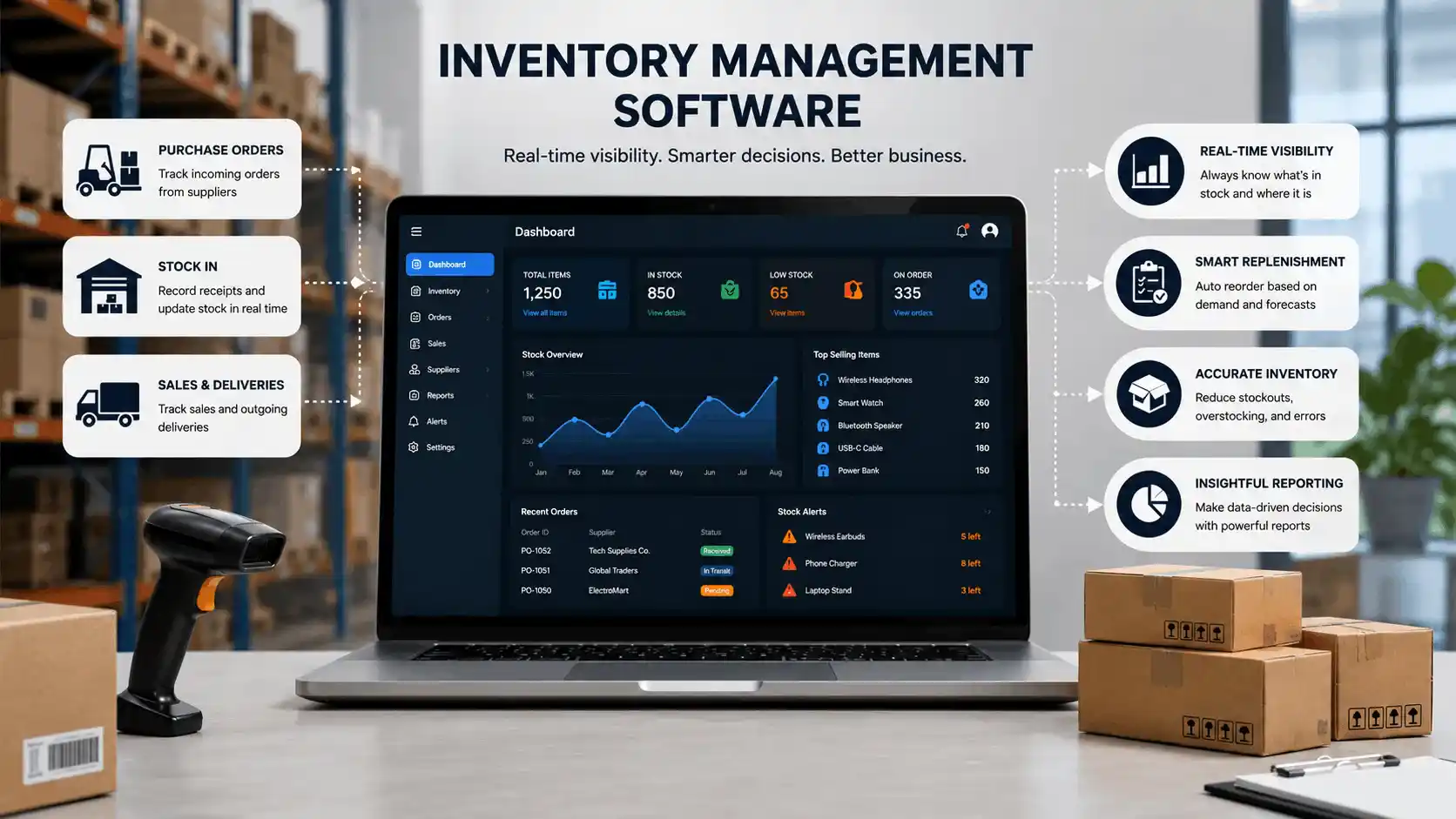
Inventory management software is a system that tracks stock levels, orders, sales, and deliveries in real time, replacing manual counts and spreadsheets with a single, continuously updated record. Instead of someone walking the warehouse floor with a clipboard, the software knows what’s in stock, what’s on order, and what’s about to run out automatically.
At its core, it answers three questions a business needs answered constantly:
what do we have?
where is it?
how much do we need to reorder?
Everything else – forecasting, supplier data, and reporting – builds on top of that foundation.
How It Actually Works
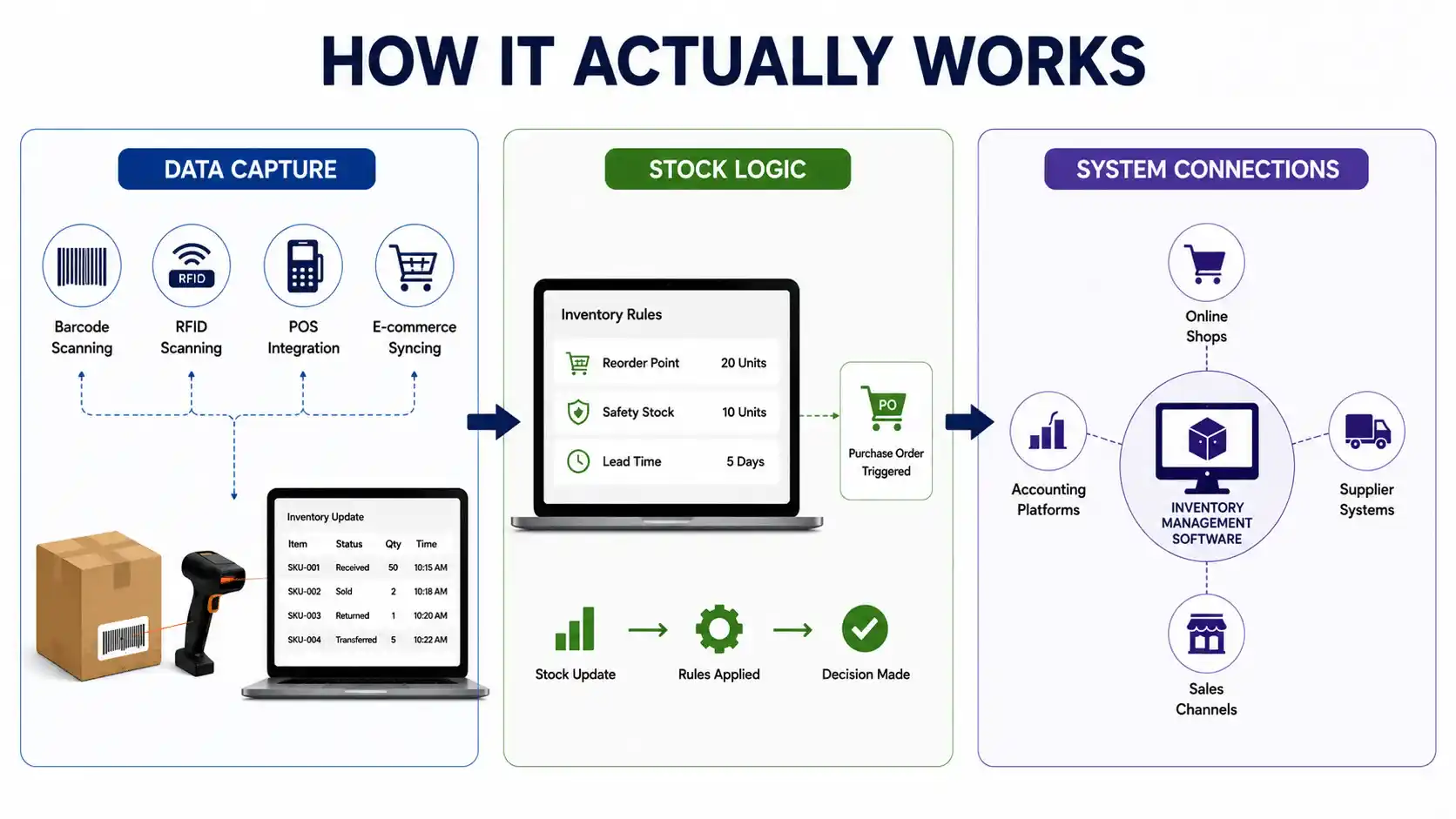
Data Capture
Every unit that moves, is received, is sold, is returned, or is transferred gets logged the moment it happens, usually through barcode or RFID scanning, point-of-sale integration, or e-commerce platform syncing. This is what makes inventory management software different from a spreadsheet: the data enters the system automatically instead of being typed in after the fact.
Stock Logic
Behind the scenes, the software applies rules: reorder points, safety stock thresholds, and lead-time calculations that trigger purchase orders before shelves actually go empty. This logic is what turns raw data into decisions a human doesn’t have to make manually every day.
System Connections
Most inventory management software connects to accounting platforms, online shopfronts, and supplier systems, so stock data, financial records, and sales channels all stay in sync without anyone re-entering the same numbers three times.
Types of Inventory Management Software
Not all stock-tracking platforms work the same way, and picking the wrong type is a common source of frustration. Broadly, it breaks down into a few categories:
- Barcode-based systems: rely on scanning to log stock movement; simple, affordable, and a strong starting point for smaller operations.
- RFID-enabled systems: track items via radio tags rather than line-of-sight scans, useful for high-volume warehouses where speed matters more than per-unit cost.
- Cloud-based, multi-channel platforms: built for businesses selling across a physical store, a website, and marketplaces simultaneously, syncing stock across all of them in real time.
- ERP-integrated systems: stock-tracking tools bundled inside a larger enterprise resource planning suite, better suited to large or complex operations that need inventory tied directly into finance, HR, and production planning.
Signs Your Business Needs It
A few patterns tend to show up before a business finally switches from spreadsheets to a real automated system:
- Stock counts in the system rarely match what’s actually on the shelf
- Staff spend more time counting and reconciling than actually managing stock
- Stockouts or overstock situations keep repeating on the same products
- Multiple people update the same spreadsheet, and it constantly gets out of sync
- The business is expanding to a new location or sales channel, and tracking is already straining
These signals rarely show up all at once; they tend to creep in gradually until the cost of staying manual quietly outpaces the cost of switching.
Core Features Worth Paying For
Not every feature matters equally. When evaluating a new platform, these tend to deliver the most return:
- Real-time syncing across every sales channel and warehouse location
- Automated reorder points that generate purchase orders without manual monitoring
- Demand forecasting that adjusts for seasonality and sales trends. McKinsey & Company research shows AI-assisted forecasting can cut forecasting errors by 20–50% compared to manual methods
- Supplier performance tracking covering delivery times, pricing consistency, and quality scores
- Reporting dashboards that break down performance by SKU, category, and location
- Native integrations with existing accounting, POS, and e-commerce tools, so data doesn’t need to be re-entered manually

How Different Industries Use It
Retail
Retailers lean on these systems to keep shelves stocked across multiple store locations and prevent the empty-shelf moments that push customers to competitors.
Manufacturing
Manufacturers use it to track raw materials and components alongside finished goods, tying inventory data directly into production scheduling so a shortage upstream doesn’t stall the whole line.
E-commerce
Online sellers depend on it to avoid overselling the same unit across multiple marketplaces and to keep fulfilment fast enough to meet customer expectations on delivery time.
Food and Perishables
For businesses handling perishable goods, inventory management software helps reduce spoilage through tighter demand planning relevant given that the Food and Agriculture Organization estimates roughly 14% of food produced globally is lost between harvest and retail.
Common Implementation Mistakes
Even a well-chosen platform can underperform if the rollout goes wrong. The most frequent mistakes:
- Skipping the process audit: implementing software on top of broken workflows just automates the same mistakes faster
- Migrating dirty data: carrying over inaccurate stock counts from the old system undermines trust in the new one from day one
- Under-training staff: a powerful system is only as good as the team’s ability to actually use it
- Ignoring change management: switching everything over at once, instead of a phased rollout, tends to create more resistance and more errors
How to Choose the Right Vendor
A few questions are worth asking before signing a contract for inventory management software:
- Does it integrate with the accounting and e-commerce tools we already use?
- Can it scale with us if we add locations, products, or sales channels?
- What does onboarding and ongoing support actually look like?
- Is pricing based on SKUs, users, or order volume, and does that model fit how we’re likely to grow?
- Can we test it with our own data before committing?
Taking the time to answer these upfront tends to matter more for long-term satisfaction than any single feature on a sales page.
Conclusion
Inventory management software isn’t a single product; it’s a category with real differences between a barcode-based setup for a single store and an ERP-integrated system running across a multi-location manufacturer. The right choice depends less on which platform has the longest feature list and more on matching the system to how the business actually operates day to day.
The businesses that get the most value tend to do two things well: they’re honest about the signals that they’ve outgrown spreadsheets, and they treat implementation as a process change, not just a software purchase. Get the process audit, data migration, and staff training right, and the forecasting, automation, and reporting features do the rest.
FAQs
Is inventory management software worth it for a small business?
Yes, if stockouts, overstock, or manual counting are already costing time or sales. Cloud-based platforms have gotten cheap enough that even single-location retailers can offset the cost quickly through fewer lost sales and less wasted stock.
How long does it take to see results after implementation?
Most businesses notice measurable improvements in stock accuracy and admin time within the first two to three months, with the full return typically visible by month six.
Can this kind of system integrate with my existing accounting or e-commerce tools?
Most modern platforms connect directly with accounting software, online shopfronts, and CRM systems, which removes the need for manual data entry between tools.
What’s the biggest mistake businesses make when adopting a new stock-tracking system?
Skipping the planning stage. Teams that jump straight to implementation without mapping current processes or training staff tend to see slower, weaker results than teams that plan the rollout first.
Can inventory management software handle multiple sales channels at once?
Yes, most modern platforms sync stock across a physical store, an online shop, and third-party marketplaces in real time, so the same item doesn’t get sold twice from two channels.