
Table of Contents
Introduction to Flutter
Flutter is an open-source UI software development toolkit created by Google. It is designed to develop natively compiled applications for mobile (Android and iOS), web, and desktop platforms, all using a single codebase. Its hybrid nature lets developers build efficient, scalable, visually appealing applications while saving significant time and resources.
Why Flutter Matters for Businesses and Developers
Instead of maintaining separate iOS, Android, and web teams, a single Flutter codebase lets teams ship consistent UI everywhere, cutting development time and long-term maintenance overhead, which is why it’s increasingly used for everything from consumer apps to internal SaaS dashboards.
Quick Snapshot
- Built and maintained by Google, first released in 2017
- Uses Dart as its programming language
- Renders through the Impeller engine (replacing Skia as default) for smoother animations
- Powers apps across mobile, web, desktop, and embedded devices
- Backed by an active open-source community and growing plugin ecosystem
10 Reasons to Choose Flutter for Mobile and Software Development
1. Single Codebase for All Platforms
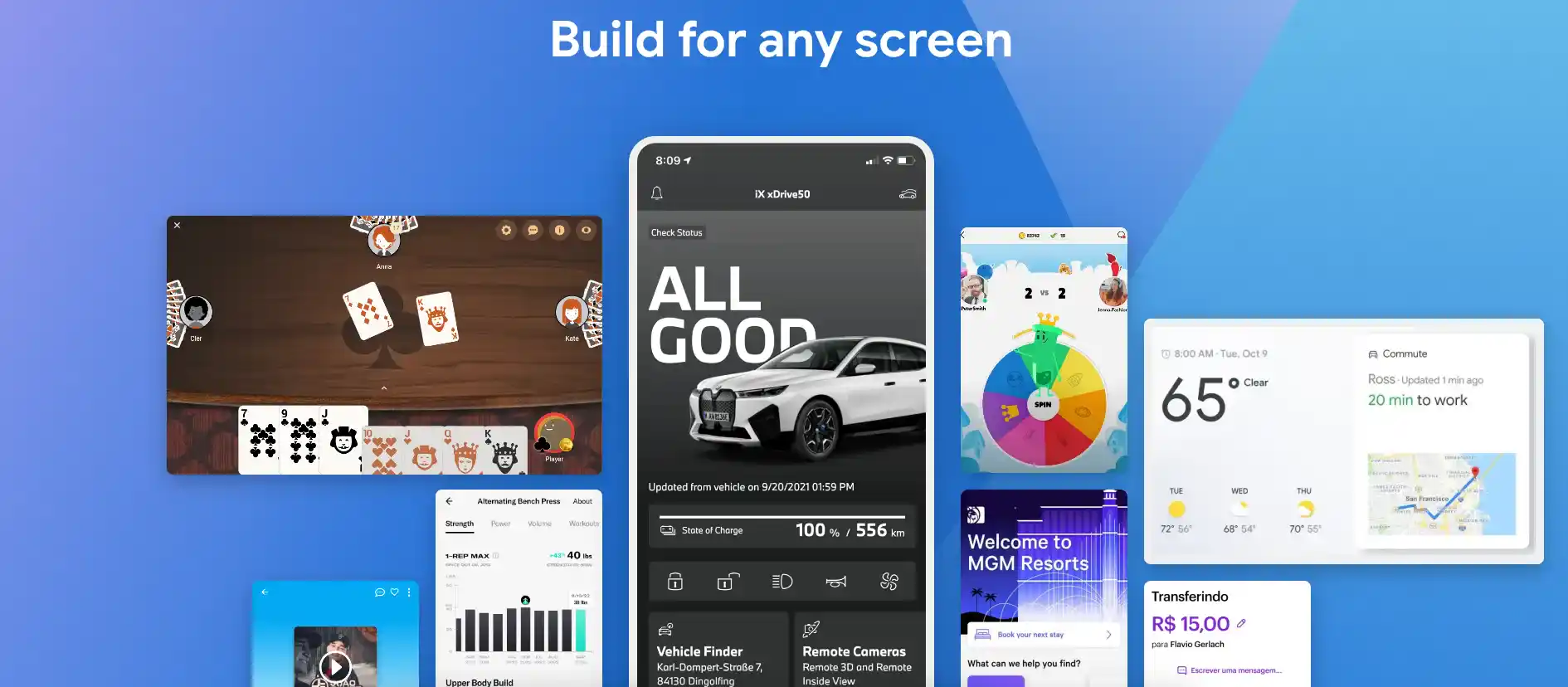
With Flutter, developers write a single codebase that works seamlessly across Android, iOS, web, and desktop. This approach drastically reduces development and maintenance time while ensuring a consistent user experience across all platforms.
Example Code:
The following Flutter app will run on Android, iOS, web, and desktop without any modification:
import 'package:flutter/material.dart';

void main() => runApp(MyApp());

class MyApp extends StatelessWidget {
  @override
  Widget build(BuildContext context) {
    return MaterialApp(
      home: Scaffold(
        appBar: AppBar(title: Text('Flutter App')),
        body: Center(child: Text('Hello, World!')),
      ),
    );
  }
}
2. Hot Reload for Faster Development
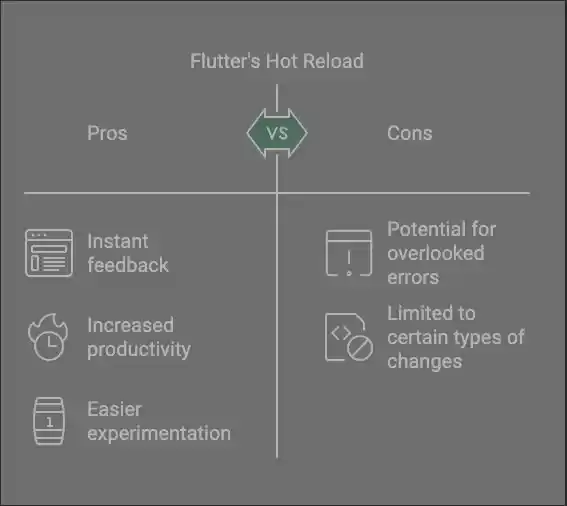
Flutter’s hot reload allows developers to see the results of code changes instantly, without restarting the app. This feature significantly improves productivity and makes experimenting with UI and functionality much easier.
3. Extensive Pre-Built Widgets
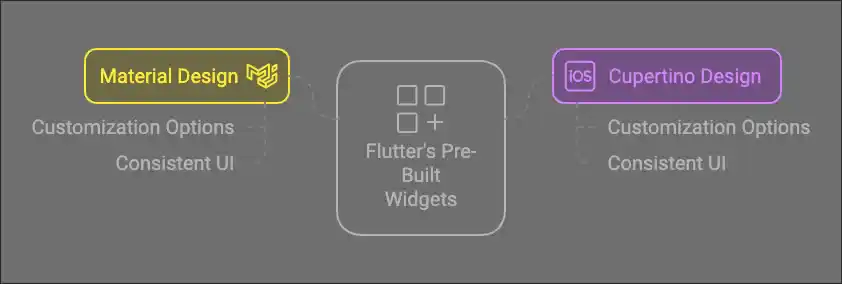
It offers an extensive library of pre-built widgets that conform to both Material Design (for Android) and Cupertino Design (for iOS). These widgets are highly customizable, ensuring a consistent and polished UI for any app.
Example of Using a Pre-Built Button Widget:
ElevatedButton(
  onPressed: () {
    print('Button Pressed!');
  },
  child: Text('Click Me'),
)
4. Native Performance
Unlike traditional hybrid frameworks that rely on a JavaScript bridge, Flutter compiles directly to native machine code (ARM/x64) using Dart’s AOT (Ahead-of-Time) compilation. This removes the translation layer that slows down many cross-platform apps.
- No JavaScript Bridge Overhead: Flutter widgets talk directly to the platform’s rendering surface instead of passing messages through a bridge, cutting out a common source of lag.
- Impeller Rendering Engine: Flutter’s current default rendering engine precompiles shaders ahead of time, eliminating the “jank” (frame drops) that used to happen on first animation.
- Smooth 60–120 FPS UI: Animations, scrolling, and transitions stay fluid even on mid-range devices, since rendering isn’t dependent on JS thread performance.
- Faster App Startup: AOT-compiled code means the app doesn’t need to interpret JavaScript at runtime, so cold-start times are generally quicker.
5. Open-Source Ecosystem with Strong Community Support
Flutter is fully open-source and backed by an active global developer community, giving teams a steady supply of packages, plugins, and troubleshooting resources.
- pub.dev Package Registry: Thousands of published packages cover everything from state management to payment integrations, reducing the need to build common functionality from scratch.
- Active Forums and Q&A: Stack Overflow, r/FlutterDev, and Discord communities move fast, so most common errors already have a documented fix.
- Regular Google-Backed Releases: Flutter ships stable version updates on a predictable cadence, keeping the framework current with new platform requirements (like Android/iOS OS updates).
- Enterprise Adoption: Companies like Google, BMW, and eBay use Flutter in production, which has pushed the plugin ecosystem toward more enterprise-grade maturity.
6. Customizable Animations and Graphics
Flutter leverages the Skia rendering engine to create custom animations and visually rich UIs. Whether you’re building a game or a business app, Flutter’s robust animation toolkit allows you to craft dynamic and engaging user experiences.
Example of a Simple Animation:
import 'package:flutter/material.dart';

class AnimatedBox extends StatefulWidget {
  @override
  _AnimatedBoxState createState() => _AnimatedBoxState();
}

class _AnimatedBoxState extends State<AnimatedBox> {
  double _size = 100;

  void _toggleSize() {
    setState(() {
      _size = _size == 100 ? 200 : 100;
    });
  }

  @override
  Widget build(BuildContext context) {
    return Scaffold(
      appBar: AppBar(title: Text('Animated Box')),
      body: Center(
        child: GestureDetector(
          onTap: _toggleSize,
          child: AnimatedContainer(
            duration: Duration(seconds: 1),
            width: _size,
            height: _size,
            color: Colors.blue,
          ),
        ),
      ),
    );
  }
}

void main() => runApp(MaterialApp(home: AnimatedBox()));
7. Responsive Design for Multiple Devices
Flutter makes it easy to design apps that look great and function seamlessly across any device, whether it’s a smartphone, tablet, or desktop.
- Responsive Layout Builder: With tools like
LayoutBuilderandMediaQuery, Flutter allows developers to create dynamic layouts that adapt to different screen sizes and orientations. These tools enable the app to adjust its UI elements based on the available screen space. - Adaptive Widgets: Flutter provides adaptive widgets like
AdaptiveLayoutand platform-specific UI packages to ensure the app feels natural on both iOS and Android. Widgets automatically adjust their styles and behavior to align with the platform’s design guidelines. - Flexibility with Grid and Flex Layouts: Flutter’s
FlexandGridViewwidgets offer powerful mechanisms for designing complex, responsive UIs. Developers can easily create layouts that rearrange or resize elements based on the screen dimensions. - Device-Specific Customization: With conditional logic, developers can implement device-specific layouts or features, such as splitting views for larger screens like tablets or desktops while maintaining a unified codebase.
This robust support for responsive design ensures that Flutter apps deliver a consistent user experience across various devices, enhancing user satisfaction and engagement.
Example of Responsive Layout:
class ResponsiveWidget extends StatelessWidget {
  @override
  Widget build(BuildContext context) {
    return LayoutBuilder(
      builder: (context, constraints) {
        if (constraints.maxWidth > 600) {
          return Text('Tablet or Desktop Layout');
        } else {
          return Text('Mobile Layout');
        }
      },
    );
  }
}
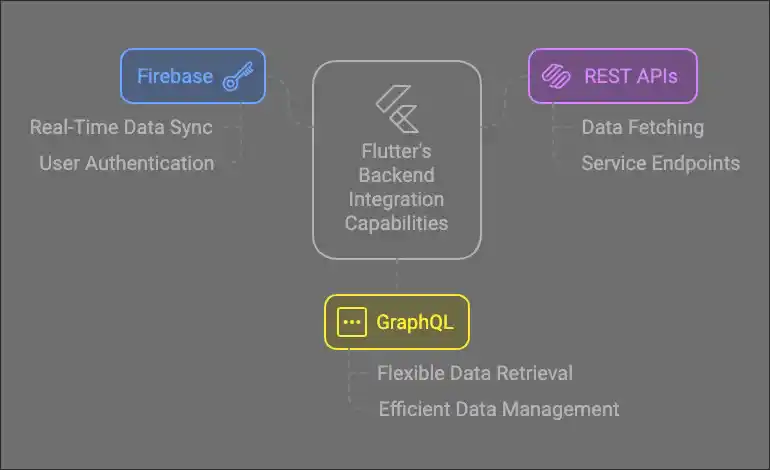
8. Cross-Platform Backend Integration
Flutter excels in providing seamless integration with a wide range of backend services, making it an ideal choice for building scalable, full-stack applications.
- Firebase Integration: Flutter’s extensive support for Firebase services enables developers to integrate real-time databases, authentication, cloud storage, push notifications, and analytics with minimal effort. Firebase plugins, such as
cloud_firestoreandfirebase_auth, streamline backend connectivity and reduce development time. - REST API Support: Flutter simplifies communication with RESTful APIs using libraries like
httpanddio. These libraries provide robust tools for making network requests, handling JSON responses, and ensuring secure communication with backend servers. - GraphQL Support: Flutter offers efficient integration with GraphQL APIs using packages like
graphql_flutterandhasura_connect. These tools enable developers to fetch, cache, and update data seamlessly, providing efficient and optimized data handling. - Custom Backend Solutions: Whether it’s Node.js, Django, or Spring Boot, Flutter can connect to any custom backend solution. By leveraging native HTTP requests or third-party libraries, developers can easily manage API endpoints and data exchange.
This rich backend integration capability makes Flutter a comprehensive solution for creating cross-platform applications that cater to diverse business needs, whether it’s a small-scale app or an enterprise-grade system.
Example of Fetching Data from an API:
import 'package:flutter/material.dart';
import 'dart:convert';
import 'package:http/http.dart' as http;

class FetchDataExample extends StatelessWidget {
  Future<List<dynamic>> fetchData() async {
    final response = await http.get(Uri.parse('https://jsonplaceholder.typicode.com/posts'));
    if (response.statusCode == 200) {
      return json.decode(response.body);
    } else {
      throw Exception('Failed to load data');
    }
  }

  @override
  Widget build(BuildContext context) {
    return Scaffold(
      appBar: AppBar(title: Text('Fetch Data Example')),
      body: FutureBuilder<List<dynamic>>(
        future: fetchData(),
        builder: (context, snapshot) {
          if (snapshot.connectionState == ConnectionState.waiting) {
            return Center(child: CircularProgressIndicator());
          } else if (snapshot.hasError) {
            return Center(child: Text('Error: ${snapshot.error}'));
          } else {
            return ListView.builder(
              itemCount: snapshot.data!.length,
              itemBuilder: (context, index) {
                return ListTile(
                  title: Text(snapshot.data![index]['title']),
                  subtitle: Text(snapshot.data![index]['body']),
                );
              },
            );
          }
        },
      ),
    );
  }
}

void main() => runApp(MaterialApp(home: FetchDataExample()));
9. Efficient State Management
State management is a critical aspect of app development, and Flutter provides a variety of tools and libraries to handle state effectively. These tools simplify managing and synchronizing the state of the UI and application logic, making it easier to build scalable and maintainable apps.
For complex applications requiring advanced control, Bloc or Redux can handle intricate workflows efficiently.
- Built-In State Management: Flutter comes with built-in solutions for state management, such as
setStatefor managing local widget state andInheritedWidgetfor propagating state down the widget tree. While suitable for smaller apps, these methods can become cumbersome in complex applications. - Popular State Management Libraries: Flutter’s ecosystem offers powerful libraries for more advanced state management:
- Provider: A lightweight and flexible library endorsed by Google. It simplifies state management by using dependency injection and context to pass state across the widget tree.
- Performance Optimization: Efficient state management tools ensure that only necessary widgets rebuild, minimizing performance overhead. For example, by using fine-grained state listeners in libraries like Riverpod or Bloc, developers can avoid unnecessary UI re-renders, leading to smoother user experiences.
- Scalability: With solutions like Provider or Bloc, it’s easier to manage state in large-scale applications. These tools provide patterns and best practices for managing both UI and application-wide state, ensuring maintainability as the app grows.
- Flexibility for Different Use Cases: Flutter’s state management options cater to various use cases:
- For simple state,
setStateorInheritedWidgetmight suffice. - For medium-complexity apps, Provider or Riverpod offers simplicity with scalability.
- For simple state,
10. Actively Maintained and Backed by a Strong Release Cycle
Flutter isn’t just a Google side project; it has a consistent, predictable release cadence and a development model that doesn’t depend entirely on one company’s continued involvement.
- Regular Stable Releases: Flutter ships versioned updates on a steady schedule, each with performance improvements, new widgets, and platform-compatibility fixes rather than long stretches of stagnation.
- Open-Source Continuity: Because Flutter’s source is fully open, development can continue through community and outside-contributor support even if Google’s internal team size changes, a real counterpoint to the “what if Google drops it” concern.
- Proven Production Adoption: Companies like BMW, eBay, and Google itself run Flutter in production apps at scale, which is a stronger signal of staying power than backing alone.
- Active Roadmap: Ongoing investment in the Impeller rendering engine and expanded desktop/web support shows the framework evolving rather than coasting.
Disadvantages of Flutter
While it offers many advantages, it’s important to consider its limitations:
- Large App Size: Flutter apps are typically larger than their native counterparts. This is because the framework includes the Dart runtime, rendering engine, and other libraries in the final app package, increasing its size.
- Limited Platform-Specific Features: Accessing advanced native features may require developing custom plugins or using platform-specific code. This can increase development complexity and effort, especially for features not yet supported by Flutter’s core libraries.
- Complex Debugging: Debugging platform-specific issues can be challenging. While it offers tools like DevTools, solving bugs that arise from communication between this framework and native code may require deeper expertise in both Flutter and native development.
- Limited Ecosystem for Third-Party Libraries: Although the Flutter ecosystem is growing, it still lags behind native ecosystems like Android and iOS in terms of the availability and maturity of third-party libraries. Developers may need to create custom solutions for certain features.
- Performance Constraints for Complex UI Animations: While it excels at creating beautiful UIs, extremely complex animations or graphic-intensive apps may experience performance bottlenecks compared to highly optimized native implementations.
- Dependence on Google: It is developed and maintained by Google. While this ensures high-quality updates, it also poses a risk, as any strategic shift by Google could impact its future.
Conclusion
Flutter is a transformative framework for modern app development, enabling developers to create high-performance, cross-platform applications efficiently. Its hybrid nature, coupled with robust tools and community support, makes it a strong contender for businesses and developers looking to streamline their workflows.
Despite some drawbacks, its benefits make it a top choice for versatile software development in today’s competitive landscape.
FAQs
Is Flutter still worth learning in 2026, or is React Native a safer bet?
Yes, Flutter’s release cadence and Impeller rollout show active investment, though most devs recommend learning both if you can.
Why is my Flutter app size so much bigger than a native app?
Flutter bundles its own rendering engine and Dart runtime rather than borrowing the OS’s UI toolkit, so a baseline app starts around 15–20MB before you write a line of business logic.
Should I use Provider, Riverpod, or Bloc for state management in a new project?
Riverpod has become the more common recommendation for new apps in 2026 discussions, with Bloc still favored for large enterprise codebases needing strict structure.
Is Google going to abandon Flutter like it did other projects?
This resurfaces after every layoff round; the framework remains open-source with outside contributors, so community consensus is that it would survive even a reduced Google team, though it’s a legitimate risk to flag.
Can Flutter really replace native development for complex apps?
For most business and consumer apps, yes, but apps needing deep platform-specific APIs (ARKit, advanced camera control) still sometimes need native modules or plugins.
What’s the best way to migrate an existing native app to Flutter gradually?
Add-to-app (embedding Flutter modules into an existing native codebase) is the standard recommended path rather than a full rewrite.
What’s the real performance difference between Flutter and React Native in 2026?
Benchmarks generally show Flutter with more stable frame rates and better memory usage, while React Native’s New Architecture (Fabric/JSI) has closed some of the gap.