

Table of Contents
Kubernetes has become the default way to run containerized applications in production.
It’s the layer that most cloud-native companies build on, and it now sits underneath everything from simple web apps to large-scale AI training and inference pipelines.
But running Kubernetes and running it well are two very different things.
Most Kubernetes failures aren’t caused by the platform itself; they’re caused by how teams configure and operate it.
Clusters get built quickly to hit a deadline, best practices get skipped “for now,” and six months later, a team is debugging a 3 a.m. outage caused by a pod with no memory limit that took down an entire node.
Security gaps, runaway cloud bills, and fragile deployments are almost always the result of early shortcuts.
This guide walks through the practices that separate stable, secure, cost-efficient Kubernetes environments from the ones that generate incidents.
It covers the fundamentals, security, resource management, deployments, networking, storage, as well as the practices that have become essential more recently: GitOps, FinOps, and running AI and GPU workloads on Kubernetes.
By the end, you’ll have a practical framework for evaluating your own cluster and a prioritized list of what to fix first.
What Are Kubernetes Best Practices?
Kubernetes best practices are the accumulated set of configuration, architecture, and operational decisions that keep a cluster secure, reliable, and cost-effective at scale.
Kubernetes itself is unopinionated; it will happily let you deploy a pod with no resource limits, no health checks, and root access to the host.
Best practices exist to close that gap between what Kubernetes allows and what production actually requires.
Why They Matter
Kubernetes rewards good configuration and punishes bad configuration in equal measure.
A well-configured cluster self-heals, scales automatically, and survives node failures without anyone noticing.
A poorly configured one turns every deployment into a risk and every incident into a scavenger hunt.
Common Production Failures
The same handful of root causes show up again and again in postmortems:
- Pods with no resource limits are starving neighboring workloads
- Secrets stored in plaintext or committed to Git
- No monitoring until something is already broken
- Manual, undocumented deployment processes
- Clusters running a single control plane node with no redundancy
The Business Case
Kubernetes adoption has moved well past the early-adopter phase; it’s now the standard orchestration layer across most mid-size and large engineering organizations, and CNCF’s annual surveys have consistently shown the majority of enterprises running Kubernetes in production rather than just experimenting with it.
That maturity raises the stakes: a poorly managed cluster isn’t a side project anymore; it’s core infrastructure.
The cost of a mismanaged cluster shows up in three places: unplanned downtime, security incidents, and cloud bills that grow faster than the workloads running on them.
Kubernetes Architecture Explained
Understanding architecture is the foundation of implementing best practices; you can’t secure or scale a system you don’t understand.
At a high level, a Kubernetes cluster is split into two planes:
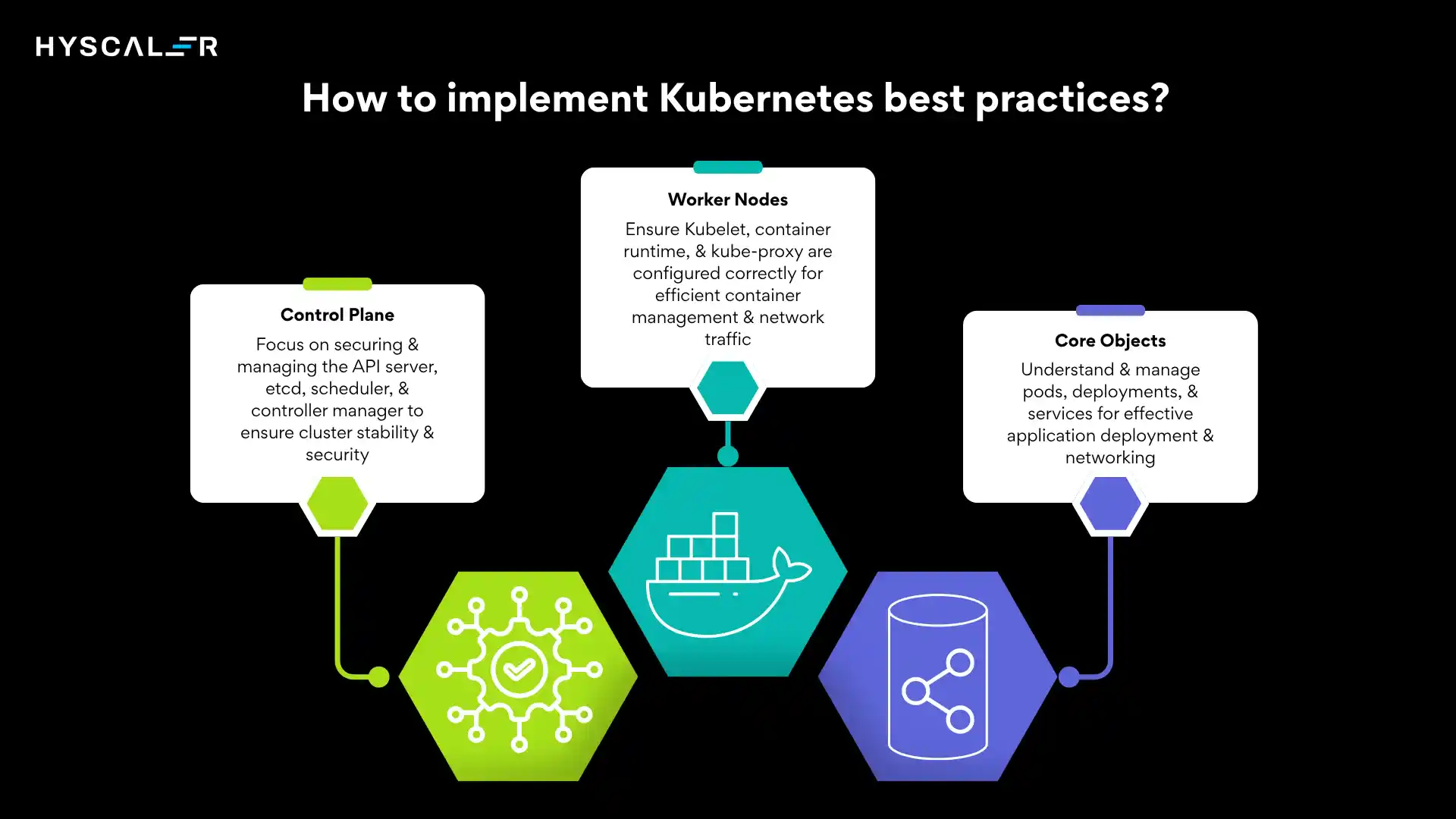
Control Plane
- API Server – the front door to the cluster. Every kubectl command, every controller, every internal component talks to Kubernetes through the API server.
- etcd – the cluster’s database. It stores every object’s desired and current state. If etcd is lost without a backup, the cluster’s state is lost with it.
- Scheduler – decides which node a new pod should run on, based on resource availability, affinity rules, and taints/tolerations.
- Controller Manager – runs the control loops that keep actual state matching desired state (e.g., the Deployment controller noticing a pod died and creating a replacement).
Worker Nodes
- Kubelet – the agent on each node that talks to the API server and manages the containers scheduled to that node.
- Container Runtime – the software actually running containers (containerd is the standard today).
- Kube-proxy – handles network rules that let traffic reach the right pods.
Core Objects
- Pods – the smallest deployable unit, usually one container (sometimes more).
- Deployments – manage replica sets of pods and handle rolling updates.
- Services – provide stable networking to a set of pods.
Understanding architecture is the foundation of implementing best practices.
Every recommendation in this guide maps back to one of these components: resource limits affect the scheduler, RBAC affects the API server, and backup strategy is really an etcd strategy.
Kubernetes Best Practices Checklist (Quick Summary)
| Category | Importance |
|---|---|
| Security | ⭐⭐⭐⭐⭐ |
| Resource Limits | ⭐⭐⭐⭐⭐ |
| Monitoring | ⭐⭐⭐⭐⭐ |
| GitOps | ⭐⭐⭐⭐⭐ |
| Secrets Management | ⭐⭐⭐⭐⭐ |
| Backup & Disaster Recovery | ⭐⭐⭐⭐⭐ |
| CI/CD | ⭐⭐⭐⭐⭐ |
| Autoscaling | ⭐⭐⭐⭐ |
| Networking | ⭐⭐⭐⭐ |
| Storage | ⭐⭐⭐⭐ |
Security Best Practices
Security is where most Kubernetes incidents originate, and it’s the category with the least room for shortcuts.
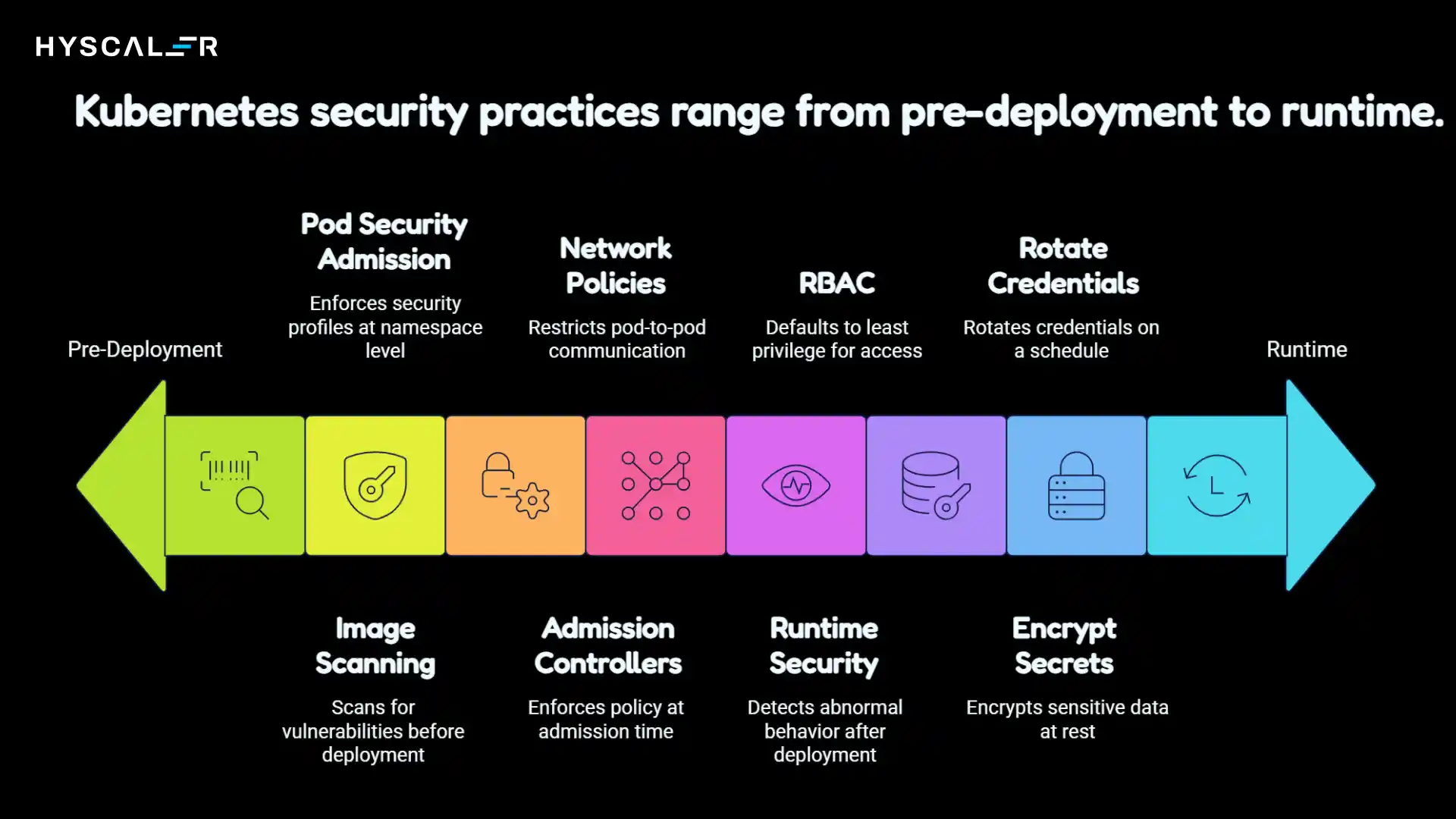
Never Run Containers as Root
Running as root inside a container means that a container escape gives an attacker root on the host.
Set runAsNonRoot: true in your pod security context and build images with a dedicated non-root user.
Enable Pod Security Admission
Pod Security Admission (the built-in successor to PodSecurityPolicy) lets you enforce baseline or restricted security profiles at the namespace level, blocking privileged containers, host networking, and other risky configurations before they’re scheduled.
Use RBAC Correctly
Default to least privilege.
Avoid cluster-wide cluster-admin bindings for anything other than break-glass access, scope roles to namespaces, and audit Cluster Role Bindings regularly; they’re one of the most common sources of privilege creep.
Encrypt Secrets
Kubernetes Secrets are base64-encoded, not encrypted, by default.
Enable encryption at rest for etcd, and for anything sensitive, use an external secrets manager (Vault, AWS Secrets Manager, or similar) integrated via an operator rather than storing raw values in the cluster.
Rotate Credentials
Service account tokens, database credentials, and TLS certificates should all be rotated on a schedule, not left to live indefinitely.
Short-lived, automatically rotated credentials shrink the blast radius of any single leak.
Image Scanning & Supply Chain Security
Every image that reaches production should be scanned for known vulnerabilities before deployment.
Beyond scanning, mature teams are adopting:
- Signed images – cryptographically verifying that an image came from a trusted build pipeline
- SBOMs (Software Bills of Materials) – a manifest of every dependency inside an image
- Image provenance – proof of exactly which pipeline, commit, and steps produced an image
Admission Controllers
Tools like Kyverno and OPA Gatekeeper let you enforce policy at admission time, blocking deployments that violate your rules (no latest tags, mandatory resource limits, no privileged containers) before they ever reach a node.
Network Policies
By default, every pod in a cluster can talk to every other pod.
Network Policies let you restrict that to only the traffic you actually intend, which limits lateral movement if a single pod is compromised.
Runtime Security
Static scanning catches known issues before deployment; runtime security tools catch abnormal behavior after it.
Falco watches for suspicious syscalls in real time, while Trivy handles vulnerability and misconfiguration scanning, and Cosign handles image signing and verification.
Cluster Configuration Best Practices
Good cluster configuration is largely invisible when done right; it just means things fail gracefully instead of catastrophically.
- Namespace strategy – separate by team, environment, or application domain, not arbitrarily. Namespaces are also the natural boundary for RBAC and ResourceQuotas.
- Labels & annotations – consistent labeling (app, env, team, version) makes selectors, cost attribution, and debugging dramatically easier.
- Taints & tolerations – use taints to reserve nodes for specific workloads (e.g., GPU nodes) so general workloads don’t accidentally land there.
- Affinity & anti-affinity – pod anti-affinity rules spread replicas across nodes and zones so a single node failure doesn’t take down an entire service.
- Node pools – separate node pools by workload type (general purpose, memory-optimized, GPU) rather than running everything on one instance type.
- Multi-AZ deployment – spreading nodes across availability zones protects against a single zone outage.
- HA control plane – run at least three control plane nodes (or use a managed control plane) so the API server survives a single node failure.
Resource Management Best Practices
Resource mismanagement is the single most common cause of Kubernetes instability, and it’s entirely preventable.
Requests and Limits
- Requests tell the scheduler how much CPU/memory a pod needs to be placed on a node.
- Limits cap how much a pod can consume, preventing it from starving its neighbors.
resources:

  requests:

    cpu: "250m"

    memory: "256Mi"

  limits:

    cpu: "500m"

    memory: "512Mi"
Pods with no limits are the number one cause of “noisy neighbor” incidents, where one misbehaving workload consumes all available memory on a node and triggers cascading evictions.
QoS Classes
Kubernetes assigns each pod a Quality of Service class based on its requests/limits:
- Guaranteed – requests equal limits (highest priority, last to be evicted)
- Burstable – requests are set but lower than limits
- BestEffort – no requests or limits set (first to be evicted under pressure)
LimitRanges and ResourceQuotas
LimitRange objects enforce default and maximum resource values at the namespace level, while ResourceQuota caps total consumption per namespace; both are essential guardrails in multi-team clusters.
Autoscaling
- Horizontal Pod Autoscaler (HPA) – scales the number of pod replicas based on CPU, memory, or custom metrics.
- Vertical Pod Autoscaler (VPA) – adjusts a pod’s resource requests/limits automatically based on observed usage.
- Cluster Autoscaler – adds or removes nodes based on whether pods are pending due to insufficient capacity.
Deployment Best Practices
How you ship changes matters as much as how you configure the cluster.
Deployment Strategies Compared
| Strategy | How It Works | Best For |
|---|---|---|
| Rolling Update | Gradually replaces old pods with new ones | Default choice for most apps |
| Blue-Green | A new environment was set up, and then traffic was switched | Zero-downtime cutovers, easy rollback |
| Canary | A small percentage of traffic is routed to the new version first | High-risk changes, gradual validation |
| Progressive Delivery | Automated, metric-driven canary rollout | Teams with strong observability and automation |
Health Checks
- Liveness probe – restarts a container if it’s stuck or deadlocked.
- Readiness probe – removes a pod from service traffic until it’s actually ready to handle requests.
- Startup probe – gives slow-starting applications time to initialize before liveness checks kick in and kill them prematurely.
Skipping probes is one of the fastest ways to turn a routine deployment into an outage, since Kubernetes has no way to know a pod is unhealthy until it’s told.
Rollback Strategy
Every deployment pipeline needs a fast, well-tested rollback path.
kubectl rollout undo is the manual fallback, but GitOps tools handle this more reliably by reverting to a known-good Git commit.
Networking Best Practices
- Services – use ClusterIP for internal traffic, LoadBalancer sparingly (it’s expensive at scale), and prefer routing through an Ingress or Gateway.
- Ingress / Gateway API – the Gateway API has become the modern, more expressive successor to Ingress, offering better support for traffic splitting, header-based routing, and multi-team ownership of a single load balancer.
- Service Mesh – tools like Istio and Linkerd add mutual TLS, fine-grained traffic control, and rich observability between services, at the cost of added operational complexity.
- eBPF networking – Cilium, built on eBPF, has become a popular CNI choice for its performance and built-in network policy and observability features without the overhead of a traditional sidecar mesh.
- DNS and load balancing – CoreDNS is the cluster standard; keep an eye on DNS query volume, since it’s a common bottleneck at scale.
Storage Best Practices
- Persistent Volumes (PV) & Persistent Volume Claims (PVC) – decouple storage requests from the underlying storage implementation.
- Storage Classes – define different tiers of storage (SSD vs. HDD, replicated vs. local) so teams can request the right performance profile.
- CSI Drivers – the standard interface for integrating cloud or on-prem storage systems with Kubernetes.
- StatefulSets – use for workloads that need stable network identities and persistent storage per replica, like databases and message queues.
- Backups & Disaster Recovery – application data backups are separate from etcd backups. Both need a tested restore process, not just a backup job that “probably works.”
GitOps Best Practices
Why GitOps Matters
GitOps treats Git as the single source of truth for cluster state. Instead of engineers running kubectl apply from their laptops, a controller continuously reconciles the live cluster to match what’s declared in a Git repository.
This gives you an audit trail, easy rollbacks, and eliminates configuration drift caused by manual changes.
Practical Setup
- Repository structure – separate application code repos from configuration/manifest repos, and consider separate repos or directories per environment.
- Secrets – never commit plaintext secrets to Git, even in a private repo. Use sealed secrets or an external secrets operator that syncs from a vault at deploy time.
- Promotion strategy – changes flow from dev → staging → production through pull requests, not by editing each environment independently.
- Drift detection – GitOps controllers continuously detect and can auto-correct any manual changes made directly to the cluster, closing the loop that manual kubectl access leaves open.
Tools
Argo CD and Flux are the two dominant GitOps controllers in the CNCF ecosystem, both offering continuous reconciliation, drift detection, and multi-cluster support.
CI/CD Best Practices
- Container builds – use multi-stage builds to keep images small, and pin base image versions rather than tracking the latest.
- Testing – run unit and integration tests before an image is even built; run smoke tests against a staging environment before promoting to production.
- Security in the pipeline – scan images and dependencies as a required pipeline step, not an optional one.
- Deployment & rollback – CI builds and pushes images; GitOps (not the CI pipeline) should actually own applying changes to the cluster.
- Progressive delivery – pair CI/CD with canary or blue-green rollouts so bad deploys are caught on a small percentage of traffic.
Common Tools
GitHub Actions and Jenkins remain the most widely used general-purpose CI platforms, while Tekton offers a Kubernetes-native pipeline model that runs pipeline steps as pods inside the cluster itself.
Observability Best Practices
You cannot fix what you cannot see.
Observability rests on three pillars:
- Metrics – numeric time-series data (CPU, memory, request rate, error rate).
- Logging – structured, centralized logs from every pod, searchable in one place rather than scattered across nodes.
- Tracing – following a single request across multiple services to find where latency or errors originate.
Alerting and dashboards turn that raw data into something actionable.
Alerts should be tied to symptoms that affect users (error rate, latency) rather than every possible internal metric, to avoid alert fatigue.
Standard Toolchain
- Prometheus – metrics collection and alerting
- Grafana – dashboards and visualization
- Loki – log aggregation, designed to pair naturally with Prometheus/Grafana
- Tempo and Jaeger – distributed tracing
- OpenTelemetry – the vendor-neutral standard for instrumenting applications- is increasingly the default way teams collect all three signal types
Cost Optimization Best Practices
Cost optimization has become one of the most searched Kubernetes topics as cloud bills have grown alongside cluster adoption.
- Rightsizing – most clusters are significantly over-provisioned; use VPA recommendations or historical usage data to bring requests closer to actual consumption.
- Spot/preemptible nodes – run fault-tolerant, stateless workloads on spot capacity for substantial cost savings, backed by a stable node pool for anything that can’t tolerate interruption.
- Autoscaling – the Cluster Autoscaler (or newer node-provisioning tools) should be scaling nodes down during off-peak hours, not just up during peak load.
- Idle workload cleanup – dev/staging environments left running 24/7 are a common source of silent waste; scale them down outside business hours.
- Storage optimization – delete orphaned PVCs and snapshots, and match storage class to actual performance needs rather than defaulting to the fastest tier everywhere.
- GPU optimization – GPUs are the most expensive resource in most clusters; use time-slicing or MIG (Multi-Instance GPU) to avoid a single underutilized GPU sitting idle.
- FinOps practices – consistent cost-allocation labels plus a tool like OpenCost or a cloud-native cost dashboard make it possible to attribute spend back to teams and catch anomalies early.
- Carbon-aware scheduling – an emerging practice where workloads are scheduled to run in regions or times with lower carbon intensity, increasingly relevant for enterprises with sustainability commitments.
Kubernetes for AI Workloads
Running AI training and inference workloads on Kubernetes has become one of the biggest growth areas for the platform, and it comes with its own set of best practices.
- GPU scheduling – use device plugins and node taints to ensure GPU workloads land only on GPU-equipped nodes, and consider GPU sharing (time-slicing or MIG) for inference workloads that don’t need a full GPU.
- Model serving & inference – KServe provides a standardized, serverless-style model serving layer on top of Kubernetes, handling autoscaling (including scale-to-zero) for inference endpoints.
- Training workloads – Kubeflow provides pipelines and job orchestration purpose-built for ML training workflows, including distributed training jobs.
- Batch and distributed compute – Ray has become a popular framework for scaling Python-based ML workloads (training and serving) across a Kubernetes cluster.
- Resource isolation – AI workloads are often bursty and resource-hungry; dedicated node pools and strict quotas prevent them from starving other workloads sharing the cluster.
Multi-Cluster Best Practices
As organizations scale, a single cluster often stops being enough.
- Cluster federation – tools for managing configuration and policy consistently across multiple clusters, rather than configuring each one independently.
- Regional clusters – running separate clusters per region reduces latency for global users and limits the blast radius of a regional outage.
- Disaster recovery – a true DR strategy means being able to fail traffic over to a healthy cluster, not just restoring backups within a single dead cluster.
- Traffic management & failover – global load balancing (often via DNS-based routing or a multi-cluster service mesh) is what actually makes failover seamless to end users.
Production Readiness Checklist
Use this before promoting any new service to production:
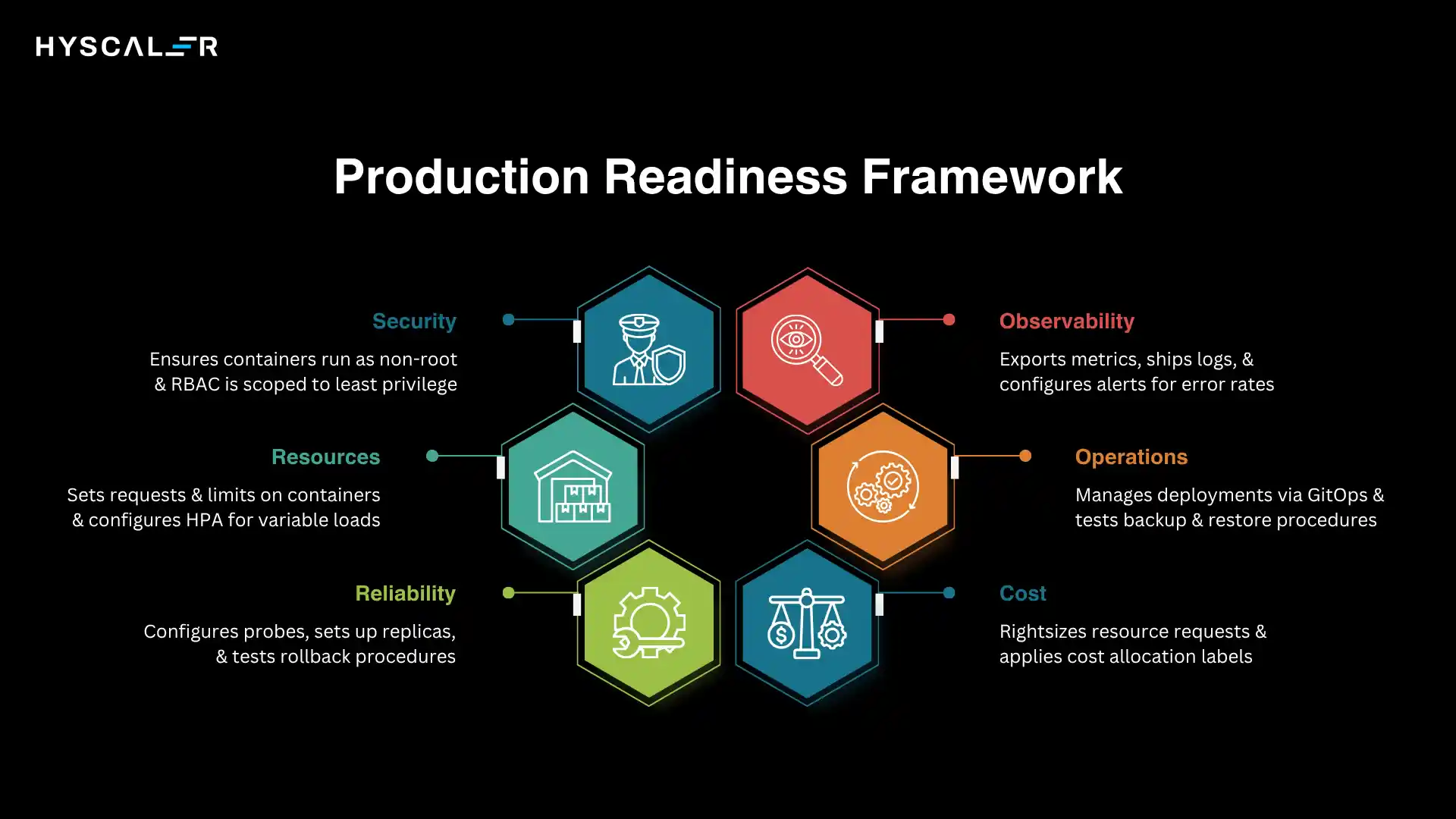
Security
- Containers run as non-root
- RBAC scoped to least privilege
- Secrets stored outside plain Kubernetes Secrets
- Images scanned and signed
- Network policies applied
Resources
- Requests and limits are set on every container
- ResourceQuota set at the namespace level
- HPA configured for variable-load services
Reliability
- Liveness, readiness, and startup probes configured
- At least 3 replicas across multiple nodes/zones
- Pod anti-affinity configured for critical services
- Rollback procedure tested
Observability
- Metrics exported and scraped by Prometheus
- Logs shipped to a central log store
- Alerts configured for error rate and latency
- Dashboards published for the on-call team
Operations
- Deployment managed via GitOps
- CI pipeline includes security scanning
- Backup and restore tested for stateful data
- A runbook exists for common failure scenarios
Cost
- Resource requests rightsized against actual usage
- Cost allocation labels applied
- Non-production environments scaled down off-hours
Common Kubernetes Mistakes
- Deploying workloads with no resource limits
- Running everything in the default namespace
- Using the latest image tags instead of pinned versions
- Going live with no monitoring in place
- Never testing backups until a real disaster
- Leaving RBAC wide open or unconfigured
- Storing secrets in plaintext manifests
- Ignoring node failures instead of investigating the root cause
- Skipping autoscaling and manually resizing under load
- Deploying without health probes, so Kubernetes can’t detect failures
Kubernetes Best Practices by Team
For Developers – Set your own resource requests based on real profiling data, write meaningful health checks rather than a hardcoded 200 OK, and keep images small and dependency lists lean.
For DevOps Engineers – Standardize namespace and labeling conventions across teams, and treat every manual kubectl change as a signal that something is missing from the GitOps pipeline.
For SREs – Define SLOs before defining alerts, and make sure every alert maps to a documented runbook, not just a Slack ping.
For Platform Teams – Build self-service guardrails (admission policies, templates, golden paths) so individual teams can move fast without needing platform approval for every deployment.
For Enterprises – Invest in a multi-cluster strategy, centralized policy enforcement, and FinOps practices early; retrofitting governance onto dozens of already-running clusters is far harder than building it in from the start.
Conclusion
Kubernetes rewards discipline.
The clusters that stay stable, secure, and affordable aren’t the ones running the newest tools; they’re the ones that consistently apply the fundamentals: resource limits on every workload, least-privilege security, real monitoring, and deployments that go through GitOps instead of someone’s laptop.
If you’re starting from a cluster with gaps, don’t try to fix everything at once.
Prioritize in this order:
- Security – RBAC, non-root containers, secrets management
- Resource management – requests, limits, autoscaling
- Observability – metrics, logs, alerts before you need them
- GitOps – so every future change is tracked and reversible
Once those four are solid, move on to the more advanced practices- multi-cluster architecture, AI workload optimization, and FinOps- that turn a stable cluster into a genuinely efficient one.
FAQ
What are Kubernetes best practices?
They’re the configuration and operational standards, covering security, resource management, deployments, and monitoring, that keep a Kubernetes cluster reliable and secure in production, beyond what Kubernetes enforces by default.
How do you secure a Kubernetes cluster?
Start with RBAC, non-root containers, network policies, and encrypted secrets, then layer on image scanning, admission control policies, and runtime security monitoring.
What is the 80/20 rule for Kubernetes optimization?
Roughly 80% of cost and reliability gains come from a small set of practices: setting accurate resource requests/limits, autoscaling correctly, and rightsizing nodes, before more advanced optimization is worth the effort.
How often should Kubernetes be upgraded?
Most teams aim to stay within one or two minor versions of the latest release, since older versions fall out of support and lose security patches; check your provider’s supported-version policy specifically.
What are Kubernetes resource requests and limits?
Requests are what the scheduler guarantees a pod, and limits are the maximum a pod is allowed to consume; together, they determine scheduling decisions and a pod’s Quality of Service class.
Is Kubernetes suitable for small businesses?
It can be, but the operational overhead is real;, many small teams are better served by a managed Kubernetes offering or a simpler platform until their scale genuinely requires Kubernetes’ flexibility.
What is GitOps in Kubernetes?
An operational model where Git is the single source of truth for cluster configuration, and a controller continuously reconciles the live cluster state to match it.
How do you monitor Kubernetes clusters?
With a combination of metrics (Prometheus), logs (Loki or similar), and traces (Tempo/Jaeger), typically visualized together in Grafana and increasingly instrumented via OpenTelemetry.
What is Pod Security Admission?
A built-in Kubernetes feature that enforces security standards (privileged, baseline, or restricted) at the namespace level, blocking non-compliant pods at admission time.
What is the Gateway API?
The newer, more expressive successor to Ingress for managing external traffic into a cluster, with better support for traffic splitting and multi-team routing configuration.
Which deployment strategy is best?
It depends on risk tolerance; rolling updates work for most services, while canary or progressive delivery is better suited to high-risk changes where you want gradual, metrics-based validation.
How do you reduce Kubernetes costs?
Rightsize resource requests, use spot nodes for fault-tolerant workloads, scale down idle environments, and attribute spend to teams so waste is visible rather than hidden in a shared bill.
What is the best Kubernetes monitoring stack?
Prometheus and Grafana remain the most widely adopted combination, often paired with Loki for logs and Tempo or Jaeger for tracing, unified through OpenTelemetry instrumentation.
What are the biggest Kubernetes mistakes?
Missing resource limits, no monitoring, weak RBAC, and manual deployments are the most common root causes behind production incidents.
What changed in Kubernetes in 2026?
Beyond routine version upgrades, the biggest shifts have been the continued adoption of the Gateway API over Ingress, eBPF-based networking (Cilium) displacing traditional CNI plugins, and Kubernetes increasingly being used as the default orchestration layer for AI training and inference workloads.