

Table of Contents
Did you know that 95% of cloud security failures are caused by human error, not platform flaws? This still holds in 2025, and Gartner predicts that by 2026, 99% of cloud breaches will be customer-driven, rooted in misconfigured settings, over-permissive access, and ignored defaults.
Despite growing investments in cloud security each year, breaches continue to rise. The reason isn’t always sophisticated cyberattacks; it’s often much simpler.
A misconfiguration.
A storage bucket left exposed.
An admin role with excessive permissions.
A password without multi-factor authentication.
Individually, these may seem like minor oversights. But together, they create some of the most critical vulnerabilities in modern cloud environments.
In this blog, we break down the top 10 cloud security misconfigurations, explain why they matter, and share clear, actionable steps to help you identify and fix them before attackers do.
What Is Cloud Misconfiguration?
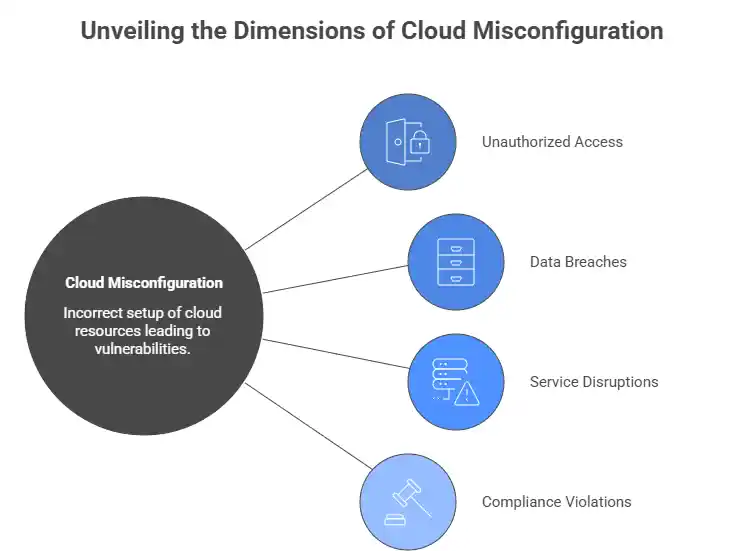
A cloud misconfiguration happens when cloud resources, storage buckets, virtual machines, identity roles, or network settings are set up incorrectly, leaving them vulnerable to unauthorized access or attack. These are not exotic exploits. They are toggle switches left in the wrong position.
Understanding the cloud security shared responsibility model is essential. Your cloud provider (AWS, Azure, GCP) secures the underlying infrastructure. Everything above it: data, configurations, identity, and access controls, is your responsibility. Most misconfiguration failures occur precisely in this space.
Top 10 Cloud Security Misconfigurations and How to Fix Them
1. Publicly Accessible Storage Buckets
The risk: Open storage buckets are one of the most common and damaging cloud security vulnerabilities. When a bucket is configured with public read or write access, anyone on the internet can access, download, or overwrite your sensitive data, including customer records, credentials, and intellectual property.
How to prevent it:
- Audit storage bucket permissions regularly using cloud-native tools such as AWS Trusted Advisor or Azure Security Center.
- Enable Block Public Access settings at the account level, not just per bucket.
- Apply bucket policies that explicitly deny public access.
- Use CSPM (Cloud Security Posture Management) tools to scan for exposed storage continuously.
2. Overly Permissive IAM Roles
The risk: Identity and access management (IAM) misconfiguration is the single largest cloud security risk category. Wildcard permissions, unused service accounts, and broadly assigned admin roles create massive attack surfaces. Once an attacker gains access to an over-privileged identity, they can move laterally across your entire cloud environment.
How to prevent it:
- Enforce the principle of least privilege: grant only the permissions a user or service actually needs.
- Regularly review and remove unused IAM roles and credentials.
- Use IAM Access Analyzer (AWS) or Azure AD Access Reviews to surface excessive permissions.
- Maintain separate permission boundaries for human and non-human (service account) identities.
3. Disabled or Insufficient Logging and Monitoring
The risk: Without proper logging and monitoring in your cloud environment, attacks go undetected for months. If you are not logging API calls, access events, and configuration changes, you have zero visibility into what is happening inside your cloud environment and no way to detect a breach until serious damage is done.
How to prevent it:
- Enable AWS CloudTrail, Azure Monitor, or Google Cloud Audit Logs across all regions and services.
- Forward logs to an immutable, centralized SIEM for analysis and alerting.
- Configure real-time alerts for suspicious activity, such as root account logins, bulk data downloads, or permission escalations.
- Review logs regularly and immediately after any configuration change.
4. Unrestricted Inbound Security Group Rules
The risk: Security groups act as virtual firewalls for your cloud resources. When rules allow inbound traffic from all IP addresses on sensitive ports like SSH (22) or RDP (3389), you are leaving your cloud server’s front door open to the entire internet, a direct invitation for brute-force attacks, ransomware, and unauthorized access.
How to prevent it:
- Audit security groups regularly and remove rules that allow unrestricted inbound access.
- Restrict management ports to known, trusted IP ranges or use bastion hosts and VPN access.
- Apply zero trust architecture principles: never trust, always verify, regardless of traffic origin.
- Use Infrastructure as Code (IaC) templates to enforce consistent network rules across all deployments.
5. Unencrypted Data at Rest and in Transit
The risk: Storing or transmitting sensitive data without encryption is a critical security failure in any cloud environment. Even if access controls are in place, unencrypted data can be read in plaintext the moment those controls are bypassed, dramatically worsening the impact of any breach.
How to prevent it:
- Enable data encryption at rest using cloud-managed key services like AWS KMS, Azure Key Vault, or Google Cloud KMS for all storage volumes, databases, and backups.
- Enforce TLS 1.2 or higher for all data in transit. Disable outdated protocols like SSL, TLS 1.0, and TLS 1.1.
- Rotate encryption keys on a scheduled and regular basis.
- Classify data by sensitivity and apply stricter encryption requirements to high-value assets.
6. Missing Multi-Factor Authentication (MFA)
The risk: A large share of breaches in the cloud originates from compromised identities. Attackers don’t break in; they log in. Without multi-factor authentication (MFA) enabled, a single stolen or guessed password is all it takes for an attacker to access your cloud console and cause catastrophic damage.
How to prevent it:
- Enforce MFA for every user account, no exceptions, especially for privileged and root/admin accounts.
- Prefer hardware tokens or authenticator apps over SMS-based MFA wherever possible.
- Configure conditional access policies that trigger MFA requirements based on location, device, or risk score.
- Audit MFA enrollment monthly and flag any non-compliant accounts immediately.
7. Insecure API Configurations
The risk: APIs are the backbone of modern cloud architecture, and one of its biggest security weak points. Broken authentication, missing rate limiting, and over-permissioned API endpoints allow attackers to enumerate cloud resources, exfiltrate data, and invoke privileged operations without triggering alarms.
How to prevent it:
- Inventory all public-facing APIs and retire or secure any undocumented “shadow” APIs.
- Enforce strong authentication (OAuth 2.0, API keys) and input validation on every endpoint.
- Implement rate limiting and request throttling to prevent automated abuse.
- Route all API traffic through a gateway with built-in security policies and logging enabled.
8. Lack of Network Segmentation
The risk: A flat cloud network where all workloads can communicate with each other freely is a serious misconfiguration weakness. After an initial compromise, attackers move laterally with ease, turning a single misconfigured virtual machine into a launchpad for attacking databases, admin consoles, and backup systems.
How to prevent it:
- Segment workloads using Virtual Private Clouds (VPCs), subnets, and network ACLs.
- Isolate production, development, and staging environments into separate network zones.
- Apply micro-segmentation within workloads to restrict east-west traffic between services.
- Enforce zero trust architecture: verify every connection between cloud services, even internal ones.
9. Hardcoded Credentials and Secrets in Code
The risk: Developers often hardcode API keys, passwords, and database credentials directly into application code, or inadvertently commit them to public repositories. This is a serious exposure that undermines your entire security posture. Attackers actively scan platforms like GitHub for leaked secrets, and exploitation can begin within minutes of a commit.
How to prevent it:
- Never hardcode credentials. Use dedicated secrets managers such as AWS Secrets Manager, Azure Key Vault, or HashiCorp Vault.
- Integrate secret scanning tools (GitGuardian, TruffleHog) into your CI/CD pipeline to catch leaks before they reach production.
- Rotate all exposed credentials immediately upon detection.
- Enforce peer code reviews that specifically flag any plaintext secrets in pull requests.
10. Unpatched and Misconfigured Cloud Workloads
The risk: Cloud VMs, containers, and serverless functions running outdated software are easy targets. This is a persistent blind spot for many teams; they focus on new deployments while existing workloads accumulate unpatched vulnerabilities that attackers are quick to exploit.
How to prevent it:
- Automate patch management using tools like AWS Systems Manager Patch Manager or Azure Update Management.
- Use Infrastructure as Code (IaC) security scanning tools such as Checkov or Terrascan to catch misconfigurations before they reach production.
- Define and enforce a baseline security configuration for all cloud images and workloads using policy-as-code.
- Run scheduled vulnerability assessments and penetration tests against live cloud environments.
How to Build a Stronger Cloud Security Posture
Preventing misconfigurations is not a one-time checklist; it is a continuous cloud security discipline. Here is how to stay ahead:
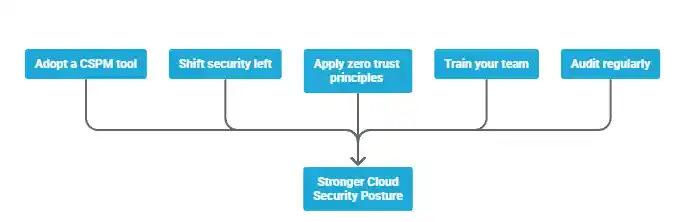
- Adopt a CSPM tool. Cloud security posture management platforms continuously monitor your environment for misconfigurations, policy violations, and compliance gaps in real time, giving your team the visibility it needs.
- Shift security left. Embed security checks into your CI/CD Pipeline using IaC scanning tools. Catching misconfigurations at the code stage costs far less than remediating a breach after the fact.
- Apply zero trust principles. Treat every access request, internal or external, as unverified by default. Zero trust limits the blast radius of any individual misconfiguration or compromised credential.
- Train your team. Because misconfiguration failures are overwhelmingly driven by human error, regular security training for developers, DevOps engineers, and cloud architects is non-negotiable.
- Audit regularly. Schedule quarterly cloud security audits covering IAM roles, network rules, storage permissions, encryption status, and logging configurations. Use a security audit checklist to make the process repeatable and consistent.
Final Thoughts
Misconfigurations are the leading cause of breaches in cloud environments today, not advanced persistent threats or nation-state actors. The good news is that every risk on this list is preventable.
Start with a cloud security audit of your existing environment. Enable logging everywhere. Enforce MFA. Apply least privilege across all IAM roles. Adopt a CSPM platform for continuous visibility. The deliberate improvements you make to your cloud security practices today are what stand between your organization and tomorrow’s breach.
FAQ’s
What is a cloud misconfiguration?
Cloud misconfigurations are improperly configured security settings that expose sensitive data and grant excessive privileges; they are a leading cause of data security breaches.
What are the most common cloud misconfigurations across AWS, Azure, and GCP?
AWS S3 bucket misconfigurations, Azure storage account and VM security group misconfigurations, and GCP Cloud Storage and IAM role misconfigurations are the most prevalent issues.
Why is my S3 bucket one of the biggest security risks?
S3 bucket misconfigurations are a major source of cloud breaches and have exposed millions of files containing sensitive employee data, financial records, and customer information.
What’s the difference between IAM overprivilege and least privilege?
Overprivilege means granting more permissions than needed (increasing attack surface), while least privilege grants only the minimum permissions required to perform specific tasks.
How do I actually detect misconfigurations in my cloud environment?
Deploy a CSPM (Cloud Security Posture Management) tool like Prisma Cloud, Check Point CloudGuard, or Orca Security to continuously scan for misconfigurations and compliance violations.
What is CSPM, and do I really need it?
CSPM automates the detection, monitoring, and remediation of cloud misconfigurations in real-time; it’s essential because manual oversight cannot keep pace with cloud-native development.
Can I automate the detection and remediation of misconfigurations?
Yes, use AWS Config with Lambda, Azure Policy, or GCP Cloud Functions to automatically detect and remediate misconfigurations in near real-time without manual intervention.
How can I prevent the most critical misconfigurations?
Follow the principle of least privilege, enable MFA for all privileged accounts, regularly audit IAM permissions, and implement automated security checks in your CI/CD pipeline.