Table of Contents
Email security in 2026 is the frontline defence for every business online. Attackers now use AI to craft flawless, hyper-personalized phishing messages that fool even seasoned executives.
Email remains the entry point for the vast majority of data breaches.
This guide breaks down key threats such as phishing, BEC, and malware and provides a practical, layered strategy to stop them.
Key Stats at a Glance
- 94% of malware is delivered via email
- $2.9 billion lost to BEC (Business Email Compromise) in 2025 alone
- 3.4 billion phishing emails are generated daily
- 300% rise in AI-crafted spear phishing attacks in 2026
The 2026 Email Threat Landscape
Understanding the 2026 email security landscape starts with recognizing how dramatically the threat environment has evolved.
The email threat landscape has fundamentally shifted; adversaries now operate with the efficiency of well-funded product teams, using automation, AI, and criminal-as-a-service platforms to scale attacks that previously required significant skill and time.
Businesses that treat email security as a set-and-forget configuration are routinely compromised. Effective email security in 2026 demands continuous, layered protection against a threat ecosystem that adapts faster than most security teams can respond.
The Four Major Email Security Threat Categories
| Threat | Description |
| Phishing | Mass or targeted deceptive emails designed to steal credentials, install malware, or trick users into revealing sensitive data. AI-powered phishing is now indistinguishable from real emails. |
| Business Email Compromise (BEC) | Impersonation of executives, vendors, or partners to authorize fraudulent wire transfers or redirect payments. BEC is the most costly email security threat in terms of financial impact. |
| Email-Borne Malware | Ransomware, spyware, and trojans are delivered via malicious email attachments or links. Often, weaponised documents exploit zero-day vulnerabilities. |
| AI-Enhanced Attacks | LLM-generated spear phishing using public LinkedIn, social media, and leaked data to craft eerily accurate, contextual phishing emails with no tell-tale grammar errors. |
Phishing: Types, Tactics & How to Stop It
Phishing remains the most widespread email security threat businesses face. What began as clumsy mass email scams has evolved into surgical, research-driven phishing attacks. Understanding the taxonomy of phishing is the first step to building strong email security defences against it.
Types of Phishing in 2026
- Spear Phishing: Highly targeted phishing emails directed at specific individuals, referencing real projects, colleagues, or recent activities scraped from public sources. Spear phishing protection requires both technical and human email security controls.
- Whaling: Spear phishing specifically targeting C-suite executives and board members who have high-value authorization privileges. Whaling is one of the most costly phishing variants.
- Vishing & Smishing: Voice- and SMS-based phishing that often originates with or follows up on a phishing email to build false credibility.
- QR Code Phishing (Quishing): Malicious QR codes embedded in email bodies or PDF attachments that bypass email security URL scanning entirely.
- Adversary-in-the-Middle (AiTM): Real-time session hijacking that defeats MFA by intercepting authentication tokens post-login is one of the most dangerous evolutions in phishing attack techniques.
Technical & Human Defences Against Phishing
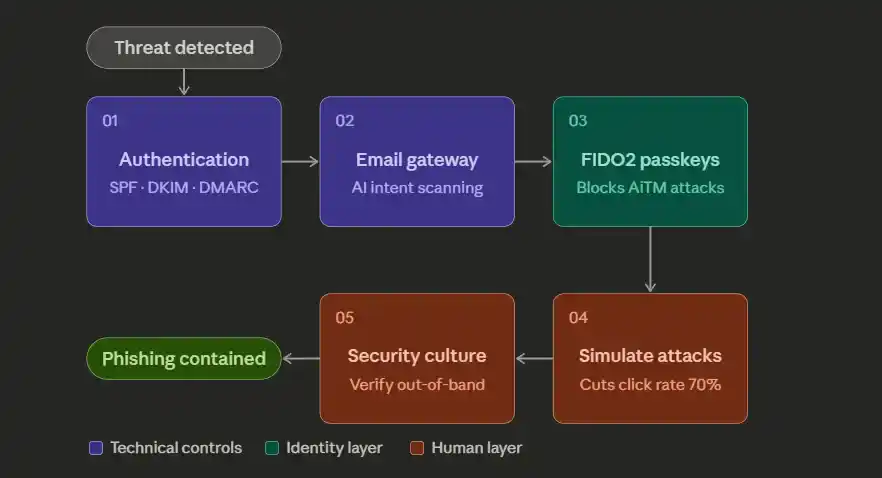
Step 1: Deploy Email Authentication Protocols. Implement SPF, DKIM, and DMARC with a p=reject policy. These three email authentication protocols work together to prevent domain spoofing, which underpins most phishing campaigns. Without SPF, DKIM, and DMARC, your domain can be freely impersonated in phishing attacks targeting your own customers and partners.
Step 2: Use an AI-Powered Secure Email Gateway (SEG). A Secure Email Gateway is a foundational email security control. Modern SEGs use NLP and computer vision to analyze email intent, detect impersonation patterns, and sandbox suspicious phishing links and attachments in real time before delivery to the inbox.
Step 3: Enable FIDO2/Passkey Authentication. Replace SMS-based MFA with phishing-resistant FIDO2 security keys or passkeys. These cryptographically bind to the legitimate domain, making AiTM phishing attacks ineffective. Phishing-resistant MFA is now considered a minimum email security standard for businesses in 2026.
Step 4: Run Monthly Phishing Simulations. Automated phishing simulation platforms deliver realistic phishing tests and provide immediate training moments when employees click. Organizations running regular phishing simulations reduce click rates by up to 70%, making them one of the most cost-effective email security investments available.
Step 5: Enforce a “Trust, Then Verify” Email Security Culture. Train staff to treat any email requesting credentials, payments, or urgent action with healthy suspicion, regardless of how legitimate it looks. A strong email security culture is as important as any technical control.
Business Email Compromise (BEC): The $2.9 Billion Problem
What Makes BEC Different
- The most financially damaging email security threat in the world
- Unlike malware-based attacks, BEC requires no technical exploitation
- Operates entirely through social engineering
- Delivers results even against organizations with advanced tech maturity
Why It’s So Hard to Stop
- Does not need to bypass firewalls or crack encryption
- Bypasses people, not systems
- Exploits three core psychological levers:
- Trust: impersonating known, credible parties
- Urgency: pressuring targets to act without verification
- Authority: mimicking executives or senior decision-makers
How a BEC Attack Unfolds
Phase 1:Reconnaissance
- Attackers spend days or weeks profiling the target organization
- Sources include LinkedIn, media releases, and publicly filed documents
- Key intelligence gathered:
- Organizational hierarchy and key personnel
- Payment processes and financial workflows
- Vendor and partner relationships
- Internal communication style and tone
Phase 2: Impersonation
- Attacker assumes the identity of a trusted party
- Strike is timed to coincide with an active financial workflow
- The request is crafted to appear routine and expected
The 5 Most Common BEC Attack Scenarios
- CEO Fraud: The attacker impersonates the CEO, urging the CFO or finance team to make an urgent, confidential wire transfer. CEO fraud is the most reported form of business email compromise.
- Vendor/Supplier Fraud: A fake email from a known vendor requests updated payment details, redirecting future payments to attacker-controlled accounts. Strong email security verification policies are the primary defence.
- Employee Payroll Redirect: HR or payroll teams are tricked into changing an employee’s direct deposit details to an attacker’s account via a convincing BEC email.
- Attorney Impersonation: Fake legal counsel emails create urgency around “confidential settlements” requiring immediate fund transfers.
- Data Theft BEC: Attackers request W-2 forms, employee PII, or sensitive corporate data rather than money used for secondary fraud or dark web sale.
Defending Against Business Email Compromise
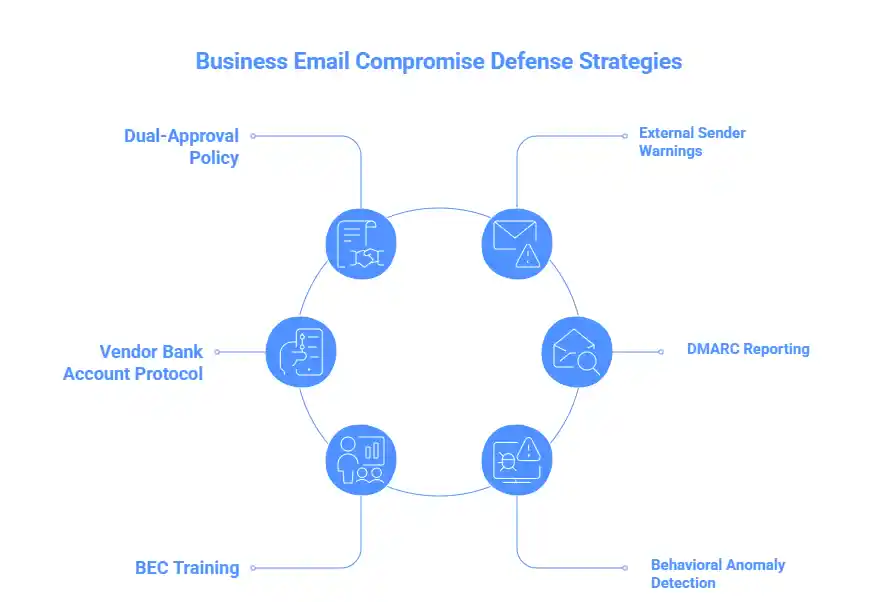
- Establish a dual-approval policy for all wire transfers and payment detail changes, the single most effective BEC countermeasure available.
- Configure email clients to display prominent external sender warnings; a simple email security banner dramatically reduces business email compromise success rates.
- Implement a vendor bank account change protocol: any BEC-style request to modify payment details must be verified via a phone call to a pre-registered number, never the one in the email.
- Use DMARC reporting tools (e.g., Dmarcian, Valimail) to monitor domain usage. DMARC is a critical email security infrastructure for detecting BEC impersonation before it reaches recipients.
- Conduct regular BEC-specific security awareness training using real-world business email compromise scenarios from your own industry.
- Integrate behavioural anomaly detection in your email security platform to flag unusual logins, forwarding rules, or delegation access on executive accounts, common indicators of a BEC compromise in progress.
Email-Borne Malware: Ransomware, RATs & Beyond
Despite the rise of social-engineering-only attacks like BEC, malicious email attachments and weaponized links remain the number one malware delivery mechanism globally. Effective email security must treat malware delivery as a primary concern. Ransomware gangs continue to rely on email as their primary initial access vector, often chaining a phishing email with a malware exploit to achieve full domain compromise within hours.
Common Email Malware Delivery Methods
| Method | Description |
| Malicious Attachments | Office macros, PDFs with embedded scripts, ISO/IMG files, and OneNote notebooks containing hidden executables are the most common email malware vectors in 2026. |
| Weaponised URLs | Phishing links to drive-by download sites, credential harvesting pages, or legitimate cloud services (OneDrive, Dropbox) hosting malicious malware payloads to evade email security URL filtering. |
| HTML Smuggling | Malicious code is assembled inside the browser from seemingly innocent HTML email attachments, completely bypassing network-level email security scanning. |
| QR Code Payloads | QR codes redirect mobile devices rarely covered by enterprise email security or endpoint detection to malware download pages or credential harvesting sites. |
Technical Controls for Email Malware Prevention
- Attachment sandboxing: A core email security control detonates all attachments in an isolated cloud environment before delivery. Evaluate behaviour, not just signatures, to catch zero-day malware.
- URL rewriting and time-of-click protection: Rewrite all embedded links so they pass through an email security proxy at click time, catching malicious phishing URLs that activate after delivery.
- Block high-risk file types at the email security gateway: Restrict delivery of .exe, .iso, .img, .vhd, .ps1, .wsf, .hta, and macro-enabled Office files unless explicitly required.
- Implement Content Disarm & Reconstruction (CDR): An advanced email security technique that strips active malware content from documents and rebuilds a clean, safe copy.
- Deploy EDR on all endpoints: Modern Endpoint Detection & Response solutions catch malware post-delivery, stopping lateral movement even when an email slips through your email security gateway.
- Patch management on a 24–72 hour critical cycle: Many email malware exploits rely on known vulnerabilities that remain unpatched for weeks, a critical gap in any email security posture.
AI-Enhanced Attacks: LLMs, Deepfakes & the New Frontier
AI-enhanced attacks are the fastest-growing email security threat in 2026. Adversaries no longer need technical skill; they simply use a large language model. The result is a wave of email attacks that are personalized, grammatically flawless, and generated at an industrial scale, making traditional email security awareness training obsolete overnight.
Manual Phishing vs. AI-Enhanced Phishing
| Metric | Manual Phishing | AI-Enhanced Phishing |
|---|---|---|
| Emails per hour | ~50 | ~50,000+ |
| Personalisation | Generic or light | Deep real names, projects, events |
| Grammar & tone | Variable, often poor | Native-level, stylistically matched |
| Lookalike domains | Manual, slow | Automated, hundreds generated instantly |
| Evasion of email security | Moderate | High dynamic, mutating content |
| Cost to attacker | Moderate | Near zero |
5 AI-Enhanced Attack Types to Know
01 · LLM-Generated Spear Phishing AI models ingest LinkedIn profiles, press releases, and social data to generate emails referencing real colleagues and live projects. No grammar errors. No suspicious formatting. Indistinguishable from a legitimate internal email.
02 · Deepfake Voice & Video BEC AI voice cloning replicates a CEO’s voice from just 30 seconds of public audio. A phishing email is followed by a deepfake voicemail authorizing a fraudulent payment, defeating both technical and human email security layers at once.
03 · AI-Powered Phishing-as-a-Service (PhaaS) Criminal dashboards with built-in LLMs auto-personalize email content, register lookalike domains, and rotate infrastructure to evade email security blocklists. No technical skill required, just a browser and a credit card.
04 · Polymorphic AI Malware AI generates malware that mutates its code signature on every single deployment. Each attachment is cryptographically unique, making signature-based email security scanning unreliable without behavioural analysis.
05 · Automated AI Reconnaissance Before a single email is sent, AI tools correlate data from LinkedIn, news articles, and company websites to build precise target profiles in minutes, producing emails that feel genuinely familiar to the recipient.
“AI has eliminated the one signal employees were trained to spot imperfection. In 2026, a flawless email is no longer proof of legitimacy.”
— SANS Institute, 2026 Email Security Threat Report
Defences Against AI-Enhanced Email Attacks
| # | Defence | Why It Works |
|---|---|---|
| 1 | Behavioural AI at the Email Security Gateway | Uses LLMs to detect manipulation intent and urgency patterns not just technical indicators that AI attacks are designed to avoid. |
| 2 | Out-of-Band Verification for High-Stakes Requests | No email alone should authorise a wire transfer or credential reset. A pre-registered phone call defeats the majority of AI-enhanced BEC attacks. |
| 3 | Anti-Deepfake Code Words | A shared verbal verification word between executives defeats voice-cloning BEC if the caller can’t provide it, the request is fraudulent. |
| 4 | Behavioural Sandboxing for All Attachments | Analyses what an attachment does at runtime, not what it looks like the only reliable method against polymorphic AI malware. |
| 5 | AI-Era Security Awareness Training | A shared verbal verification word between executives defeats voice-cloning BEC if the caller can’t provide it; the request is fraudulent. |
Email Authentication Protocols: SPF, DKIM & DMARC
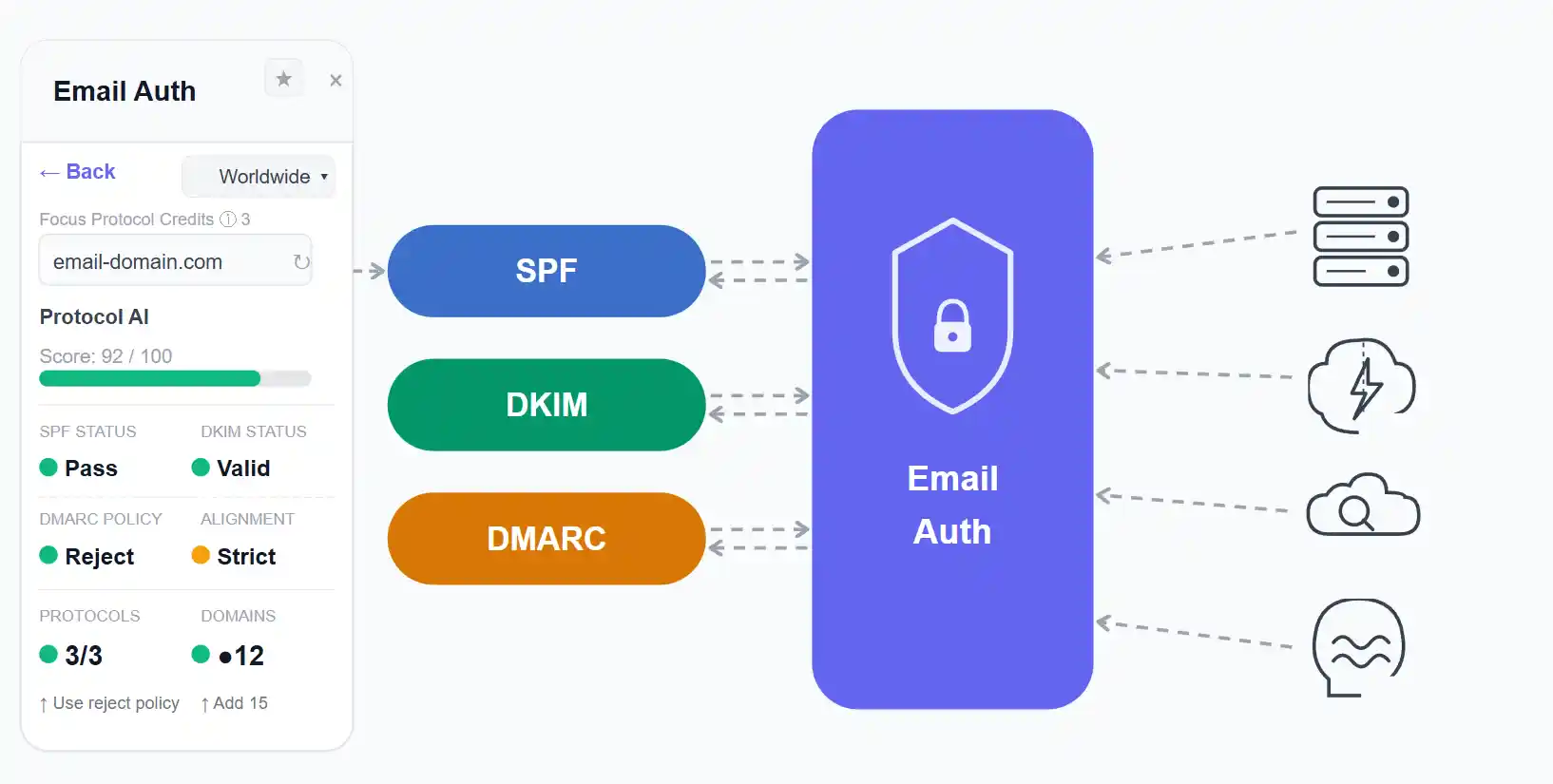
SPF, DKIM, and DMARC are the technical backbone of email security authentication. Deploying all three is non-negotiable for any serious email security programme in 2026. Together, they make it significantly harder for attackers to send emails that appear to originate from your domain, protecting your employees, customers, and brand reputation from phishing and BEC attacks alike.
SPF, DKIM & DMARC Explained
| Protocol | What It Does | Without It | Priority |
| SPF | Specifies which mail servers are authorized to send email on behalf of your domain via a DNS TXT record. SPF is the first layer of email authentication. | Anyone can send phishing emails appearing to come from your domain, the foundation of most BEC and phishing attacks. | Essential |
| DKIM | Adds a cryptographic signature to every outbound email, proving it hasn’t been tampered with in transit. DKIM works alongside SPF to complete email authentication. | Email content can be modified after sending with no detection, making DKIM critical to email security integrity. | Essential |
| DMARC | Tells receiving servers what to do when SPF and DKIM checks fail: nothing (monitor), quarantine, or reject. DMARC is the enforcement layer that makes SPF and DKIM meaningful. | SPF and DKIM failures have no consequence; attackers simply continue sending phishing and BEC emails unchecked. | Enforce p=reject |
| BIMI | Displays your verified brand logo in recipients’ inboxes once DMARC is in enforcement, a powerful email security and brand trust signal. | No brand logo in the inbox, impersonators appear equally credible to your own legitimate email. | Recommended |
| MTA-STS | Enforces TLS encryption for all email in transit to your domain, preventing downgrade attacks. Complements DMARC and DKIM for comprehensive email security. | Email between servers can be intercepted and read in plaintext, undermining all other email security controls. | Recommended |
Zero Trust Email Architecture
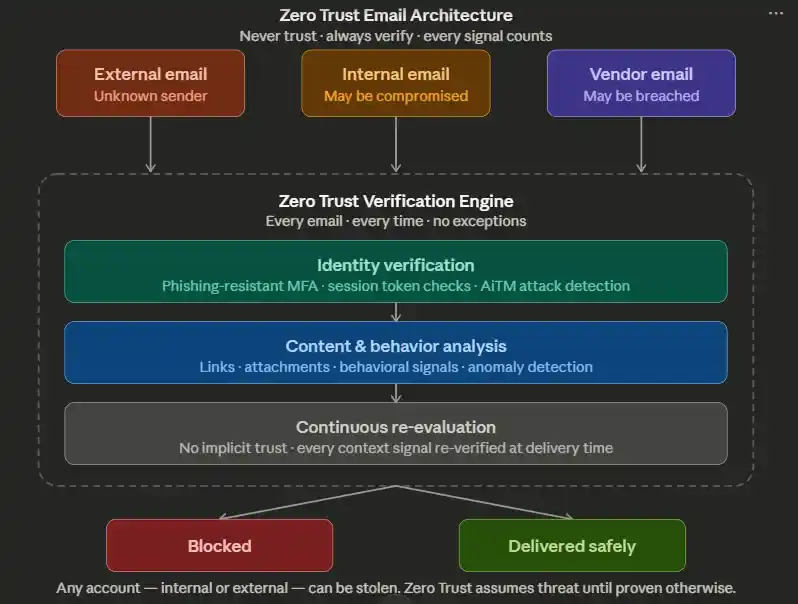
The perimeter-based email security model is dead. “Trust but verify” has become “never trust, always verify”, and this Zero Trust philosophy is now being applied to email security infrastructure with impressive results across enterprise organizations.
A Zero Trust email security architecture assumes that any email could be malicious, including email from internal accounts (which may be compromised) and from known vendors (who may themselves have been breached). Every signal is evaluated continuously, not just the sender’s address at delivery time.
Zero Trust email security also assumes that identities can be stolen. Even with MFA enabled, session tokens can be hijacked via AiTM phishing attacks, which is why continuous session evaluation and phishing-resistant MFA together form the identity layer of any robust Zero Trust email security programme.
Five Pillars of Zero Trust Email Security
1. Least Privilege Inbox Access: Restrict email account permissions to what each role strictly requires. Shared service accounts and delegate access are a common persistence mechanism for attackers after gaining email access, as well as a well-documented Zero Trust email security gap.
2. Conditional Access Policies: Block email access from unmanaged or non-compliant devices. Use device compliance signals from your MDM to ensure only healthy, enrolled devices can access corporate email. This is a foundational Zero Trust email security control.
3. Continuous Session Evaluation Don’t just verify identity at login; continuously evaluate session risk signals (location changes, unusual access patterns, bulk email forwarding rules) and force re-authentication when anomalies are detected. Continuous evaluation distinguishes Zero Trust email security from legacy access control.
4. Email Data Loss Prevention (DLP) Configure email security DLP policies to detect and block outbound email containing sensitive data, PII, financial records, source code, and intellectual property, even when the account is legitimately authenticated but behaving abnormally.
5. Encrypted Email for Sensitive Communications: Use S/MIME or a secure messaging gateway for communications involving contracts, financial data, or M&A discussions. Encryption ensures that even if an email is intercepted, it cannot be read, a critical Zero Trust email security control for high-value communications.
Conclusion
Email security in 2026 demands more than a single tool; it requires a layered strategy combining SPF, DKIM, and DMARC for authentication, a secure email gateway for filtering, phishing-resistant MFA for identity protection, and regular phishing simulations to keep your people sharp. No single control stops every attack; together, they make your organization a significantly harder target than the vast majority of businesses that are simultaneously attacked. The organizations that act decisively on the controls covered in this guide, especially DMARC enforcement and Zero Trust email access, will be the ones that contain threats quickly and recover confidently when attacks inevitably come.
FAQs
What is zero-trust security?
A security model that assumes no user or email is trusted by default and requires continuous verification.
What is a credential stuffing attack?
An attack where hackers use stolen usernames and passwords to gain unauthorized access across multiple accounts.
Are default email protections (Google/M365) enough?
No, they provide a baseline but lack advanced protection against targeted and AI-driven attacks.
Why are phishing emails impossible to block now?
Because modern phishing uses AI and trusted platforms, making emails look completely legitimate.
How do companies defend against AI-generated phishing emails?
By using behavioral detection, phishing-resistant MFA, and strict verification processes.
What is phishing-as-a-service (PhaaS)?
A subscription-based model where attackers use ready-made tools to launch phishing campaigns easily.
What is email security?
Email security is the practice of protecting email systems from phishing, malware, and unauthorized access.
What is Business Email Compromise (BEC)?
BEC is when attackers impersonate trusted people to trick businesses into sending money or data.
What is phishing?
Phishing is a scam where attackers send fake emails to steal sensitive information like passwords or money.