
Table of Contents
Quick Summary: Mobile app development in 2026 is defined by three forces: AI integration as a baseline expectation, aggressive cost competition from cross-platform frameworks, and sky-high user retention standards. This guide covers everything: the step-by-step development process, real cost breakdowns, native vs. cross-platform decisions, the best tech stacks, and what’s actually working in the field right now. Whether you’re a first-time founder or an enterprise product leader, this is the guide we wish had existed when we started.
The State of Mobile App Development in 2026
Mobile apps aren’t a channel anymore; they’re the core of how businesses operate and how users experience the world.
Here’s where things stand right now:
- The global mobile app market is valued at $206.6 billion in 2026, projected to reach $616.4 billion by 2033 (a 14%+ CAGR)
- Over 5.78 billion people worldwide own a smartphone
- Users spend roughly 88% of their mobile screen time inside apps, not browsers
- Mobile commerce accounts for 72.9% of all e-commerce transactions
- The average person spends 4.8 hours per day on mobile apps (up from 3.7 hours in 2019)
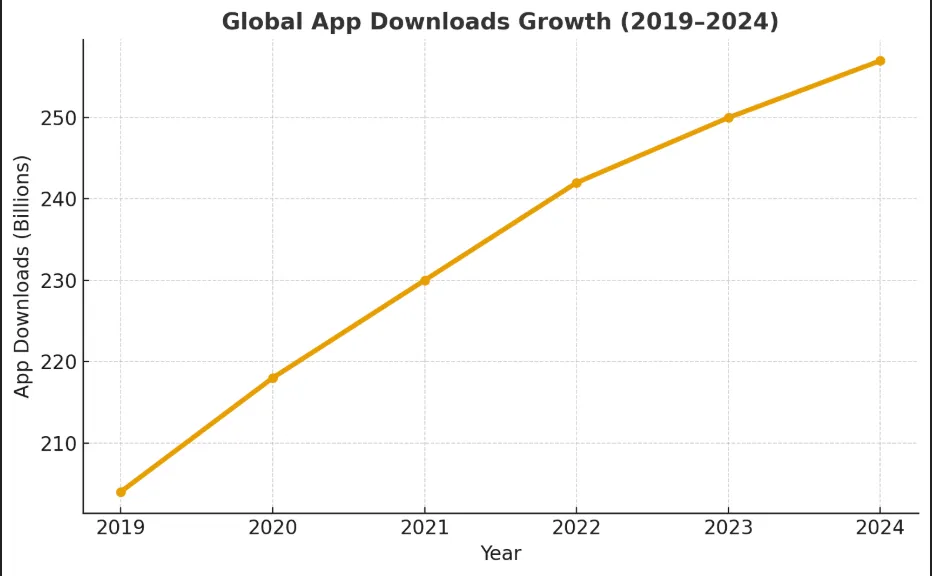
- 257 billion apps were downloaded globally in 2024
Despite this opportunity, the harsh reality is that 90% of apps are used once and abandoned. The gap between “an app that exists” and “an app people return to” is what this guide is really about.
The defining shift in 2026 is this: AI is no longer a premium add-on. According to Gartner, 40% of enterprise applications are expected to incorporate task-specific AI agents by the end of 2026, up from less than 5% in 2025. Users now expect apps to anticipate, not just respond.
What Is Mobile App Development?
Mobile app development is the end-to-end process of conceiving, designing, building, testing, launching, and maintaining software applications that run on smartphones and tablets.
It’s not just coding. A successful app project involves:
- Product strategy: understanding the business problem and user needs
- UX/UI design: creating an experience that feels effortless
- Frontend development: what users see and interact with
- Backend development: servers, databases, APIs, business logic
- QA and testing: catch failures before users do
- DevOps and deployment: App Store, Play Store, CI/CD pipelines
- Post-launch maintenance: updates, security patches, and feature iterations
Many businesses underestimate the last two. Launching is not the finish line. It’s the starting gun.
Types of Mobile Apps
Before you build, you need to know what kind of app you’re building. This decision affects every downstream choice cost, timeline, team, and tech stack.
Native Apps
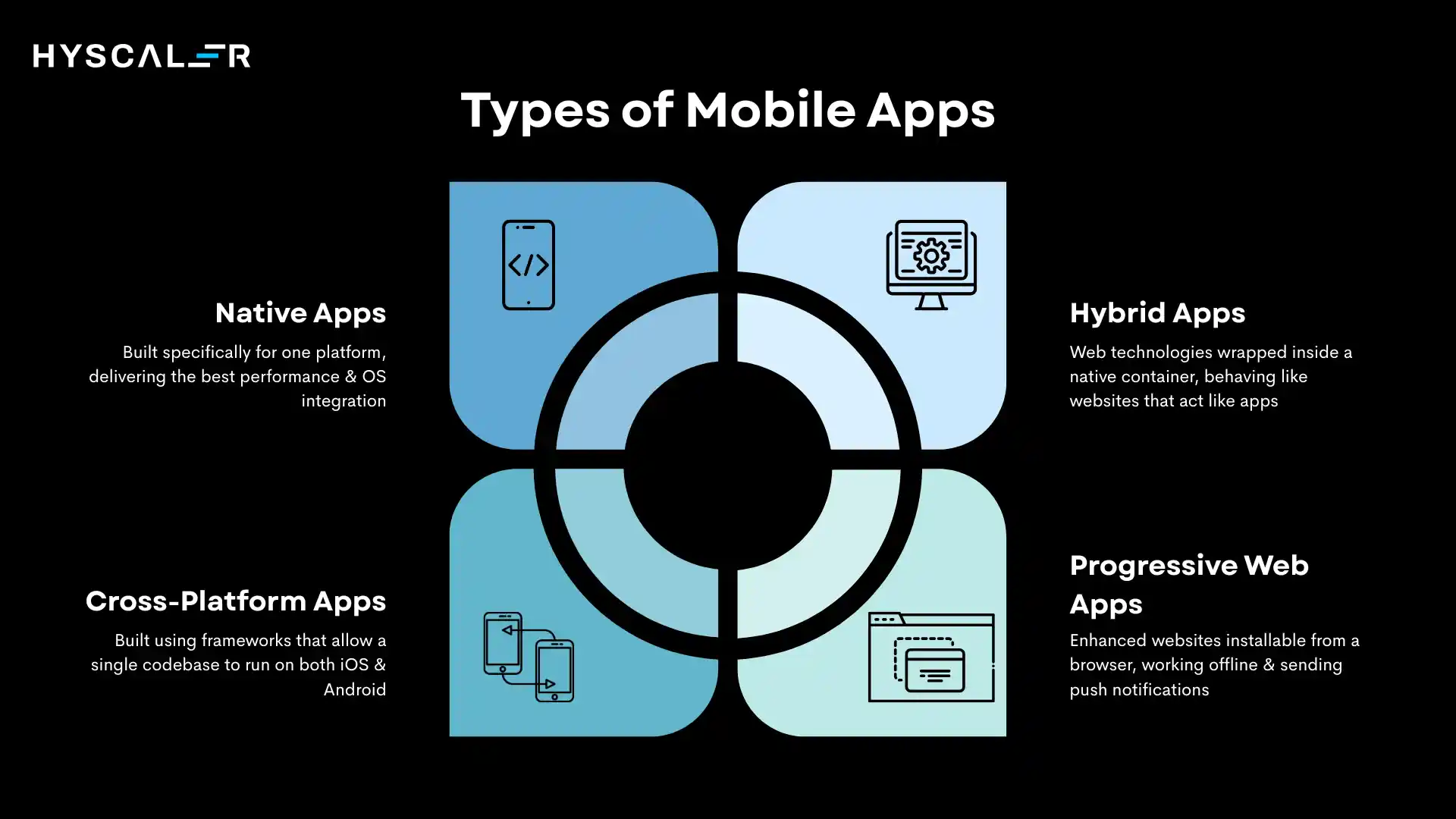
Built specifically for one platform using its native language (Swift/SwiftUI for iOS, Kotlin/Jetpack Compose for Android). They deliver the best performance, deepest OS integration, and most polished UX.
Best for: Performance-heavy apps (AR/VR, gaming, real-time trading), apps requiring deep device hardware access, or when the platform experience itself is a differentiator.
Trade-off: Higher cost, you’re effectively building two separate apps.
Cross-Platform Apps
Built using frameworks like Flutter or React Native that allow a single shared codebase to run on both iOS and Android. Modern cross-platform performance is significantly closer to native than it was even three years ago.
Best for: MVPs, budget-conscious builds, apps with standard UI patterns, B2B tools, and most SaaS-style apps.
Trade-off: Some platform-specific customizations require extra work. Performance gaps exist in graphics-heavy use cases.
Hybrid Apps
Web technologies (HTML, CSS, JavaScript) wrapped inside a native container (like Ionic or Capacitor). Think of them as websites that behave like apps.
Best for: Content-driven apps, internal enterprise tools, rapid prototypes.
Trade-off: Limited access to native device APIs; performance is noticeably lower in complex UIs.
Progressive Web Apps (PWAs)
Enhanced websites that behave like apps installable from a browser, capable of working offline, and able to send push notifications. No App Store download required.
Best for: Content platforms, e-commerce storefronts, and tools where the friction of downloading is a barrier.
Trade-off: iOS support remains limited; cannot access all device hardware; no App Store discoverability.
The Mobile App Development Process: Step by Step
This is the process we follow at HyScaler, refined across dozens of projects and continuously updated based on what actually works.
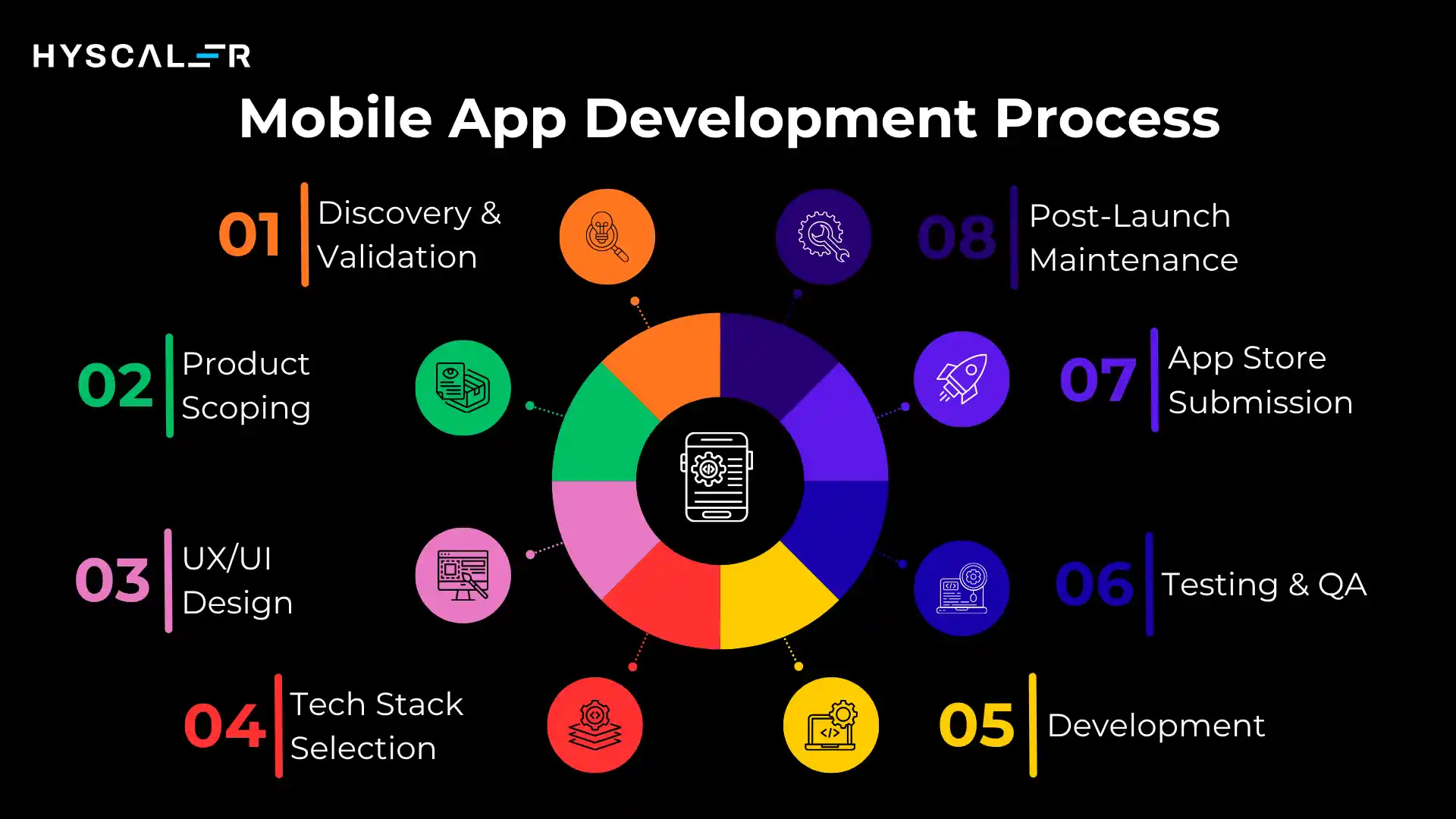
Phase 1: Discovery & Validation (Weeks 1–3)
This is the most undervalued phase. Building the wrong thing faster is not progress.
What happens here:
- Define the core problem and the user experiencing it
- Conduct competitive analysis, not just “what exists,” but “what gaps exist.”
- Identify your riskiest assumptions (what must be true for this to work?)
- Create user personas based on interviews, not guesses
- Define success metrics before writing a line of code
The hard truth: 70% of apps fail not because of bad code, but because they solve a problem people don’t actually have or don’t have badly enough to change behavior. Validation is not optional.
Phase 2: Product Scoping & MVP Definition (Weeks 2–4)
Once you’ve validated direction, ruthlessly narrow the scope.
An MVP is not “a simple version of the full product.” An MVP is the minimum set of features that delivers genuine value to a real user and allows you to learn something specific.
Deliverables:
- Prioritized feature list (MoSCoW method: Must-have, Should-have, Could-have, Won’t-have)
- User stories and acceptance criteria
- Technical requirements document
- Project roadmap with milestones
Phase 3: UX/UI Design (Weeks 3–7)
Design is a strategy made visible. Poor UX kills good apps 53% of users abandon apps that take more than 3 seconds to load, and 71% may never return after a single crash.
The design process:
- Information architecture: how content and features are organized
- Wireframes: low-fidelity layout sketches for each screen
- User flows: how users move through the app to complete goals
- Interactive prototypes: clickable mockups tested with real users before any code is written
- High-fidelity design: final visual design with brand, colors, typography, and imagery
- Design system creation: reusable component library for developer handoff
In 2026, AI-assisted design tools (Figma AI, Framer AI) accelerate wireframing and layout generation significantly. Human designers still own the strategy, taste, and brand coherence.
Phase 4: Tech Stack Selection (Weeks 3–5, overlapping design)
This decision is permanent in the short term and expensive to reverse.
Phase 5: Development (Weeks 5–20+, depending on scope)
App Development happens in agile sprints, typically two-week cycles. Each sprint produces working, testable software.
What good development looks like:
- Modular architecture: code written in components that are reusable and independently testable
- API-first design: backend built as a structured API from day one (easier to integrate with, easier to scale)
- Continuous integration (CI): automates code testing on every commit
- Feature flags: ability to turn features on/off without deploying new code
- Clear documentation: future-you and future-teammates will be grateful
Frontend + Backend work in parallel. Frontend developers build what users see. Backend developers build the data layer, business logic, and integrations. They sync through well-defined API contracts.
Phase 6: Testing & QA (Ongoing throughout development)
Testing is not a phase at the end. It’s embedded in every sprint.
| Testing Type | What It Checks |
| Functional | Does every feature do what it’s supposed to do? |
| Performance | How does the app behave under load? On slow networks? |
| Security | Are user data, APIs, and payment flows protected? |
| Usability | Can real users complete tasks without help? |
| Device Compatibility | Does it work across a range of devices and OS versions? |
| Regression | Does the new code break existing features? |
In 2026, AI-powered testing tools (like those integrated into GitHub Actions) automatically generate test cases and detect edge cases, significantly reducing QA time.
Phase 7: App Store Submission & Launch (Weeks 2–4 for review cycles)
Both Apple and Google have strict, and sometimes unpredictable, review processes.
Apple App Store:
- Review time: 24–72 hours (expedited reviews available for critical bugs)
- Strict guidelines on privacy, in-app purchases, and UI design
- Rejections for violations of App Tracking Transparency, inappropriate content, or incomplete functionality
Google Play Store:
- Review time: Hours to a few days
- More lenient than Apple but increasingly rigorous on privacy and permissions
What to prepare for launch:
- App Store Optimization (ASO) keyword-rich title, description, screenshots, and preview video
- Pre-launch marketing (email list, waitlist, PR)
- Analytics and crash reporting tools live from Day 1 (Firebase, Mixpanel, Sentry)
- A staged rollout plan doesn’t push to 100% of users at once
Phase 8: Post-Launch Maintenance & Scaling
This is where most products live or die.
Ongoing activities:
- Monitor crash rates, performance metrics, and user retention daily in the first weeks
- Respond to App Store reviews, both positive and negative
- Ship bug fixes within 48–72 hours of critical issues
- Quarterly feature updates based on user feedback and analytics
- Annual OS update compatibility work (iOS 20, Android 16, etc.)
- Security audits at least twice per year
Budget reality:
Plan to spend 15–25% of your original development cost per year on maintenance. An app that costs $100,000 to build needs $15,000–25,000/year to stay healthy. Hiring a full-time iOS developer costs around $120,000-150,000 annually in the US. Add an Android developer, a designer, a project manager, and a QA tester, and you’re looking at $400,000+ per year before you’ve written a single line of code.
Choosing Your Tech Stack
There is no universally “best” stack only the right stack for your context. Here’s what we recommend in 2026 based on actual project outcomes:
Our Recommended Modern Stack (Most Use Cases)
| Layer | Technology | Why |
|---|---|---|
| Mobile Frontend | Flutter | Best cross-platform performance; Google-backed; massive ecosystem |
| Mobile Frontend (Alt) | React Native | Great for teams with JavaScript expertise |
| iOS Native | Swift + SwiftUI | Required for performance-critical or deeply hardware-integrated apps |
| Android Native | Kotlin + Jetpack Compose | Modern, concise, fully supported by Google |
| Backend | Node.js or Python (FastAPI) | Node for real-time apps; Python for AI/ML-heavy backends |
| Rapid Backend | Firebase | Excellent for MVPs; serverless; real-time database |
| Database | PostgreSQL (primary) + Redis (cache) | Proven reliability + speed |
| Cloud Infrastructure | AWS or GCP | Scalability, global CDN, managed services |
| AI Layer | OpenAI API / custom fine-tuned models | For recommendations, chat, and personalization features |
| On-Device AI | TensorFlow Lite / Core ML | For offline AI features with privacy |
| Authentication | Auth0 or Firebase Auth | Don’t build auth from scratch |
| Payments | Stripe | Industry standard; excellent mobile SDKs |
| Analytics | Mixpanel + Firebase | Behavioral analytics + crash/performance monitoring |
Stack Decision Factors
Choose Flutter if: Budget matters, you’re building for both platforms, and your UI doesn’t require deep platform-specific components.
Choose React Native if: Your team already lives in JavaScript/TypeScript and you need strong community library support.
Choose native (Swift/Kotlin) if: You’re building a game, AR/VR experience, or anything that relies on bleeding-edge OS APIs the day they’re released.
Choose Firebase if: You need to ship an MVP in under 8 weeks, and scalability is a future problem.
Native vs. Cross-Platform vs. PWA: How to Decide
This is the decision we get asked about most often. Here’s an honest, non-promotional breakdown:
The Decision Framework
Step 1: Who is your user, and where are they?
- Targeting North America/Western Europe with premium pricing → iOS-first or native
- Targeting global or emerging markets → Android-first or cross-platform
- Targeting both → cross-platform (Flutter) or native dual build
Step 2: What does your app actually need?
- Requires real-time graphics, complex animations, or deep hardware integration → Native
- Standard UI patterns (lists, forms, dashboards, chat) → Cross-platform handles this perfectly
- Content-driven, low-friction → Consider PWA first
Step 3: What’s your budget and timeline reality?
- Under $100K budget → Cross-platform or PWA
- Over $200K with 12+ months → Can justify native for one platform
- Need to launch in under 4 months → Flutter or React Native + Firebase
Side-by-Side Comparison
| Factor | Native (iOS + Android) | Cross-Platform (Flutter/RN) | PWA |
|---|---|---|---|
| Performance | Best | Near-native | Good for basic UIs |
| Dev Cost | Highest (2x teams) | Moderate | Lowest |
| Time to Market | Slowest | Fast | Fastest |
| Device Feature Access | Full | Near-full | Limited |
| App Store Discovery | Yes | Yes | No |
| Offline Capability | Full | Full | Partial |
| Update Speed | Slow (store review) | Slow (store review) | Instant |
| Best For | Gaming, AR, finance, health | Most B2C and B2B apps | Content, tools, e-commerce |
Our real-world recommendation: For 80% of the apps we build, Flutter hits the right balance. Reserve native builds for use cases where the platform differences are your product’s core value proposition.
Mobile App Development Cost in 2026
Cost is the question everyone asks. The honest answer: “It depends,” but we can give you meaningful ranges.
Cost by App Complexity
| App Type | Cost Range | Timeline | Example |
|---|---|---|---|
| Simple / MVP | $25,000 – $60,000 | 2–4 months | Basic booking app, informational app with auth |
| Mid-Level | $60,000 – $175,000 | 4–8 months | Marketplace, social app, SaaS mobile client |
| Complex | $175,000 – $350,000 | 8–14 months | Fintech app, healthcare platform, real-time multi-user |
| Enterprise-Grade | $350,000 – $750,000+ | 12–24 months | Banking app, large-scale logistics, regulated industries |
What Drives Cost Up
- Number of screens and features, each feature is a scope and testing unit
- Backend complexity: custom APIs, real-time sync, third-party integrations
- Compliance requirements HIPAA, PCI-DSS, and GDPR, each add 20–40% to the cost
- AI/ML features custom model training is expensive; using OpenAI APIs is far cheaper
- Design polish level, custom animations, and micro-interactions add significant time
- Team location US/Western Europe: $100–200/hr; India/Eastern Europe: $25–70/hr
Hidden Costs People Miss
- App Store fees: Apple charges $99/year; Google charges a one-time $25
- Third-party services push notifications, maps, payments, and analytics all have recurring costs
- Post-launch maintenance budget 15–25% of dev cost annually
- QA devices real-device testing across multiple models
- Marketing and ASO, your app won’t market itself
The India Advantage
India-based development teams (like HyScaler, based in India with global clients) typically run 40–60% lower than equivalent US rates, while quality has significantly converged in the last five years, particularly for product companies with established QA and design processes. This isn’t outsourcing arbitrage anymore; it’s talent market reality.
Timeline: How Long Does It Take?
| Milestone | Realistic Timeline |
|---|---|
| MVP (cross-platform, core features only) | 10–16 weeks |
| Mid-level app (cross-platform) | 16–32 weeks |
| Complex app (cross-platform or native) | 32–52+ weeks |
| Enterprise platform | 52+ weeks |
Factors that compress timelines:
- Using Firebase/BaaS instead of a custom backend
- Choosing cross-platform over native
- Narrowing MVP scope ruthlessly
- Experienced team with relevant domain knowledge
Factors that extend timelines:
- Scope changes mid-project (most common culprit)
- Regulatory compliance requirements
- Third-party API integration complexity
- Slow stakeholder decision-making
- App Store rejection and resubmission cycles
The Top Mobile App Development Trends in 2026
These aren’t trend-report buzzwords. These are things happening in production apps being shipped right now.
1. AI as Infrastructure, Not Feature
AI has moved from “add a chatbot” to “the entire product is AI-native.” In 2026, leading apps will use AI for:
- Personalization engines, content, product, and UI adapt to individual behavior
- Predictive UX apps anticipate next actions (Gmail’s Smart Compose, but for every category)
- On-device AI inference using TensorFlow Lite and Core ML to run models locally for speed and privacy
- AI-generated content, user-specific copy, images, and summaries
- Intelligent search, semantic search replacing keyword matching
The paradigm shift: previously, you built features and added AI. Now you design the AI behavior first and the UI second.
2. Super Apps
Single apps offering multiple services under one identity: payments, messaging, shopping, health, transport. WeChat and Grab pioneered this in Asia; Western markets are following.
Building a super app requires micro-frontend architecture, where separate teams own separate modules that compose into one coherent experience. This is complex to build but enormously powerful for retention.
3. On-Device AI (Edge AI)
Running AI models directly on the user’s device rather than in the cloud. The benefits: faster responses (no round-trip latency), lower infrastructure costs, and privacy preservation.
Core ML (Apple Silicon) and Google’s ML Kit now make this genuinely viable for classification, OCR, real-time translation, and face detection.
4. 5G-Enabled Experiences
The widespread 5G rollout is enabling use cases that were previously impossible on mobile:
- Real-time AR overlays on live camera feeds
- Low-latency multiplayer gaming without dedicated gaming hardware
- Live video collaboration with production-quality streams
- Telemedicine with real-time diagnostics
If you’re building in healthcare, retail, education, or entertainment, 5G capability planning should be in your architecture from day one.
5. Privacy-First Architecture
Privacy is now a product feature, not a legal obligation. iOS App Tracking Transparency, GDPR, India’s DPDP Act, and increasing Android restrictions have fundamentally changed data collection.
In 2026, winning apps are building trust through transparency: clear data usage explanations, granular permission controls, and local-first data storage where possible.
6. Voice and Conversational Interfaces
Voice search, in-app AI assistants, and conversational flows are becoming expected in several categories: productivity tools, healthcare apps, automotive, and accessibility-focused products. Building for voice isn’t just about adding a microphone button; it requires rethinking information architecture for non-visual interaction.
7. Modular and Micro-Frontend Architecture
Large app teams are moving away from monolithic codebases toward modular architectures where features are independently deployable. This dramatically speeds up release cycles and reduces regression risk. Flutter’s module system and React Native’s Metro bundler support this increasingly well.
Common Mistakes That Kill Apps
These are patterns we’ve seen repeatedly and that we deliberately build processes to prevent.
Mistake 1: Skipping market validation, building before confirming someone will actually use the thing. The fix: user interviews and landing page tests before a single line of code.
Mistake 2: Building the full vision as Version 1. Every feature you add to V1 delays your learning. The fix: define what you need to learn, and build only what teaches you that.
Mistake 3: Ignoring app store optimization ASO is app SEO. A great app that nobody finds is a failed app. The fix: keyword research, optimized screenshots, localized listings from launch day.
Mistake 4: Not planning for retention. Getting downloads is marketing. Getting people to return is a product. The fix: instrument Day 1, Day 7, and Day 30 retention before launch, and build at least one retention mechanic into V1.
Mistake 5: Building for performance at scale on Day 1. Premature optimization is expensive. The fix: architect for scale, but don’t over-engineer infrastructure you don’t need yet.
Mistake 6: Treating security as a later phase. One breach undoes years of trust-building, the fix: OWASP Mobile Top 10 baked into development standards from sprint 1.
Mistake 7: No post-launch owner Apps without a dedicated owner decay rapidly. OS updates break things, security patches get delayed, and users leave. The fix: assign explicit ownership and budget for maintenance.
How to Monetize a Mobile App
Monetization strategy should be decided before you build, as it affects architecture, UX flows, and App Store compliance.
| Model | Best For | Pros | Cons |
| Subscription (SaaS) | Productivity, health, media | Predictable MRR; high LTV | Must continuously justify value |
| Freemium | Consumer apps, tools | Low acquisition barrier | Conversion optimization is hard |
| In-App Purchases | Gaming, content | High ceiling per user | Apple/Google take 15–30% |
| Advertising | High-volume consumer apps | No payment friction | Requires massive scale; UX degradation |
| Marketplace Commission | Two-sided platforms | Scales with GMV | Trust-building with both sides is slow |
| B2B Licensing | Enterprise tools | High contract value | Long sales cycles |
| Transactional | Fintech, e-commerce | Clear value alignment | Requires payment infrastructure |
2026 insight: Subscription models now dominate among high-performing apps. Users have become more selective about subscriptions, which means the value proposition must be crystal clear and continuously earned.
Working with a Mobile App Development Company
Most businesses, especially startups and mid-market companies, are better served by a development partner than by building an internal team from scratch. Here’s why:
The cost comparison:
- Hiring internally (iOS dev + Android dev + designer + PM + QA): $400,000–500,000+/year before benefits
- External MVP development: $50,000–150,000, then ongoing maintenance at a fraction of full-time salaries
What to look for in a partner:
- Domain experience in your vertical: a healthtech app has radically different compliance and UX requirements than a consumer game
- A portfolio with published apps: asks for App Store links, not just design screenshots
- Clear process documentation: how do they run sprints? How are decisions made? How are changes scoped?
- Post-launch support model: what happens after launch is often the most important part of the relationship
- Communication infrastructure: timezone overlap, async documentation practices, and escalation paths
Red flags:
- Quotes significantly below market rate with no explanation
- Unwillingness to sign NDAs or provide clear contracts with milestone deliverables
- No discovery phase offered if they want to skip straight to building, they’re not thinking about your business
- Vague timelines with no breakdown
- Portfolio of only internal tools or unpublished apps
HyScaler’s Approach: What We’ve Learned from Real Projects
We’re a product engineering company based in India with a global client base spanning healthcare, fintech, logistics, and consumer apps. Over years of shipping mobile products, here’s what we’ve learned that doesn’t appear in most guides:
Lesson 1: The discovery investment pays for itself. Every project where we’ve done thorough discovery (user interviews, competitive analysis, assumption mapping) has delivered better outcomes than those that skipped it. The hour you spend upfront saves ten hours of rework.
Lesson 2: Design systems save projects. Apps built without a component-based design system become increasingly difficult to maintain. A proper design system, even a lightweight one for an MVP, dramatically reduces inconsistency and dev time for new features.
Lesson 3: Retention mechanics belong in V1, not V2. Push notification strategies, habit loops, and re-engagement flows that are added after launch are always less effective than those designed from the start. Build one retention mechanic into your MVP.
Lesson 4: Cross-platform has become the right default. Three years ago, we had to carefully argue the case for Flutter on every project. Today, the performance gap is narrow enough that the cost and speed advantage of a single codebase is almost always the right trade-off for apps that aren’t performance-intensive.
Lesson 5: Post-launch is where reputations are made. The first four weeks after launch are critical. How you respond to crashes, reviews, and user feedback in that window determines long-term product trajectory. We treat launch as the beginning of the engagement, not the end.
Final Thoughts
Mobile app development in 2026 is not simpler than it was five years ago, but the tools, frameworks, and accumulated knowledge make it possible to ship better products faster and at lower cost than ever before.
The companies winning with mobile apps share a few things in common: they validate before they build, they ship an MVP and learn, they invest in retention from day one, and they treat their app as a living product rather than a project with a finish line.
At HyScaler, we’ve seen this pattern play out across fintech, healthcare, logistics, and consumer categories. The technology is largely commoditized at this point. The differentiation is in the thinking that happens before and after the code is written.
If you’re planning a mobile app project, we’d love to understand what you’re building. Reach out to our team. The first conversation is always about your business problem, not our services.
HyScaler is a product engineering company based in India, building mobile and web applications for global clients across fintech, healthcare, logistics, and enterprise SaaS. Our engineering team has shipped production apps on iOS, Android, Flutter, and React Native.
FAQ
How much does it cost to build a mobile app in 2026?
A basic MVP ranges from $25,000–$60,000. A mid-level app runs $60,000–$175,000. Complex apps with real-time features, AI, or compliance requirements cost $175,000–$350,000+. Enterprise-grade platforms can exceed $500,000. India-based teams like HyScaler typically run 40–60% below equivalent US market rates.
Should I build for iOS or Android first?
Start where your users are. If you’re targeting North American or Western European markets, especially with subscription monetization, start with iOS. iOS users spend significantly more per transaction. If you’re targeting global or emerging markets, start with Android. If the budget allows, use Flutter to build both simultaneously from one codebase.
How long does it take to build a mobile app?
A focused MVP takes 10–16 weeks. A mid-level app takes 16–32 weeks. Complex apps take 32–52+ weeks. The biggest timeline killers: scope changes mid-sprint, slow stakeholder approval cycles, and App Store rejection/resubmission loops.
What’s the difference between native and cross-platform development?
Native apps are built specifically for one platform (Swift for iOS, Kotlin for Android) and deliver the best performance and deepest OS integration. Cross-platform apps (Flutter, React Native) share one codebase across both platforms, reducing cost and time by 30–40%, with performance that now meets the bar for the vast majority of use cases.
Do I need an app? Can a PWA do the job?
A PWA is worth considering if your use case is content-heavy, your users are acquisition-driven (no App Store needed), and you don’t require deep device hardware access. For most businesses that want user retention, push notifications, offline functionality, and App Store discoverability, a native or cross-platform app is the right investment.
How do I validate my app idea before spending money on development?
Run a three-step validation: (1) Conduct 10–15 user interviews with your target audience about the problem, not your solution. (2) Build a landing page describing the app and measure email signups. (3) Create a clickable prototype in Figma and run moderated user sessions. If people aren’t excited enough to give you their email address, they won’t be excited enough to download your app.
What should I budget for app maintenance?
Plan for 15–25% of your original development cost annually. This covers OS compatibility updates (iOS and Android release major versions yearly), security patches, bug fixes, and minor feature iterations. Apps without maintenance budgets decay visibly within 12–18 months.