Table of Contents
In a business landscape where mobile applications are mission-critical, the market is projected to surge to over $626 billion by 2030. This explosive growth underscores a fundamental truth: a high-quality app is no longer a luxury but a necessity.
We will also explore 10 of the most essential frameworks available today, breaking down their unique strengths, weaknesses, and ideal use cases in a simple, straightforward way.
By the end, you’ll have the clarity you need to choose the perfect tool for your next big idea. Let’s dive in and find the right framework for your project.
Why This Matters In the Coming Years?
The global mobile app market is exploding. Reports suggest it will hit $1,017.18 billion by 2034. Smart technical choices drive this growth. Your choice of framework sits at the top of that list.
Data reveals a clear shift. Cross-platform builds now make up 42% of all mobile projects. This is a massive leap. Competition is fierce. Flutter leads with 12.64% of the market. React Native follows at 12.57%. This landscape is more than a study; it is your key to survival and success.
What Exactly is a Mobile App Development Framework?
A mobile app framework is a toolkit or a blueprint for building apps. It provides an organized space with pre-built templates, code libraries, and tools. You don’t have to start from scratch.
Frameworks allow developers to focus on unique features rather than basic building blocks. This approach slashes development time and costs. It also accelerates your launch and ensures the app performs well on all devices.
Now you understand frameworks. Let’s explore three ways to build an app.
The 4 Core Approaches: Native, Cross-Platform, and Hybrid
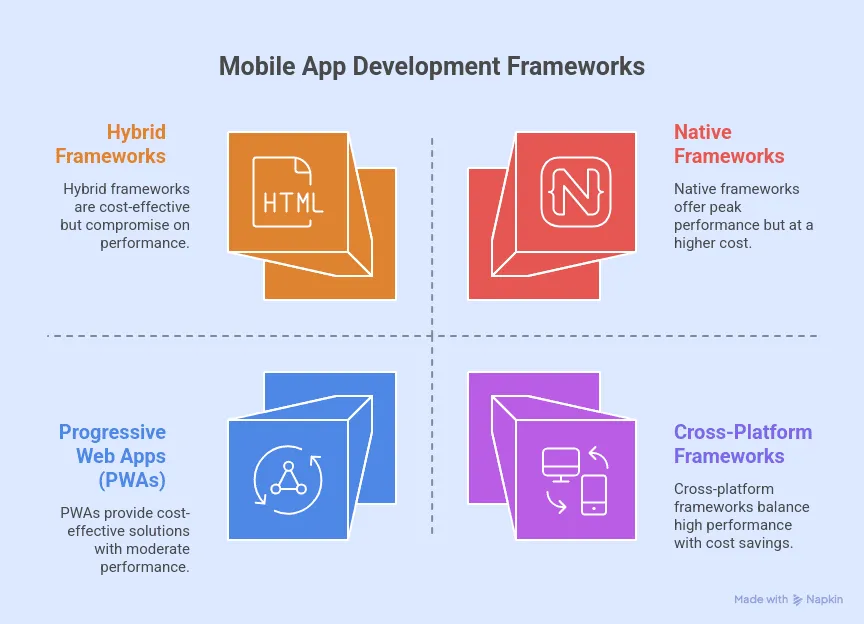
Let’s find out the four main categories of mobile app development before you proceed. Choosing the right mobile framework is a critical business move. It dictates your app’s speed, user experience, budget, and launch date.
1. Native Frameworks
Native frameworks build apps for one operating system, like iOS or Android. This method uses the official languages and tools from Apple and Google. It delivers peak performance and blends perfectly with device features.
- When to Choose: Pick a native framework for high performance. It handles complex animations and advanced hardware like GPS or cameras flawlessly. Use it to build a premium experience that follows platform rules.
- Technologies: Pick Swift for iOS development in Xcode. Use Kotlin for Android apps in Android Studio.
2. Cross-Platform Frameworks
Cross-platform frameworks let you write code once and launch it on both iOS and Android. They create a shared codebase that slashes development time and cost. Unlike hybrid tools, frameworks like React Native and Flutter use a “bridge” or compile directly to render native components. This ensures high performance that rivals native apps.
- When to Choose: Startups must choose this path to reach wider audiences and hit the market faster. It is the perfect solution for apps that need to run on both platforms without complex, platform-specific code.
- Technologies: Dart (Flutter), JavaScript/TypeScript (React Native, NativeScript), C# (.NET MAUI).
3. Hybrid Frameworks
Hybrid frameworks merge web and native tech. Developers build an app with standard tools like HTML, CSS, and JavaScript. Then, they wrap it in a native shell for the app store. The app runs in a “WebView,” which acts as a container for your web content.
- When to Choose: Choose a hybrid framework if your team knows web development. It saves money and works best for content-driven projects like news apps or catalogs. Skip this if you need elite, high-end performance.
- Technologies: HTML, CSS, JavaScript (used in frameworks like Ionic and Apache Cordova).
4. Progressive Web Apps (PWAs)
Web-based applications aren’t traditional mobile apps. They are websites that mimic the look and feel of a native app. Progressive Web Apps (PWAs) evolve this concept further. They offer offline access, send push notifications, and “install” directly to your home screen. You don’t even need an app store
- When to Choose: Choose a PWA to provide an app-like experience without the friction of a download. They excel for e-commerce, content platforms, and internal tools. Use them when you need instant updates and broad accessibility
- Technologies: HTML, CSS, JavaScript.
Below is the table with the comparison
| Native | Cross-Platform | Hybrid | PWA | |
| Core Concept | Built for a single operating system (e.g., iOS or Android) using platform-specific languages. | A single, shared codebase is used to build apps that run natively on multiple platforms. | A web application (built with HTML, CSS, JS) is wrapped inside a native container. | Web apps behaving like native. |
| Performance | Highest | Near-Native | Moderate | Moderate |
| Development Cost & Time | High | Moderate | Low | Moderate |
| Codebase | Separate for each platform | Single shared codebase | Single shared codebase | Single web technology codebase. |
| Best For | Performance-critical apps, complex graphics, and full device integration. | Startups, MVPs, and apps need a consistent UI on both iOS and Android. | Content-driven apps, rapid prototypes, and simple utility tools. | Simple, content-heavy apps. |
With these core concepts in mind, let’s explore the top frameworks within each category.
The Top 10 Mobile Development Frameworks to Watch
Here is a detailed breakdown of 10 essential frameworks, categorized by their development approach. Each one is a powerful tool designed to solve a specific set of challenges.
Native Frameworks
1. SwiftUI
SwiftUI is Apple’s modern, declarative framework for building beautiful and responsive native apps across all Apple platforms, including iOS, macOS, watchOS, and tvOS, using the Swift language.
- Key Features:
- Declarative UI: Write code that describes what your UI should do, making development faster and more intuitive.
- Seamless Apple Ecosystem Integration: Gain full, direct access to the latest iOS features, like ARKit and Core ML, for a premium user experience.
- Native Performance: Delivers the highest possible speed and optimization by compiling directly for Apple’s hardware.
- Best For: Building premium, high-performance apps exclusively for the Apple ecosystem.
- Example App: Apple’s demo app, Landmarks, which showcases SwiftUI’s capabilities.
2. Jetpack Compose
Jetpack Compose is Google’s modern UI toolkit for building native Android applications. It simplifies and accelerates UI development on Android by using a declarative approach with the Kotlin language.
- Key Features:
- Simplified UI Development: Drastically reduces the amount of code needed to build and maintain user interfaces compared to traditional methods.
- Seamless Kotlin Integration: Built to work perfectly with Kotlin, enabling concise, safe, and powerful code.
- Material Design Built-in: Effortlessly create apps that adhere to Google’s modern design guidelines for a consistent and beautiful look.
- Best For: Creating modern, high-performance, Android-specific applications with complex user interfaces.
- Example App: Google is actively incorporating Jetpack Compose into its own Google Play Store app.
Cross-Platform Frameworks
3. Flutter
Developed by Google, Flutter is an open-source UI toolkit for building beautiful, natively compiled applications for mobile, web, and desktop from a single codebase using the Dart language.
- Key Features:
- Fast Development with Hot Reload: See code changes reflected instantly without restarting the app, dramatically speeding up the development cycle.
- Expressive and Flexible UI: A rich library of customizable widgets allows for pixel-perfect, highly creative user interfaces.
- Excellent Performance: Compiles directly to native ARM code, ensuring smooth, high-fidelity experiences that rival true native apps.
- Key Consideration: Flutter apps tend to have a larger file size compared to native ones, and teams new to the ecosystem must account for the learning curve of the Dart language.
- Best For: Startups building a Minimum Viable Product (MVP) or apps that require a highly customized, beautiful UI on both iOS and Android.
- Example Apps: Google Ads and the e-commerce giant Alibaba.
4. React Native
Created by Meta (Facebook), React Native is a hugely popular open-source framework that lets you build natively rendered mobile apps for iOS and Android using JavaScript and the React library.
- Key Features:
- Single Codebase: “Write once, deploy everywhere,” with high code reusability between iOS and Android, saving significant time and resources.
- Large Community & Ecosystem: Access a massive collection of third-party libraries and community support, making it easy to find solutions and add features.
- Hot Reloading: Instantly see the results of your latest changes, allowing for rapid iteration and a faster development cycle.
- Key Consideration: Its reliance on a JavaScript “bridge” to communicate with native modules can create performance bottlenecks in apps with complex animations or heavy computations.
- Best For: Teams with existing JavaScript or React expertise who need to build an app for both platforms quickly.
- Example Apps: Tech giants like Instagram, Facebook, and Uber Eats are built with React Native.
5. Xamarin / .NET MAUI
Xamarin is a Microsoft-owned framework for building cross-platform apps with C# and the .NET platform. It has evolved into .NET MAUI, which offers a unified project structure to create native apps for iOS, Android, macOS, and Windows.
- Key Features:
- Native Performance: Provides direct access to native APIs, allowing apps to achieve performance levels very close to true native apps.
- Strong Microsoft Ecosystem Integration: The perfect choice for enterprise environments that rely on Microsoft tools like Azure and Office 365.
- Code Sharing Across Platforms: Share business logic, data access, and network communication code across mobile and desktop.
- Best For: Enterprise applications, especially for teams already invested in the Microsoft .NET ecosystem.
- Example App: The widely used UPS Mobile app for package tracking.
6. Kotlin Multiplatform
From the creators of Kotlin, Kotlin Multiplatform is a modern framework that allows developers to share business logic, connectivity, and other common code across platforms like iOS and Android while keeping the user interface 100% native.
- Key Features:
- Shared Business Logic: Write complex code once (e.g., for data handling or authentication) and use it on both iOS and Android to avoid duplication and errors.
- Native UI Experience: Since only the logic is shared, the UI can be built with SwiftUI for iOS and Jetpack Compose for Android, ensuring no compromises on user experience.
- Gradual Adoption: Can be integrated into existing native projects, allowing teams to start sharing code without a complete rewrite.
- Best For: Teams that want to maximize code reuse for business logic without sacrificing the platform-specific native user interface.
- Example App: Major applications like Netflix use Kotlin Multiplatform to share code between their iOS and Android apps.
7. NativeScript
NativeScript is an open-source framework for building truly native mobile apps with JavaScript, TypeScript, Angular, or Vue.js. It stands out by providing direct, uninhibited access to native platform APIs.
- Key Features:
- Direct Native API Access: Unlike other frameworks that use a “bridge,” NativeScript lets you call iOS and Android APIs directly from your JavaScript code for better performance.
- Cross-Platform UI: Design your app’s user interface once using a single codebase that renders native UI components on each platform.
- Robust Backend Support: Easily integrates with various backend services, making it suitable for mission-critical business applications.
- Best For: Projects that require deep integration with native device features while using web development skills.
- Example Apps: The childcare management app Daily Nanny and the crypto app BitPoints Wallet.
Hybrid Frameworks
8. Ionic
Ionic is a popular open-source hybrid framework that empowers web developers to build cross-platform mobile, web, and desktop apps using standard web technologies like HTML, CSS, and JavaScript.
- Key Features:
- Easy to Learn for Web Developers: Teams with web development experience can quickly become productive without needing to learn native languages.
- Wide Range of Pre-built UI Components: Offers an extensive library of mobile-optimized components that adapt to the look and feel of each platform.
- Single Codebase for Mobile and PWAs: Build an iOS app, an Android app, and a Progressive Web App (PWA) all from the same code.
- Key Consideration: Performance can be limited for complex applications, and it relies heavily on plugins for native device features, which can lead to an inconsistent user experience across platforms.
- Best For: Content-driven applications or for web development teams needing to create a mobile app quickly and cost-effectively.
- Example Apps: Widely used apps like MarketWatch and Sworkit.
9. Apache Cordova
Apache Cordova (formerly PhoneGap) is a foundational hybrid framework that wraps web applications built with HTML, CSS, and JavaScript into a native container. However, in 2025, it is considered a declining technology.
- Key Features:
- Large Plugin Ecosystem: Access a vast library of plugins to connect your web code to native device features like the camera, GPS, and accelerometer.
- Cross-Platform Development: Use a single web-based codebase to target multiple mobile operating systems.
- Low Barrier to Entry: A straightforward choice for web developers looking to enter the mobile app space for the first time.
- Key Consideration: The framework is declining fast. Many teams face the “Cordova curse” of slow rendering, outdated plugins, and limited community support, making it a risky choice for new projects.
- Best For: Simple utility apps, rapid prototyping, or maintaining legacy projects where performance is not the primary concern.
- Example App: Wikipedia’s mobile application has utilized this technology in the past.
10. Framework7
Framework7 is an open-source framework used to build hybrid apps with HTML, CSS, and JavaScript that aim to perfectly replicate the native look and feel of iOS and Android applications.
- Key Features:
- Native Look and Feel: Excels at mimicking the iOS look-and-feel with pre-styled web components and animations.
- Rich Ecosystem: While lightweight, it integrates well with popular tools like Vue.js and React to add more power and structure.
- Prototyping Power: An excellent tool for quickly creating high-fidelity, interactive prototypes that feel like real native apps.
- Best For: Prototyping or building apps where a native-like appearance is more important than complex, high-performance functionality.
- Example App: The cryptocurrency news app Blokt.
Now that you’ve seen the top contenders, how do you pick the one that’s right for you?
How to Decide Which Framework Is Best For You?
Let’s be clear: choosing a framework isn’t a technical preference; it’s a core business decision with long-term consequences for your budget, team velocity, and user experience. To find your perfect match, ask yourself these four key questions:
What is my primary goal?
If uncompromising performance and access to the latest platform features are non-negotiable, you must build Native. If speed-to-market across both app stores is the key driver for your MVP, your focus should be on high-performance Cross-Platform tools like Flutter or React Native. If you’re building a simple, content-driven app on a tight budget, a Hybrid approach may suffice.
Who is my audience?
Are you targeting only iPhone users, which makes SwiftUI a strong contender? Or do you need to reach both iOS and Android users from day one, pushing you toward a tool like Flutter or React Native?
What skills do my team have?
If your team is proficient in JavaScript and React, React Native is a natural fit. If they are C# experts, .NET MAUI is the logical choice. Don’t underestimate the “switching cost.” Aligning the framework with existing skills isn’t just about speed; it’s about minimizing risk and avoiding the productivity drain of a steep learning curve.
How complex is my app?
Is your app a simple, content-driven tool perfect for a Hybrid framework like Ionic? Or is it a graphics-intensive game or a complex enterprise application that demands the power and direct device access of a Native or high-performance Cross-Platform framework?
Future Trends Shaping Mobile App Development
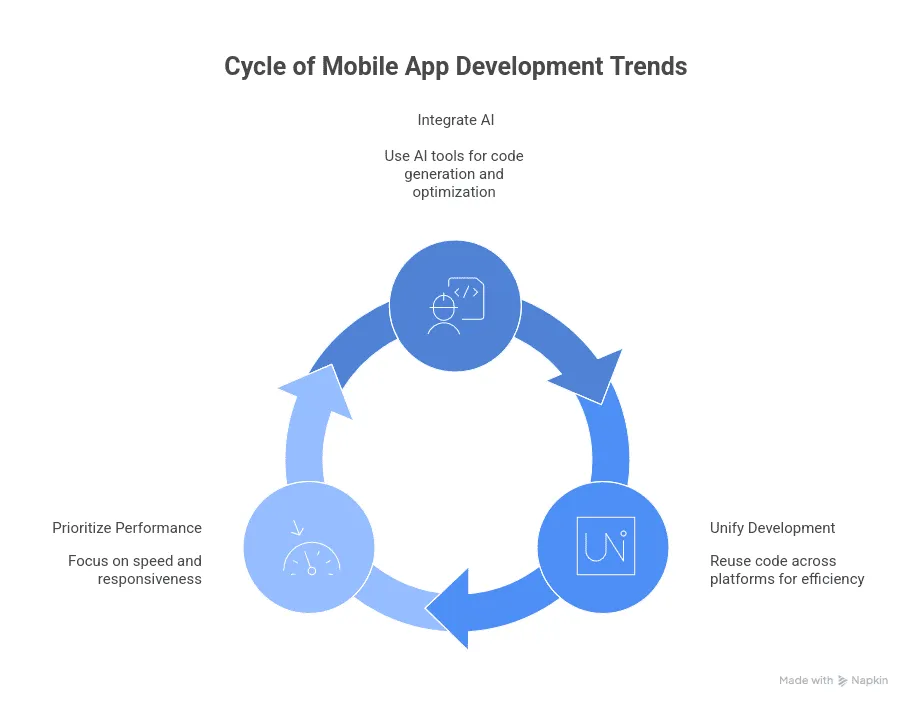
Technological changes and new user needs constantly reshape the mobile world. To build lasting apps, you must track trends that redefine how we create and run software.
AI-Integrated Workflows
Artificial intelligence changes how we work. AI assistants now generate code, suggest layouts, and fix performance issues. This makes development faster and easier. You should choose a framework that works with AI tools to gain a lead on your rivals.
Unified Development & Low-Code
Unified development is the new standard. Frameworks now let you reuse code across mobile, desktop, and web from one project. Meanwhile, low-code tools speed up your launch. You should pick a framework like Flutter or .NET MAUI today to protect your code for the future.
Efficiency and Performance Prioritization
Users demand speed. Apps must start fast and respond instantly. Focus on frameworks that deliver a smooth, light experience. Avoid architectures with known lag or heavy files, as these choices create risk.
These trends lead to smarter, faster development and better mobile experiences for everyone.
Conclusion
Mobile development offers many powerful tools, but no single framework reigns supreme. The right choice depends on your specific goals, budget, and team. Whether you rank native power, cross-platform efficiency, or hybrid speed, choose a framework that anchors your success.
Which of these frameworks are you most excited to try for your next project? Are there any great frameworks we missed? Share your thoughts in the comments below!!
Frequently Asked Questions
Q1. What is the difference between native and cross-platform frameworks?
Native frameworks build apps for one platform, like iOS or Android. They deliver peak performance and full access to device features. Cross-platform frameworks like React Native and Flutter let you write one codebase for both. This saves time and money. Expect minor performance trade-offs.
Q2. Which framework is best for beginners?
Ionic is the best starting point for web developers. Its reliance on HTML, CSS, and JavaScript eliminates the need to learn a new language, providing the gentlest learning curve.
Q3. Should startups choose cross-platform or native development?
Most startups should choose a cross-platform framework. Launch on both platforms at once. This choice speeds up your time-to-market, cuts initial costs by using one team, and sharpens resource allocation. These factors are vital for a young company. The only exception: stick to platform-specific builds if your app relies on cutting-edge features unique to one system.
Q4. How much does it cost to maintain a mobile app?
Expect to pay 15-25% of your initial build cost for annual app maintenance. This budget keeps your app alive. It funds bug fixes, boosts speed, and ensures your app works with the latest phone updates. You must also budget for ongoing server and infrastructure costs.
Q5. What is the difference between a hybrid app and a PWA?
Hybrid apps wrap web technology in native containers. This allows hardware access and easy app store installs. In contrast, PWAs run directly in browsers. They require no installation. Hybrid frameworks offer deeper device integration, but PWAs deliver instant updates. They also provide cross-browser access and reliable offline use.