
Table of Contents
Introducing Viggle AI: Beyond the Text-to-Video Generator
Most “AI video” conversations in 2026 are dominated by text-to-video models that dream up entirely new scenes from a prompt.
Viggle AI takes a different approach.
Its core strength has always been controllable character motion, taking a character image and transferring movement from a reference video onto it, while keeping that character’s identity, proportions, and outfit consistent from frame to frame.
That focus has expanded a lot since Viggle first went viral on Discord in 2024.
The platform now serves casual meme-makers, marketers, filmmakers, VFX artists, and, increasingly, game developers who use it as a low-cost alternative to traditional motion capture.
Viggle says it’s used by more than 40 million creators, and its developer platform reports over 50 million registered users and nearly 100 million videos generated to date.
What Is Viggle AI?

Viggle AI is a character-animation and motion-control platform, not a general-purpose scene generator.
Its main capabilities now span:
- Motion transfer from a reference video onto a character image
- Character replacement and multi-character scene editing (Multi-Track)
- Real-time character swapping for streaming and live content
- Talking/singing character animation from audio
- Image-to-3D avatar conversion
- Video-to-3D skeletal animation export (mocap-style, for game engines)
- A professional creative engine (PINOC) and a self-serve developer API
How Is Viggle AI Different From Traditional AI Video Generators?
| Traditional AI Video | Viggle AI |
|---|---|
| Generates new scenes from a text prompt | Controls movement of an existing character |
| Motion is often unpredictable | Motion is reference-driven and repeatable |
| Strong for scene/concept generation | Strong for character animation and consistency |
| Prompt-heavy workflow | Image + motion-reference workflow |
| Rarely exports usable animation data | Can export game-ready skeletal data (GLB/FBX) |
Viggle hasn’t abandoned prompt-based generation; its Pro-tier-and-above plans now bundle access to Veo 3.1, Kling 3.0, Seedance 2.0, Wan 2.7, and image models like GPT Image 2 and Nano Banana Pro, but motion control on an uploaded character remains what sets it apart.
How Does Viggle AI Work?
At a basic level, the workflow looks like this:
Character Image → Motion Reference → AI Motion Transfer → Character Refinement (optional) → Generate & Export
Step 1 – Upload a Character
Start with a photo, illustration, or 3D-style character image.
Viggle also supports generating a character from a text prompt if you don’t have a starting image.
Step 2 – Add a Motion Reference
Supply a video containing the movement you want, your own footage, a TikTok clip, or one of Viggle’s thousands of built-in motion templates.
Step 3 – Viggle Transfers the Motion
The system maps the reference movement onto your character using its JST 3D world model, which understands motion structurally rather than just predicting pixels frame by frame; this is part of why Viggle handles fast or complex movement more stably than diffusion-based video models.
Step 4 – Refine the Character (Optional)
Run Character Refine to lock in identity before generating: upload one character image and Viggle automatically produces five reference angles, merges them into a single reference, and uses that for more accurate results across poses and camera angles.
Step 5 – Generate and Export
Render the final clip, download it, and edit further if needed.
Viggle AI Features in 2026
Viggle V4
V4 is Viggle’s current flagship model, and it’s a real jump from the version most 2024-era articles describe.
Key improvements:
- Much better handling of complex, high-speed motion (flips, gymnastics-style movement, partial occlusion)
- Stronger character consistency across shots, including for non-humanoid characters (animals, robots, armored figures) that used to drift toward generic human shapes
- Richer textures and detail retention
- Facial expressions and lip sync that track the source video’s mouth shapes and timing, even during fast body movement
- Reliable multi-person scenes, including group choreography
- Faster rendering (seconds to under a minute) and support for outputs up to roughly a minute long, versus the ~15-second cap common on many other video tools
V4 also introduced two paired controls: Smooth Motion and Foot Lock, aimed at reducing shakiness and keeping ground contact stable.
Character Refine
Covered above, but worth calling out as its own feature, it’s the single biggest addition the old article misses entirely.
It’s especially useful for stylized, non-human, or heavily detailed characters where identity tends to drift across a video.
Mix
Places a character into an existing motion video, the core “drop your character into this clip” workflow.
Move
Animates a static character image using a separate motion reference, rather than compositing into an existing scene.
Multi-Track
Handles multiple characters in one scene: tracking, targeted character replacement, and group choreography.
Viggle says Multi-Track can track scenes up to a minute long and swap out specific characters while preserving the original background and camera motion.
Mic and Rap
Audio-driven animation, Mic handles talking/singing characters from an uploaded audio track; Rap is a stylized variant tuned for rap-style delivery.
Real-Time Swap
Live character swapping for streaming; plans differ mainly in session length, from 5 minutes on the free tier up to unlimited on the top plan.
PINOC
PINOC is Viggle’s professional creative engine, aimed at game developers and animators who want a GUI-based workflow (rather than raw API calls) for building characters and directing motion.
It runs on the same JST-2 model foundation as the consumer app and the API.
Viggle AI for Game Development
This is genuinely one of the most-changed parts of the product, and the old article has nothing on it.
Viggle now positions itself directly as a mocap alternative for indie and studio developers, with a dedicated gamedev workflow covering:
- Character pre-visualization before committing to a model or rig
- Combat, idle, and traversal animation blocking
- NPC and enemy animation
- Cutscene blocking
- Marketing assets, trailers, and devlog content
- Full skeletal animation export
Pre-Visualization
Drop character concept art into a motion reference (Mix) or animate a still image against a reference clip (Move) to see how a design performs before modeling or rigging it.
Motion Capture, Without a Mocap Studio
Film a reference video, even on a phone, and Viggle extracts a skeleton and exports clean, game-ready animation data.
Viggle’s own comparison: traditional mocap runs roughly $500–$1,500 per clip or $5,000–$15,000 per studio session with a multi-week turnaround, versus roughly $0.03 per custom animation on Viggle, delivered in seconds.
Engine Compatibility
Output is GLB with Mixamo-compatible bone naming (60+ bone standard human skeleton, 30fps, root motion included), and it’s built to drop into:
- Unity (auto-detected as Humanoid, Mecanim-ready)
- Unreal Engine 5 (retarget to any UE5 skeleton)
- Godot (via Blender import)
- Blender and Maya directly
FBX export is available today through the API’s dedicated Mocap endpoint.
Viggle built its own fighting game, Fight Anyone, using this same pipeline; players upload any photo and get a fully animated playable fighter, which the company points to as proof the tech holds up in a shipped product rather than just demos.
Viggle explicitly allows commercial use of generated animations in indie and commercial games, with no royalties or attribution required.
How to Use Viggle AI: Step-by-Step
- Create or choose your character: upload an image or generate one from a prompt.
- Select a motion: pick from templates or upload your own reference video.
- Choose the right tool for the job: Mix (drop character into motion), Move (animate a still image), Multi-Track (multiple characters), Mic/Rap (audio-driven), or V4 directly for advanced motion control.
- Run Character Refine if needed: especially for stylized or non-human characters.
- Generate the video.
- Download and edit: trim, add text, or layer into a larger edit.
What Can You Create With Viggle AI?
- Social content – TikTok, Reels, Shorts
- AI memes – still one of Viggle’s strongest use cases
- Character animation and short films
- Music videos – via Mic/Rap
- Marketing and advertising creative
- Film and game previsualization
- VFX and compositing workflows (transparent-mask output for compositing is available via the API)
- Game development assets
- Virtual avatars and brand mascots
Viggle AI for Businesses
Beyond individual creators, Viggle’s client list on its developer page includes brands and studios spanning entertainment, gaming, and enterprise, which points to real commercial adoption rather than purely hobbyist use.
For businesses, the practical applications include:
- Social and advertising content at scale
- Branded mascots and virtual influencers
- Interactive fan campaigns (Viggle’s collaboration with AWA Studios on a Ronda Rousey graphic-novel tie-in is one public example)
- Game character pipelines for studios of any size
- Product and avatar personalization (“put yourself in the video” flows)
For businesses that want this integrated into an actual product, a branded avatar generator, a game’s animation pipeline, a personalization feature inside an app, that’s where it moves from “using a tool” to “building on an API,” which is where an integration partner like HyScaler typically comes in.
Viggle AI Pricing in 2026
Current published pricing (verify before publishing, since SaaS pricing changes):
| Plan | Monthly | Annual (per mo) | Credits/month | Notes |
|---|---|---|---|---|
| Free | $0 | – | 5 videos/day | Watermarked, 1 generation at a time, 7-day storage |
| Pro | $9.99 | $7.99 | 80 | Watermark removed, 4 concurrent generations, unlimited Multi-Track |
| Live | $19.99 | $15.99 | 200 | Most popular tier; 6 concurrent generations, 6+ hrs Real-Time Swap |
| Max | $79.99 | $63.99 | 800 | 10 concurrent generations, unlimited Real-Time Swap |
All paid tiers now include access to third-party models (Kling 3.0, Veo 3.1, Seedance 2.0 Fast, Wan 2.7, GPT Image 2, Nano Banana Pro) alongside Viggle’s own tools, so the paid plans function as a broader creative suite, not just motion transfer. Business/enterprise pricing is available on request.
Viggle AI Pros and Cons
Pros
- Best-in-class controllable character motion
- Strong character identity consistency, even for non-human designs
- Real multi-character and group-scene support
- Fast generation, minute-plus output length
- Legitimate mocap alternative for game developers
- Self-serve API with clear, usage-based pricing
- No royalties on commercial use of generated animation
Cons
- Output quality still depends heavily on the clarity of your source image and reference video
- Complex scenes can require iteration and manual cleanup
- Not a substitute for a full professional animation pipeline on high-end productions
- Credit-based pricing needs planning for high-volume commercial use
- Best results still benefit from human creative direction, not pure automation
Viggle AI vs Other AI Video Generators
| Tool | Best For |
| Viggle AI | Character motion control & animation |
| Runway | General AI video production/editing |
| Kling AI | Realistic AI video generation |
| Pika | Fast, creative short-form video |
| Luma | Cinematic generation |
| Veo | High-quality generative video |
| Sora | Generative storytelling |
Worth noting: since Viggle now bundles Kling and Veo access directly into its own plans, the “Viggle vs. Kling” or “Viggle vs. Veo” framing is less either/or than it used to be; for some workflows, Viggle is now a front end to those models plus its own motion-control layer on top.
Viggle AI API and Developer Capabilities
Viggle’s self-serve API runs on JST-2, the same foundation model behind its consumer Meme Maker product and PINOC.
It’s built around reusable assets rather than one-off generations:
- Characters, turn an image into a reusable character asset
- Motions, create reusable motion from your own footage or Viggle’s template library
- Renders, compose character + motion assets into asynchronous video output (with optional transparent mask output for compositing, and multi-character rendering)
- 3D Avatars, extract a character image into a downloadable 3D asset
- Mocap API: convert footage into a downloadable FBX animation
- A Scene Model is listed as coming soon
Pricing is usage-based: video render costs $0.01 per character per output second, character creation is $0.01 each, 3D avatar extraction is $0.25 each, and mocap conversion is $0.05 per input second, with the first 100 credits free.
Logos on Viggle’s developer page include names like Google, ByteDance, NetEase, and Salesforce, suggesting the API sees real production use beyond consumer apps.
This is the layer that turns Viggle from “a tool creators use” into infrastructure a product or engineering team can build on: avatar systems, UGC personalization, game animation pipelines, or branded interactive experiences.
How to Get Better Results With Viggle AI
- Use clear, well-lit, front-facing character images
- Choose motion references where the subject is clearly visible and not too heavily occluded
- Match camera angles between the character image and the motion reference where possible
- Avoid excessively complex or rapid movement in a first pass
- Run Character Refine for non-human, heavily stylized, or texture-rich characters
- Keep the subject centered and unobstructed in both the character image and reference video
- Test a couple of different motion references before committing to a final render
Is Viggle AI Worth Using in 2026?
Yes, particularly if your goal is controllable character animation rather than generating an entire scene from scratch with a text prompt.
Motion control is still Viggle’s clearest differentiator, and V4, Character Refine, Multi-Track, the gamedev pipeline, and the JST-2 API make the platform considerably broader than the Discord-bot-era tool most 2024 write-ups describe.
How to do the Viggle AI head top trend on TikTok?
Step-by-Step Guide
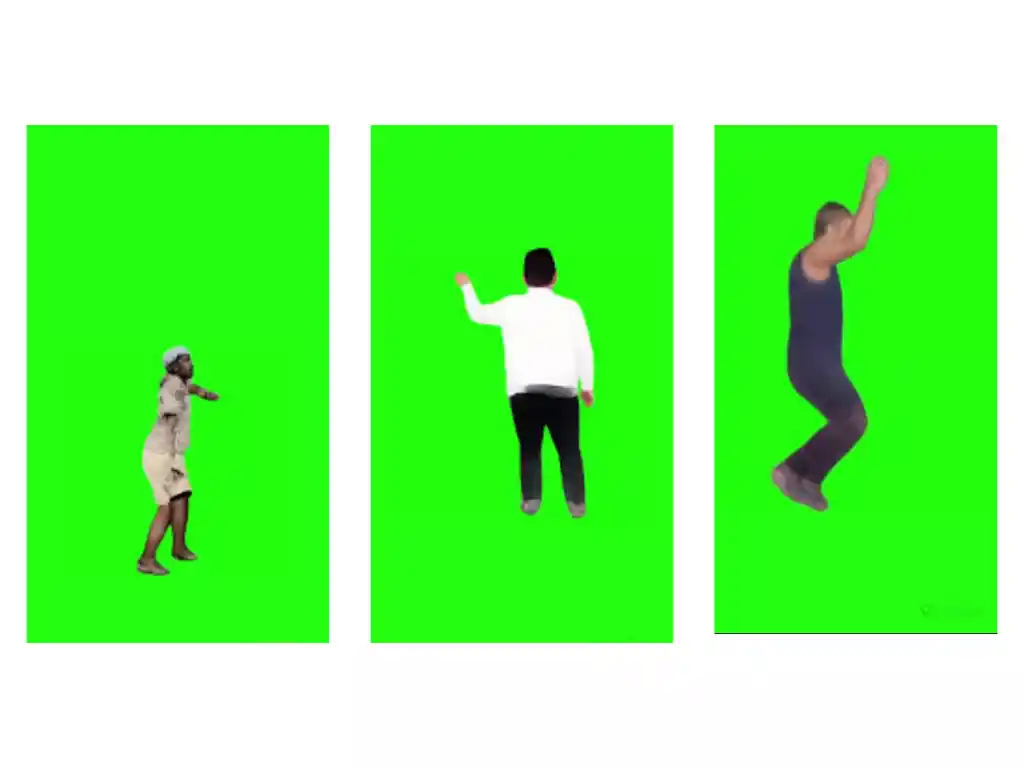
Creating your own Viggle AI head top video is a straightforward process:
- Access Viggle AI: Visit the Viggle AI website or join the Viggle AI Discord channel.
- Choose Your Mode: Select either “Mix” or “Animate” to start.
- If using “Mix”:
- Upload a standing picture.
- Click on the template in the “Motion” section.
- Search for “$gimme_head_top”.
- Select a white or green background.
- Enable “Enhance quality”.
- Click “Generate” and wait for the video to be created.
- If using “Animate” (Only on Discord):
- Choose between Animate 16 or Animate 14.
- Customize the movements and expressions as desired.
- If using “Mix”:
Adding Your Personal Touch
While the basic head top movement is the core of the trend, there are endless possibilities for customization. Here are some tips to make your video stand out:
- Experiment with Camera Angles: Different angles can add a dynamic element to your video.
- Play with Lighting Effects: Lighting can dramatically change the mood and impact of your video.
- Incorporate Background Scenery: Use greenscreen to replace the background with anything you want.
- Add Text Overlays and Visual Effects: Enhance your video with additional animations and text to make it more engaging.
Final Verdict
Viggle AI has grown from a viral Discord animation bot into a broader motion-control platform spanning consumer content, professional creative tools (PINOC), game development, and a production-grade API.
Its edge is still character-driven motion control, but V4, Character Refine, Multi-Track, real mocap export, and JST-2 now make it a legitimate option for creators, marketers, filmmakers, and game studios alike.
FAQ’s
What is Viggle AI?
A character-animation platform that transfers motion from a reference video onto a character image, built on its own JST 3D world model.
Is Viggle AI free?
Yes, with a free tier offering 5 videos/day, a watermark, and limited concurrent generations. Paid plans start at $9.99/month.
Is Viggle AI safe to use?
Viggle filters explicit content and blocks celebrity likeness misuse.
Can Viggle AI turn an image into a video?
Yes, that’s its core function (Move and Mix, when paired with a motion reference).
Can Viggle AI animate any character?
Most character types, including non-human and stylized designs, especially when combined with Character Refine.
Does Viggle AI support multiple characters?
Yes, via Multi-Track, including targeted character replacement in group scenes.
What is Viggle V4?
Viggle’s current flagship motion-control model, with major upgrades to complex-motion handling, character consistency, and facial/lip sync accuracy.
What is Viggle Character Refine?
A feature that generates five reference angles from one character image to improve identity consistency across a generated video.
Can Viggle AI be used for commercial projects?
Yes, on paid plans; free-tier output is watermarked and not licensed for commercial use.
Does Viggle AI have an API?
Yes, a self-serve, usage-based API (JST-2) for characters, motion, video rendering, 3D avatars, and mocap/FBX export.
Can Viggle AI be used for game development?
Yes, it has a dedicated gamedev workflow with GLB/FBX export for Unity, Unreal, Godot, Blender, and Maya, with unrestricted commercial use.
Is Viggle AI better than Runway?
They’re built for different jobs: Viggle for controllable character motion, Runway for broader video production and editing. Many teams use both.
What are the best Viggle AI alternatives?
Runway, Kling AI, Pika, Luma, Veo, and Sora, depending on whether you need character-driven motion or general scene generation.