Table of Contents
AutoClaw is Zhipu AI’s innovative software. It transforms standard personal computers into 24/7 autonomous AI agents. Launched in 2026, it marks a shift from cloud-based agents. It provides a local-first solution. This solution executes complex, multi-step workflows directly on macOS and Windows machines.
AutoClaw AI’s core function is to automate technical and commercial tasks. It requires no human intervention. Its “one-click installation” removes the high technical barrier of previous developer-only frameworks. Once installed, it operates in a continuous “observe → reason → act” loop. This loop lets it handle long-running projects. Examples include building websites from PRDs, managing financial assets, or performing deep financial research. It achieves this by directly operating the web browser via AutoGLM Browser-Use and interacting with system APIs.
The Pony-Alpha-2 Engine: Technical overview of the underlying model’s reasoning capabilities
The intelligence behind the autonomous agent is driven by Pony-Alpha-2, a proprietary large language model developed by Zhipu AI. Unlike general-purpose LLMs, Pony-Alpha-2 is specifically optimized for Agent scenarios. This specialization provides:
- Superior Tool-Calling Stability: The model is engineered to reliably transition between tasks and correctly trigger its internal “Skills” (tools) without losing context, minimizing workflow failures.
- Strong Task Progression: It excels at breaking down a high-level goal (e.g., “Write a marketing plan”) into a series of executable, logical steps and seeing that process through to completion.
- Transparent Reasoning: The agent’s decision-making process, often called the “Mind,” is powered by Pony-Alpha-2. This logic is made public through a dashboard that displays the agent’s real-time “thoughts,” offering transparency into why it chose a specific action.
Visual Interface vs. CLI: How the visual task board simplifies agent management
AutoClaw replaces the traditional, technical command-line interface (CLI) with a consumer-friendly visual dashboard, turning an advanced developer framework into a standard desktop application.
- One-Click Installation: The process is a simple, standard desktop package install, eliminating the need for terminal commands, Node.js, or Docker setup for the average user.
- Skill Library: Users manage the agent’s capabilities via a visual library of over 50 pre-loaded “Skills” for high-frequency tasks (content creation, coding, research).
- Hive Mind Dashboard: This feature serves as the agent’s visual task board, showing a live activity feed of the agents’ “thoughts” and actions. For complex tasks (or multi-agent swarms, like on Solana), it categorizes activity by specialized roles (e.g., Collector, Strategist, Mind), providing simple monitoring that mirrors a project management board.
Key Benefits of Using AutoClaw for Software Development
Developers and businesses are increasingly adopting the local AutoClaw setup for mission-critical tasks, largely due to its advantages over traditional cloud-based AI agent services.
Data Privacy and Security: The advantage of local execution for proprietary code
The single most compelling reason to use AutoClaw is its local-first architecture. All data processing, code execution, and compilation are completed entirely on the user’s personal hardware.
- Zero Third-Party Server Exposure: Sensitive commercial information, proprietary code, or financial data never leaves your environment. This provides a critical advantage in data security and compliance compared to cloud-based agents that require data to be uploaded and processed on a third-party server.
- Secure Key Management: For blockchain or financial use cases, the local deployment ensures that cryptographic keys and wallets can remain within the user’s local security perimeter, making them far less susceptible to public network attacks.
Multi-Agent Orchestration: Running parallel tasks like debugging and documentation
AutoClaw is built upon an architecture that supports autonomous, concurrent operation. This allows it to handle workflows that require a dedicated “team” of AI workers operating in parallel.
- Specialized Agent Roles: The system can spin up specialized agents (like the Collector and Strategist in the token management swarm) to handle parallel sub-tasks, such as simultaneous code debugging and automatic documentation generation, or multi-site data scraping.
- 24/7 Autonomy: The continuous “observe → reason → act” loop, often repeating every 60 seconds, means the agent is perpetually active. This allows it to monitor systems, respond to triggers (like new support tickets or code changes), and execute tasks around the clock without human supervision.
How to Install and Set Up AutoClaw AI
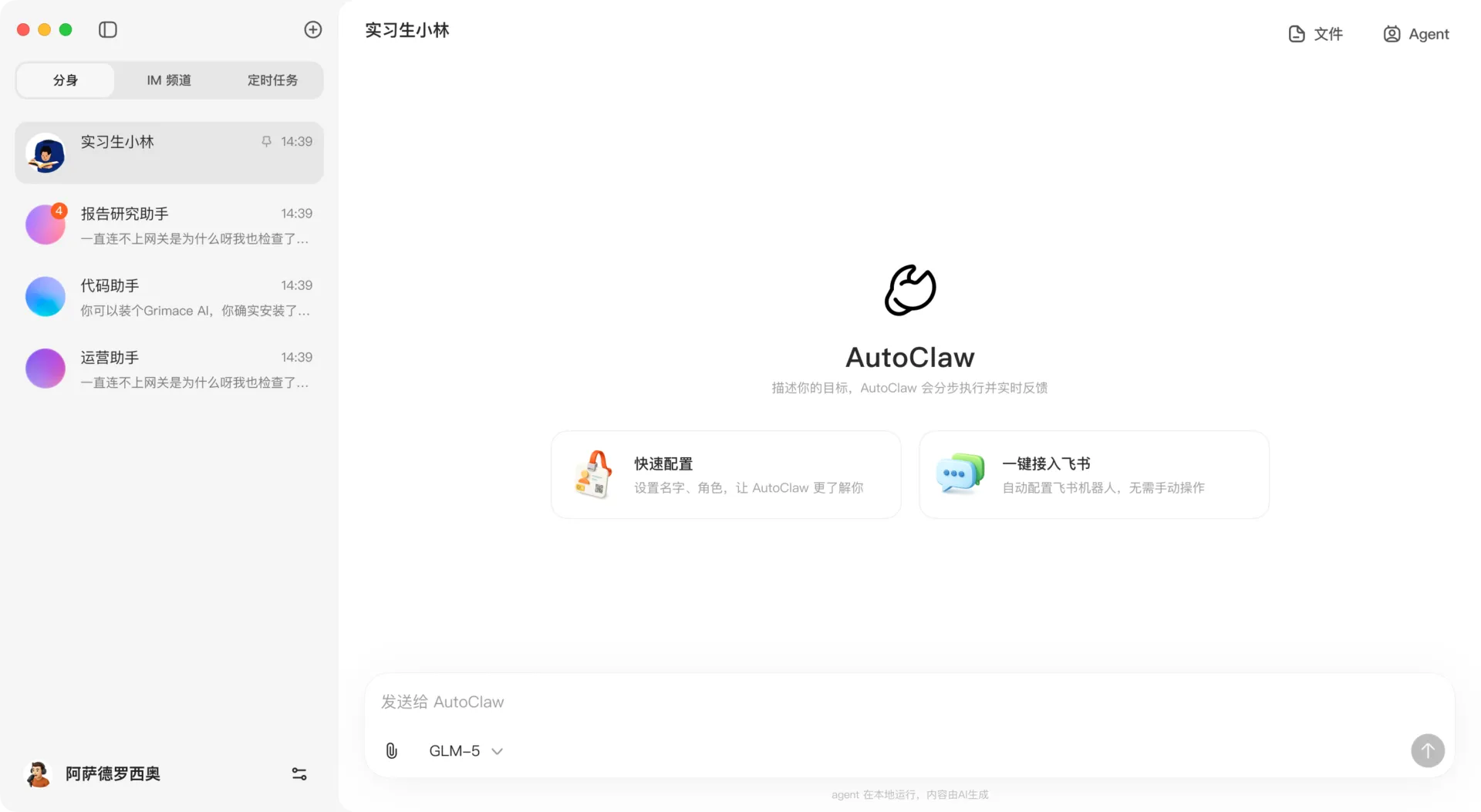
To install and set up the AutoClaw, you should follow the development installation path.
To install and set up the AutoClaw engineering-first headless framework from GitHub, you should follow the development installation path. This version is designed for stable, scalable automation in headless systems, such as Docker containers or local servers.
1. Prerequisites
Before beginning, ensure you have Node.js installed on your system, as AutoClaw is built on the Node.js runtime and uses TypeScript.
2. Installation Steps
According to the official repository instructions, you can set up the project by following these commands in your terminal:
- Clone the Repository: Download the source code from GitHub.
- git clone https://github.com/tsingliuwin/autoclaw
- Install Dependencies: Navigate into the directory and install the necessary packages.
- Build the Project: Compile the TypeScript code.
- Link Globally (Optional): This allows you to run the autoclaw command from any directory on your system.
Alternatively, you can skip the manual build and install it directly via npm: npm install -g autoclaw.
3. Configuration and Setup Wizard
Once the software is installed, you must configure your environment before the agent can execute tasks:
- Run the Setup Wizard: Launch the interactive setup wizard to configure your API keys and integrations by typing autoclaw in your terminal.
- Essential API Keys: You will need to provide an OpenAI API Key (the system is also compatible with DeepSeek and LocalLLM).
- Optional Integrations: You can also configure a Tavily API Key for web searches, SMTP settings for sending emails, and Webhooks for notifications to platforms like Feishu, Slack, or DingTalk.
5. Running AutoClaw
After setup, you can use the agent in several modes:
- Interactive Mode: Run autoclaw to enter a continuous chat loop with the agent.
- Headless Mode (One-Shot): Use the command autoclaw -n “your query” to execute a single task and exit immediately.
- Auto-Confirm: For CI/CD environments, the -y flag automatically approves all tool executions (such as shell commands), though this should be used with caution.
If you prefer a simpler method that does not require using GitHub or the command line, you can download the consumer-facing desktop client (available for macOS and Windows) from the official website for a “true one-click installation”.
Initial Configuration: Connecting to IDEs and setting up “Skills”
For developers and advanced users, the initial configuration centers on connecting the agent to the environment it needs to control:
- IDE/System Access: Since AutoClaw operates via system APIs and shell commands, it can interact with code in any local directory. The framework needs appropriate permissions to read, write, and execute files within the designated working directory.
- API Key Management: While the software runs locally, its intelligence is remote. Users must configure API keys for the chosen LLM (e.g., Zhipu AI, OpenAI) and for web search (e.g., Tavily) to enable the agent’s reasoning and research capabilities.
- Customizing Skills: The 50+ pre-loaded Skills can be customized or chained together to create unique, complex workflows, eliminating the need to write custom automation scripts from scratch.
Frequently Asked Questions (FAQs)
Is AutoClaw AI free to use?
AutoClaw AI employs a hybrid cost model. It is not completely free. New users receive initial free credits to test the system after “one-click installation.” After users exhaust these credits, the system transitions to a credit-based system. Running locally eliminates the recurring cost of cloud server rentals.
What programming languages does AutoClaw support?
The core framework uses TypeScript and JavaScript (Node.js). While it supports these languages natively, its “engineering-first” design executes any language installed on the host system. It achieves this via precise shell commands and system APIs.
Does AutoClaw require an internet connection?
AutoClaw needs an internet connection. The software runs locally on your PC. However, its intelligence is external. It uses API integrations to access the remote Pony-Alpha-2 model. It also relies on services like Tavily for web searches.
Choosing the Right AutoClaw for Your Needs
AutoClaw is a tool built for precision and automation. It provides a transformative, secure, and autonomous worker that executes complex tasks directly on your machine, fundamentally changing how software and workflows are managed.